


Kapta Pricing, Reviews, Pros and Cons (2026)
Directories show $49/month. SelectHub shows $1,000/month. Kapta's own site? Demo-first with no public price sheet. Three different answers for the same product, and none are technically wrong. That kind of confusion kills buying momentum, so let's sort it out - what it actually costs, what users love, what frustrates them, and whether it's worth your budget.
What Kapta Actually Does
Your VP of Customer Success just realized Salesforce tracks deals but doesn't help anyone manage a strategic account relationship. That's the gap Kapta fills - a "system of action" for B2B account teams that layers structured account plans, org charts, and health scores on top of your CRM. It's purpose-built for post-sale retention and expansion, not net-new pipeline.
30-Second Verdict
Kapta is a solid KAM platform for mid-market B2B teams managing up to ~250 strategic accounts. It carries a 4.7/5 on G2, based on 18 reviews. Team deployments typically start around $1,000/month - the $49/user/month you see on directories usually maps to a much more limited tier than what most teams actually buy. Excellent at org charts, health scoring, and account planning. Weak on reporting customization and mobile access. Best fit: teams of 5-25 account managers who need structured account management beyond native Salesforce.
Kapta Pricing Breakdown
Kapta's pricing is confusing because different directories pull from different tiers and sometimes outdated snapshots.
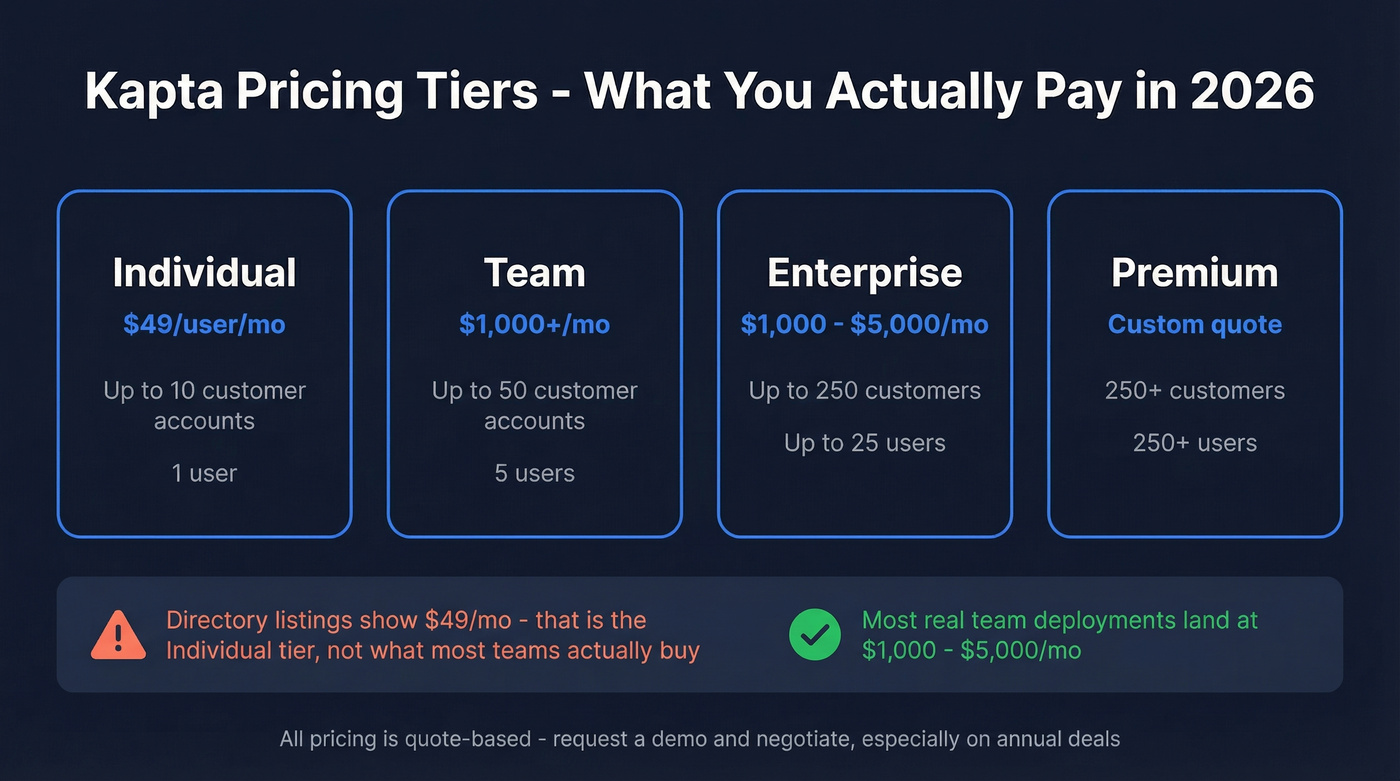
- Capterra and GetApp both show $49/user/month.
- SelectHub lists pricing starting at $1,000/month, with a commonly cited range of $1,000-$5,000/month.
- Several listicles and directories repeat the $1,000/month starting point.
GetApp breaks Kapta into versions with clear limits, which helps explain why a low per-user number can coexist with higher platform pricing:
- Individual: up to 10 customer accounts
- Team: 5 users and up to 50 customer accounts
- Enterprise: up to 25 users and 250 customers
- Premium: supports more than 250 users and customers
Here's the most practical way to think about it:
| Package | Common Price | What It Usually Means |
|---|---|---|
| Directory "starting at" listing | $49/user/mo | Entry-level individual tier, often capped at 10 accounts |
| Team platform pricing | $1,000-$5,000/mo | What most teams budget for real workflows, rollout support, and integrations |
All pricing is quote-based, so these numbers are directional. Request a demo and negotiate - especially on annual deals.
For context, Year 1 TCO for Gainsight often lands around $90K-$140K, and ChurnZero around $60K-$99K including admin time. Kapta at $12K-$60K/year is a different weight class - purpose-built KAM without the full CS platform overhead.
Kapta Pros
Org charts and relationship mapping. This is Kapta's standout feature. Many G2 reviewers praise the ability to map stakeholders, power dynamics, and relationship strength within accounts. We've reviewed dozens of KAM tools, and Kapta's org charts are genuinely best-in-class for the price point.

Account health scoring with sentiment analysis. Kapta's health scoring combines KPIs, satisfaction signals, and activity to surface risk early. G2 reviewers call the sentiment analysis intuitive and actionable.
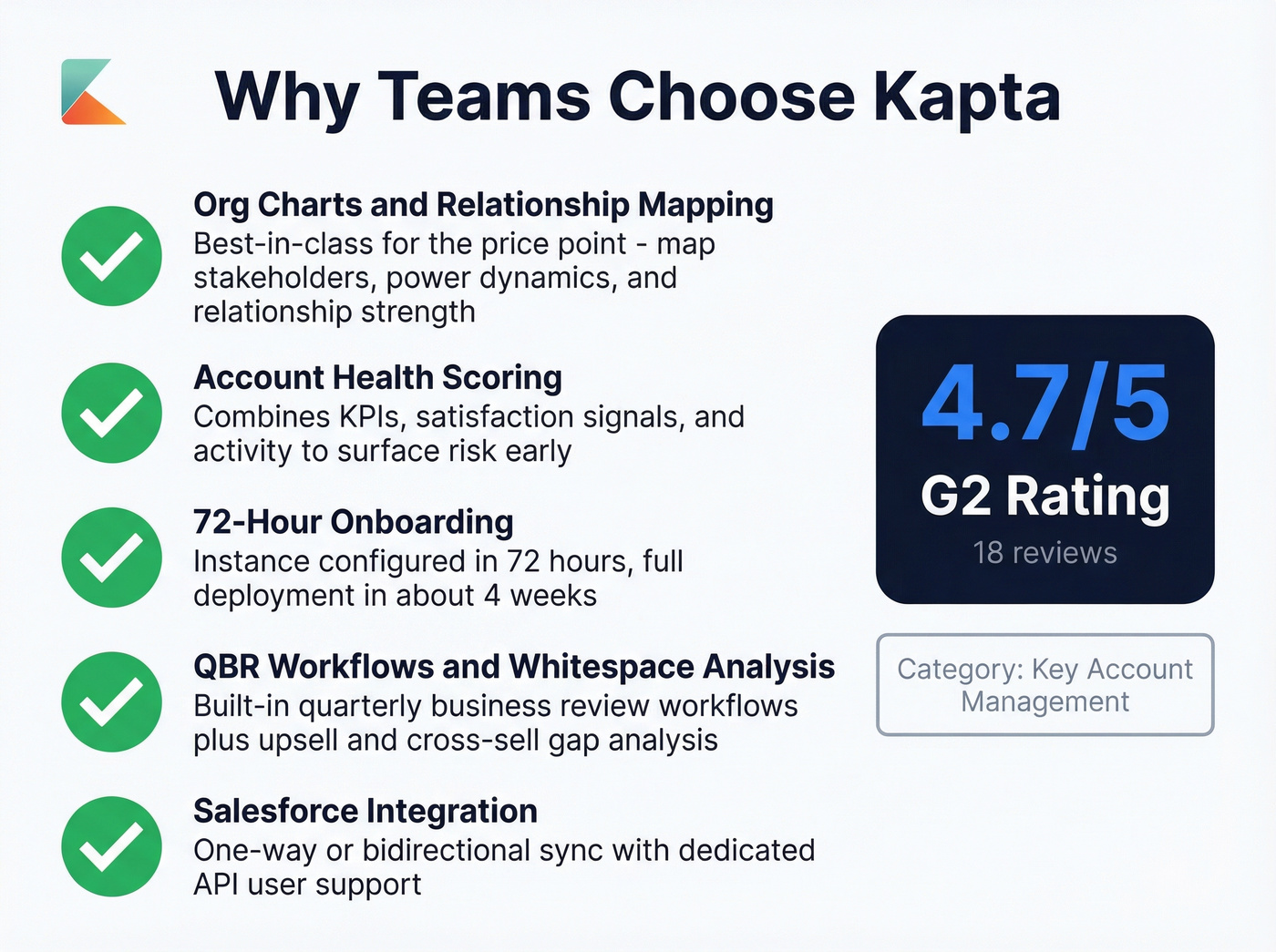
Fast onboarding. Kapta configures your instance within 72 hours. Full deployment - configuration sessions, data import, and change management support - wraps in about 4 weeks. That's fast for this category.
QBR workflows and whitespace analysis. Built-in QBR/EBR workflows plus whitespace analysis to highlight upsell and cross-sell gaps. These aren't afterthoughts; they're core to the product. (If you're standardizing your review cadence, see QBR vs EBR.)
Salesforce integration. Supports one-way or bidirectional sync, and you can link Kapta fields to Salesforce fields. Kapta recommends using a single dedicated Salesforce API user to reduce license overhead and avoid credential resets.

Kapta's org charts are only as good as the data inside them. Champions leave, roles shift, and stale contacts kill expansion deals. Prospeo refreshes contact data every 7 days with 98% email accuracy and 125M+ verified mobile numbers - so your account plans always reflect reality.
Stop managing strategic accounts with outdated contacts.
Kapta Cons
Reporting customization is limited. This is a recurring complaint in G2 reviews. Teams want more flexibility to create customized reports and dashboards. If your leadership team expects highly tailored analytics, you'll hit walls fast. (If forecasting is the real ask, compare sales forecasting solutions instead.)
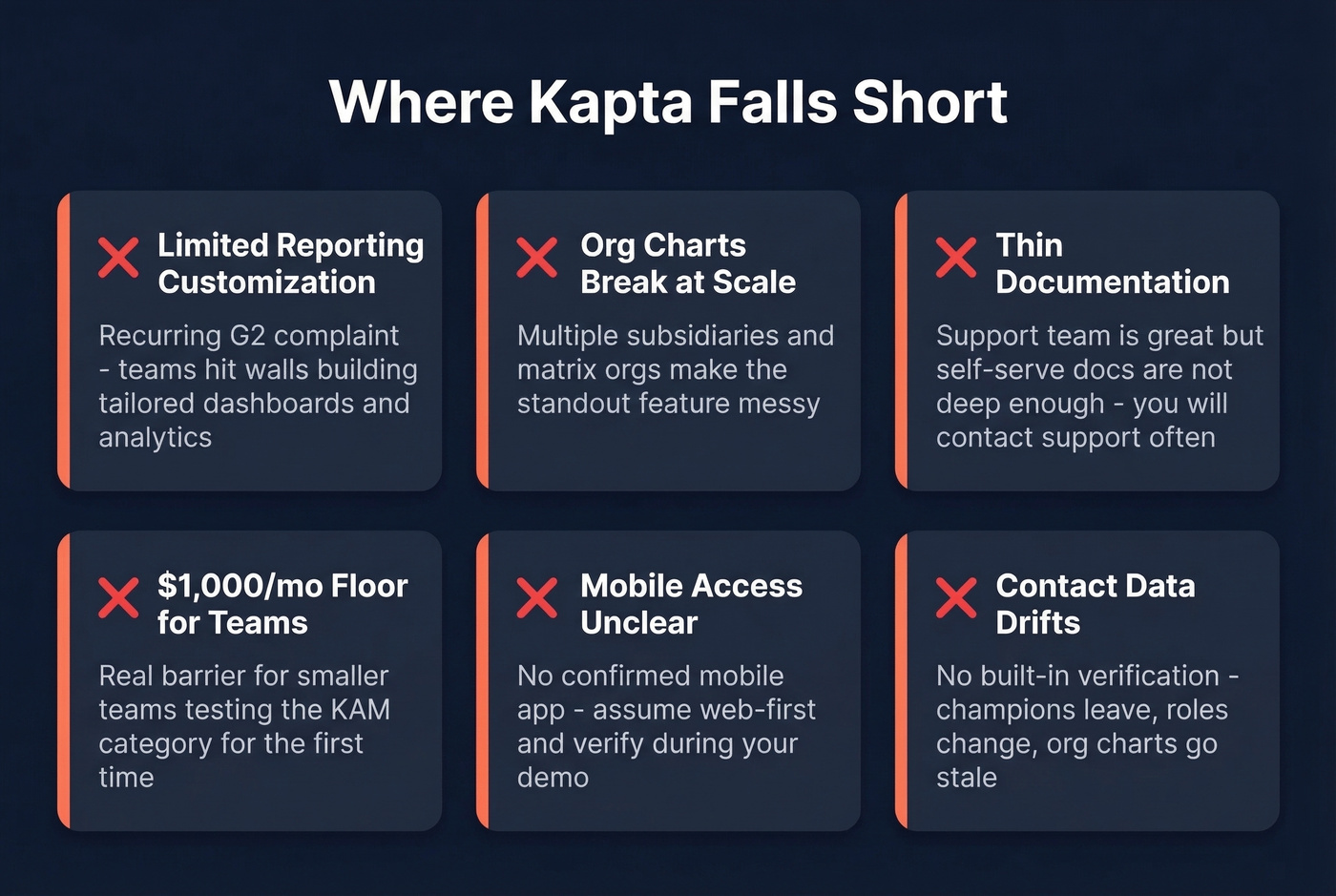
Org charts struggle with complex structures. For companies with multiple subsidiaries or matrix organizations, the org chart feature can get messy. One reviewer specifically flagged this for large, multi-entity accounts - ironic, since org charts are the product's biggest strength.
Documentation is thin. The support team gets praise, but the self-serve docs aren't deep enough. You'll end up contacting support for things that should be in a knowledge base.
$1,000/month is a real floor for team use. That's a barrier for smaller teams testing the KAM category, and it's why the $49 directory listing can be misleading when you're evaluating the platform for a real rollout.
Mobile access is unclear. Some sources flag "no mobile app," while others imply mobile support. Assume web-first and verify during your demo.
Contact data drifts. Like any account management tool, Kapta doesn't verify whether contact data is still accurate. Champions leave, roles change, and org charts go stale without a data hygiene layer underneath. (Related: data enrichment services.)
Who Should (and Shouldn't) Buy
Use Kapta if you're a mid-market B2B team with 5-25 account managers handling up to ~250 strategic accounts post-sale, your focus is retention and expansion, and you've got budget for $1,000+/month in tooling.
Skip Kapta if you're focused on net-new pipeline generation, you're a team of one or two people, your budget is under $1K/month, or you need deep custom reporting. For analytics-heavy customer success, Gainsight is the better fit.
Here's the thing: if Kapta published transparent pricing, they'd close more deals. The product is good enough to sell itself - the buying experience isn't. When directories show different numbers and the vendor sells through demos, that creates a trust problem, not a pricing strategy. (If you're negotiating, anchor in negotiation matters more than most teams think.)
Alternatives Worth Considering
Gainsight is the enterprise standard for customer success - deep analytics, health scoring, and CS workflows, but heavy to implement. Expect $90K-$140K in Year 1 TCO including admin resources. Best if you have a dedicated CS Ops person and 50+ accounts that justify the investment. For teams under that threshold, it's overkill.
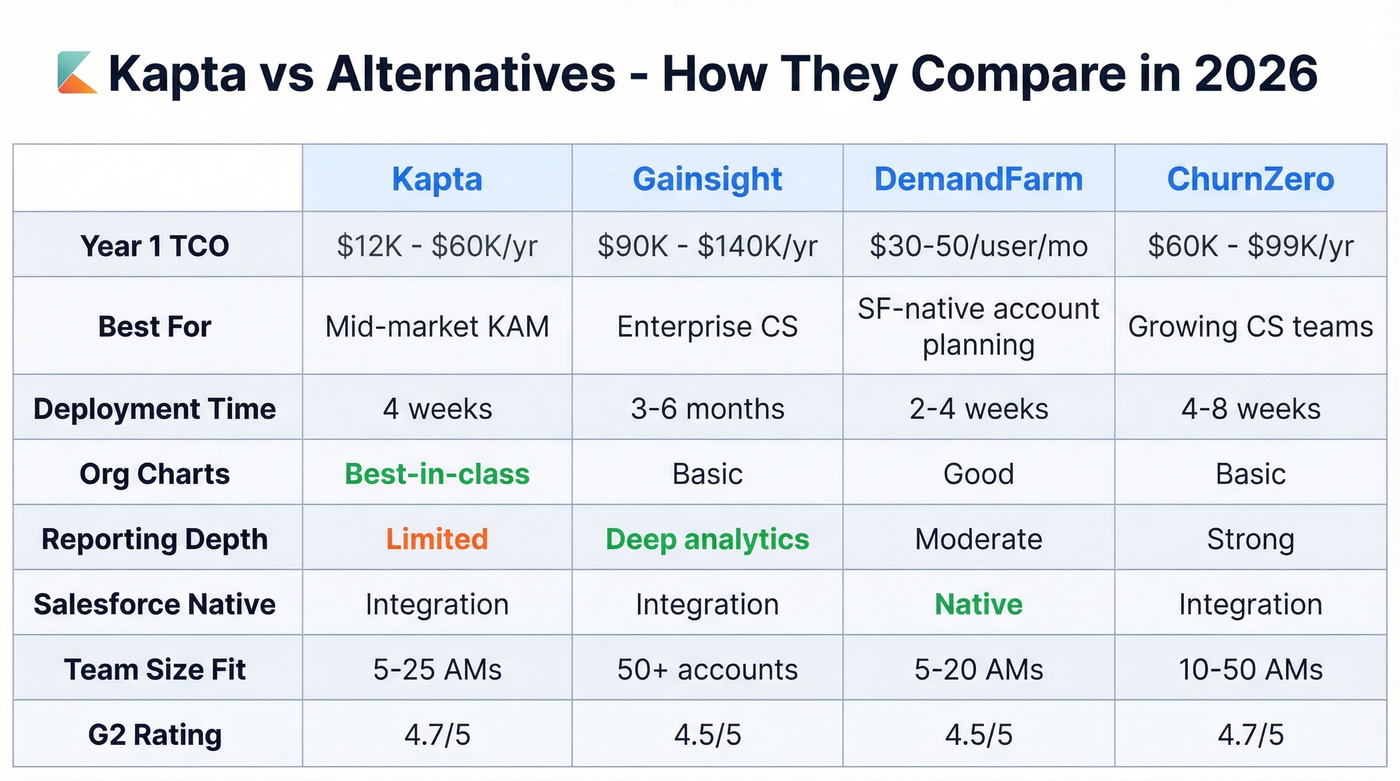
DemandFarm embeds account planning directly into Salesforce, so if your team lives there and doesn't want another platform, it eliminates the "yet another tool" problem. Runs ~$30-50/user/month. The tradeoff: you're locked into Salesforce's UI constraints, and the feature set is narrower than Kapta's.
ChurnZero splits the difference between Kapta and Gainsight. Faster deployment at 4-8 weeks, $60K-$99K in Year 1 TCO, and stronger in-app engagement features. A solid pick if you're outgrowing Kapta's reporting but don't need Gainsight's complexity.
One gap every KAM tool shares: none of them verify whether the contact data inside your accounts is still accurate. Prospeo fills that gap with 98% email accuracy, 125M+ verified mobiles, and a 7-day data refresh cycle. Your org charts and QBR invites are only as good as the data behind them - and stale contacts are the silent killer of account management. Free tier available with 75 emails/month. (If you're comparing options, start with best contact management software.)
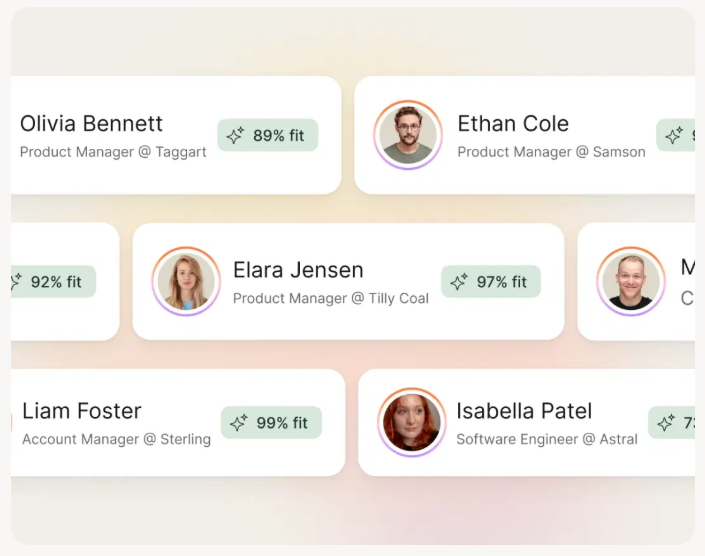
Every KAM tool on this list shares the same blind spot: none of them verify whether your contacts still work there. Prospeo's CRM enrichment returns 50+ data points per contact at a 92% match rate - for roughly $0.01 per email. That's the data hygiene layer Kapta doesn't include.
Fill the gap every account management platform leaves open.
The Bottom Line
Kapta is strong for its niche - and it is a niche. Purpose-built KAM for mid-market B2B account teams, with genuinely good org charts, health scoring, and onboarding speed. The 4.7/5 G2 rating is real, but 18 reviews makes it directional rather than definitive. The platform rarely shows up in Reddit KAM discussions; most threads center on Salesforce-native solutions or Gainsight. (If you're building a broader account motion, account-based selling best practices can help.)
Budget $1,000-$5,000/month for a real team rollout, expect strong account planning features with limited reporting flexibility, and request a demo to negotiate. If you're committing annually, push for a discount. You've got real leverage in a category with multiple viable alternatives. (More options: Kapta alternatives.)