

Lead Builder: What It Actually Means and How to Build Better Lead Lists
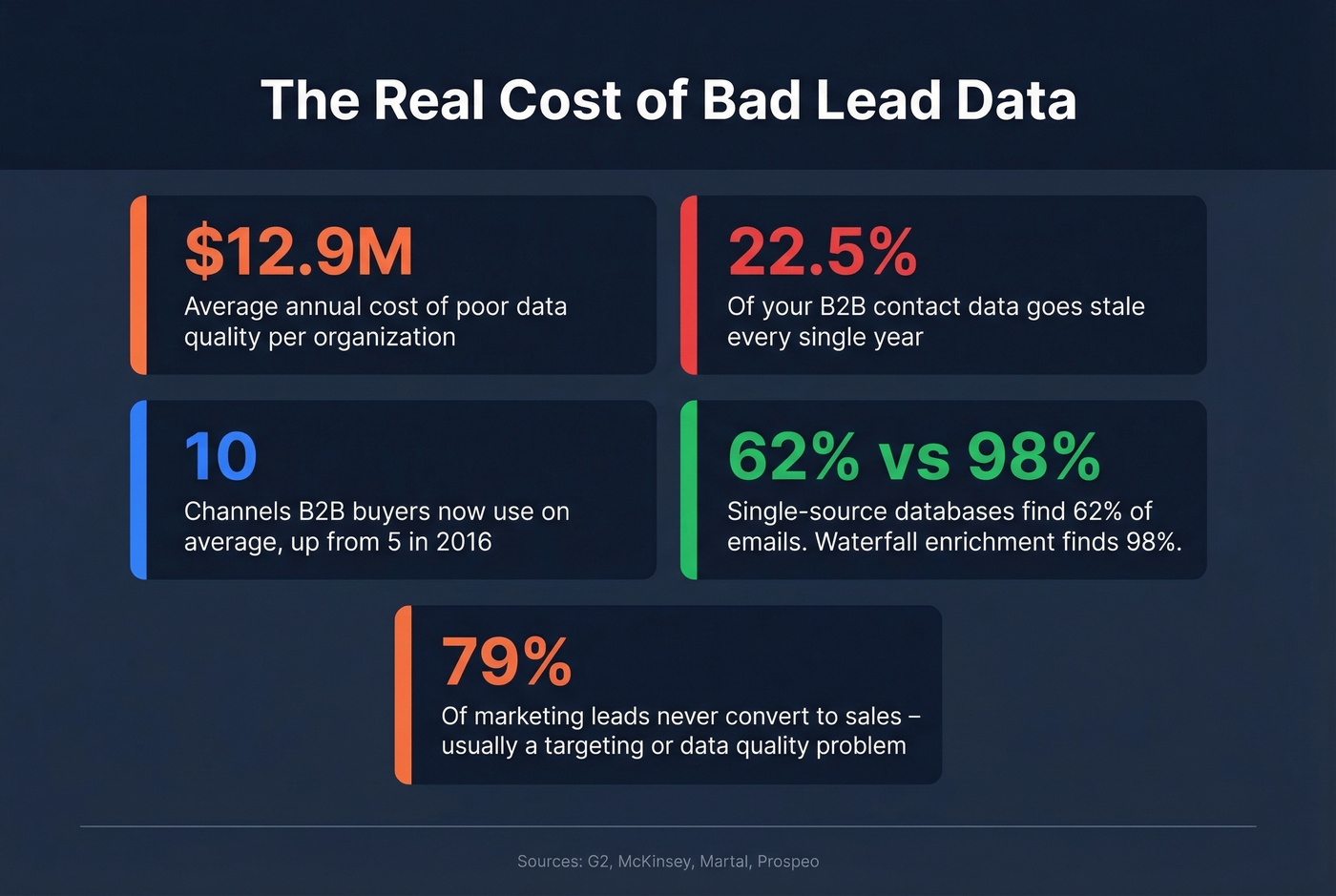
The term "lead builder" means three different things depending on who's talking, and every vendor wants to own the definition. That confusion costs teams real money - they buy the wrong tool, build the wrong workflow, and wonder why 79% of their marketing leads never convert into sales.
Here's what people actually mean when they use the phrase:
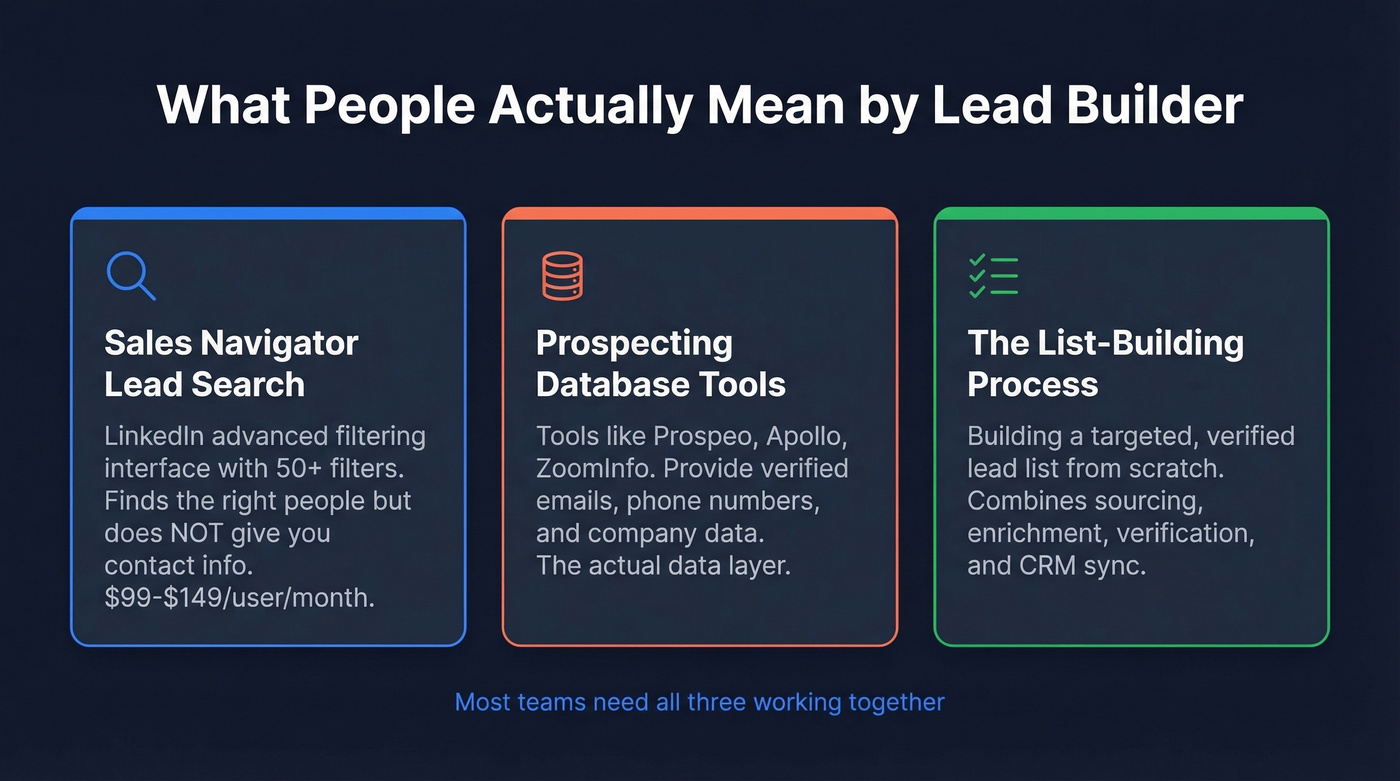
- Sales Navigator's Lead Search ("Lead Builder") - LinkedIn's advanced filtering interface
- A category of prospecting tools - databases like Apollo, ZoomInfo, and Prospeo
- The process itself - building a targeted, verified lead list from scratch
If you're here to build a B2B lead list, you need three things: a prospecting database with built-in verification, a CRM (HubSpot free works fine), and a sequencer like Instantly or Smartlead. Total cost: $100-$200/month. You don't need 10 tools. You need three.
Sales Navigator's Lead Builder Explained
The most literal use of the term comes from LinkedIn Sales Navigator, where "Lead Builder" refers to Lead Search - the advanced search interface. It's a targeting tool, powerful for finding the right people, but it doesn't give you their contact information.
Sales Navigator supports 50+ search filters in Lead Search, but we've found you're better off stacking just 2-3 high-signal filters rather than layering a dozen weak ones. Combos that actually work:
- Seniority + Current job title + Posted on LinkedIn in last 30 days - catches active decision-makers, not dormant profiles
- Company size + Industry + Changed jobs in last 90 days - targets leaders in transition who are more open to new vendors
- Location + Function + Years in current position - useful for stability signals in enterprise selling
The "Spotlight" filters are where the warm signals live. People who've posted recently, changed jobs, or follow your company convert 3-4x faster than dormant profiles. Sales Navigator users generate 42% larger deals and 17% more pipeline than those prospecting without it.
One tactical warning: the Industry filter on leads is self-reported and unreliable. Run an Account Search filtered by industry instead, then drill into leads at those companies.
Pricing runs $99.99/month for Core, $149.99/user/month for Advanced, and custom for Advanced Plus. But Sales Navigator is a targeting tool, not a data tool. You still need verified contact info to actually reach anyone.
What Your Lead List Should Contain
A lead list isn't a spreadsheet of names. A useful list has three layers, and most teams only build the first one.
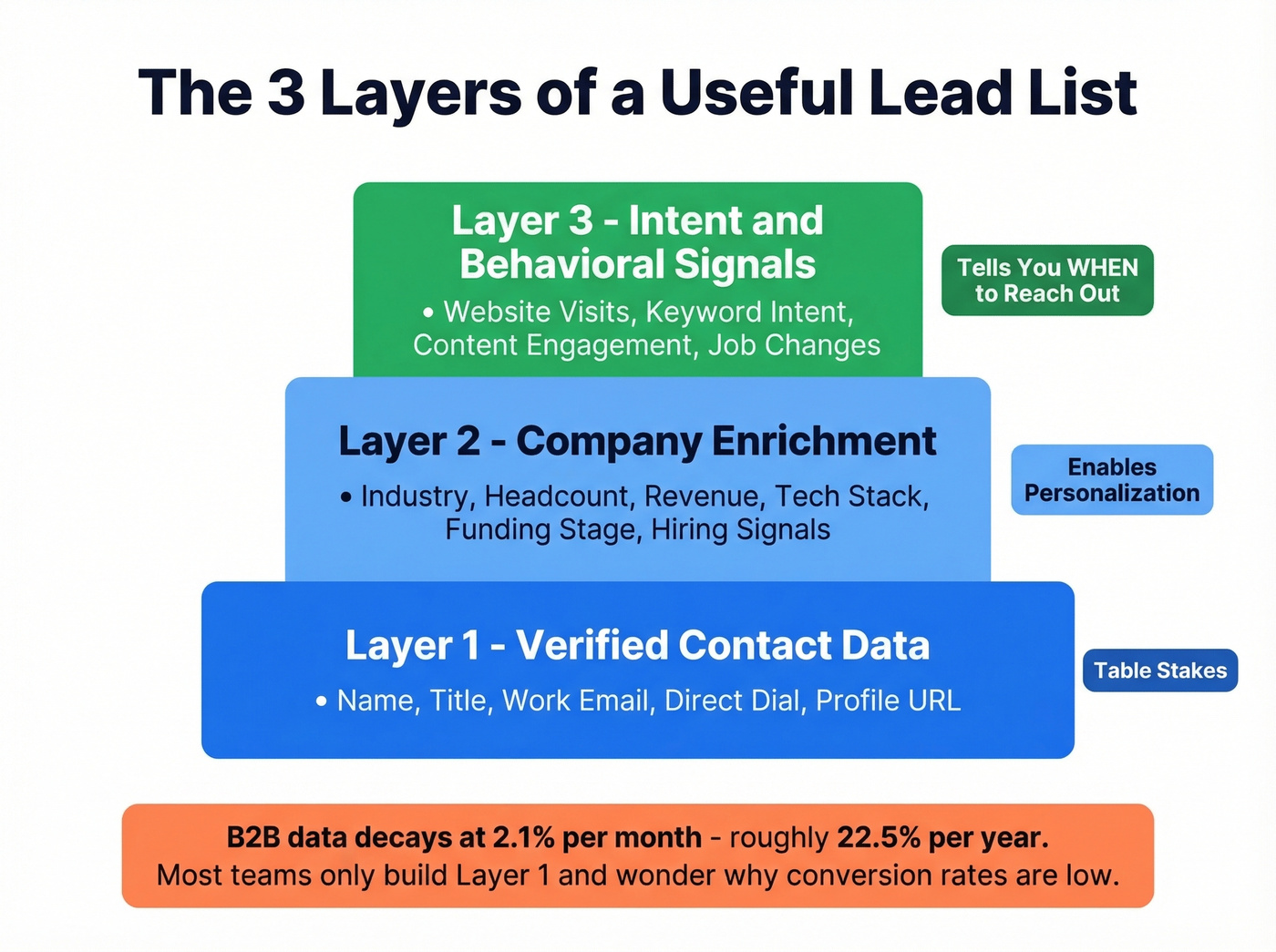
Layer 1 - Verified contact data. Name, title, work email, direct dial, and a profile URL. Table stakes. If your emails aren't verified, you're gambling with your domain reputation.
Layer 2 - Company enrichment. Industry, headcount, revenue range, tech stack, funding stage, hiring signals. This is what makes personalization possible at scale. Without it, you're sending the same generic pitch to a 10-person startup and a 5,000-person enterprise.
Layer 3 - Intent and behavioral signals. Website visits, keyword intent, content engagement, job changes. This layer tells you when to reach out, not just who to reach out to.
B2B contact data decays at 2.1% per month - roughly 22.5% annually. Factor in incomplete records, incorrect entries, and role changes, and industry estimates put overall CRM data quality issues closer to 70%. Data freshness isn't a nice-to-have; it's a buying criterion. The industry average refresh cycle is 6 weeks, which means your "fresh" data could be over a month old before you use it.
How to Build a Lead List from Scratch
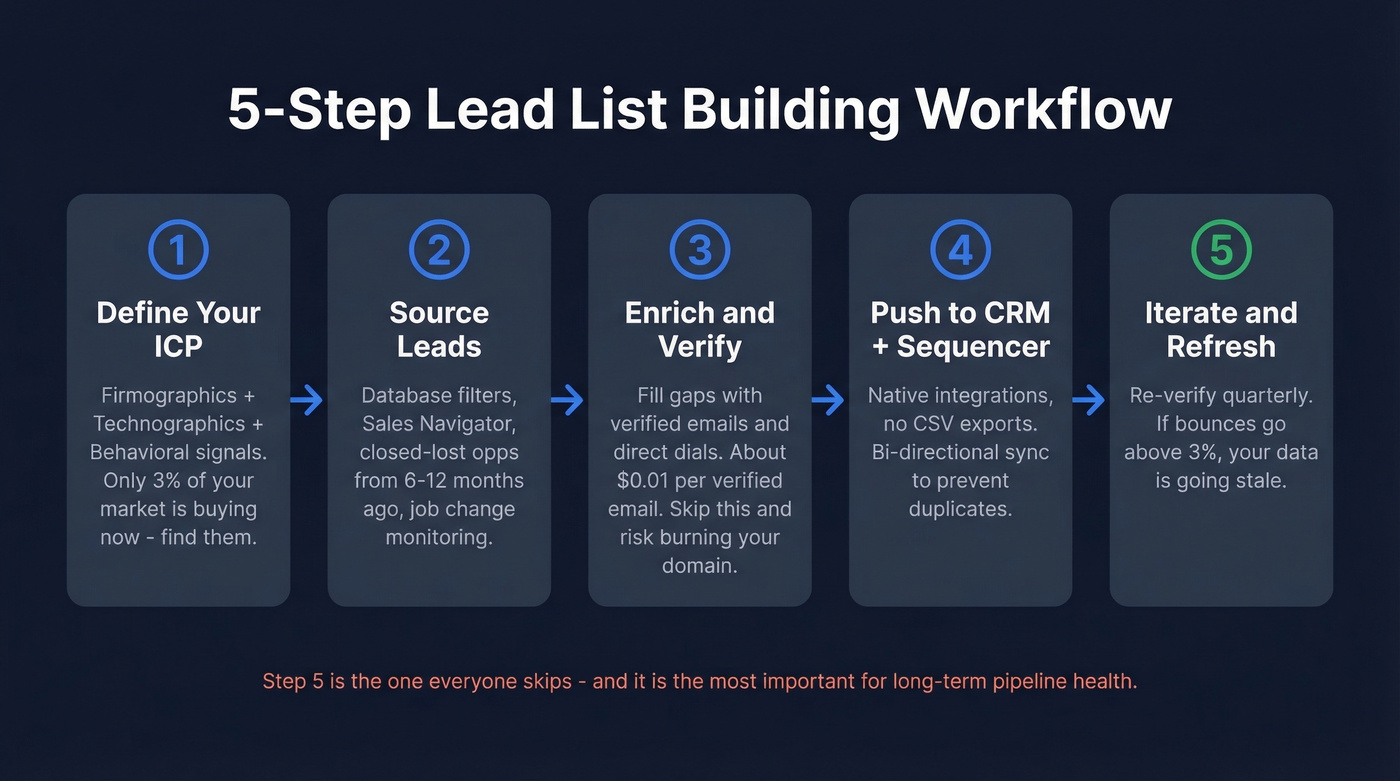
Here's the five-step workflow we've seen work consistently across outbound teams of all sizes.
Step 1: Define Your ICP
Your Ideal Customer Profile should combine firmographic data (industry, headcount, revenue), technographic signals (what tools they use), and behavioral indicators (hiring patterns, funding events). Chet Holmes' buyers pyramid still holds: only the top 3% of your market is "buying now." Your ICP definition determines whether you're reaching that 3% or wasting sequences on the other 97%.
Step 2: Source Your Leads
Use database filters or Sales Navigator to build your initial list. Two underused sources most teams ignore: closed-lost opportunities from 6-12 months ago, because circumstances change, and job change monitoring - a champion who moves to a new company is your warmest lead. On r/Entrepreneur, the most common complaint about list building is the manual grind of connecting and following up one by one, which is exactly the workflow a good outbound lead generation database eliminates.
Step 3: Enrich and Verify
Raw lists are incomplete. Upload your prospect list to an enrichment tool and fill the gaps - verified emails, direct dials, company data. At roughly $0.01 per verified email, enrichment is the cheapest step in your entire outbound workflow. Skip verification, and you're one bad batch away from tanking your domain reputation. Recovering a burned domain takes weeks; verifying an email takes seconds.

Step 4: Push to CRM and Sequencer
Native integrations with Salesforce, HubSpot, Smartlead, Instantly, and Lemlist mean you can push verified leads directly - no CSV export/import dance required. Bi-directional sync helps reduce duplicate records, which is one of those small things that saves hours of cleanup down the line.
Step 5: Iterate and Refresh
This is the step everyone skips. Set a calendar reminder to re-verify your active lists quarterly. Monitor reply rates and bounce rates weekly - if bounces creep above 3%, your data's going stale faster than expected.

You just read that B2B data decays at 2.1% per month and the industry refreshes every 6 weeks. Prospeo refreshes every 7 days - 6x faster. 300M+ profiles, 98% email accuracy, 30+ filters including intent, technographics, and job changes. That's all three layers of a lead list in one platform.
Build a verified, enriched lead list in minutes - not days.
Lead Builder Tools Worth Knowing
You don't need 10 tools. But you should know what's out there so you pick the right three.
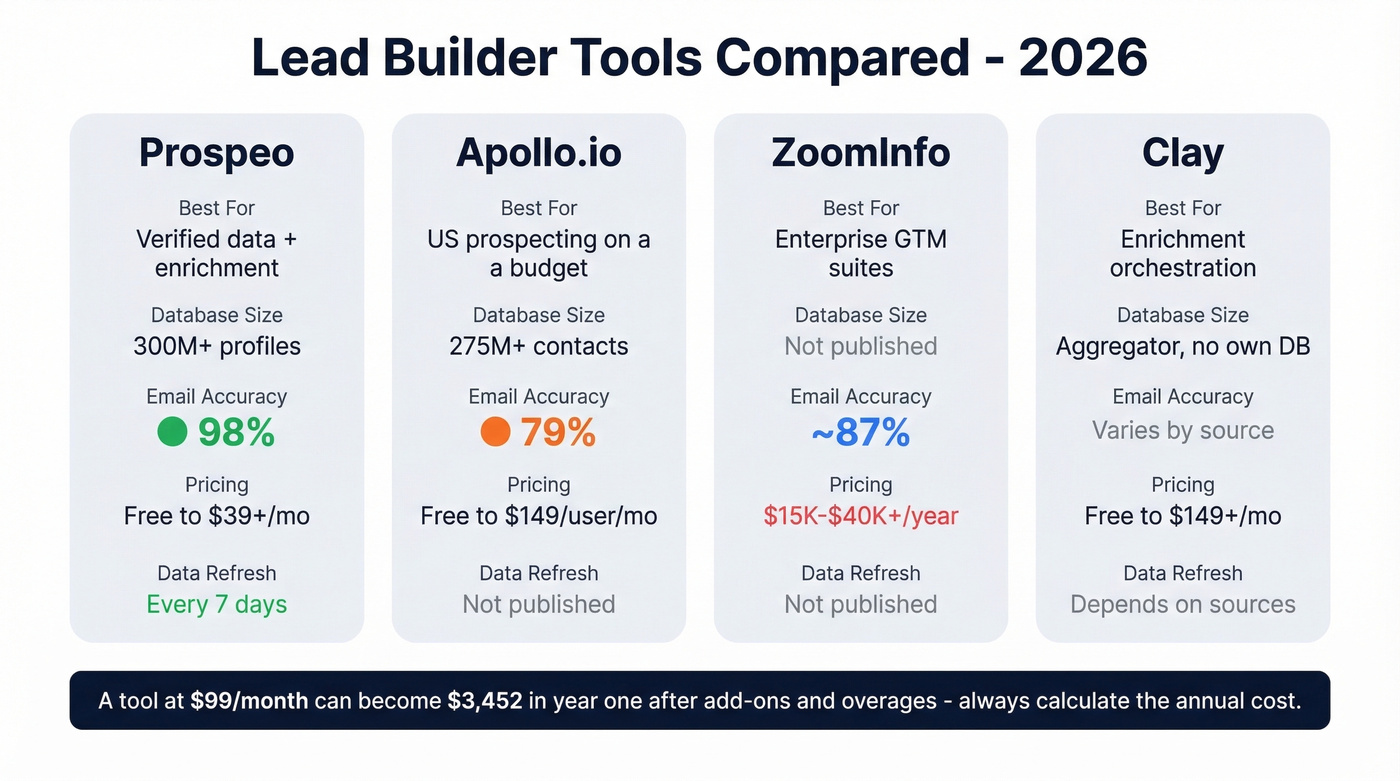
| Tool | Best For | Pricing | Email Accuracy |
|---|---|---|---|
| Prospeo | Verified data + enrichment | Free-$39+/mo | 98% |
| Apollo.io | US prospecting on a budget | Free-$149/user/mo | 79% |
| ZoomInfo | Enterprise GTM suites | $15K-$40K+/yr | ~87% |
| Clay | Enrichment orchestration | Free-$149+/mo | Varies by source |
| Hunter | Email finding | Free-$499/mo | Not published |
| Lusha | Quick lookups | Free-$29+/user/mo | Not published |
Prospeo
Prospeo covers prospecting and verification in a single platform: 300M+ professional profiles, 143M+ verified emails, 125M+ verified mobile numbers, all refreshed every 7 days. The 98% email accuracy comes from a proprietary 5-step verification process with catch-all handling, spam-trap removal, and honeypot filtering.
The 30+ search filters include buyer intent across 15,000 topics via Bombora, technographics, job changes, headcount growth, and funding signals. Free tier gives you 75 email lookups and 100 Chrome extension credits per month. Paid plans start around $39/month with no annual contracts. In our testing, the combination of accuracy and refresh speed is hard to beat at this price point - teams using Prospeo book 26% more meetings compared to ZoomInfo and 35% more compared to Apollo.
Apollo.io
Apollo's the obvious starting point for budget-conscious US-focused teams. The database covers 275M+ contacts across 73M+ companies, and the free tier is genuinely usable. Paid plans run from $49/user/month. Where Apollo falls short: data quality outside the US drops noticeably, and email accuracy sits at 79% - which means roughly one in five emails you send could bounce.
ZoomInfo
Skip this if your deal sizes are under $25K. ZoomInfo's breadth is unmatched - intent data, website visitor tracking, conversation intelligence, the works. But a 10-seat contract with intent data and mobile numbers runs $35K-$45K+/year. The fact that ZoomInfo won't publish pricing tells you everything about their sales process. Most teams end up using a small slice of what they pay for.
Quick Mentions
Clay is an enrichment orchestrator, not a database - it waterfalls across multiple providers to maximize coverage. Free tier gives 100 credits/month; Starter runs $149/month. Hunter does email finding and verification well, with a free tier and paid plans up to $499/month. Lusha is built for quick lookups with 5 free credits/month and Pro from $29/user/month.
For teams whose priority is identifying anonymous website visitors rather than outbound prospecting, tools like Leadfeeder or Leadinfo serve a different use case entirely.
One warning on total cost: a tool advertised at $99/month can become $3,452 in year one after add-ons, overage fees, and seat expansions. Always calculate the annual number before you commit.
How to Choose the Right Tool
Here's the thing: most teams overthink this decision. If your average contract value is under $15K, you almost certainly don't need ZoomInfo-level data. A self-serve prospecting database with strong verification will outperform an enterprise suite that's 90% shelfware.
The evaluation comes down to five things:
- Enrichment and verification in one workflow. Separate tools for finding and verifying contacts means more manual steps and more data leakage between systems.
- Bi-directional CRM sync. One-way pushes create duplicate records that haunt your ops team for months.
- Intent data. Knowing when a prospect is in-market is half the equation.
- Basic lead scoring. Even simple scoring prevents reps from chasing unqualified leads.
- Pricing transparency. If you can't find the price on the website, the price is going to be painful.
One stat that should guide your architecture: single-source databases find 62% of emails. Waterfall enrichment - layering multiple sources - finds 98%. Coverage matters more than any single feature.
List-Building Mistakes That Kill Pipeline
Poor data quality costs organizations $12.9M annually on average. Here are the five mistakes we see most often.
Targeting a stale ICP. Your ICP from 18 months ago isn't your ICP today. Markets shift, product-market fit evolves. Update quarterly using firmographic, technographic, and behavioral data.
Over-reliance on one channel. B2B buyers now use roughly 10 channels on average, up from 5 in 2016. If your entire pipeline comes from cold email, you're one deliverability issue away from zero pipeline.
Skipping verification. Let's be honest - most teams skip this because it feels like an extra step. Then bounce rates spike and their domain reputation tanks. The cost of verification at roughly $0.01/email is negligible compared to weeks of domain recovery.
Ignoring data decay. At 2.1% monthly decay, a list you built in January is ~13% stale by July. Refresh quarterly at minimum.
Sales and marketing misalignment. If sales and marketing can't agree on what a "qualified lead" means, every list you build feeds a broken process. I've watched teams burn through thousands of leads per month because nobody bothered to align on definitions - it's the most expensive free problem to fix.
FAQ
What Is Lead Builder in Sales Navigator?
Sales Navigator's Lead Builder is the advanced search tool with 50+ filters for finding prospects by seniority, company size, industry, and behavioral signals. It's available on all plans starting at $99.99/month. It's a targeting tool - you'll still need a separate data provider for verified emails and phone numbers.
How Much Does a Lead Builder Tool Cost?
Free tiers exist at Apollo, Prospeo, and HubSpot. Mid-range tools run $29-$149/month per user. Enterprise platforms like ZoomInfo start at $15K/year. A solid starter stack - prospecting database, CRM, and sequencer - runs $100-$200/month total.
How Do I Keep My Lead List from Going Stale?
B2B contact data decays 2.1% per month - roughly 22.5% of your list goes bad every year. Use a data provider with frequent refresh cycles (a 7-day cycle beats the 6-week industry average). Re-verify emails quarterly, and monitor job changes as trigger events for fresh outreach.