

Lead Capture Automation: Workflow, Tools, and Mistakes Nobody Talks About
A real estate consultancy cut lead response time from two hours to under two minutes. Sales conversions jumped 25% within 30 days. The entire change was a single automation workflow connecting their web forms to a CRM with routing logic and an acknowledgment email. That's the gap between "we capture leads" and doing it right.
What Automated Lead Capture Actually Is
This system collects contact details and consent from prospects, then routes that data into your CRM or CDP with proper attribution - without a human copying and pasting anything. Common sources include form fills, chat handoffs, ad lead forms, event scans, and trial signups.
Let's separate this from lead generation, because most teams conflate the two and end up with a messy pipeline. Generation creates awareness and interest - ads, content, SEO, events. Capture is the collection and routing layer that turns interest into a verified, actionable contact record.
The market reflects how seriously companies are taking this. Lead capture software sits at $2.8B as of 2025, projected to hit $5.8B by 2035 at a 7.4% CAGR. SMEs account for 58.2% of that market, so this isn't just an enterprise play.
What You Need for High-Converting Capture
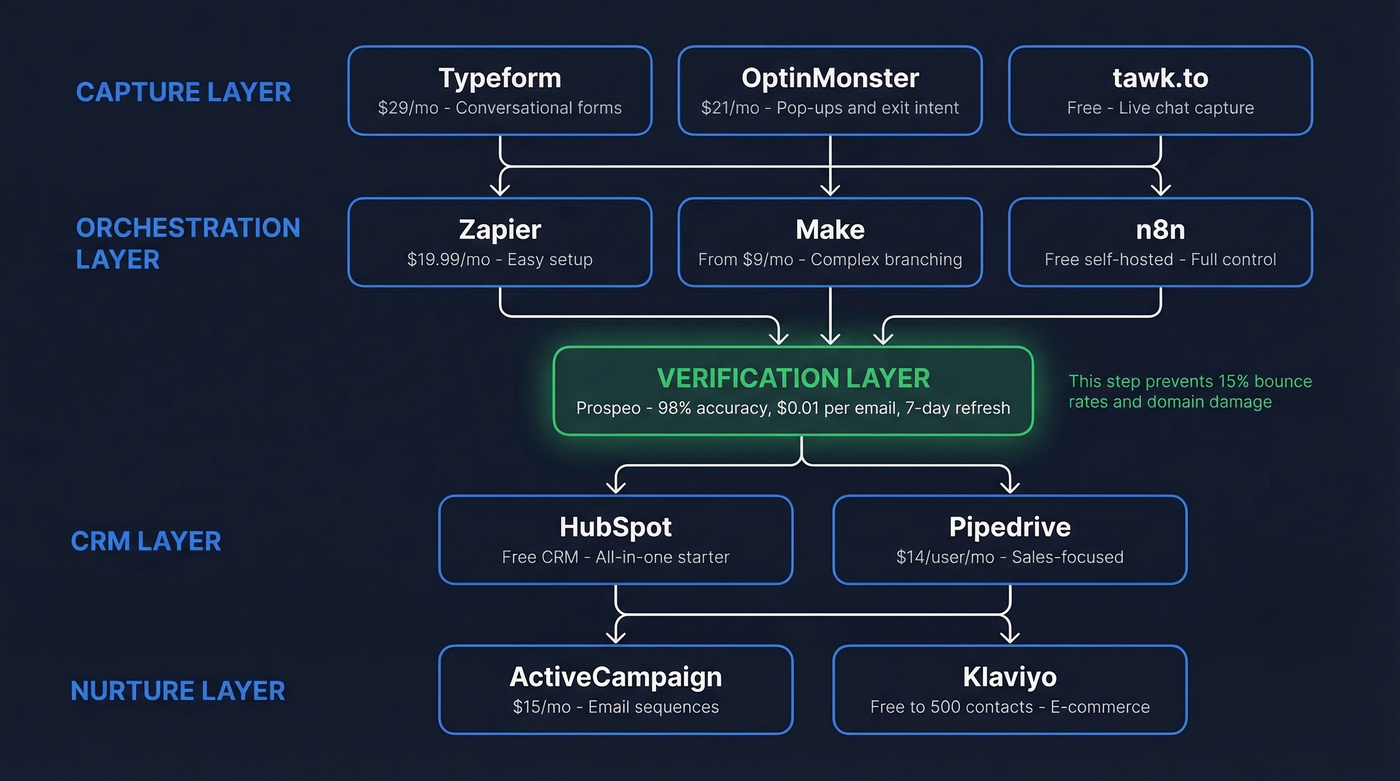
Your stack needs four layers:
- Capture: Typeform, OptinMonster, or tawk.to
- Orchestration: Zapier, Make, or n8n
- CRM: HubSpot, Pipedrive, or Salesforce
Wire these together correctly and you're looking at 50% more sales-ready leads at 33% lower cost compared to teams that don't nurture leads. The rest of this guide shows you how to connect them without breaking things.
The Workflow, Step by Step
Here's the full pipeline, from first touch to first sequence:
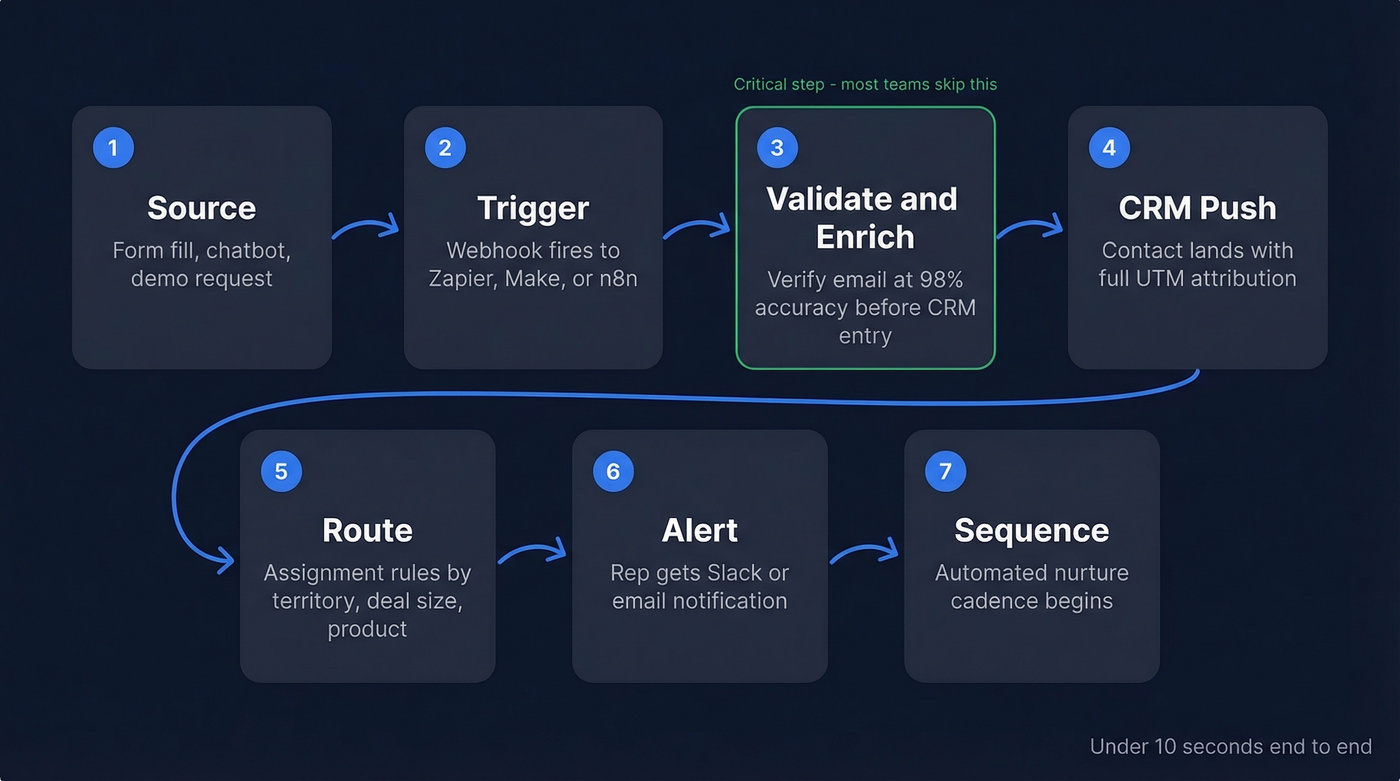
- Source - A prospect fills out a form, engages a chatbot, or submits a demo request.
- Trigger - The submission fires a webhook to your orchestration tool (Zapier, Make, or n8n).
- Validate and enrich - Run captured leads through a verification tool before they hit your CRM. With 98% email accuracy and a 5-step verification process, your sequences actually reach inboxes instead of bouncing into the void.
- CRM push - The verified contact lands in your CRM with full attribution: source, campaign, UTM parameters.
- Route - Assignment rules send the lead to the right rep based on territory, deal size, or product interest.
- Alert - The rep gets a Slack or email notification with the triggering behavior.
- Sequence - The lead enters an automated nurture or outreach cadence.
Let's make this concrete. Say you're running a high-intent MQL workflow. The trigger fires when a lead score crosses 100 points or someone visits your /pricing page. The system tags them as MQL in your CRM, pings the assigned rep via Slack with the specific page they visited, and enrolls them in a 3-email sequence on Day 1, Day 3, and Day 5. Exit conditions: they reply, book a meeting, or get manually removed. Otherwise, they roll into long-term nurture.
The manual version of this takes 20-30 minutes per lead. Automated, it runs in under 10 seconds. That isn't a marginal improvement - it's the difference between responding while the prospect is still on your site and responding after they've already talked to your competitor.

Every unverified email in your capture workflow is a bounce waiting to happen. Prospeo's 5-step verification runs at 98% accuracy with native Zapier, Make, and n8n integrations - slotting directly into the orchestration layer described above. At $0.01 per email, it costs less than a single bounced message costs your domain reputation.
Stop routing bad data into your CRM. Verify every captured lead automatically.
Mistakes That Break Everything
We've seen the same five failures kill otherwise solid automation setups:
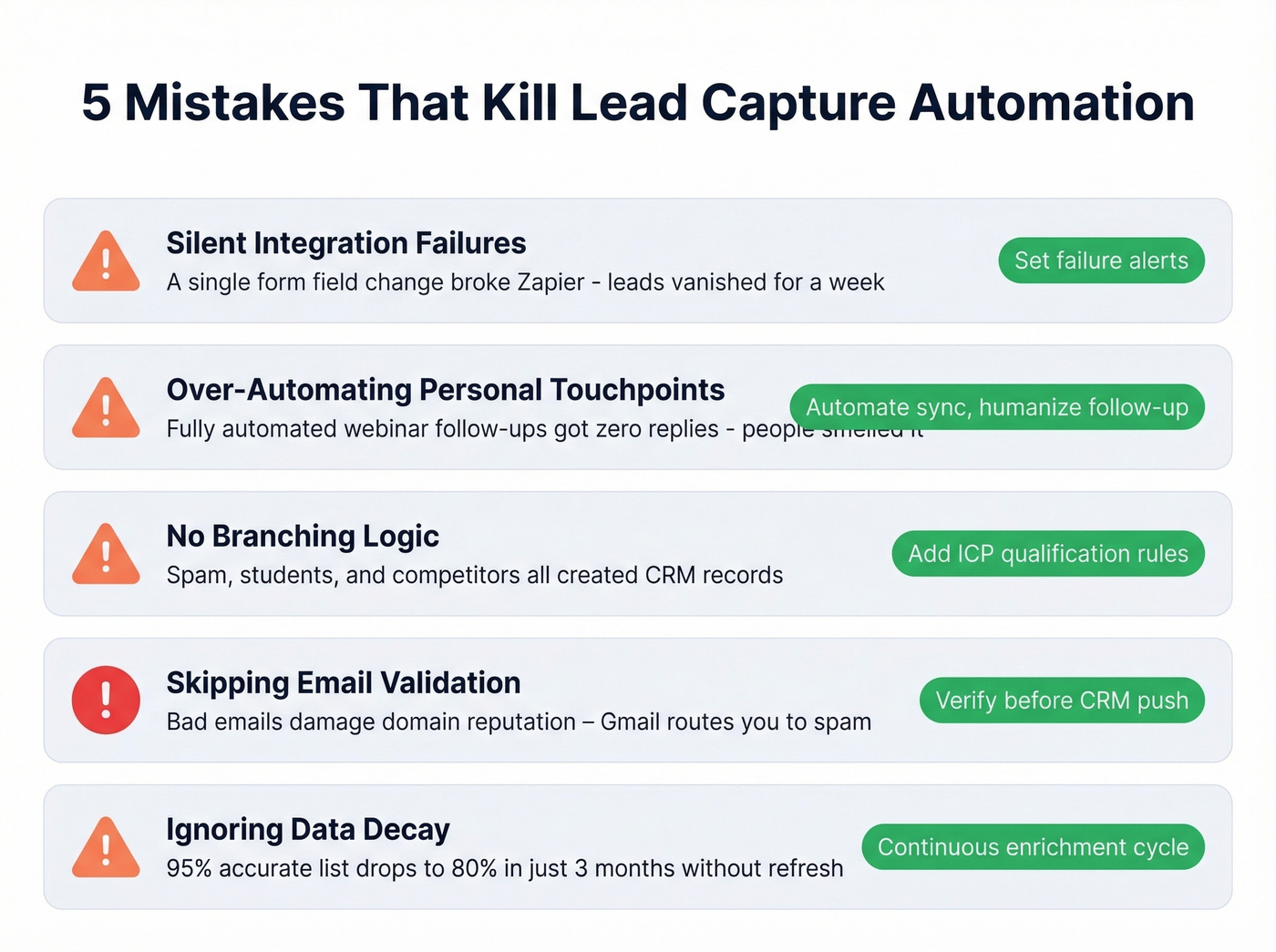
1. Silent integration failures. A small form-field change broke a Zapier integration and dozens of leads vanished into the ether. Nobody noticed for a week. The fix: set up failure alerts and monitoring logs. Check them weekly at minimum.
2. Over-automating personal touchpoints. One team automated their entire post-webinar follow-up sequence. Open rates were fine. Responses were zero - recipients could smell the automation. The fix: automate the list sync and initial thank-you, then have a human write the actual follow-up.
3. No branching logic. Without qualification rules, every form submission - including spam, students, and competitors - creates a CRM record. Your pipeline turns into a junkyard. Add branching that separates qualified leads from noise before anything touches your sales pipeline. Only prospects who meet your ICP criteria get routed to sales; everyone else enters a separate nurture track.
4. Skipping email validation. Bad email addresses don't just bounce - they damage your domain reputation. Send enough emails to invalid addresses and Gmail starts routing your legitimate outreach to spam. Verify every captured email before it enters your CRM. Full stop.
5. Ignoring data decay. Contacts change jobs, companies rebrand, emails go stale. A list that was 95% accurate three months ago might be 80% accurate today. The fix: continuous enrichment on a regular refresh cycle, not a quarterly CSV upload. The consensus on r/sales is that data hygiene is the single most underrated factor in outbound performance, and we'd agree.
Best Tools for Each Step
| Category | Tool | Starting Price | Best For |
|---|---|---|---|
| Capture | Typeform | $29/mo | Conversational forms |
| Capture | OptinMonster | $21/mo | Pop-ups, exit intent |
| Capture | tawk.to | Free | Live chat capture |
| Orchestration | Zapier | $19.99/mo | Ease of use |
| Orchestration | Make | Free plan; paid from ~$9/mo | Complex branching |
| Orchestration | n8n | Free (self-hosted) | Full control |
| CRM | HubSpot | Free CRM | All-in-one starter |
| CRM | Pipedrive | ~$14/user/mo | Sales-focused teams |
| Nurture | ActiveCampaign | $15/mo | Email sequences |
| Nurture | Klaviyo | Free to 500 contacts | E-commerce nurture |
The Verification Layer
Here's the thing - most teams skip verification because it feels like an extra step. Then they wonder why their sequences bounce at 15% and their domain reputation tanks. A verification tool sits between your capture form and your CRM, checking every email address before it pollutes your pipeline.
The numbers matter here. Prospeo delivers 98% email accuracy with a 7-day data refresh cycle (the industry average is six weeks), and its native integrations with Zapier, Make, and n8n mean it slots directly into the orchestration layer you're already building. The free tier covers 75 email verifications per month - enough to test the workflow before committing. Paid plans run about $0.01 per email, which is negligible compared to the cost of a burned domain. Beyond verification, the enrichment API returns 50+ data points per contact at a 92% match rate, so your CRM records arrive complete rather than half-empty.
Skip this tool category if you're only capturing a handful of leads per month. But once you're past 50-100 monthly form submissions, verification isn't optional - it's infrastructure.
B2B Lead Capture Strategies
Not every automated capture setup looks the same. B2B teams face a unique tension: you need enough information to qualify and route leads, but every additional form field reduces conversion rates.
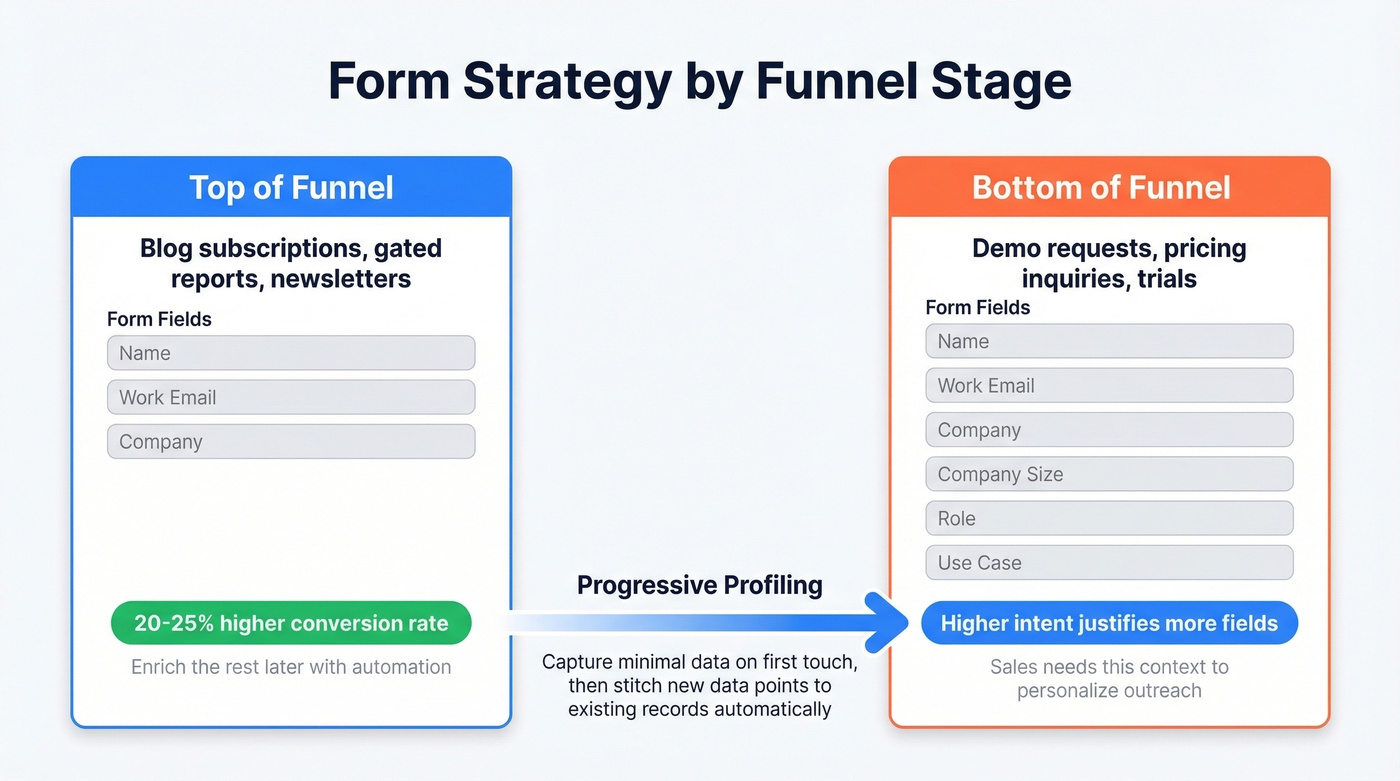
For top-of-funnel assets like blog subscriptions or gated reports, keep forms to two or three fields - name, work email, and maybe company name. Conversion rates on these shorter forms can run 20-25% higher than their longer counterparts. For bottom-of-funnel actions like demo requests or pricing inquiries, longer forms with fields for company size, role, and use case are justified because the prospect's intent is already high and your sales team needs that context to personalize outreach.
The best approach is progressive. Capture minimal data on first touch, then use enrichment tools and subsequent interactions to fill in the rest. Your automation handles the stitching - matching new data points back to the existing contact record in your CRM so reps always see a complete picture without the prospect filling out the same fields twice. We've found this approach works especially well for teams running multi-touch campaigns where a single prospect might interact with three or four different assets before they're ready to talk to sales.
Compliance You Can't Skip
Region-based rules should be baked into your automation logic from day one:
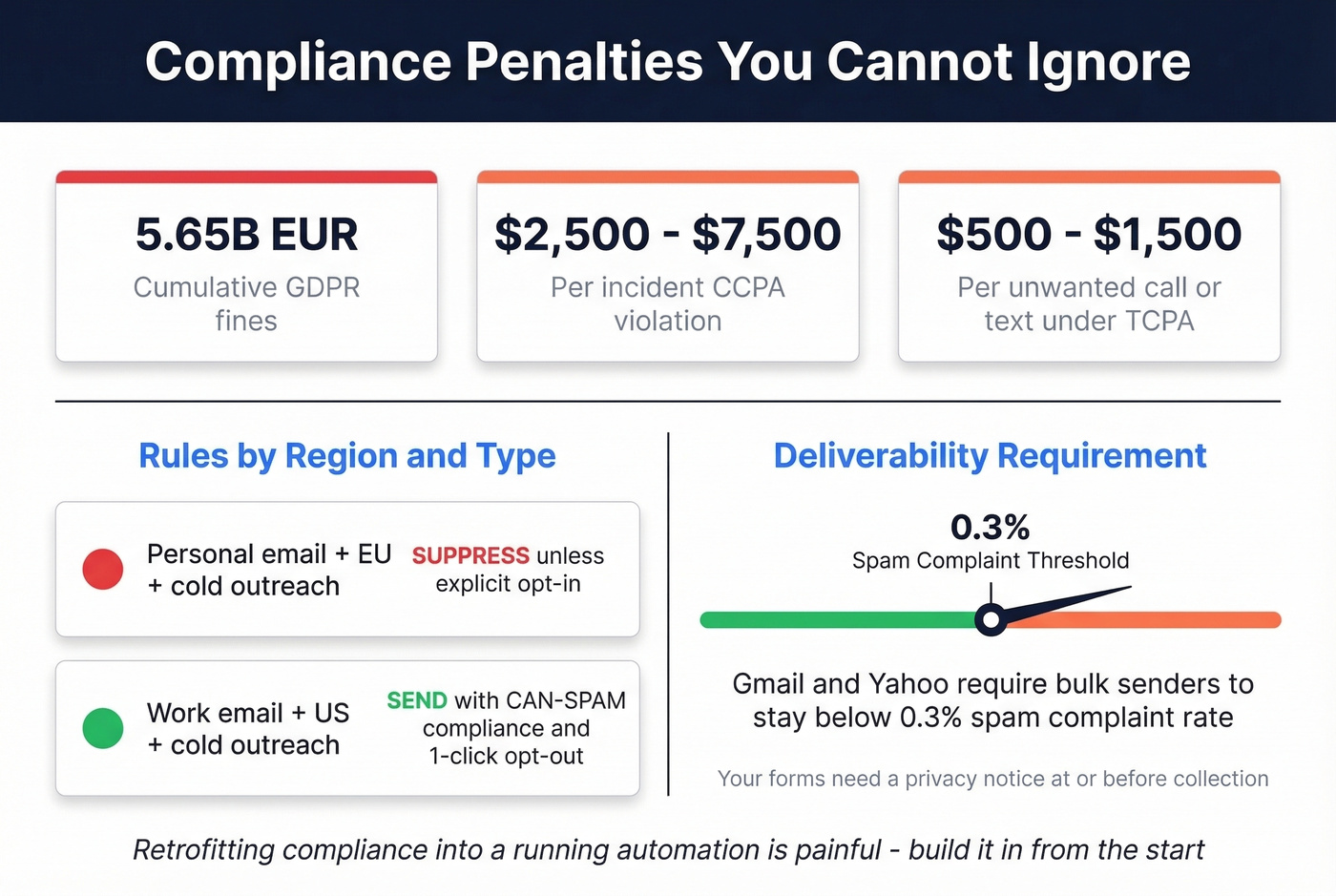
- Personal email + EU + cold outreach - suppress unless you have explicit opt-in
- Work email + US + cold outreach - send with CAN-SPAM compliance and a 1-click opt-out
The penalties aren't theoretical. GDPR fines have hit EUR 5.65B cumulative. CCPA violations run $2,500-$7,500 per incident. TCPA damages land between $500 and $1,500 per unwanted call or text.
On the deliverability side, Gmail and Yahoo require bulk senders to keep spam complaint rates below 0.3%. Your forms need a privacy notice at or before collection, and you must honor right-to-know, right-to-delete, and opt-out requests. Retrofitting compliance into a running automation is painful - build it in from the start.
If you're tightening deliverability controls, pair this with a proper email deliverability guide and a plan to improve sender reputation.
Data decay is the silent killer of lead capture automation. While competitors refresh every 6 weeks, Prospeo refreshes every 7 days - so the contacts you captured last week still have valid emails when your sequence fires. The enrichment API returns 50+ data points at a 92% match rate, turning half-empty CRM records into complete prospect profiles.
Build capture workflows on data that's actually fresh. Start with 75 free verifications.
FAQ
What's the difference between lead capture and lead generation?
Lead generation creates awareness through ads, content, and events. Lead capture is the collection and routing layer that turns interest into a verified CRM record with proper attribution and consent. Generation fills the top of the funnel; capture ensures nothing leaks out the bottom.
How much does a lead capture automation stack cost?
A basic stack using free tiers (tawk.to + Zapier free + HubSpot free CRM) costs $0. A production stack with verification and nurture sequences runs $50-150/month for SMBs. Enterprise setups with Salesforce and high-volume verification can exceed $500/month.
How do I verify captured leads before they enter my CRM?
Add a verification step between your form capture and your CRM push. Tools like Prospeo check emails in real time via API or Zapier integration - invalid addresses get flagged before they damage your sender reputation. The free tier covers 75 verifications per month, enough to validate the workflow before scaling.
What's a good free tool for email verification in a capture workflow?
Prospeo's free tier includes 75 email verifications per month with 98% accuracy and native Zapier/Make integrations. For comparison, Hunter offers 25 free searches monthly but caps enrichment data. NeverBounce and ZeroBounce offer limited free credits but lack the orchestration integrations that make automated workflows seamless.