

LeadEngine.ai vs MailTag: You're Comparing a Race Car to a Speedometer
LeadEngine.ai vs MailTag isn't a fair fight. It's a category error. One is a full AI cold email platform with dedicated sending infrastructure; the other is a Chrome extension that drops a tracking pixel into your Gmail messages so you know who opened what. They solve different problems entirely.
Here's the thing most teams get wrong: they obsess over the sending tool or the tracking layer while ignoring the data underneath. We've watched teams burn months A/B testing subject lines when 20% of their list was bouncing. The tool doesn't matter if the list is garbage.
30-Second Verdict
What Each Tool Actually Does
The core distinction is simple: a cold email platform automates outbound campaigns end-to-end - copywriting, sequencing, deliverability, replies. An email tracking tool embeds a tiny pixel in your message and fires a notification when someone loads it. They're complementary at best. Never interchangeable.

LeadEngine.ai - AI Cold Email Platform
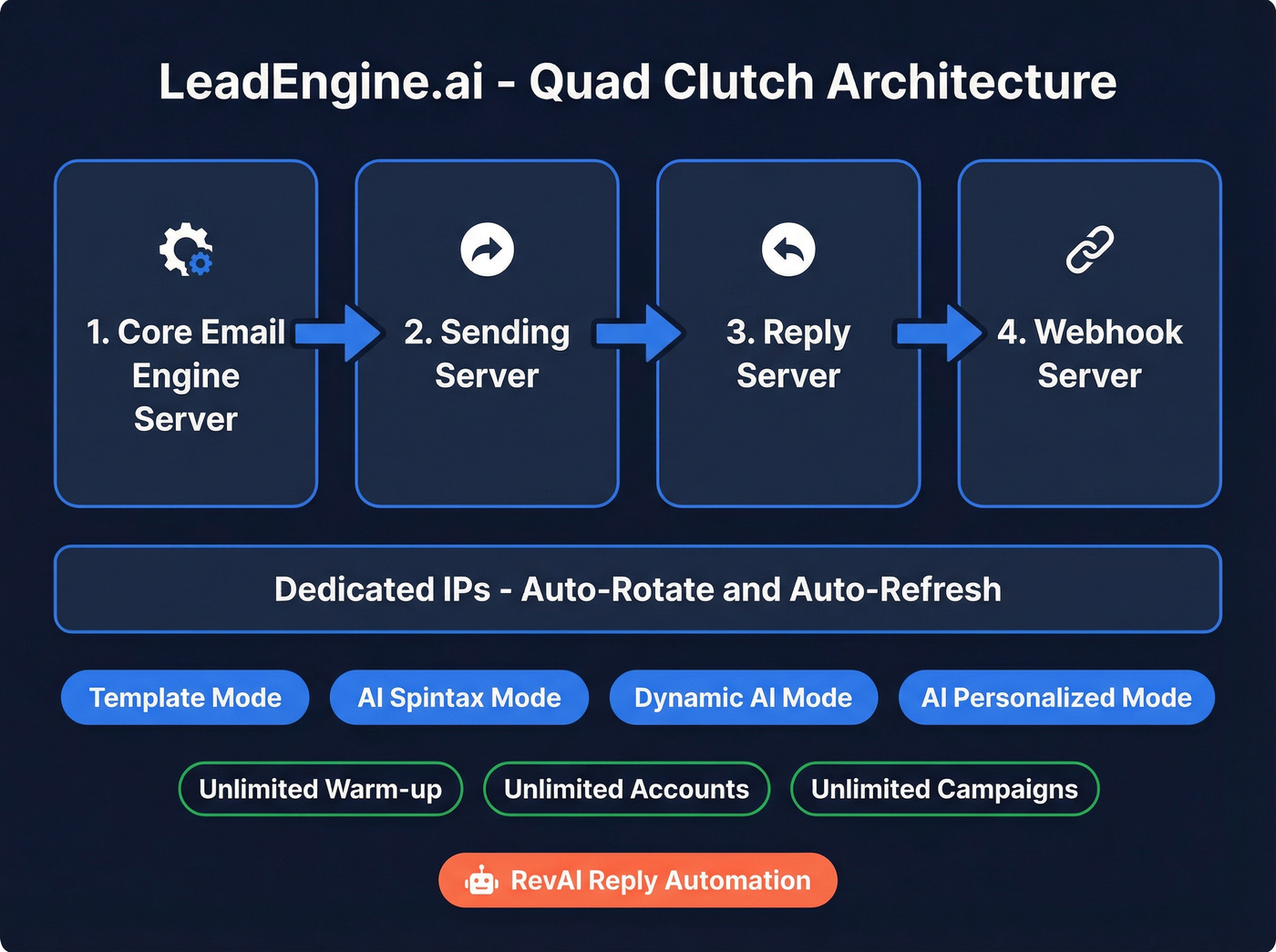
LeadEngine uses a 4-server architecture as part of its "Quad Clutch" Overdrive Method: a Core Email Engine Server, Sending Server, Reply Server, and Webhook Server, plus multiple dedicated IPs that auto-rotate and auto-refresh. On top of that, you get four AI copy modes (Template, AI Spintax, Dynamic AI, and AI Personalized), unlimited warm-up, unlimited email accounts, and a reply automation system called RevAI that can sort, label, respond, or route leads. Every plan includes unlimited campaigns, white-glove implementation, and weekly live support calls.
Skip this if you just need to know whether someone opened your email. That's not what this tool does.
MailTag - More Than Open Tracking
MailTag lives entirely inside Gmail as a Chrome extension, but it does more than most people realize. Beyond real-time open and click tracking with desktop notifications, it includes Auto-BCC to CRM (Salesforce being a common example), a signature generator, a read/unread dashboard with unlimited analytics, and "Ping" sequences for automated follow-ups. MailTag also markets a stat that its average user closes 23% more sales in a 2-month period. The extension touts military-grade encryption and says it can't see your emails.
Side-by-Side Comparison
| Feature | LeadEngine.ai | MailTag |
|---|---|---|
| Category | AI cold email platform | Gmail tracking extension |
| Core function | Outbound campaigns at scale | Open/click tracking + light automation |
| Pricing | $97-$497/mo | $9.99/mo per user (annual) or $12.99/mo (monthly) |
| Free trial | "Overdrive Guarantee" - generate deals or it's free until you do | 14-day free trial, no card required |
| Best for | Teams scaling AI-driven cold email | Gmail users wanting engagement visibility |
| Key limitation | Steep learning curve, very few third-party reviews | Gmail-only, no outbound campaign engine |
| G2 rating | Limited reviews | 3.9/5 (11 reviews) |
The pricing gap tells the story. You're paying $97+ for full sending infrastructure with AI copywriting, or $10 per user for a tracking pixel inside Gmail. Different tools, different jobs.

The article says it clearly: sending tools aren't the bottleneck - bad data is. Prospeo gives you 300M+ profiles with 98% email accuracy on a 7-day refresh cycle, so every email you send through LeadEngine or any other platform actually reaches a real inbox. At $0.01 per email, cleaning your list costs less than one bounced campaign.
Stop debating tools. Start with data that doesn't bounce.
Strengths and Weaknesses
LeadEngine.ai
Pros:
- AI personalization across four distinct copy modes - truly personalized emails at scale, not just mail merge
- Dedicated private infrastructure plus auto-rotating IPs to protect deliverability
- Unlimited email accounts, warm-up, and campaigns on every plan
- White-glove implementation plus weekly live coaching calls
Cons:
- The "Quad Clutch" system takes real time to configure - expect a learning curve
- Pricing discrepancies between third-party directories ($59/mo) and the homepage ($97-$497/mo) create confusion
MailTag
MailTag's biggest selling point is simplicity. Install the Chrome extension and you're tracking opens within minutes. The Auto-BCC to CRM is a genuine time-saver for CRM-dependent teams, and unlimited analytics without a 30-day cap puts it ahead of some pricier tools.
The downsides are real, though. Customer support is a recurring complaint in third-party writeups - one example flags no cancel subscription button and non-responsive support. G2 reviewers also call the UI cluttered and hard to navigate. And the Gmail-only lock-in means if you're not sending from Gmail, MailTag isn't an option at all.
The Missing Piece: Your Data
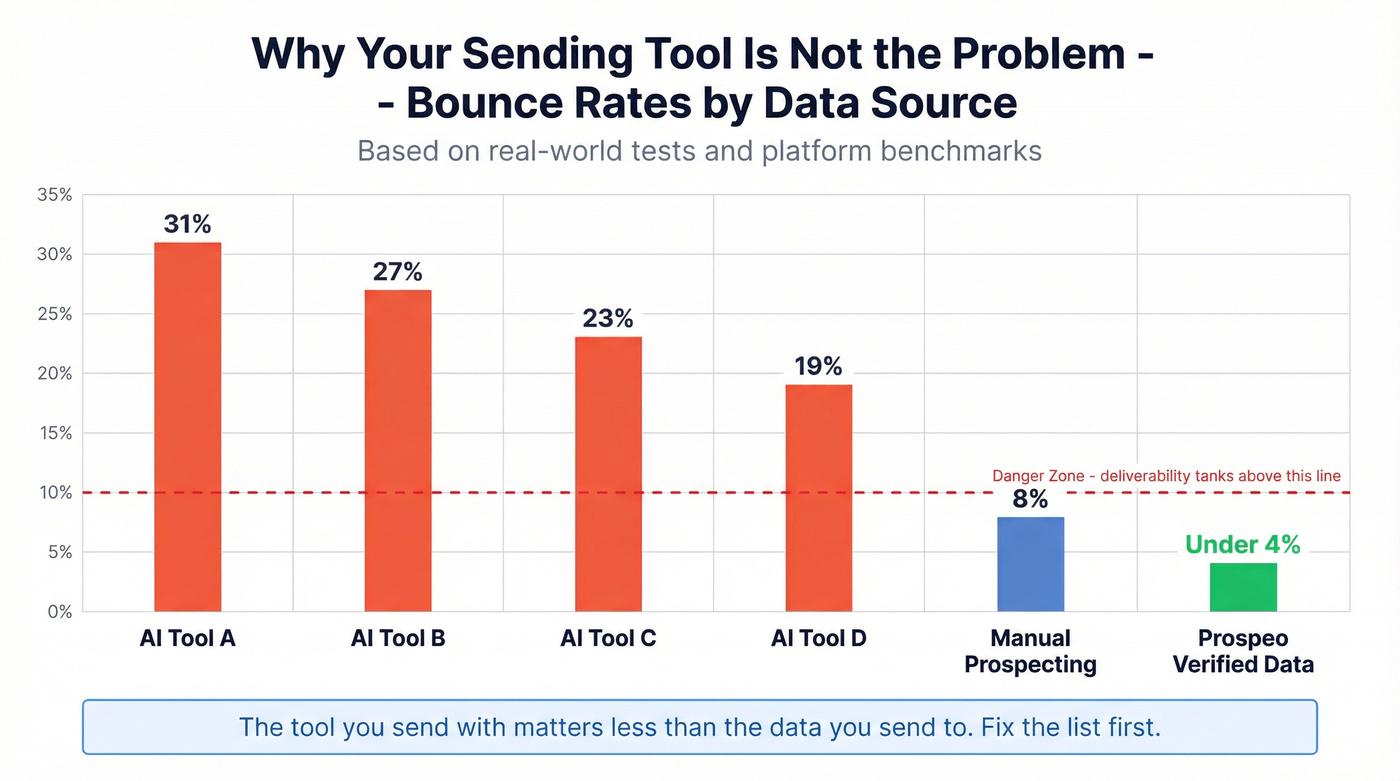
Let's be honest - the sending tool is never the bottleneck. In our experience, the teams that struggle with cold email aren't choosing the wrong platform. They're sending to the wrong addresses. One Reddit test of four AI list-building platforms found bounce rates in the 19%-31% range, while manual prospecting came in closer to 8%. Data freshness, not sending infrastructure, is what usually decides whether your campaigns land in inboxes and get replies.

If you're trying to reduce bounces fast, start with email verification and a repeatable lead generation workflow before you touch copy.
Which Tool Should You Pick?
Choose LeadEngine.ai if you're scaling outbound with AI-driven personalization and want dedicated sending infrastructure. Budget $97-$497/mo depending on volume.
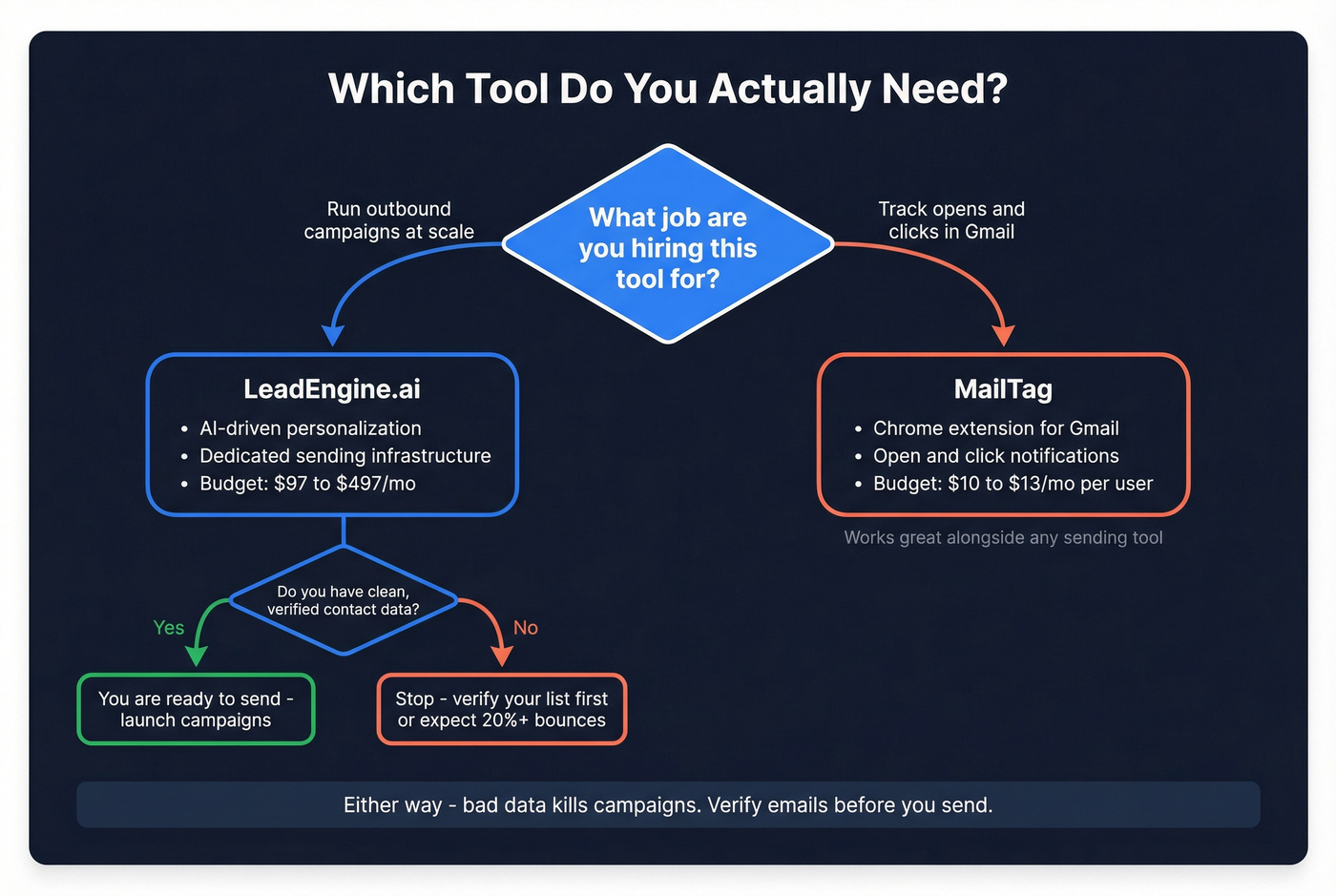
Choose MailTag if you send from Gmail and just want to see who opened what. Budget $10-$13/mo per user. The 30-day refund guarantee lowers the risk.
The LeadEngine.ai vs MailTag decision comes down to what job you need done. One runs campaigns. The other tracks opens. Neither fixes bad data, and bad data is where most outbound pipelines quietly die. If you want a deeper playbook on modern outbound, see AI cold email outreach and sales prospecting techniques.
Teams testing AI list-building tools see 19-31% bounce rates. Prospeo users see under 4%. Whether you pick LeadEngine for sending or MailTag for tracking, neither matters if 1 in 5 emails bounces. Build your list on Prospeo's 5-step verified data first, then send with whatever tool you want.
Verify before you send. 75 free emails, no card required.
FAQ
Can LeadEngine.ai and MailTag work together?
Technically yes - you could track Gmail opens with MailTag while running campaigns through LeadEngine. But LeadEngine already includes its own analytics and reply tracking, so the overlap is minimal. Most teams pick one workflow rather than layering both.
Is MailTag free?
MailTag offers a 14-day free trial with no card required. After that, it's $9.99/month per user billed annually or $12.99/month billed monthly. There's no permanent free tier.
Do either tool include email verification?
Neither LeadEngine.ai nor MailTag is a contact database. LeadEngine handles sending and AI-driven sequencing; MailTag handles Gmail tracking and follow-ups. For verified contact data with 98% email accuracy and a 7-day refresh cycle, use a dedicated platform like Prospeo, then push clean lists into whatever sending or tracking tool fits your workflow.