

Lusha vs SafetyMails: Which Do You Actually Need in 2026?
You send 2,000 cold emails on Monday. By Wednesday, 460 have bounced. Your domain reputation tanks, your sequences stall, and you're scrambling to figure out what went wrong. The answer is almost always the same: you used an enrichment tool without a verification layer, or you verified a list that was already stale. B2B contact data decays 22-30% per year - job changes, acquisitions, and domain migrations eat your list alive.
Lusha vs SafetyMails is a comparison that surfaces often because both tools touch email data, but they solve fundamentally different problems. Lusha is an enrichment tool: it finds contacts you don't have. SafetyMails is a verification tool: it checks contacts you already have. Comparing them head-to-head is like comparing a metal detector to a quality inspector - different jobs, different workflows.
Here's the thing: most teams don't realize they need both functions until after their first major bounce spike. If you're running outbound sequences daily, don't rely on enrichment confidence scoring alone. Verify every address before it touches your sequencer.
30-Second Verdict
- Need to find contacts (emails, phone numbers, company data) - Lusha
- Already have a list and need to clean it before sending - SafetyMails
Lusha at a Glance
Lusha's Chrome extension is its bread and butter. Hover over a professional profile, get an email and phone number, move on. It's fast, simple, and the free tier (70 credits/month) lets you test without commitment. The email confidence scoring feature helps you decide which contacts to auto-sync to your CRM and which to flag for review.
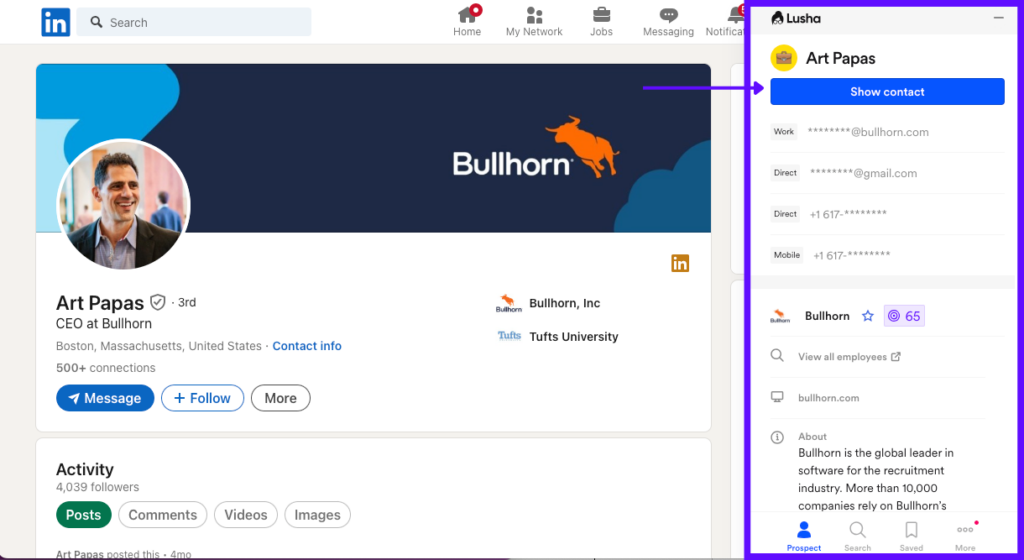
Skip this if you need high-volume enrichment or verified-clean data out of the box. One practitioner report after a few thousand enrichments put Lusha at roughly 60-70% valid email rates, with phone numbers running about 50/50. That's fine for quick lookups, but if you're running sequences at scale, those invalid addresses will bounce and damage your sender reputation. We've seen teams fix deliverability faster by verifying before a sequencer import, not after the first bounce spike.
Pricing and Credit Economics
Lusha's paid plans start around $29.90/month per SoftwareWorld's pricing data. Credits cost 1 per verified email reveal and 10 per phone number, so those 70 free credits on the free tier disappear in a single prospecting session if you're pulling direct dials.
One detail worth knowing: Lusha's monthly plans allow unused credits to roll over and accumulate up to a 2x cap on your monthly allotment. Annual plans provide credits up front, and unused credits reset at the end of the annual cycle. If you prospect in bursts rather than steadily, the monthly rollover flexibility matters more than the annual discount.
SafetyMails at a Glance
SafetyMails exists for one job: telling you which addresses on your list are safe to send to. You upload a file, and its 19-step verification algorithm checks syntax, MX records, spam traps, disposable domains, and other risky patterns. The platform has processed over 2 billion emails across 8,000+ customers, and bulk uploads support up to 2 million emails per run - serious capacity for teams managing large lists.
Skip this if you need to find contacts in the first place. SafetyMails has no contact database. It doesn't do enrichment. You upload a list, it tells you what's valid and what's not. That's the entire product.
For teams that only need list hygiene, don't pay for a contact database you won't use. SafetyMails is purpose-built and priced accordingly.
Integrations and Real-Time API
SafetyMails offers two integration paths. The bulk verification tool handles large file uploads with a straightforward, non-technical interface. The real-time API returns verification results in under one second, which makes it useful for protecting signup forms and landing pages from typos, disposable addresses, and bot floods. It catches domain typos, flags 80+ known disposable email services, and includes flood-protection features. API access requires a subscription plan.
Pricing Breakdown
SafetyMails keeps pricing transparent, with one credit equaling one email checked:
- Pay-as-you-go: $7.50 per 1,000 credits. Credits never expire.
- Subscription: $6.80/month for a 1,000-credit monthly allotment (or $68/year). Required for API access.
- No refunds. All purchases are non-refundable, so start with a small credit pack to test.
The security posture is strong: ISO/IEC 27001:2013, SOC 1 Type II, SOC 2 Type II, and PCI DSS Level 1 certifications. The main user complaints center on billing clarity - invoicing issues that can cause unexpected service interruptions - plus a "pending" status on some results that doesn't explain why an email couldn't be fully verified.

The Lusha-to-SafetyMails CSV handoff is where your data decays. Prospeo eliminates that gap entirely - every email runs through 5-step verification at the point of discovery. 98% accuracy, 7-day data refresh, and you never export a file just to clean it somewhere else.
One tool. Find and verify. No bounced-email cleanup required.
Side-by-Side Comparison
| Category | Lusha | SafetyMails | Winner |
|---|---|---|---|
| Core job | Lead enrichment (find contacts) | Email verification (clean lists) | Depends on your need |
| Data source | Hundreds of millions of contacts | No database (BYO list) | Lusha (if you need contacts) |
| Verification | Confidence scoring (pre-send flag) | 19-step algorithm, 99%+ deliverability guarantee | SafetyMails |
| Pricing starts | ~$29.90/mo | $7.50 per 1,000 credits | SafetyMails (for verification alone) |
| Integrations | CRM enrichment + Chrome extension | Bulk verification + real-time API (sub-1s) | Depends on workflow |
| Best for | Reps doing quick contact lookups | Teams cleaning large lists pre-send | - |
| Capterra rating | - | 4.9/5 (33 reviews) | SafetyMails |
| G2 rating | - | 4.3/5 | - |
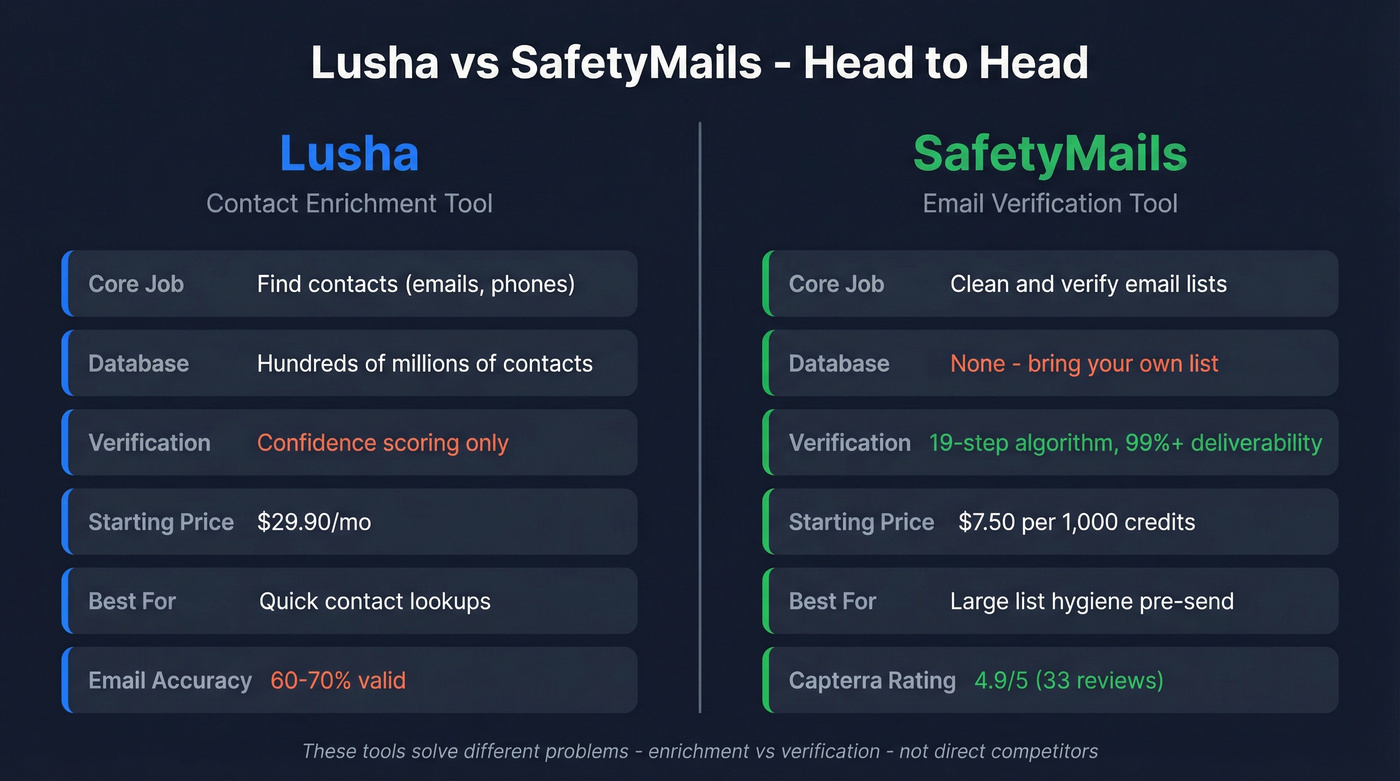
The table makes it clear: enrichment and verification sit at different points in the workflow. These tools don't compete. They complement each other.
When to Use Each (or Both)
Your workflow determines which tool you need, not a feature matrix. In our audits, the biggest failure point is the CSV handoff between enrichment and verification - stale records slip through, formatting breaks, and contacts age between export and import.
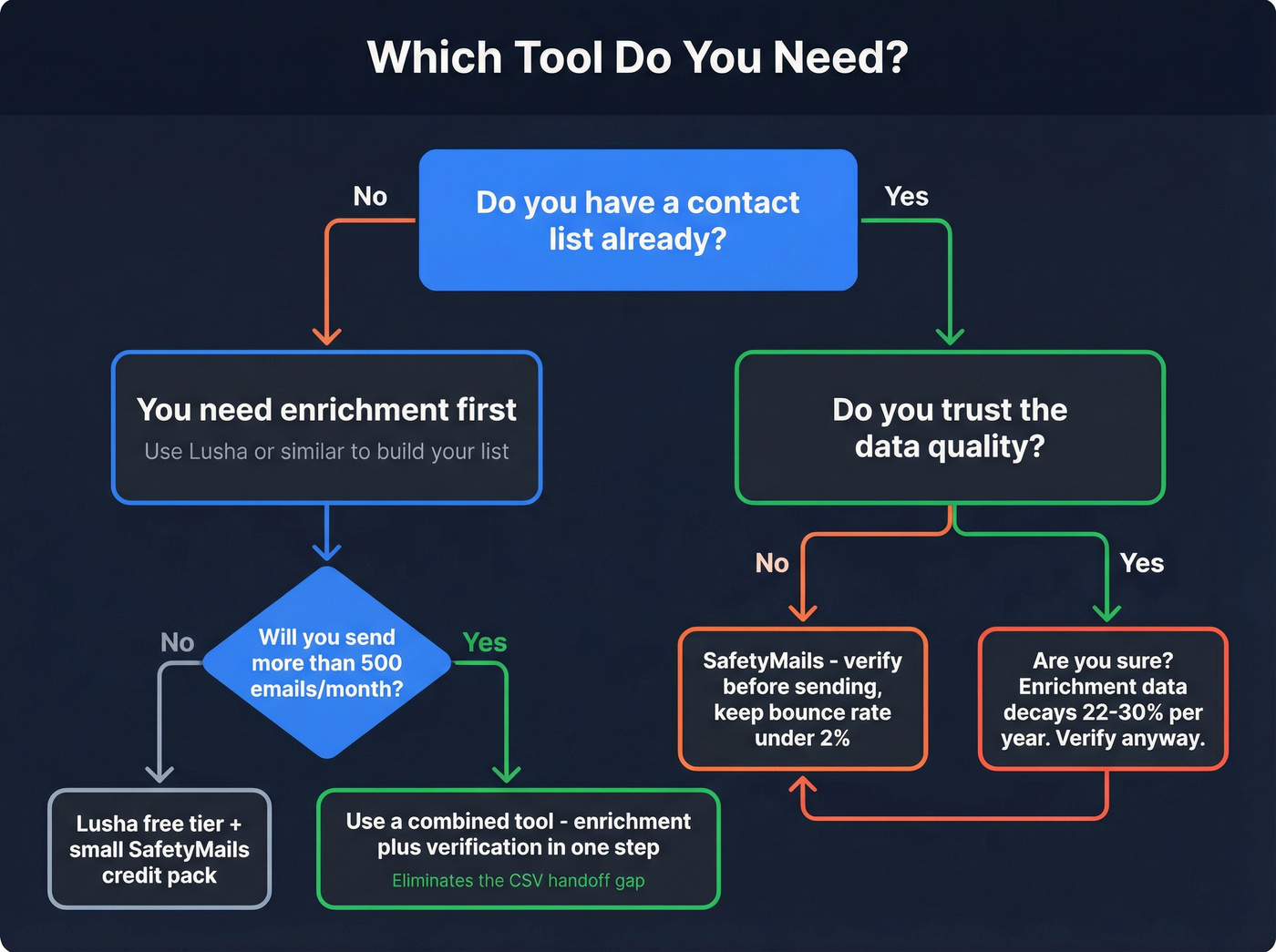
You don't have contacts yet. You need Lusha or another data enrichment tool to build the list first. Verification is irrelevant if there's nothing to verify.
You have a list but don't trust it. You need SafetyMails. Run the list through verification before loading it into your sequencer. Keep your bounce rate under 2%. Anything above 5% signals serious deliverability problems (see email bounce rate benchmarks and fixes).
You need both. Many teams export Lusha contacts, then verify them in SafetyMails. That means paying for an enrichment plan plus $7.50 per 1,000 verifications, and doing a manual CSV handoff between the two. It works, but every handoff introduces delay - and delay means data decay. The consensus on r/sales and r/coldemail is that any gap between enrichment and send is where bounce rates creep up.
Decision Rules
Three hard boundaries we'd draw:
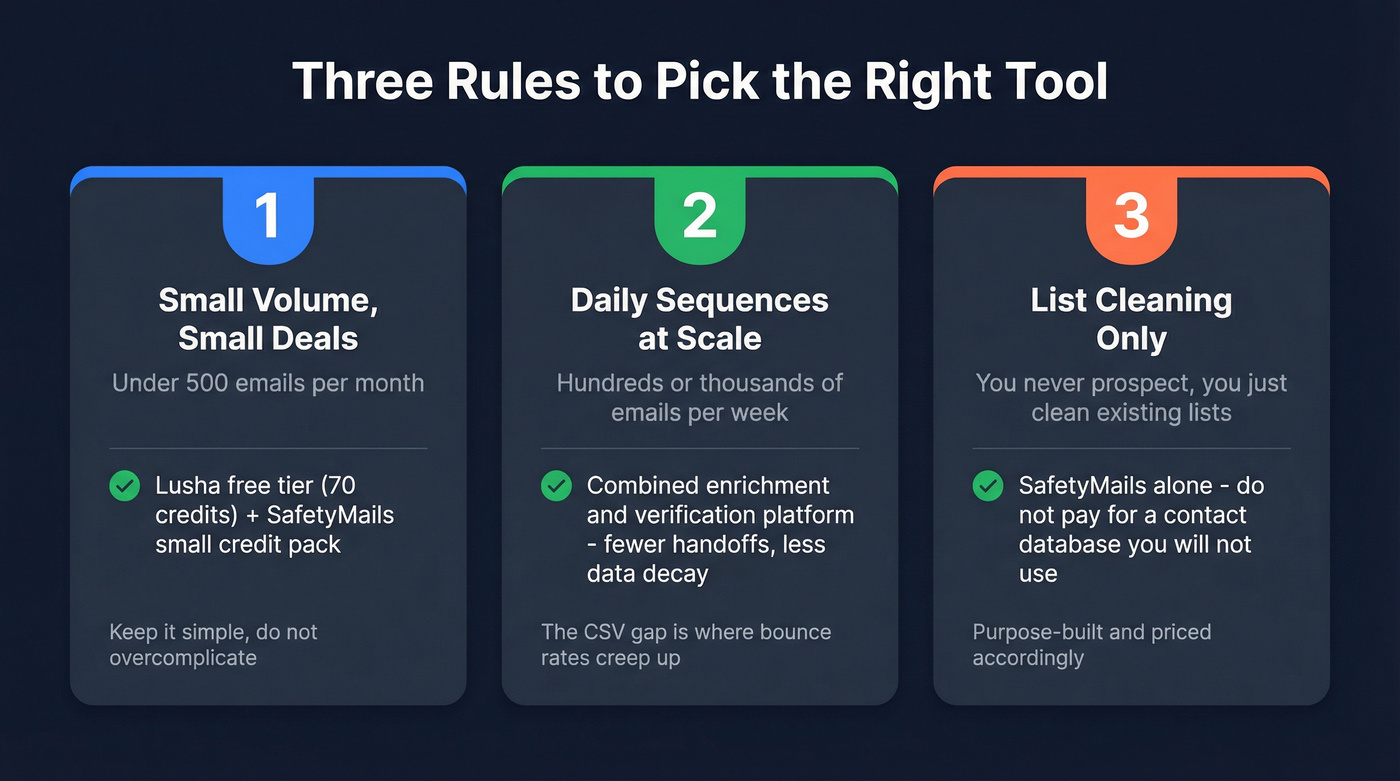
- Deal sizes are small, volume under 500 emails/month. Lusha's free tier plus a small SafetyMails credit pack covers you. Don't overcomplicate it.
- You're sending sequences daily at scale. A combined enrichment-and-verification workflow beats exporting CSVs between tools. Less leakage, fewer stale records, lower bounce risk (use an email deliverability guide to audit the rest of your stack).
- You only clean lists and never prospect. SafetyMails alone is the right call. Don't pay for a contact database you won't use.
One Tool That Does Both
Let's be honest - running two tools for one job is overhead. Prospeo combines a 300M+ contact database (143M+ verified emails) with built-in 5-step email verification - catch-all handling, spam-trap removal, honeypot filtering - so every contact is verified before it hits your sequencer. Email accuracy sits at 98%, with data refreshed every 7 days while many data providers refresh on 4-6 week cycles. Meritt switched and watched their bounce rate drop from 35% to under 4%. The free tier gives you 75 emails and 100 Chrome extension credits per month, enough to run a real test before committing.
If you're comparing stacks, it also helps to look at the broader landscape of SDR tools and outbound lead generation tools that sit around your data layer.
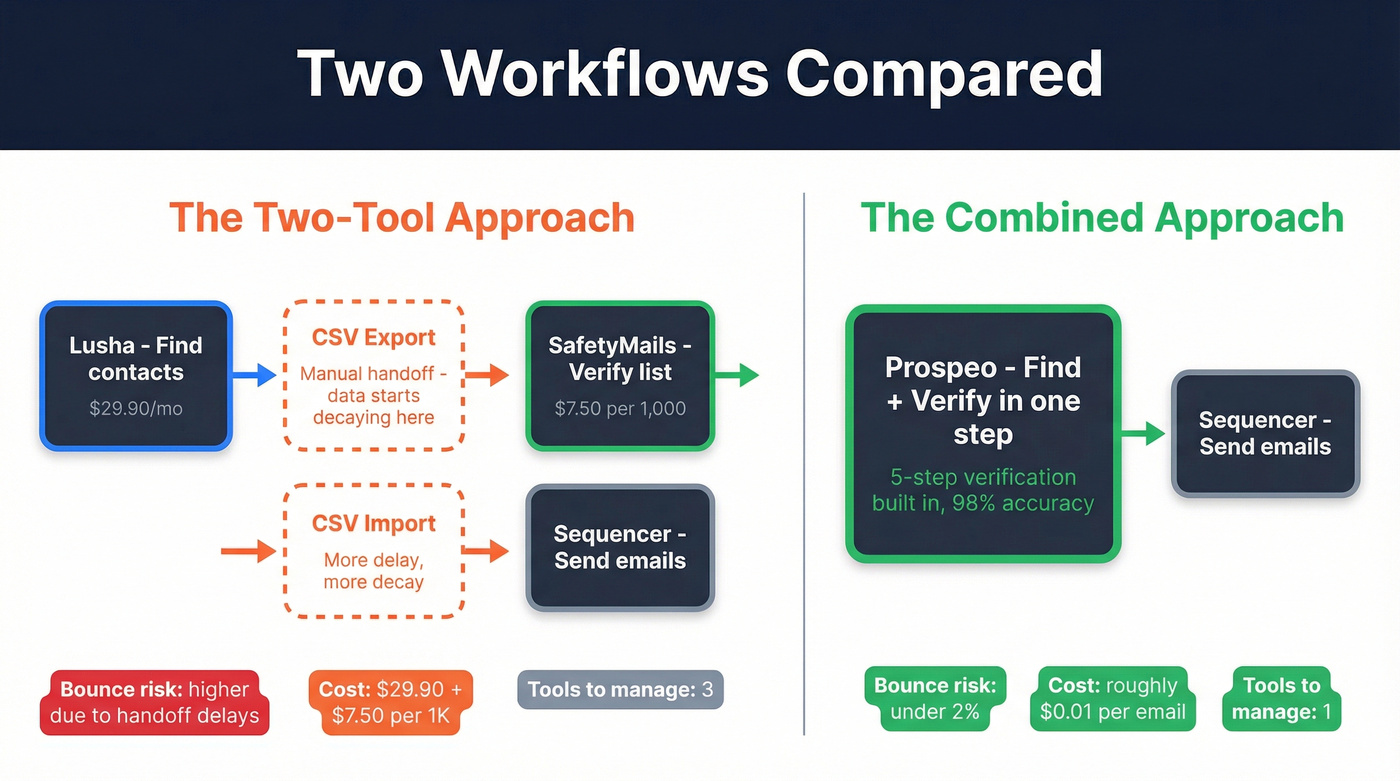
Paying $29.90/mo for enrichment plus $7.50 per 1,000 verifications adds up fast - and you still risk stale data between tools. Prospeo delivers 300M+ contacts with built-in verification at ~$0.01/email. No second tool. No handoff delay. No bounce spikes.
Replace two tools with one that actually keeps bounce rates under 2%.
FAQ
Can I use Lusha and SafetyMails together?
Yes. Export Lusha contacts as a CSV, upload to SafetyMails for verification, then import clean records to your sequencer. It works but adds a manual step and a second bill. A combined platform eliminates that gap with built-in verification on every record.
Is SafetyMails accurate enough to replace manual list cleaning?
For most outbound teams, yes. Its 19-step verification algorithm and 4.9/5 Capterra rating make it reliable for bulk hygiene. Watch for "pending" results though - those need a second pass or manual review before sending.
What's the biggest mistake teams make with enrichment and verification?
Treating enrichment data as send-ready. Enrichment tools find contacts; they don't guarantee deliverability. Always verify before sending, whether that's a separate tool like SafetyMails or a platform with built-in verification. Skipping this step is how bounce rates climb past 5% and domain reputation craters.
What's a good free option that covers both enrichment and verification?
Prospeo's free tier includes 75 email credits and 100 Chrome extension credits per month with full verification built in. Lusha's free plan offers 70 credits but no verification. SafetyMails has no free tier, only paid credit packs. For small teams testing outbound, a free plan that covers both functions saves you from stitching two tools together on day one.