

Mail Append: Costs, Compliance & Better Alternatives
You inherit a CRM that's been "maintained" for years: names, postal addresses, maybe a company field - and a depressing number of blank email columns. Budgets tighten, and suddenly mail append sounds like the cheap fix.
Here's the thing most guides won't tell you: they're written by append vendors. The real question for B2B teams isn't which append service to use - it's whether you should be appending at all.
Quick orientation:
- You have names + postal addresses and need consumer emails: traditional email append (Melissa, AtData, DataZapp) is the right tool.
- You have names + companies and need B2B emails: you don't need append - you need enrichment. Tools like Prospeo are built for exactly this.
- Compliance is your top concern: verify opt-in requirements for your jurisdiction before appending anything. "Appended" doesn't mean "permissioned."
What Is Email Appending?
Mail append - also called email append - is a batch process where you send a file of people with name + physical address, and a vendor matches those records to an email address in their database. In practical terms, it's identity resolution: connecting offline records to digital contact points so you can reach people through a new channel.
AtData describes this as identity resolution at scale, with a proprietary database covering billions of records connecting names, addresses, and emails. That scale matters because append success depends entirely on the reference database. Bigger and fresher means more matches.
The typical process:
- Export your file (CSV) from your CRM, POS, donor system, or membership database.
- Normalize fields - names, street, city, state, ZIP - so matching doesn't fail on formatting.
- Upload to the append vendor or send via SFTP/API for larger programs.
- Vendor matches your records against their reference database.
- Vendor returns results - appended emails, match flags, and sometimes confidence indicators.
- You import back into your system and decide how to message those contacts.
The required inputs are non-negotiable: full name + postal address at minimum. For business email data append, vendors typically need company name too, because "John Smith at 12 Main St" doesn't narrow things down.

Append vs. Finder vs. Verifier
Teams mix these up constantly, and it leads to bad buying decisions.
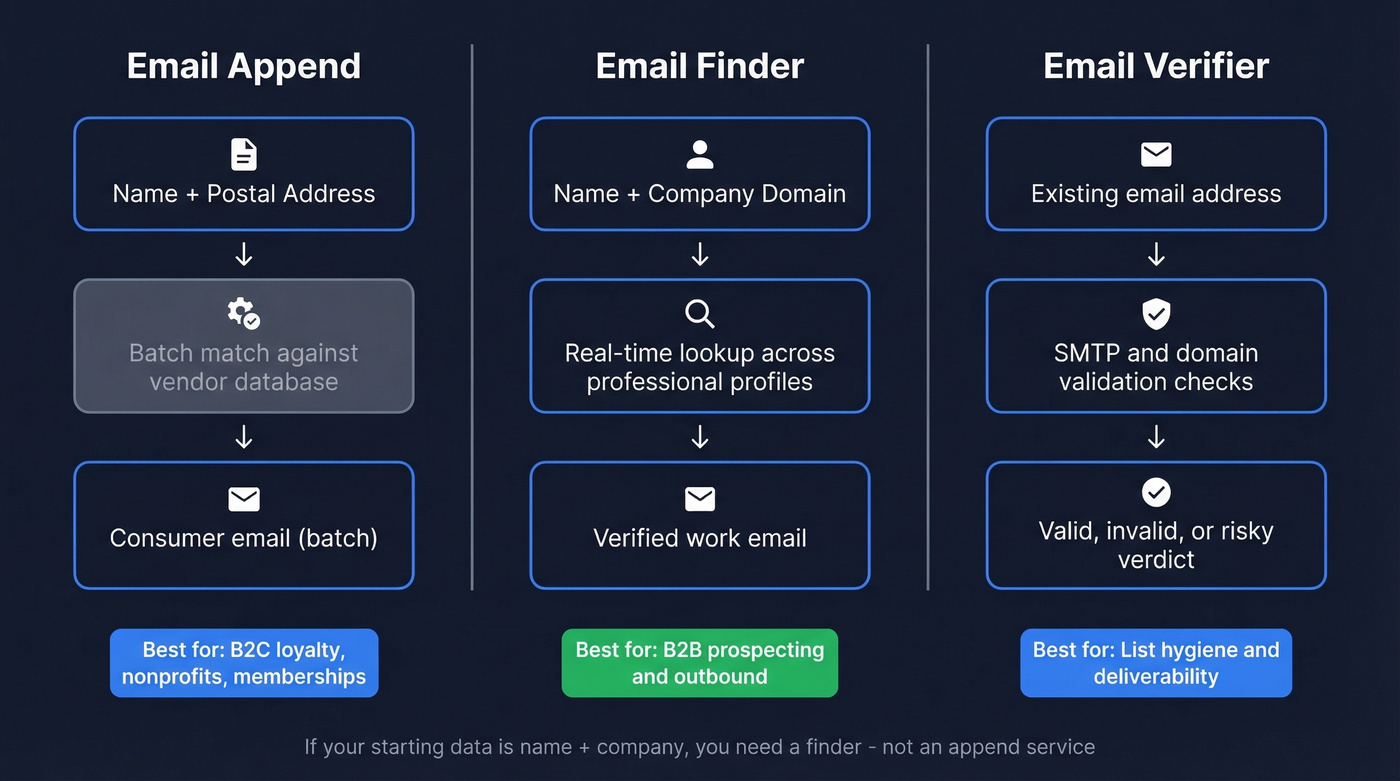
An append vendor matches a person to an email using offline identifiers like name and address. An email finder discovers an email from online/work identifiers like name and company domain. An email verifier checks whether an email you already have is safe to send to.
| Method | Input | Output | Best for |
|---|---|---|---|
| Append | Name + address | Email (batch) | B2C lists, loyalty |
| Finder | Name + company | Work email (real-time) | B2B prospecting |
| Verifier | Email address | Valid/invalid/risk | Deliverability |
If your starting data is name + company, you're in "finder" territory - not append. (If you want a broader vendor landscape, see our breakdown of email append vendors.)
When It Makes Sense (and When It Doesn't)
Good use cases
Append is a legit tool for offline-first databases: retail loyalty programs, nonprofits, membership orgs, warranty registrations, and event attendee lists.
Nonprofits are a prime example. Fundraising teams use append to reconnect with lapsed donors whose emails were never captured during in-person events or direct mail campaigns. AtData's pet supply case study shows the classic pattern: a loyalty program with 4.6M members where roughly 40% of records were missing email. You're not prospecting - you're reconnecting with people who already have a relationship with you, but data capture was incomplete at checkout. That's the sweet spot.
Append also shows up in small business land for demographic appends - age band, household income, and similar attributes. A thread on r/smallbusiness had a D2C operator trying to append attributes to about 2,000 leads. That's consumer segmentation, not B2B enrichment, and it's a legitimate use of the technology.
Skip this if you're doing B2B outbound
Full stop.
If your starting point is "company + job title" and you're trying to build outbound lists, postal-based append is a square peg. You'll pay for matches you don't get, then still need to verify, dedupe, and clean the output before it touches your sequencer. We've seen teams force append into B2B because it sounds cheaper than a data platform. They end up with low match rates, messy fields, and a deliverability hit that costs more than the tool they were trying to avoid.
What It Costs in 2026
Pricing is all over the place, and the lack of transparency is frustrating. Some vendors publish clean per-record rates; others hide behind "contact sales" for what's basically a commodity service.
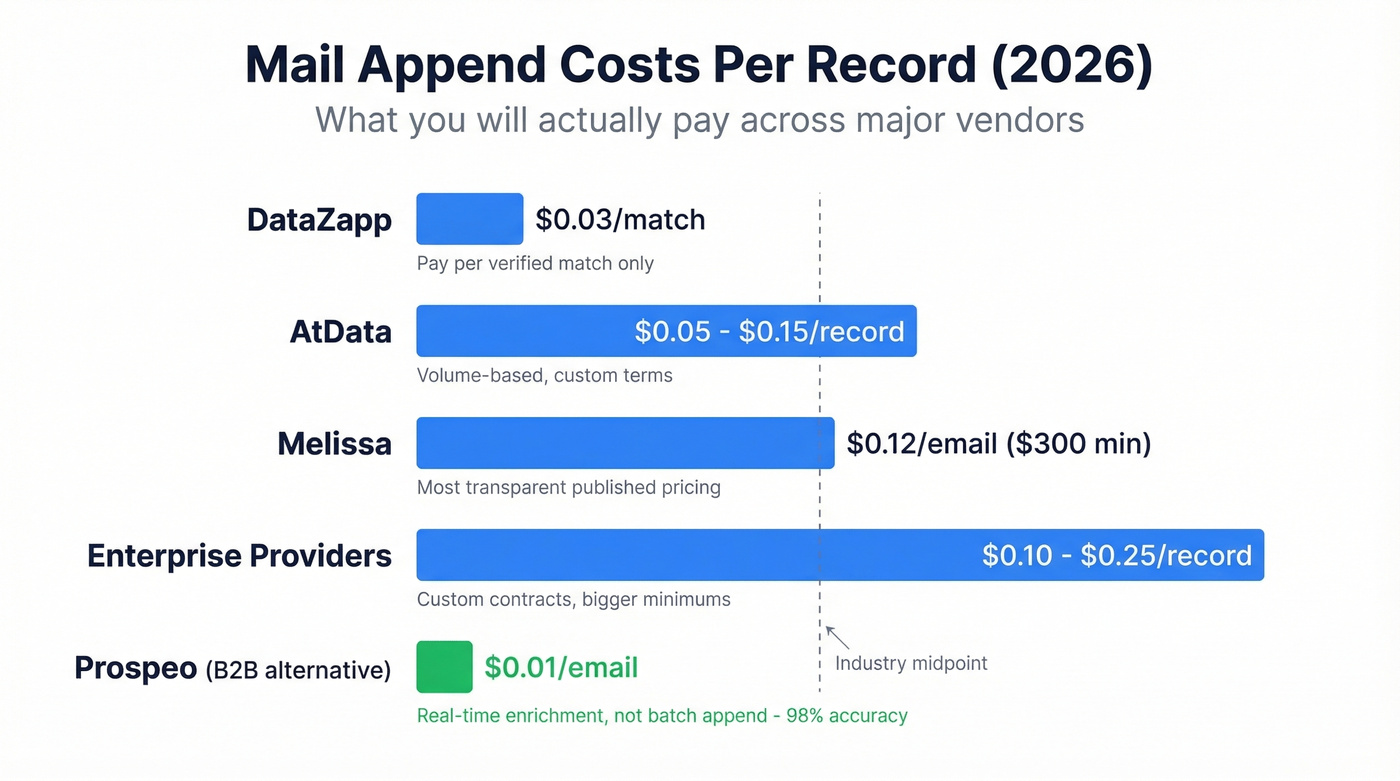
| Vendor | Pricing model | Typical cost |
|---|---|---|
| Melissa | Per appended email + min | $0.12 per appended email, $300 min |
| DataZapp | Pay per match | $0.03 per verified email match |
| AtData | Volume-based | ~$0.05-$0.15/rec |
| Enterprise providers | Custom | ~$0.10-$0.25/rec |
Melissa is the clearest anchor because their email append pricing is published: $0.12 per appended email up to 100k, $0.10 for 100k-500k, and a $300 minimum.
DataZapp goes cheaper on paper at ~$0.03 per verified email match. The catch: you're paying per successful append, so total cost depends on match rate and how loosely "verified match" is defined.
AtData and other enterprise-grade appending services price on volume tiers and custom terms, with bigger minimums.

If your starting data is name + company, you don't need append - you need enrichment. Prospeo finds verified B2B emails at 98% accuracy from 300M+ profiles, refreshed every 7 days. At $0.01 per email, it's cheaper than most append services - with match rates that actually hold up.
Skip the append middleman. Get verified emails directly.
Realistic Match Rates
Vendors love "up to" numbers. DataZapp advertises match rates up to 60% and accuracy around 75-87%. That's the top of the range, on clean consumer files, in the best segments.
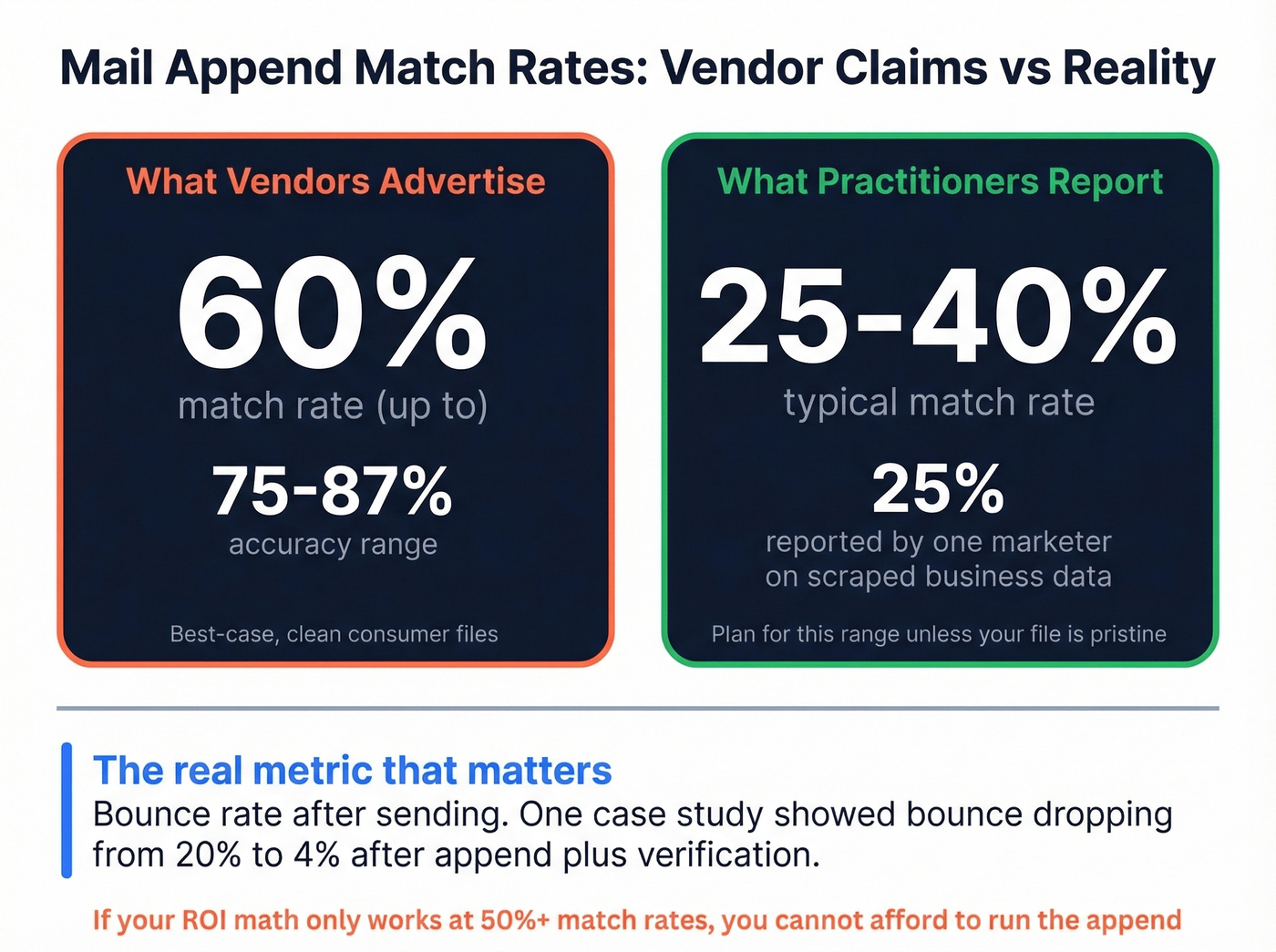
Practitioner reality is harsher. A marketer on Reddit trying to append emails onto scraped business listing data reported only ~25% matches. Different workflow than true postal append, but the emotional outcome is the same: you expected half your file to come back, and you got a quarter.
The more important metric is what happens after you send. One Accurate Append case study shows bounce rate dropping from 20% to 4% after append over three weeks. That's believable because appending services often run verification as part of the process - removing bad emails can be as valuable as adding new ones.
Our take: plan for 25-40% match rate unless your file is pristine and your audience is easy - consumer, stable addresses, recent activity. Anything above that is upside. If your ROI math only works at 50%+ match rates, you can't afford to run the append.
Legal Compliance Risks
Email appending sits at the intersection of "possible" and "regrettable." The data is obtainable, but your right to email it is a separate question entirely.
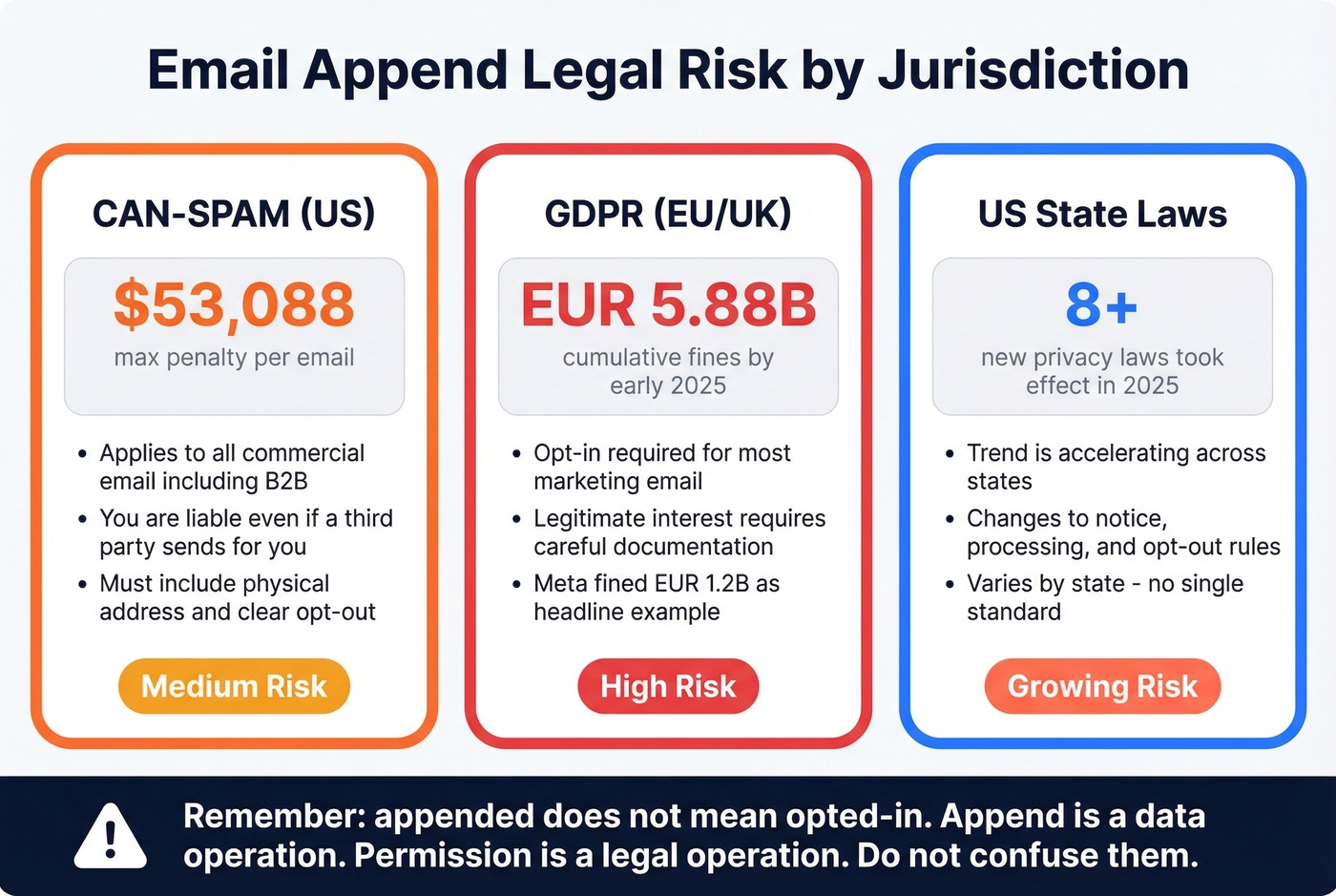
CAN-SPAM (US)
CAN-SPAM applies to all commercial email, including B2B. Penalties run up to $53,088 per email in violation, and you're on the hook even if a third party sends on your behalf. Appended contacts don't give you a free pass - you still need honest headers, a physical postal address, and a clear opt-out honored within 10 business days.
GDPR (EU/UK)
GDPR is opt-in for most marketing email, with limited legitimate-interest/soft opt-in scenarios that require careful documentation. Cumulative fines had already reached ~EUR5.88B across 2,245 enforcement actions by early 2025, and the headline example everyone references is Meta's EUR1.2B fine.
If you're appending emails for EU contacts, you're taking on high risk unless you have a documented lawful basis - and for most marketing teams, that means opt-in.
US state laws
Eight new comprehensive state privacy laws took effect in 2025 alone, and the trend is accelerating. Even when these laws aren't anti-email specifically, they change expectations around notice, data processing, and opt-out mechanics.
One line we wish more teams internalized: appended doesn't mean opted-in. Append is a data operation; permission is a marketing and legal operation. Don't confuse them.
Post-Append Best Practices
Appending emails is the easy part. Not torching your sender reputation is the hard part.
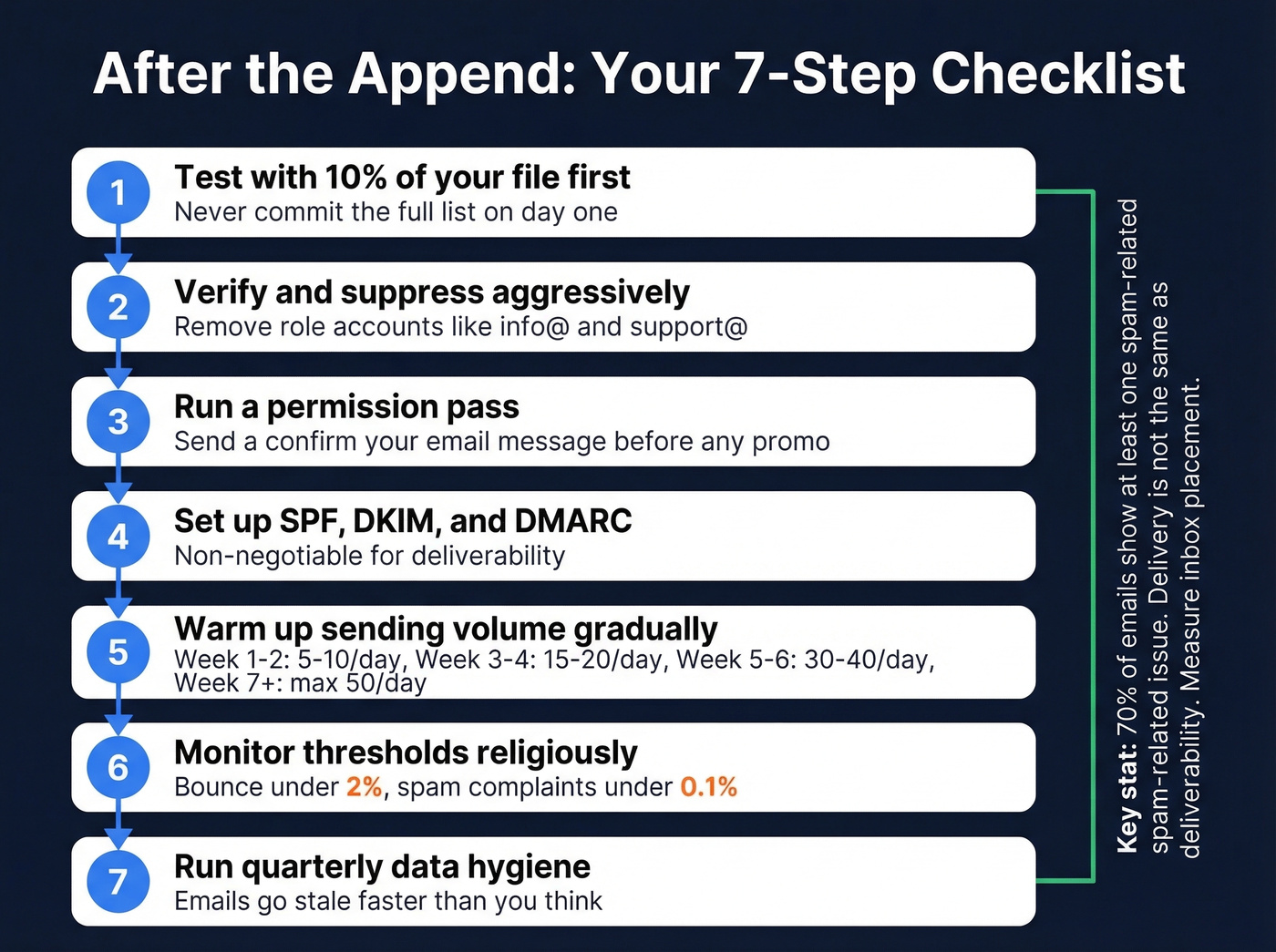
Let's break this down into what actually matters. Start by appending only about 10% of your file as a test batch before committing the full list.
- Run a permission pass first. Send a "confirm your email" or "update preferences" message before any promotional sequence.
- Verify and suppress aggressively. Even appended emails should be verified. Suppress role accounts (info@, support@) unless you have a specific reason.
- Warm up sending volume. Appended lists behave like cold outreach. Ramp gradually - 5-10/day for weeks 1-2, then 15-20, then 30-40, capping around 50/day per inbox.
- Watch thresholds. Keep bounce under 2% and spam complaints under 0.1%. Cross either, stop and fix the list.
- SPF/DKIM/DMARC are non-negotiable. Without them, you're playing deliverability on hard mode for no reason. (If you need a deeper setup guide, start with DMARC alignment.)
- Run quarterly data hygiene. Email addresses go stale faster than you think. Quarterly cleaning is a sane default.
| Week | Emails/day/inbox |
|---|---|
| 1-2 | 5-10 |
| 3-4 | 15-20 |
| 5-6 | 30-40 |
| 7+ | Max 50 |
Litmus found 70% of emails show at least one spam-related issue, which is why "delivery" (accepted by servers) isn't the same as "deliverability" (inbox placement). Measure the latter. (More on fixing root causes in our email deliverability guide.)
Modern Alternatives to Batch Append
Batch append is a legacy move for most B2B teams. Real-time enrichment plus verification gets you to the same outcome - contacts you can actually reach - without the batch file theater.
Prospeo
If you've got name + company rather than postal address, Prospeo is the better answer. It's built for B2B enrichment: 300M+ profiles, 98% email accuracy, and a 7-day refresh cycle that's far faster than the 6-week industry average. The workflow is cleaner - you search or enrich in real time, verification happens automatically, and you pay roughly ~$0.01/lead instead of ~$0.03-$0.12 per appended email for a batch append that may not match.
In our experience, the difference shows up most in deliverability. One customer, Stack Optimize, maintains 94%+ deliverability and under 3% bounce across all their clients - numbers that batch append simply can't touch because the data is stale by the time you send. There's a free tier with 75 emails/month, no credit card required.
Try it against 50 target accounts with the Prospeo Email Finder and see how it compares to your last append batch.

FullEnrich
FullEnrich takes the "waterfall enrichment" approach: it checks multiple sources in sequence until it finds a good email, which pushes match rates higher than single-source tools. A HubSpot Community thread pegs it at 85%+ match rates, with pricing around $29/month and rollover credits. Strong value for lightweight enrichment if you're comfortable with a credits model. (If you're comparing options, start with our roundup of data enrichment services.)
Apollo & Cognism
Apollo remains the obvious "all-in-one-ish" starting point for SMB outbound, with user-reported hit rates around 70-80% and pricing typically landing at ~$49-$99/user/month. Cognism is the compliance-forward pick for teams selling into Europe, priced accordingly at $15k+/year. Cognism wins on EMEA coverage and compliance posture; Apollo wins on accessibility and price for smaller teams. (For list-building workflows, see our guide to sales prospecting techniques.)
Append vendors promise 40-60% match rates and deliver 25%. Prospeo's enrichment API returns contact data on 83% of leads with 92% match rates - plus 50+ data points per record. No postal addresses required. Just name and company.
Get 3x the match rate of append at a fraction of the cost.
FAQ
Is mail append legal?
Mail append is legal in the US under CAN-SPAM's opt-out model, but appended contacts still aren't opted in - you must include opt-out mechanisms and comply fully. Under GDPR, appended EU contacts are high-risk unless you have documented consent. Always run a permission pass before marketing to appended addresses.
What's a realistic match rate?
Plan for 25-40% on a clean consumer file with stable addresses and recent activity. Vendors advertise up to 60%, but that's best-case on pristine data. Build your ROI math on the lower end - anything above 40% is upside.
How much does email appending cost?
Expect $0.03-$0.12 per appended email depending on vendor and volume, with enterprise providers landing closer to $0.10-$0.25/record. Melissa charges $0.12/email with a $300 minimum; DataZapp prices around $0.03 per verified match.
What's the difference between append and enrichment?
Email append matches postal addresses to emails in batch - mostly a B2C tactic. Enrichment finds work emails from name + company in real time - built for B2B. The inputs are different, the freshness is different, and the match rates are different. For B2B prospecting, enrichment wins every time.