

Your Mail Tester Score Is Lying to You - Here's What Actually Matters
You scored 10/10 on Mail-Tester.com. Perfect authentication, clean content, no blacklists. Then you check your Outlook delivery stats and every single email landed in junk. This isn't a hypothetical - it's a real case from r/sysadmin that captures the core problem with mail tester scores: they check what's wrong with your email, but they can't predict what mailbox providers will actually do with it.
The gap between "good score" and "inbox placement" is wider than most people realize. Only 55.4% of senders have SPF configured, 58.5% have DKIM, and just 42.5% use DMARC. Authentication matters. But even when you nail it, provider-specific filtering, sender reputation, and engagement history determine where your email lands. A spam score is step one of five.
What You Need (Quick Version)
Don't overthink the tool stack. Here's what covers 90% of use cases:
- Free spam score check: Mail-Tester.com - quick content and authentication audit
- Free inbox placement test: GMass Inbox Tester - see where emails actually land across major providers
- Ongoing monitoring: Google Postmaster Tools - track your Gmail reputation over time
A spam score tells you what's wrong with your email. These four tools tell you what's wrong with your deliverability.
"Mail Tester" Means Three Things
When people search for a mail tester, they're usually after one of three distinct tool categories. Picking the wrong type wastes time and gives you answers to questions you didn't ask.
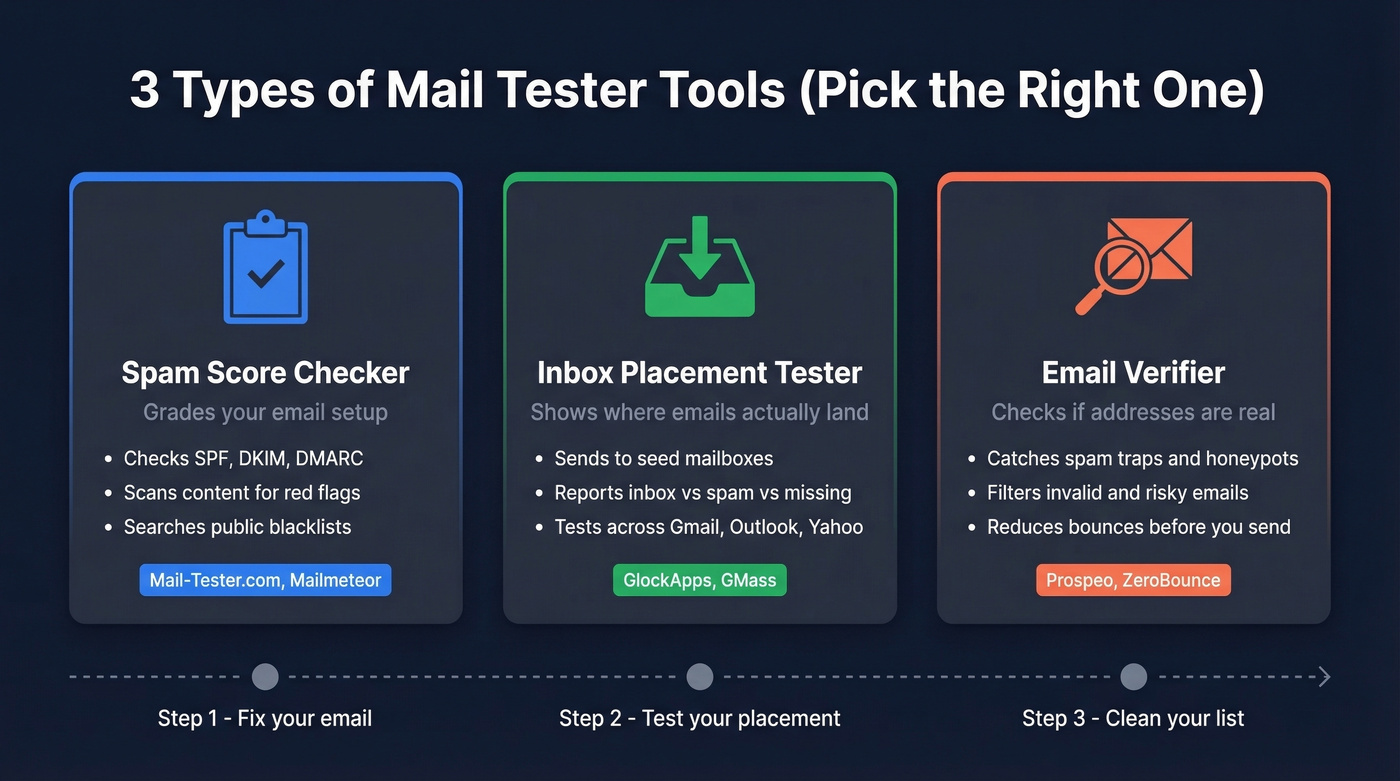
| Type | What It Does | Example Tools | Free Option |
|---|---|---|---|
| Spam score checker | Analyzes content, auth, blacklists | Mail-Tester.com, Mailmeteor | Yes |
| Inbox placement tester | Shows where emails land by provider | GlockApps, GMass | Yes |
| Email verifier | Confirms addresses are real/deliverable | Prospeo, ZeroBounce | Yes |
Spam score checkers grade your email's technical setup and content. They'll flag a missing DKIM record or too many images, but they won't tell you whether Gmail puts you in Primary or Promotions.
Inbox placement testers send your email to seed addresses across providers and report back whether each one hit the inbox, spam, or went missing entirely. This is closer to reality, but seed lists have limitations we'll cover shortly.
Email verifiers don't test your email at all - they test your list. They confirm whether the addresses you're sending to actually exist, catch spam traps, and filter out honeypots. Most people skip this step. It's the reason their test results don't match real-world performance.
What a Spam Score Actually Checks
Four layers determine your score. Understanding what they measure - and what they miss - is the key to interpreting results correctly.
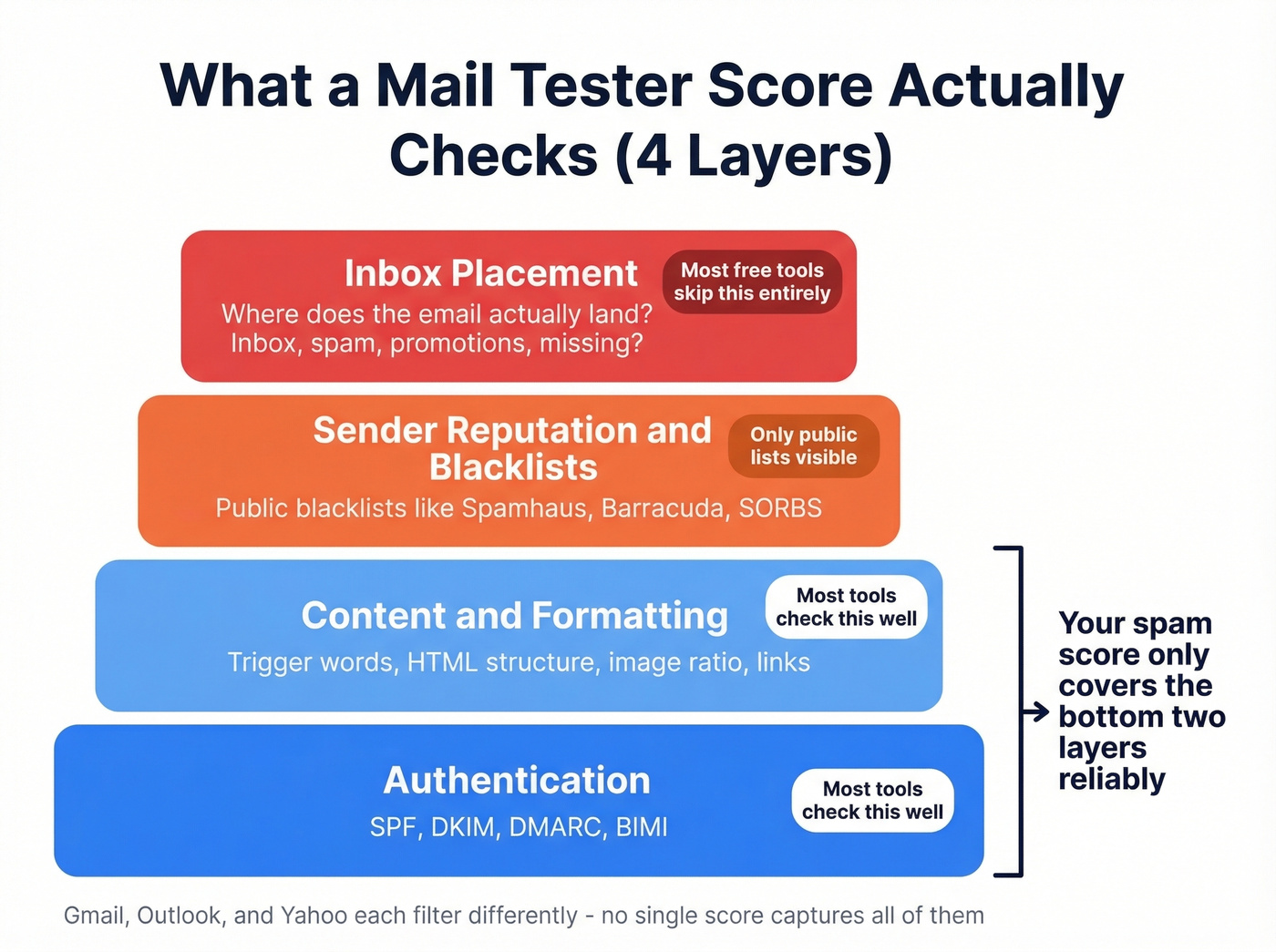
Authentication (SPF, DKIM, DMARC)
Major providers like Gmail, Yahoo Mail, and Outlook require authentication from senders. SPF authorizes which IP addresses can send on your domain's behalf. DKIM adds a cryptographic signature verifying the message wasn't tampered with. DMARC ties them together and tells receivers what to do when checks fail. BIMI is the next layer - displaying a verified brand logo in the inbox - but it requires DMARC enforcement first .
The most common SPF pitfall we see: exceeding the 10 DNS lookup limit. Every include: mechanism in your SPF record counts as a lookup. Stack too many SaaS tools sending on your behalf - your CRM, marketing platform, helpdesk, transactional email service - and you'll hit PermError. Some receivers silently fail your SPF check, and your spam test won't always catch the downstream impact.
Also watch for multiple SPF records on the same domain. That invalidates SPF entirely. One record, one domain, always.
Content and Formatting
Spam score tools scan for trigger words, text-to-image ratio, link hygiene, and HTML structure. They catch obvious red flags like all-caps subject lines, broken HTML, and naked tracking pixels. Necessary, but not sufficient.
Sender Reputation and Blacklists
Tools like MXToolbox check your sending IP and domain against public blacklists including Spamhaus, Barracuda, and SORBS. Getting listed on one of these will tank your deliverability regardless of your content score. Most testing tools include blacklist checks, but they only scan public lists - private reputation systems at Gmail and Microsoft aren't visible to any external tool.
Inbox Placement via Seed Lists
This is where things get interesting. Tools like GlockApps and GMass send your email to seed addresses - mailboxes set up specifically to receive test emails - and report whether each one landed in inbox, spam, or went missing.
The critical limitation: emails sent to seed lists behave like cold emails with no prior engagement. There's no open history, no reply history, no relationship signal. Real deliverability for engaged subscribers will be higher than what seed tests show. For cold outreach, seed tests are more representative - but still imperfect.
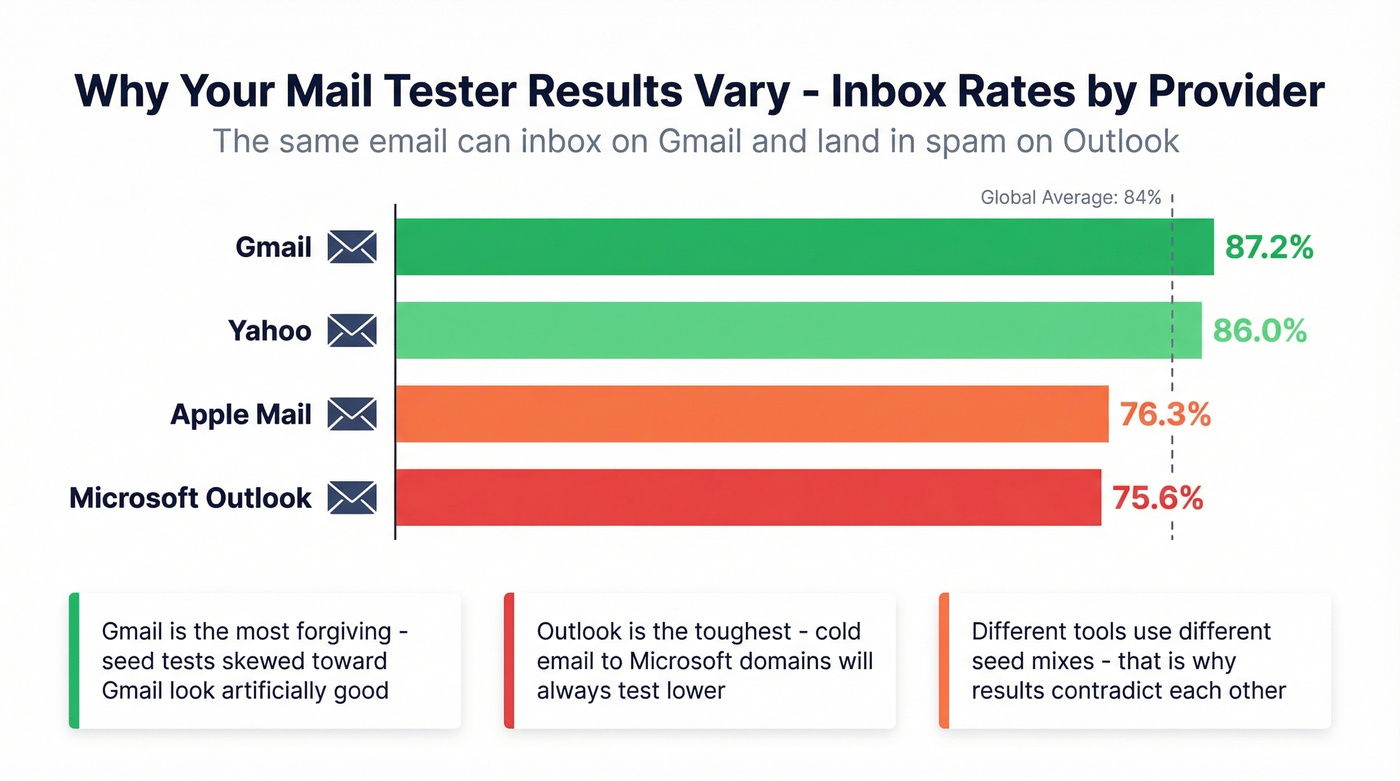
For context, the global average inbox placement rate sits around 84%. Breaking that down by provider, the latest benchmarks show Gmail inboxing at 87.2%, Microsoft at 75.6%, Yahoo at 86%, and Apple Mail at 76.3%. If your seed test shows 60% inbox placement on Outlook, that's below average - but Microsoft is the toughest provider for cold email, so don't panic.

Your mail tester score checks authentication and content. It doesn't check whether the addresses on your list are real. Prospeo's 5-step verification catches spam traps, honeypots, and catch-all domains before you hit send - with 98% email accuracy and bounce rates under 4%.
Clean your list before you test your email. Start free with 75 verifications.
Best Mail Testing Tools Compared
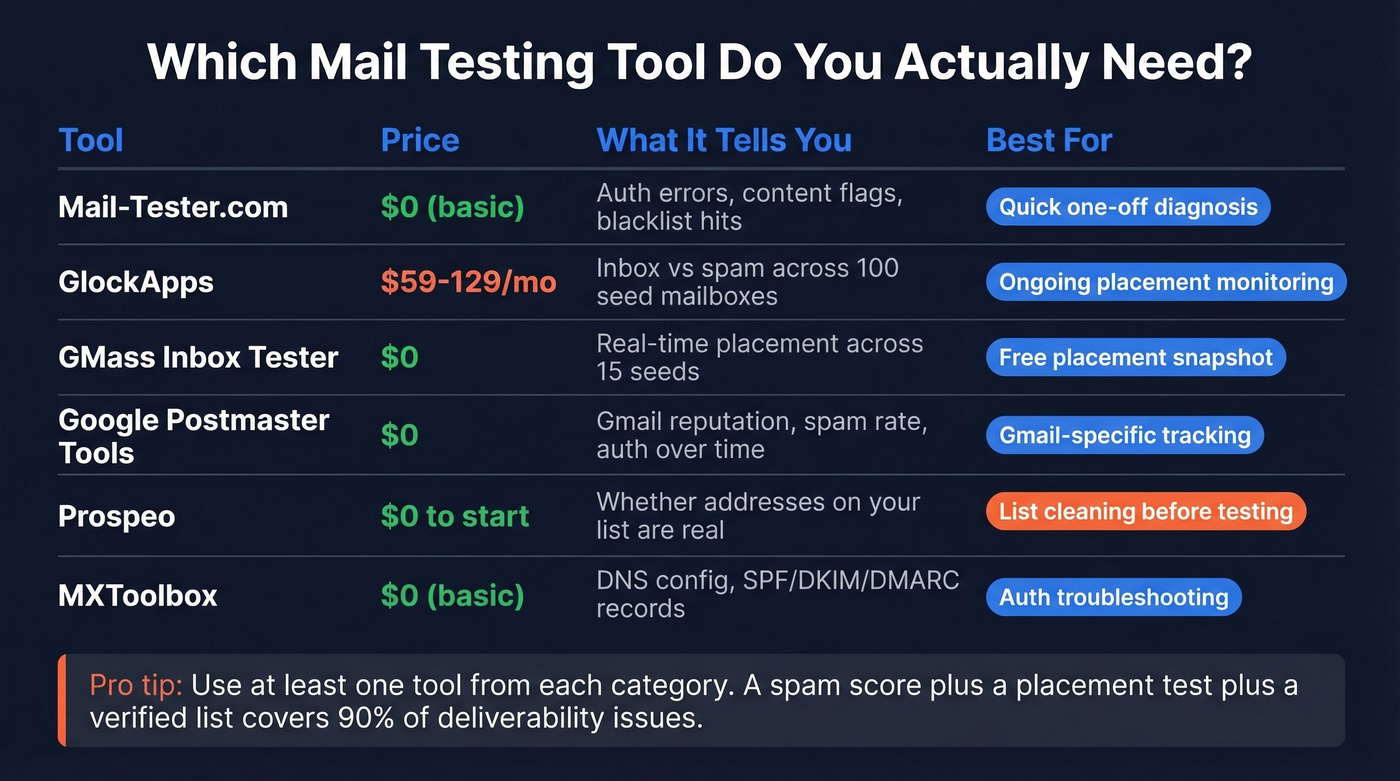
| Tool | Category | Free Tier | Paid From | Best For |
|---|---|---|---|---|
| Mail-Tester.com | Spam score | Yes (basic) | ~$39/mo | Quick auth & content audit |
| GlockApps | Placement + monitoring | 2 tests/mo | $59/mo | Ongoing placement monitoring |
| GMass | Inbox placement | Yes | Free | Real-time provider snapshot |
| Prospeo | Email verification | 75 emails/mo | ~$0.01/email | Cleaning lists before testing |
| MXToolbox | Auth checker | Free lookups | $129/mo | DNS/blacklist diagnostics |
| Postmaster Tools | Reputation monitoring | Free | Free | Gmail reputation tracking |
| ZeroBounce | Verification + testing | 1 test free | $49/mo | Combined verify + test |
| Mailmeteor | Spam word checker | Free | Free | Quick single-email checks |
Mail-Tester.com
The tool that probably brought you here. Send an email to a unique address, get a score out of 10 with a detailed breakdown of authentication, content, and blacklist status. It's fast, it's free for basic checks, and the reports are genuinely useful for diagnosing specific issues.
The limitation is that it's a score, not a placement test. A 10/10 doesn't mean inbox.
Use this if you need a fast diagnostic on a single email. Skip this if you need to know where emails actually land across providers.
GlockApps
The deepest paid option for inbox placement monitoring. GlockApps runs inbox placement tests across around 100 seed mailboxes - a decent sample, though not exhaustive. It monitors DMARC/DKIM/SPF, tracks IP reputation, and can alert you via Slack or Telegram when something breaks.
Pricing: free gets you 2 spam tests/month, Essential at $59/mo gives 360 tests, Growth at $99/mo bumps to 1,080, and Enterprise at $129/mo covers 1,800. The free tier is too limited to be useful for anything beyond a quick look, so budget for at least the Essential plan if you're serious about ongoing monitoring.
Use this if you're running outbound at scale and need to catch deliverability drops before they crater a campaign. Skip this if you're testing one-off emails or on a tight budget.
GMass Inbox Tester
Completely free, no account required. You send your email to 15 specific seed addresses and watch placement results in real time. Some seed accounts run Barracuda, Mimecast, and Sophos filters, which gives you a more realistic picture than a single-provider test.
The methodology is transparent and the price is right. The tradeoff: 15 seeds is a small sample, and there's no ongoing monitoring. It's a snapshot, not a dashboard.
Use this if you want a quick, free placement check before a campaign.
MXToolbox
The Swiss Army knife for DNS diagnostics. Free lookups for SPF, DKIM, DMARC, blacklists, and MX records. It won't test inbox placement, but it'll tell you exactly what's misconfigured in your authentication stack. Paid plans start at $129/mo for the Delivery Center with monitoring and alerts. Most people only need the free tier.
Google Postmaster Tools
Free, directly from Google, and the only tool that shows you how Gmail actually sees your domain. Tracks spam rate, IP reputation, domain reputation, and authentication success rates over time. It won't help with Outlook or Yahoo, but for Gmail-specific monitoring, nothing else comes close. Every sender should have this set up. It takes five minutes.
ZeroBounce
Combines email verification with a basic inbox placement test. One free inbox test to start, paid plans from $49/mo. A decent all-in-one if you want verification and testing in a single dashboard, though it doesn't go as deep as GlockApps on placement.
Mailmeteor
Lightweight toolset for quick checks. Mailmeteor's Google Sheets email verifier offers 50 email verifications per month for free, and its spam word checker is a handy gut-check before sending - but it's not a substitute for a real placement test.
Why Your Score Doesn't Match Reality
Here's the thing: the #1 complaint on Reddit about mail testing tools is contradictory results. One tool says inbox, another says spam, a third says promotions. One user called the cross-tool results "laughable."
We've tested most of these tools side by side, and the results rarely agree. That's not a bug - it's a feature of how email filtering works.
Gmail, Outlook, and Yahoo use completely different algorithms. Gmail inboxes 87.2% of email on average; Outlook manages just 75.6%. A test that's Gmail-heavy will look great. The same email tested against Outlook seeds might look terrible. Neither result is "wrong."
Then there's the Promotions tab problem. A user on r/email reported a perfect deliverability score on unspam.email, but Gmail routed their invoices to Promotions instead of Primary. The score was technically correct - the email wasn't spam. It just wasn't where they needed it to be.
Let's be honest about something most deliverability consultants won't say: most free spam checkers are lead-gen funnels for warmup services. They show you a scary score and then sell you the fix. The score itself is real, but the urgency is manufactured. If your authentication is solid and your list is clean, a 7/10 on Mail-Tester is fine. Stop chasing 10/10 and start tracking actual inbox placement.
Seed list tests also can't account for your sending history with real recipients. If your domain has been flagged by Microsoft's SmartScreen filter because of past complaints, no seed test will reflect that. The seeds have no complaint history with you.
These scores are diagnostic tools, not crystal balls. Use them to find problems, not to declare victory.
What to Do After You Test
A spam score is the starting point. Here's the five-step sequence that actually moves deliverability.
1. Fix Your Authentication
SPF, DKIM, and DMARC - all three, no exceptions. Use MXToolbox to verify your records are valid. Watch for the 10 DNS lookup limit on SPF. Remove any deprecated ptr mechanisms. Set your DMARC policy to at least p=quarantine once you're confident in your setup.
2. Verify Your List
Your test results are only as reliable as your list. If 15% of your addresses bounce, your sender reputation tanks regardless of authentication. In our experience, list quality is the single biggest factor most senders underestimate - and the one no spam score catches.
Upload a CSV to a verification tool, get results in minutes, and remove anything that doesn't verify. Prospeo's 5-step verification process handles catch-all domains, spam traps, and honeypots, delivering 98% email accuracy - which is why outbound agencies like Stack Optimize maintain 94%+ deliverability and under 3% bounce rates across all their clients. The goal is getting your bounce rate under 3% before you even think about content optimization. If you want a deeper walkthrough, start with our email deliverability guide and then benchmark against typical email bounce rate targets.
3. Warm Your Domain
If you're sending from a new domain or recovering from reputation damage, start at 50 emails per day and ramp gradually over six weeks. Don't blast 5,000 emails on day one from a fresh domain - every major provider will flag you immediately. If you're unsure what "safe" looks like, use an email velocity framework and compare tools in our guide to unlimited email warmup.
4. Earn Engagement Signals
This is the lever most people underestimate. Replies matter more than opens. Opens matter more than clicks. Mailbox providers watch how recipients interact with your emails and use that signal to decide future placement.
Don't waste time removing "spam trigger words." A practitioner on r/Emailmarketing who spent a year recovering from spam hell reported that removing trigger words "did almost nothing," calling that advice "from 2015." Focus on sending to people who are likely to engage and removing people who don't. Blasting your full list without segmentation will crater your reputation within weeks. If you need help tightening copy and targeting, pull from proven cold email subject line examples and build better personalized outreach.
5. Monitor Continuously
Set up Google Postmaster Tools and check it weekly. Watch for spam rate spikes above 0.3%, drops in domain reputation, and authentication failures. Deliverability isn't a one-time fix - it's an ongoing practice. For a broader view beyond Gmail, keep a shortlist of email reputation tools and learn how to improve sender reputation over time.
Bad data is the deliverability killer no spam score will ever flag. Teams using Prospeo cut bounce rates from 35%+ to under 4% - because every email passes a 5-step verification process that removes spam traps, honeypots, and invalid addresses before they torch your sender reputation.
Fix the problem your mail tester can't see. Verify at $0.01 per email.
FAQ
Is Mail-Tester.com free?
Yes - basic spam score tests are free with no account required. Send an email to a generated address and get a detailed report. Paid options start around $39/month on subscription plans, with pay-as-you-go credits starting around $19 for 5,000 tests.
What's a good spam score?
On Mail-Tester.com, aim for 8/10 or higher. A perfect 10/10 doesn't guarantee inbox placement - authentication, list quality, sender reputation, and engagement history all matter more than the number itself.
Why do different tools give different results?
Each tool uses different seed lists, scoring algorithms, and test methodologies. ISP-level inbox rates vary dramatically - Gmail inboxes 87.2% while Outlook manages 75.6%. Cross-reference two or three tools and focus on patterns, not individual scores.
What's the difference between a spam test and email verification?
A spam test checks whether your email content and authentication will trigger filters. Email verification checks whether the addresses on your list are real and deliverable. You need both: verify your list first, then test your email. Skipping verification makes every other test unreliable.