


Mission Inbox: Pricing, Reviews, and Honest Pros & Cons for 2026
You're staring at $199/month for 30 mailboxes - no free trial, zero reviews on any major platform, and every "review" on page one is written by a competitor selling their own infrastructure. This breakdown covers Mission Inbox pricing, reviews, pros and cons so you can make a decision based on actual facts, not competitor spin.
30-Second Verdict
Mission Inbox is a compliance-grade cold email infrastructure platform with dedicated IPs and pre-send scanning. It starts at $199/month for 30 mailboxes, and there's no free trial. Zero user reviews exist on any major platform as of 2026, which is a genuine buying risk. Solid fit for regulated industries needing IP isolation. Overkill and overpriced for startups. And regardless of which infrastructure you pick, bad contact data will destroy the sender reputation it's designed to protect (see our Email Deliverability Guide for the full playbook).
What Is Mission Inbox?
Mission Inbox launched in 2024 out of San Francisco with a team of 2-10 people. The core pitch is workload isolation for email sending - they call these isolated server instances "Cubes." Each Cube gets its own dedicated IP, so your sales outreach doesn't tank your transactional email reputation.
The platform includes MI Shield, an AI-powered pre-send scanner that checks content, headers, and DNS configuration before emails leave your servers. It also handles automated SPF/DKIM/DMARC setup with one-click DNS for Cloudflare and GoDaddy. Think of it as infrastructure-as-a-service for teams that need audit trails, data residency controls, and clear sender attribution.
Pricing Breakdown
Starter vs Pro Plans
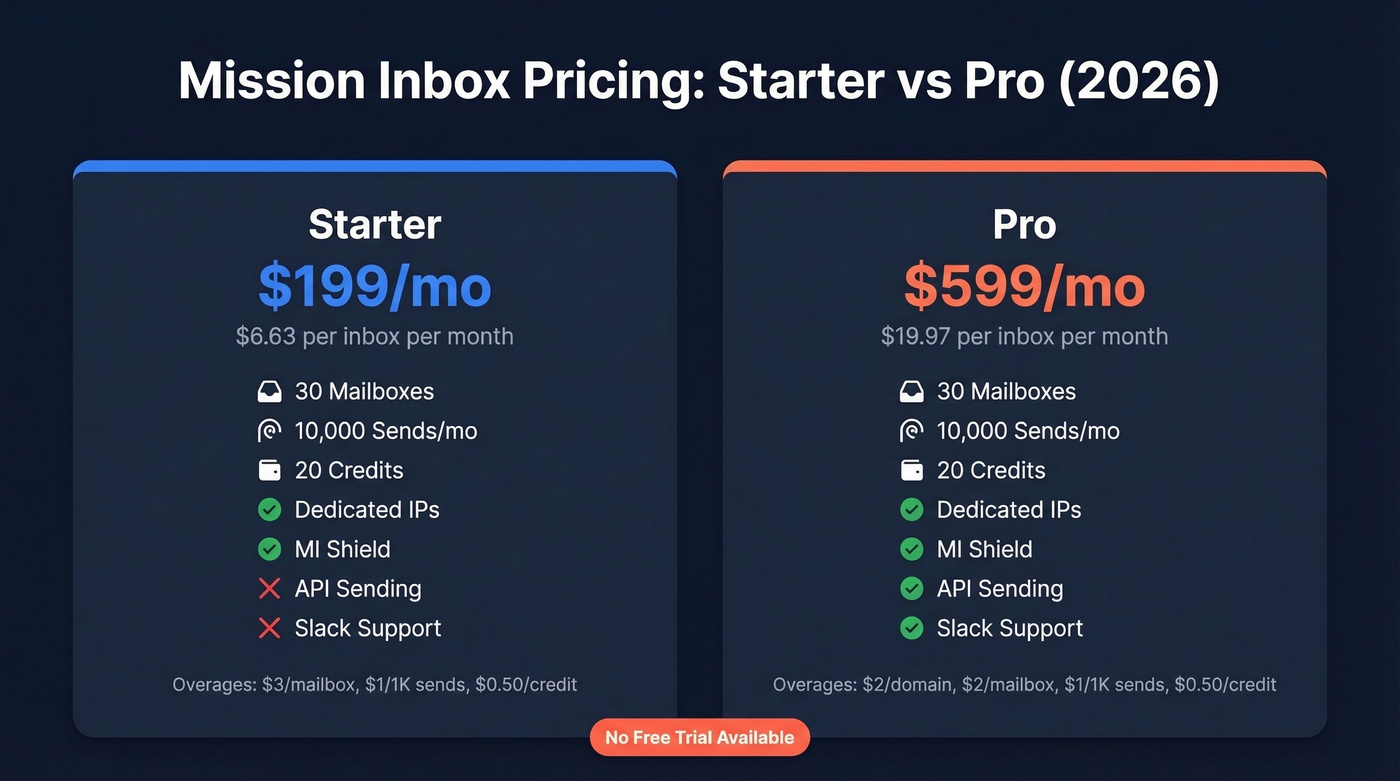
| Starter | Pro | |
|---|---|---|
| Monthly price | $199/mo | $599/mo |
| Mailboxes included | 30 | 30 |
| Sends included | 10,000/mo | 10,000/mo |
| Credits included | 20 | 20 |
| Dedicated IPs | ✓ | ✓ |
| MI Shield | ✓ | ✓ |
| API sending | ✗ | ✓ |
| Slack support | ✗ | ✓ |
Overages
- Starter: $3 per additional mailbox, $1 per additional 1,000 sends, $0.50 per premium credit
- Pro: $2 per connected domain, $2 per additional mailbox, $1 per additional 1,000 sends, $0.50 per premium credit
At baseline, the Starter plan works out to $6.63 per inbox per month ($199 / 30). Third-party comparisons from InboxFlow put Mission Inbox at $5-8 per inbox depending on usage - our calculation lands right in that range. That's roughly 2-3x what shared-IP providers charge, but you're paying for IP isolation and compliance tooling. The Pro plan at $599/month only makes sense if you need API sending or Slack-based support, which is a steep jump for features most cold email teams won't touch.
There's no free trial. Mission Inbox's pricing FAQ explicitly confirms: "No, we do NOT offer free trials." That matters when you're committing $199-599/month with zero social proof.
What Other Sites Get Wrong
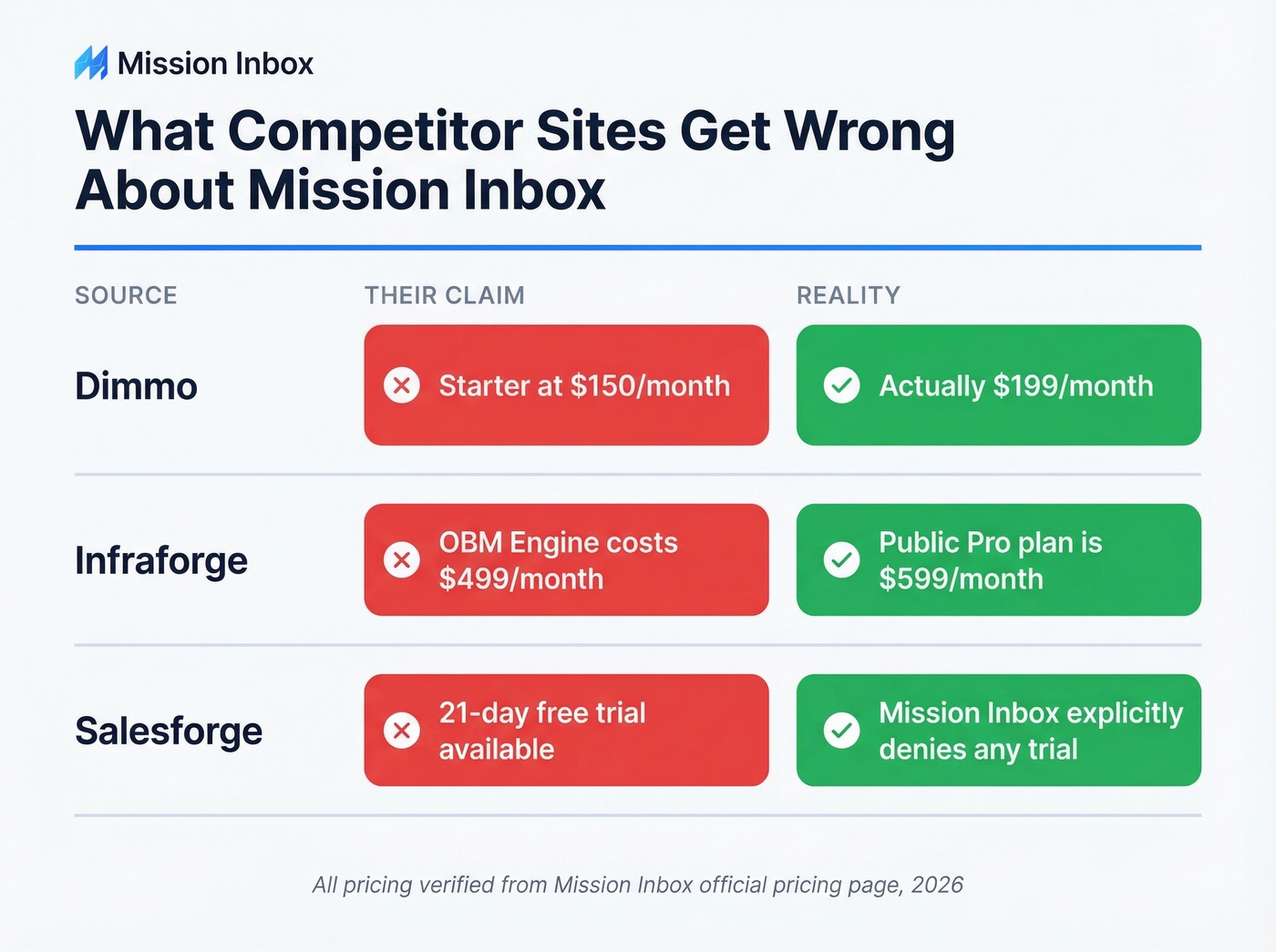
Every top-ranking "review" of Mission Inbox is written by a direct competitor. And they're getting basic facts wrong:
| Site | Their Claim | Reality |
|---|---|---|
| Dimmo | Starter at $150/month | Actually $199/month |
| Infraforge | OBM Engine costs $499/month | The public Pro plan is $599/month |
| Salesforge | 21-day free trial available | Mission Inbox explicitly denies offering any trial |
If you're making a purchasing decision based on these competitor-written pages, you're working with bad data. The numbers in this article come from Mission Inbox's actual pricing page as of 2026.
Reviews: The Honest Picture
There aren't any. That's not an exaggeration.
Capterra shows 0 reviews and a 0.0 rating as of 2026. There's no established G2 review footprint yet. Reddit threads in r/coldemail mention Mission Inbox in "has anyone tried this?" posts with no substantive replies. Even Woodpecker's own competitor blog acknowledges there are "no reviews available anywhere online."
Dimmo claims Mission Inbox delivers "20% higher open rates" and "80% increase in reply rates," but provides zero methodology behind those numbers. Treat them as marketing claims, not benchmarks.
Here's the thing: a $199-599/month commitment with zero social proof and no free trial means you're buying blind. We've seen teams get burned by this exact pattern - promising features, no track record, small team that might not be around in 18 months.

Spending $199-599/month on infrastructure with zero social proof is risky. Spending it while feeding unverified emails into those dedicated IPs is worse. Prospeo delivers 98% email accuracy on a 7-day refresh cycle - used by 15,000+ companies with actual reviews to back it up. Start with 75 free verifications.
Don't let bad data burn the infrastructure you're paying a premium to protect.
Pros and Cons
Pros
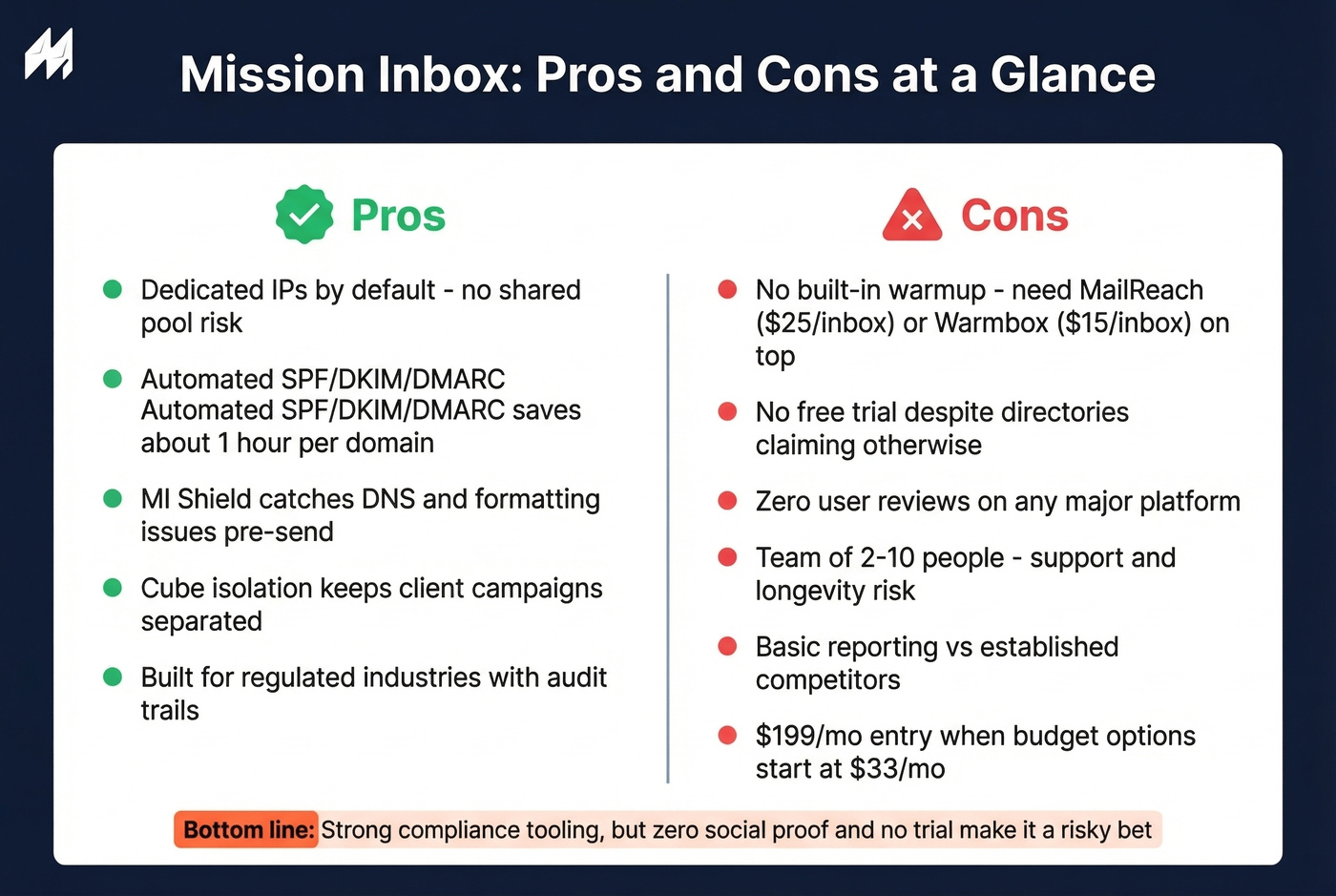
- Dedicated IPs by default - no shared-pool reputation risk from other senders
- one-click DNS for Cloudflare and GoDaddy saves roughly an hour per domain compared to manual configuration
- MI Shield pre-send scanning catches formatting and DNS problems before they hit inboxes (pair it with an Email Spam Checker when you’re troubleshooting)
- Workload isolation via Cubes keeps client campaigns separated, so one bad domain doesn't bleed into another's reputation
- Compliance and audit-trail features built for regulated industries
Cons
- No built-in email warmup - you'll need a separate tool like MailReach ($25/inbox/month) or Warmbox ($15/inbox/month), which adds up fast (compare options in our Best Unlimited Email Warmup Tools guide)
- No free trial despite multiple directories claiming otherwise
- Zero user reviews on any major platform as of 2026
- Team of 2-10 people raises legitimate support and longevity concerns
- Basic reporting compared to more established competitors
- $199/month entry is steep when budget alternatives start around $33/month
Who Should (and Shouldn't) Use It
Use Mission Inbox if you're in a regulated industry - finance, healthcare, legal - where IP isolation, audit trails, and compliance features aren't optional. It's also worth evaluating if you're an agency managing 10+ client domains and need strict workload separation so one client's aggressive sending doesn't torch another's reputation.
Skip it if you're budget-conscious, you want a proven track record backed by real user reviews, or you need warmup bundled into your infrastructure cost. Woodpecker starts at ~$20/month with warmup included. For most SMB outbound teams, the compliance premium doesn't justify the price gap.
The Missing Piece: Data Quality
Infrastructure protects sender reputation. But if 10-15% of your list is invalid - common with purchased or scraped data - bounces destroy that reputation regardless of how good your Cubes are (benchmarks and fixes: Email Bounce Rate). MI Shield catches formatting issues and DNS misconfigurations pre-send, but it doesn't verify whether the recipient actually exists.
This is where we've seen the biggest disconnect in our own testing. Teams invest hundreds per month in infrastructure, then feed it unverified lists and wonder why deliverability tanks. Run your lists through a verification tool like Prospeo before you send. With 98% email accuracy and a 7-day data refresh cycle, it catches the invalid addresses that infrastructure tools can't. The free tier handles 75 verifications per month - enough to test the workflow before committing. Agencies like Stack Optimize maintain 94%+ deliverability and under 3% bounce rates across all clients by verifying every list before it touches their sending infrastructure (more on safe sending limits in Email Velocity).

Stack Optimize built a $1M agency with under 3% bounce rates across every client - not by overpaying for infrastructure, but by verifying every list before it sends. Prospeo's 5-step verification catches invalid addresses, spam traps, and honeypots that MI Shield was never designed to detect. At $0.01 per email, it costs less than a single Mission Inbox overage credit.
Protect your sender reputation at the source - the data, not just the pipes.
Quick Alternatives
If Mission Inbox doesn't fit, here's the short list:
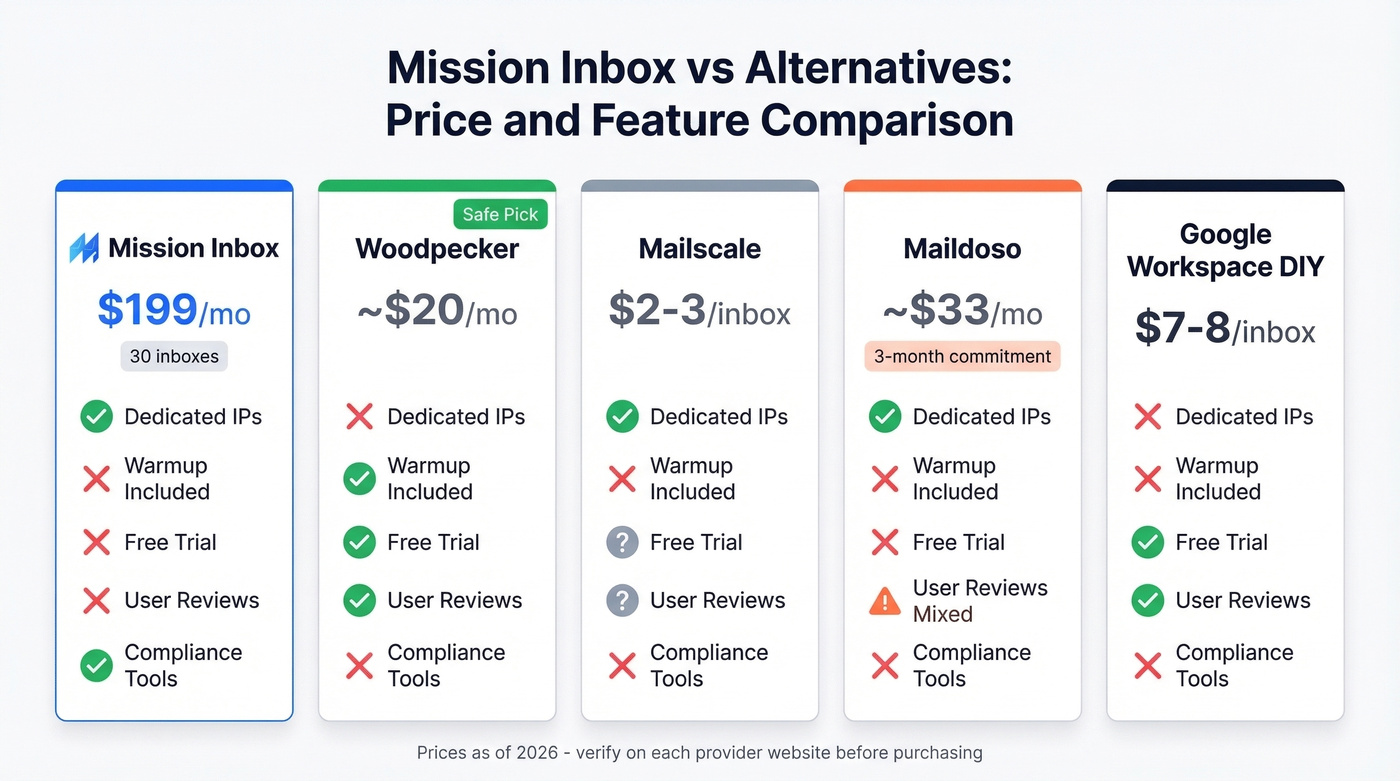
- Woodpecker (~$20/mo) - includes warmup, has years of user reviews, and covers most SMB cold email needs out of the box. The safe pick.
- Mailscale ($2-3/inbox/month) - budget-friendly infrastructure if you're optimizing for scale over compliance.
- Maildoso ($99 for 3 months, ~$33/mo) - budget option, though Reddit users report deliverability issues within a week of sending.
- Google Workspace DIY ($7-8.40/inbox) - viable if you don't mind manual DNS setup taking ~1 hour per domain. No compliance features, no isolation, but the cheapest path to dedicated mailboxes.
Let's be honest: the cold email infrastructure space is commoditizing fast. We've tested most of these dashboards, and they're nearly identical under the hood. The real differentiator isn't the infrastructure. It's the data you feed into it (if you’re building lists from scratch, start with How to Generate an Email List). Get that right first, and the infrastructure choice becomes secondary.
FAQ
Is Mission Inbox worth $199/month?
For regulated industries needing dedicated IPs, audit trails, and workload isolation, the $199/month Starter plan is competitive with comparable compliance-grade infrastructure. For most SMB outbound teams, budget alternatives like Woodpecker (~$20/mo with warmup included) cover the essentials at a fraction of the cost.
Does Mission Inbox offer a free trial?
No. Mission Inbox's own FAQ explicitly states they don't offer free trials, despite several third-party directories incorrectly listing a 21-day trial. You're committing $199-599/month from day one with no way to test the platform first.
Why are there no Mission Inbox reviews online?
Mission Inbox launched in 2024 with a small team and hasn't yet built a user base large enough to generate organic reviews. Capterra shows 0 reviews and a 0.0 rating. Every "review" ranking on Google is written by a competing infrastructure provider, not an actual customer.
Does Mission Inbox include email warmup?
No. You'll need a separate warmup tool like MailReach ($25/inbox/month) or Warmbox ($15/inbox/month), which can significantly increase your total cost. Woodpecker and some other competitors bundle warmup into their base plans.
How do I protect sender reputation if Mission Inbox doesn't verify contacts?
MI Shield scans for formatting and DNS issues, but it won't catch invalid email addresses. Verify your lists with a dedicated tool before sending - even the best infrastructure can't save you from a 10-15% bounce rate caused by bad data.