

MX Record: The Complete Guide to Email Routing, Setup, and Troubleshooting
It's Monday morning. You migrated to Google Workspace over the weekend, but you left the old host's MX record sitting at priority 100 "just in case." Now half your team's email lands in the old system, the other half in Google, and nobody can find the CFO's reply to the board deck. A WhoisFreaks report found that 72% of organizations experienced a DNS attack last year - but the most common email disasters aren't attacks. They're misconfigurations you made yourself.
What You Need (Quick Version)
If you're setting up a new domain, copy your email provider's exact MX records into your DNS panel, delete any old entries, and add SPF/DKIM/DMARC. If email stopped working after a change, verify you're editing the right DNS panel - check your nameservers first. The rest of this guide explains why, and what to do when things break.
What Is an MX Record?
MX stands for Mail Exchange. A DNS MX record tells the internet where to deliver email for your domain. Think of it like a postal forwarding address: when someone sends mail to you@yourdomain.com, the sending server looks up your domain's MX records to find out which mail server should receive it.
MX is one of several DNS record types. A records map hostnames to IPv4 addresses. AAAA records do the same for IPv6. CNAME records create aliases. TXT records store text strings like SPF and DKIM. Mail exchange records specifically handle email routing - nothing else.
One critical rule from the RFCs that define SMTP and DNS behavior: an MX record points to a hostname, not an IP address. The MX target must not be a CNAME, either. The hostname it points to - like mail.example.com - needs its own A or AAAA record that resolves to an IP. Violate this and you'll get silent delivery failures that are maddening to debug.
How Does Email Routing Work?
When someone sends you an email, their mail server queries DNS for your domain's MX records. DNS returns one or more hostnames with priority values. The sending server connects to the highest-priority host via SMTP on port 25 and attempts delivery.
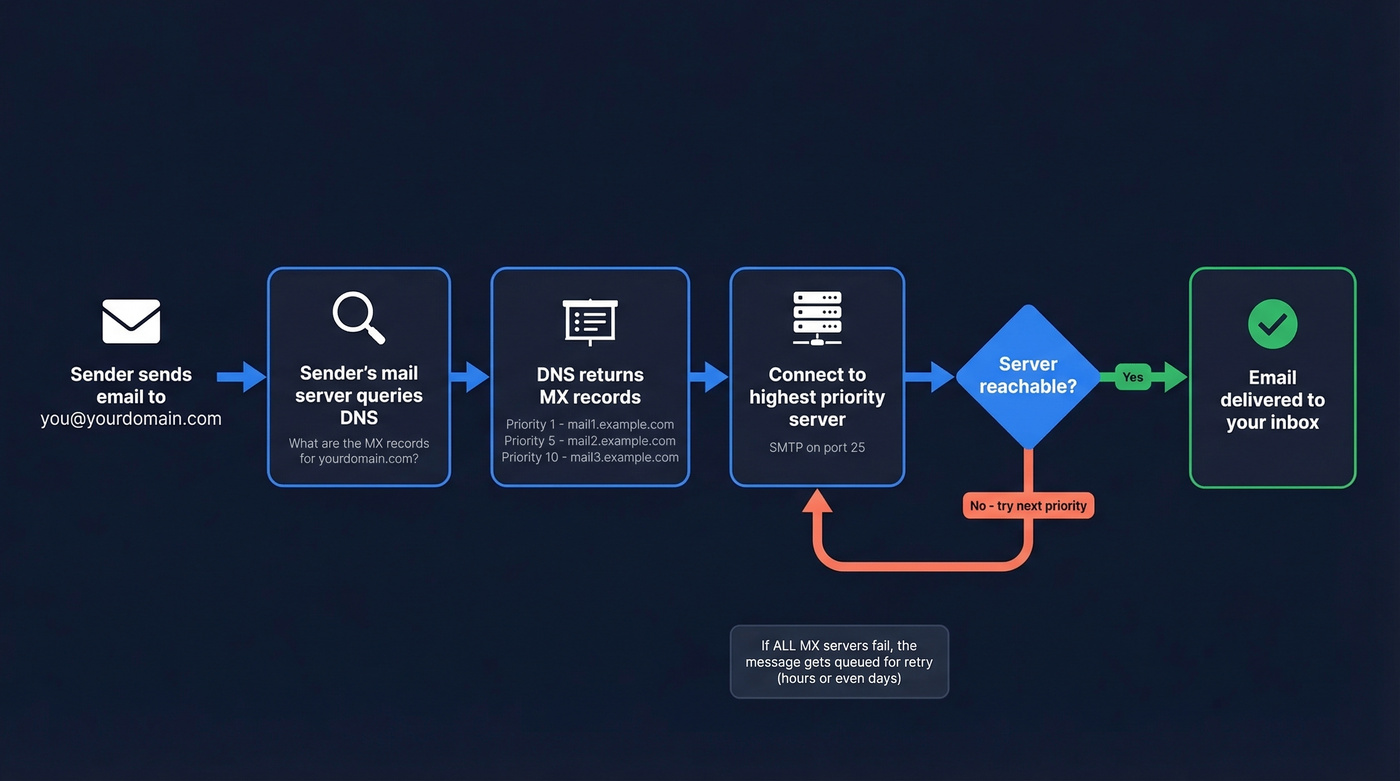
If the primary server is unreachable - down, firewalled, or timing out - the sender moves to the next-priority server. If all MX servers fail, the message gets queued for retry. This is why email sometimes "disappears" for hours after you change MX records: sending servers are retrying against cached DNS data, and the old records haven't expired yet.
RFC 5321 defines specific timeout values for each stage of the SMTP conversation, and they add up fast:
| SMTP Stage | Timeout |
|---|---|
| 220 greeting | 5 min |
| MAIL command | 5 min |
| RCPT command | 5 min |
| DATA initiation | 2 min |
| Data blocks | 3 min |
| DATA termination | 10 min |
| Server timeout | 5 min |
A single failed delivery attempt can take 30+ minutes before the sending server moves on to the next MX host. Multiply that by retry intervals across multiple senders and you start to understand why mail can lag for hours during a migration.
How MX Priority Works
Every MX record has a priority value, sometimes called preference. Lower numbers mean higher priority. If your domain has three entries with priorities 1, 5, and 10, sending servers try 1 first, then 5, then 10.
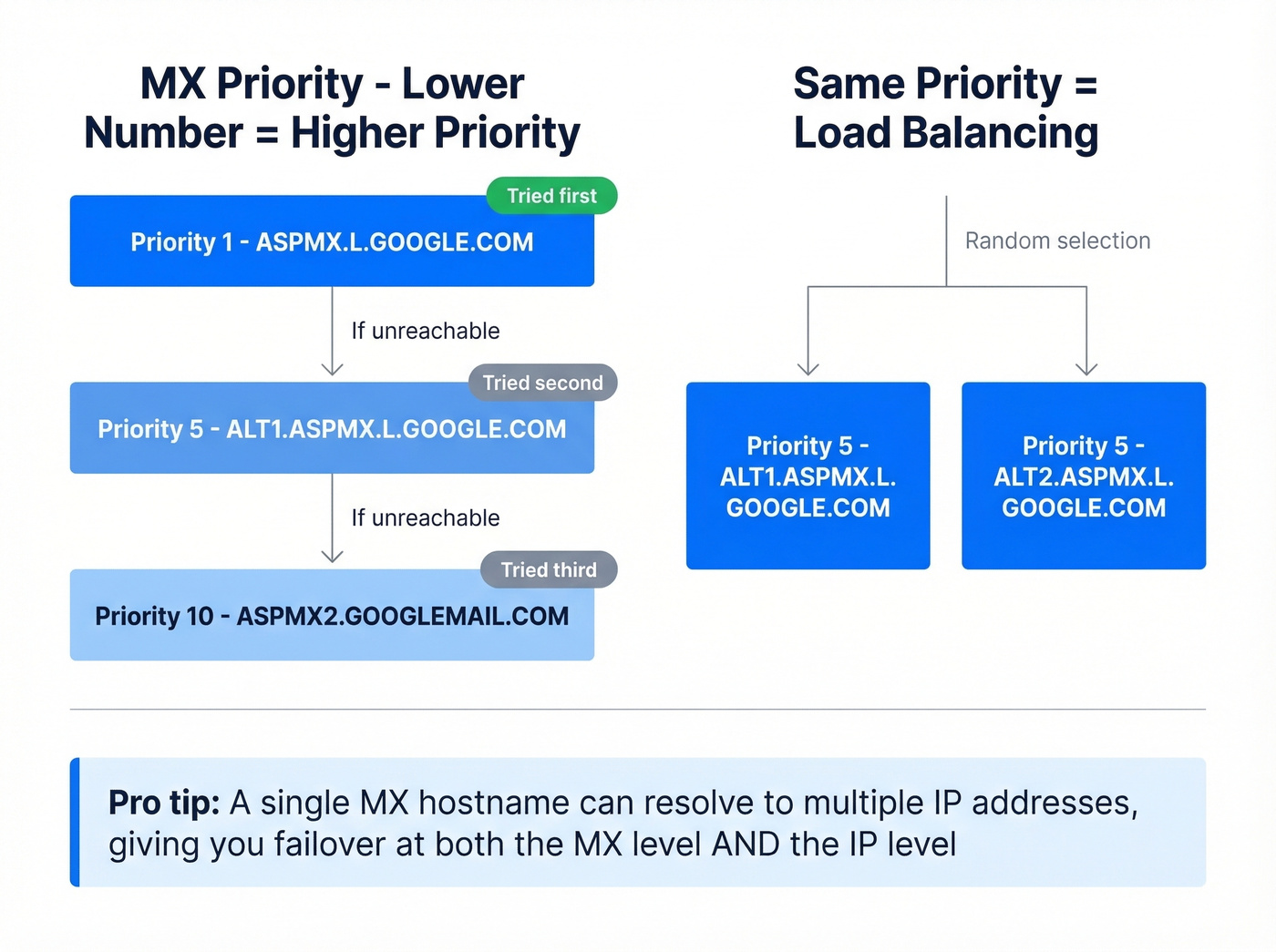
When multiple records share the same priority, sending servers pick among them at random. That's a load-balancing mechanism baked right into the protocol.
There's another subtlety worth knowing. If a single MX hostname resolves to multiple A records - multiple IP addresses - the sending server tries each IP before moving to the next MX host. This gives you failover at both the MX level and the IP level, which is why large providers like Google publish multiple MX hostnames that each resolve to multiple IPs.
MX Record Format and Fields
An actual entry in a DNS zone file looks like this:
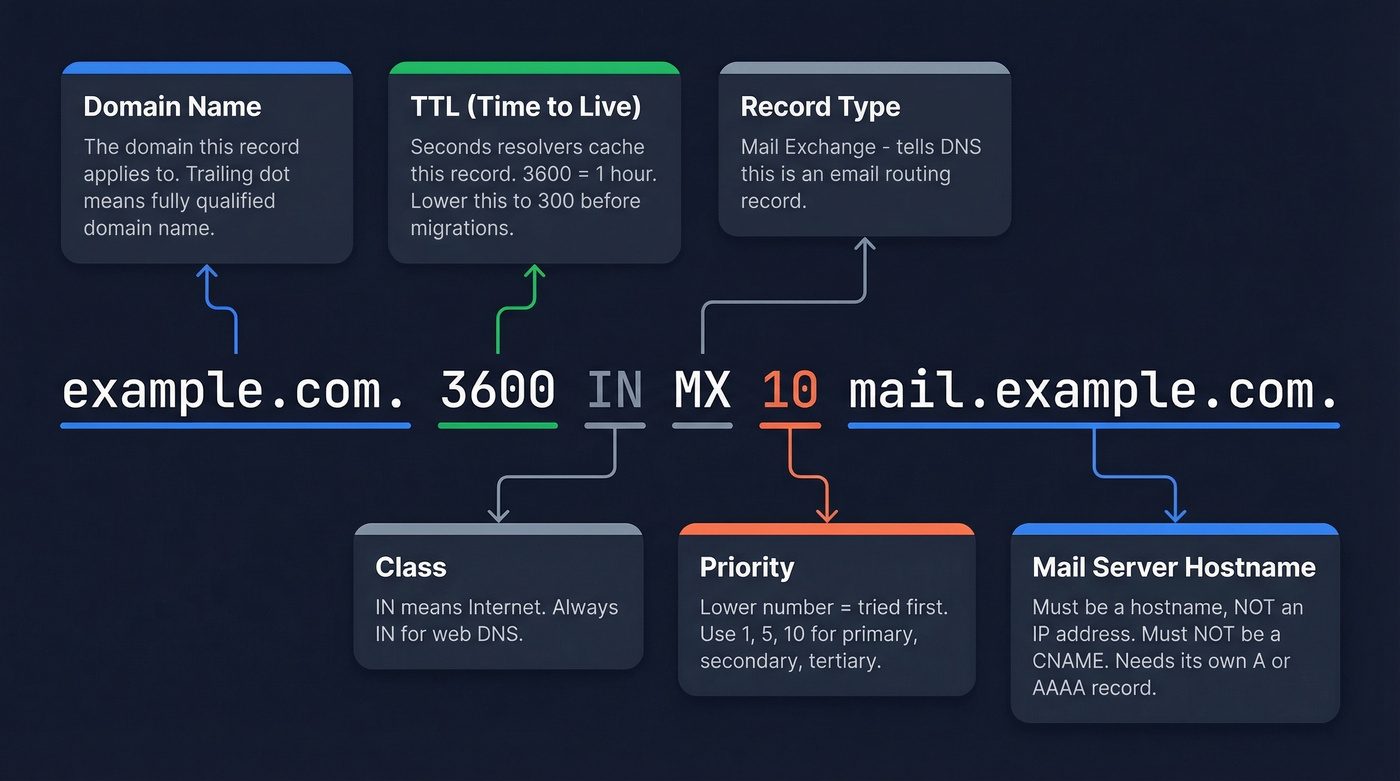
example.com. 3600 IN MX 10 mail.example.com.
Each field serves a specific purpose:
- example.com. - the domain name; the trailing dot indicates a fully qualified domain name in zone files
- 3600 - TTL in seconds, telling resolvers how long to cache this record
- 10 - priority value
- mail.example.com. - the exchange hostname where mail should be delivered
TTL directly controls propagation speed. A TTL of 300 means resolvers refresh the record every 5 minutes. A TTL of 86400 means some resolvers won't see your changes for up to a day. Before a migration, lower your TTL to 300 at least 24 hours in advance. This is the single most impactful thing you can do to reduce migration risk.
MX Records for Major Providers
Google Workspace
Google Workspace uses multiple MX records with staggered priorities for redundancy and load balancing:
| Priority | Hostname |
|---|---|
| 1 | ASPMX.L.GOOGLE.COM |
| 5 | ALT1.ASPMX.L.GOOGLE.COM |
| 5 | ALT2.ASPMX.L.GOOGLE.COM |
| 10 | ASPMX2.GOOGLEMAIL.COM |
| 10 | ASPMX3.GOOGLEMAIL.COM |
Remove any conflicting entries first, add the full set with the exact priorities shown, verify in the Google Admin Console, then configure SPF/DKIM/DMARC.
Here's a mistake we've seen come up repeatedly on r/sysadmin and r/googleworkspace: using SMTP.GOOGLE.COM as the only mail exchange entry. Google's MX checker flags this as incorrect. You need the full published set, not a single "Google-ish" hostname.
Microsoft 365
Microsoft 365 typically uses a single entry:
| Priority | Hostname |
|---|---|
| 0 | yourdomain-com.mail.protection.outlook.com |
The domain portion is formatted with hyphens - so acme-co.mail.protection.outlook.com for acme.co. Microsoft handles redundancy and load balancing behind mail.protection.outlook.com, so you don't need multiple entries.
Zoho Mail and ProtonMail
Zoho Mail:
| Priority | Hostname |
|---|---|
| 10 | mx.zoho.com |
| 20 | mx2.zoho.com |
| 50 | mx3.zoho.com |
Zoho uses region-specific values depending on your account's data center, so always use the exact hostnames shown in your Zoho admin panel for your region.
ProtonMail:
| Priority | Hostname |
|---|---|
| 10 | mail.protonmail.ch |
| 20 | mailsec.protonmail.ch |
Both follow the standard pattern: primary server at the lowest priority number, backup servers at higher numbers. Copy these exactly - don't improvise with different priority values. Other providers like Amazon SES and Fastmail follow similar patterns; always use the exact hostnames from your provider's documentation.

Configuring MX records correctly is step one. Step two is making sure the emails you send to those domains actually land. Prospeo's 5-step verification catches catch-all domains, spam traps, and honeypots - delivering 98% email accuracy across 143M+ verified addresses.
Stop debugging bounces. Start reaching real inboxes at $0.01 per email.
How to Check MX Records
Quick Check
Open your terminal and run dig +short yourdomain.com MX. If the output matches your email provider's published records, you're good. If it doesn't, keep reading.
Online Tools
MxToolbox is one of the most popular tools for quick MX lookups - paste in a domain and get instant results. DNS Checker is useful for verifying propagation across multiple geographic locations after you've made changes. Both are free.
dig (Linux / macOS)
# Just the records, no noise
dig +short example.com MX

# Query a specific resolver (useful for checking propagation)
dig @8.8.8.8 example.com MX
By default, dig uses whatever resolver is configured in /etc/resolv.conf. Specifying @8.8.8.8 (Google's public DNS) or @1.1.1.1 (Cloudflare) lets you check what the broader internet sees, not just your local cache.
nslookup (Windows)
On Windows, nslookup is available by default:
nslookup -query=mx example.com
On Linux, you'll need to install it via dnsutils on Debian/Ubuntu or bind-utils on RHEL/CentOS. For a quicker alternative on Linux/macOS, host -t mx example.com gives clean output with minimal typing.
Common MX Record Mistakes
These are the issues that show up over and over in support threads and migration postmortems. We've seen every single one of them cause real outages:
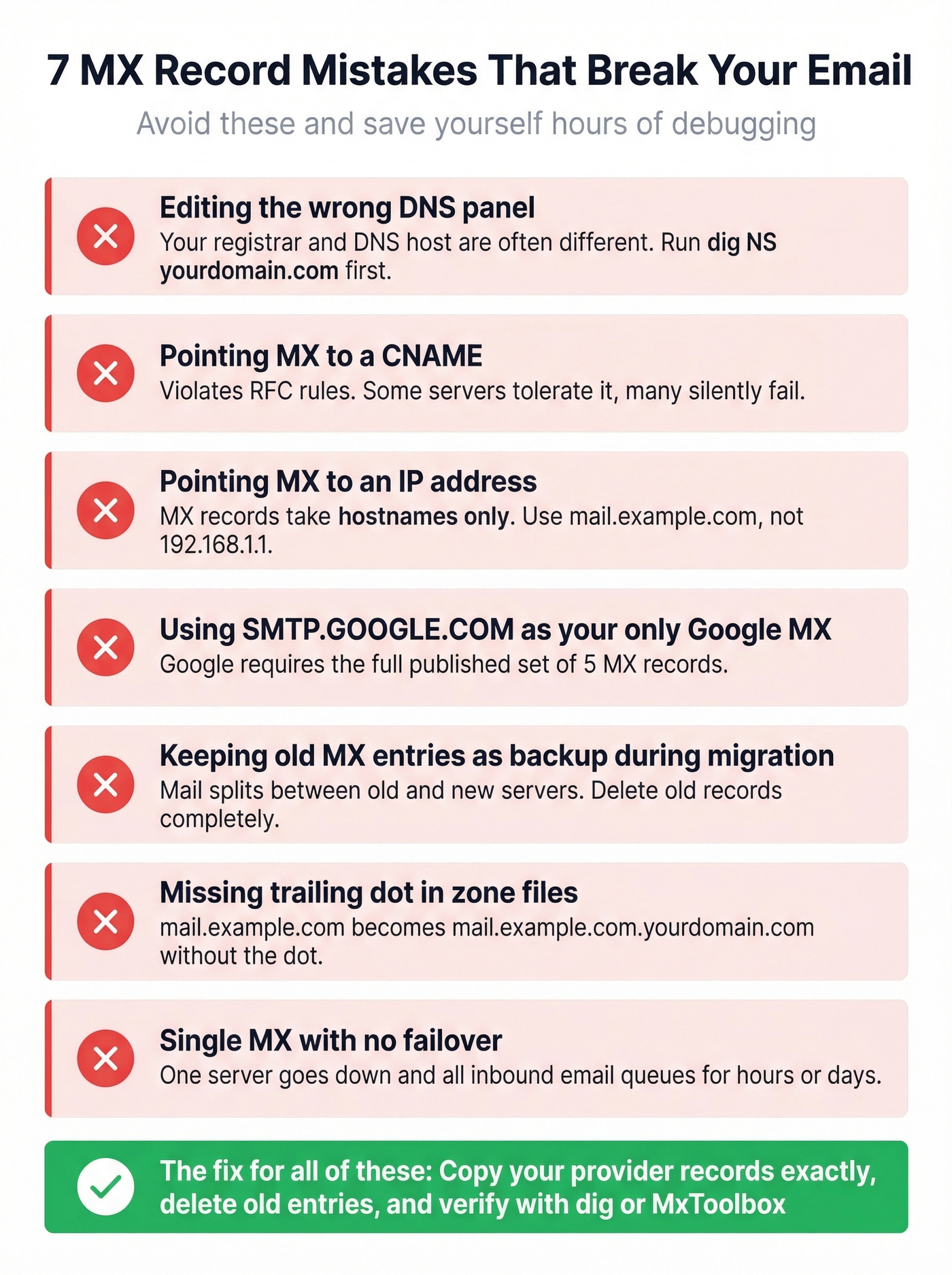
1. Editing in the wrong DNS panel. Your domain registrar and your DNS host are often different companies. Run dig NS yourdomain.com first to confirm where your nameservers actually point. The consensus on r/selfhosted is that this catches the most common root cause of "I changed it but nothing happened."
2. Pointing MX to a CNAME. This violates RFC-defined behavior and causes unpredictable results. Some mail servers tolerate it; many don't. Always point to a hostname with a direct A/AAAA record.
3. Pointing MX to an IP address. Mail exchange records take hostnames, not IPs. MX 10 192.168.1.1 won't work. You need MX 10 mail.example.com where mail.example.com has an A record pointing to the IP.
4. Using SMTP.GOOGLE.COM as the only Google MX. Surprisingly common. Google requires the full published set.
5. Keeping old entries as "backup" during migration. This is the trap from our Monday-morning scenario. Leaving the old host's entry at priority 100 and wondering why mail still lands there 12 hours later is a classic migration failure mode. Delete old records during migration. Full stop.
6. Missing trailing dot in zone files. In a BIND-style zone file, mail.example.com without a trailing dot gets interpreted as mail.example.com.yourdomain.com. Always use mail.example.com. with the dot.
7. Single MX with no failover. If your one mail server goes down, all inbound email queues at the sender for hours or days. Add at least one backup entry.
MX Records and Email Deliverability
MX records handle inbound routing - where email gets delivered to your domain. They don't do anything for outbound authentication. That's where SPF, DKIM, and DMARC come in, and since February 2024, Gmail and Yahoo tightened requirements for bulk senders around SPF/DKIM and DMARC alignment.
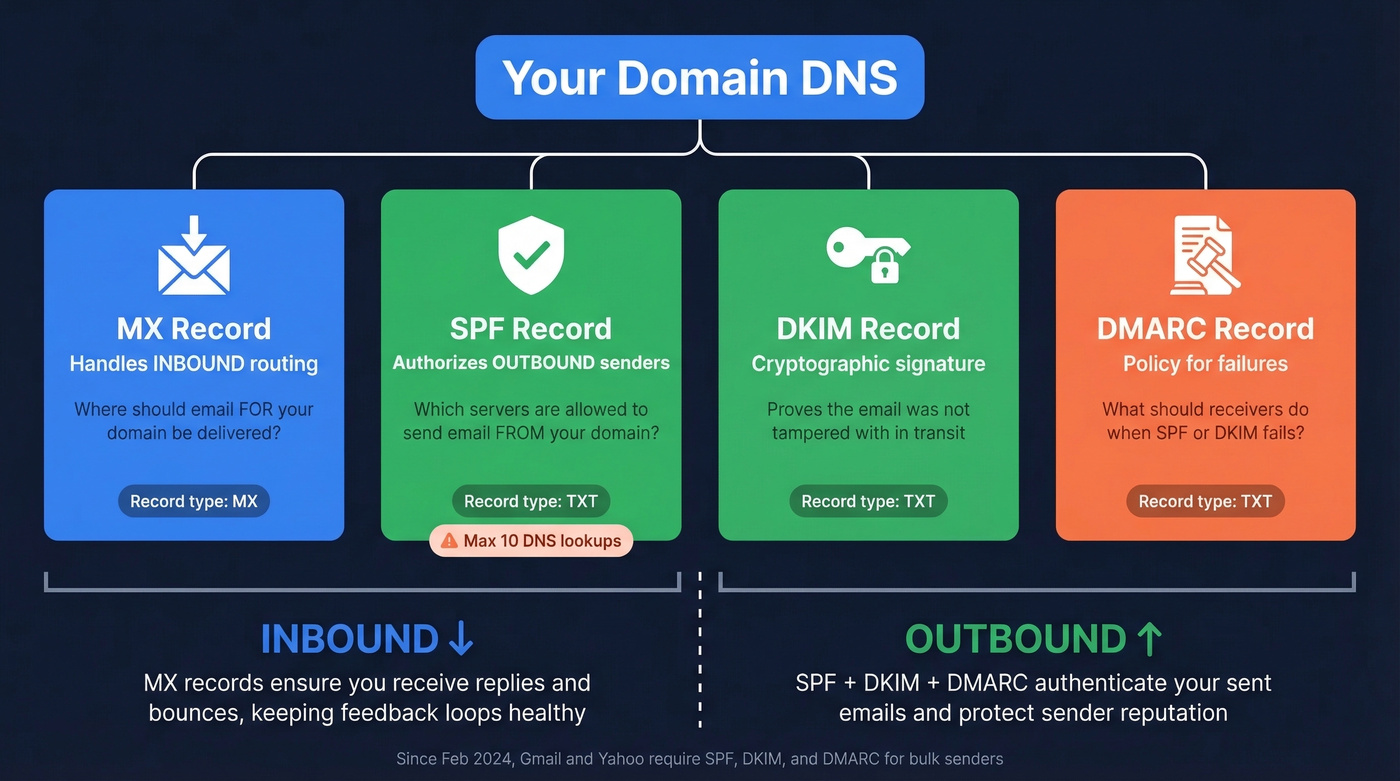
The relationship between mail exchange records and deliverability is often misunderstood. Correctly configured entries ensure you receive replies and bounces, which keeps your feedback loops healthy. Missing or broken records cause bounce-backs that damage sender reputation over time.
All three authentication records are TXT records in your DNS:
| Record | Purpose | Example |
|---|---|---|
| SPF | Authorized sending IPs | v=spf1 include:_spf.google.com -all |
| DKIM | Cryptographic signature | v=DKIM1; k=rsa; p=MIGf... |
| DMARC | Policy for failures | v=DMARC1; p=reject; rua=mailto:... |
SPF has a few pitfalls worth knowing. You can't have more than 10 DNS lookups in your SPF record - exceed this and the entire record fails validation. You also can't publish multiple SPF records for the same domain; they must be merged into one. And watch the mechanism at the end: -all (hard fail) rejects unauthorized senders, while ~all (soft fail) is a weaker testing posture that many teams forget to upgrade.
Let's be honest: if your average deal size is under five figures, you probably don't need a dedicated email infrastructure team. But you absolutely need these three DNS records configured correctly. Skipping DMARC alone will tank your deliverability faster than any misconfigured mail exchange entry.
With MX and authentication configured, your domain is ready for outbound email. The next bottleneck is contact data quality - bad addresses destroy the sender reputation you just built. Prospeo's 5-step email verification with spam-trap removal catches invalid addresses before they hit your sequences, protecting the infrastructure you spent time configuring.
Null MX: Rejecting Email Immediately
Not every domain needs to receive email. Parked domains, brand-protection domains, and subdomains used only for marketing pages shouldn't accept mail at all. Without an explicit signal, sending servers fall back to the domain's A or AAAA record and attempt SMTP delivery there - and if nothing's listening, they'll retry for up to a week before generating a bounce.
RFC 7505 introduced null MX to solve this:
example.com. IN MX 0 .
That's a single entry with preference 0 and an exchange of . - a dot representing the DNS root. This tells sending servers to fail delivery immediately; the RFC recommends using SMTP code 556 (enhanced status code 5.1.10) for this case.
Two rules: a null MX must be the only mail exchange entry for the domain, and no other MX entries can coexist alongside it. DNSimple added UI support for null MX in 2024, though some DNS providers still don't support the . exchange value in their interfaces. If yours doesn't, you'll need to edit the zone file directly.
Troubleshooting MX Record Issues
When email breaks after a change, work through this checklist in order. Don't skip steps - in our experience, the problem is almost always in step 1 or 2.
1. Verify your active nameservers. Run dig NS yourdomain.com and confirm the nameservers match the DNS panel you're editing. This catches the "wrong control plane" problem that causes a huge share of issues.
2. Check propagation against multiple resolvers. Query dig @8.8.8.8 yourdomain.com MX, then @1.1.1.1, then @9.9.9.9. If results differ, propagation is still in progress. The timeline depends on your old record's TTL - not a magic "24-48 hours."
3. Confirm records resolve to correct hostnames. Run dig yourdomain.com MX and verify the hostnames match your provider's published records exactly.
4. Verify the MX target has an A/AAAA record. Run dig A mail.example.com with your actual hostname substituted. If this returns nothing, the MX entry is technically valid but delivery will fail because there's no IP to connect to.
5. Check blacklists. If you migrated to a new mail server, its IP might be on a blocklist. Resolve your MX hostname to its IP address, then run that IP through MxToolbox's blacklist check, which tests against 100+ DNS-based blacklists.
6. Verify TLS and firewall rules. Post-migration failures from Gmail and Outlook.com can stem from TLS handshake failures or blocked IP ranges on the new server, not DNS issues. If dig shows correct results but mail from major providers isn't arriving, check your server's TLS configuration and firewall logs. If you're diagnosing handshake issues, a quick STARTTLS test can save hours.
7. Confirm authentication records. SPF, DKIM, and DMARC must reference your new provider. Old SPF records authorizing your previous host's IPs won't help with the new one.
Skip this whole checklist if you haven't actually changed anything recently and email just stopped working - that's more likely a server-side issue or a blacklisting event, not a DNS problem.

You understand how email routing works at the DNS level. Now apply that knowledge at scale. Prospeo refreshes its 300M+ contact database every 7 days - so you're never sending to stale addresses on misconfigured or abandoned mail servers.
Data refreshed weekly means fewer bounces and zero domain reputation damage.
FAQ
What are MX records used for?
MX records tell sending mail servers which hostname should receive email for your domain. Every domain that needs to accept email must have at least one published in DNS. Without one, senders fall back to the domain's A record, which usually isn't configured to handle mail - causing silent delivery failures.
What happens if a domain has no MX record?
Most sending servers fall back to the domain's A or AAAA record and attempt SMTP delivery there. If no mail server is listening, the sender retries for up to a week before bouncing. To reject delivery immediately, publish a null MX record (0 .) per RFC 7505.
Can an MX record point to an IP address?
No. MX records must point to a hostname like mail.example.com, never directly to an IP. That hostname needs its own A or AAAA record resolving to an IP. Pointing directly to an IP violates the standard and causes delivery failures with most mail servers.
How long do MX record changes take to propagate?
Propagation depends on the TTL of your old record. A TTL of 300 seconds means most resolvers update within 5-10 minutes; a TTL of 86400 means some resolvers cache the old data for up to a full day. Check by running dig @8.8.8.8 yourdomain.com MX against multiple public resolvers.
Do I need MX records to send email?
MX records control where incoming mail is delivered - they don't directly affect sending. To send reliably, you need SPF, DKIM, and DMARC (all TXT records). But without valid MX records, bounces and replies can't reach you, which degrades sender reputation over time.