

Name2Email: Honest Review, How It Works, and Better Alternatives in 2026
You find a hiring manager's name on a company's about page. You install Name2Email, type the name and domain into Gmail's compose field, and get a green "confirmed" suggestion. You send your carefully crafted pitch. It bounces. You never find out - because Gmail doesn't always tell you, and you've already moved on thinking the email landed.
Name2Email has 80,000 users, but its 3.53/5 rating from 251 reviews tells a more complicated story. With 361.6 billion emails sent daily and B2B contact data going stale at 33% per year, guessing email formats without verification is a gamble most teams can't afford.
Our Picks (TL;DR)
- Prospeo - Best for verified accuracy and scale. 98% email accuracy, 5-step verification with catch-all handling, free tier with 75 emails/month.
- Hunter.io - Best free option for light, occasional use. 25 free searches plus 50 verifications per month.
- Apollo - Best all-in-one platform. Free tier, 275M+ contacts, built-in sequencing.
What Is Name2Email?
Name2Email is a free Chrome extension built by Reply that finds corporate email addresses from Gmail's compose window. You type a first name, last name, and company domain into the "To" field, and the extension suggests the most likely email address.
It launched in April 2020 and currently sits at version 3.1.6. The tool is entirely free - no paid tiers, no stated usage limits. That sounds great until you understand what "free" actually gets you.
How the Extension Works
- Install the extension from the Chrome Web Store and open Gmail.
- Compose an email and type a first name, last name, and company domain in the "To" field (e.g., "John Smith companyname.com").
- The tool generates permutations -
john@company.com,john.smith@company.com,jsmith@company.com- testing common patterns against the domain. - The extension highlights its best guess with a green "confirmed" indicator.
Behind the scenes, Name2Email sits in Reply's ecosystem. Reply Data is described as a database of 140M contacts, with roughly 17M emails flagged as valid. But the day-to-day workflow people actually use is still pattern permutation - and it doesn't include the kind of dedicated, multi-step verification you get from standalone email search tools.
Does It Actually Work?
Sometimes. That's the honest answer from a team that's tested dozens of email finders.
For large companies with standardized formats (firstname.lastname@bigcorp.com), the hit rate is reasonable. Job seekers doing one-off outreach can get lucky. But the recurring complaints across user reviews are consistent: the extension often stops working after Chrome changes, autosuggestion fails intermittently with no warning, and the green "confirmed" indicator is only sometimes correct.
Here's the thing: a green "confirmed" indicator on a dead address is worse than no indicator at all. If you're a job seeker who sent a carefully crafted email to a hiring manager and it bounced, you don't get a second chance. You just think you were ignored. The extension is also strictly a Gmail-compose workflow - not a full prospecting platform for list building, enrichment, or verification at scale.

Pattern guessing gave you a green checkmark on a dead address. Prospeo's 5-step verification - with catch-all handling, spam-trap removal, and honeypot filtering - confirms real inboxes before you send. 98% accuracy, 7-day data refresh, 75 free verified emails per month.
Replace guessed emails with verified ones in under 60 seconds.
Is Name2Email Safe?
The extension requests storage, identity, scripting, and webRequest permissions. It has host permissions for mail.google.com, contacts.google.com, and api.reply.io. Reply's privacy policy states they "pull only the minimum amount of information required." Chrome-Stats labels the extension as "high risk impact / low risk likelihood" - the permissions could be misused, but there's no evidence they are.
The real risk isn't data access. It's trusting unverified suggestions for professional outreach where a bounce damages your sender reputation.
Why Pattern Guessing Fails
Contact data goes stale at 33% per year. People change jobs, companies restructure, domains get consolidated. A pattern-based tool that worked six months ago is now generating emails for people who left the company.

Consider a company like Salesforce - some employees are on firstname@salesforce.com, but after acquisitions, others sit on firstname@tableau.com. A pattern guesser misses that entirely. Then there's the catch-all problem: some business domains accept every email sent to them, so anything@domain.com gets accepted by the server regardless of whether a real person sits behind it. Pattern guessers can't tell the difference without verification. Poor data quality costs organizations $12.9M per year on average.
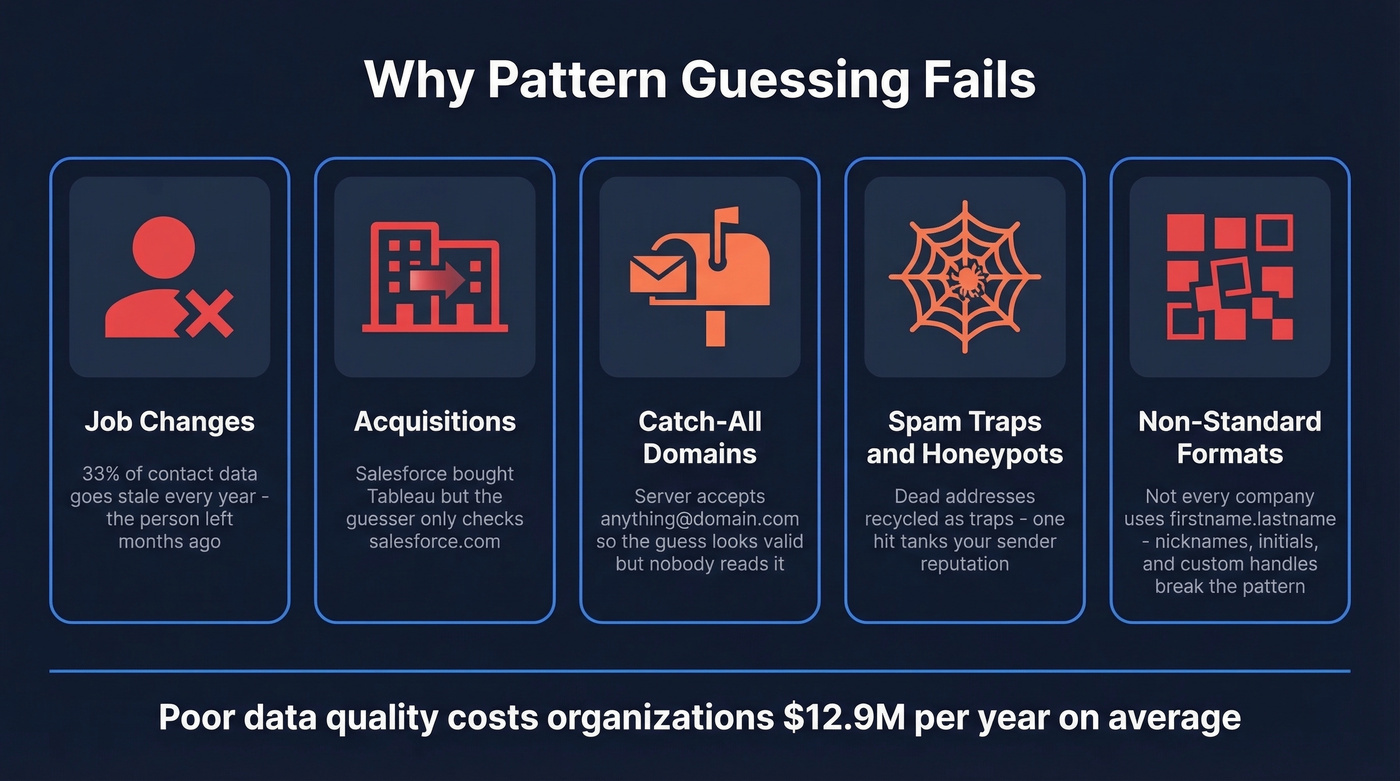
Guessing isn't a strategy.
Best Name2Email Alternatives
| Tool | Best For | Verified? | Free Tier | Starting Price | Bulk? |
|---|---|---|---|---|---|
| Prospeo | Accuracy + scale | Yes (5-step) | 75 emails/mo | Free / credit-based | Yes |
| Hunter.io | Quick domain lookups | Yes (separate credits) | 25 searches/mo | ~$34/mo | Yes |
| Apollo | All-in-one prospecting | Yes (basic) | 10K credits/mo | ~$49/mo | Yes |
| RocketReach | Individual lookups | Yes | Limited | ~$32/mo | Yes |
| Snov.io | Budget outreach | Yes | 50 credits/mo | ~$30/mo | Yes |
| Dropcontact | GDPR compliance | Yes (algorithmic) | 25 credits/mo | ~$24/mo | Yes |
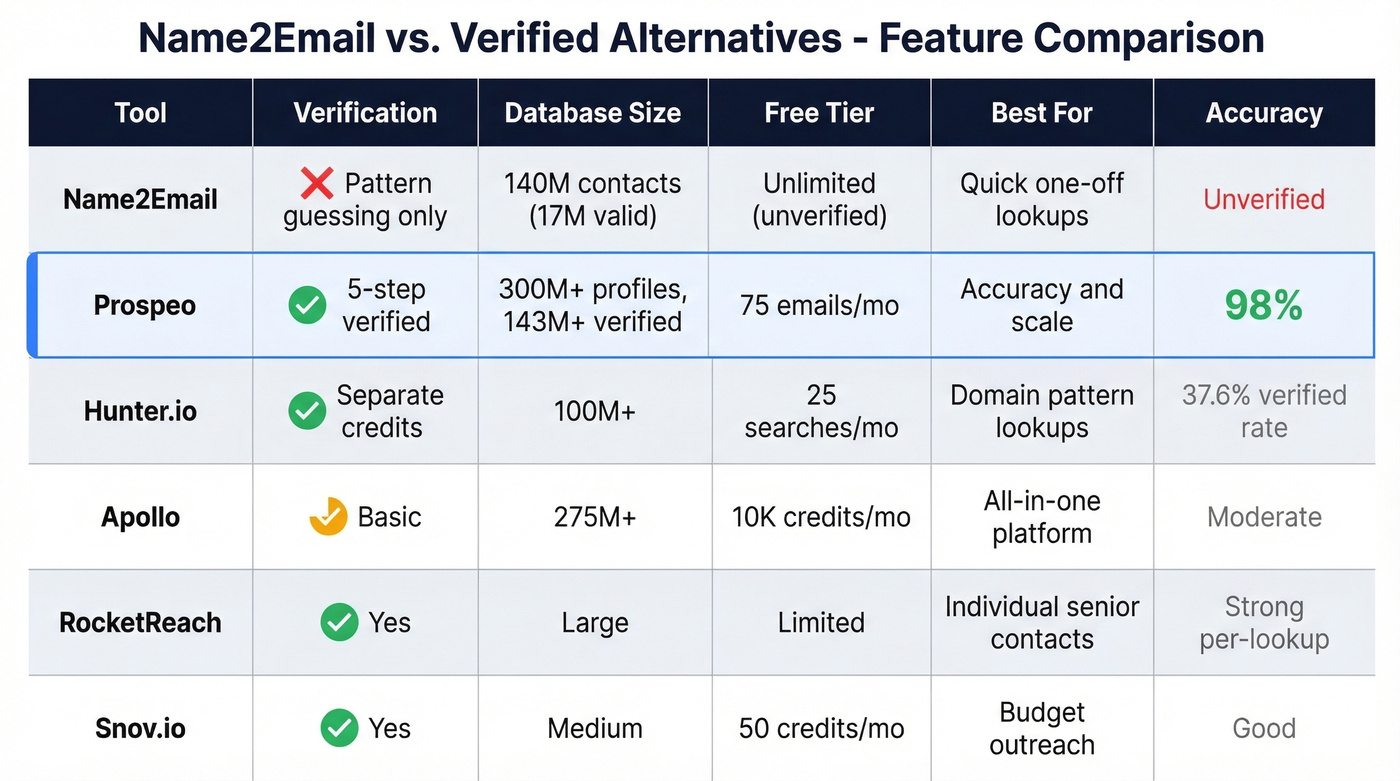
Prospeo
Use this if you're done guessing email formats and need verified addresses at scale - whether that's 50 emails or 50,000.
Skip this if you need a full sequencing platform built in (pair with Instantly or Lemlist for that).
Prospeo covers 300M+ professional profiles with 143M+ verified emails and 125M+ verified mobile numbers. The 98% email accuracy comes from a proprietary 5-step verification process that includes catch-all domain handling, spam-trap removal, and honeypot filtering - the exact problems that make pattern-guessing tools unreliable. Data refreshes every 7 days, compared to the 6-week industry average.

You can search by name and company, paste a professional profile URL, upload a CSV for bulk lookups, or use the Chrome extension (40K+ users) to find contacts from any website. We've seen the difference firsthand: Meritt switched to Prospeo, saw bounce rates drop from 35% to under 4%, and tripled their pipeline from $100K to $300K per week. The free tier gives you 75 verified emails plus 100 Chrome extension credits per month - more useful than unlimited unverified guesses.
Hunter.io
Hunter's domain search is the feature that keeps people coming back. Enter a company domain and instantly see the email pattern plus every known address - it's the fastest way to understand how a company structures its emails. The database covers 100M+ business email addresses, and the free plan gives you 25 searches and 50 verifications per month.

The catch: verification costs separate credits on top of search credits, and paid plans start at around $34/month. That two-credit system adds up fast at any real volume. A 5,000-contact benchmark put Hunter's verified rate at 37.6%, which is middle-of-the-pack. For free, occasional lookups, it's solid. For anything mission-critical, you'll want stronger verification (or compare options in our Hunter alternatives guide).
Apollo
Apollo is the Swiss Army knife of the space - 275M+ contacts, built-in sequencing, a dialer, and CRM functionality, all with a usable free tier. Paid plans start around $49/month per user, and the platform carries a 4.7/5 on G2.
The trade-off: Apollo does a lot of things well but doesn't specialize in email verification the way dedicated tools do. We've seen teams use Apollo for prospecting and list building, then run their lists through a separate verification tool before launching sequences. If you want one platform for everything and can tolerate slightly lower email accuracy, Apollo is hard to beat on value.
For teams where deal sizes are under $10K, you probably don't need Apollo's full platform. A dedicated email finder with higher accuracy will get you further than a suite you only use 30% of.
RocketReach
A commonly cited pick in cold email communities - one r/coldemail thread calls it "most accurate so far" for individual lookups. At around $32/month for 125 credits, it's not cheap, but per-lookup accuracy tends to be strong for senior contacts at mid-market and enterprise companies. If you're doing targeted research rather than bulk prospecting, RocketReach earns its price.
Snov.io
Snov.io bundles email finding with drip campaigns starting at ~$30/month, with a free tier of 50 credits. A budget-friendly pick for small teams who want outreach and email finding in one tool without Apollo's complexity.
Dropcontact
Dropcontact takes a no-database approach, using proprietary algorithms instead of stored contact data. Starting at ~$24/month with 25 free credits, it's the most GDPR-focused option on this list. If European data compliance is your primary concern, it's worth a look.
Meritt switched from unverified email data to Prospeo and watched bounce rates drop from 35% to under 4%. With 143M+ verified emails across 300M+ profiles, you get real addresses - not pattern permutations that damage your sender reputation.
Every bounced email costs you trust. Start with data that actually connects.
How to Find Any Email From a Name
A reliable workflow that doesn't depend on pattern guessing:
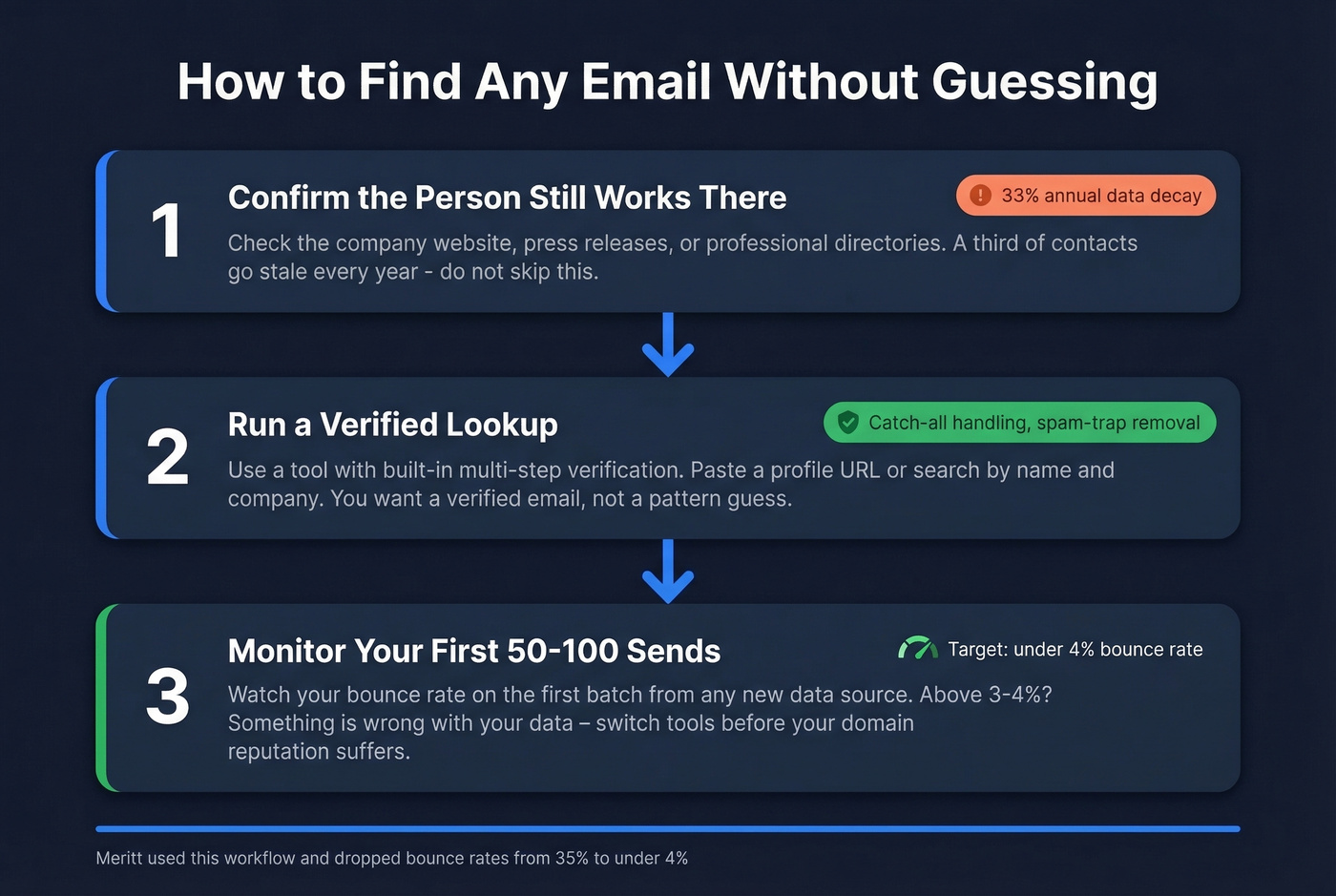
1. Confirm the person's current role. Check the company website, press releases, or professional directories to verify they still work there. A third of contact data goes stale every year - don't skip this step.
2. Run a verified lookup. Use a tool with built-in verification. Paste a professional profile URL or search by name and company. You want a verified email back, not a guess. (If you're comparing approaches, see our guide to name to email.)
3. Verify before sending. Even with a high-accuracy tool, watch your bounce rate on the first 50-100 emails from any new data source. If you're above 3-4%, something's wrong with your data - switch tools before you damage your domain. Use these email bounce rate benchmarks as your baseline, and follow an email deliverability checklist if you’re trending up.
Let's be honest about what this means in practice: the extra two minutes you spend verifying an email saves you weeks of dealing with a burned domain. I've watched teams nuke their sender reputation in a single afternoon because they trusted unverified data from a free tool.
FAQ
Why does Name2Email stop working?
The extension hooks into Gmail's compose dialog. When Chrome or Gmail updates change the underlying page structure, it breaks until Reply pushes a fix. This is a recurring issue documented across hundreds of reviews and is inherent to how compose-window extensions work.
Can I find emails in bulk with Name2Email?
No - it's built for one-at-a-time lookups inside Gmail's compose field. For bulk email finding, you need a dedicated platform that supports CSV uploads and batch searches with verification. Hunter and Apollo both support bulk workflows, as does Prospeo.
What's the most accurate email finder in 2026?
Tools with built-in multi-step verification consistently outperform pattern-based guessers. Look for catch-all domain handling, spam-trap removal, and real-time deliverability checks. Prospeo's 5-step process delivers 98% accuracy; Hunter and Apollo sit lower at roughly 70-85% in independent benchmarks.
How do I verify an email before sending?
Never trust a "found" email at face value. Run it through a verification service that checks SMTP response, catch-all status, and spam-trap databases. Most quality email finders include verification automatically, but if yours doesn't, add a separate verification step before any outreach campaign.