


7 NetHunt CRM Alternatives Worth Your Time in 2026
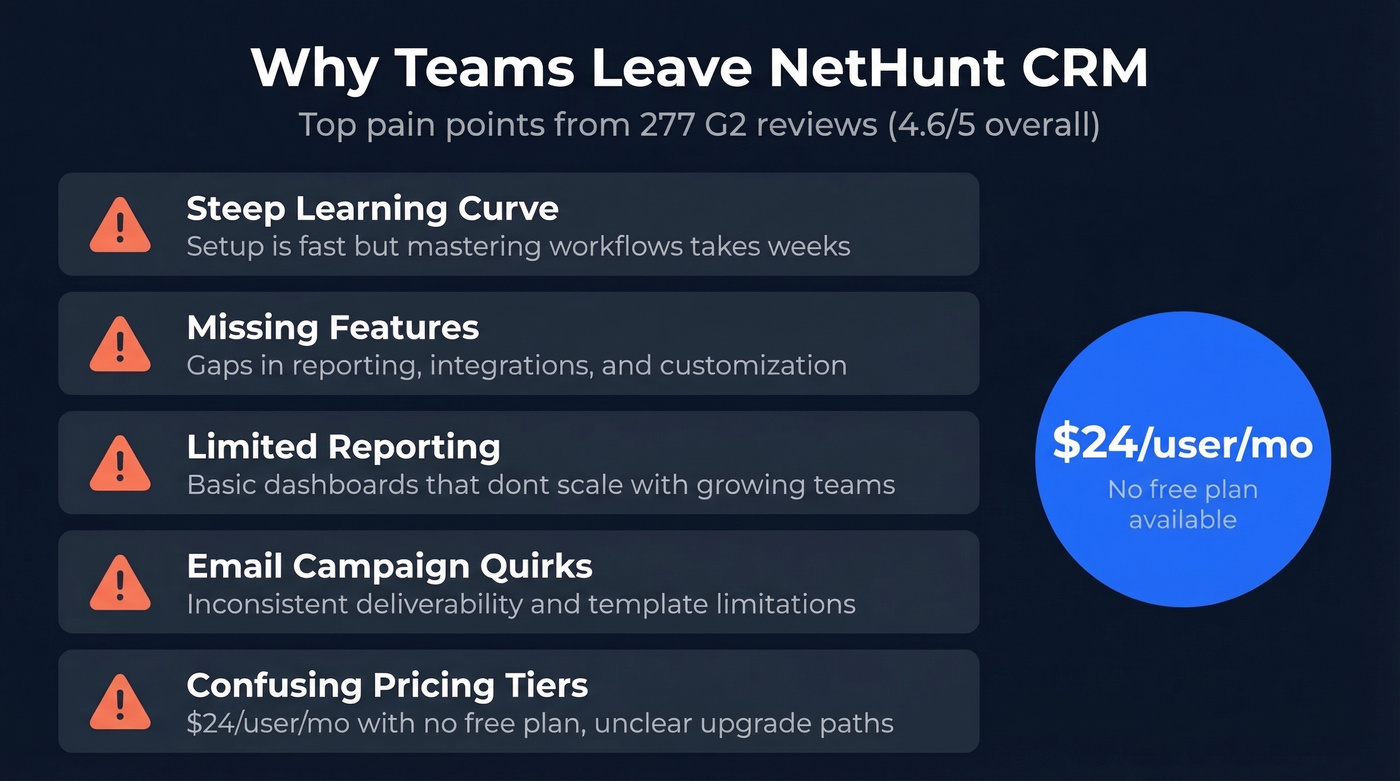
NetHunt CRM does a lot right. The Gmail integration is genuinely good, multichannel lead capture works out of the box, and setup takes minutes, not days. But at $24/user/month with no free plan, you're paying a premium for a tool that 277 G2 reviewers rate 4.6/5 while consistently flagging the same problems: a steep learning curve, missing features, limited reporting, email campaign quirks, and confusing pricing tiers.
If those pain points sound familiar, it's time to look elsewhere. We excluded enterprise platforms like Salesforce and NetSuite - if you're at that scale, you aren't comparing against NetHunt. Instead, we focused on tools where Gmail integration depth, per-user cost at 10+ seats, and automation ceiling actually matter, because those are the three areas where NetHunt users hit walls.
Our Picks (TL;DR)
- Best free starting point: HubSpot CRM - zero risk, unlimited users, room to scale.
- Best pipeline UX: Pipedrive - visual, fast, starts at $14/seat/mo.
- Best value with AI: Freshsales - free plan for 3 users, 21-day trial on paid tiers.
How to Choose the Right Replacement
94% of sales professionals use less than 75% of their CRM's available features. Don't overbuy. The consensus on r/sales is that Gmail integration depth and email tracking are the top two criteria when evaluating CRM switches - and that tracks with what we've seen working with sales teams migrating off NetHunt.
Start with Gmail integration depth. Two-way email sync, automatic logging, Calendar-to-CRM activity mapping, and Google Drive linking to records are table stakes, but not all "Gmail integrations" deliver equally. Some tools live inside Gmail natively. Others bolt on through a Chrome extension that breaks every other update.
Then stress-test the automation ceiling. A CRM that handles your current 5-rep workflow might choke when you hit 15 reps and need branching sequences. Watch per-user cost at scale too - a $9/mo tool that jumps to $59/mo for the features you actually need isn't cheap. Finally, demand at least a 14-day trial. You need that long to know if a CRM fits your workflow.

No CRM performs well with bad data inside it. Before you migrate off NetHunt, fix the foundation: Prospeo gives you 300M+ profiles with 98% email accuracy, 125M+ verified mobiles, and 30+ filters to build targeted lists - all at $0.01/email.
Enrich your new CRM with data that actually connects you to buyers.
Comparison Table
| Tool | Starting Price | Free Plan | Gmail Integration | Best For |
|---|---|---|---|---|
| NetHunt CRM | $24/user/mo | No | Native | Current tool |
| HubSpot CRM | Free | Yes (unlimited) | Extension / add-on | Scaling teams |
| Pipedrive | $14/seat/mo | No (14-day trial) | Extension | Pipeline management |
| Freshsales | Free (3 users) | Yes | Extension | Budget teams + AI |
| Copper | $12/seat/mo | No | Native | Google Workspace |
| Streak | $49/user/mo | Free email tools only | Native | Solo inbox reps |
| Zoho CRM | Free (3 users) | Yes | Not inbox-native | Suite buyers |
| Close | $49/user/mo | No (14-day trial) | Not inbox-native | High-vol calling |
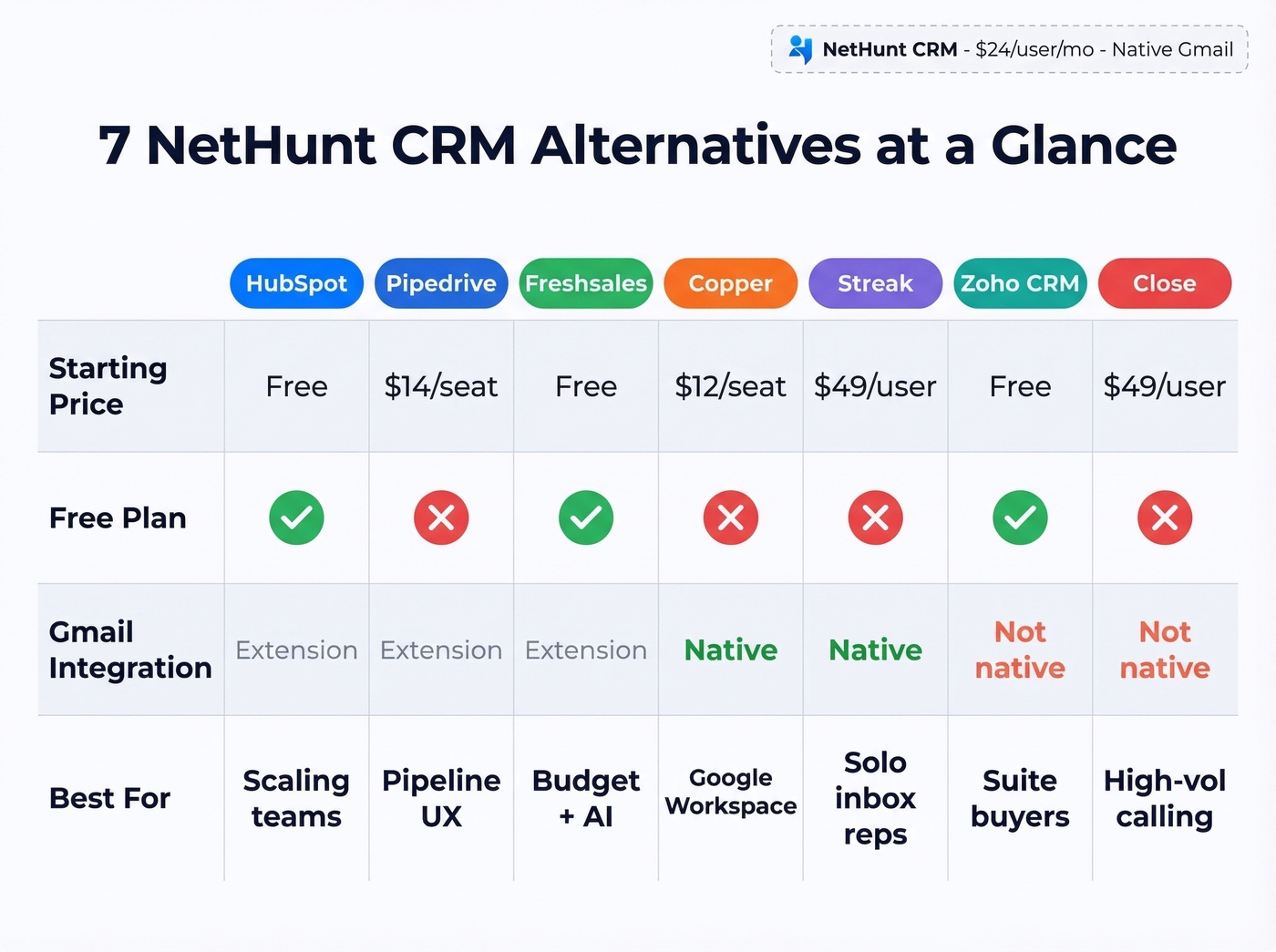
All prices reflect annual billing. Monthly billing is typically 15-30% higher.
The 7 Best NetHunt CRM Alternatives
HubSpot CRM
Use this if you want a CRM you'll never outgrow. HubSpot's free tier is genuinely generous - unlimited users, up to 1 million contacts, and enough pipeline tools to run a real sales process. The Gmail integration isn't native the way NetHunt's is, but two-way sync and email logging work well once you install the extension.
Here's the thing, though. HubSpot's Sales Hub starts at $20/month, which is reasonable. But the Marketing Hub starts at $500/month, and that's where the sticker shock hits. We've seen teams adopt HubSpot CRM for free, then feel locked in when they need marketing features a year later. If your roadmap includes marketing automation, price that out before you commit.
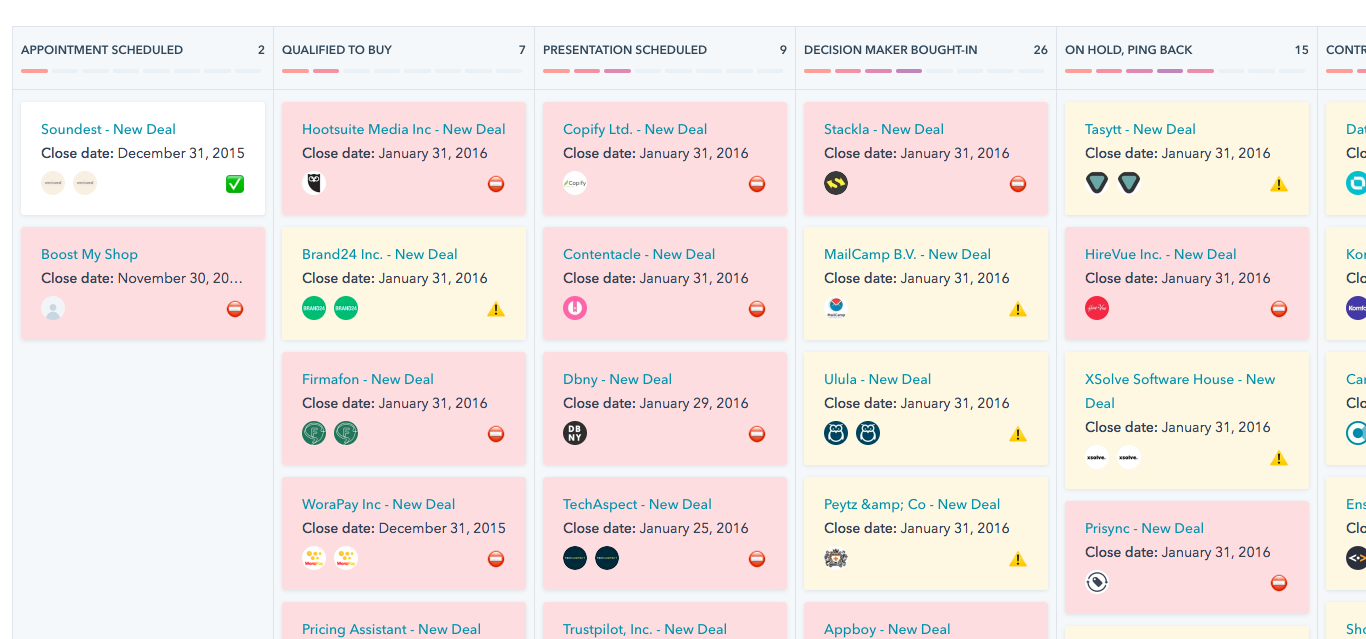
If you're still comparing CRM options, it helps to look at a few examples of a CRM side-by-side before you decide.
Pipedrive
Use this if your team thinks visually. Pipedrive's drag-and-drop pipeline is the best in this list - reps actually enjoy using it, which matters more than any feature matrix. Plans run $14-$79/seat/mo on annual billing, and the 14-day trial doesn't require a credit card.

Skip this if you need a free plan. Pipedrive doesn't have one. And add-ons stack up fast - LeadBooster starts at $32.50/mo, Web Visitors at $41/mo. Once you start layering paid add-ons, your per-seat cost can cross $100/month before you realize what happened.
If you're trying to tighten your process after switching, these sales activities are a good baseline for what to track in any CRM.
Freshsales
Use this if you're budget-conscious but still want AI features. The free plan covers 3 users with basic CRM functionality. Paid tiers start at $9/user/mo on annual billing, and the Pro tier at $39 includes Freddy AI for lead scoring and deal insights. The 21-day trial is the longest on this list.
Skip this if you're a Google Workspace purist. Freshsales integrates with Gmail but doesn't live inside it. For teams where inbox-native CRM is non-negotiable, Copper ($12/seat/mo) and Streak ($49/user/mo) both live inside Gmail.
If you're building outbound sequences in parallel, pair your CRM with a solid follow up email software tool (or at least a repeatable workflow).
Copper
Copper was built for Google Workspace teams, and it shows. Gmail, Calendar, Contacts, Drive - everything syncs natively without a Chrome extension middleman. At $12/seat/mo on annual billing, it's one of the cheapest Gmail-native options available.
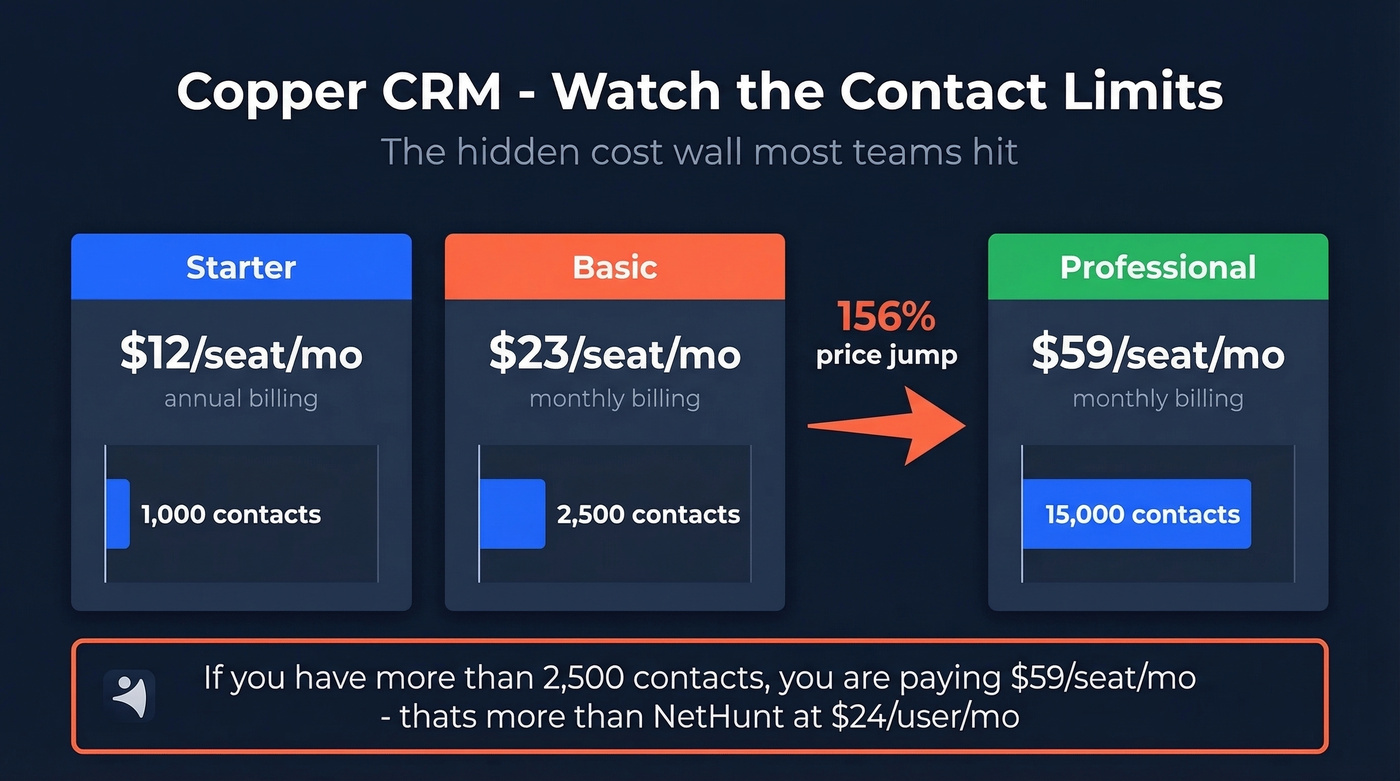
The problem is contact limits. Starter caps at 1,000 contacts, Basic at 2,500, Professional at 15,000. You won't realize this until you hit the wall. And the jump from Basic ($23/mo on monthly billing) to Professional ($59/mo on monthly billing) is steep - you'll need Professional for any serious automation or reporting. For teams with more than a few thousand contacts, the math gets ugly fast.
If you're deciding between inbox-native and pipeline-first CRMs, this Copper vs Pipedrive breakdown helps clarify the tradeoffs.
Streak
Streak lives entirely inside Gmail - no separate tab, no context switching. For solo reps who live in their inbox, nothing else comes close. Free email power tools like tracking, snippets, and mail merge (up to 50/day) are legitimately useful.
The catch: CRM plans start at $49/user/mo. That's more expensive than NetHunt's Basic plan. For a tool that's essentially a Gmail sidebar, that's a tough sell. AI credits are stingy too - 10/month on Pro. Reddit sentiment on Streak is consistent: great concept, but the UI "looks like crap" and pricing doesn't match the feature depth. I'd only recommend it to solo operators who refuse to leave their inbox for anything.
Zoho CRM
Zoho's free plan covers 3 users, and paid tiers start at $14/user/mo. Pick it if you're already in the Zoho ecosystem - the suite integration across Zoho One is unmatched. For everyone else, the Gmail integration is functional but not inbox-native, and the UI feels dated next to Pipedrive or HubSpot. It's a workhorse, not a showpiece.
If you're mostly trying to keep things simple, you may be better served by contact management software rather than a full suite.
Close
Close starts at $49/user/mo, making it a solid option for sales-first teams without enterprise pricing. The real draw is its calling-first workflow - if your team runs high-volume outbound with phone as the primary channel, Close is purpose-built for that. It solves a different problem than NetHunt entirely, so only consider it if dialing is your team's bread and butter.
If you're building a calling motion from scratch, a structured cold calling system will matter as much as the dialer/CRM you choose.
Honorable mentions: Agile CRM offers a free plan for up to 10 users - the most generous free tier on the market if headcount matters more than feature depth. Insightly starts at $29/user/mo and includes an AI Copilot on higher tiers.
Fix Your Data Before You Migrate
Let's be honest: the CRM you pick matters less than the data you put into it. We've watched teams spend weeks evaluating tools, pick the perfect one, import their NetHunt CSV, and then spend the first month fixing the same stale contacts they had before. A migration is the perfect moment to break that cycle.

NetHunt exports to CSV. Before you import that file into your new CRM, run it through Prospeo's enrichment. If you want to compare options, these data enrichment services are a good starting point. 83% of contacts come back with updated data - verified emails, direct dials, job titles, and 50+ data points per record, all at 98% email accuracy with a 7-day refresh cycle. Native HubSpot and Salesforce integrations mean you can also enrich directly inside your new CRM without CSV gymnastics. A free tier gives you 75 email lookups per month to test quality, and paid plans run about $0.01 per email with no contracts. For a team migrating a few thousand contacts, you're looking at $20-30 to ensure your new CRM starts clean instead of inheriting garbage data.
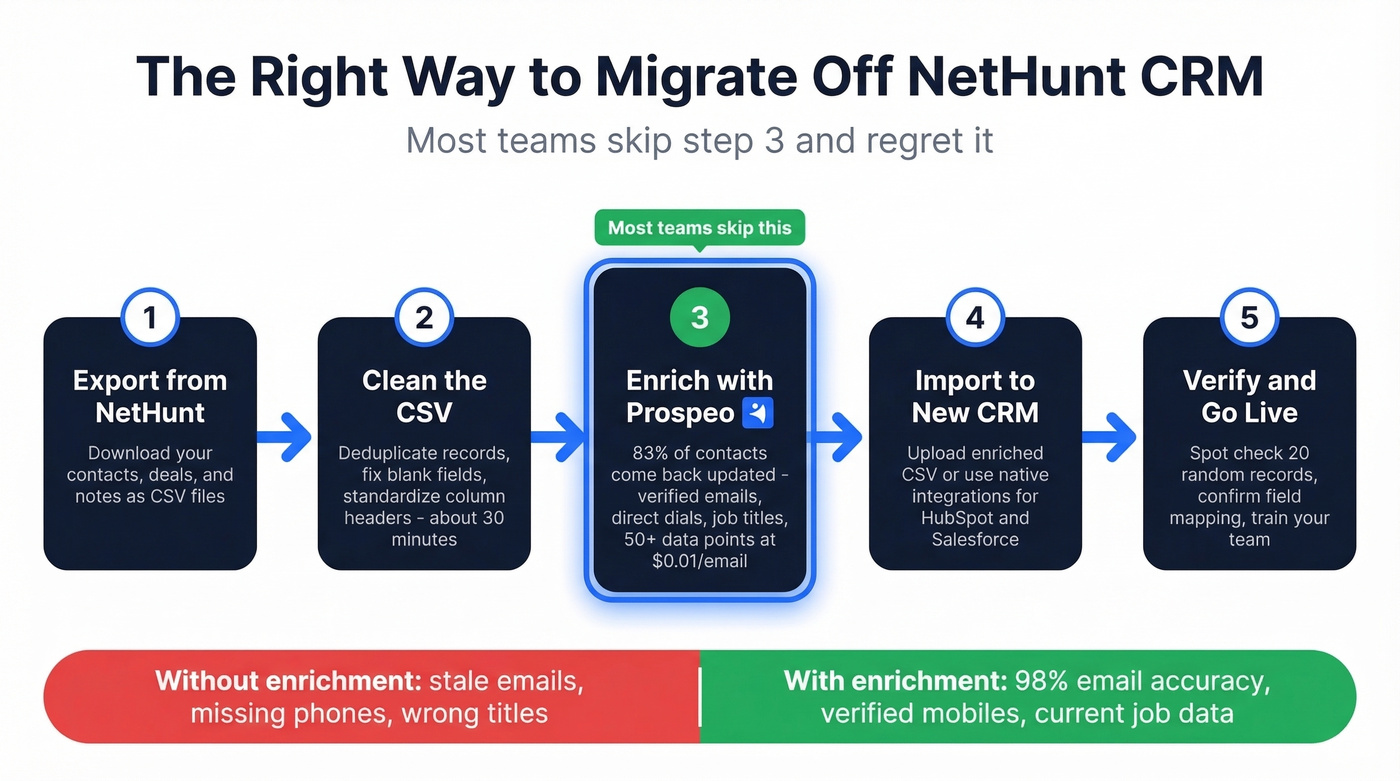
Every CRM on this list integrates with Prospeo. Push 50+ verified data points per contact straight into HubSpot, Pipedrive, or whichever tool you pick - with a 92% match rate and 7-day data refresh that keeps records current, not stale.
Your new CRM is only as good as the contacts inside it.
FAQ
Can I migrate data from NetHunt CRM?
Yes - NetHunt exports to CSV, and every alternative on this list imports CSV files. Budget about 30 minutes for cleanup: deduplication, fixing blank fields, and standardizing column headers. For extra credit, run the export through an enrichment tool to update stale emails before importing.
What's the best free alternative?
HubSpot CRM is the safest free option - unlimited users, forever free, and a massive ecosystem to grow into. Freshsales is the runner-up with a free plan for 3 users and a 21-day trial on paid tiers, giving you more evaluation time than any other tool here. If you need the most seats free, Agile CRM covers up to 10 users.
Should I clean my contacts before switching CRMs?
Absolutely. Your new CRM starts with verified, current data instead of inheriting stale records that were probably causing problems in NetHunt to begin with. An enrichment pass before import catches outdated emails, missing phone numbers, and job title changes that accumulated over months or years of neglect. It's the cheapest insurance you can buy during a migration.