

Opt-In Email List: How to Build & Maintain One in 2026
A 5,000-person opt-in email list with strong deliverability and engagement will outperform a 50,000-person list full of low-intent subscribers and bad addresses every single time. List size is vanity. List health is revenue. Here's how to build a permission-based subscriber list that actually converts - and keep it clean long after the initial signup.
What Is an Opt-In Email List?
An opt-in email list is a collection of email addresses from people who've explicitly asked to hear from you. They filled out a form, clicked a button, raised their hand. That's the distinction: permission.
Seth Godin coined "permission marketing" back in 1999, and the core idea hasn't changed. Opt-in means someone chose to receive your emails. Opt-out means you added them without asking and gave them a way to leave. The US (CAN-SPAM) technically allows opt-out models. The EU (GDPR) doesn't - you need affirmative consent. But regardless of jurisdiction, permission-based lists perform better because the people on them actually want to be there.
Opt-in is an invitation. Opt-out is an interruption with an exit door.
The Short Version
- Use permission-based opt-in. Never add someone without explicit consent. Better for deliverability, engagement, and compliance.
- Default to double opt-in. The list quality improvement is worth the friction. Nearly 40% of senders use it.
- Exit-intent popups convert extremely well. Case studies regularly show mid-to-high single-digit and even 10%+ conversion rates, while sidebars are effectively dead.
- Verify your list before every major send. Bulk verification catches invalid emails, spam traps, and catch-all domains before they tank your sender reputation.
- A clean 5K list beats a dirty 50K list. Deliverability, open rates, and revenue all favor smaller, verified lists.
Why Permission-Based Lists Outperform Everything Else
Email marketing returns $36-$40 for every $1 spent, making it the highest-ROI channel most companies have access to. The global email marketing market is projected to hit $18B by 2027 - growth driven by teams who treat their lists as assets, not afterthoughts.
Healthy opt-in list performance across industries:
| Industry | Open Rate | CTR |
|---|---|---|
| All industries (avg) | 19.21% | 2.44% |
| Government | 30.5% | 4.10% |
| Ecommerce | 15.68% | 2.01% |
| 2026 benchmark avg | 23.44% | 2.62% |
Those benchmark averages - 23.44% open rate, 2.62% CTR - represent opt-in lists. Cold or purchased lists don't come close. Slazenger saw a 49X ROI in just 8 weeks, recovering 40% of abandoned revenue and driving a 700% increase in customer acquisition from a single campaign. That kind of performance only happens when people on your list chose to be there.
One caveat: Apple Mail Privacy Protection inflates open rates by pre-loading tracking pixels. CTR and click-to-open rate are now the metrics that matter most. A good CTR sits between 2% and 5% for most industries.
Single vs. Double Opt-In
Single opt-in means someone enters their email and they're on the list. Done. Double opt-in adds a confirmation email - subscribers click a link to verify they actually want in.
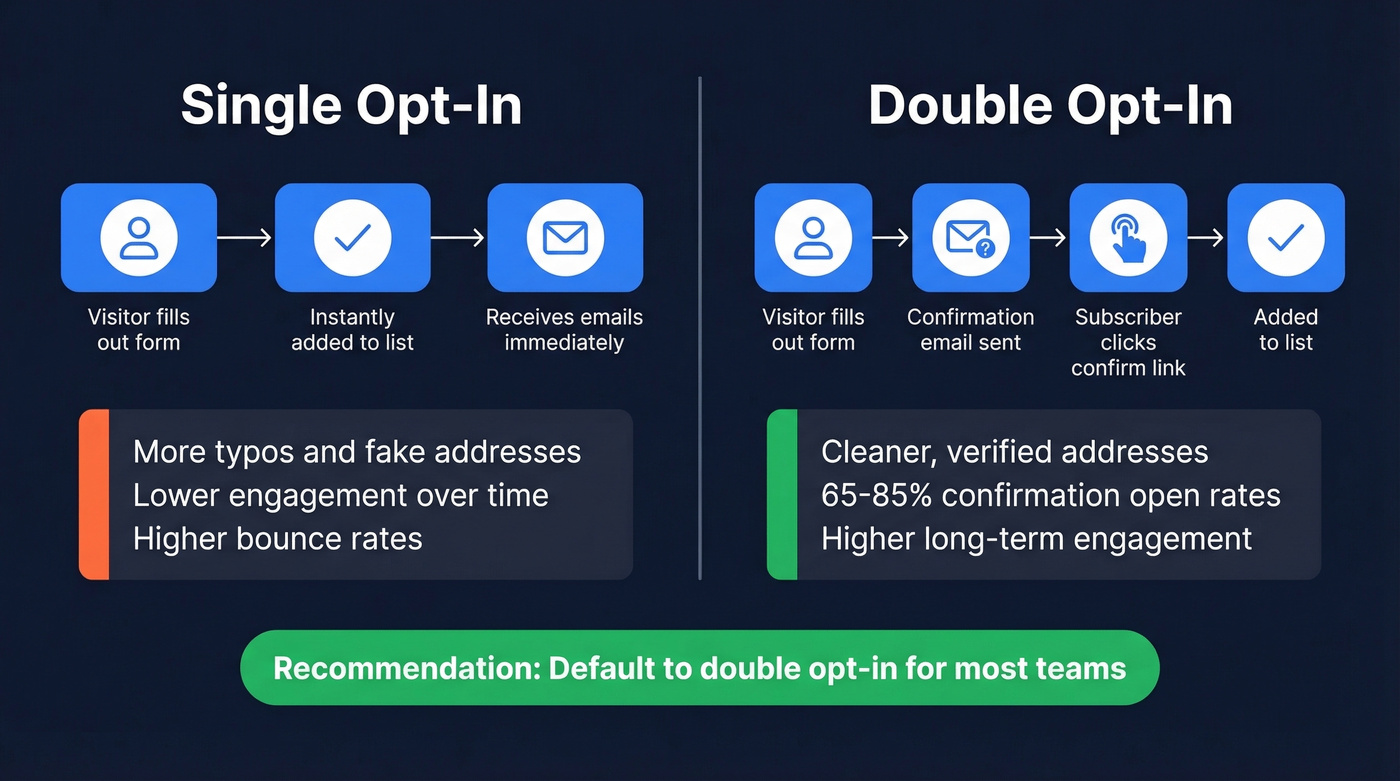
Single opt-in gets you faster list growth with no friction. But you'll collect more typos, fake addresses, and low-intent subscribers. If you're running a flash sale or time-sensitive promotion, single opt-in makes sense.
Double opt-in produces a cleaner, more engaged list. Confirmation emails often see 65-85% open rates, which tells you something about the quality of people who complete the step. The tradeoff is real - you'll lose subscribers who never confirm. But the ones who do confirm are genuinely interested.
Let's be honest: double opt-in is the safer default for most teams. If you're running single opt-in, pair it with real-time email validation at the form level, send a welcome email within 5 minutes, set up suppression rules for hard bounces, and clean your list quarterly. That combination closes most of the quality gap.
Form Types and Conversion Rates
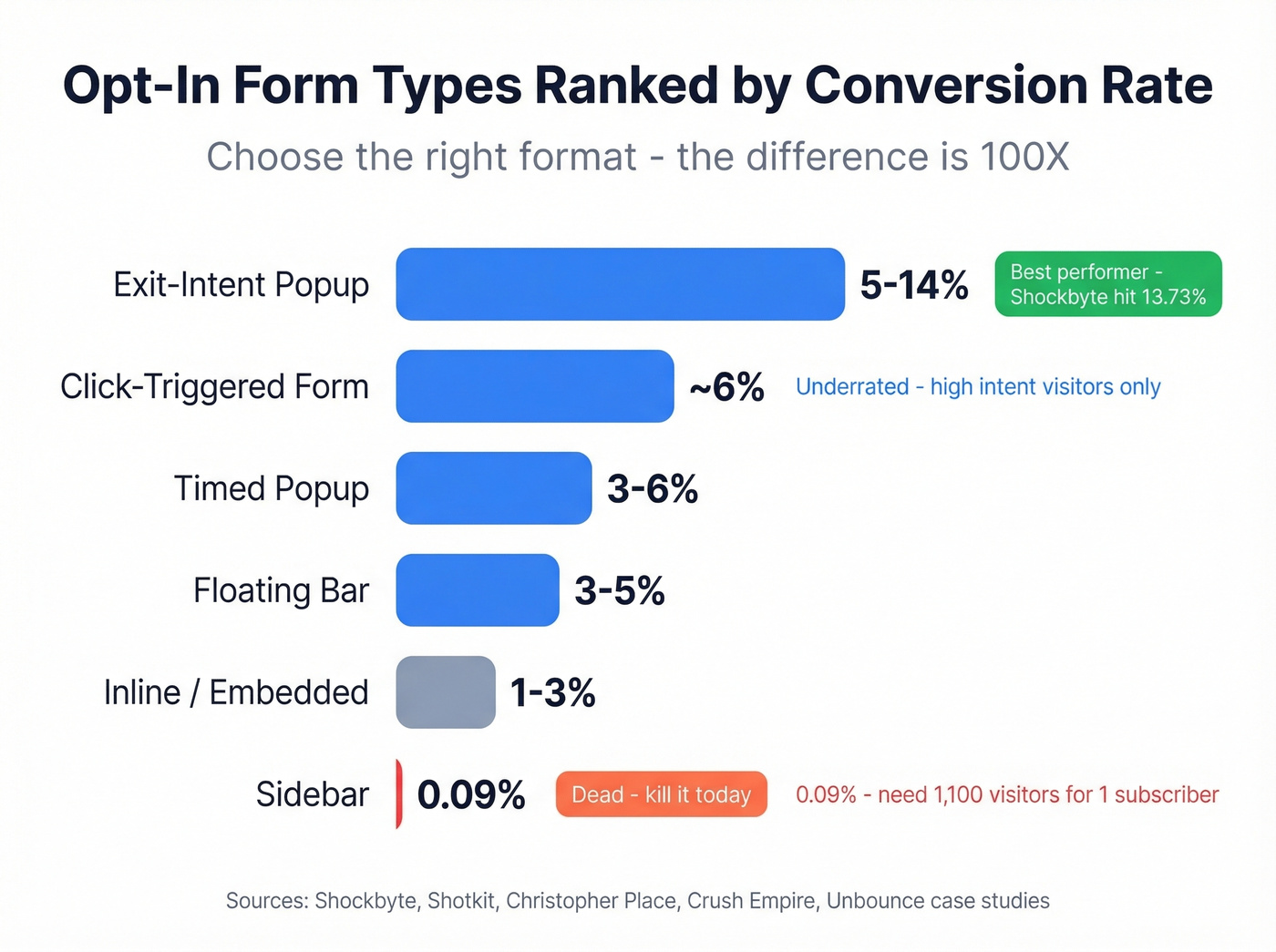
The format you choose matters more than most people realize - we're talking order-of-magnitude differences in conversion rates.
| Form Type | Avg. Conversion | Best For | Example |
|---|---|---|---|
| Exit-intent popup | 5-14% | Recovering abandoners | Shockbyte (13.73%) |
| Timed popup | 3-6% | General list building | Shotkit (5.77%) |
| Click-triggered | ~6% | High-intent upgrades | Christopher Place |
| Floating bar | 3-5% | Persistent, low-friction | Crush Empire (4.4%) |
| Inline/embedded | 1-3% | Blog content, below-fold | General |
| Sidebar | <1% | Nothing - kill it | Unbounce (0.09%) |
That sidebar number deserves attention. 0.09% means you need 1,100 visitors to get a single subscriber. Sidebars are dead. Replace yours with a floating bar or timed popup today.
Exit-intent popups are the clear winner. Shockbyte hit 13.73% conversion and reported a 52% revenue increase from their exit-intent campaign alone. These fire only when someone's about to leave, so they don't interrupt browsing.
Click-triggered forms are underrated. They only appear when someone clicks a specific link or button, meaning every person who sees the form has already expressed interest. Christopher Place hit nearly 6% conversion with this approach. We've tested click-triggered forms on content upgrade offers and the engagement quality is noticeably higher than what you get from timed popups - fewer unsubscribes in the first 30 days, better open rates on the welcome sequence.
Lead Magnets That Drive Signups
A well-optimized lead magnet converts 5-15% of visitors into subscribers. A generic PDF nobody reads won't hit those numbers.
Ecommerce brands should lean on discount codes and free shipping offers - immediate, tangible value. B2B and SaaS companies do better with checklists, templates, free tools, and mini-courses. Quiz-gated lead magnets are gaining traction too; they feel interactive rather than transactional, and completion rates tend to be higher than static downloads.
One warning about giveaways and contests: they spike your numbers fast but attract people who want the prize, not your emails. We've seen teams add 10,000 subscribers from a giveaway, then watch engagement crater because most never wanted the newsletter in the first place.
Here's the stat that should shape your post-signup strategy: 79% of marketing leads fail to convert without proper follow-up. The lead magnet gets them on the list. What you do next determines whether they buy.

You just read that a clean 5K list beats a dirty 50K list. Prospeo's 5-step verification process delivers 98% email accuracy - with spam-trap removal, honeypot filtering, and catch-all handling built in. Every record refreshes every 7 days, not every 6 weeks.
Stop cleaning bad data. Start with good data.
Best Practices for Building Your List
Start with single-field forms. Ask for the email address and nothing else at signup - every additional field reduces completions. Collect segmentation data after the opt-in, not before. Pair this with a phone mockup showing what your emails actually look like. Setting expectations builds trust and reduces early unsubscribes.
Social proof near the form makes a measurable difference. "Join 12,000 marketers" converts better than "Subscribe to our newsletter." Subscriber counts, testimonials, or brand logos all work.
Before and after copy example:
- ❌ "Subscribe to receive our curated selection of industry insights and best practices delivered to your inbox."
- ✅ "Weekly growth tactics. No fluff."
Five words beat twenty-two every time. Design mobile-first - over 60% of emails are opened on mobile, and if your form doesn't work on a phone, you're losing the majority of potential subscribers before they even see your offer. A/B test placement, copy, and timing relentlessly. The same form in a different position can convert 10X differently. Start with exit-intent, then layer in timed popups and inline forms.
What Happens After the Opt-In
The signup is the beginning, not the finish line.
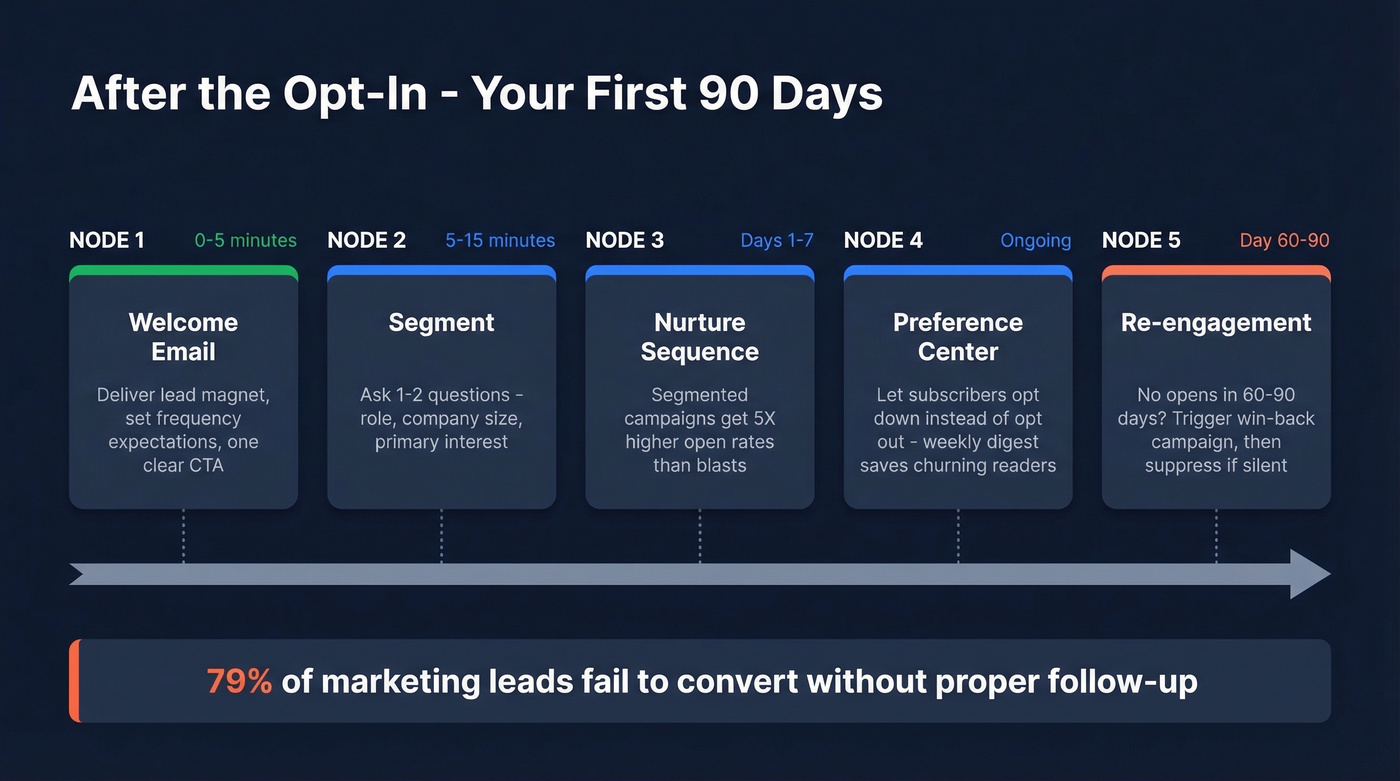
Welcome email within 5 minutes. This is your highest-engagement touchpoint. Deliver the lead magnet, set expectations for email frequency, and give them one clear next action.
Segment immediately. Segmented campaigns see 5X higher open rates than unsegmented blasts. Use the welcome flow to ask one or two segmentation questions - role, company size, primary interest.
Build a preference center. Give subscribers control over what they receive and how often. An "opt down" option - receiving a weekly digest instead of daily emails, for example - saves subscribers who'd otherwise unsubscribe entirely.
Set up re-engagement sequences. When someone hasn't opened in 60-90 days, trigger a re-engagement campaign. If they still don't engage, suppress them. A smaller, active list always beats a large, dead one.
A common mistake practitioners flag on r/emailmarketing is over-automation without personalization. Automated sequences are essential, but if every email reads like it was written by a robot for a segment, engagement drops fast. Add a personal anecdote, reference a recent event, or just write like a human being - it makes a difference.
Keeping Your List Healthy
Even a perfectly built opt-in email list degrades over time. People change jobs, switch providers, abandon inboxes, and addresses go stale. If you're not actively maintaining your list, you're sending to an increasingly dead audience.
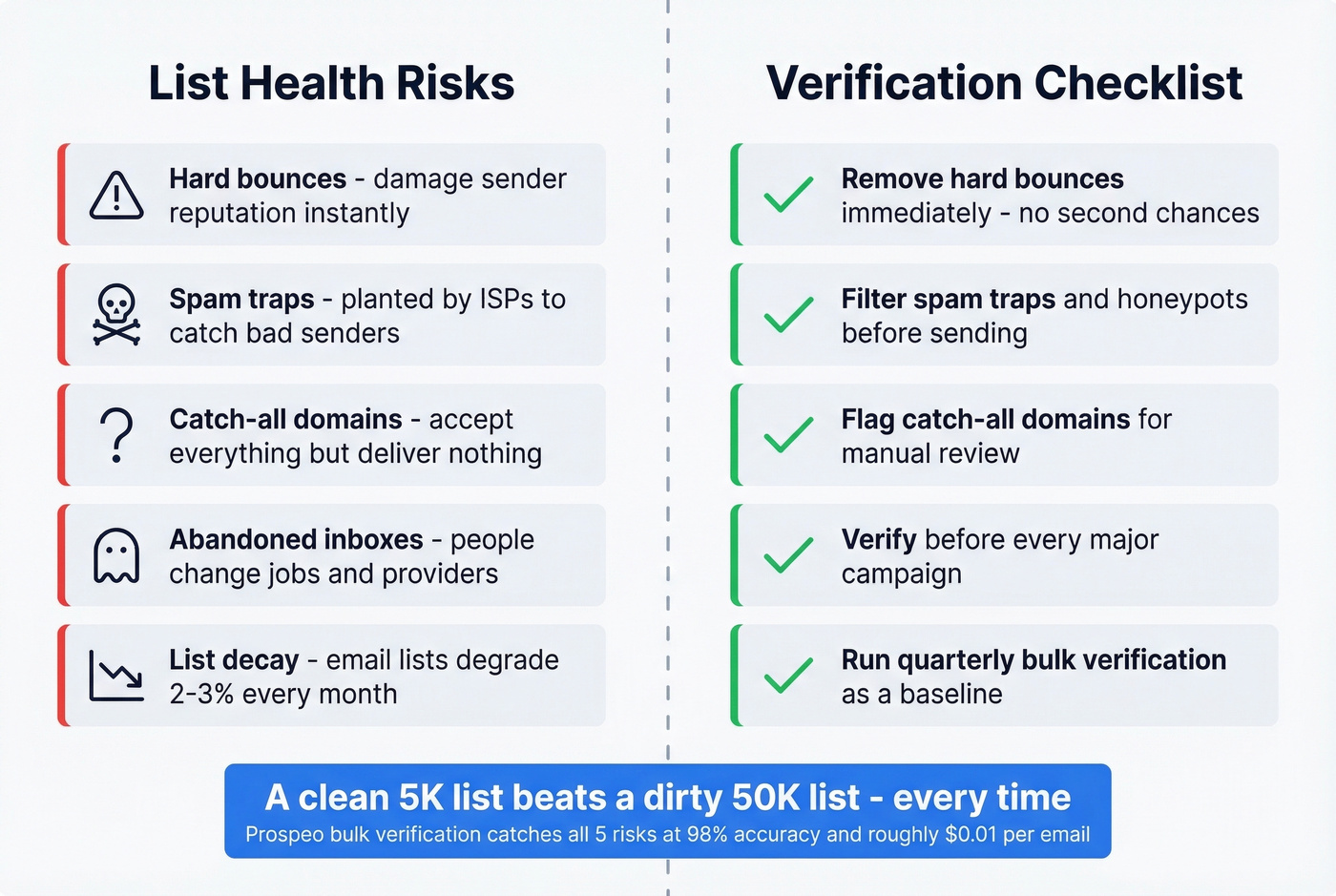
High bounce rates are one of the fastest ways to damage deliverability. Hard bounces should trigger immediate suppression - no second chances. Your sender reputation score directly determines whether your emails land in inboxes or spam folders.
Spam traps and catch-all domains are two of the biggest list-hygiene risks. If you're not filtering them out, you're gambling with your domain reputation. Tools like Prospeo's bulk email verification handle all of this - upload your list and it catches invalid addresses, spam traps, honeypots, and catch-all domains before they become bounces, at 98% accuracy and roughly $0.01 per verification. A free tier with 75 verifications per month lets you test it without commitment. Quarterly verification is a solid baseline, and you should also verify before any major campaign.
79% of leads fail without proper follow-up - and follow-up fails when emails bounce. Prospeo gives you 143M+ verified emails at $0.01 each, so every address on your list actually reaches a real inbox.
Protect your sender reputation before you hit send.
Gray Areas: When Consent Isn't Clear
Not every email address arrives through a clean opt-in form. Business cards collected at trade shows, customer email addresses from purchases, lists inherited through a company acquisition - these are gray areas that trip up even experienced marketers.
The safe rule: if someone didn't explicitly opt in to receive marketing emails from you, they haven't opted in. A purchase relationship doesn't equal newsletter consent. A business card exchange doesn't equal permission to add someone to a drip campaign.
If you've inherited a list through an M&A deal, send a re-permission campaign before you do anything else. Ask people to confirm they want to hear from the new entity. You'll lose a chunk of the list, but the people who remain are actually yours. One team we spoke with lost 60% of an acquired list during re-permissioning - and their engagement metrics tripled within two months because the remaining 40% were genuinely interested.
Compliance and Legal Requirements
The compliance landscape has gotten stricter. CAN-SPAM violations cost up to $53,088 per email. GDPR fines reach EUR 20M or 4% of global annual turnover.
CAN-SPAM requires: no false headers, no deceptive subject lines, ad identification, a valid physical address, a clear opt-out mechanism, opt-outs honored within 10 business days, and accountability for third parties sending on your behalf. GDPR goes further - you need affirmative consent before sending.
Gmail and Yahoo's bulk sender requirements, enforced since early 2024, added another layer. If you're sending 5,000+ messages per day to Gmail addresses, you must authenticate with SPF, DKIM, and DMARC, offer one-click unsubscribe, and stay below their spam complaint threshold. Gmail's earlier authentication requirement had already produced a 75% drop in unauthenticated messages - the bulk sender rules built on that foundation.
Mistakes That Kill Your List
Buying email lists is lighting money on fire. Purchased lists have terrible engagement, trigger spam traps, and violate most ESP terms of service. Under GDPR, it's potentially illegal. The consensus on r/sales and r/emailmarketing is unanimous: don't do it. Senders who've torched their domain reputation with a single purchased list are a recurring cautionary tale.
Over-sending causes more damage than most teams realize. Email fatigue leads to unsubscribes and spam complaints, both of which erode your sender reputation. What's the right cadence? There isn't a universal answer, but if your unsubscribe rate spikes after a send, you're sending too often.
Blasting without segmentation is lazy and it shows. Segment by behavior, interest, or lifecycle stage at minimum.
Ignoring mobile - tiny text, broken layouts, un-tappable CTAs - still plagues most email programs. And over-automating without personalizing turns your carefully built list into a disengaged audience. Automation is a tool, not a strategy.
Skip the "verify later" mindset. A 5% bounce rate doesn't have to happen. Run your list through a verification tool before every major campaign and catch the dead addresses before they damage your deliverability. This is the cheapest insurance you'll ever buy for your sender reputation.
Here's our hot take: most teams don't have a list-building problem. They have a list-maintenance problem. The obsession with growing subscriber counts while ignoring verification, segmentation, and re-engagement is why the average email list has more dead weight than active buyers. Stop optimizing for size. Optimize for signal.
FAQ
What's the difference between opt-in and double opt-in?
Opt-in is a one-step signup - enter your email and you're on the list. Double opt-in adds a confirmation email requiring a verification click, filtering out typos, bots, and low-intent signups. Nearly 40% of senders use double opt-in because it produces measurably higher engagement rates.
Is buying an email list illegal?
Under CAN-SPAM, buying lists is legal but almost always counterproductive. Under GDPR, it violates consent requirements and can trigger fines up to EUR 20M. Most ESPs like Mailchimp and ActiveCampaign prohibit purchased lists in their terms of service.
What's a good opt-in form conversion rate?
Exit-intent popups typically convert at 5-14%, timed popups at 3-6%, and sidebars below 1%. If your overall form conversion exceeds 3%, you're outperforming most sites. Start with exit-intent popups for the fastest gains.
How do I verify my opt-in email list for free?
Upload a CSV to a bulk verification tool that flags invalid emails, spam traps, and catch-all domains. Prospeo offers 75 free verifications per month at 98% accuracy - enough to test the process before committing to a paid plan.
What does opt-in consent vs opt-out consent mean for my strategy?
Opt-in consent means subscribers actively agree to receive emails before you send anything; opt-out means you add contacts and let them unsubscribe later. GDPR requires opt-in, CAN-SPAM permits opt-out, but opt-in lists consistently deliver higher engagement and fewer spam complaints regardless of jurisdiction.