

How to Validate Email Addresses: The Practitioner's Guide
Nearly 1 in 10 emails entered on webforms are invalid. That's not a rounding error - it's a pipeline leak. When 64.6% of businesses say deliverability problems have directly hit revenue or retention, the gap between "we have a list" and "we have a list that works" is where most outbound teams quietly bleed money.
Before you can validate email addresses at scale, you need to understand what's actually happening under the hood - and which tools are worth paying for.
Quick Version
Email validation runs five layers: syntax check, disposable detection, DNS/MX lookup, SMTP handshake, and catch-all classification. Two rules matter more than anything else: verify at capture AND before every campaign. Lists decay faster than most teams realize.
Here's the thing: the best validation strategy is never needing one. If you source pre-verified data, you skip the entire cleaning step. Most teams bolt verification onto a broken sourcing process instead of fixing the source.
What Does Email Validation Actually Mean?
Email validation confirms that an address is correctly formatted, attached to a real domain, and capable of receiving mail. It's the difference between sending into a void and sending to an inbox.
You'll see "validation" and "verification" used interchangeably. Technically, they're different: validation focuses on syntax and formatting, while verification goes deeper into deliverability checks like DNS/MX and SMTP mailbox probing. In practice, every decent tool does both, and the industry has stopped splitting hairs about the terminology.
| Validation | API Verification (Full-Stack) | |
|---|---|---|
| Checks | Format, syntax, typos | Domain, mailbox, deliverability |
| Speed | Instant, under 1ms | 50-200ms per address |
| Catches | Obvious errors | Dead mailboxes, spam traps |

Why Deliverability Depends on It
Deliverability got meaningfully harder in 2025, and early 2026 signals suggest no relief. Office 365 inbox placement dropped 26.73 percentage points year-over-year. Outlook and Hotmail fell 22.56 points. If you're selling into enterprises running Microsoft infrastructure - and most of us are - your emails are fighting upstream.
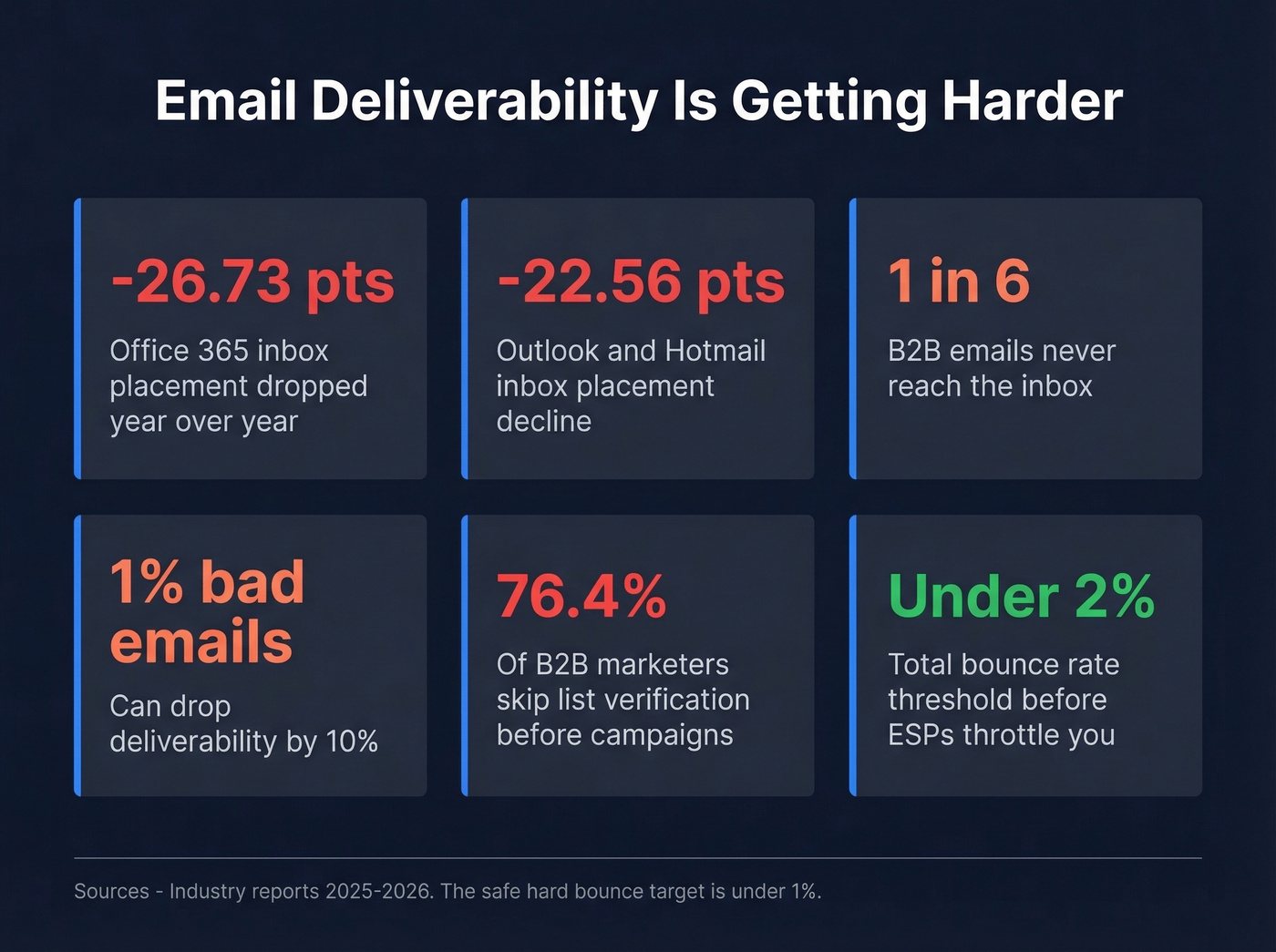
By some estimates, 1 in 6 B2B emails never reaches the inbox. Even a 1% increase in bad emails can drop deliverability by 10%. Yet only 23.6% of B2B marketers verify their lists before campaigns. Three-quarters of outbound teams are gambling with their sender reputation every time they hit send. The accepted threshold is 2% total bounces, with top performers targeting hard bounces under 1%. Exceed that and ESPs start throttling you.
DMARC enforcement sits at just 7.6% of domains, meaning the authentication layer most senders rely on is barely enforced. The result is a noisy, low-trust environment where clean data is one of the few levers you actually control.
The 5-Layer Verification Process
Every serious email validation tool runs some version of this pipeline. Understanding the layers helps you evaluate which tools are doing real work versus just running a regex and calling it a day.
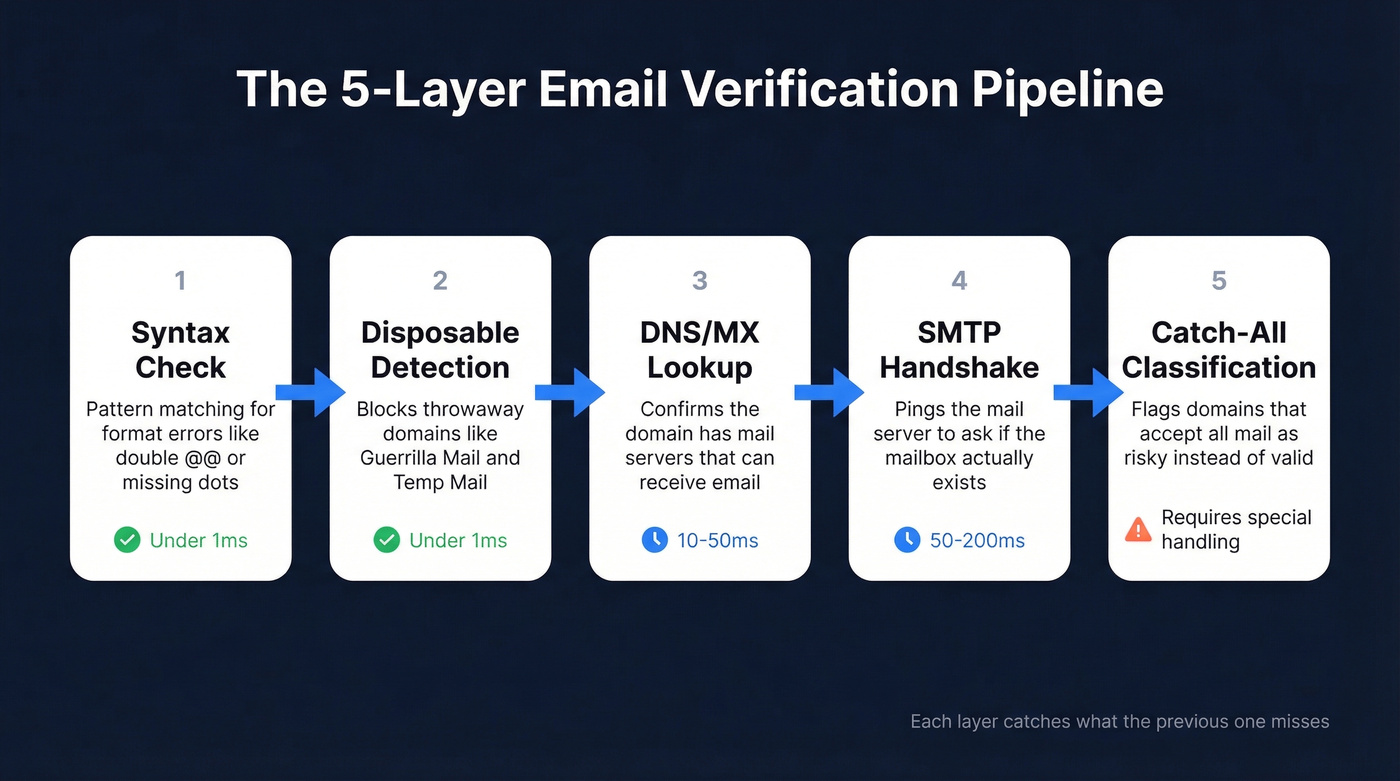
Layer 1: syntax check and Format Check
The first layer is pure pattern matching. A valid email follows rules: the local part - everything before the @ - allows alphanumerics plus a handful of special characters. No consecutive dots. No dot at the start or end. The domain part allows alphanumerics and hyphens, but not at the beginning or end of a label.
This catches obvious typos like john@@company.com, jane.company.com, and trailing spaces. Fast, essentially free, and necessary - but nowhere near sufficient.
Layer 2: Disposable Email Detection
Disposable email services like Guerrilla Mail or Temp Mail generate addresses that self-destruct. They pass syntax checks perfectly. Detection works by maintaining blocklists of known disposable domains and flagging matches. This layer matters most for inbound forms and freemium signups.
Layer 3: DNS and MX Record Lookup
This is where validation starts talking to the internet. An MX record tells you which server handles email for a domain. No MX record, no email delivery. You can run this yourself:
[nslookup -q=mx company.com](https://learn.microsoft.com/en-us/windows-server/administration/windows-commands/nslookup)
The response shows mail servers ranked by priority. A lower preference value means higher priority. If the query returns nothing, that domain can't receive email. Period.
Layer 4: SMTP Handshake
The most technically involved layer. Your validation tool opens a connection to the recipient's mail server and initiates the SMTP protocol - asking "would you accept mail for this address?" - without actually sending anything.
- 250: Accepted (mailbox exists, or the server says it does)
- 550: Invalid recipient (safe to suppress permanently)
- 450: Temporary error or greylisting (retry later, don't suppress)
This layer catches dead mailboxes, departed employees, and deactivated accounts. It's also the layer that breaks on catch-all domains.
Layer 5: Catch-All Classification
When a domain accepts all incoming mail regardless of whether the specific mailbox exists, SMTP verification can't distinguish real from fake. The server returns 250 for everything. Good tools flag these as "catch-all" or "risky" rather than "valid," which is critical for downstream decision-making.
Regex vs. API - When to Use Which
Regex validation runs in under 1ms. It's perfect for real-time form validation - giving users instant feedback when they mistype an address. Here's a simplified JavaScript pattern:
const emailRegex = /^[^\s@]+@[^\s@]+\.[^\s@]+$/;
emailRegex.test("user@example.com"); // true
This is intentionally basic. Production-grade email regex gets absurdly complex - the full RFC 5322 pattern runs hundreds of characters. For front-end validation, simple is better. Catch the obvious mistakes and let an API handle the rest.
API-based verification runs the full stack in roughly 50-200ms. That's too slow for keystroke-level UX feedback but perfect for background processing. The smart play: use regex on the front end for instant UX, then fire an API call in the background for deliverability assurance. You get both speed and accuracy.

You just read about the 5-layer verification process. Prospeo runs all five - including catch-all handling, spam-trap removal, and honeypot filtering - before you ever see an email. 98% accuracy. Under 4% bounce rates across 15,000+ companies. The best validation strategy is never needing one.
Stop cleaning bad lists. Start with data that's already clean.
Handling Catch-All Domains
Let's be honest - catch-all domains are the single biggest headache in email verification. An estimated 30-40% of B2B email addresses sit on catch-all domains, and that number skews higher in enterprise environments running Microsoft 365, Google Workspace, or Secure Email Gateways like Proofpoint and Mimecast.
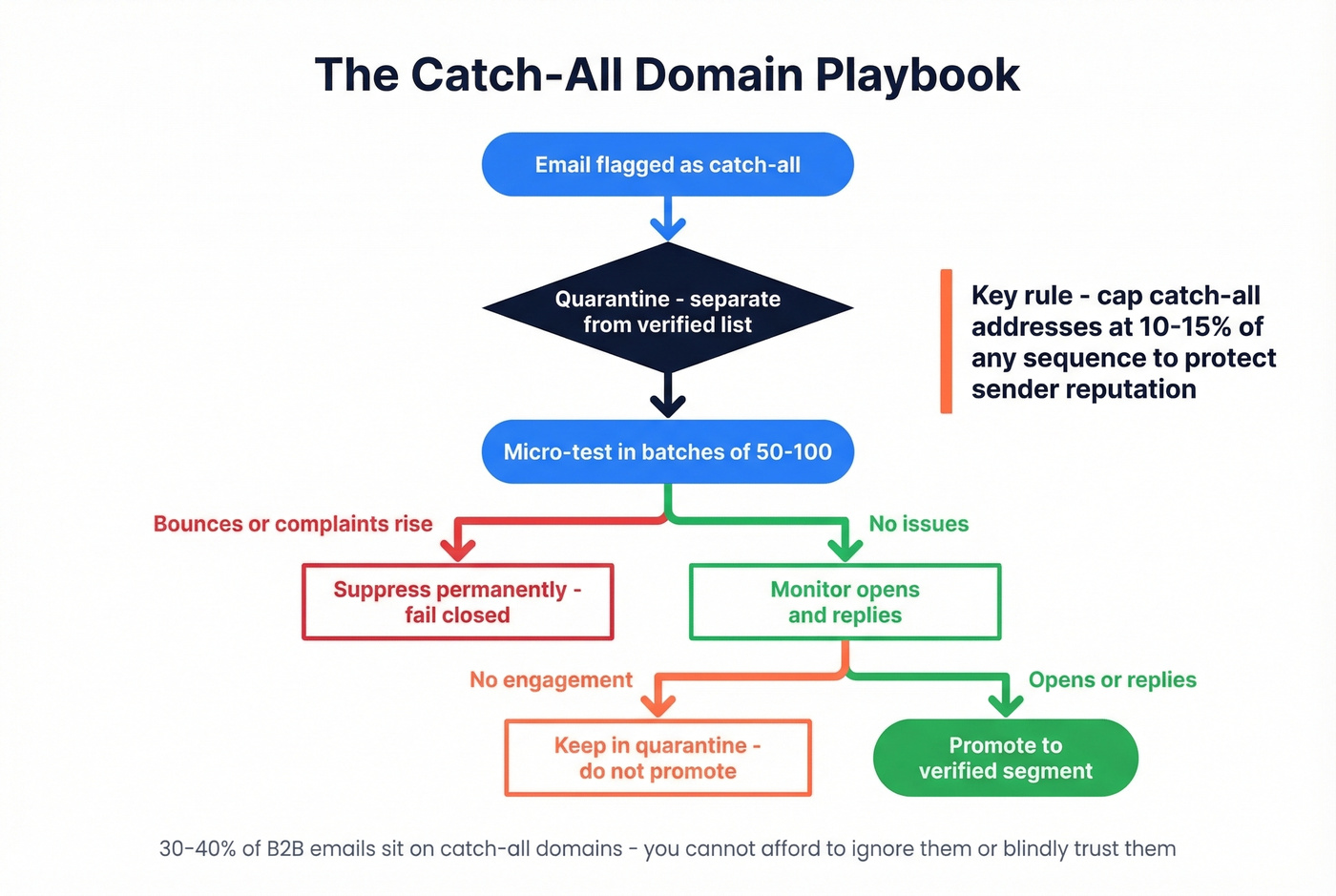
The problem is straightforward: SMTP handshakes return 250 for every address at a catch-all domain, whether the mailbox is real or not. SEGs can block verification attempts entirely via greylisting and rate limiting, producing "unknown" results even for valid mailboxes.
Here's the playbook we've seen work for outbound teams:
- Quarantine by default. Don't send to catch-all addresses alongside your verified list. Separate them.
- Micro-test in small batches. Send to 50-100 catch-all addresses per sequence and monitor bounces and complaints.
- Cap catch-all share at 10-15% per sequence. Higher than that and you're risking your sender reputation on unknowns.
- Promote on engagement. If a catch-all address opens or replies, move it to your verified segment. If it bounces, suppress permanently.
- Fail closed. If bounce rates or complaints rise, stop sending to catch-all addresses immediately.
The consensus on r/sales and r/coldemail is that most teams either ignore catch-all entirely (risky) or refuse to send to it at all (wasteful). The micro-test approach threads the needle, and it's what we recommend.
When to Validate: 5 Triggers
At capture. Check addresses in real-time on forms and signups. Blocking bad data at the door is 10x cheaper than cleaning it later.
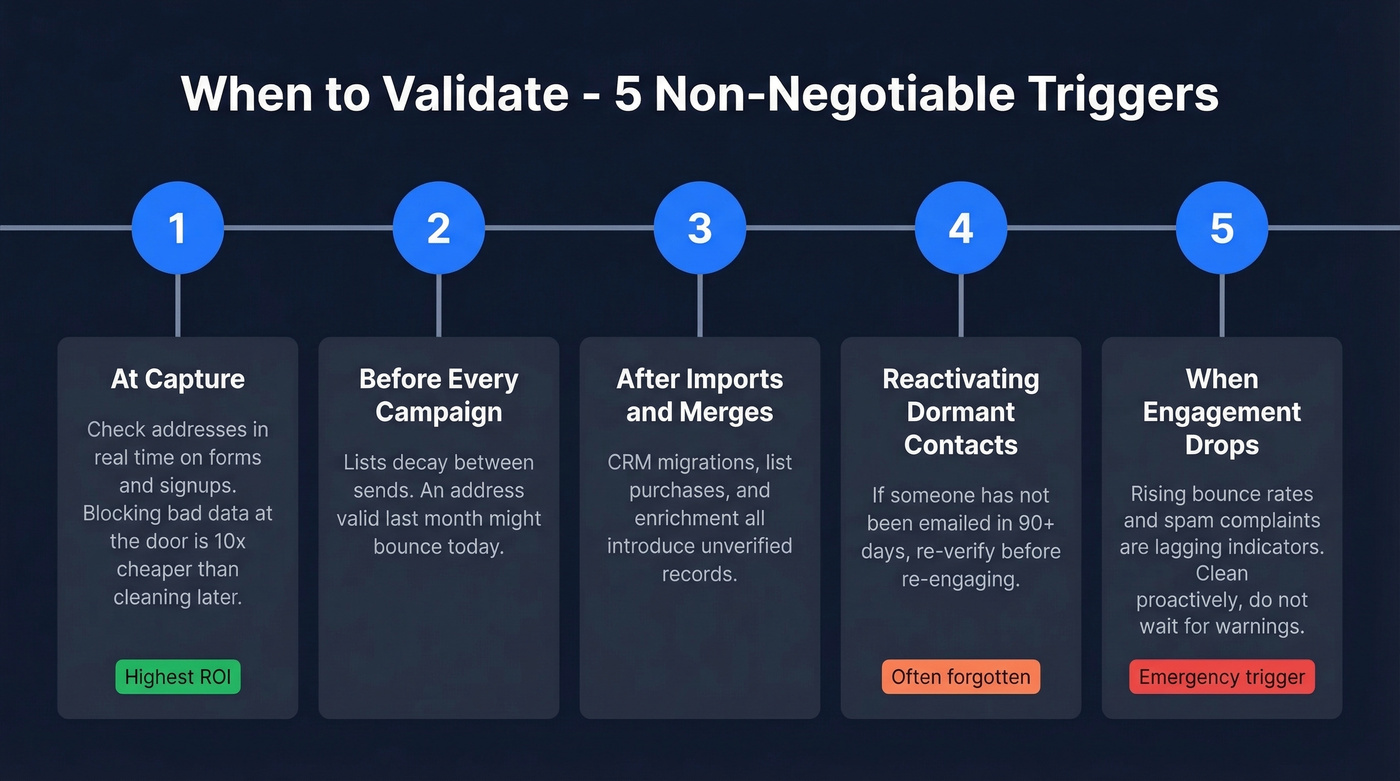
Before every campaign. Lists decay between sends. An address that was valid last month isn't guaranteed today.
After imports and merges. CRM migrations, list purchases, and data enrichment all introduce unverified records.
When reactivating dormant contacts. If someone hasn't been emailed in 90+ days, re-verify before re-engaging.
When engagement drops or your ESP flags you. Rising bounce rates and spam complaints are lagging indicators. Don't wait for the warning - clean proactively.
Best Email Validation Tools
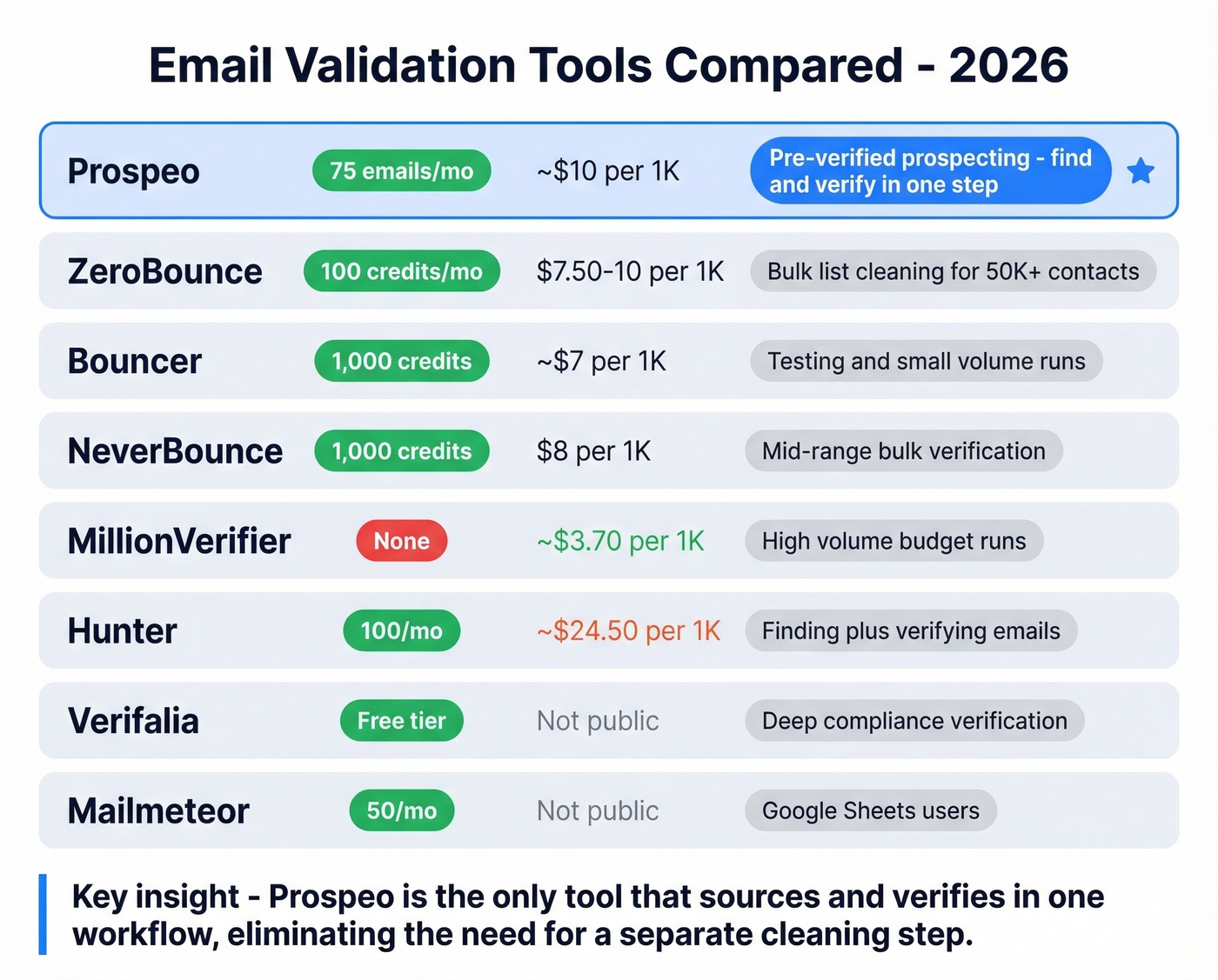
| Tool | Free Tier | Cost per 1K | Best For |
|---|---|---|---|
| Prospeo | 75 emails/mo | ~$10 | Pre-verified prospecting |
| ZeroBounce | 100 credits/mo | $7.50-10 | Bulk list cleaning |
| Bouncer | 1,000 credits | ~$7 | Testing and small volume |
| NeverBounce | 1,000 credits | $8 | Mid-range bulk verification |
| MillionVerifier | None | ~$3.70 | High-volume budget runs |
| Hunter | 100/mo | ~$24.50 | Finding + verifying |
| Verifalia | Free tier | Not public | Deep compliance verification |
| Mailmeteor | 50/mo | Not public | Google Sheets users |
Prospeo
Prospeo isn't a standalone verifier - it's a B2B data platform where verification is built into the sourcing process. Instead of finding emails from one tool and then paying a second tool to verify them, Prospeo's 143M+ emails are pre-verified through a proprietary 5-step process that includes catch-all handling, spam-trap removal, and honeypot filtering.
The 98% email accuracy rate holds up because of a 7-day data refresh cycle. Most verification tools check an address once and hand you a result. Prospeo continuously re-verifies its database, so the data you pull today was validated within the last week - not the last six weeks. At roughly $0.01 per email with 75 free emails per month, it's the most cost-effective path when you're sourcing and verifying in the same workflow. Pair it with Instantly, Lemlist, or Smartlead via native integrations and you've got a clean pipeline from search to sequence.
Real-world proof: Meritt went from a 35% bounce rate to under 4% after switching. That kind of delta only happens when catch-all handling actually works.

ZeroBounce
Use this if: You've got 50K+ contacts sitting in your CRM and need a bulk cleaning pass before a major campaign.
Skip this if: You're sourcing new contacts. ZeroBounce verifies, it doesn't find. You'll still need a data provider upstream.
ZeroBounce is the go-to for teams that already have large lists. They report 99.6% accuracy, which is aggressive but tracks with what we've seen on standard domains. Catch-all and enterprise domains are where every tool's accuracy drops, ZeroBounce included. Pricing runs about $7.50-10 per 1,000 verifications depending on volume, with 100 free credits to test.
Bouncer
Bouncer offers 1,000 free credits - generous for a trial. At roughly $7 per 1,000 after that, it's competitively priced and reliable for small-to-mid volume verification. We haven't tested Bouncer deeply enough on enterprise catch-all domains to recommend it confidently for that use case, but for standard verification of marketing lists and outbound sequences, it's solid. A good choice for teams that want to test before committing budget.
NeverBounce
NeverBounce sits in the reliable middle of the market. $8 per 1,000 verifications, 1,000 free credits, and an API that integrates cleanly with most marketing automation platforms. It doesn't try to be flashy - it just verifies lists and returns results. For teams running regular list hygiene on 10K-50K contact databases, NeverBounce handles the job without surprises.
MillionVerifier
The budget pick. At roughly $3.70 per 1,000 verifications, MillionVerifier is less than half the cost of most competitors. If you're running high-volume cold outbound and need to check 100K+ addresses monthly, the savings add up fast. Accuracy is good on standard domains, though we've seen mixed results on catch-all heavy lists. No free tier, so you're paying from day one. DeBounce is another budget option at $1.50-2 per 1,000 if you want to compare.
Hunter, Verifalia, and Mailmeteor
Hunter charges roughly $24.50 per 1,000 verifications - expensive if verification is all you need. Where Hunter makes sense is as a combined email finder and verifier for small teams. The 100 free verifications per month are enough for light prospecting. Skip it for bulk cleaning.
Verifalia offers enterprise-grade verification with a 30+ step process. Free tier available for testing. Best for compliance-heavy industries that need audit trails and deep verification documentation.
Mailmeteor is a Google Sheets add-on that lets non-technical users verify emails without leaving their spreadsheet. 50 free verifications per month. If your "CRM" is a shared Google Sheet - and for many early-stage teams, it is - Mailmeteor is the path of least resistance.
Catch-all domains break most verification tools. Prospeo's proprietary infrastructure handles catch-all classification natively - no quarantine batches, no guesswork. 143M+ verified emails refreshed every 7 days, not the 6-week industry average. At $0.01 per email, fixing your source costs less than cleaning your list.
Kill the bounce rate problem at the source for a penny per email.
Best Practices for List Hygiene
Validate email addresses at capture AND before send - these are two separate moments, and skipping either one costs you. Use regex for UX and APIs for deliverability, giving you both speed and accuracy in a single workflow.
Clean lists monthly for active outbound. Quarterly or bi-annually for marketing lists. Industry estimates put address decay at roughly 2-3% per month, which means a list that's six months old has lost 12-18% of its value. Implement double opt-in for inbound - it's the single most effective way to keep garbage out of your database. Double opt-in also proves the subscriber actually owns the address, which ESPs reward with better placement.
Stay compliant. GDPR and CAN-SPAM aren't optional. Verification doesn't replace consent. Monitor bounce rates as a leading indicator - if bounces creep above 2%, don't wait for your ESP to flag you. Clean immediately. And per RFC 5321, the SMTP spec that governs all of this, understanding the protocol basics helps you troubleshoot when things break.
If you're running cold outbound, pair list hygiene with a broader email deliverability plan, plus ongoing work to improve sender reputation as you scale volume.
FAQ
How do I validate an email address?
Run it through a 5-layer process: syntax check, disposable detection, DNS/MX lookup, SMTP handshake, and catch-all classification. Use regex for the syntax layer and an API-based tool for the rest. Regex alone only catches formatting errors - always pair it with a full-stack API for production use.
How accurate are email validation tools?
Top tools hit 98-99.6% accuracy on standard domains. Accuracy drops significantly on catch-all domains, where 30-40% of B2B addresses sit. The real differentiator isn't headline accuracy - it's how a tool handles catch-all and enterprise domains where SMTP verification breaks down.
Can I verify emails for free?
Yes. Bouncer gives 1,000 free credits, ZeroBounce offers 100, and Prospeo provides 75 free verified emails per month with full catch-all handling included. These free tiers are enough for testing and light prospecting but won't cover production-scale list cleaning.
How often should I clean my email list?
Monthly for active outbound sequences, quarterly for marketing lists. Always re-verify before campaigns, after imports, and when bounce rates rise above 2%. Addresses decay at roughly 2-3% per month - a six-month-old list has lost 12-18% of its deliverable contacts.
What is a catch-all email domain?
A domain configured to accept all incoming mail regardless of whether the specific mailbox exists. SMTP verification returns "valid" for every address on these domains, so tools flag them as "unknown" or "risky" instead. Cap catch-all addresses at 10-15% of any outbound sequence and micro-test in small batches before scaling.