

Outlook Email Limits: The Complete Reference for 2026
It's 2 PM on a Tuesday. Your SDR just blasted a cold outreach sequence to 1,000 new prospects through Outlook - and now the account's locked. No grace period, no warning. Just a 24-hour sending block because they hit the non-relationship recipient cap.
Microsoft's own documentation scatters these limits across multiple pages, mixes consumer and business tiers, and leaves the free-tier numbers unpublished entirely. We've pulled everything into one reference so you don't have to piece it together yourself.
Every Sending Cap at a Glance
Bookmark this table. It's the one we keep coming back to whenever a client asks why their outbound just stopped working.
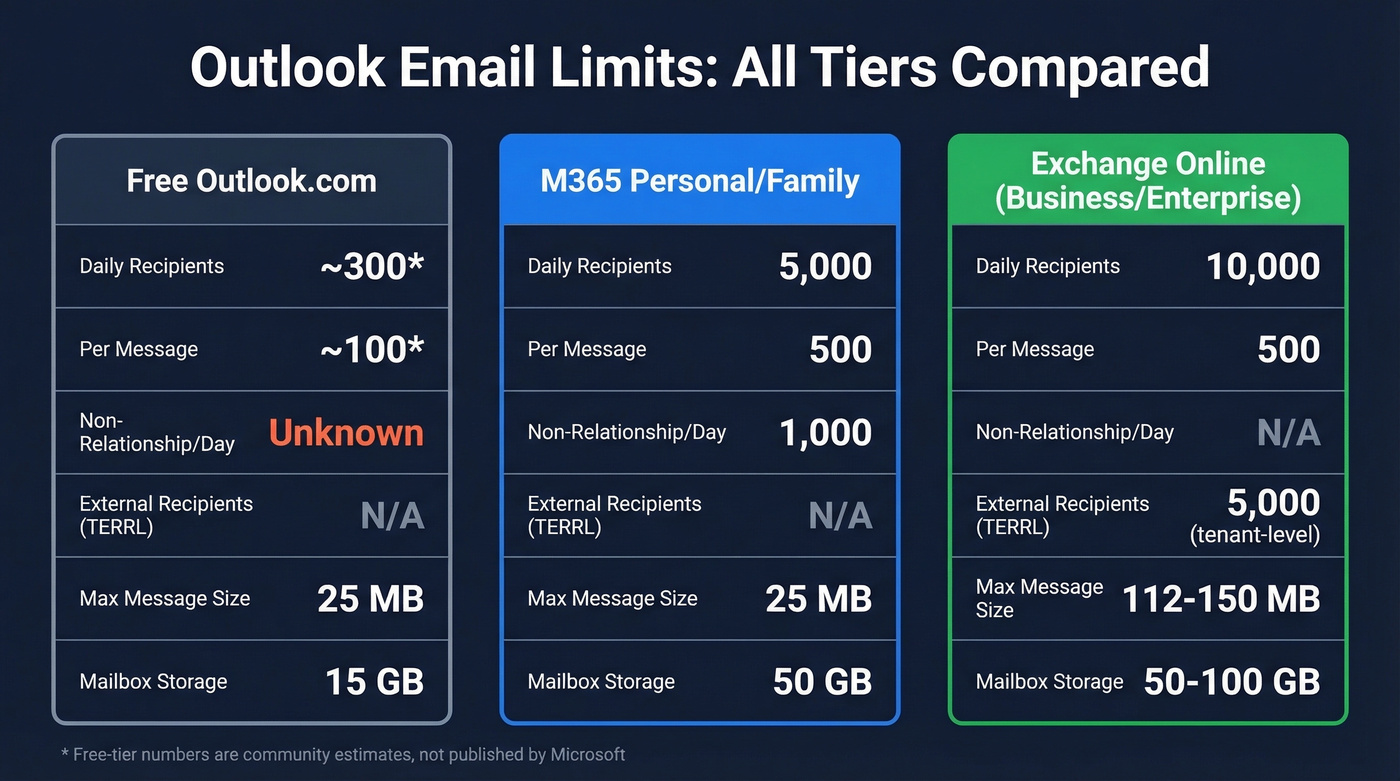
| Limit | Free Outlook.com | Microsoft 365 Personal/Family | Exchange Online (Business/Enterprise) |
|---|---|---|---|
| Daily recipients | ~300* | 5,000 | 10,000 |
| Per-message recipients | ~100* | 500 | 500 |
| Non-relationship/day | Unknown | 1,000 | N/A** |
| External recipients/day (TERRL) | N/A | N/A | 5,000 (tenant-level) |
| Max message size | 25 MB | 25 MB | ~112 MB (external) / 150 MB (internal) |
| Attachment limit | 25 MB | 25 MB | Varies (see below) |
| Mailbox storage | 15 GB | 50 GB | 50-100 GB |
\Free-tier numbers are estimates based on community reporting. Microsoft doesn't publish them.*
\*Exchange Online doesn't use the "non-relationship" concept; external sending is governed by recipient-rate limits and the tenant-level TERRL instead.*
The Exchange Online column applies to Microsoft 365 Business, Enterprise (E3/E5), and standalone Exchange Online plans.
Outlook.com Caps (Free and Paid)
If you're using an @outlook.com, @hotmail.com, or @live.com address, your limits depend on whether you pay for Microsoft 365.
Microsoft 365 Personal/Family subscribers get the published numbers: 5,000 daily recipients, 500 per message, and 1,000 non-relationship recipients per day. That's generous for personal use, but the non-relationship cap is the one that bites outbound teams. You can email 5,000 people you've contacted before, but only 1,000 brand-new contacts per day.
Here's the thing: a "non-relationship recipient" is anyone you've never emailed before. Microsoft tracks this per mailbox. Once you've sent someone a message, they're no longer non-relationship - but that first touch counts against your 1,000/day cap.
Free-tier accounts get significantly less. Community testing puts them around ~300 recipients per day and ~100 per message. Brand-new free accounts get throttled even harder - expect ~10 to 100 emails per day until the account builds sending history. Enabling Microsoft Authenticator helps build account trust faster and can speed up the ramp.
Exchange Online and the Daily Sending Limit
This is where most business users live. If your company runs Microsoft 365 Business Basic, Standard, E3, E5, or a standalone Exchange Online plan, here are your numbers:
| Limit | Value |
|---|---|
| Daily recipients | 10,000 |
| Per-message recipients | 500 |
| Messages per minute | 30 |
| External recipients/day (TERRL) | 5,000 (tenant-level) |
The 10,000 daily recipient limit covers both internal and external recipients. Send a company-wide email to 2,000 employees? That's 2,000 off your daily total. This catches people off guard more than almost anything else we see.
The TERRL - Tenant External Recipient Rate Limit - caps you at 5,000 external recipients per day across the entire tenant. Not per mailbox. Per tenant. So if five reps each send 1,000 external emails, you've hit the wall for everyone.
Then there's the 30-messages-per-minute cap, which is separate from the daily limit and primarily affects automated sends. Mail merge, sequencing tools, and Power Automate flows can all trigger it even if you're nowhere near your daily recipient ceiling.
Shared mailboxes follow the sending principal's limits. If you Send As from a shared mailbox, the rate limit applies to the sending user's mailbox, not the shared one.

When Outlook gives you 10,000 daily recipients and a rolling 24-hour lockout, bad data is unforgivable. Every bounce wastes a slot you can't get back. Prospeo's 98% email accuracy and 5-step verification mean your sends reach real inboxes - not spam traps, honeypots, or dead addresses.
Stop burning Outlook sends on unverified emails. Get data that connects.
Attachment and Message Size Caps
This is where Outlook gets genuinely confusing, because the limit changes depending on how you're sending and which account type you're using.
| Client/Method | Max Attachment / Message Size |
|---|---|
| Outlook desktop (POP3/IMAP) | 20 MB (default client limit) |
| Outlook desktop (Exchange Server) | 10 MB (common default; admin-controlled) |
| Outlook on the web (external) | ~112 MB max message size |
| M365-to-M365 (internal) | 150 MB |
The Outlook desktop client enforces a 20 MB default for internet email accounts using POP3 and IMAP. Exchange Server accounts commonly default to 10 MB, controlled by admin transport settings.
And here's the part people miss: email encoding adds roughly 33% overhead. A 15 MB file becomes ~20 MB after MIME encoding, so you'll hit the wall sooner than you'd expect. Power users can modify the desktop client limit via the MaximumAttachmentSize registry key (DWORD value), but your server or provider limits still apply. The real workaround? OneDrive sharing links, which handle files up to 2 GB and keep your message size tiny.
What Happens When You Hit the Wall
No grace period. No warning email. Outlook blocks outbound messages until quota becomes available again.
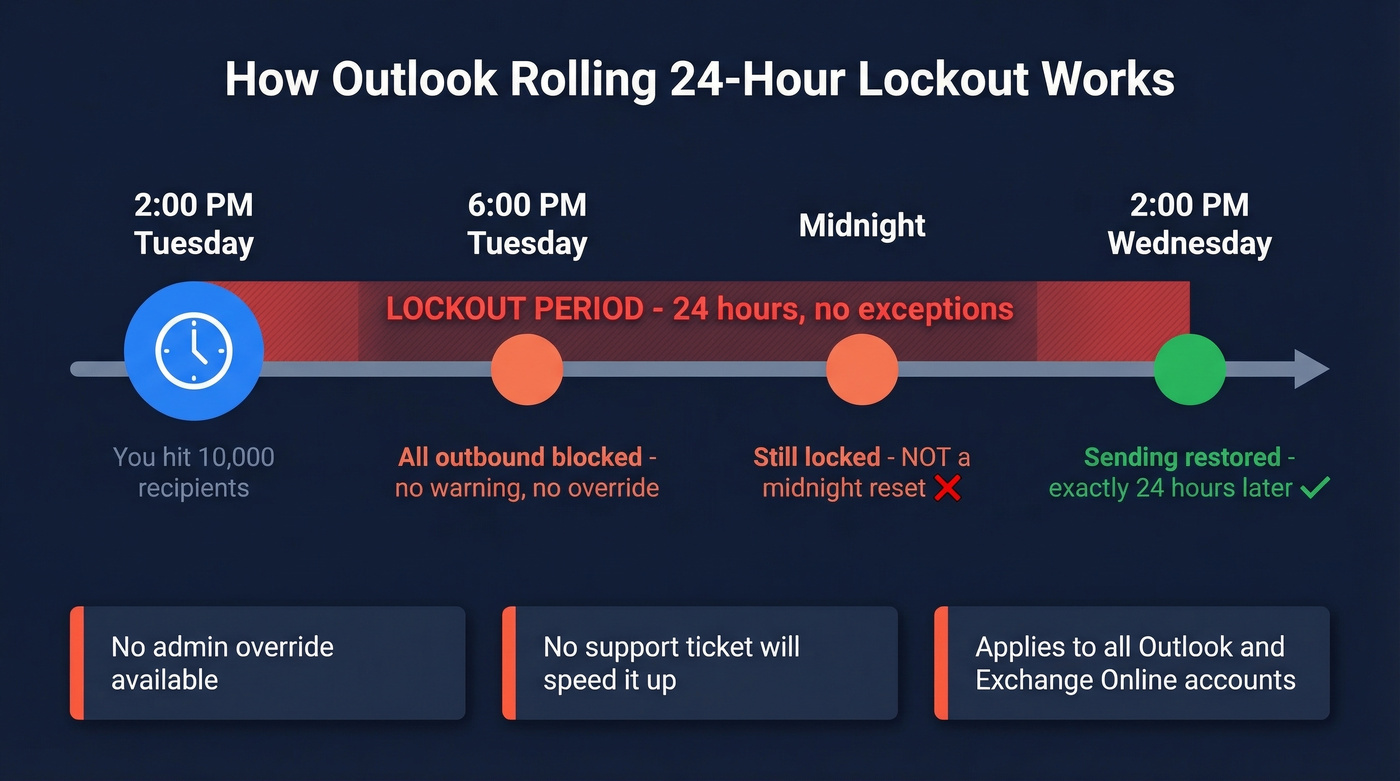
The lockout runs on a rolling 24-hour window - not a midnight reset. A Microsoft moderator confirmed this behavior directly, and there's no admin override. No support ticket will expedite it. You wait.

If you want to see how painful this is in practice, check out this representative admin thread on Reddit: "User has exceeded recipient limit. How to allow?". The answer is always the same - you can't lift it early.
Recent Changes: The 2025 Shakeup
Two big developments, one of which didn't actually happen.
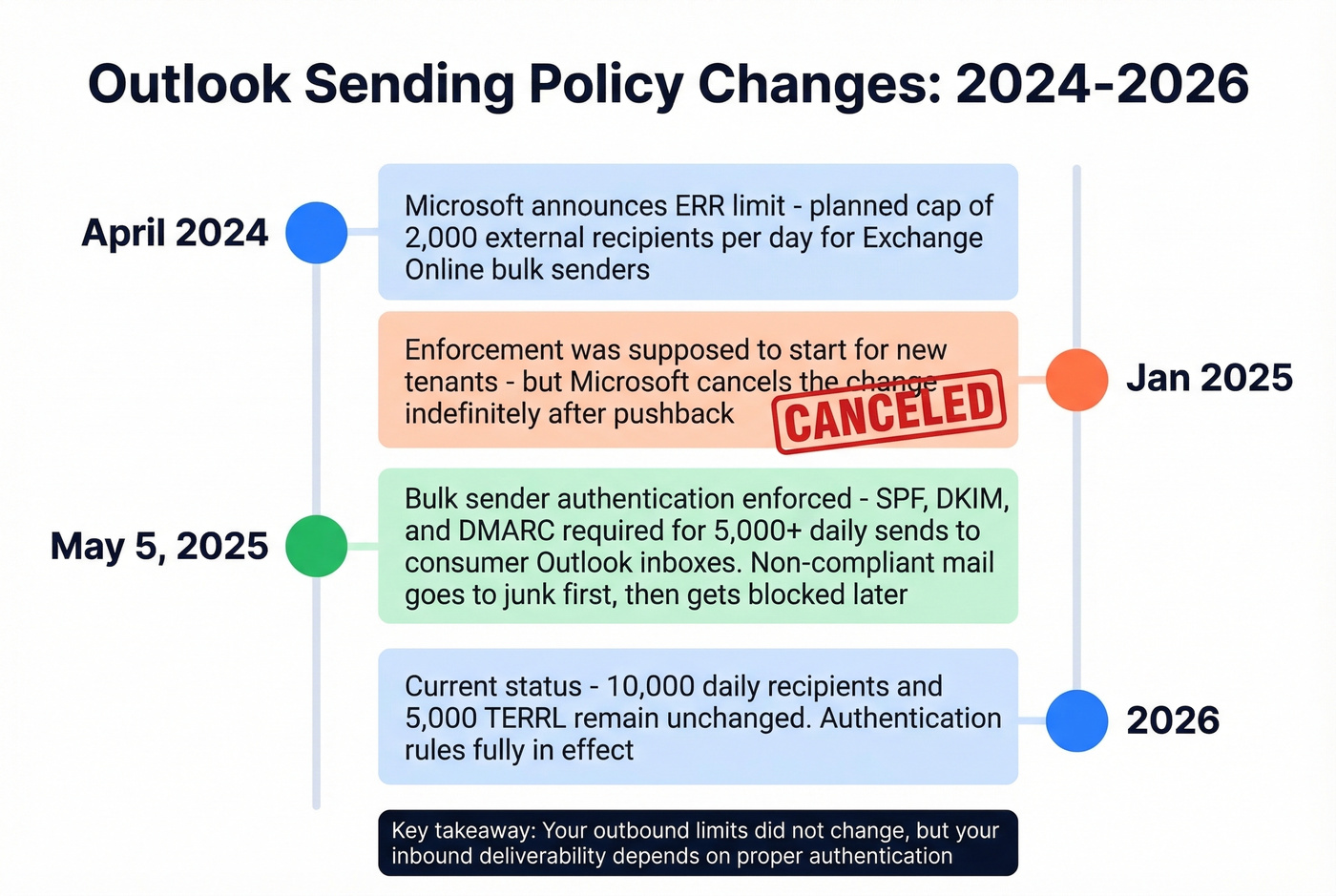
The ERR limit that wasn't. In April 2024, Microsoft announced plans to cap Exchange Online bulk senders at 2,000 external recipients per day. Enforcement was supposed to start January 2025 for new tenants, with existing tenants phased in through July-December 2025. After significant pushback, Microsoft canceled the change indefinitely. The existing 10,000/day recipient limit and 5,000/day TERRL remain untouched heading into 2026.
Bulk sender authentication rules. Starting May 5, 2025, Microsoft began enforcing SPF, DKIM, and DMARC alignment for bulk senders delivering 5,000+ emails per day into @outlook.com, @hotmail.com, and @live.com consumer inboxes. Non-compliant mail initially gets routed to junk, with full blocking planned for later enforcement phases. These are inbound filtering rules - they don't change your outbound sending limits, but they'll tank deliverability if you're not authenticated properly.
Maximizing Sends Within the Caps
Schedule in waves. Since the limit is rolling, send in batches and let 24 hours pass before the next wave. Outlook's built-in delay delivery or any sequence management platform handles this.
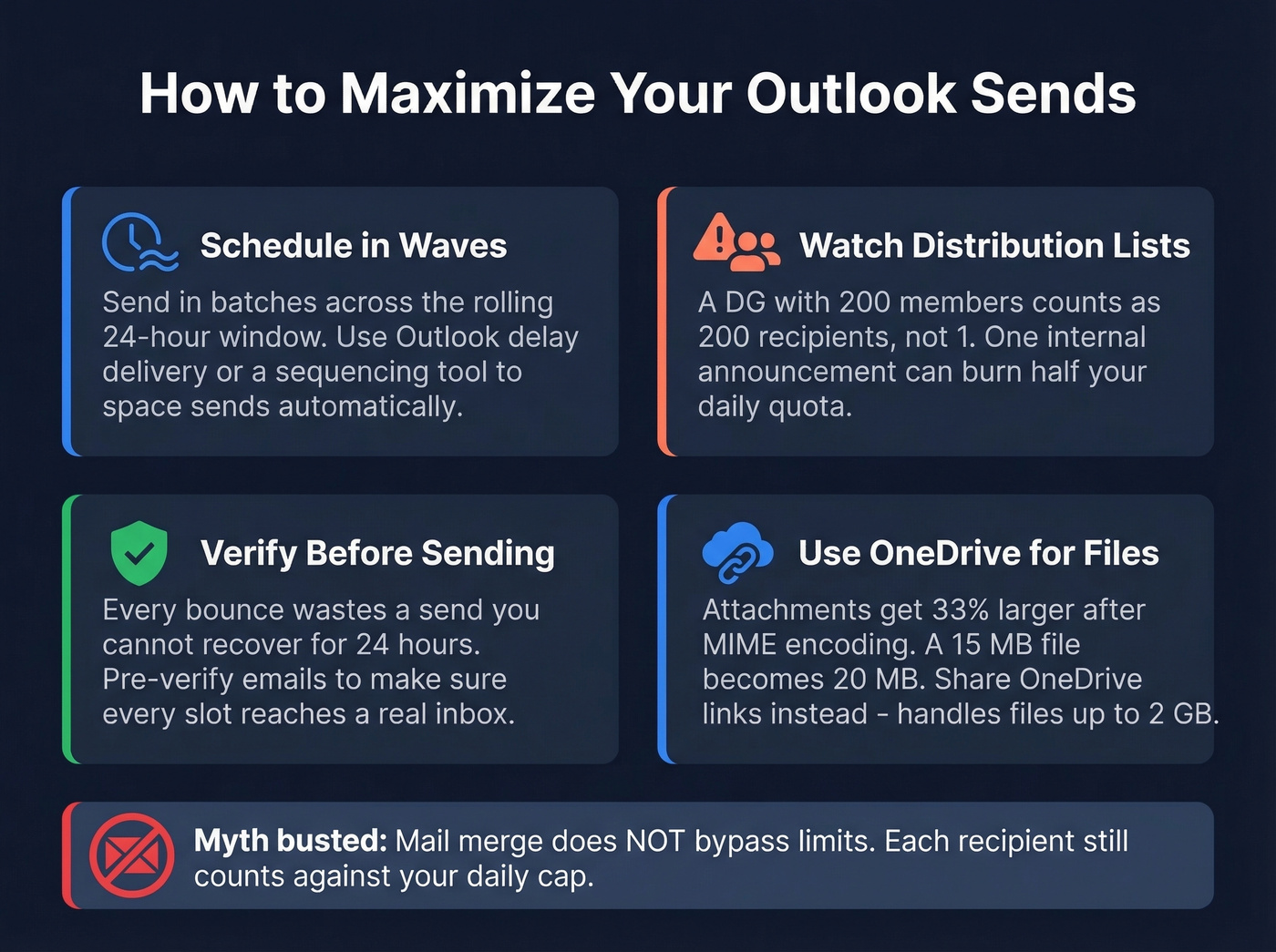
Know the distribution list math. Distribution groups expand at send time. A DG with 200 members counts as 200 recipients against your daily cap, not one. We've seen teams burn half their daily quota on a single internal announcement because they forgot this.
For large files, share a OneDrive link instead of attaching. For newsletters and internal comms to thousands of recipients, use a dedicated mass-mailing platform like Mailchimp or Constant Contact. For enterprise-scale sends, Microsoft points to Azure Communication Services Email as their bulk infrastructure. Outlook wasn't built for bulk sends, and Microsoft will tell you the same thing.
For cold outbound: verify before you send. Every bounced email wastes a send you can't get back for 24 hours. Prospeo's 5-step verification catches invalid, catch-all, and spam-trap addresses at 98% accuracy before you hit send, so none of your limited daily sends go to dead addresses. If you're trying to reduce bounces systematically, start with bounce rate benchmarks and fixes. The free tier covers 75 verifications per month - enough to validate a small outbound list before you commit your precious daily quota.
Let's bust a myth while we're here: mail merge does NOT bypass limits. A Microsoft moderator confirmed that mail merge is just a send method - each recipient still counts against your Exchange Online recipient rate limit. Merge-send to 10,000 contacts and you'll hit the cap and get locked out just like any other method. Guides that tell you otherwise are wrong.
Look, if your outbound volume regularly pushes against these caps, you've outgrown Outlook as a sending tool. Most teams hit this realization once they're trying to send hundreds of cold emails per day. Below that threshold, Outlook works fine with smart batching. Above it, you need dedicated sending infrastructure - and fighting Microsoft's restrictions is a losing battle. If you're evaluating options, compare AI bulk email senders and learn the best way to send bulk email without getting blacklisted.
Hitting the TERRL or non-relationship cap with undeliverable emails is the fastest way to stall your outbound. At $0.01 per verified email, Prospeo lets you pre-verify every contact before it touches Outlook - so your limited sends go to real buyers, not bounces.
Verify before you send. Every Outlook slot is too valuable to waste.
FAQ
Do distribution list members count against my daily limit?
Yes. Exchange expands the distribution group at send time, so each member counts as one recipient against your daily cap. A 500-person DG uses 500 of your 10,000 daily recipients in one message.
Does the daily limit reset at midnight?
No. Outlook uses a rolling 24-hour window. If you hit the limit at 2 PM, you can send again at 2 PM the next day - not at midnight. There's no way to speed this up.
Can my admin increase the sending caps?
Exchange Online sending limits are fixed by Microsoft at the service level. Admins can't raise them, and support tickets won't expedite a lockout. The only workaround is batching sends across multiple days or using a dedicated mailing platform for bulk volume.
How do I avoid bounces eating into my daily quota?
Verify every address before sending. A tool like Prospeo catches invalid and spam-trap addresses before they waste your limited sends. The free plan covers 75 verifications per month, and paid credits run roughly $0.01 per email.
What are the current Outlook email limits for 2026?
The limits haven't changed since Microsoft canceled the planned ERR reduction in 2025. Exchange Online allows 10,000 daily recipients with a 5,000 external recipient TERRL. Microsoft 365 Personal/Family Outlook.com accounts get 5,000 daily recipients with a 1,000 non-relationship cap. Free Outlook.com accounts sit around ~300 daily recipients based on community reports.