

Outlook Emails Bouncing Back: Every Error Code, Every Fix (2026)
You just got an NDR from Microsoft - a wall of diagnostic text, a cryptic error code, and zero clarity on what actually went wrong. The email you needed to send five minutes ago is sitting in limbo. Let's fix that.
Quick Triage
Before you work through the full guide, run this three-step check:
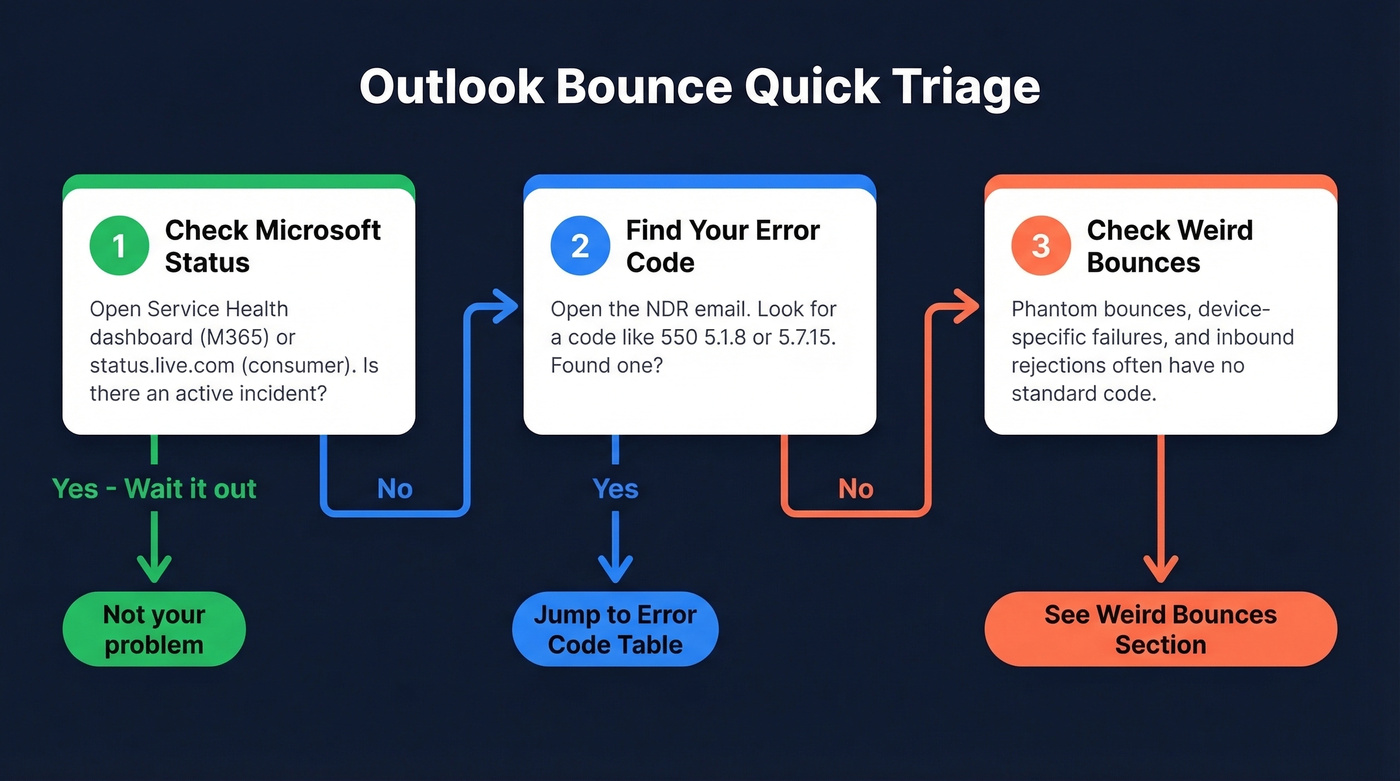
- Check if it's Microsoft's fault first. M365 admins: open the Service Health dashboard. Consumer Outlook.com users: check status.live.com. Recent incidents have caused mass false-positive bounces and blocks, so your account might be perfectly fine.
- Find your error code. Open the NDR, locate the 3-digit or enhanced status code like 550 5.1.8 or 5.7.15, and jump to the reference table below.
- No error code? Skip to the "Weird Bounces" section - phantom bounces, device-specific failures, and inbound rejections don't always produce standard codes.
What a Bounce-Back Actually Means
A bounce-back - technically a Non-Delivery Report (NDR) or Delivery Status Notification (DSN) - is an automated message from a mail server telling you your email didn't reach its destination. It shows up in your inbox looking like a reply, usually with a subject line starting "Undeliverable" or "Delivery has failed."
There are two types. A hard bounce means permanent failure: the address doesn't exist, the domain is dead, or the server flat-out refused your message. A soft bounce means temporary failure: the recipient's mailbox is full, their server is down, or there's a transient connection issue. Soft bounces retry automatically before giving up.
The distinction matters because hard bounces damage your sender reputation immediately, while soft bounces only become a problem if they persist over days.
Rule Out a Microsoft Outage First
Sometimes your emails bounce because Microsoft broke something on their end. Before you spend an hour troubleshooting SPF records, check whether the problem is even yours to fix.
April 2025, incident MO1058051: Microsoft's outbound anti-spam models incorrectly flagged legitimate messages as phishing. Users across multiple organizations were silently added to Restricted Entities and started getting "550 5.1.8 Access denied, bad outbound sender" NDRs. Nothing had changed on their side - Microsoft eventually added affected domains to an allow list, but not before thousands of admins panicked. One Reddit user described having their energy company, insurance provider, and employer all questioning whether their address was valid. All because of a Microsoft false positive.
Separately, Outlook.com experienced a 533 5.4.0 false NDR incident where an incorrect campaign data file triggered false-positive spam detection, generating bounce notices even though emails were actually delivered.
How to check:
- M365 admins: Admin Center -> Service Health -> look for active advisories
- Consumer Outlook.com: Visit status.live.com
- Quick test: Send a test email to a Gmail address. If it goes through, the problem is specific to certain recipients or Microsoft's filtering - not your account setup.

Most Outlook bounces start with bad data. Prospeo's 5-step email verification catches invalid addresses, spam traps, and catch-all domains before you hit send - delivering 98% accuracy and keeping bounce rates under 4%.
Fix your bounce problem at the source - start with verified emails.
Error Code Reference
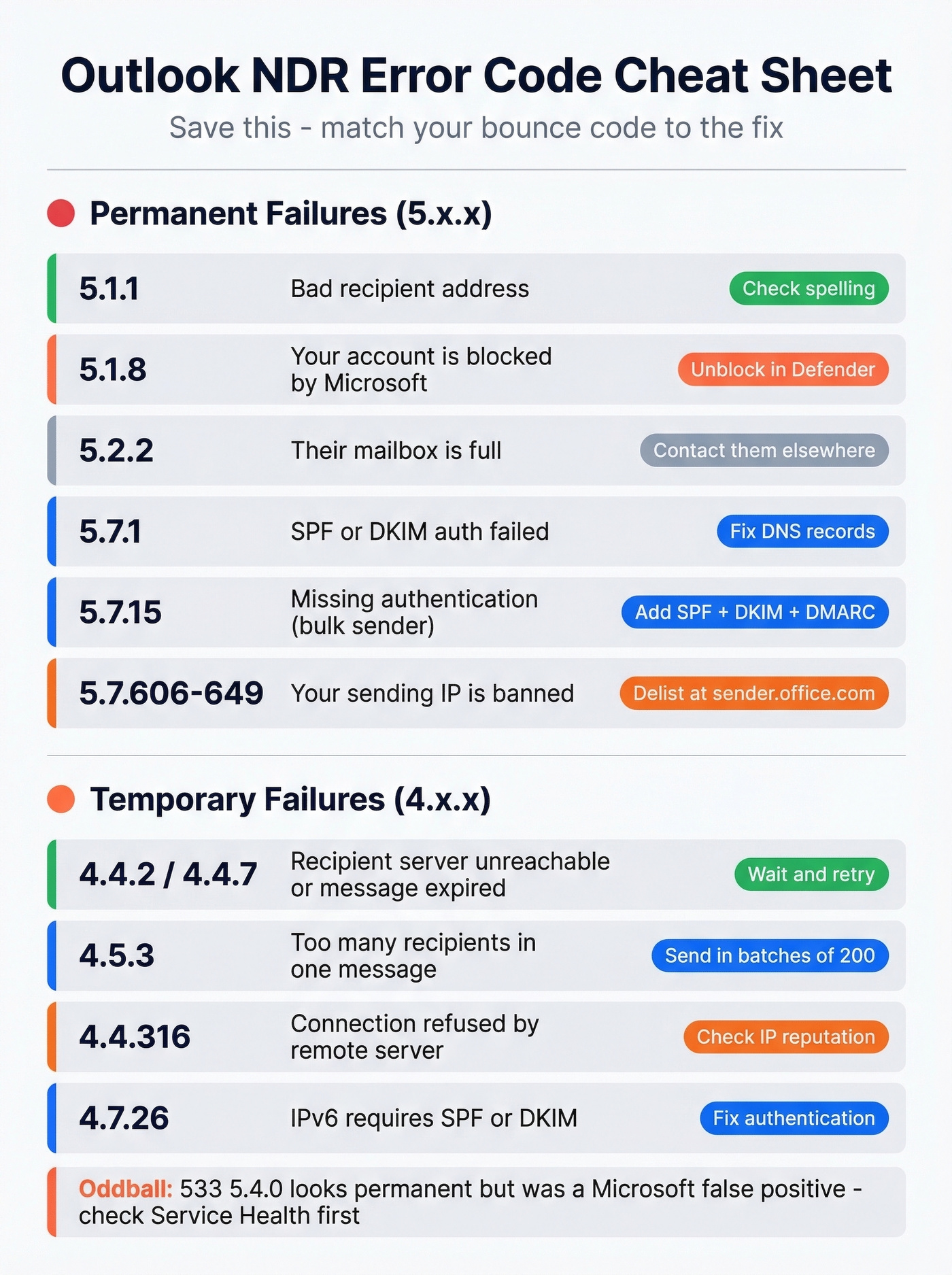
Open your NDR and find the enhanced status code. Match it here.
| Code | What It Means | Quick Fix |
|---|---|---|
| 5.1.1 | Recipient address invalid | Check spelling; clear autocomplete |
| 5.1.8 | Sender blocked (Restricted Entities in M365) | Unblock via Defender portal |
| 5.2.2 | Recipient mailbox full | Contact them another way |
| 5.4.300 / 4.4.2 | Recipient server unreachable / message expired | Wait and retry |
| 5.7.1 | Auth failure (SPF/DKIM) | Fix DNS records |
| 5.7.15 | Authentication enforcement reject | Set up SPF + DKIM + DMARC |
| 5.7.509 | DMARC policy reject | Fix SPF/DKIM alignment |
| 5.7.606-649 | Banned sending IP | Delist via sender.office.com |
| 4.4.7 | Message expired in queue | Recipient server unreachable |
| 4.5.3 | Too many recipients | Chunk into 200 or fewer recipients |
| 4.4.316 | Connection refused | Remote server blocking you |
| 4.7.26 | IPv6 auth required | Ensure SPF or DKIM passes |
| 533 5.4.0 | False spam detection | Microsoft-side bug; check status |
| 4.4.8 / 4.7.321-325 | MTA-STS/DANE policy/cert failure | Contact recipient admin |
Codes starting with 4.x.x are generally temporary - the system retries automatically. Codes starting with 5.x.x are permanent failures that won't resolve on their own. The 533 5.4.0 code is an oddball: it looks permanent but was caused by a Microsoft-side false positive.
If your code isn't listed, check Microsoft's full NDR reference for Exchange Online.
Fixes for Outbound Bounces
Invalid Recipient (5.1.1)
Everyone tells you to "check for typos." That's obvious. The real culprit most people miss is Outlook's autocomplete cache.
Outlook desktop stores every address you've ever typed. If a contact changed their email six months ago, Outlook keeps suggesting the old address every time you start typing their name. You think you're sending to the right person. You're not.
Best fix: When the bad address appears as a suggestion in the To field, hover over it and click the X to delete just that entry. If your Outlook build supports it, you can also use the Empty Auto-Complete List option in settings to nuke the entire cache.
Restricted Entity Block (5.1.8)
If your NDR says "550 5.1.8 Access denied, bad outbound sender," your account has been added to Microsoft's Restricted Entities list. This is one of the most common complaints on r/sysadmin - and it happens when Microsoft's anti-spam system detects suspicious outbound activity from your mailbox, or thinks it does.
To unblock via the Defender portal (M365 admins):
- Open Microsoft Defender Portal
- Navigate to Email & Collaboration -> Review -> Restricted Entities
- Select the blocked user
- Click Unblock -> Next -> Submit
To unblock via PowerShell:
- List blocked senders:
Get-BlockedSenderAddress - Remove a block:
Remove-BlockedSenderAddress -SenderAddress user@domain.com
Restrictions typically clear within an hour, though it can take up to 24 hours. If you were affected by incident MO1058051 or a similar false positive, the block likely hit many users simultaneously - check Service Health before assuming compromise.
One caveat: if an account has been delisted too many times, the portal will refuse to unblock it. You'll need a support ticket at that point.
Auth Failures: SPF, DKIM, DMARC (5.7.1 / 5.7.15)
These three protocols prove your emails are legitimately from your domain. SPF tells receiving servers which IPs can send on your behalf. DKIM adds a cryptographic signature. DMARC tells receivers what to do when SPF or DKIM fails. (If you want a deeper walkthrough, see our email deliverability guide.)
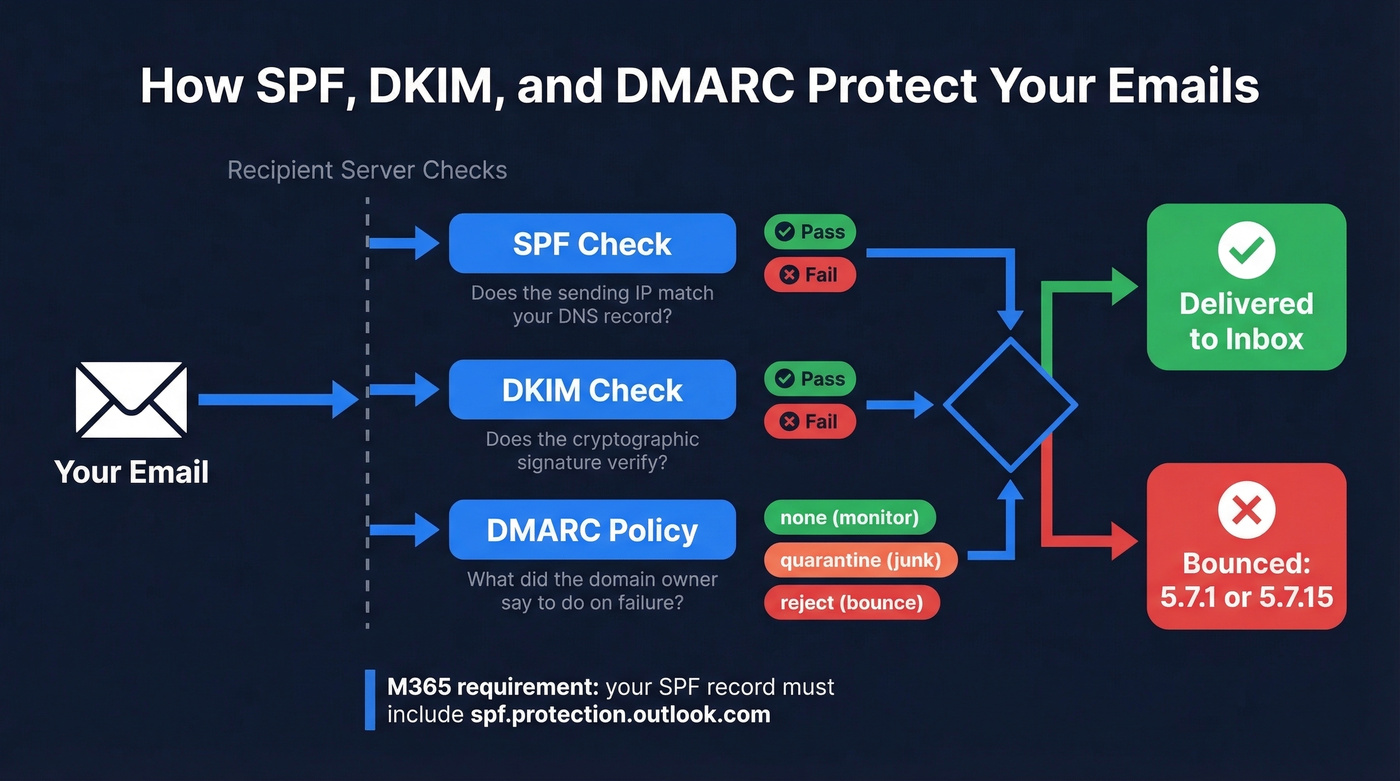
If you're on Microsoft 365, your SPF record needs include:spf.protection.outlook.com. Without it, every email you send through M365 fails SPF checks at the recipient's end.
Here's the thing: as of 2025, Microsoft rejects mail from high-volume senders lacking proper authentication. Domains sending over 5,000 emails per day to Outlook/Hotmail addresses that don't pass SPF, DKIM, and DMARC get rejected with 550 5.7.15. Google and Yahoo implemented the same policy in early 2024. This isn't going away - it's the new baseline for email deliverability.
4.7.26 means IPv6 mail must pass SPF or DKIM. Microsoft requires at least one for IPv6 connections.
Banned Sending IP (5.7.606-649)
An NDR containing "550 5.7.606-649 Access denied, banned sending IP" means Microsoft has banned your mail server's IP. Common for on-premises Exchange servers or third-party SMTP relays with shared IPs.
Steps to delist:
- Confirm which IP is blocked - it's in the NDR text
- Check your IP reputation at MXToolbox or Cisco Talos
- Submit a delist request at sender.office.com
- Wait - delisting often takes minutes but can stretch to 24 hours
If you're on a shared IP from budget hosting, someone else's spam probably got your IP flagged. Move to a dedicated sending IP or route through M365's own infrastructure. Don't keep paying for a shared IP that other tenants keep getting banned.
Mailbox Full (5.2.2)
A 552 5.2.2 bounce means the recipient's mailbox has hit its storage quota. Nothing you can do except reach them through another channel.
Attachment Too Large
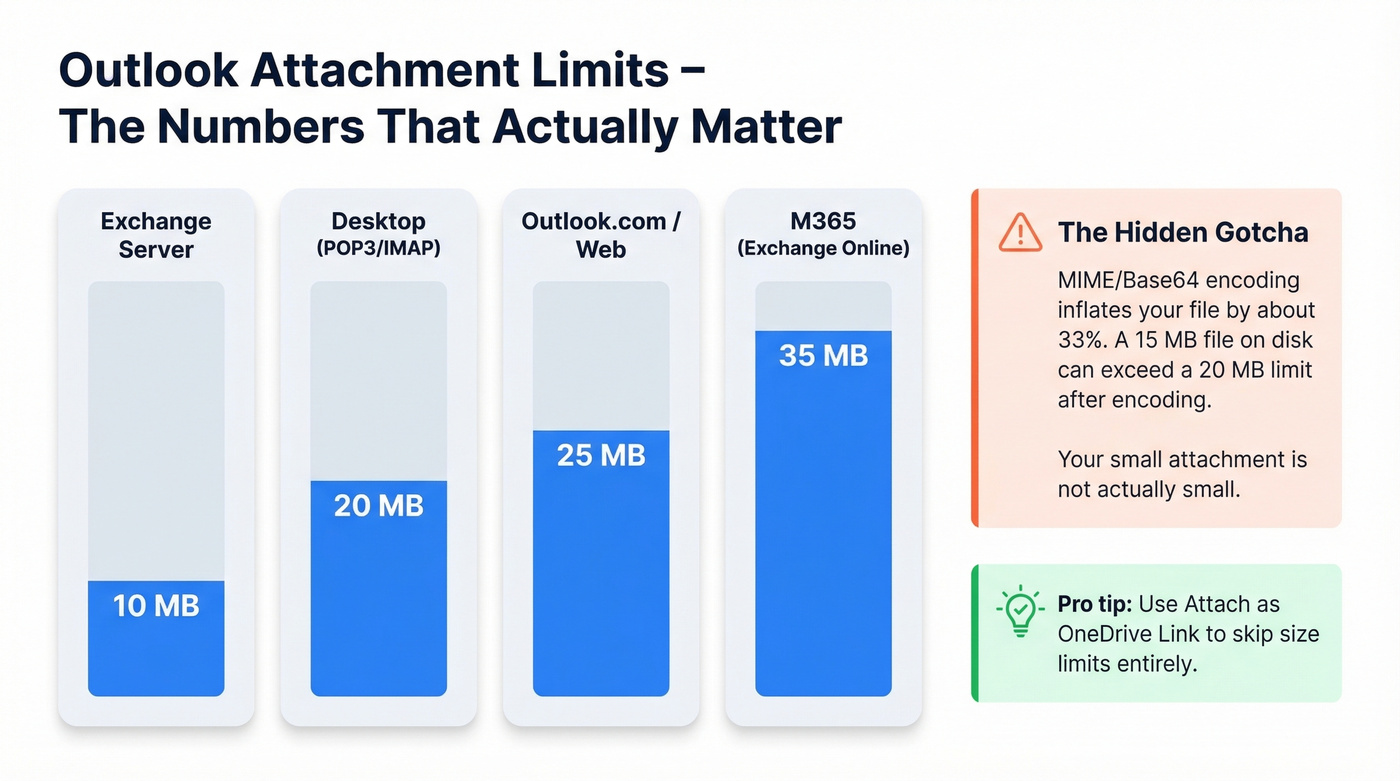
Outlook's attachment limits are lower than most people expect:
| Outlook Version | Default Limit |
|---|---|
| Desktop (POP3/IMAP/Internet email accounts) | 20 MB |
| Exchange Server | 10 MB |
| M365 (Exchange Online) | 35 MB |
| Outlook.com / Outlook on the web | 25 MB |
Here's the detail that trips people up: MIME/Base64 encoding inflates file size by roughly 33%. A 15 MB file on disk can exceed a 20 MB limit after encoding. That's why your "small" attachment bounces.
Skip the registry fix unless you're on a POP3/IMAP account - it's not worth the hassle. Use OneDrive or SharePoint links instead. Outlook natively supports "Attach as OneDrive link," which avoids attachment limits and Base64 overhead entirely.
Recipient Server Down (4.4.2 / 4.4.7 / 5.4.300)
Sometimes the bounce has nothing to do with you. Here's a real NDR we've seen from users sending to AOL/Yahoo addresses:
550 5.4.300 Message expired -> 421 4.4.2 Connection dropped due to SocketError Remote server: mx-aol.mail.gm0.yahoodns.net (67.195.228.84)
Exchange Online tried to deliver your message, couldn't connect, retried until the message expired, and gave up. Wait and resend later, or reach the person through a different channel.
Weird Bounces That Aren't Standard
These are the scenarios that drive people to Reddit - because the standard troubleshooting guides don't cover them.
Phantom Bounces - NDR Sent, Email Delivered
Multiple users have reported this exact scenario: people emailing them receive automatic failure responses, but the emails actually arrive in the recipient's inbox just fine. Senders - energy companies, insurance providers, employers - start questioning whether the address is even valid.
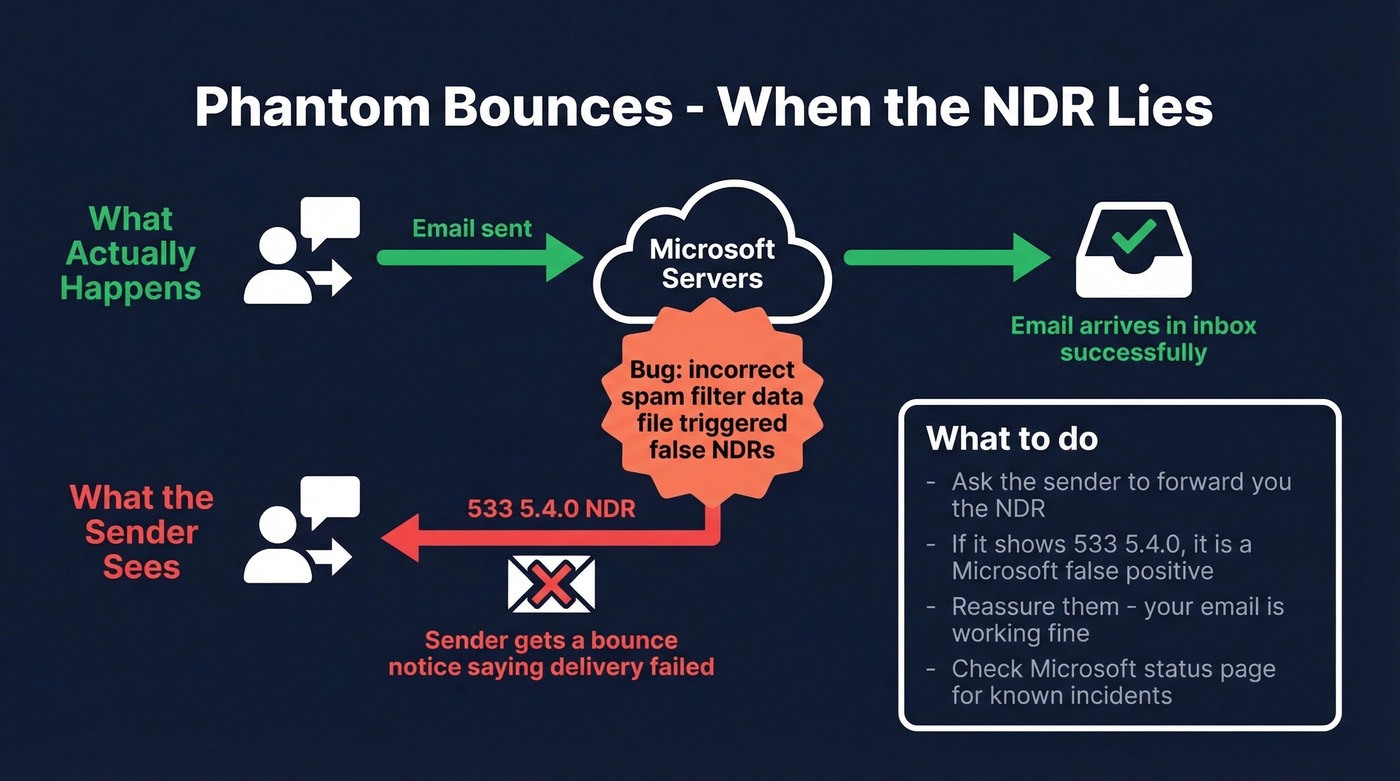
This ties back to the 533 5.4.0 false NDR incident Microsoft documented on their Outlook.com known-issues page. An incorrect campaign data file caused false-positive spam detection, generating NDRs after sending. Microsoft reverted the file, but the damage to user trust was already done.
If people tell you their emails to you are bouncing but you're receiving them, ask them to forward the NDR. If it contains 533 5.4.0 or references spam/junk filtering, it's a Microsoft-side false positive. There's nothing to "fix" - just reassure senders that delivery is working.
Bounces on Phone but Not Desktop
A common Reddit complaint: Hotmail or Outlook.com emails bounce when sent from a phone but work perfectly from a computer. The error is typically generic - "Your message wasn't delivered because the recipient's email provider rejected it" - with no useful diagnostic code.
Try these in order:
- Clear the mail app's cache and re-authenticate your account
- Check for app updates - outdated mail apps can use deprecated auth methods
- Switch from your phone's native mail app to the official Outlook mobile app
- Remove and re-add the account entirely
The native mail app on iOS and Samsung is the worst offender here. It uses different sending paths than the Outlook app, and those paths break more often. In our experience, switching to the Outlook mobile app resolves this most of the time because it uses modern authentication by default.
Inbound Bounces - Emails to You Are Rejected
If senders tell you their emails to your Outlook.com address are bouncing, and the messages don't even appear in your Junk folder, the rejection is happening at the SMTP server level - before your mailbox rules or Safe Senders list are even evaluated.
Look, Microsoft's Safe Senders feature is fundamentally broken for server-level rejections. One user reported on Reddit that roughly 25% of their incoming emails from a forwarding service were bounced despite configuring the sender as a Safe Sender. The messages never hit Junk - they were rejected outright. Adding a sender to Safe Senders only works if the message makes it past Microsoft's server-level filtering first. If it doesn't, there's no inbox-side override. Your options: contact Microsoft support, or ask the sender to try from a different email service.
How to Prevent Bounces Long-Term
Fixing a bounce is reactive. Preventing them is what actually protects your sender reputation over months and years.
Verify your contact lists before sending. Bad addresses cause hard bounces, hard bounces damage sender reputation, and damaged reputation triggers Restricted Entities blocks. It's a chain reaction that starts with one invalid email. If you're running outbound campaigns, tools like Prospeo catch invalid addresses, catch-all domains, and spam traps through a 5-step verification process at 98% accuracy - the kind of pre-send hygiene that keeps your bounce rate under the 2% threshold Microsoft cares about.
Lock down your authentication. Set up SPF, DKIM, and DMARC for every domain you send from. This isn't optional anymore - Microsoft, Google, and Yahoo all enforce it. A bounce rate above 2% is already a red flag; above 5% and you're actively damaging your deliverability. If you need a quick syntax check, start with these SPF record examples and make sure you understand DMARC alignment.
Monitor your message traces. M365 admins should run regular message trace reviews in the Exchange admin center. A spike in 5.1.1 bounces means your team is sending to stale addresses. A spike in 5.1.8 means accounts are getting flagged. Catch these trends early.
Clean your autocomplete cache periodically. Old addresses accumulate silently, especially if your team has been at the company for years. One stale address can trigger a hard bounce that snowballs into a reputation problem. If you're doing this at scale, it helps to pair list hygiene with a process to check if an email exists before it ever hits Outlook.
Troubleshooting NDRs is a symptom. The root cause is sending to unverified addresses. Prospeo refreshes 300M+ profiles every 7 days - so you never email someone who left their company six months ago.
Stop decoding error codes and start reaching real inboxes.
FAQ
Why are my Outlook emails suddenly bouncing?
Check Microsoft Service Health first - incidents like MO1058051 cause mass false-positive blocks across tenants. If there's no active outage, open the NDR, find your enhanced status code (e.g., 5.1.8, 5.7.1), and match it to the error code reference table above.
What does "550 5.1.8 Access denied" mean?
Your account has been added to Restricted Entities in Microsoft Defender. An M365 admin can unblock you via the Defender portal (Email & Collaboration -> Review -> Restricted Entities) or PowerShell. The block typically clears within one hour, though it can take up to 24 hours.
How do I stop invalid addresses from causing bounces?
Use an email verification tool before sending campaigns. Keeping your bounce rate under 2% prevents Microsoft from flagging your account. If you're sending at any real volume, pre-send verification isn't optional - it's the difference between a healthy domain and a restricted one.
Why do senders get a bounce notice but I still receive their email?
This is a "phantom bounce" caused by a Microsoft-side false positive, often error 533 5.4.0. Microsoft confirmed an incident where incorrect spam-detection data generated NDRs even though delivery succeeded. Ask senders to forward the NDR to confirm the error code.
Does adding someone to Safe Senders stop bounces?
No - not if Microsoft rejects the message at the SMTP server level before inbox rules are evaluated. Messages blocked at the server never reach your Junk folder, let alone your inbox. Your only recourse is contacting Microsoft support or having the sender try from a different email provider.