

How to Ping an Email Address Online - And Why Tools Do It Better
Someone told you to "just ping the email address to see if it's real." So you opened Terminal, typed a telnet command, and watched it hang. Port 25 is blocked. Your ISP doesn't care about your list hygiene project. Even if you'd gotten through, the answer would've been ambiguous at best.
Here's what pinging actually means at the protocol level, why it fails in practice, and which tools replace it with something that works.
Quick Answer
Manual SMTP pinging is dead for most practical purposes. ISPs block port 25, catch-all domains return false positives, and greylisting creates false negatives. Use a verification tool instead (or follow a full how to check if an email exists workflow).
Top picks:
- Prospeo - 98% email accuracy, catch-all handling, 75 free verifications/month
- Bouncer - $7/1,000 emails, clean bulk processing
- NeverBounce - $8/1,000 emails, strong API for automated workflows
What "Ping an Email" Actually Means
"Pinging" an email address isn't like pinging a server with ICMP. It's an SMTP-level check - you connect to a mail server and ask whether a specific mailbox exists, without actually sending a message.
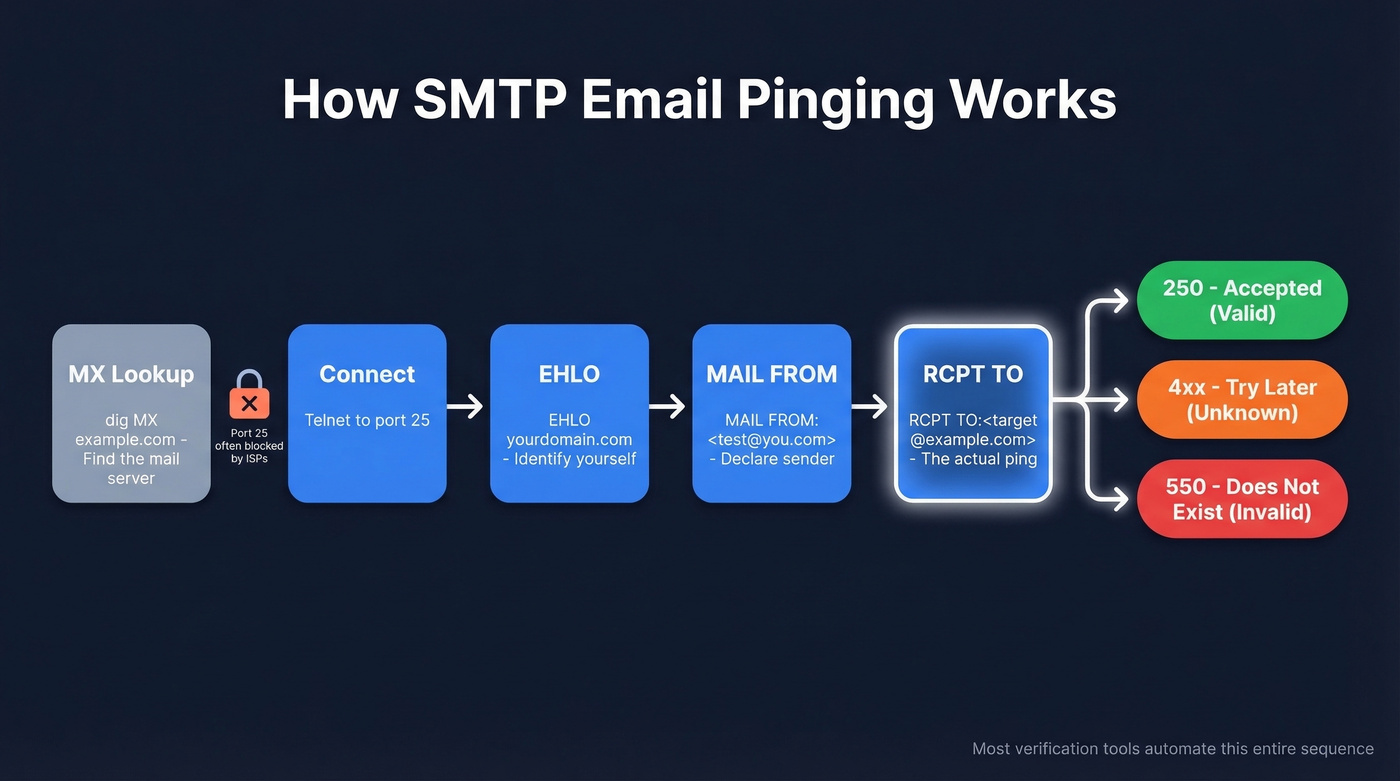
SMTP dates to 1982, codified in RFC 821. Modern SMTP servers typically speak ESMTP, where the conversation starts with EHLO (older servers use HELO). After that, the basic idea is the same: you identify a sender with MAIL FROM:<>, then probe the recipient with RCPT TO:<user@domain> and interpret the response.
A 250 means "accepted." A 550 means "mailbox doesn't exist." A 4xx means "try again later."
There's also the VRFY command, designed specifically to confirm whether a user exists. Almost no server supports it anymore - it was too useful for spammers. So RCPT TO became the de facto method, and it's what most email verification tools use under the hood today.
Can You Ping an Email Manually?
Technically, yes:
- Look up the domain's MX record (
dig MX example.com) - Telnet to the mail server on port 25
- Issue
EHLO yourdomain.com - Issue
MAIL FROM:<test@yourdomain.com> - Issue
RCPT TO:<target@example.com> - Read the response code
In practice, you'll hit a wall before step 2. Most ISPs and cloud providers block outbound port 25 to prevent spam. Corporate firewalls interfere. And even when you do connect, the server might accept everything regardless of whether the mailbox is real.
Technically possible. Practically useless.

Manual SMTP pinging fails on catch-all domains, greylisting, and anti-harvesting protections. Prospeo's 5-step verification handles all three - delivering 98% email accuracy with catch-all resolution that other tools skip. Start with 75 free verifications, no credit card required.
Replace your dead telnet session with answers that actually work.
Why Manual Pinging Fails
Manual SMTP pinging breaks down for four predictable reasons.
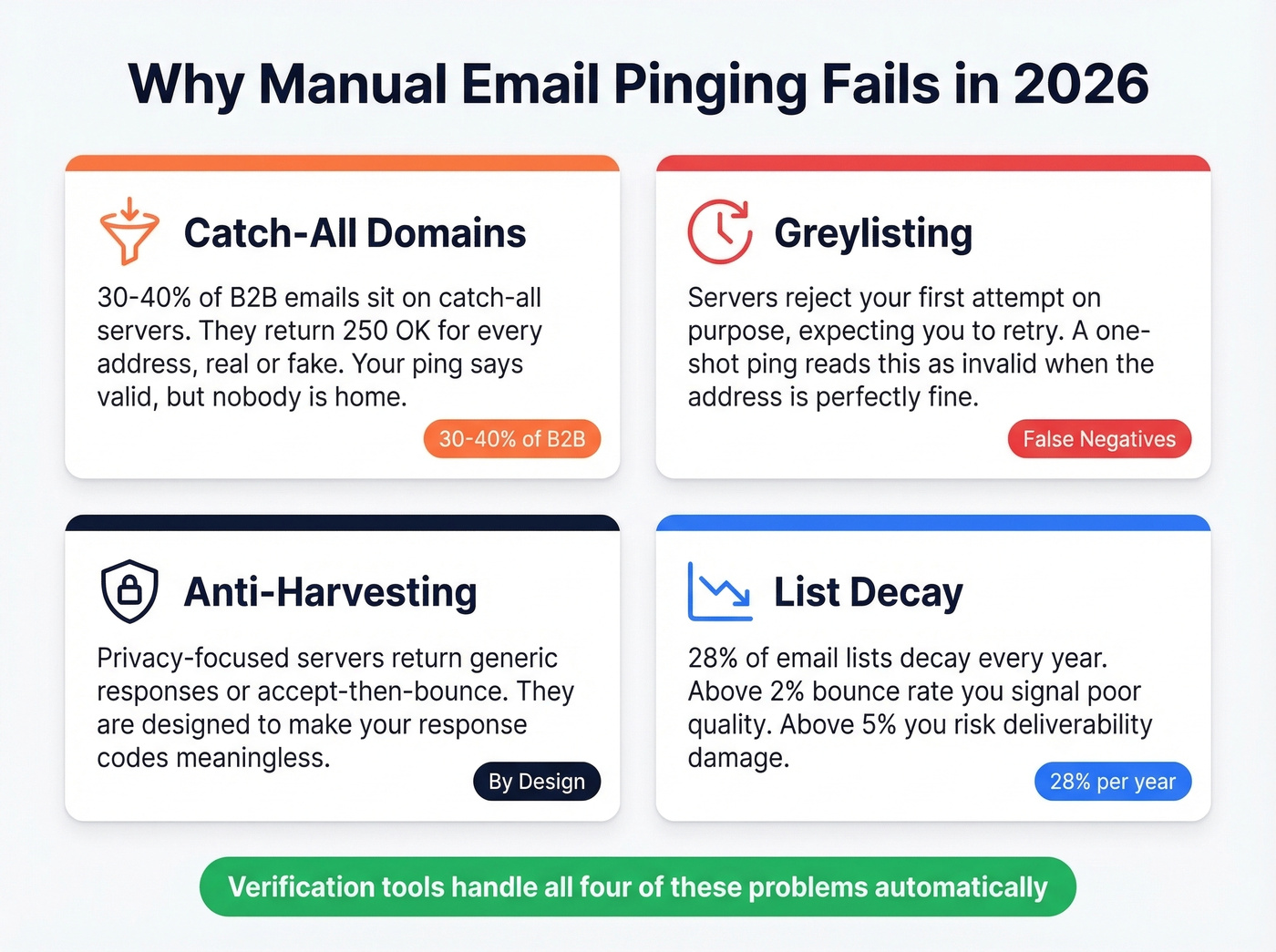
Catch-all domains. Somewhere between 30-40% of B2B email addresses sit on catch-all domains. These servers accept mail for any address - real, fake, or randomly generated. Your RCPT TO check gets a 250 OK whether the person exists or not. We've seen teams waste weeks cleaning lists only to realize half their "verified" addresses were catch-all phantoms that never reached a real inbox.
Greylisting. Some servers temporarily reject the first connection attempt, expecting a legitimate mail server to retry. A one-shot verification reads this as "invalid" when the address is perfectly fine.
Anti-harvesting protections. Privacy-conscious servers return generic responses or accept-then-bounce. They're designed to prevent exactly what you're trying to do, making response codes meaningless.
List decay. Email lists decay by roughly 28% every year, with about 23% of addresses becoming invalid annually. If your email bounce rate climbs above 2%, you're signaling poor list quality. Above 5%, you're risking deliverability damage. Gmail and Yahoo now enforce a 0.3% spam complaint threshold - there's zero room for error.

How Verification Tools Work
Every reputable tool follows the same basic pipeline, then layers proprietary logic on top: syntax check, DNS/MX lookup, SMTP probe with RCPT TO, and classification.
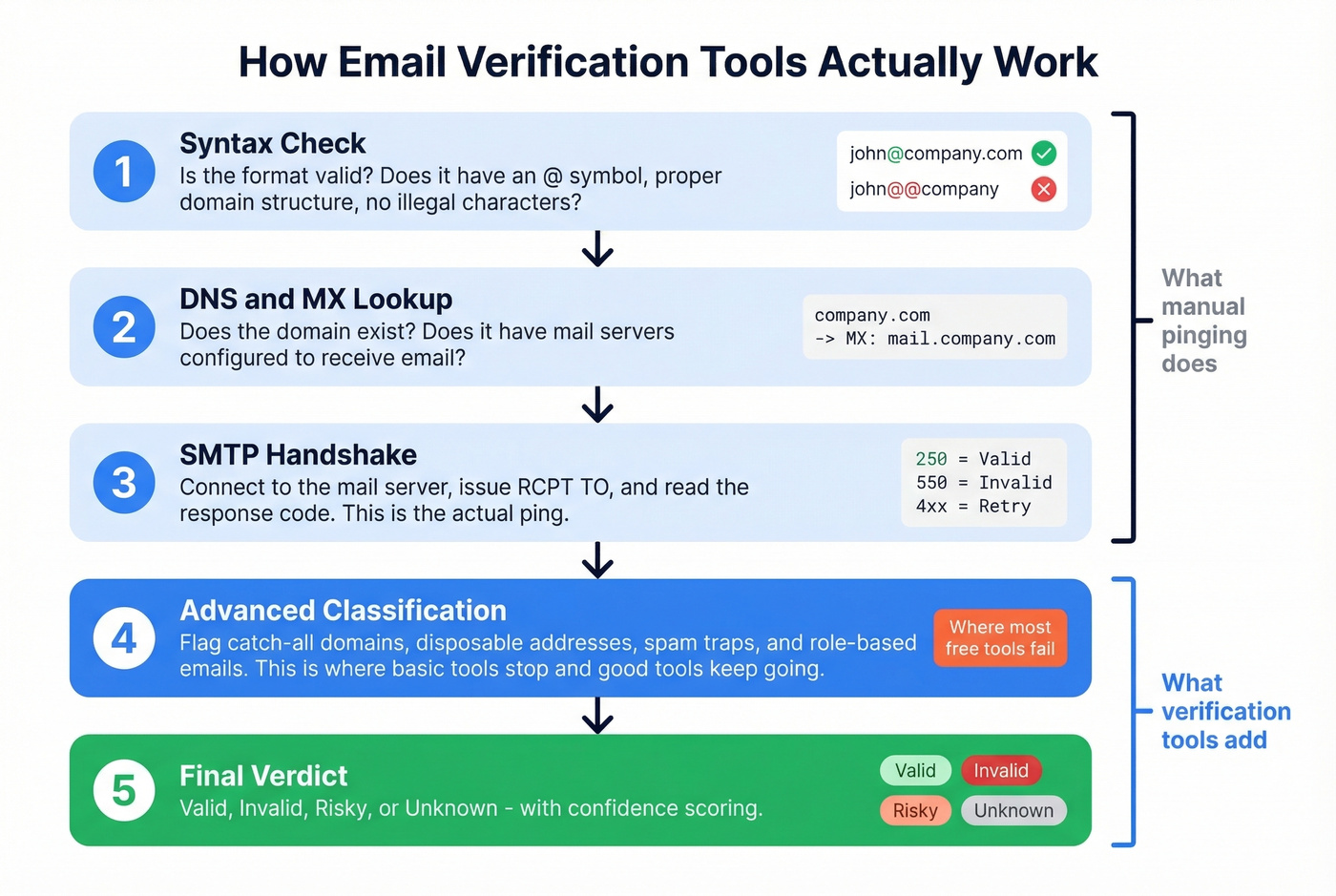
| Response Code | Meaning | Tool Label |
|---|---|---|
| 2xx (e.g., 250) | Accepted | Valid |
| 4xx (e.g., 450) | Temporary rejection | Retry / Unknown |
| 5xx (e.g., 550) | Permanent rejection | Invalid |
Beyond these basics, tools also flag catch-all, disposable, and spam-trap addresses - categories that basic SMTP probing misses entirely. That classification intelligence is what separates a useful tool from a glorified telnet script (and it ties directly into email deliverability outcomes).
Best Tools to Verify Emails Online
Prospeo
Where other tools return "unknown" on catch-all domains, Prospeo gives you an answer. In our experience, catch-all domains are where most tools fall apart - and with 30-40% of B2B addresses sitting on catch-all configurations, that gap matters more than any other single feature.
Prospeo runs a 5-step verification process on proprietary infrastructure with a 7-day data refresh cycle, compared to the six-week industry average. Email accuracy sits at 98%. One customer, Meritt, went from a 35%+ bounce rate to under 4% after switching - and tripled their pipeline from $100K to $300K per week. That's not a marginal improvement; that's a different business.
Use this if: You need definitive answers on catch-all domains. The free tier gives you 75 verifications per month - no contract, no credit card.
Pricing: Free tier (75 emails/month). Paid plans start at ~$39/mo for 5,000 credits, roughly $0.01 per email.
ZeroBounce
ZeroBounce starts at $15/month for 2,000 verifications, working out to ~$7.50 per 1,000. Beyond valid/invalid, it layers AI-powered scoring and abuse/spam-trap detection - useful for marketers who want deliverability intelligence, not just a binary answer. Catch-all handling is partial, so don't rely on it for B2B-heavy lists.
Bouncer
Cheapest mainstream option at $7 per 1,000. The UI is clean, processing is fast, and it's rated highly for straightforward verification. Skip it if catch-all resolution is critical to your workflow - you'll get too many "unknown" results on corporate domains. (If you're comparing options, see Bouncer alternatives.)
NeverBounce
If your verification needs to happen inside an automated pipeline, NeverBounce is the right call. The real-time API integrates with most ESPs and CRMs, and free credits let you test the integration before committing. At $8 per 1,000, it's not the cheapest, but for one-off list cleaning it's overkill - Bouncer does that job for less.
Quick Comparison
| Tool | Free Tier | Price / 1,000 | Catch-All Handling | Best For |
|---|---|---|---|---|
| Prospeo | 75/mo | ~$10 | Yes | Overall accuracy |
| ZeroBounce | 100/mo | ~$7.50 | Partial | Deliverability scoring |
| Bouncer | 100 credits | $7 | Basic | Budget bulk cleaning |
| NeverBounce | 10 credits | $8 | Basic | API-first workflows |
| Hunter | 50/mo | ~$40/mo plan | Partial | Email finding + verify |
| Verifalia | 25/day | ~$9/1,000 | Partial | Low-volume spot checks |
| QuickEmailVerification | 100/day | ~$8/1,000 | Basic | High-volume bulk |
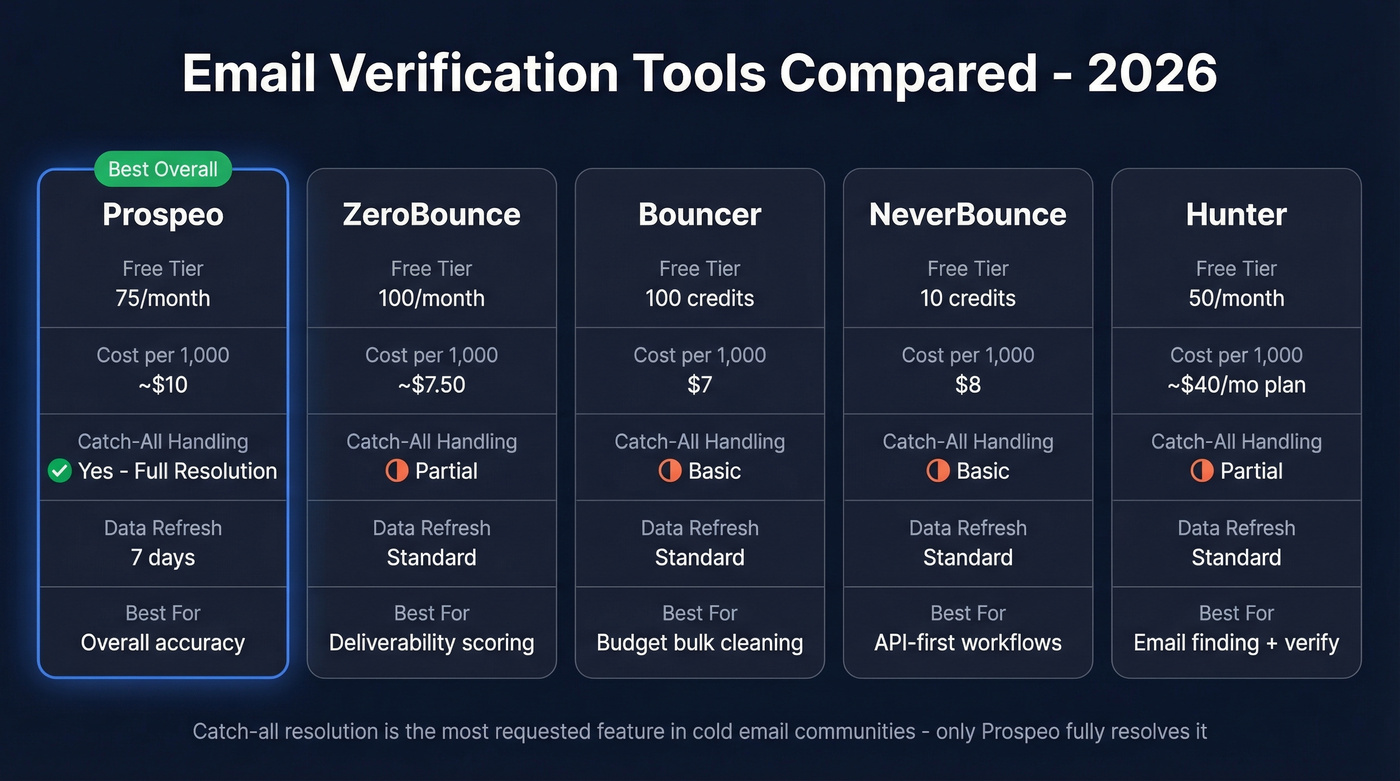
Here's the thing: in cold email communities on Reddit, catch-all handling is the feature practitioners complain about most. NeverBounce, ZeroBounce, and Bouncer get mentioned constantly, but the recurring frustration is always the same - too many "unknown" results on the domains that matter most. If you're selling deals worth $5k+ to mid-market companies, you need a tool that actually resolves catch-alls instead of punting.
If you're building lists before you verify them, pair verification with a reliable source (see email list providers and how to generate an email list).
Meritt cut their bounce rate from 35% to under 4% and tripled pipeline to $300K/week - because Prospeo resolves catch-all domains where other verification tools return 'unknown.' At $0.01 per email with a 7-day data refresh cycle, you get definitive answers, not guesses.
Stop guessing on catch-all domains. Get a real answer for every address.
FAQ
Is pinging an email address legal?
Yes. SMTP verification sends no actual email - it initiates a partial connection and disconnects before transmitting anything. It's standard practice for list hygiene. GDPR still governs how you obtained the address in the first place, but the verification step itself isn't the issue.
What does "catch-all" mean in verification results?
A catch-all domain accepts mail for any address, real or fake. Basic SMTP pinging can't tell the difference, so most tools return "unknown." Prospeo's 5-step verification uses additional signals to classify catch-all addresses with higher confidence - most competitors skip this step entirely.
Can you ping a Gmail or Outlook address?
Sometimes, but results aren't reliable. Major consumer providers like Gmail and Microsoft 365 restrict SMTP-level recipient checks, so tools often return "unknown" even for valid addresses. Dedicated verification tools handle these edge cases better than manual commands ever will.
How often should I re-verify my email list?
Let's be honest - most teams wait until bounces spike before they think about this. Don't be that team. With lists decaying at roughly 28% per year, we recommend re-verifying quarterly at minimum. If you're running high-volume outbound campaigns, monthly is safer.