

How to Build Pipeline Management in Excel That Actually Works
84% of sales reps missed quota last year, according to Salesforce's State of Sales research. Not because they couldn't sell - because they couldn't see what was in their pipeline. A single-tab spreadsheet with deal names and close dates isn't pipeline management in Excel. It's a to-do list with dollar signs.
Here's the thing: 80%+ of SMEs still run their pipeline in a spreadsheet, and most of them should keep doing it. The tool isn't the problem. The architecture is.
Why Most Pipeline Spreadsheets Fail
Most reps treat their pipeline sheet like a junk drawer. Deals tossed in with no stage definitions, no aging logic, no exit criteria. 56% of sales teams rate their own pipeline management as poor or neutral, per a Vantage Point Performance study. That's teams admitting their own system is broken.
The root cause is always the same: a single sheet with inconsistent stages, no probability weighting, and no mechanism to flag stale deals. Once multiple people touch the file, things break in predictable ways - version conflicts, buried deals nobody reviews, and messy onboarding when the logic lives in one person's head. The fix isn't a new tool. It's a better structure.
The Short Version
- Build a 3-4 tab workbook (Pipeline, Stage Rules, Forecast & Health, Admin) - not a single flat sheet.
- Use four formulas: weighted forecast, stage aging, coverage ratio, and pipeline velocity.
- Verify contact data before it enters the pipeline. Bounced emails and disconnected phones create phantom deals that inflate your forecast.
The 4-Tab Architecture
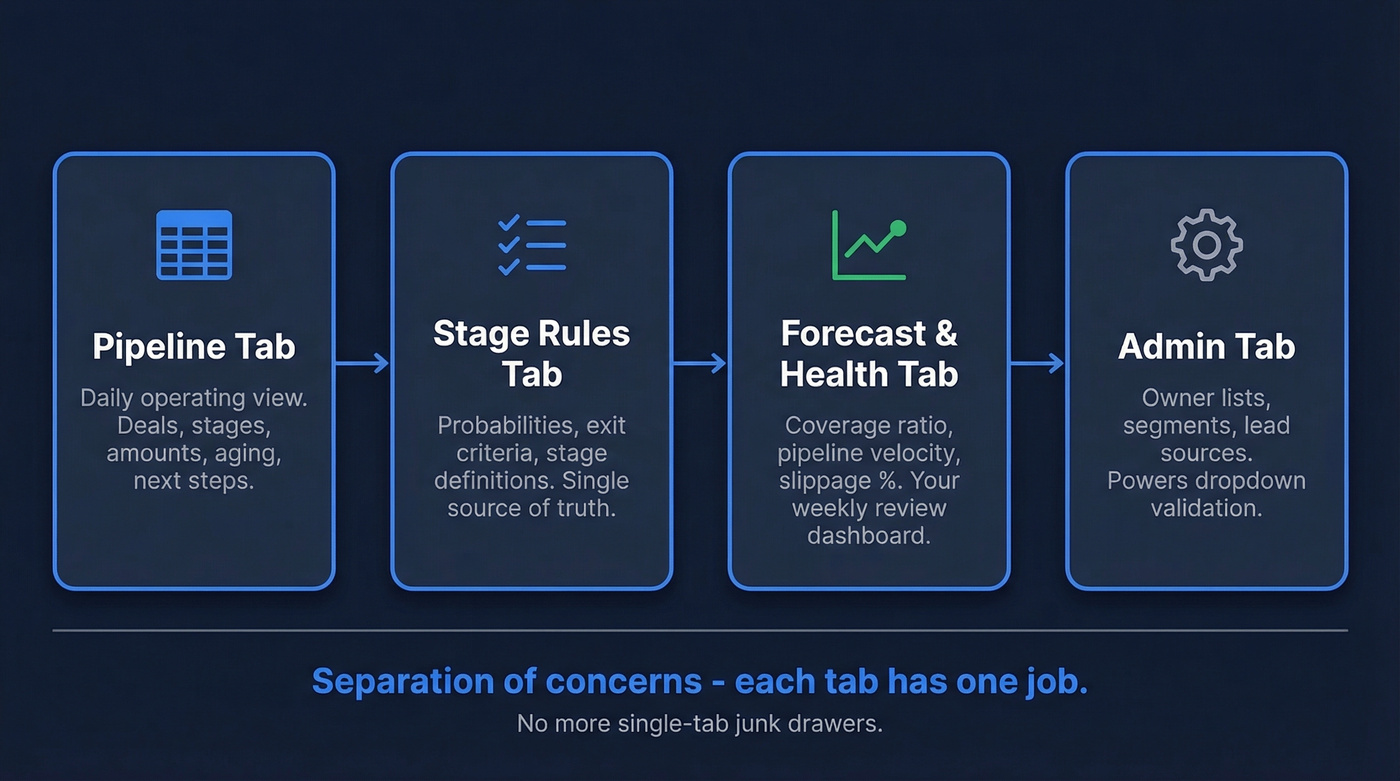
A working pipeline workbook needs separation of concerns. One tab for live deals, one for rules, one for health metrics, one for admin lookups. We've rebuilt this structure for three different teams in the past year, and the pattern holds every time.
Pipeline Tab
Your daily operating view. Every column earns its place:
Deal Name | Stage | Stage Entered Date | Next Step | Amount | Probability | Weighted Amount | Close Date | Owner | Last Activity
The critical column most people skip is Stage Entered Date. Without it, you can't calculate aging - and aging is how you catch deals that are quietly dying. We've seen pipelines where 40% of "active" deals hadn't been touched in three weeks. Nobody noticed because there was no aging column to make it obvious.
If you want a more complete view of what to track beyond the spreadsheet basics, use these pipeline health metrics as your checklist.
Stage Rules Tab
Every stage gets a defined probability and clear exit criteria.
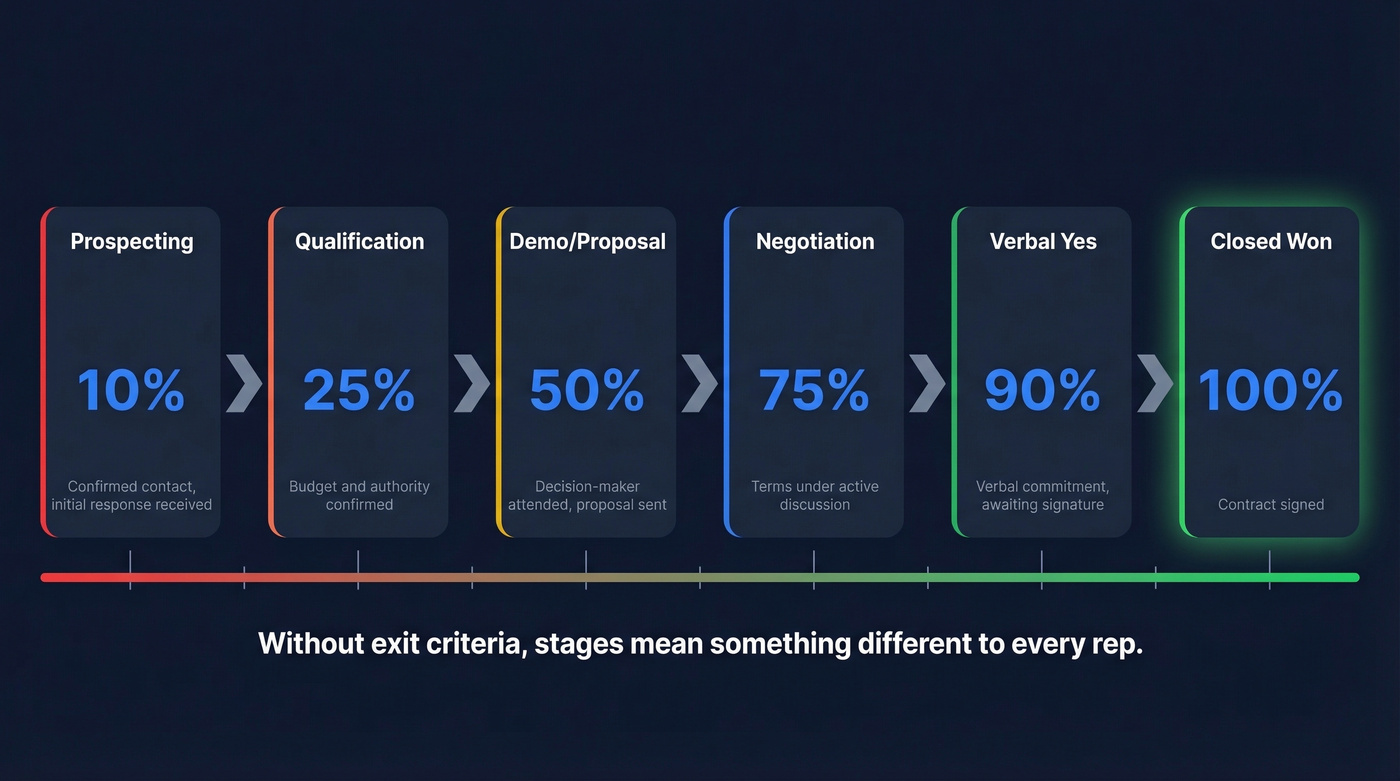
| Stage | Probability | Exit Criteria |
|---|---|---|
| Prospecting | 10% | Confirmed contact, initial response |
| Qualification | 25% | Budget + authority confirmed |
| Demo/Proposal | 50% | Decision-maker attended, proposal sent |
| Negotiation | 75% | Terms under discussion |
| Verbal Yes | 90% | Verbal commitment, awaiting signature |
| Closed Won | 100% | Contract signed |
Without exit criteria, "Qualification" means something different to every rep. That kills forecast accuracy. If you want a tighter definition of qualification, borrow a framework like MEDDIC.
Forecast & Health Tab
Three numbers matter: coverage ratio (total pipeline / quota - aim for 3-5x), pipeline velocity, and slippage percentage. Pull these from the Pipeline tab with the formulas below.
If you need a quick sanity check on what “good” looks like, compare against current sales pipeline benchmarks.
Admin Tab
Set up lookup lists for owners, segments, and lead sources. Use Data Validation lists to create dropdowns in your Pipeline tab. Dropdowns cut data entry errors dramatically and stop reps from inventing new stage names every week.
If your “Admin” tab is getting bloated, it’s usually a sign you’re drifting into lightweight contact management software territory.

Your 4-tab pipeline architecture means nothing if 20% of your deals are tied to dead contacts. Prospeo's 7-day data refresh and 98% email accuracy eliminate phantom deals before they inflate your forecast.
Clean contacts in, accurate forecast out. Start free with 75 verifications.
The Four Formulas You Need
[Weighted Forecast](https://blog.workday.com/en-us/how-to-calculate-and-forecast-expected-value.html) = Amount * Probability
Your reality-adjusted deal value. Sum the column for your weighted pipeline total.
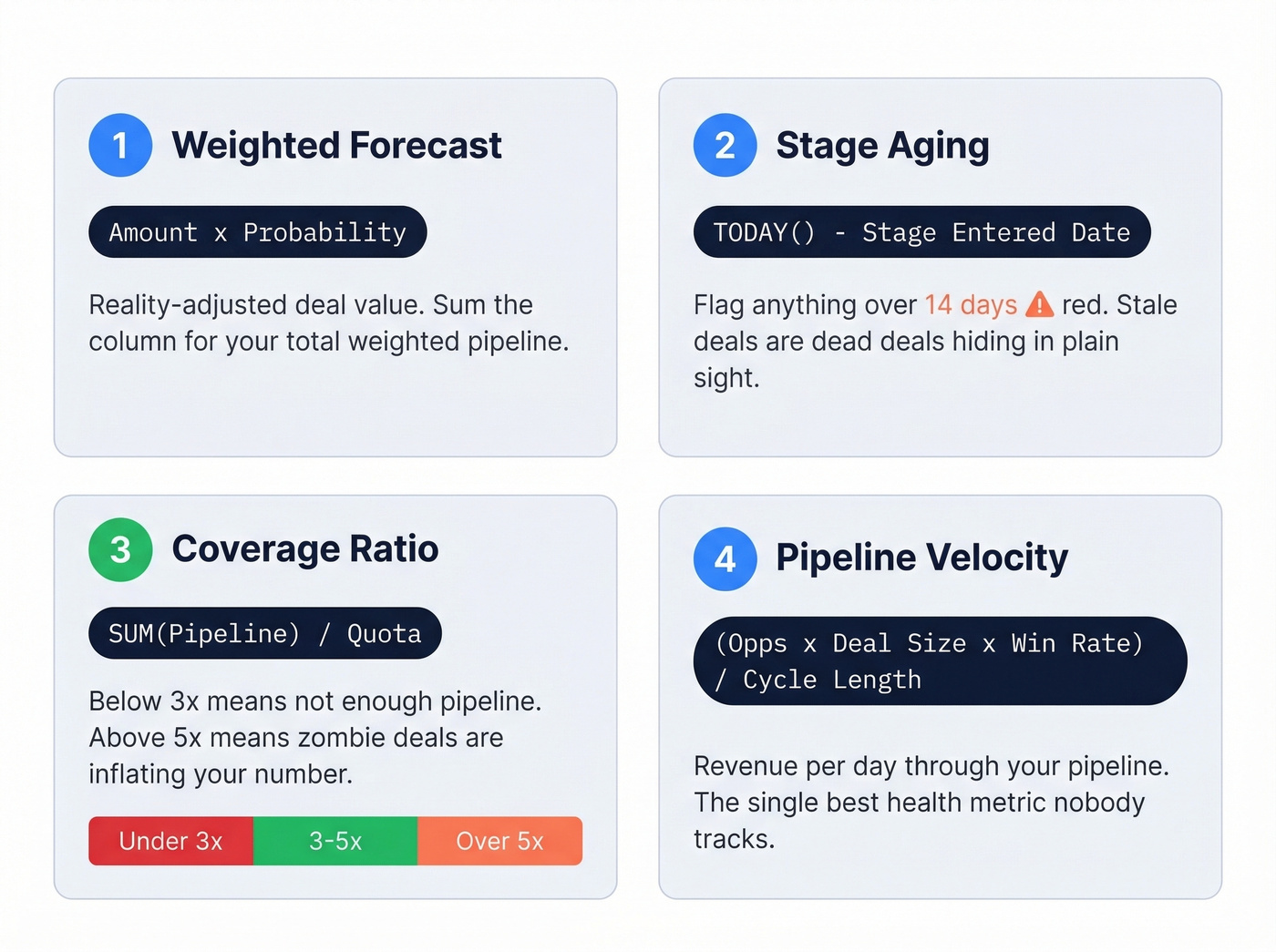
Stage Aging = TODAY() - [Stage Entered Date]
Conditional format anything over 14 days red. A deal sitting in "Demo/Proposal" for three weeks with no next step isn't a deal - it's a memory.
Coverage Ratio = SUM(Pipeline) / Quota
Below 3x? Not enough pipeline. Above 5x? Zombie deals are inflating the number.
[Pipeline Velocity](https://monday.com/blog/crm-and-sales/what-is-sales-velocity/) = (Opportunities x Avg Deal Size x Win Rate) / Avg Cycle Length
Revenue moving through your pipeline per day. This is the single best health metric for a sales team, and it's the one almost nobody tracks in their spreadsheet.
If you want to go deeper on forecasting beyond Excel math, these sales forecasting solutions are worth comparing.
Clean Data In, Clean Pipeline Out
None of these formulas matter if the contacts behind your deals are wrong. A "Negotiation" stage deal tied to a bounced email isn't at 75% probability - it's at zero. In our experience, roughly one in five "active" deals in a typical pipeline review have no valid contact path to the buyer. That's not a rounding error. That's a fifth of your forecast built on nothing.
Let's be honest: most pipeline hygiene advice focuses on stages and probabilities while ignoring the most basic question - can you actually reach the person? Prospeo verifies emails at 98% accuracy on a 7-day refresh cycle, and the free tier handles 75 verifications per month. Enough for a solo founder to keep their pipeline clean without spending a dollar.
If you’re seeing lots of bounces, start with the fundamentals of email bounce rate and how to reduce it.

Moving from Excel to a CRM doesn't fix bad data - it just organizes it better. Prospeo enriches your contacts with 50+ data points at ~$0.01/email, so every deal in your pipeline has a verified path to the buyer.
Stop forecasting on contacts you can't actually reach.
Weekly Review Cadence
A pipeline without a review cadence is just a spreadsheet.
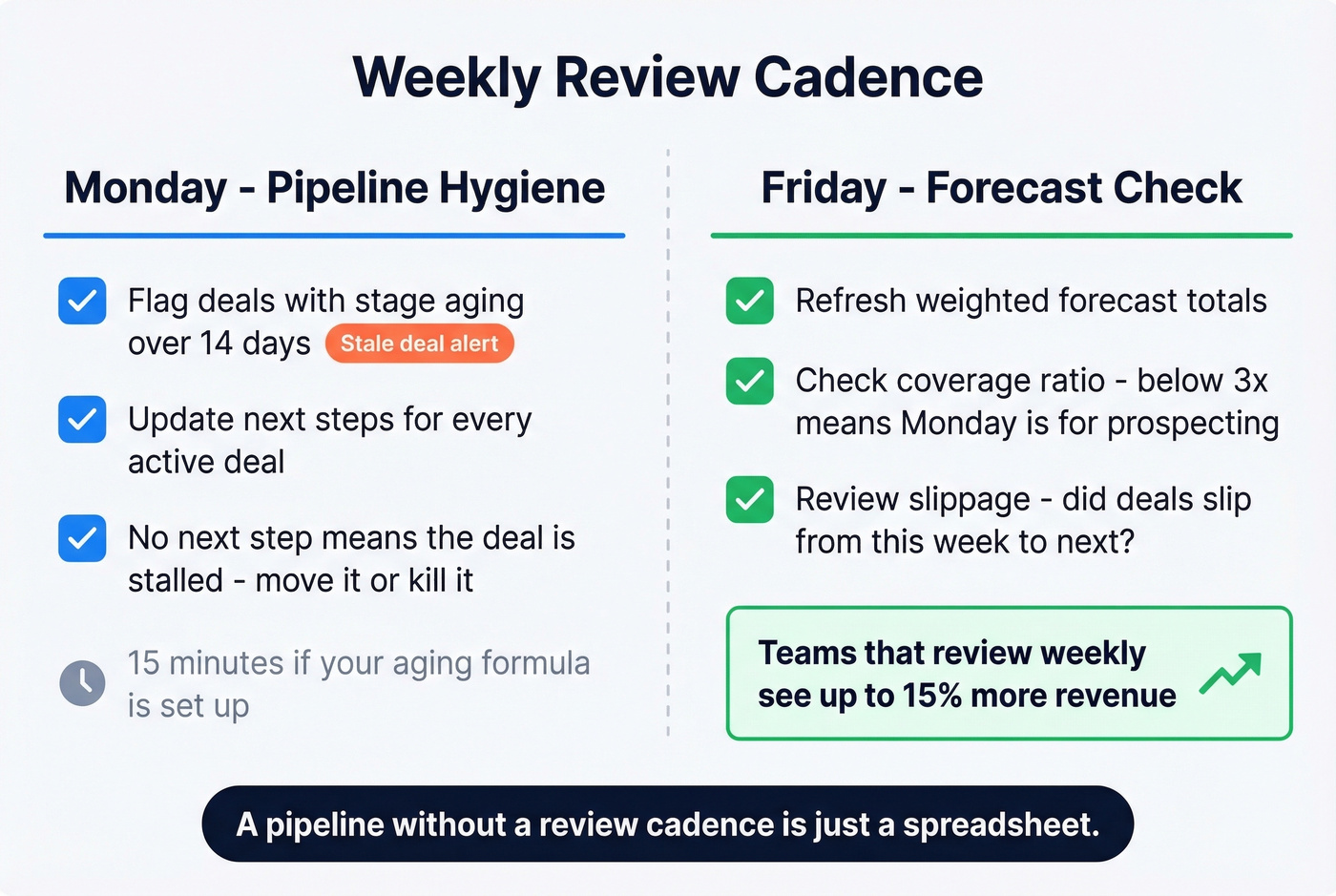
Monday: Flag anything with stage aging over 14 days. Update next steps for every deal - no next step means the deal is stalled. This takes 15 minutes if your aging formula is already set up.
Friday: Refresh your weighted forecast. Check coverage ratio. Below 3x? Monday's priority is prospecting, not deal management. The consensus on r/sales is that Friday pipeline reviews are non-negotiable, and we agree - it's the one habit that separates reps who forecast accurately from those who don't.
If your team struggles to keep next steps current, steal a few sales activities examples to standardize what “progress” looks like.
Effective pipeline management increases revenue up to 15% per the Vantage Point study. That's not from better tools. It's from looking at the data weekly and acting on it.
When Excel Stops Working
Excel is a great starting point and a terrible finishing point. Skip it entirely if you already have 5+ reps - you'll spend more time managing the spreadsheet than managing deals.
The failure modes are predictable: version conflicts between reps, buried deals nobody's reviewed, no audit trail, and onboarding nightmares for new hires who can't figure out which tab matters. When you hit 3-5 active sellers or 500+ contacts, move to a CRM. HubSpot's free tier handles basic pipeline visualization. Pipedrive starts around $14-24 per user/month. Even after switching, you still need verified contact data feeding your system - that problem doesn't go away just because you upgraded the interface.
If you’re evaluating options, this list of examples of a CRM can help you map “Excel needs” to CRM features.
FAQ
Can I use Google Sheets instead of Excel?
Yes. Every formula here works identically in Google Sheets, with better real-time collaboration but slightly weaker conditional formatting. For teams under five reps, Sheets' built-in sharing often makes it the better choice.
What pipeline stages should I start with?
Five: Prospecting, Qualification, Demo/Proposal, Negotiation, Closed Won. Add "Verbal Yes" if your sales cycle has a gap between agreement and signature. Fewer stages means less ambiguity and cleaner forecasts.
How do I keep contact data accurate in my pipeline?
Verify emails before deals enter the sheet, not after they bounce. Run a bulk verification on your existing pipeline quarterly to clear out dead contacts inflating your forecast. Tools like Prospeo handle this at scale - 98% email accuracy, and the free tier covers 75 verifications a month for solo operators.