

Professional Email Endings: What the Data Says (and What to Actually Write)
You've written the entire email. The ask is clear, the tone is right, the subject line is sharp (if you need ideas, see subject line best practices). And now you're staring at the cursor, stuck on two words: the sign-off.
Professional email endings shouldn't be hard - but 57% of Gen Z workers say their biggest email confusion is how formal to be, and the sign-off is where that confusion concentrates. Your closing isn't just a formality. It's the last impression before someone decides whether to reply. And the data on which ones actually work is surprisingly clear.
What You Need (Quick Version)
If you don't read another word, use these three:
- Formal or new contacts: "Best regards,"
- Everyday work emails: "Thanks,"
- Established relationships: "Cheers," (if your company culture supports it)
Why these three? An [analysis of over 350,000 email threads](https://blog.boomerangapp.com/2017/01/how-to-end-an-email-email-sign-offs/) found that gratitude-based sign-offs get 36% more replies than the average email. Saying "thanks" isn't just polite - it's statistically effective.
Three Parts of a Strong Closing
Most people obsess over the sign-off word itself. That's the wrong place to focus.
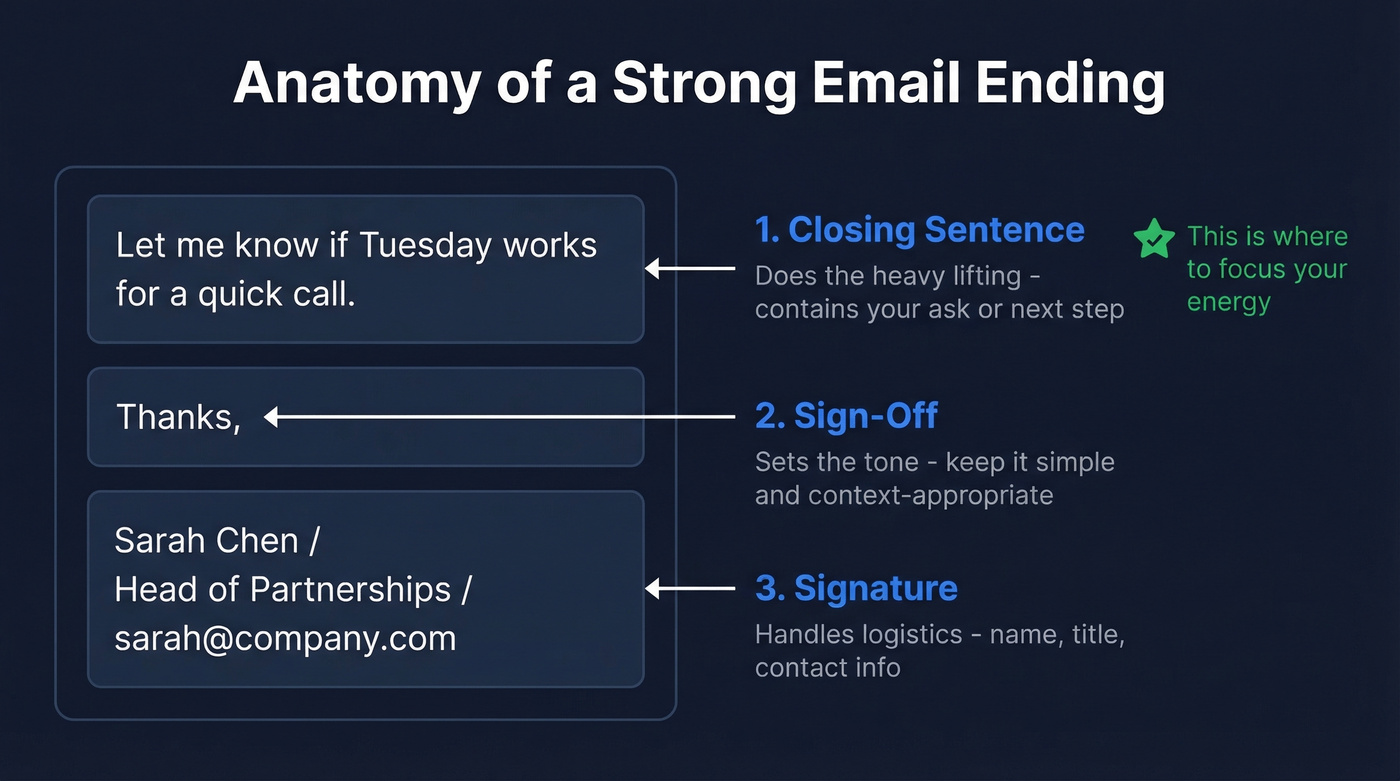
A well-crafted email ending has three parts: closing sentence, sign-off, and signature. The closing sentence does most of the work. "Let me know if Tuesday works for a quick call" carries far more weight than whether you write "Best" or "Regards" underneath it. The sign-off is tone-setting shorthand. The signature is logistics (and a clean email signature helps more than most people think).
Here's the thing: when you're agonizing over "Best regards" vs. "Kind regards," you're optimizing the wrong variable. Get the closing sentence right first.
Which Sign-Offs Actually Get Replies
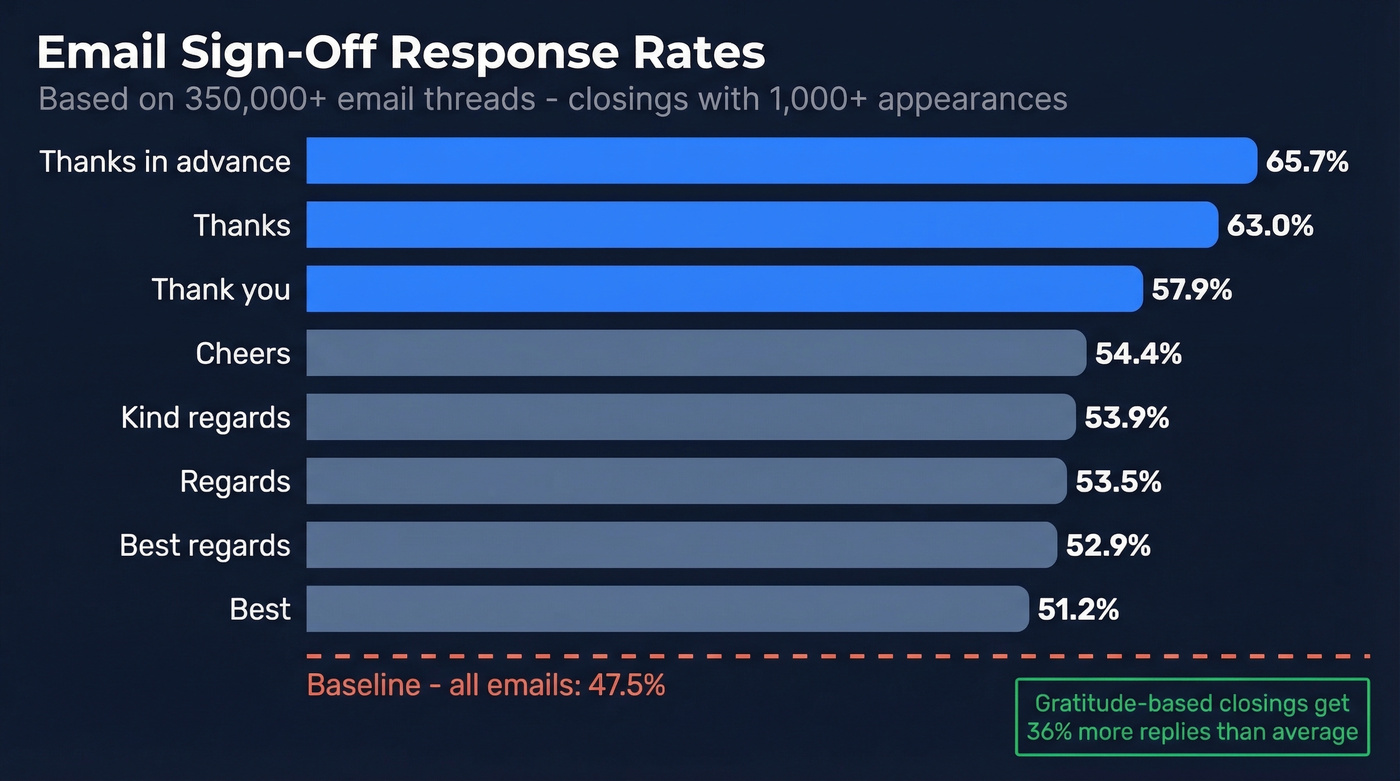
The 350,000-thread study pulled data from 20+ online communities, used open-source threading libraries and regex to extract closings, and published the methodology in a Jupyter Notebook. Here's the full breakdown for closings that appeared 1,000+ times:
| Sign-Off | Response Rate |
|---|---|
| Thanks in advance | 65.7% |
| Thanks | 63.0% |
| Thank you | 57.9% |
| Cheers | 54.4% |
| Kind regards | 53.9% |
| Regards | 53.5% |
| Best regards | 52.9% |
| Best | 51.2% |
| Baseline (all emails) | 47.5% |
The pattern is unmistakable. Every thankful closing outperforms the baseline. Emails with any variation of "thank" hit a 62% response rate, compared to 46% without one - a 36% relative lift. The researchers re-ran the analysis on threads where the initial message contained a question mark, controlling for the fact that questions naturally invite replies. Same pattern held.
"Thanks in advance" tops the chart at 65.7%, but it's also one of the most polarizing closings in business email. More on that below.
Business Email Closings by Category
You don't need 100 options. You need 5-7 that you rotate by context. If you send a lot of email, you'll eventually feel "default sign-off fatigue" - the sense that you're writing the same robotic ending all day. Here's how to build a rotation (you can also borrow from these email closers if you want more variety).
In law and finance, "Best regards" or "Sincerely" is the floor. In tech and creative agencies, "Cheers" and "Thanks" are standard. When in doubt, match the most formal email you've received from someone at that company.
Formal
"Best regards," is a safe, widely accepted default for business contexts. "Sincerely," is for job applications, legal correspondence, and government communications - safe but stiff for everyday use. "Kind regards," is slightly warmer and popular in the UK and Europe, pulling a 53.9% response rate.
Gratitude-Based
"Thanks," is the workhorse - 63% response rate, and it fits most day-to-day work emails. "Thank you," adds a touch more formality for client emails and first-time contacts. "Thanks in advance," has the highest response rate (65.7%) but implies the recipient will do what you're asking. Powerful when the ask is reasonable, presumptuous when it's not.
Friendly and Casual
"Cheers," is common in the UK and Australia - use it only if the audience and culture support it (54.4% response rate). "Talk soon," works for ongoing conversations. "All the best," is a warmer cousin of "Best" and great for networking.
Action-Oriented
"Looking forward to hearing from you," works when you've made a specific ask. "Let me know how I can help," flips the dynamic - you're offering, not asking.

You're perfecting your sign-off - but does the email even reach the inbox? Teams using unverified data see 35%+ bounce rates, which torches your domain reputation before anyone reads your closing line. Prospeo delivers 98% email accuracy with 5-step verification, so every carefully crafted ending lands where it should.
Stop perfecting emails that bounce. Verify every address before you hit send.
How to End an Email by Scenario
The sign-off word matters less than the closing sentence + sign-off pairing. Let's walk through the most common situations.
Cold Outreach
Closing sentence: "Would it make sense to grab 15 minutes next week?" Sign-off: "Thanks," or "Best,"
Keep it short and low-pressure. One clear ask, not three disguised as one (for more structure, use a proven outreach email framework). And your sign-off is irrelevant if the email bounces - we've seen teams waste weeks crafting perfect outreach only to discover half their list was dead addresses. Verify before you send.
Job Application
Closing sentence: "I'd welcome the chance to discuss how my experience with [specific skill] aligns with the role." Sign-off: "Sincerely," or "Best regards,"
One of the few contexts where "Sincerely" still makes sense. Match formality to the company culture: "Sincerely" for conservative industries, "Thanks" for more casual teams.
Apology or Bad News
Never use "Thanks" when delivering bad news - you're not thanking someone for receiving a problem. Lead with accountability: "I take full responsibility for the delay and have [specific corrective action] in place." Close with "Sincerely," or "Best regards," to match the gravity.
Internal Team Update
Internal emails are where you can drop the sign-off entirely. Nobody needs "Best regards" on the fourth reply in a thread. Write your update, close with "Let me know if you have questions - otherwise, we're moving forward with this plan," and skip the formality.
Rejection
Be direct, be kind, close warmly. "We've decided to go in a different direction, but I genuinely appreciated your time and proposal." Pair it with "All the best," - it's forward-looking without implying future business.
Networking
Casual is appropriate when you're building a relationship, not closing a deal. "I'd love to continue this conversation - coffee or a quick call sometime next month?" followed by "Cheers," or "Talk soon," signals warmth without pressure.
Sign-Offs That Sound Passive-Aggressive
Research compiled by Kylian.ai found that 91% of workers encounter passive-aggressive behavior via email, and 37% deliberately change their greetings or sign-offs to express frustration. We've watched perfectly professional threads go sideways because of a single sign-off downgrade. Here are the worst offenders and what to write instead.
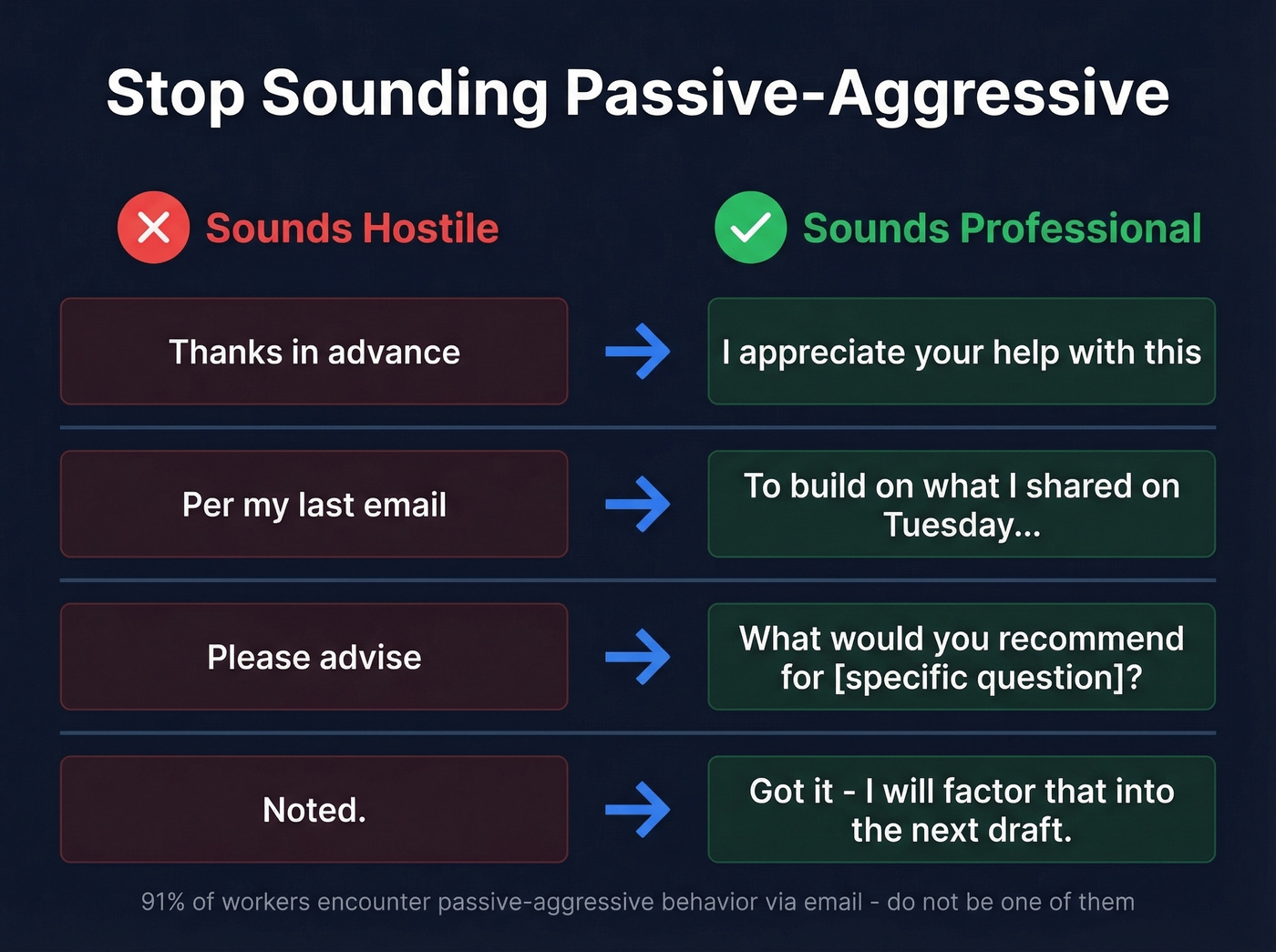
"Thanks in advance" -> "I appreciate your help with this." Thank the attention, not the outcome. "Thanks in advance" pre-assumes compliance, which reads as presumptuous when the ask is significant.
"Per my last email" -> "To build on what I shared on Tuesday..." Reference the date, not the fact that they didn't read it. Everyone knows what "per my last email" really means.
"Please advise" -> "What would you recommend for [specific question]?" Give them something concrete to respond to. "Please advise" dumps the problem without direction.
"Noted." -> "Got it - I'll factor that into the next draft." One word, a period, maximum coldness. Add what you'll do with the information.
How Gen Z Is Changing Email Closings
A ZeroBounce survey of nearly 1,400 Gen Z workers across the US, Canada, the UK, and Europe paints a clear picture: younger workers aren't abandoning email etiquette - they're simplifying it.
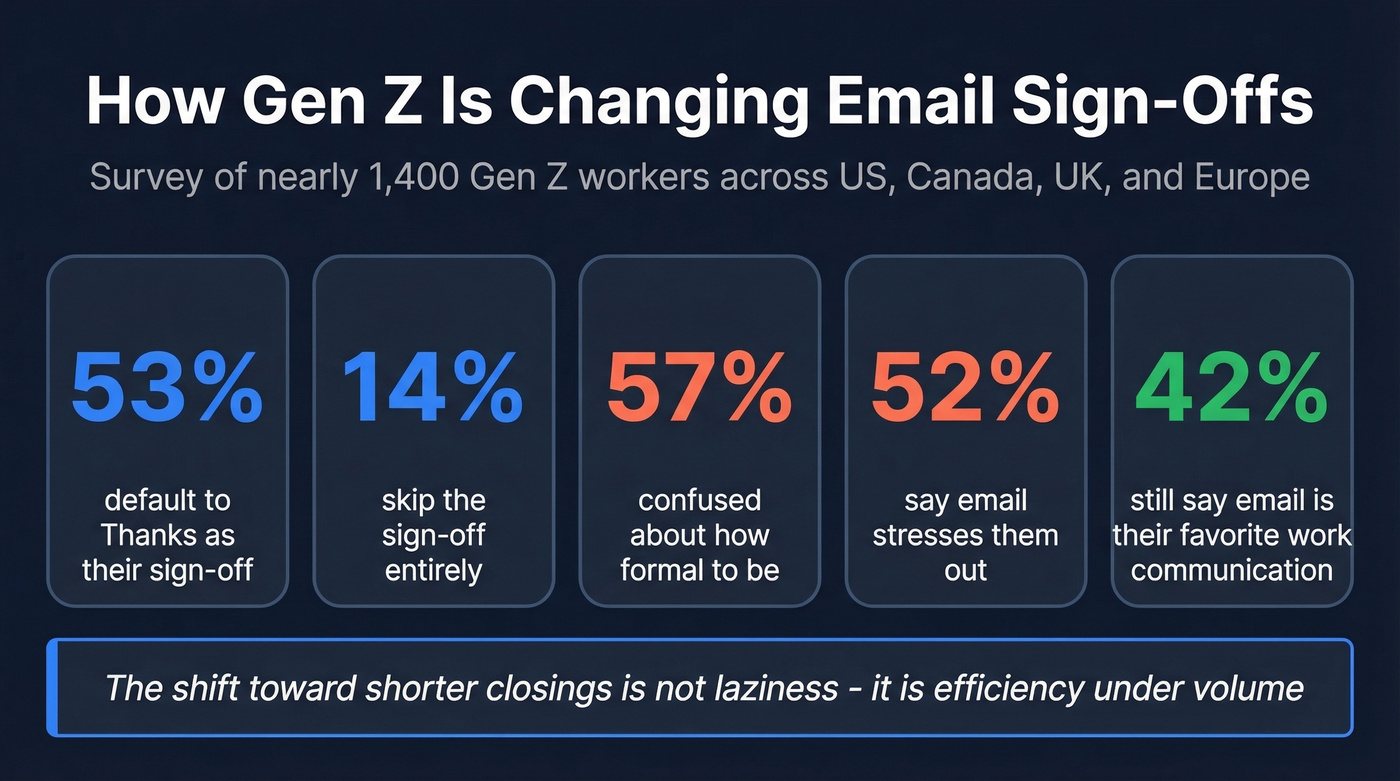
53% default to "Thanks." 14% skip the sign-off entirely and let their email signature do the work. Despite the stress (52% say email stresses them out), 42% still say email is their favorite way to communicate at work. The gravitational pull toward shorter closings isn't laziness - it's efficiency under volume. When 92% say the number of emails affects their productivity, brevity becomes a survival strategy.
The 57% confused about formality aren't being careless. They're navigating a workplace where a Slack message to their manager is casual but an email to a client two levels up requires a different register entirely. That's a training gap, not a generational flaw.
International Sign-Off Rules
If you're emailing across borders, small differences in convention create outsized impressions.
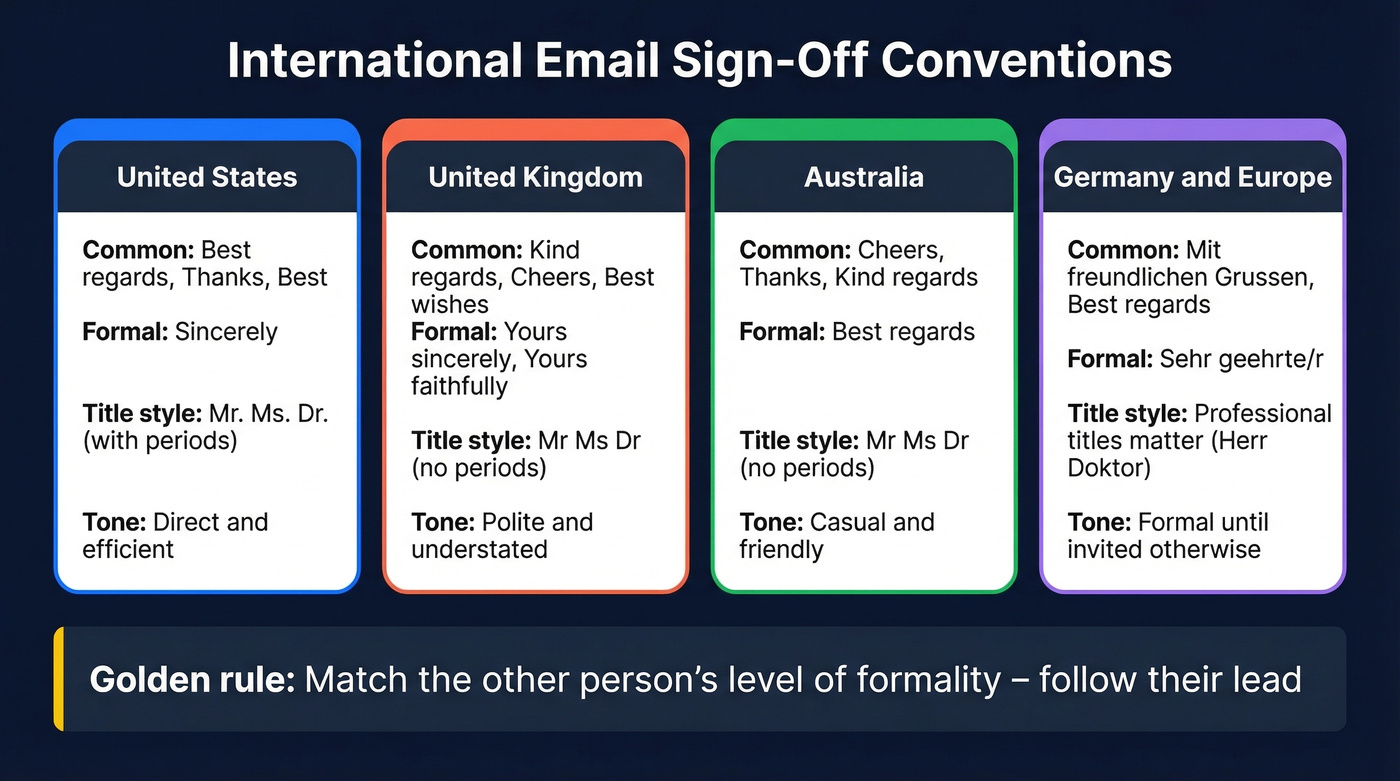
A few practical rules that prevent most awkwardness:
- Match the other person's level of formality. If they switch from "Dear Mr. Smith" to "Hi James," follow their lead.
- Watch title punctuation. American English typically uses Mr./Ms./Dr. while British English often drops the period: Mr/Ms/Dr.
- Use culture-specific closings only when you're sure they fit. "Cheers" is common in the UK and Australia but can read overly casual in more traditional US corporate contexts.
Skip this section if all your contacts are domestic - but the moment you're emailing someone in London, Sydney, or Frankfurt, these small details matter more than you'd think.
Sign-Offs to Avoid
"Love," - Unless you're emailing family.
"Sent from my iPhone" left unedited - It's not a sign-off; it's a device footer. Take 30 seconds to customize it or remove it (or just standardize your email signature so it stays clean everywhere).
"Thx," - Reads too casual and low-effort in professional contexts.
"XOXO," - No context makes this professional.
Religious sign-offs in secular contexts - "Blessings" or "God bless" can alienate recipients who don't share your faith.
Quotes in signatures - They add noise and length. Keep your signature clean.
FAQ
Is "Best" a good email sign-off?
"Best" is safe but generic - the khaki pants of email closings. It pulls a 51.2% response rate, barely clearing the 47.5% baseline. "Thanks" outperforms it at 63% and costs you zero extra effort.
Should I use a sign-off in every email?
First email in a thread: always. Ongoing replies: optional. Once you're three messages deep, dropping the sign-off is efficient, not rude.
What's the most professional email sign-off?
"Best regards" is the safest default across most business contexts, pulling a 52.9% response rate. For legal correspondence or job applications, "Sincerely" is the standard. For everything else, "Best regards" rarely gets you in trouble.
Does your email sign-off affect response rates?
Yes - significantly. The 350,000-thread study found gratitude-based closings get 36% more replies than average. "Thanks in advance" hit 65.7%, "Thanks" hit 63%, and even "Best" at 51.2% beat the 47.5% baseline.
How do I make sure outbound emails actually get delivered?
Start with a verified email address - the best sign-off in the world doesn't matter if your message bounces. Prospeo verifies addresses in real time with 98% accuracy, and the free tier gives you 75 emails per month to start.
Cold outreach lives or dies on two things: what you write and who actually receives it. You now know which sign-offs get 36% more replies. Pair that with Prospeo's 300M+ verified contacts and 98% email accuracy at $0.01/email - and your outreach finally performs like the data says it should.
Great closings deserve real inboxes. Find verified contacts in seconds.