

Proposal Email Subject Lines: What 5.5M Emails Tell Us Actually Works
You spent two weeks building a $25K proposal. Custom pricing, tailored scope, a deck that actually looks good. Then it sits unopened because the subject line read like a form letter.
We've watched teams lose deals not because of pricing or fit, but because the proposal email never got opened. The subject line is the smallest piece of the process and the one that determines whether everything else matters. A study analyzing 5.5 million emails gives us real numbers on what works - and the best proposal email subject lines share three traits: they're short, personal, and framed as questions.
Five Rules for Higher Open Rates
Personalize the subject line - personalized subjects hit a 46% open rate vs. 35% without, a 31% lift. Keep it to 2-4 words, which matched that same 46% ceiling. Front-load the first 33 characters, since that's the universal visibility cutoff across major email clients and devices. Use a question format, which also hit 46%. And follow up on Day 2-3, not Day 7 - by then, your proposal is buried.
What 5.5M Emails Reveal About Open Rates
A 5.5-million-email dataset covering the full calendar year is the largest recent study on cold email subject line performance. The findings map directly to proposal outreach.
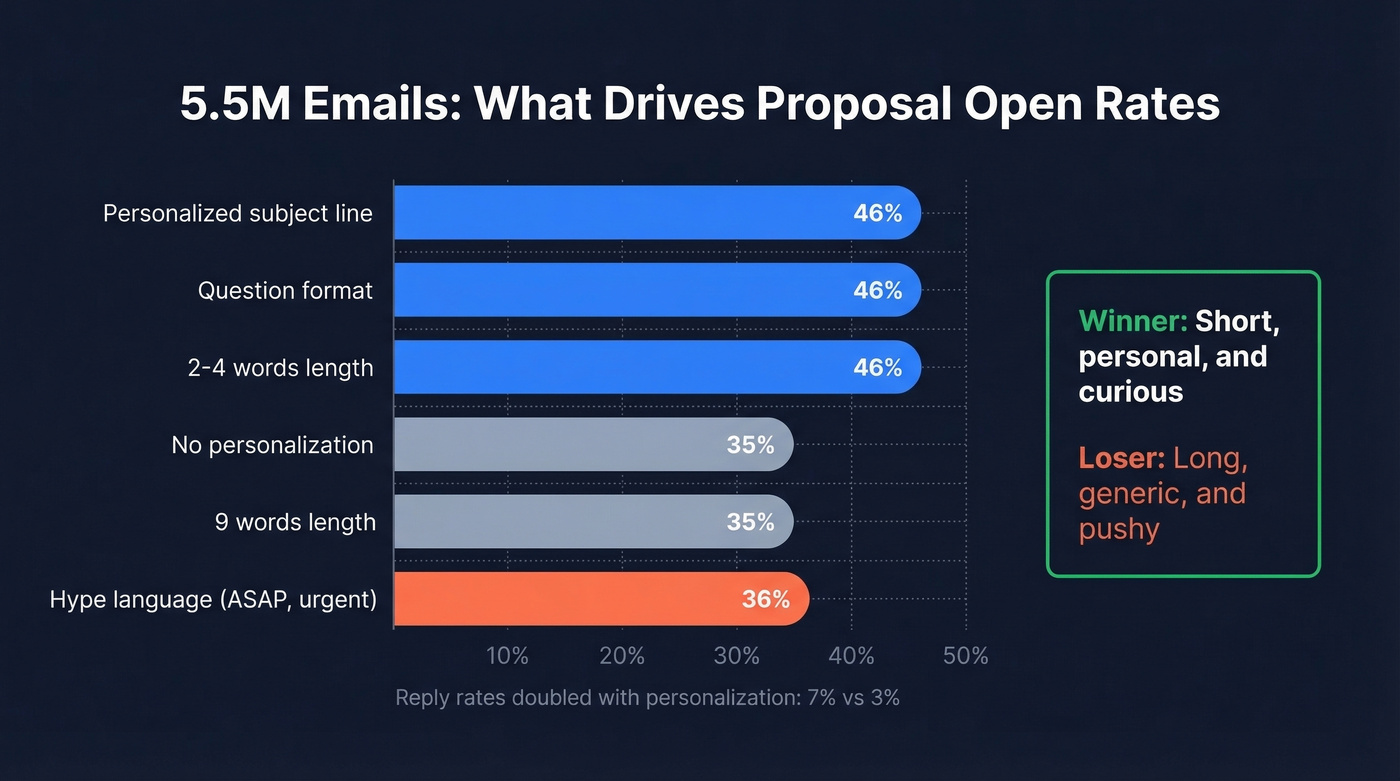
Personalization dominated. Emails with personalized subject lines pulled a 46% open rate and a 7% reply rate. Without personalization, those numbers dropped to 35% opens and 3% replies - a 133% increase in reply rate just from including a name or company in the subject.
Question-format subject lines matched that 46% ceiling. Statements performed worse. A question creates an open loop the reader wants to close.
Length matters more than most people think. Two-to-four-word subject lines hit 46% opens. At nine words, you're down to 35%. At ten, 34%. Every word past four costs you. Numbers in subject lines didn't help - 27% open rate vs. 28% without. And hype language ("ASAP," "urgent," generic greetings) correlated with open rates below 36%. The takeaway is blunt: short, personal, and curious beats long, generic, and pushy every time.
In practice, the plainest, most specific subject lines outperform anything clever. You'll notice none of the templates below promise to "blow your socks off." That's intentional.
Ideal Character Length
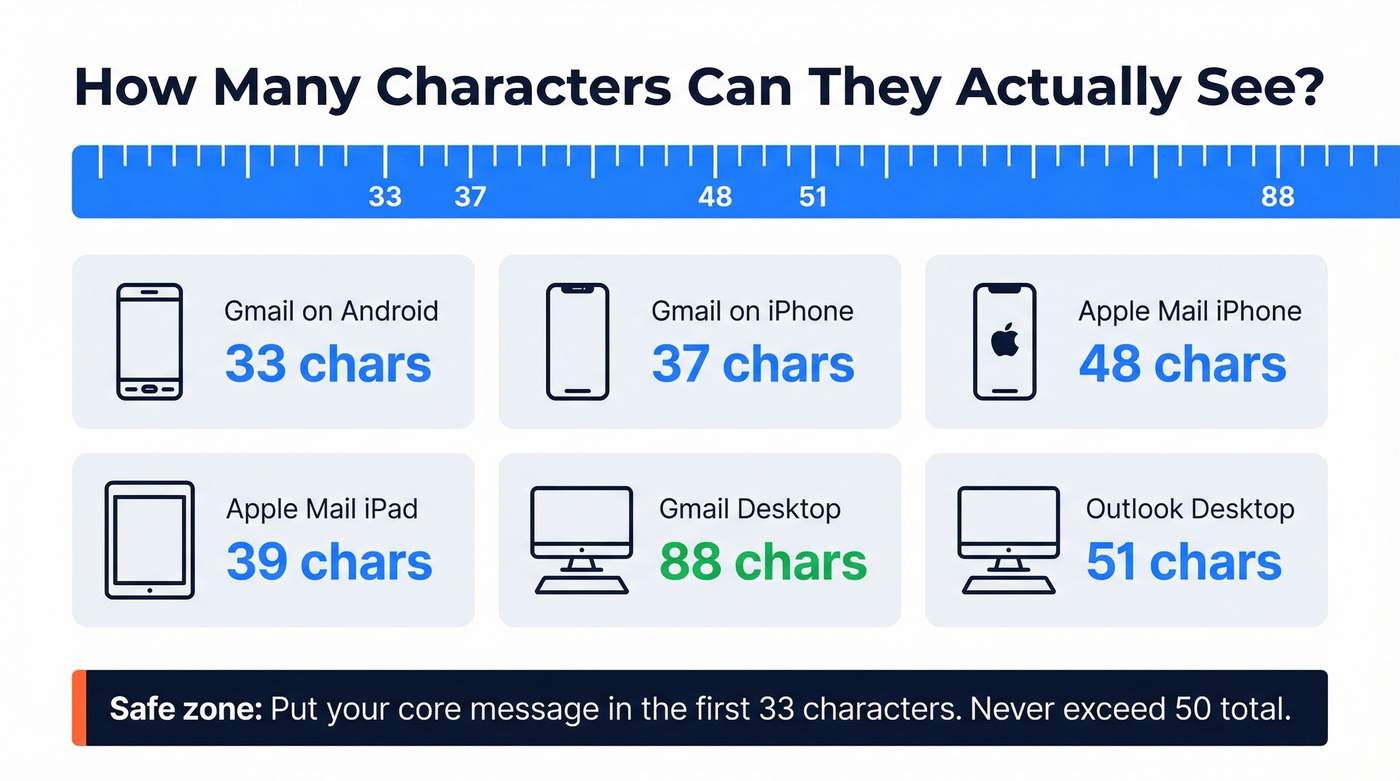
The "right" length depends on where your recipient reads email. Here's what EmailToolTester found on real devices:
| Client | Device | Char Limit | Preheader |
|---|---|---|---|
| Gmail | Android (Pixel 7) | 33 chars | 37 chars |
| Gmail | iPhone 14 | 37 chars | 39 chars |
| Apple Mail | iPhone 14 | 48 chars | 99 chars |
| Apple Mail | iPad 10th gen | 39 chars | 75 chars |
| Gmail | Desktop (1400px) | ~88 chars | - |
| Outlook | Desktop (1400px) | ~51 chars | - |
Put your core message in the first 33 characters. That's the floor for universal visibility. Don't exceed 50 characters total - Outlook desktop truncates around 51, and mobile clients cut much earlier.
For proposals, "[Name], [Project] proposal" needs to fit in that 33-character window. Everything after it is bonus context that half your audience won't see.

A 46% open rate means nothing if you're sending proposals to dead inboxes. Prospeo's 5-step email verification delivers 98% accuracy - so every perfectly crafted subject line actually reaches a real person.
Stop losing proposals to bad data. Verify every address before you hit send.
Templates by Stage
Initial Proposal Send
These templates combine the three winning signals - personalization, question format, and short length:
- [Name], [Project] proposal ready - The recipient knows exactly what's inside.
- Quick look at [Project Name]? - Question format, casual tone, under 33 characters.
- [Project Name] proposal for review - Direct and professional. Works for formal industries.
- Your [Project Name] proposal - "Your" adds subtle personalization without a first name.
- [Name], thoughts on this scope? - Frames the proposal as a conversation, not a deliverable.
- Proposal: [Company] + [Your Company] - Partnership framing. Strong for agency pitches.
- [Name], here's the [Project] plan - Swaps "proposal" for "plan" - less formal, same clarity.
For SaaS, try "[Name], ROI model for [Product]?" For agencies: "Creative brief + proposal for [Brand]." For consulting: "[Name], engagement proposal for [Initiative]."
These examples are designed to stay short and lead with either a name or the project - that's the data talking. Your subject line should also align with the email body; if the subject promises a proposal, the email should open with the problem you're solving, the outcome you're offering, and a clear next step. Mismatched subject lines and bodies tank reply rates.
Follow-Up Cadence
Most teams wait too long for the first follow-up and give up too early on the third. In our experience, the first follow-up at Day 2-3 is where the biggest gap exists. Here's the cadence that works:
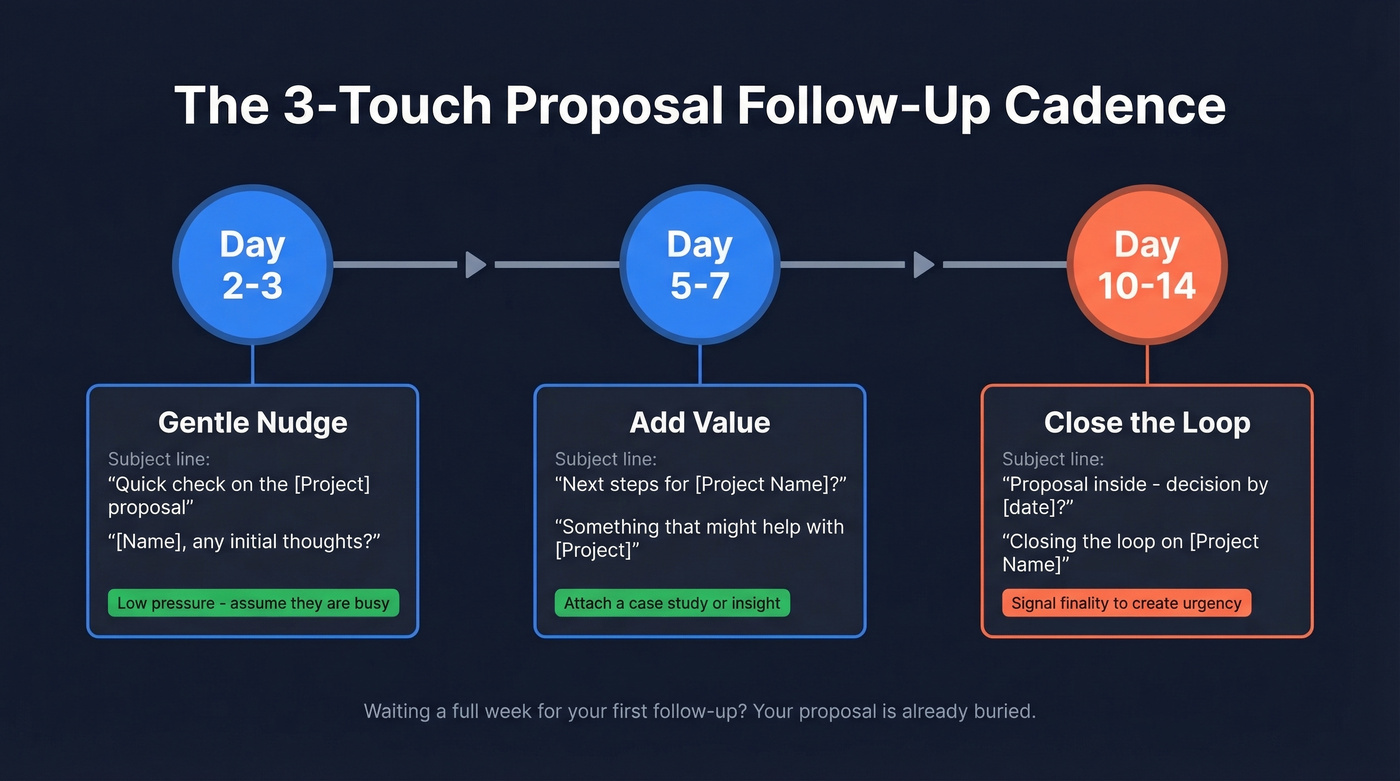
Day 2-3: Gentle nudge. Keep it low-pressure.
"Quick check on the [Project] proposal" assumes they're busy. "[Name], any initial thoughts?" opens dialogue without demanding a decision.
Day 5-7: Add value. Don't just ask "did you see it?" - give them a reason to re-engage.
"Next steps for [Project Name]?" shifts the frame forward. "Something that might help with [Project]" works if you attach a case study. "Thoughts on our [Project Name] proposal?" is a direct question with no games.
Day 10-14: Close the loop. Signal finality.
"Proposal inside - decision by [date]?" introduces a deadline without aggression. "[Name], should we revisit [Project]?" gives them an easy out, which paradoxically increases replies. "Closing the loop on [Project Name]" signals your last follow-up and creates urgency through finality.
Decision and Deadline Stage
When a decision is imminent, calm urgency beats hype. Here's what to do - and what to avoid:
| Don't write | Do write | Why it works |
|---|---|---|
| "URGENT: Proposal expires soon!!!" | Decision by [date]? | Three words. Impossible to misread. |
| "Just checking in again..." | [Name], any questions before [date]? | Positions you as helpful, not pushy. |
| "Following up for the 4th time" | Final details on [Project Name] | Implies wrapping up, not chasing. |
| "Don't miss this opportunity!" | Ready to move forward on [Project]? | Assumes the sale. Confident, not aggressive. |
| "Last chance!!!" | [Name], let's lock in [Project Name] | Collaborative ("let's") with a clear CTA. |
Look - if you've followed up three times with no response, the subject line isn't your problem. The proposal is. Or the timing. Or the fit. Pick up the phone.
A/B Testing Your Subject Lines
Test two subject lines per proposal batch. Change one variable - personalization vs. no personalization, question vs. statement, or name-first vs. project-first. You need at least 50 sends per variant to get a meaningful signal. Most teams never test because each proposal feels unique, but if you're sending similar proposals to similar buyers, even small tests compound over months. We've seen teams improve open rates by 8-12 percentage points within a quarter just by running these simple splits consistently.
If you want more inspiration beyond proposals, pull from a larger swipe file of subject lines and adapt them to your deal stage.
Mistakes That Kill Open Rates
Fake threading. Don't add "Re:" or "Fwd:" to first-touch emails. Spam filters track this manipulation, and recipients lose trust the moment they realize the thread is fake.
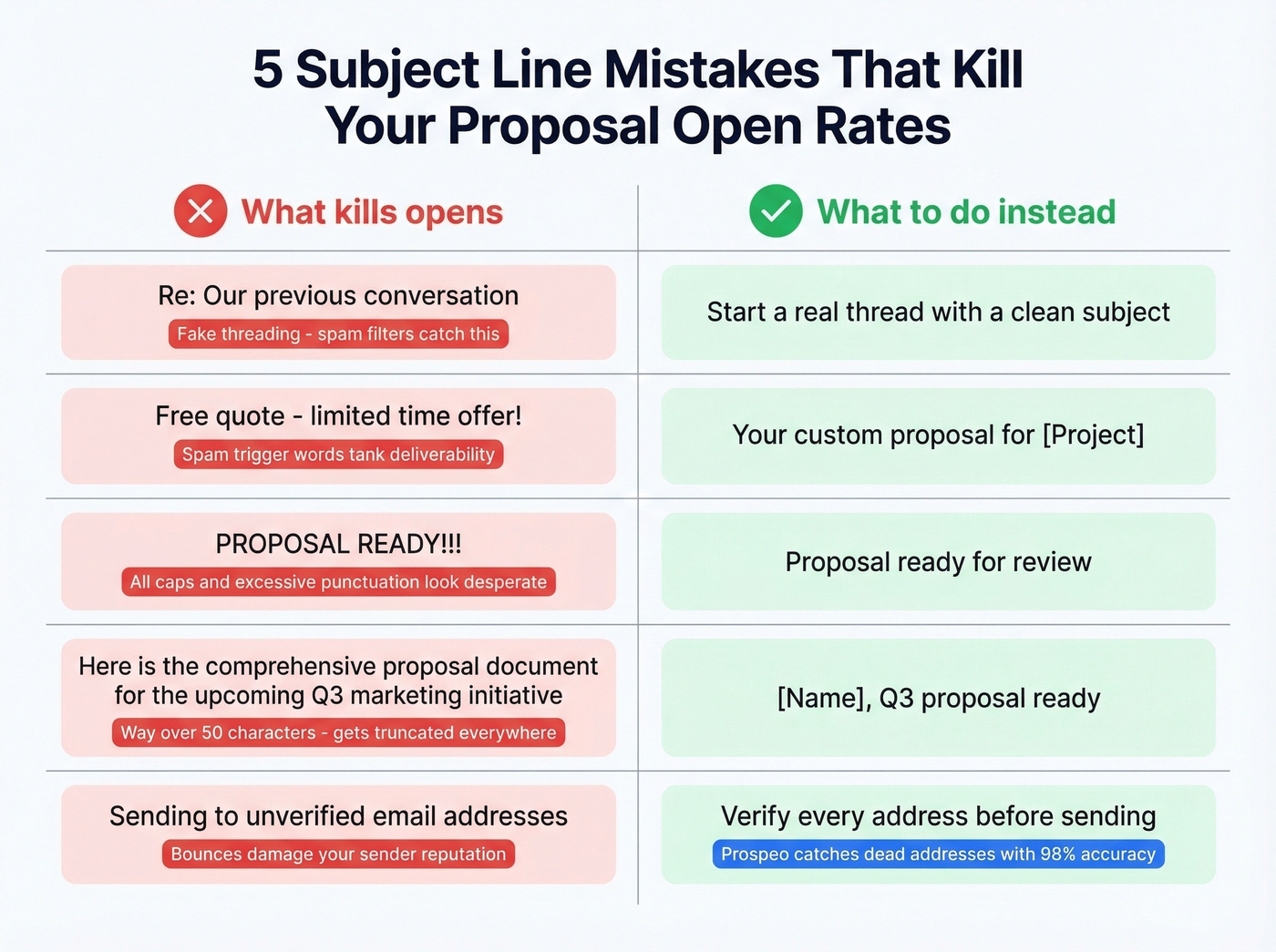
Spam trigger words. Skip "free quote," "risk-free," or "guaranteed." Write "Your custom proposal" instead of "Free quote - limited time offer." Nearly one in five emails get caught by spam filters, and these terms accelerate that. If you're fighting deliverability issues, start with the fundamentals in an email deliverability checklist.
ALL CAPS and excessive punctuation. "PROPOSAL READY!!!" doesn't convey excitement - it conveys desperation. Sentence case, one punctuation mark, done.
Going over 50 characters. Outlook desktop truncates around 51, and mobile clients cut much earlier. If they can't read it, they won't open it.
Sending to unverified addresses. The best subject line on a dead email is just poetry. A bounced proposal doesn't just waste your effort; it damages your sender reputation for every future email you send. Before optimizing subject lines, run your contact list through a verification tool - Prospeo's 5-step verification process catches catch-all domains, spam traps, and dead addresses with 98% accuracy, and the free tier covers 75 emails per month. (If you're diagnosing issues, start with email bounce rate benchmarks and causes.)

Your follow-up cadence is dialed in. But if the proposal went to the wrong contact, no subject line saves it. Prospeo gives you 300M+ verified profiles with direct emails and mobiles to the actual decision-maker.
Send your next proposal to the person who can actually sign it.
FAQ
What's the best business proposal email subject line?
Lead with the recipient's name or project, stay under five words, and use a question when possible. Templates like "[Name], [Project] proposal ready" and "Quick look at [Project Name]?" follow the patterns that tested highest in the 5.5M email dataset. Avoid hype words, all caps, and anything over 50 characters.
How long should a proposal email subject line be?
Two to four words, or under 50 characters total. The 5.5M email study found that 2-4 word subject lines hit a 46% open rate - the highest of any length bracket. Put your core message in the first 33 characters to guarantee visibility across mobile and desktop Outlook.
How soon should I follow up on a proposal email?
Send your first follow-up 2-3 days after the initial send. Follow up again at day 5-7 with added value like a case study or relevant insight. Your final close-the-loop email should go out at day 10-14. Waiting a full week for the first touch is too long - by then, your proposal is buried under fifty other emails.
Does personalizing the subject line actually improve open rates?
Personalized subject lines hit 46% opens vs. 35% without - a 31% lift. Reply rates more than doubled, from 3% to 7%. Even adding just a first name or project name counts. To personalize at scale, you need the right contact at a verified address; Prospeo's email finder pulls verified contacts from 300M+ profiles so your personalized subject line reaches the right person.