

Reverse Email Lookups: How They Actually Work and Which Tools Are Worth Using
You've got an email address and nothing else. Maybe it's a lead who filled out a form with just their work email. Maybe it's an unknown sender who landed in your inbox and you want to know who's behind it. Either way, you need a reverse email lookup - and if you've already tried one of those "free" tools that runs a fake loading bar for 30 seconds before demanding $29.95 for a report, you know the space is full of bait-and-switch garbage.
There are over 4 billion email addresses in active use globally. Turning one of those addresses into an actual identity - name, company, phone number, social profiles - is genuinely useful for sales, fraud prevention, and investigations. But the tools vary wildly in what they return and what they charge. We've tested dozens of them, and the gap between the best and worst is enormous.
Quick picks based on what you actually need:
- B2B lead enrichment: Prospeo - 98% email accuracy, free tier with 75 emails/month
- OSINT investigations: Epieos (140+ services, stealth lookups) or Holehe (free, open-source, 120+ sites)
- Sales prospecting: Hunter.io - 100M+ indexed emails, generous free tier, clear pricing
We also break down which "free" tools are actually free - and which ones aren't.
How Reverse Email Lookups Work
Every tool in this space uses some combination of three core approaches. The mix determines what you get back and why results differ so much between providers.
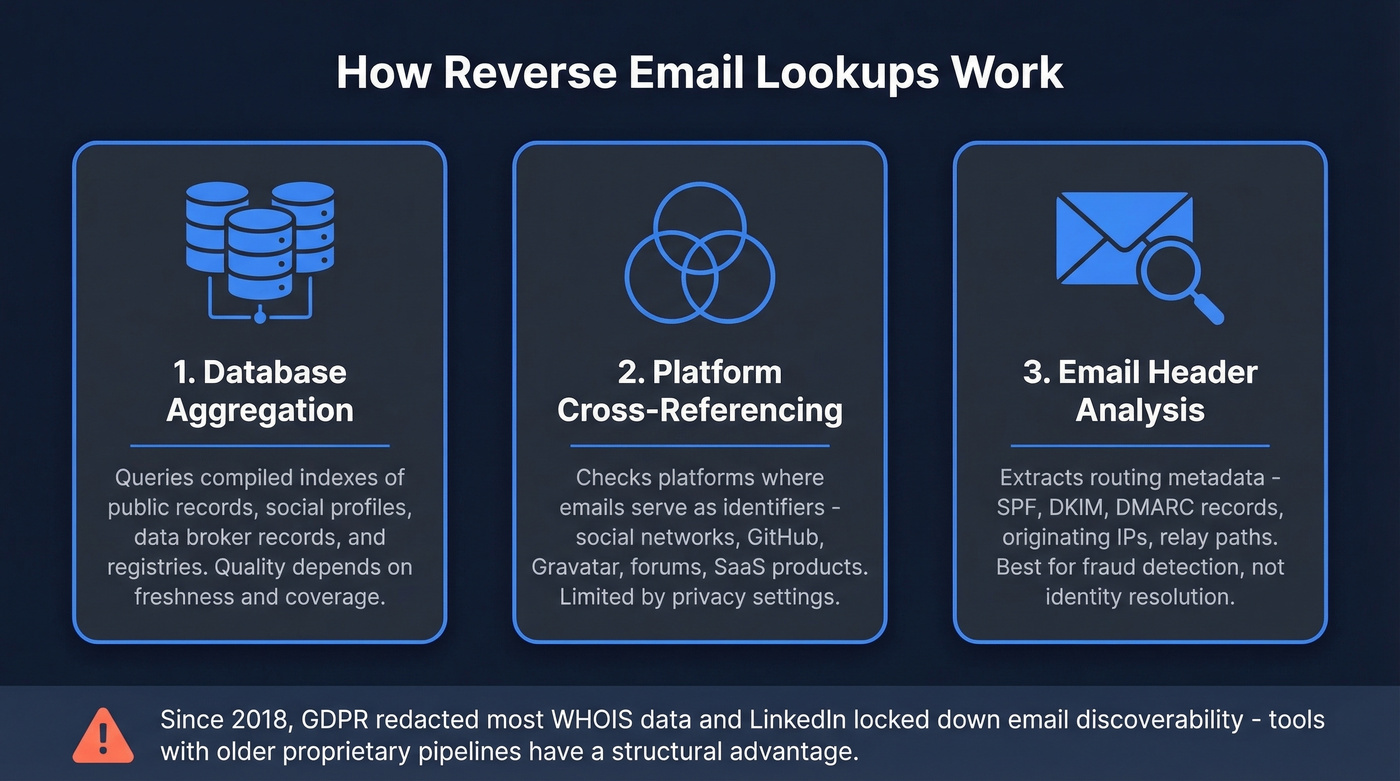
1. Database aggregation. The tool queries compiled databases of public records, social profiles, data broker records, and registries. Think of it as searching a pre-built index of billions of email-to-identity mappings. Quality depends entirely on how fresh and comprehensive that index is.
2. Platform cross-referencing. The tool checks platforms where email addresses serve as identifiers - social networks, forums, SaaS products, professional directories. When someone registers for GitHub, Gravatar, or a dozen other services with that email, the tool can surface those connections. Success depends heavily on the target's privacy settings.
3. Email header analysis. For inbound emails, you can extract routing metadata - SPF/DKIM/DMARC records, originating IPs, and relay paths. This won't give you a name, but it reveals the sending infrastructure and sometimes geographic origin. More useful for fraud detection than identity resolution.
Here's why results vary so dramatically: since 2017, LinkedIn email discoverability and WHOIS registrant data have both gone dark. Tools that built proprietary data pipelines before those doors closed now have a structural advantage. WHOIS records - once a goldmine for domain-based lookups - have been largely redacted since GDPR took effect in 2018. OSINT practitioners consistently flag false positives as a major issue with free tools, which is one reason paid tools with verification pipelines produce meaningfully better results.
Free OSINT Methods That Actually Work
Before you pay for anything, there are legitimate free techniques that work surprisingly well. They won't scale, but for one-off lookups they're hard to beat.
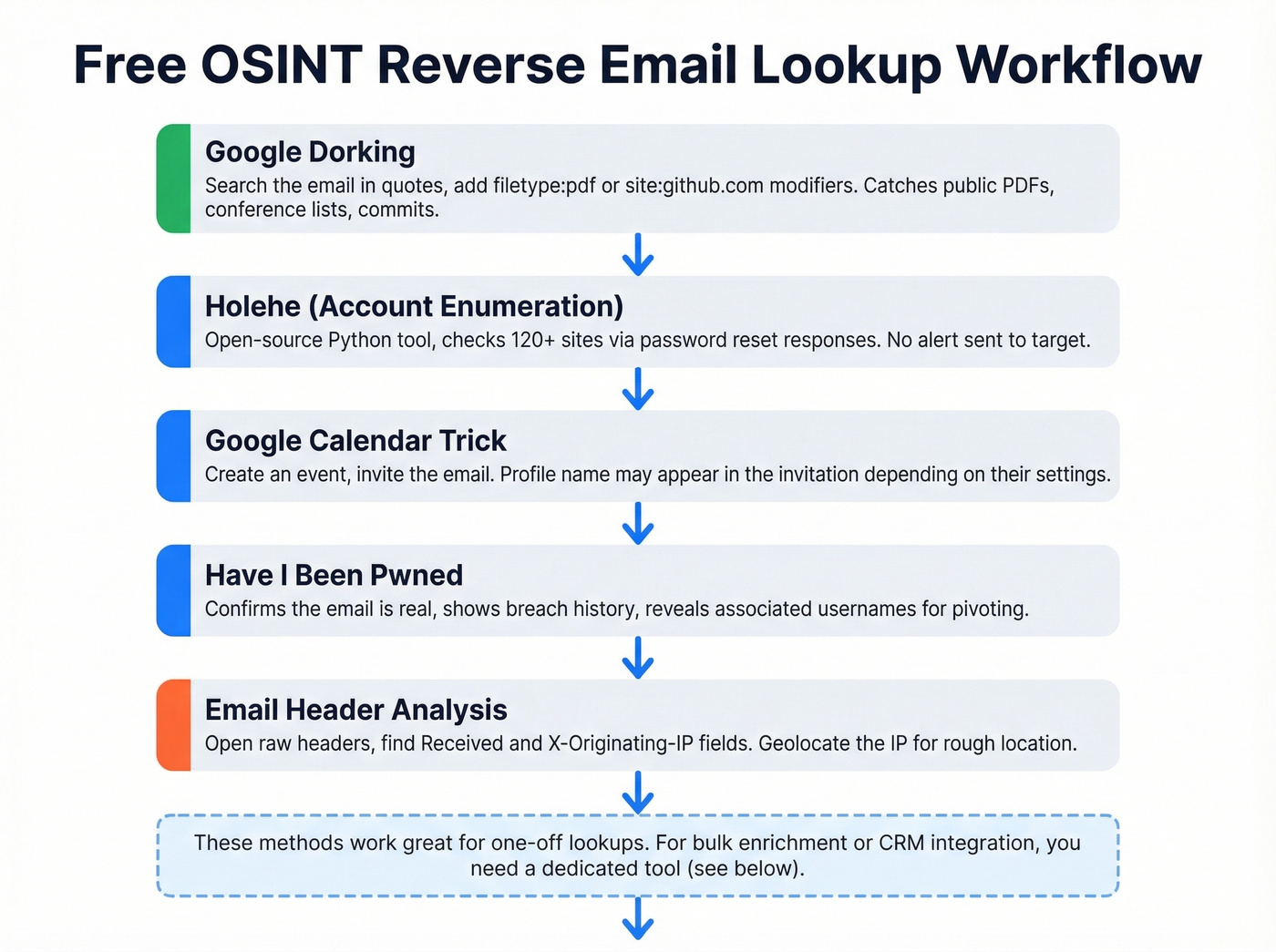
Google dorking. The simplest approach - search Google with the email in quotes:
"jane.doe@company.com"
Add modifiers to narrow results:
"jane.doe@company.com" filetype:pdf OR filetype:xlsx
site:github.com "jane.doe@company.com"
You'd be surprised how often email addresses appear in public PDFs, conference speaker lists, GitHub commits, and forum posts.
Holehe (account enumeration). This open-source Python tool checks whether an email is registered across 120+ websites by analyzing password-reset responses. It doesn't alert the target. Install and run it from the command line:
pip3 install holehe
holehe jane.doe@company.com
Holehe returns a list of services where the email has an account - Instagram, Twitter, Spotify, Adobe, and dozens more. It won't give you a name directly, but the pattern of registrations tells you a lot. For username-based pivoting after you've identified accounts, tools like Maigret and Sherlock extend the investigation by enumerating usernames across hundreds of additional platforms.
Google Calendar trick. Create a Google Calendar event and invite the email address. Depending on the target's settings, their profile name shows up in the invitation. Inconsistent, but it costs nothing - and it's one of the simplest email-to-name finder techniques out there.
Have I Been Pwned. Check the email at haveibeenpwned.com. A breach presence won't reveal the person's identity, but it confirms the email is real, establishes account age, and sometimes reveals associated usernames you can pivot on.
Email header analysis. If you received an email from the address, open the raw headers (in Gmail: three dots -> "Show original"). Look for Received: lines and X-Originating-IP: fields. Gmail often masks the origin IP, but corporate mail servers and smaller providers frequently expose it. You can geolocate the IP for a rough location.
These manual methods are powerful for individual investigations. But if you're doing this at any volume - enriching a lead list, running bulk lookups, feeding data into a CRM - you need a dedicated tool.
Best Tools for Reverse Email Lookups in 2026
Before we get into individual tools, a word on accuracy claims. A Dropcontact benchmark tested 15 email tools against 20,000 real contacts and measured hard bounce rates via actual email sends. Dropcontact and Findymail led the pack at 0.9-1.1% hard bounce rates, with effective enrichment of 54.9% and 39.9% respectively. The worst performers hit 3.6% bounce - roughly 1 in 28 emails dead on arrival. Over a 10,000-email campaign, that's 360 bad addresses tanking your domain reputation. Keep those numbers in mind as you evaluate the marketing claims below.
If you're comparing vendors beyond this list, our breakdown of data enrichment services is a good starting point.
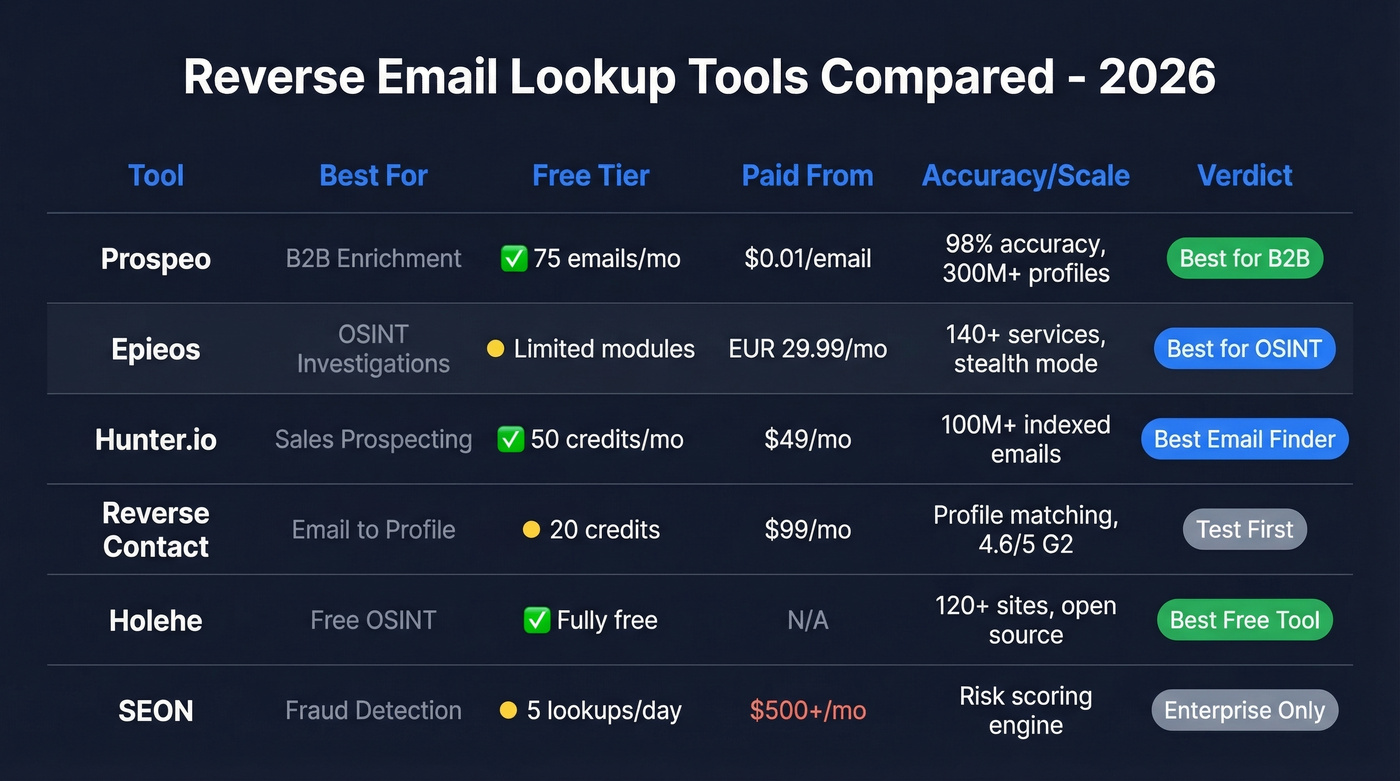
| Tool | Best For | Free Tier | Paid From | Key Strength |
|---|---|---|---|---|
| Prospeo | B2B enrichment | 75 emails/mo | ~$0.01/email | 98% accuracy, full lead profiles |
| Epieos | OSINT investigations | Limited modules | ~EUR29.99/mo | 140+ services, stealth |
| Hunter.io | Sales prospecting | 50 credits/mo | $49/mo | 100M+ indexed emails, clear pricing |
| Reverse Contact | Email-to-profile | 20 credits | $99/mo | Professional profile matching |
| Holehe | Free OSINT | Fully free | N/A | 120+ sites, open-source |
| SEON | Fraud detection | 5 lookups/day | ~$500/mo+ | Risk scoring |
| GetProspect | Bulk prospecting | 100 emails/mo | ~$49/mo | Bulk enrichment |
| Instant Checkmate | Personal records | None | ~$35/mo ($1 trial) | Consumer background data |
Prospeo
Use this if you're doing B2B outreach and need more than just a name - you need verified contact data, company info, and enough context to personalize at scale.
If you're building lists for outbound, it helps to pair enrichment with solid sales prospecting techniques so you’re not just collecting data - you’re using it.
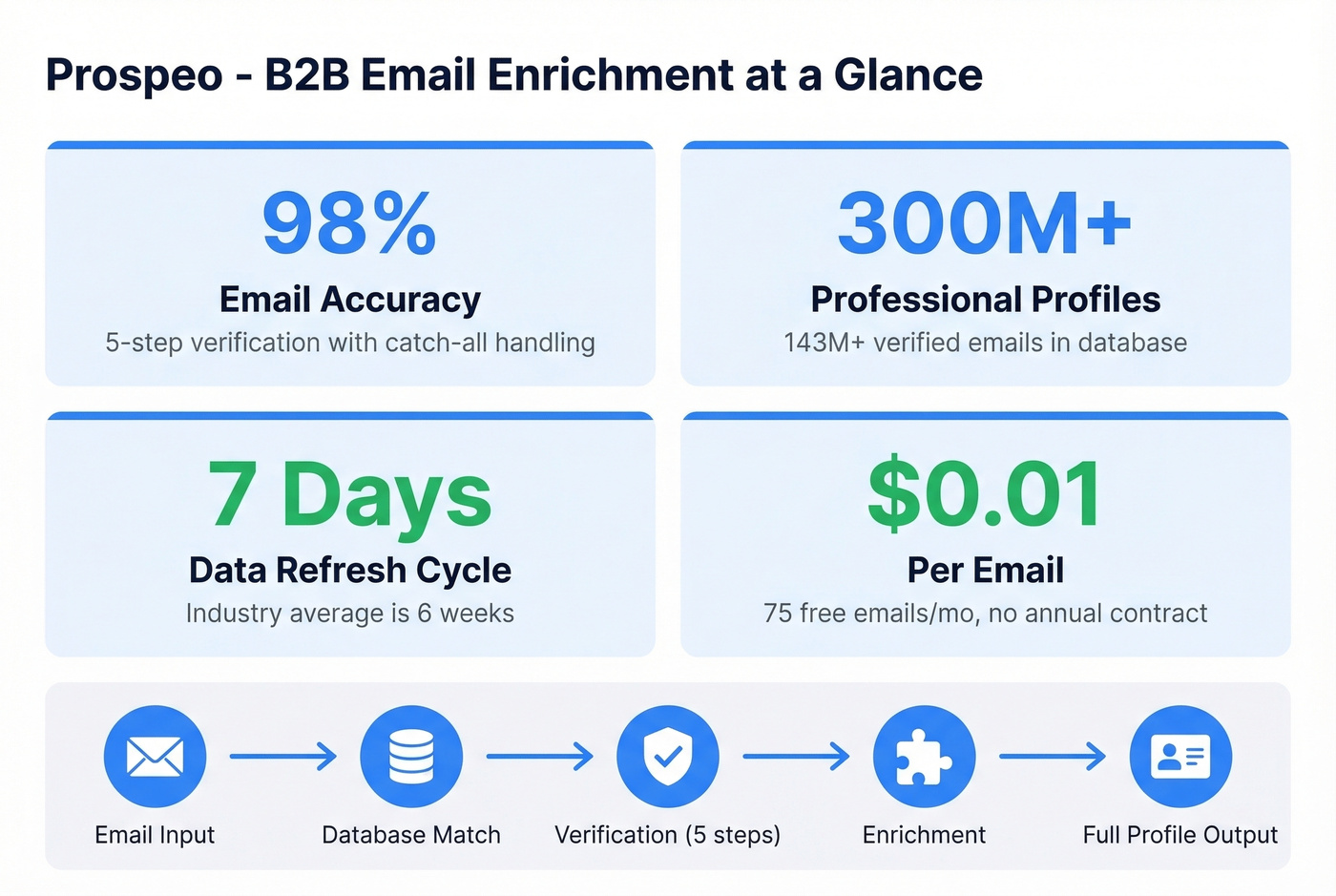
Prospeo turns a business email into a complete lead profile: verified contact data, direct mobile numbers, job title, company details, technographics, and intent signals. The database covers 300M+ professional profiles with 143M+ verified emails, and the 98% email accuracy comes from a 5-step verification process that includes catch-all handling, spam-trap removal, and honeypot filtering. Data refreshes every 7 days, while the industry average sits at 6 weeks - that freshness gap matters when you're enriching leads who change jobs every 2-3 years.

The free tier gives you 75 verified emails per month, enough to test enrichment quality before committing. Paid plans run about $0.01 per email with no annual contracts. The Chrome extension (40,000+ users) lets you enrich contacts from any website or CRM in one click. For pulling contact information from an email address at scale, it's the most cost-effective option in the B2B space.
Skip this if you're doing personal/consumer lookups or pure OSINT investigations - it's built for B2B.
Epieos
Most tools in this space are noisy. They ping platforms in ways that trigger notifications. Epieos was built for the opposite.
It checks 140+ online services for email and phone reverse lookups without alerting the target. No login notifications, no "someone searched for you" emails. That stealth design makes it the go-to for journalists, fraud investigators, and OSINT analysts who can't afford to tip off a subject.
The free tier includes limited results, including Google and Skype modules. The Osinter paid plan runs EUR29.99/month (EUR27.08/month billed annually) and includes 30 full-access requests per month with reduced captchas. The Maltego integration for visualizing relationship graphs is genuinely useful for complex investigations where you're mapping connections between multiple addresses.
Where Epieos falls short is volume. It's built for investigation depth, not sales-scale enrichment. If you need to process hundreds of emails per day, look elsewhere.
Hunter.io
Hunter is the tool you recommend to someone who asks "what's the simplest way to find someone's email?" - and that simplicity is its greatest strength. Pricing is transparent, the interface is clean, and the free plan gives you 50 credits/month with verification costing just 0.5 credits. No surprises.
If you're evaluating similar tools, see our tested list of Hunter alternatives.
Paid plans scale cleanly: Starter at $49/mo for 2,000 credits, Growth at $149/mo for 10,000, and Scale at $299/mo for 25,000. All plans include unlimited users, which is rare. Annual billing drops prices around 30%.

Here's the honest assessment: Hunter is more of an email finder than a true reverse lookup tool. It excels at finding emails from names and domains, with reverse lookup as a secondary feature. For pure "email to identity" use cases, you'll want to pair it with a dedicated enrichment tool.
Reverse Contact
Reverse Contact is a dedicated reverse contact email lookup tool carrying a 4.6/5 on G2 with 107 reviews. Users praise the ease of setup and accuracy of professional profile matching. It integrates with Zapier and Make for workflow automation. Pricing sits at $99/month for 2,000 credits (Basic) and $299/month for 10,000 credits (Growth). You get 20 free credits to test.
Two things to know before buying: G2 reviewers consistently flag that credits get consumed even when no profile is found, which contradicts the company's own marketing. Individual reviewers have also flagged customer support responsiveness as an issue. Test thoroughly with the free credits before committing budget.
Holehe
We covered the install commands above. Holehe is the free, open-source companion to any OSINT workflow - it checks 120+ sites via password-reset responses and runs entirely from the command line. It won't give you a name or phone number, but it maps an email's digital footprint across platforms. Best paired with Epieos or manual Google dorking for deeper profiling.
SEON
SEON is built for fraud detection, not sales prospecting. It enriches email addresses with risk signals - social profile presence, domain reputation, breach history - to score transaction risk. The public demo limits you to 5 lookups per day. Enterprise pricing starts around $500/month and scales into the thousands depending on transaction volume and API call needs.
GetProspect
Bulk prospecting tool with 100 free discovered emails per month. It handles email finding and basic enrichment but doesn't differentiate strongly from Hunter on reverse lookup specifically. Paid plans start around $49/mo. Worth considering if you need bulk volume at a moderate price point and Hunter's credit limits feel tight.
Instant Checkmate
Consumer-focused background check service. It searches public records, court filings, and address histories - useful for personal lookups, not B2B. There's a $1 trial that converts to around $35/mo. Results for common names can be noisy, and the data skews heavily toward US records.
Real talk: If your deal sizes are under $15k, you probably don't need a $300/month data tool. Hunter's free tier plus Prospeo's free tier covers most small-team prospecting needs. Save the enterprise spend for when your pipeline justifies it.
If you're doing outreach, make sure your follow-up system is tight - use these sales follow-up templates to turn enriched leads into replies.

Manual OSINT methods are great for one-off lookups, but they don't scale. Prospeo turns email addresses into complete B2B profiles - verified name, company, job title, direct dial, and 50+ data points - at 98% email accuracy and ~$0.01 per lookup. No fake loading bars, no bait-and-switch.
Start with 75 free reverse email lookups this month.
How Accurate Are These Tools?
Every tool claims 95%+ accuracy, and almost none of them publish methodology. In our experience, business emails return usable data roughly half the time with mid-tier tools - and that number jumps to 80%+ with the best ones.
The Dropcontact benchmark remains the most rigorous public test. Among the 15 tools tested, the spread between best and worst was stark: top performers achieved 0.9-1.1% hard bounce rates, while the bottom hit 3.6%. That gap compounds fast - a 3.6% bounce rate across a 10,000-email campaign means 360 dead addresses actively damaging your sender reputation.
If you’re trying to protect deliverability, it’s worth understanding email bounce rate benchmarks and what actually causes bounces.
Professional emails consistently produce better results than personal addresses. A work email tied to a company domain is easier to verify against live mail infrastructure. Personal Gmail or Outlook addresses are harder to enrich because they aren't tied to organizational data. Expect 40-55% enrichment rates on business emails with good tools, and much lower on personal addresses.

The consensus on r/OSINT and r/sales threads reinforces this: free tools either gate results behind paywalls or return unreliable data riddled with false positives. The tools that invest in verification infrastructure - multi-step checks against live mail servers, catch-all domain handling, spam-trap removal - produce dramatically better results than those running on stale indexes.
Reverse Lookup vs. Email Finder vs. Verifier
Most people who need to look up an email actually need one of three different things. Picking the wrong tool category wastes time and money.
| Type | Input | Output | Best For | Example Tool |
|---|---|---|---|---|
| Reverse lookup | Email address | Identity + profiles | Unknown sender ID | Epieos |
| Email finder | Name + company | Email address | Outbound prospecting | Hunter.io |
| Email verifier | Email address | Deliverability check | List cleaning | NeverBounce |
A reverse lookup starts with an email and finds the person. An email finder starts with a person's name and company and finds their email address. A verifier just tells you whether an address will bounce. Different problems, different tools.
If you’re doing list cleaning at scale, our guide to email reputation tools can help you spot issues before they hit your inbox placement.
Some platforms handle all three workflows, which eliminates the need for separate subscriptions when you're building outbound lists. But for pure OSINT investigation, a dedicated tool like Epieos or Holehe is the better fit.
Bad data from cheap lookup tools tanks your domain reputation fast. Prospeo's 5-step verification pipeline - with catch-all handling, spam-trap removal, and honeypot filtering - keeps bounce rates under 4%. That's why 15,000+ companies trust it for enrichment at scale.
Stop gambling your sender reputation on unverified lookup tools.
Legal and Privacy Considerations
Reverse email lookups are legal when you're using publicly available data for legitimate purposes - sales outreach, fraud prevention, journalism, security research. They become legally risky in specific scenarios. Here's a practical compliance checklist:
- Lawful basis: Under GDPR, you need a lawful basis (legitimate interest is the most common for B2B prospecting). Under CCPA, honor opt-out requests.
- CFAA risk: Don't access private systems or circumvent access controls. OSINT techniques should use publicly accessible data only.
- Notice and opt-out: If you're contacting someone based on enriched data, be transparent about how you got their info and provide an easy opt-out.
- Data minimization: Only collect and store what you actually need.
- Vendor DPAs: If you're using a third-party tool, make sure they offer a Data Processing Agreement.
If you’re doing outbound at scale, it’s also worth reading up on whether it is illegal to buy email lists in your jurisdiction and use case.
The WHOIS GDPR redaction and LinkedIn's 2017 discoverability changes happened precisely because the old "everything is public" approach wasn't sustainable. The tools that survive long-term build compliance into their data collection, not around it.
FAQ
Are free reverse email lookup tools actually free?
Most aren't. The typical pattern is a fake loading animation followed by a paywall demanding $20-35. Genuinely free options: Holehe (open-source CLI), HIBP (breach checking), and Hunter's free tier (50 credits/month). If a tool doesn't show results before asking for payment, close the tab.
Can you find someone's name from just their email?
Success depends on whether the email appears in public records, social profiles, or data aggregator databases. Business emails have significantly higher match rates - expect 40-55% enrichment with good tools, much lower on consumer addresses like Gmail or Outlook.
Is it legal to perform a reverse email lookup?
Yes, when using publicly available data for legitimate purposes like sales outreach, fraud prevention, or journalism. It crosses legal lines when you access private systems without authorization (CFAA), process EU personal data without lawful basis (GDPR), or use results for harassment or stalking.
What's the difference between a reverse lookup and an email finder?
A reverse lookup starts with an email and identifies the person behind it. An email finder starts with a name and company to discover their email address. Different direction, different tools - though some platforms handle both workflows in a single subscription.
How do these tools get their data?
Three main sources: aggregated public records and social profiles, cross-referencing platforms where emails serve as identifiers, and analyzing email headers for routing metadata. The quality gap comes down to freshness and verification - tools that check against live mail infrastructure and refresh data weekly outperform those running on stale indexes.