

Sales Call Reports: Why Most Fail and How to Fix Yours
Daily call reports due at 8 PM. GPS tracking to verify you actually showed up. One rep on Reddit described this setup as "micromanagement to the nth degree" - and called it miserable. That post captures something most sales orgs won't say out loud: sales call reports have a trust problem, not a format problem.
When reps see reports as surveillance, they write fiction. When they see reports as tools that help them close, they write the truth.
What You Need (Quick Version)
Stop logging novels - use 4-5 structured fields per call. Automate transcription with AI, then manually tag qualification and next steps. And fix your contact data before the call block. Bad numbers produce empty reports, not bad reps.
What a Call Report Actually Is
A sales call report isn't a transcript. It's not an activity log either.
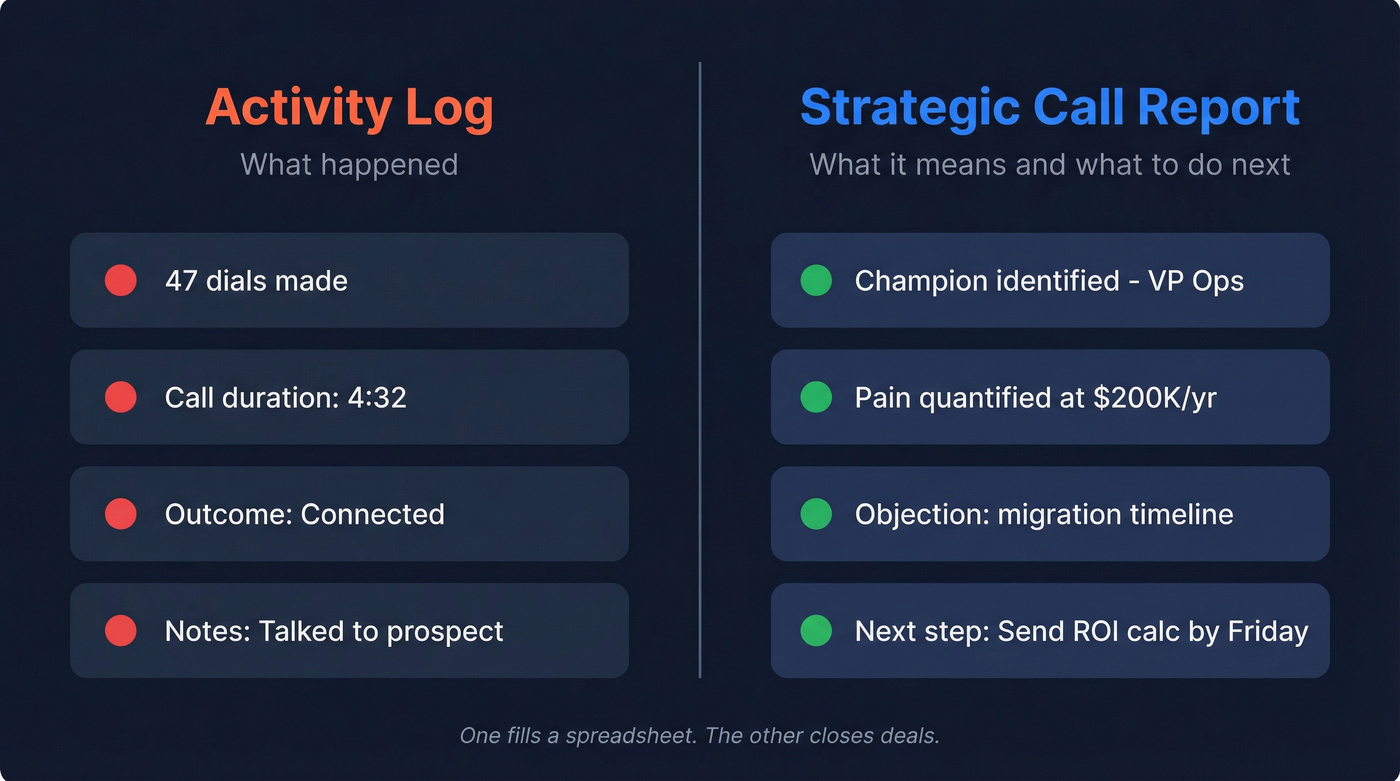
An activity log tracks what happened - dials, duration, outcome - while a strategic call report captures what it means and what to do next. Think of it as a structured record: who you spoke with, what they care about, where the deal stands, and what happens on the next touch. Frameworks like MEDDIC, BANT, or SPICED give reports structure, and without one, you're just writing diary entries that nobody reads.
With 57% of executives preferring phone calls over email for first contact, those calls - and the reports that follow - remain the backbone of pipeline generation.
What to Include in Every Report
Keep it tight. Every call report needs these fields: contact name, title, and company linked to the CRM record. Date and call duration. A 2-3 sentence summary of what was discussed. A qualification score against your framework. Objections raised. Competitor mentions. And specific next steps with an owner and date.
Log immediately after the call. Waiting even a few hours destroys accuracy.
Here's what a filled-in discovery call report looks like - something most guides skip entirely:
Contact: Sarah Chen, VP of Operations, Meridian Logistics Date: March 12, 2026 | Duration: 28 min Summary: Evaluating workflow automation for warehouse ops. Current system is homegrown, breaking under scale. Budget approved for Q2, but CFO wants three vendors. Qualification (MEDDIC): Champion identified (Sarah). Economic buyer = CFO, hasn't met yet. Pain quantified at ~$200K/yr in manual labor. Objections: Concerned about migration timeline. Asked about on-prem option - we don't offer one. Competitors: Mentioned evaluating WarehouseOS. Next steps: Send ROI calculator by March 14. Schedule CFO intro call week of March 18.
Two minutes, not twenty.
Benchmarks Worth Tracking
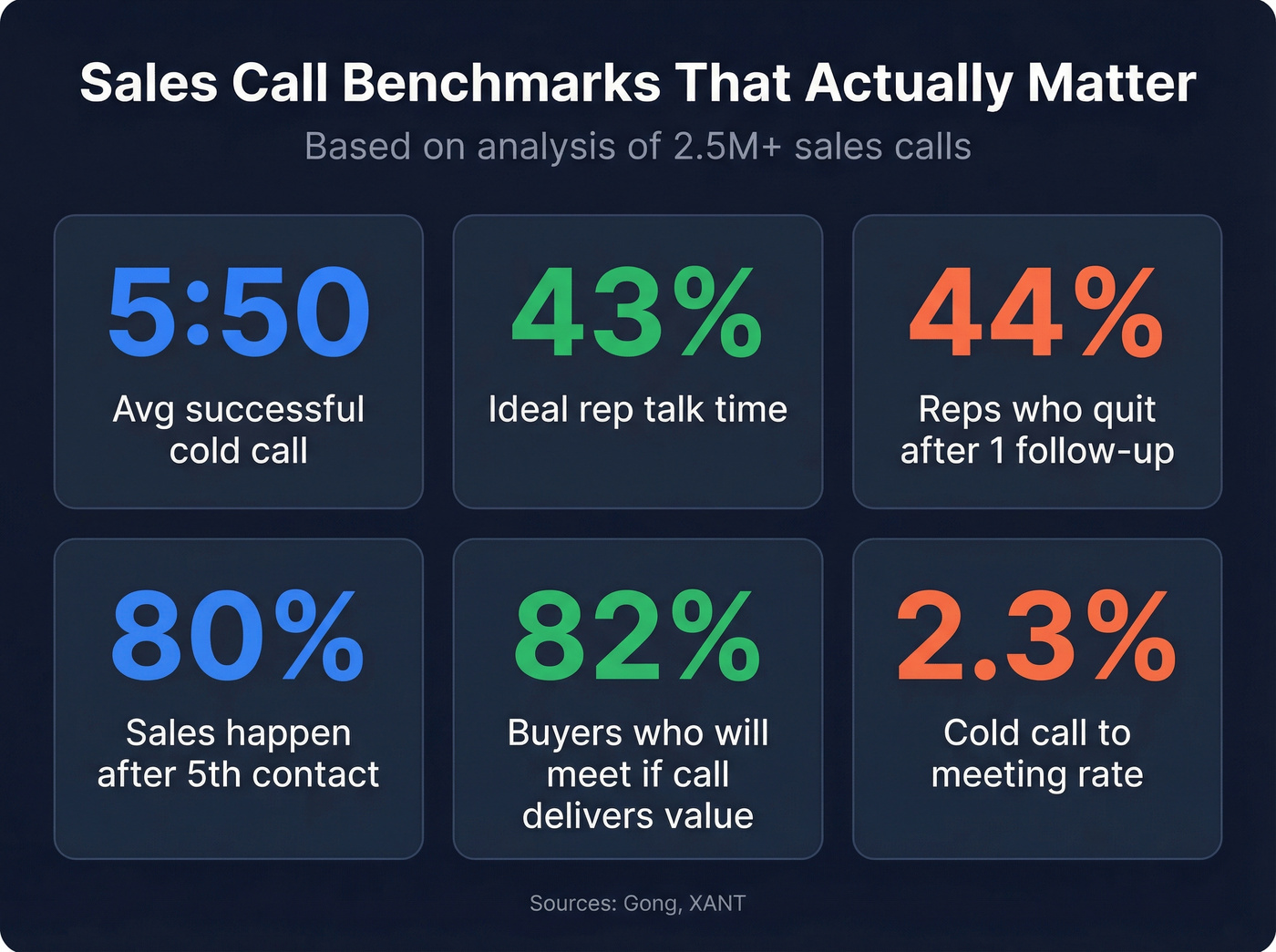
Before you redesign your call reporting process, know what normal looks like. These benchmarks pull from widely cited studies, including Gong's analysis of 2.5M+ sales calls and XANT's analysis of 100,000+ calls:
| Metric | Benchmark |
|---|---|
| Avg cold call duration | 1:24 |
| Successful cold call | 5:50 |
| Discovery call avg | 32 min |
| Wednesday connect rate | 12.1% |
| Wednesday meeting conversion | 2.8% |
| Cold call to meeting | 2.3% |
| Sales after 5th contact | 80% |
| Reps who quit after 1 follow-up | 44% |
| Ideal rep talk time | 43% |
| Buyers who'll meet if call delivers value | 82% |
That last row matters most for reporting. If your reps are talking more than 43% of the call, they're pitching, not discovering. Call reports should capture what the prospect said - and if reps are doing all the talking, there's nothing worth capturing.

Bad phone data is the #1 reason call reports are empty. Snyk dropped bounce rates from 35-40% to under 5% with Prospeo's verified contacts - and AE-sourced pipeline jumped 180%. When reps connect on calls, they have something worth reporting.
Stop documenting failure. Start with numbers that actually pick up.
Why Most Reports Fail
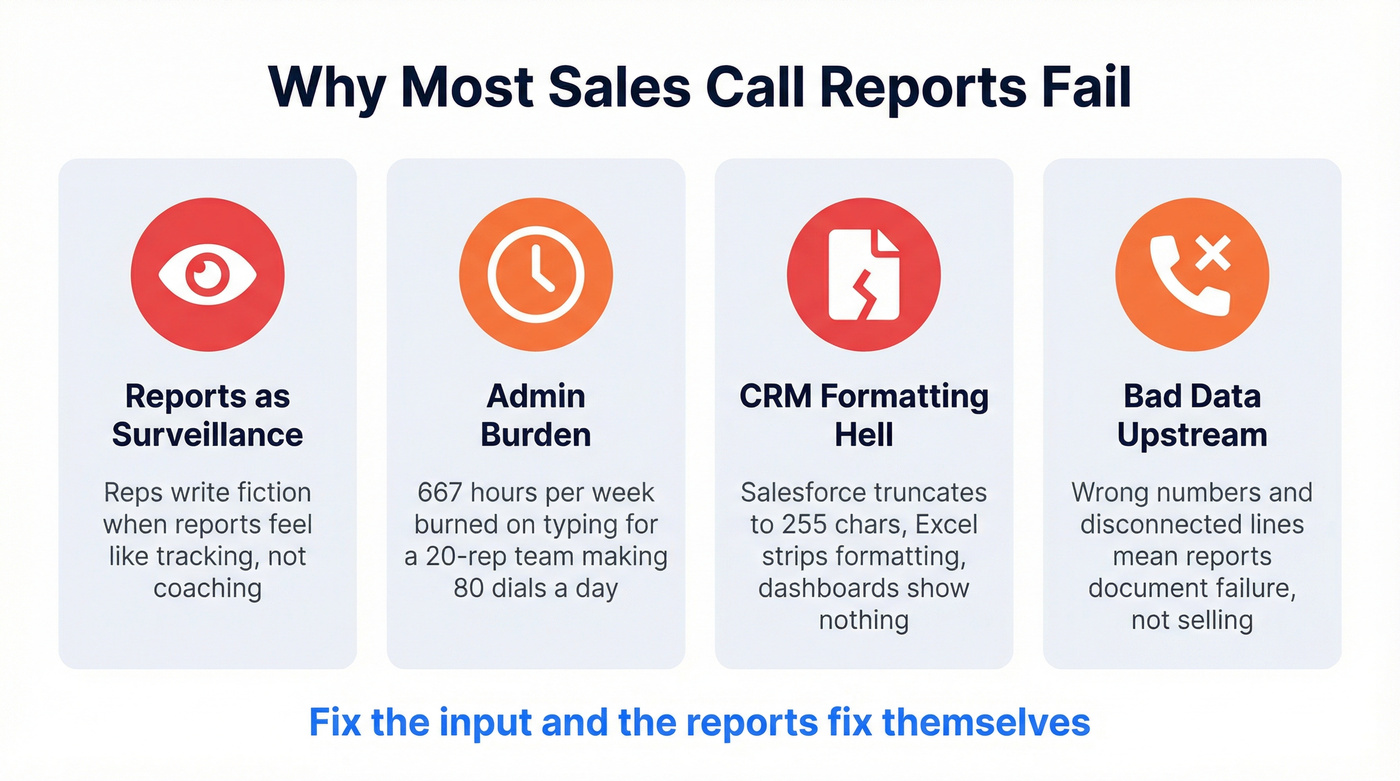
Reports as Surveillance
When leaders demand reports without showing how insights get used - in coaching, deal reviews, product feedback - reps respond rationally. They write fiction. Duplicated data, vague summaries, creative next steps that never happen.
As KD Dorsey puts it: "You're not taking notes for your manager - you're taking notes for Future You." That reframe changes everything. When reps understand that their own close rates depend on the quality of their notes, the fiction stops.
Admin Burden
Five-plus minutes per call, messy notes retyped into Salesforce, missed fields, slipped follow-ups. Multiply that across a 20-rep team making 80 dials a day and you're burning roughly 667 hours a week on typing instead of selling. That's 1,600 calls per day at 5 minutes each - 133 hours daily, 667 across a five-day week.
Transcription tools help, but they produce unstructured output. Competitor mentions and deal risks rarely get logged automatically.
CRM Formatting Hell
Here's a real one: teams logging detailed call notes in Salesforce's rich-text field, only to discover that report views truncate to 255 characters and Excel exports strip all formatting. This has been a pain point on r/salesforce for years, and it's still broken. We've watched teams spend weeks building beautiful templates only to realize none of it survives a dashboard export.
Bad Data Upstream
Your reports are thin because your data is thin. When a big chunk of your dials hit wrong numbers, disconnected lines, or gatekeepers with no path forward, reports document failure instead of selling. XANT research shows reps need at least six attempts to reach 50% of leads - but the average rep makes 1.7-2.1 before giving up. That math gets worse when half your numbers are garbage.
This is where fixing the input fixes the output. Snyk's team saw bounce rates drop from 35-40% to under 5% after switching to Prospeo's verified contact data, and their AE-sourced pipeline jumped 180%. When reps actually connect on calls, they have something worth reporting.
Automate the Boring Parts
The math on manual call reporting is brutal. CloudTalk ran the numbers: a 100-person team handling 5,000 calls per day at 5 minutes per summary burns 25,000 minutes daily - over 9,000 hours a month. Even a 10-person team loses 2,500 minutes a day to typing.
If you're rebuilding your outbound motion at the same time, start with a repeatable cold calling system so reporting reflects a consistent process.
Let's be honest: most teams don't need a $200/user/month conversation intelligence platform. They need a $19 transcription tool and a CRM with properly structured fields. The expensive part of call reporting was never the software - it was the bad process.
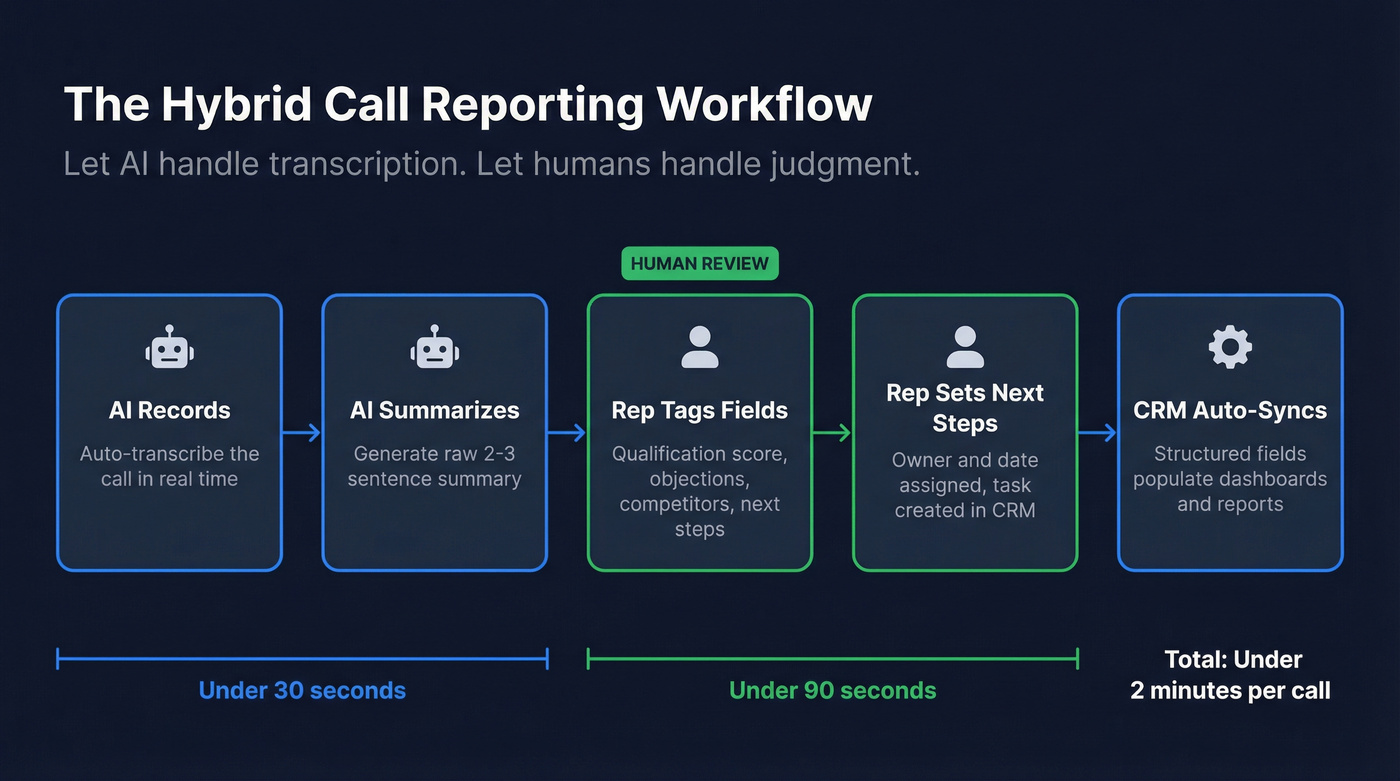
The best approach is hybrid. Let AI handle transcription and raw summarization, then have reps manually tag the 4-5 structured fields that matter: qualification score, objections, competitor mentions, next steps. AI can't reliably score deal qualification or flag competitive threats without human review. Not yet, anyway.
| Tool | Starting Price | Best For |
|---|---|---|
| Gong | ~$160-250/user/mo | Enterprise conversation intel - the gold standard, priced accordingly |
| Fireflies.ai | $10-18/user/mo | Budget AI transcription with surprisingly good search |
| Fathom | $19/user/mo | Solo reps and small teams who want simplicity |
| Otter.ai | $8-20/user/mo | Lightweight meeting notes, popular with non-sales teams too |
| Dialpad | $15-150/user/mo | All-in-one sales comms with built-in AI |
| CloudTalk | $25-50/user/mo | Call center teams running high-volume outbound |
For teams that just need transcription and basic summaries, Fireflies or Fathom get the job done at a tenth of Gong's price. Skip Gong unless you're running 50+ reps and your leadership team will actually use the analytics - we've seen too many mid-market teams buy it and use it as a glorified call recorder. In our experience, most teams under 50 reps are better served by one of these lighter tools paired with disciplined CRM fields.
CRM Setup Tips
Salesforce
Stop using Notes or long rich-text fields for call reports. They don't report, they don't export, and they truncate in dashboards. Build custom picklist fields for call disposition, qualification stage, and competitor mentioned. Use short text fields for the summary. And separate lead status from call disposition - mixing them makes forecasting impossible.
HubSpot
HubSpot's default call outcome property can't be customized, which frustrates teams with specific disposition categories. The workaround: use Playbooks on the Enterprise tier to capture structured answers during or after calls, save those answers into custom contact properties, then build reports on those properties. Professional-tier teams can use workflows to automate follow-up tasks based on call outcomes, but you won't get the same structured data capture without Playbooks.
If you're comparing CRM options, it helps to review a few examples of a CRM before you commit to a reporting structure.
KPIs to Track Alongside Reports
Reports capture qualitative context, but pairing them with the right metrics is what drives improvement. Track connect rate, talk-to-listen ratio, meetings booked per dial session, and objection frequency by category.
If your team struggles to turn “next steps” into actual touches, standardize your sales follow-up templates so reps don’t reinvent the wheel after every call.
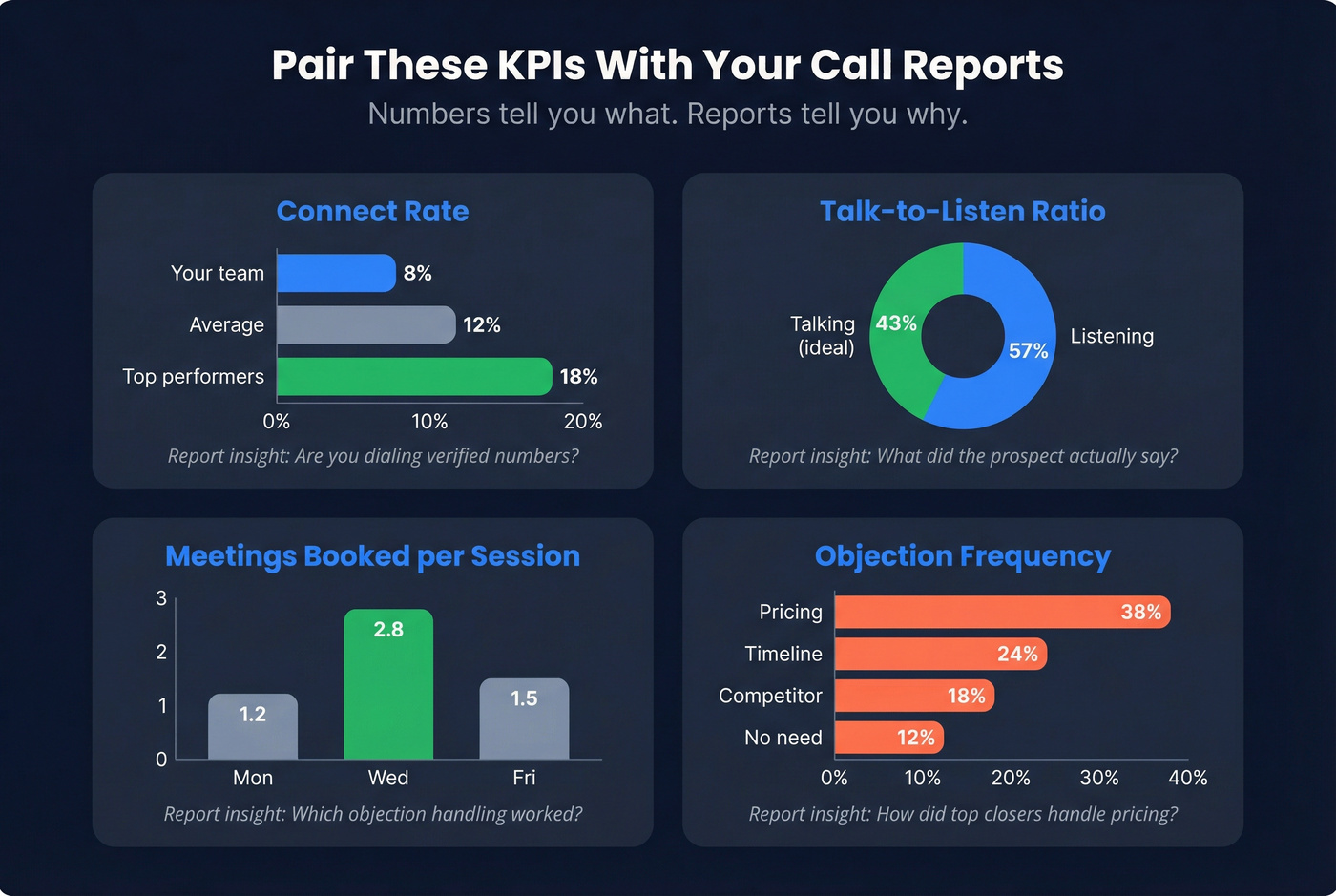
A strong call performance report ties these numbers back to the qualitative notes - showing not just that a rep booked three meetings, but how they handled the objections that got them there. When managers review sales team call performance alongside structured reports, coaching becomes specific instead of generic. That's the difference between "make more calls" and "here's exactly how your top closer handles the pricing objection on discovery calls."
If you want a broader view of what to measure, align call reporting with your sales operations metrics so coaching and forecasting use the same language.
Compliance Checklist
- Consent: Know whether your state or your prospect's requires one-party or two-party consent for recording. When in doubt, disclose.
- Verbal disclosure: State clearly at the start of the call that it's being recorded. Make this a non-negotiable script element.
- GDPR: If calling EU prospects, establish a lawful basis before recording - legitimate interest or explicit consent. The ICO's guidance on call recording is a good starting point.
- Retention policy: Define how long recordings and transcripts are stored. Enforce deletion schedules.
- Tool security: Prefer CRM-native recording where possible. If using third-party tools, review their data handling and storage policies.
Your reps aren't lazy - they're dialing dead numbers. Prospeo delivers 125M+ verified mobile numbers with a 30% pickup rate, refreshed every 7 days. More live conversations means richer call reports, better coaching, and pipeline that moves.
Fix the input and the reports fix themselves.
FAQ
How long should a call report take?
Under two minutes per call. Use AI transcription for raw notes and manually tag 4-5 structured fields - qualification score, objections, next steps. If it's taking longer, your template needs simplification.
What's the difference between a call report and a call log?
A call log tracks activity - dials, duration, outcome. A call report captures strategy: what the prospect said, what it means for the deal, and what happens next. Logs measure effort; reports drive revenue.
Can AI replace manual reporting entirely?
AI handles transcription and summarization well, but it can't reliably score qualification or assign next steps without human review. Automate the transcript, manually tag the strategic fields. Tools like Fathom or Fireflies handle the heavy lifting for under $20/user/month.
How do I get reps to actually complete their reports?
Show them how the data gets used in coaching, deal reviews, and product feedback. When reps see their notes influence strategy, they fill them out honestly. When reports feel like surveillance, you get fiction. It also helps when reps connect on more calls thanks to verified direct dials - they've got something worth reporting instead of a log full of voicemails.