

The Only Sales CRM Template Guide That Tells You When to Stop Using One
"How many deals are in the pipeline right now?" If answering that question means opening a spreadsheet and scrolling sideways for thirty seconds, you need a better sales CRM template. 29% of small businesses still manage client relationships with spreadsheets or paper, and for the first few months of a sales operation, that's genuinely fine. This article covers which template to grab, how to set it up so it actually works, and exactly when to ditch it for real software.
What You Need (Quick Version)
- Best starting template: HubSpot's free spreadsheet - clear tabs, natural upgrade path to their free CRM.
- Best structured platform: Airtable's sales CRM template - automations and relational views that Sheets can't touch.
- Hard rule: If you're tracking more than 50 active leads, stop reading this and go set up a real CRM. A template won't save you money past that point. It'll cost you deals.
Best Free CRM Templates Compared
Most free CRM templates are marketing funnels disguised as resources. Half gate the download behind an email, and the template itself is a glorified contact list with no follow-up logic. Here's what's actually worth your time:
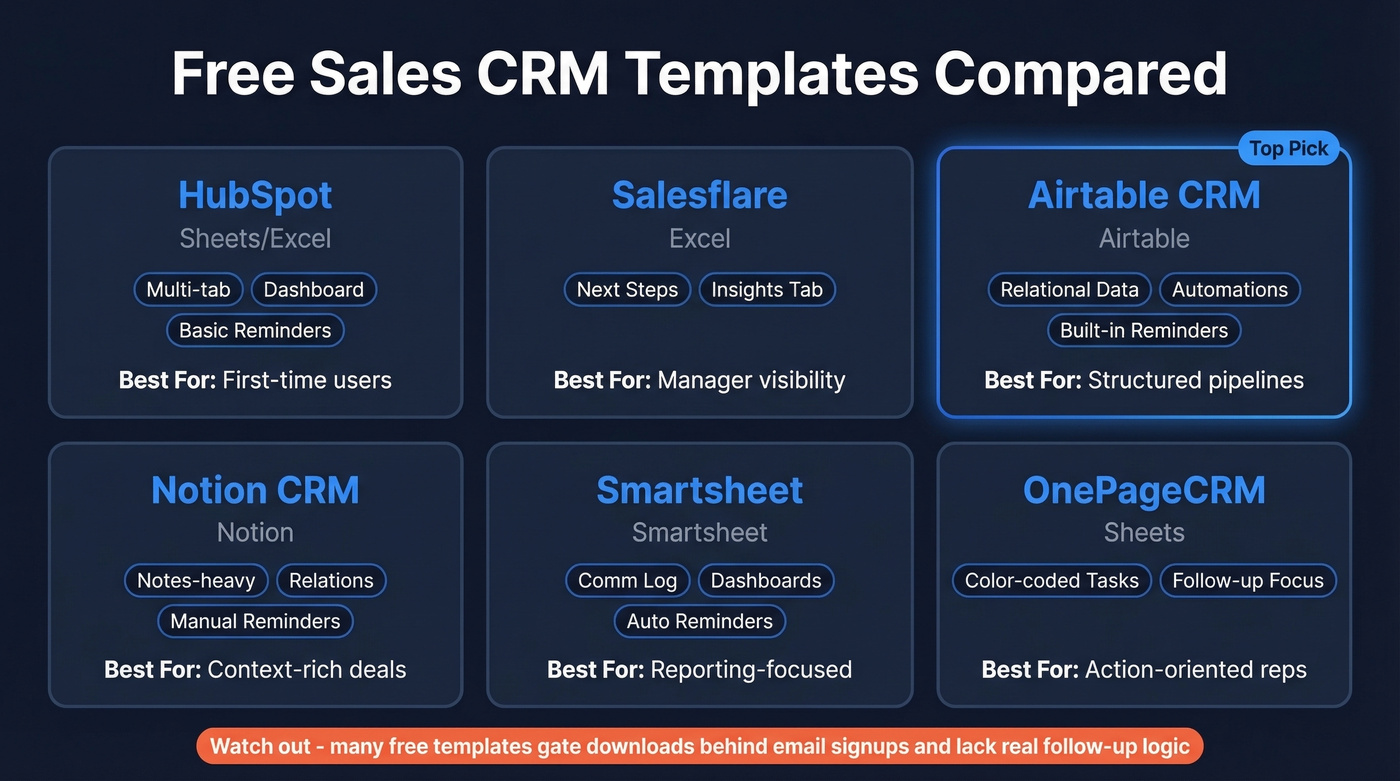
| Template | Platform | Key Features | Reminders? | Best For |
|---|---|---|---|---|
| HubSpot | Sheets/Excel | Multiple tabs + dashboard | Basic | First-time users |
| Salesflare | Excel | Next steps, Insights tab | No | Manager visibility |
| Airtable CRM | Airtable | Relational, automations | Yes | Structured pipelines |
| Notion CRM | Notion | Notes-heavy, relations | Manual | Context-rich deals |
| Smartsheet | Smartsheet | Comm log, dashboards | Yes | Reporting-focused |
| OnePageCRM | Sheets | Follow-up formatting | Color-coded | Action-oriented reps |
OnePageCRM downloaded and tested 12 popular free CRM spreadsheet templates, and the pattern is consistent: lots of "free" templates aren't truly free because the download is gated. Their own template uses conditional formatting where overdue tasks turn red, today's tasks orange, and future ones grey - a smart touch most templates skip. Watch out for Pipedrive's template, though. It splits into Contacts, Companies, and Pipeline tabs that aren't interlinked with formulas, so you're stuck doing double data entry.

Every CRM template has the same fatal column: Email. Fill it with bad data and your pipeline is fiction. Prospeo's 143M+ verified emails at 98% accuracy mean every row in your spreadsheet is a real person you can actually reach - not a bounce waiting to happen.
Start with 75 free verified emails. No credit card, no contracts.
Sheets vs. Notion vs. Airtable
Google Sheets is the right starting point for most small teams. Don't overcomplicate it. Everyone already has access, there's zero learning curve, and you can connect Gmail and Google Calendar via Zapier to auto-log emails and events - cutting the manual entry problem in half. If you're building a repeatable outreach motion, pair your sheet with sales follow-up templates so next steps don't live only in someone's head.
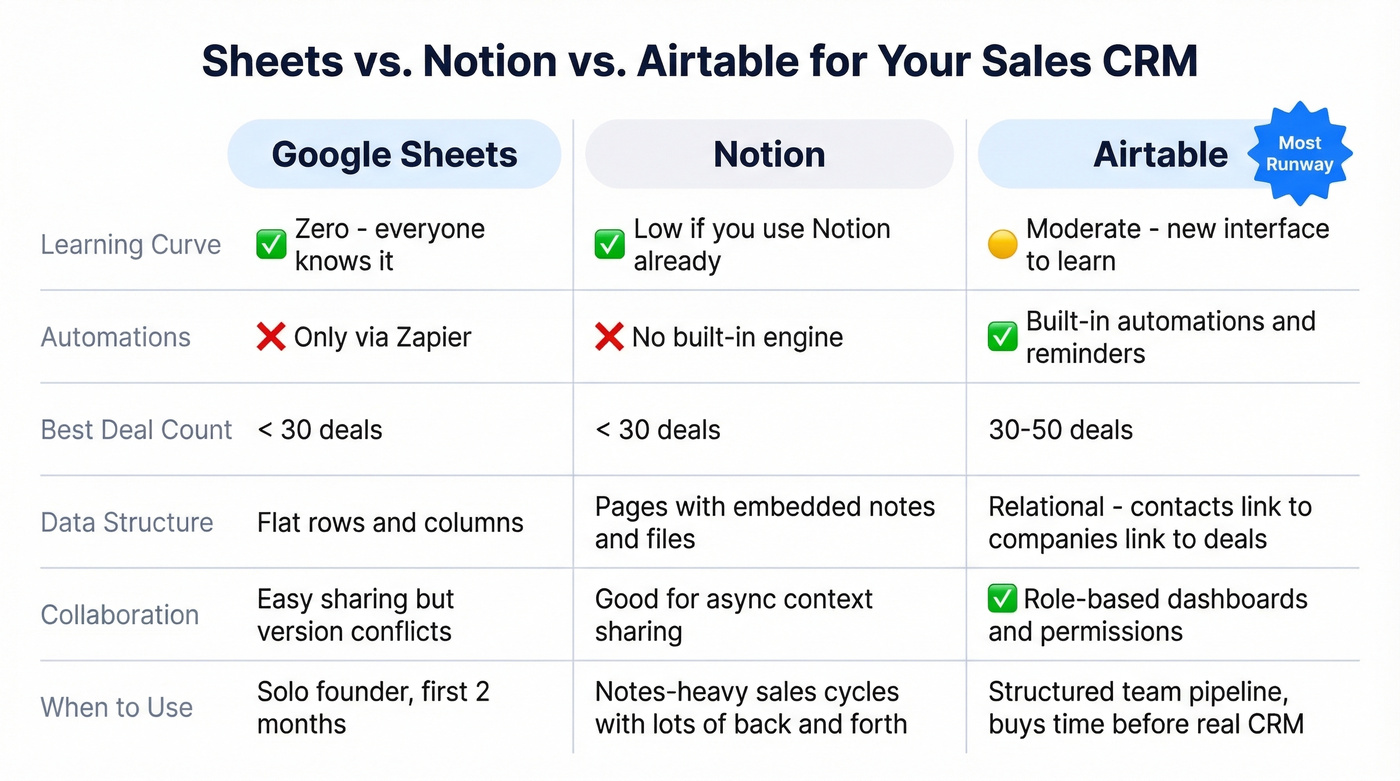
Notion works better when your deals are notes-heavy. Each record is a full page where you can embed meeting notes, briefs, and files directly on a contact. The tradeoff: very large databases slow down, and there's no built-in automation engine. If you're running fewer than 30 deals and your sales cycle involves lots of back-and-forth context, Notion is surprisingly effective.
Airtable is the right choice when you need structure. Its relational data model links contacts to companies to deals properly, automations handle follow-up reminders without workarounds, and granular permissions plus role-based dashboards via Interfaces make it easier to share the right view with the right people. We've seen teams outgrow Sheets within two months of hiring their second rep - Airtable buys you more runway before you need full CRM software. If you're already thinking about upgrading, skim a few examples of a CRM to sanity-check what "real CRM" should include.
How to Set Up Your Template Right
Grab whichever template fits, then make sure these columns exist. This schema comes from Salesforce's template guide and it's the cleanest starting point we've found:
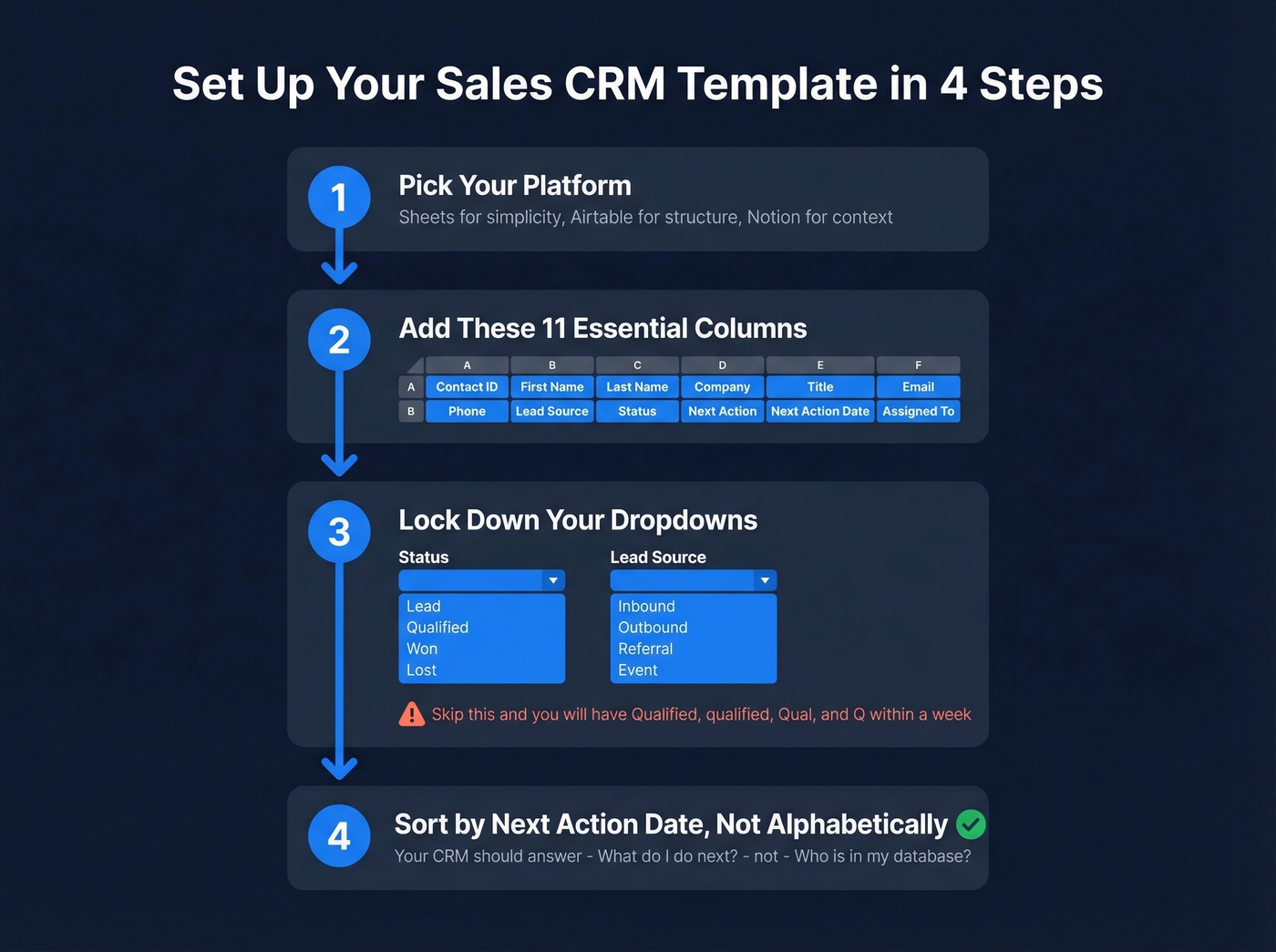
| Column | Purpose |
|---|---|
| Contact ID | Unique identifier |
| First / Last Name | Self-explanatory |
| Company | Account-level grouping |
| Title | Seniority filtering |
| Primary outreach channel | |
| Phone | Direct dial |
| Lead Source | Attribution tracking |
| Status (dropdown) | Lead → Qualified → Won/Lost |
| Next Action | What you're doing next |
| Next Action Date | When it's due |
| Assigned To | Rep ownership |
Two setup steps most people skip. First, use data validation dropdowns for Status and Lead Source. Free-text fields here guarantee you'll have "Qualified," "qualified," "Qual," and "Q" within a week - we've seen it happen on every team that skips this step. Second, sort by Next Action Date, not alphabetically. OnePageCRM calls this the "dynamic" approach, and they're right. Your spreadsheet should answer "what do I do next?" not "who's in my database?" If you want to make those stages consistent across tools, align your sheet with a clean lead status setup.

When to Stop Using a Template
You don't need a CRM template forever. You need one for three months, maybe six. Close puts the threshold at fewer than 50 contacts; HubSpot's staged framework says 25-50 contacts for a pure template, 50-500 for partial automation, and 500+ for a full CRM. At 25-50 active relationships, you're already looking at 1-2 hours per week of manual lead management just to keep a spreadsheet functional. That time adds up fast once you start tracking sales activities across multiple channels.
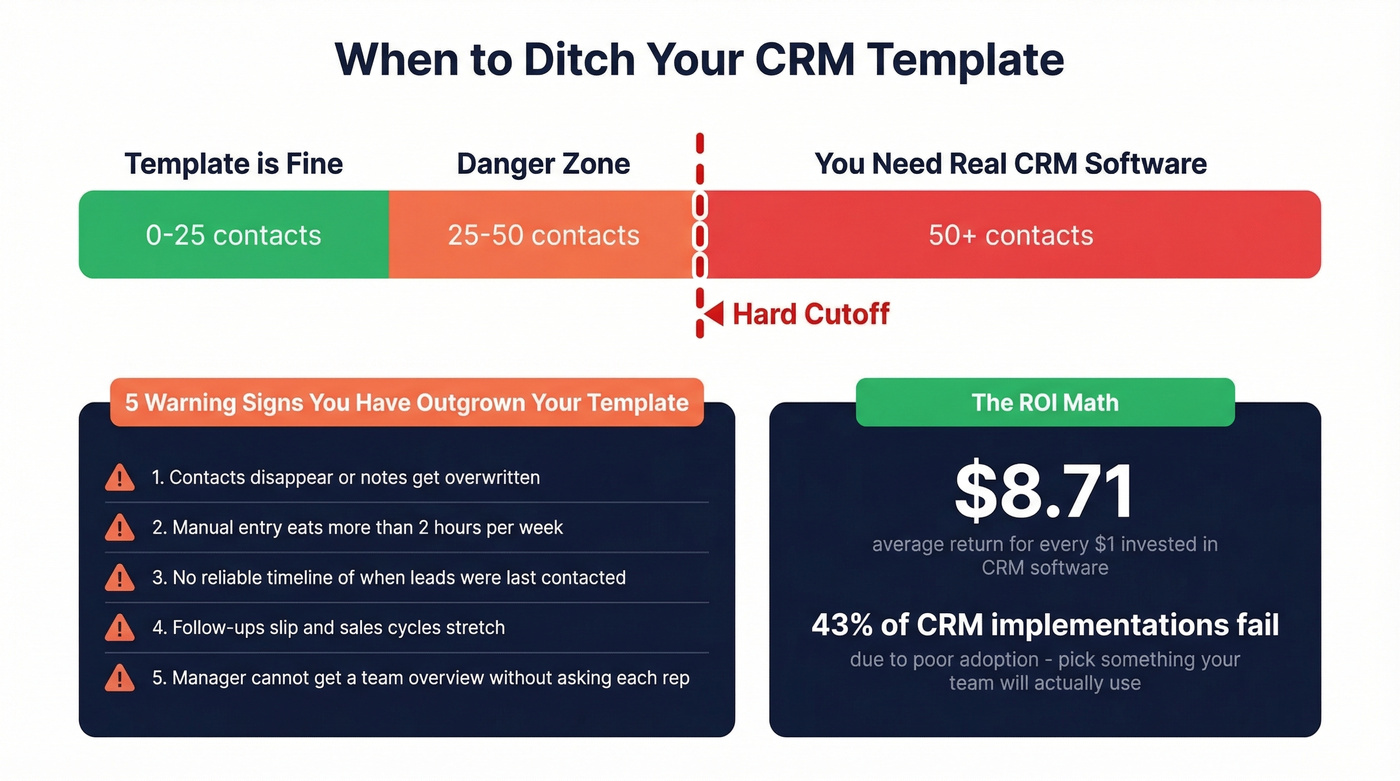
Warning signs you've outgrown your sales CRM template:
- You're losing data - contacts disappear, notes get overwritten, version conflicts break formulas.
- Manual entry eats more than 2 hours per week.
- No reliable interaction timeline - you can't see when a lead was last contacted without digging through email.
- Sales cycles are stretching because follow-ups slip through cracks.
- Your manager can't get a team overview without asking each rep individually.
On Reddit, a two-person team described wanting just reminders, call logging, file uploads, exporting, and a mobile app - features no spreadsheet template provides natively. That's the gap. Another user migrating from spreadsheets to Dynamics 365 described 5 years of accumulated garbage data - hundreds of test entries, duplicate leads, missing emails. The cleanup took longer than the CRM setup itself.
That's the real cost of staying on a template too long: you're not saving money, you're building a mess that gets more expensive to fix every month. If you're planning the switch, treat it like a lightweight RevOps project and map the handoffs early (see: connect outreach tool to CRM).
Let's be honest - if you're still running your pipeline in a spreadsheet after 50 contacts, you're not being scrappy. You're losing deals. CRM software averages $8.71 in return for every $1 invested. The math isn't close. That said, 43% of CRM implementations fail due to poor adoption, so when you do switch, pick something your team will actually use - not the most feature-rich option on the market. If you're evaluating options, start with contact management software and work backward from your workflow.
That Reddit user with 5 years of garbage data? It started with one unverified email in row 2. Before you migrate to a real CRM, clean your contacts with Prospeo's enrichment - 92% match rate, 50+ data points per contact, at ~$0.01/email. Fix the data now or pay for the cleanup later.
Enrich your spreadsheet before the garbage compounds.
FAQ
Can I use Google Sheets as a CRM?
Yes - for fewer than 50 active contacts. Beyond that, manual upkeep, version conflicts, and data decay make Sheets unreliable. Connect it to Zapier for auto-logging emails and calendar events to extend its useful life by a few months.
What columns should a CRM spreadsheet have?
At minimum: Contact ID, Name, Company, Title, Email, Phone, Lead Source, Status (dropdown), Next Action, Next Action Date, and Assigned To. Use data validation dropdowns for Status and Lead Source - free-text fields create a mess within weeks.
How do I keep template data accurate?
Verify emails before entering them. Run your list through Prospeo - 98% accuracy, free tier covers 75 emails per month. One bad-data import can poison your entire pipeline, and cleaning it up later always takes longer than verifying upfront.
When should I switch from a template to CRM software?
Once you pass 50 active contacts or spend more than 2 hours per week on manual data entry. CRM software returns an average of $8.71 per $1 invested, so the ROI case is clear - the real risk is waiting too long and migrating years of messy data.