

Sales Data Quality: What It Costs, How Fast It Decays, and How to Fix It
Your SDR just burned through 50 dials. Forty were wrong numbers, disconnected lines, or someone who left that company two quarters ago. The sequence copy was sharp, the timing was right, and none of it mattered - because the underlying data was garbage. As one practitioner on r/SaaS put it, "90% of the time the real issue is bad data."
We've seen teams waste $20K+ per year on exactly this - reps spending a quarter of their time researching, correcting, and deduplicating instead of selling. That's not a process problem. It's a sales data quality problem, and it compounds every quarter you ignore it.
What Is Sales Data Quality?
Data governance frameworks list six or seven quality dimensions. In a pipeline context, quality comes down to three questions: Can you reach this person? Is their info current? Is the record complete enough to route, score, and sequence without manual cleanup?
If any answer is no, the data is costing you money. Accuracy across these dimensions is what separates teams that hit quota from teams that burn budget dialing dead numbers.
The Real Cost of Dirty CRM Data
Bad data costs the U.S. economy $3 trillion per year. Gartner pegs the per-organization cost at $12.9 million annually. Some estimates put the damage at 15-25% of a team's operational budget. The problems don't stop at wasted dials - they cascade into bad forecasts, misrouted leads, and blown deals.
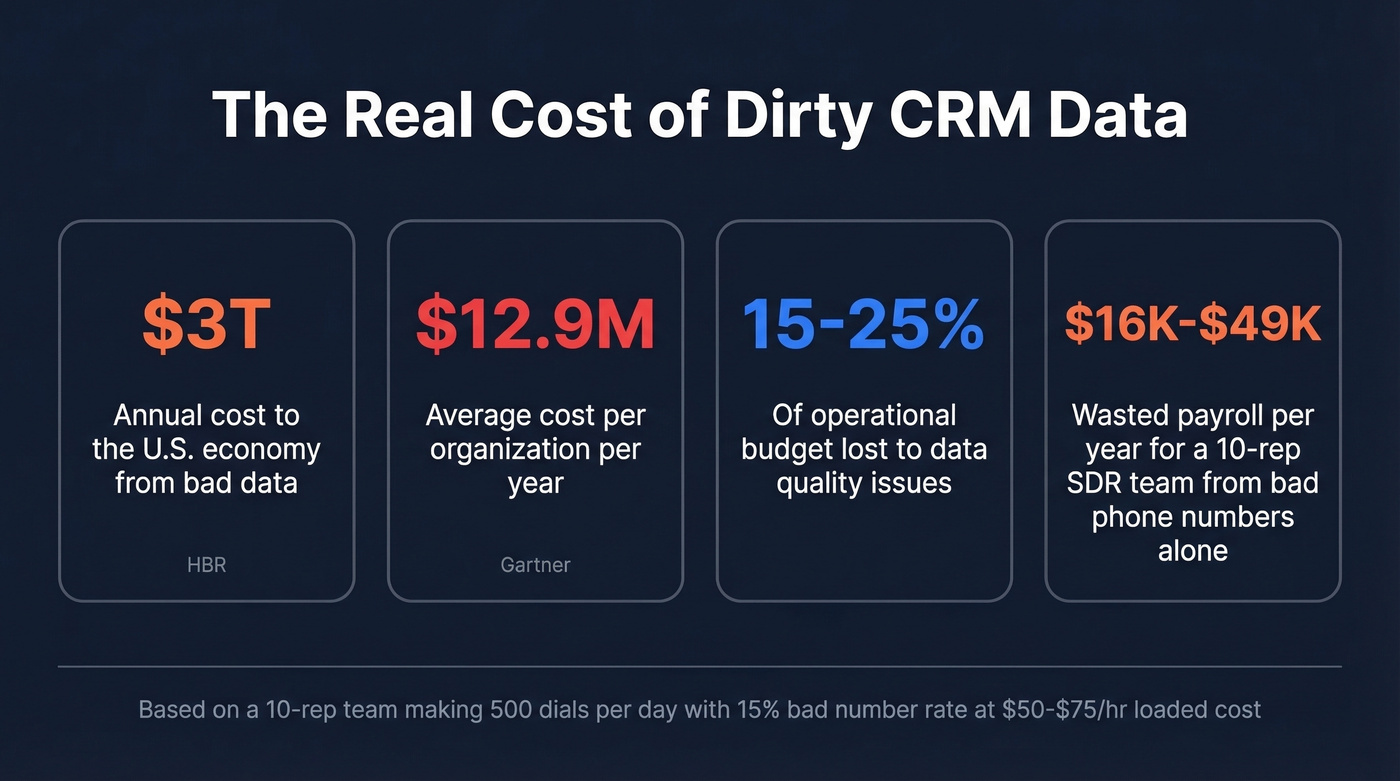
Let's make this concrete. Take a 10-rep SDR team dialing 50 calls per day each (500 total). If 15% of those numbers are bad, that's 75 wasted dials daily at a loaded cost of $50-75/hour. Each wasted dial burns 1-2 minutes on wrong numbers, voicemail mazes, and quick lookups, adding up to roughly 1.25-2.5 hours per day of dead time - or ~$16K-$49K/year in wasted payroll across 260 workdays.
Bad emails wreck your sender reputation too, which craters deliverability for every message your org sends.
| Bounce Rate | Risk Level | Impact |
|---|---|---|
| Under 2% | Healthy | None |
| 2-5% | Minor | Watch closely |
| 5-10% | Significant | Domain rep at risk |
| Over 10% | Severe | Deliverability crisis |
And here's the part most teams miss: if your forecasting models or lead-scoring algorithms run on dirty CRM data, the outputs are garbage. Clean data isn't just an outbound problem anymore - it's an AI readiness issue. When your attribution models ingest duplicates and stale records, you can't trust which channels actually drive pipeline.

Dirty data costs your SDR team $16K-$49K/year in wasted dials. Prospeo's 5-step verification and 7-day refresh cycle stop decay before it hits your pipeline - 98% email accuracy, bounce rates under 4%.
Stop cleaning bad data. Start preventing it at $0.01 per email.
How Fast Does Sales Data Decay?
The benchmark is 22.5% annual decay - roughly 2.1% per month. Nearly a quarter of your CRM is wrong by next January. But not all fields rot at the same speed.
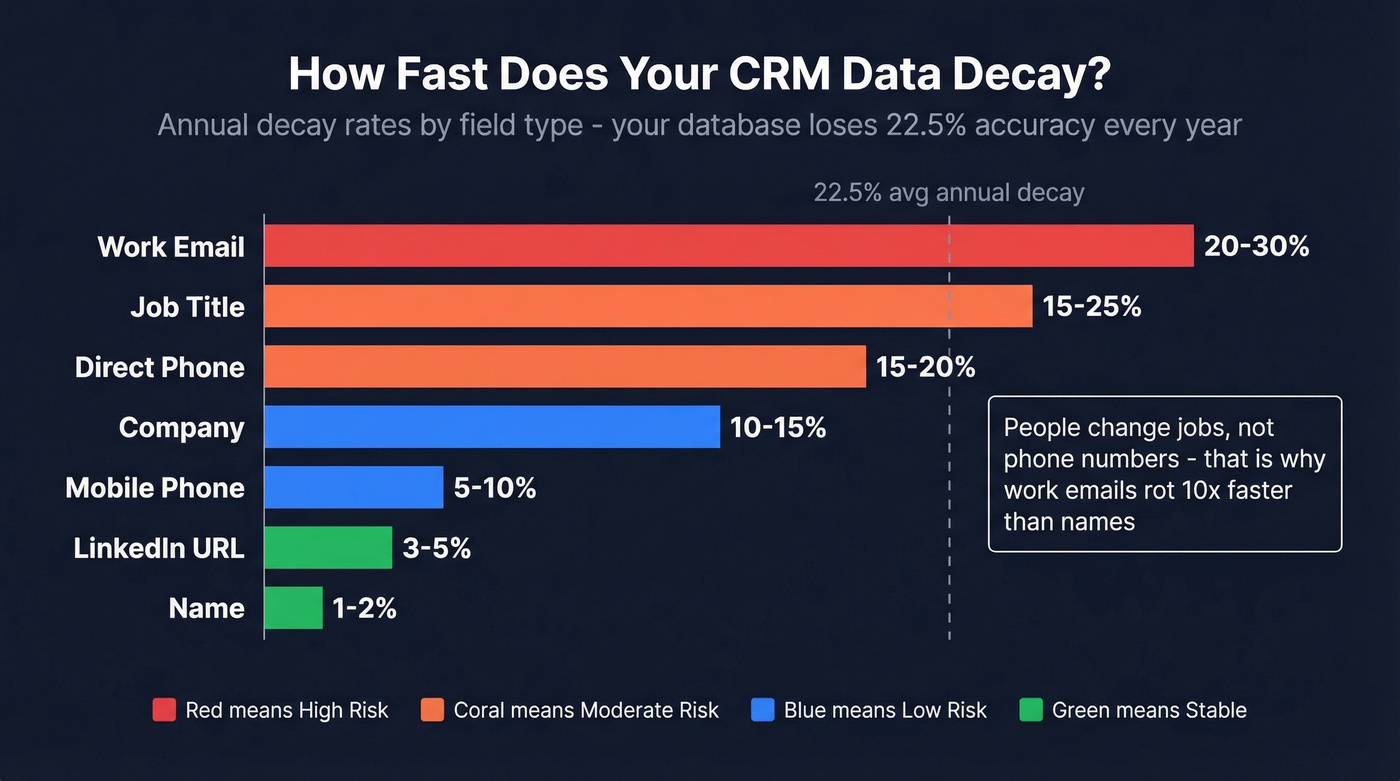
| Field | Annual Decay Rate |
|---|---|
| Work email | 20-30% |
| Job title | 15-25% |
| Direct phone | 15-20% |
| Company | 10-15% |
| Mobile phone | 5-10% |
| LinkedIn URL | 3-5% |
| Name | 1-2% |
Work emails and job titles decay fastest because people change jobs. Mobiles are more stable because they follow the person, not the role. Teams that maintain clean data see around 20% better response rates and 15% higher close rates - the link between reliable records and sales performance is measurable and immediate.
Where Quality Issues Come From
Four root causes account for most of the damage.
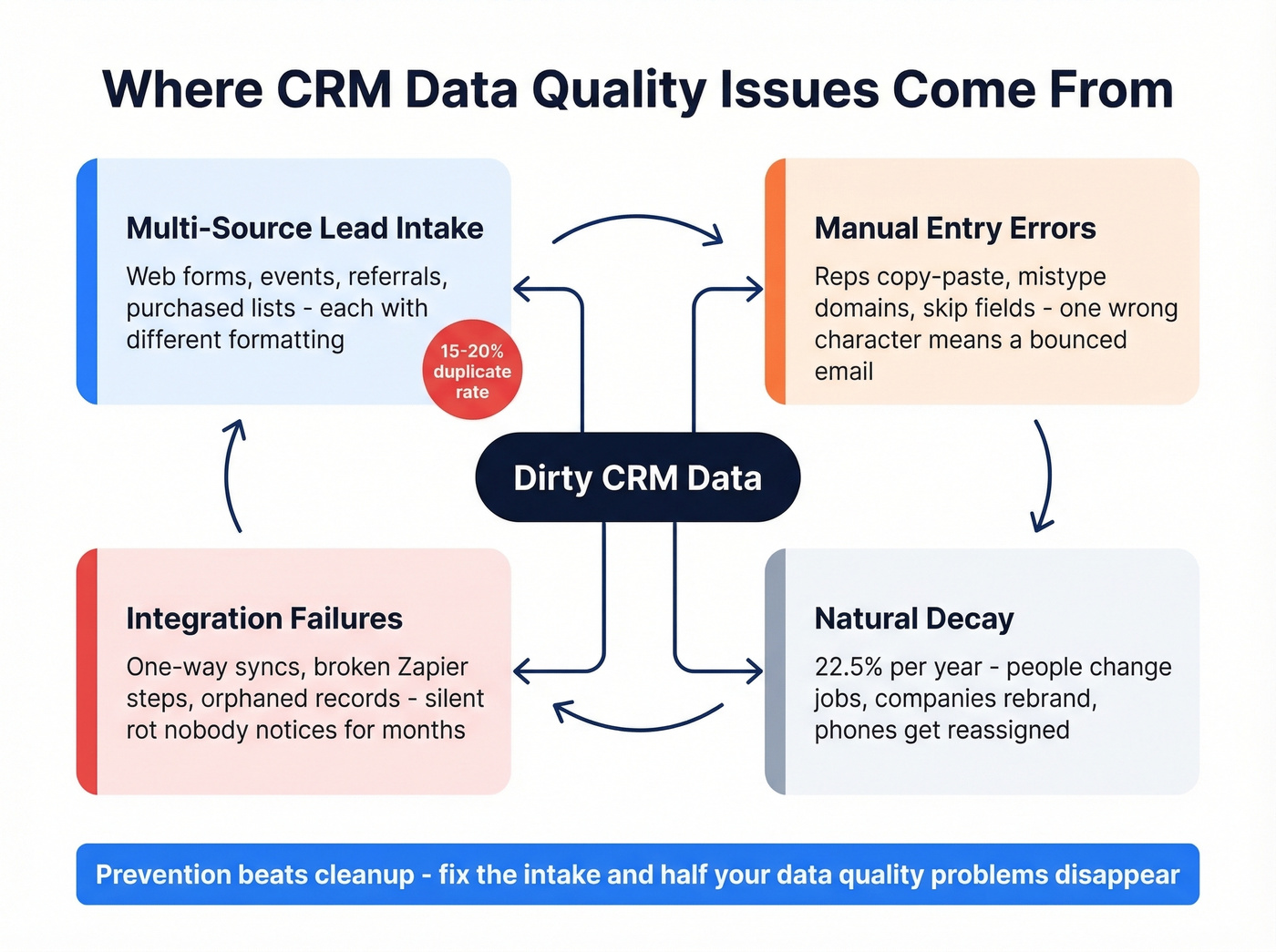
Multi-source lead intake is the biggest culprit. Leads arrive from web forms, events, referrals, and purchased lists, each with different formatting and accuracy. The result: duplicates account for 15-20% of records in a typical org.
Manual entry errors compound the problem. Reps copy-paste from browser tabs, mistype email domains, or skip fields entirely. One wrong character means a bounced message and a wasted sequence slot.
Integration failures create silent data rot. One-way syncs between your CRM and marketing automation produce orphaned records. Misconfigured integrations drop fields or fail to deduplicate on merge - and nobody notices until bounce rates spike. We've debugged CRM instances where a broken Zapier step had been silently creating duplicates for months.
Natural decay is the one you can't blame anyone for. People change jobs, companies rebrand, phone numbers get reassigned. Because decay never stops, manual cleanup is a treadmill. If you're not actively countering it, your database degrades every single day.
How to Improve Sales Data Quality
Most guides tell you to "improve accuracy" without defining what good looks like. Here are six steps with actual numbers.
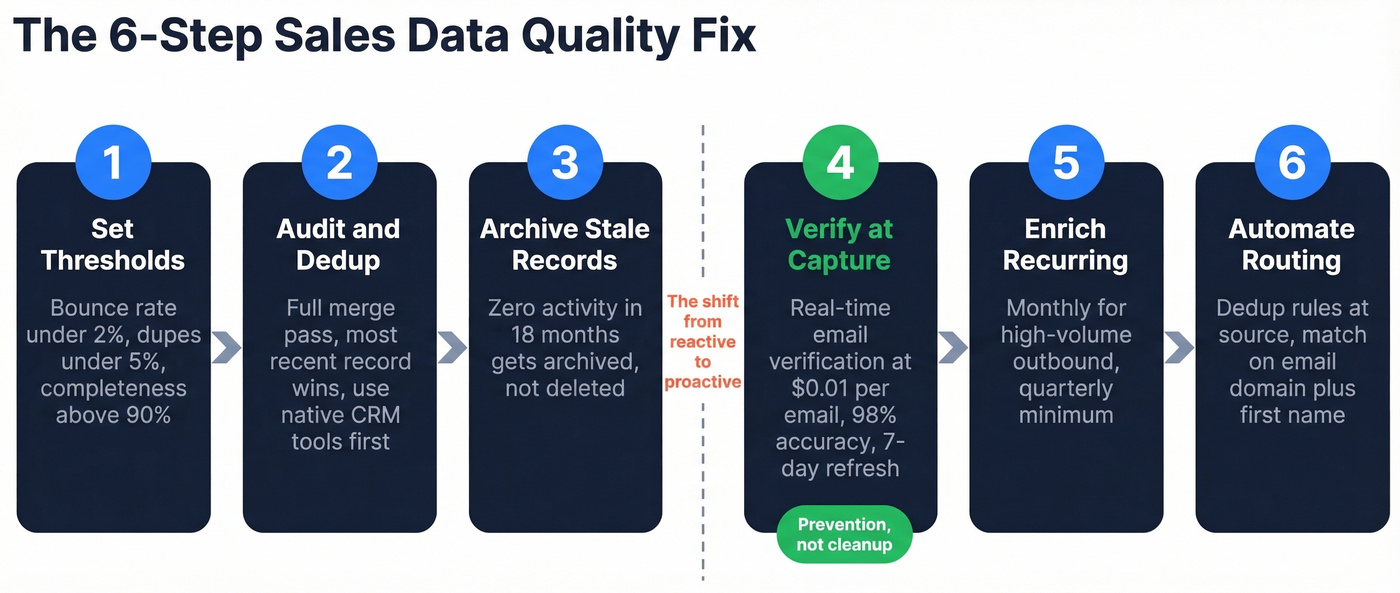
1. Define "clean" with target thresholds. Bounce rate under 2%. Duplicate rate under 5%. Field completeness above 90% for core fields like email, title, company, and phone. Write these down. Put them in your ops dashboard. If you don't measure it, you won't fix it.
2. Audit and deduplicate. Run a full merge pass using the most recently updated record as the master. Use your CRM's built-in dedup tools first, then add a dedicated dedup layer if you need more control. For teams on HubSpot or Salesforce, the native tools handle simple matches well - but they'll miss fuzzy duplicates where names are slightly misspelled or email domains differ.
3. Archive stale records. Any contact with zero activity in 18 months gets archived, not deleted. You want a clean working database, but you don't want to lose historical data you might need later.
4. Verify emails at point of capture, not after. Here's the thing: cleaning bad data after it's in your CRM is a losing game. Prevention beats cleanup every time. Prospeo verifies emails in real time with 98% accuracy and refreshes records every 7 days - compared to the 6-week industry average. One customer, Meritt, dropped bounce rates from 35% to under 4% after switching. The free tier covers 75 emails per month, and paid plans run about $0.01 per email. Plug it into your intake workflow so bad addresses never hit your CRM in the first place.
5. Enrich on a recurring cycle. In our experience, quarterly is the bare minimum. Monthly is better for high-volume outbound. Make sure your enrichment and verification tools integrate with your CRM and sequencing stack - disconnected tools just create more data drift. (If you're evaluating vendors, start with this breakdown of data enrichment services.)
6. Automate intake routing. Set up dedup rules at the source, matching on email domain plus first name, or company plus title, so duplicates merge on entry instead of piling up.
Here's my hot take: most teams don't have a data quality problem. They have a data prevention problem. They buy expensive enrichment tools, run quarterly audits, and still watch bounce rates climb - because they never stopped bad data from entering the pipeline in the first place. Fix the intake, and half your "data quality initiatives" become unnecessary. If you're rebuilding your outbound stack, it also helps to standardize on a tight set of SDR tools and a documented lead generation workflow.
Meritt dropped bounce rates from 35% to under 4% and tripled pipeline to $300K/week. The fix wasn't another quarterly audit - it was verifying emails at point of capture with 98% accuracy and a 7-day data refresh cycle.
Run your CRM exports through Prospeo and see how much data has already decayed.
FAQ
How often should I audit my CRM data?
Quarterly minimum, monthly for high-volume outbound teams. Track bounce rate trends - a 1-2% increase per quarter is normal decay. Anything faster signals a source problem. Build the audit cadence into your ops calendar rather than treating it as a one-off project.
What's an acceptable email bounce rate for outbound?
Under 2% is healthy. Between 2-5% needs monitoring. Above 5% means your data is actively damaging your sender domain - pause outbound and clean the list before resuming sequences.
Can I prevent bad data instead of cleaning it?
Yes, and it's far more efficient. Verifying emails at point of capture eliminates most bad records before they enter your CRM. Real-time verification at roughly $0.01 per email costs a fraction of what reactive cleanup costs in wasted rep time and burned sender reputation.
What tools help maintain sales data quality in 2026?
For prevention-first workflows, you want real-time verification at the point of capture, your CRM's native dedup rules, and a scheduled enrichment cadence. That covers all three layers: capture, maintenance, and decay prevention. Skip tools that only clean data retroactively - by the time they run, the damage to your sequences and sender reputation is already done.