

Best Sales Database Management Software in 2026
You just bought Pipedrive. Your pipeline view looks beautiful - stages color-coded, deal values tallied, forecasts humming. One problem: it's empty. No contacts, no companies, no leads. You've got a Ferrari with no gas.
That's the gap most teams discover too late. The CRM market is projected to hit $126.17B in 2026, and 91% of companies with more than 11 employees already use one. But a CRM without prospect data is just an expensive address book. The tools that fill it - sales intelligence platforms, no-code databases, enrichment engines - are a separate category entirely, and most guides ignore them. We evaluated these tools across pricing transparency, data accuracy, and integration depth. Let's get into it.
Our Picks (TL;DR)
| Pick | Best For | Starting Price |
|---|---|---|
| Prospeo | Verified B2B contact data & enrichment | Free (75 emails/mo) |
| HubSpot CRM | Free pipeline management | Free plan available |
| Pipedrive | Sales-first simplicity | $14/user/mo |
You need two tools, not twenty-two - one to manage deals, one to find contacts. Pair a sales intelligence tool with a CRM and you've got a complete stack for under $60/mo per rep.
Three Types of Sales Database Software
Most guides lump everything into "CRM." That's half the picture. Sales database software breaks into three distinct categories, and 45% of sales professionals struggle to choose the right technology - usually because nobody explains the difference.
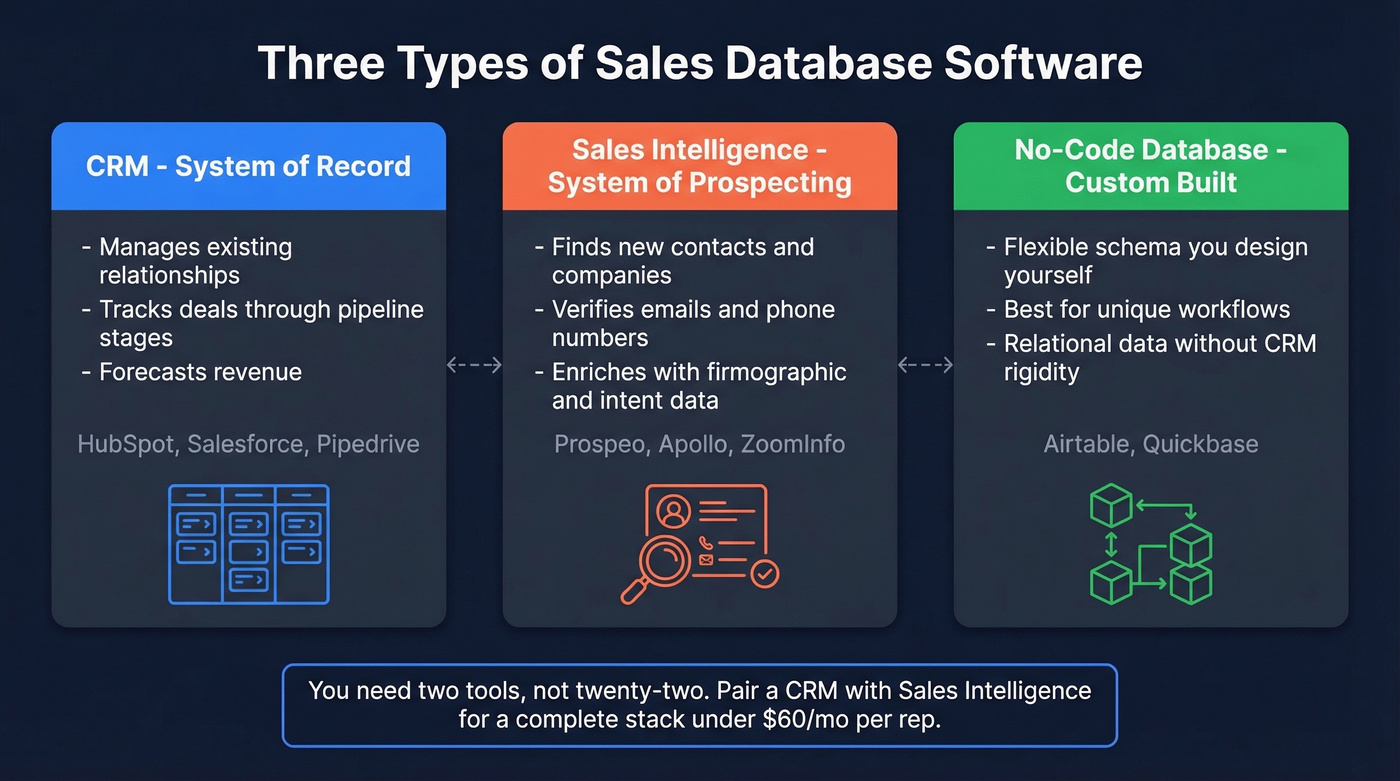
CRM (System of Record) - manages existing relationships, tracks deals through stages, and forecasts revenue. Think HubSpot, Salesforce, Pipedrive. This is where your pipeline lives.
Sales Intelligence (System of Prospecting) - finds new contacts, verifies emails and phone numbers, and enriches records with firmographic and intent data. This is where your pipeline gets fed.
No-Code Databases (Custom-Built) - flexible platforms like Airtable or Quickbase where you design your own schema. Best for teams with unique workflows that CRMs can't accommodate.
The average organization uses roughly 1,000 applications, but only 28% are integrated. That disconnect is why reps end up copy-pasting between tabs instead of selling. Companies using the right combination of sales technology categories report 28% higher win rates and 26% larger deal sizes. And 70% of customers expect reps to already know their purchase and issue history - which is impossible when your data lives in disconnected silos.
Best CRM Databases
CRMs are the foundation - the place where every deal, contact, and activity lives. They vary wildly in complexity, cost, and who they're actually built for.
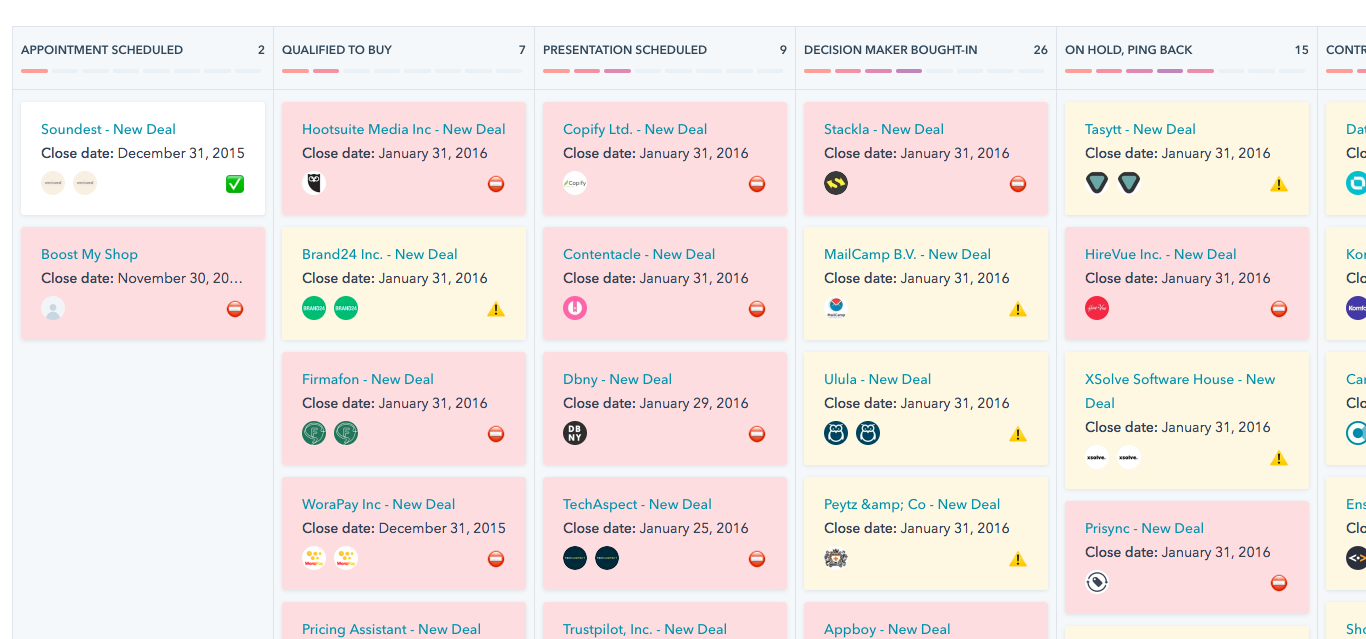
HubSpot CRM
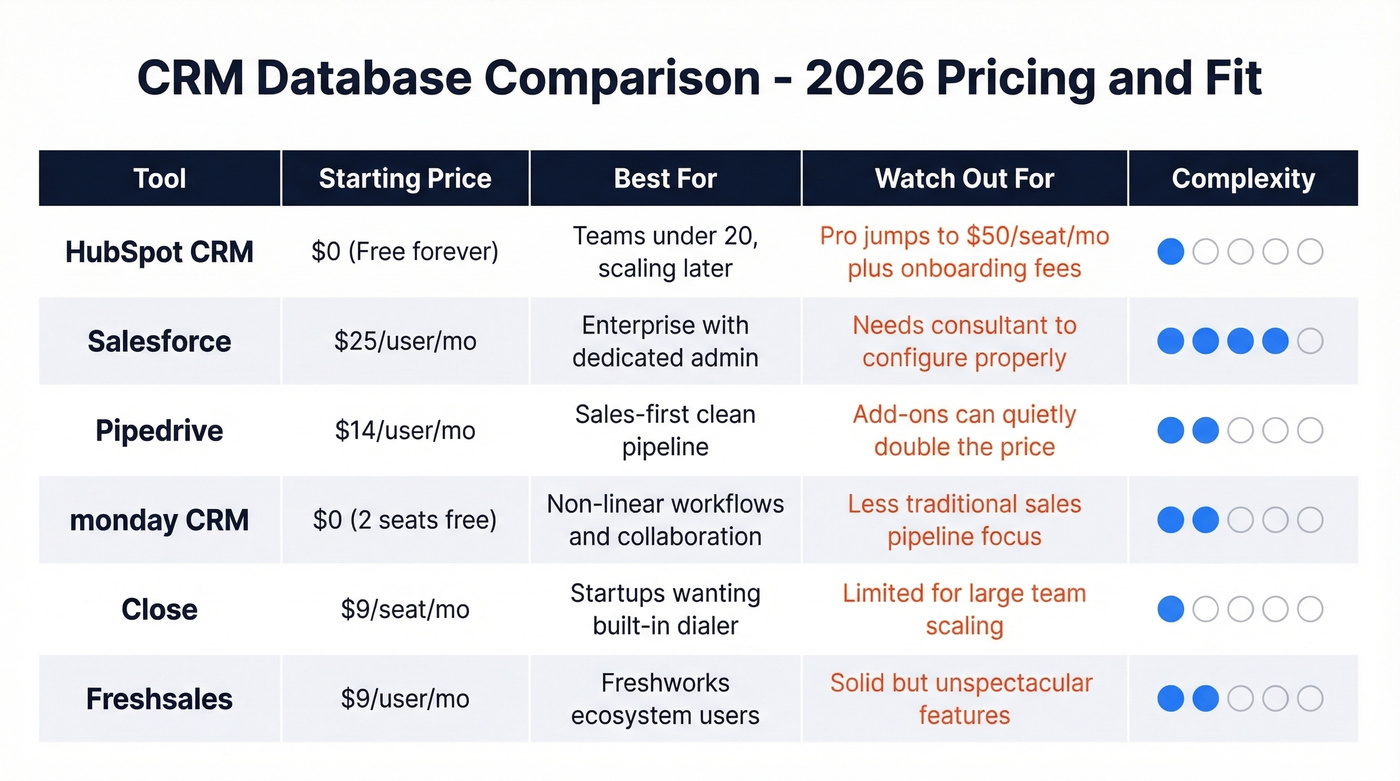
Best for: Teams under 20 who want to start free and scale later.
HubSpot's CRM is 100% free with no expiration date - contact management, deal tracking, and basic reporting included. It's the obvious starting point for most SMB teams, and plenty of companies run on it for years without paying a dime.
The trap is what happens when you outgrow it. Starter begins at $15/seat/mo. Professional jumps to $50/seat/mo, and Enterprise hits $75/seat/mo. Some Professional and Enterprise plans also come with onboarding fees ($3,000 and $7,000 respectively), which catch people off guard. Here's the thing: you'll outgrow the free tier faster than you think. The moment you need custom reporting or workflow automation, you're on a paid plan. Budget accordingly.
Salesforce
Best for: Enterprise teams that need infinite customization and can afford an admin.
Salesforce runs $25-$300/user/month depending on the edition. It's the enterprise default for a reason - the ecosystem is massive, the customization is limitless, and every tool on earth integrates with it.
The catch: you need a dedicated admin or consultant to set it up properly. A misconfigured Salesforce instance is worse than no CRM at all. If you don't have the budget for implementation support, look elsewhere until you do.
Pipedrive
Best for: Sales-first teams who need a clean pipeline without the bloat.
Pipedrive has one of the most sales-focused UIs in the category. Essential starts at $14/user/mo, Advanced at $29, Power at $49, and Enterprise at $99. The interface is built around the pipeline view, not bolted onto a project management tool.
Watch the add-ons, though. Phone integration tacks on $24/user/mo. LeadBooster - chatbots and web forms - is extra. A "fully loaded" Pipedrive seat can quietly double from the sticker price. If you already have prospect data from a sales intelligence tool, Pipedrive is excellent. If you're expecting it to find leads for you, you'll be disappointed.
monday CRM
monday CRM offers a free plan for up to 2 seats, with Basic at $9, Standard at $12, and Pro at $19/seat/mo billed annually. The visual workflow builder shines for non-linear sales processes and heavy cross-team collaboration.
Close
Close starts at $9/seat/mo and packs built-in calling, SMS, and email into a single interface. Best for startups who want a dialer and CRM in one tool without stitching together integrations.
Freshsales
Freshsales runs Growth at $9, Pro at $39, and Enterprise at $59/user/mo. It's the budget-friendly pick for teams already in the Freshworks ecosystem - solid, if unspectacular.
Best Sales Intelligence Databases
Your CRM is only as good as the data inside it. B2B contact records decay roughly 30% per year - people change jobs, companies get acquired, phone numbers go dead. Coverage varies heavily across providers too, with surprisingly little overlap for mid-market account lists. That's exactly why data accuracy matters more than raw database size.
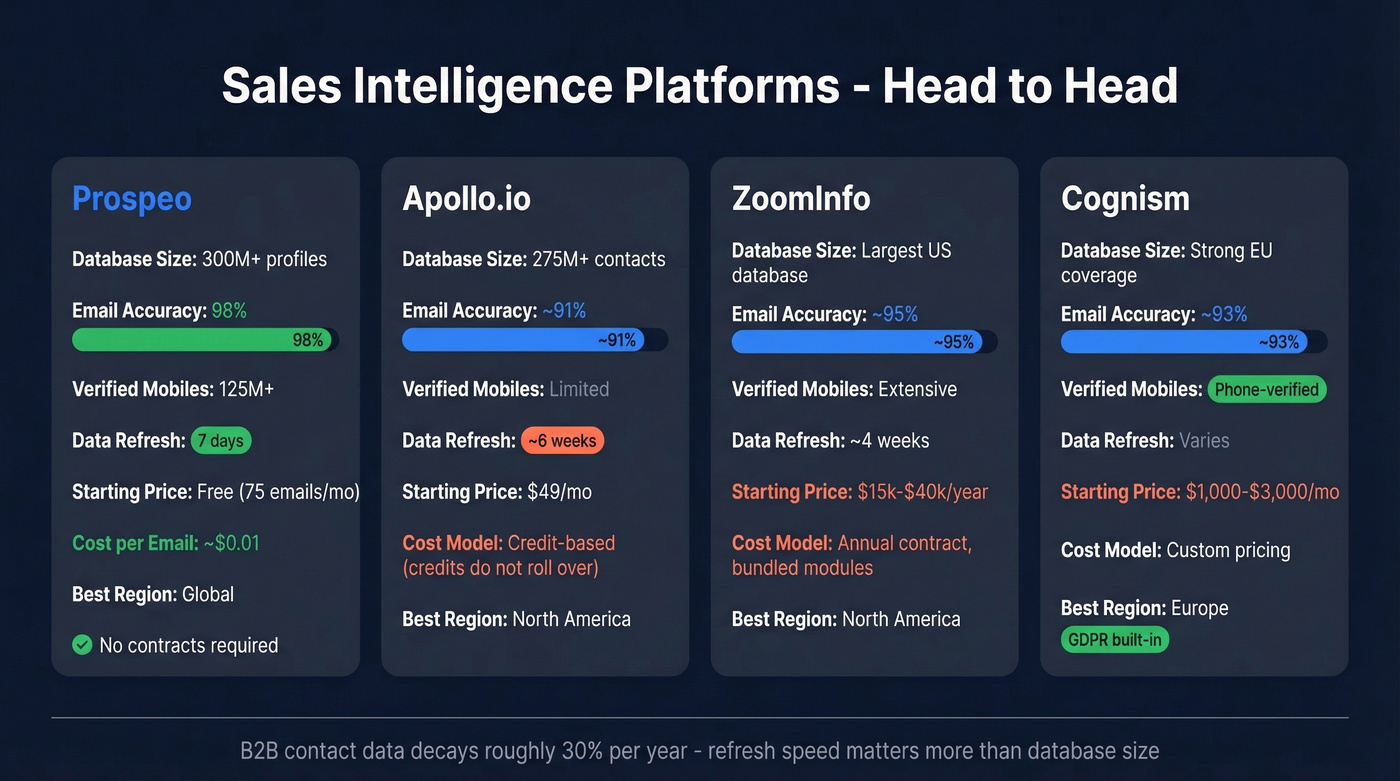
Sales intelligence tools solve this by sourcing, verifying, and refreshing contact data before it ever hits your CRM.
Prospeo
Best for: Teams that need verified emails and direct dials without enterprise pricing.
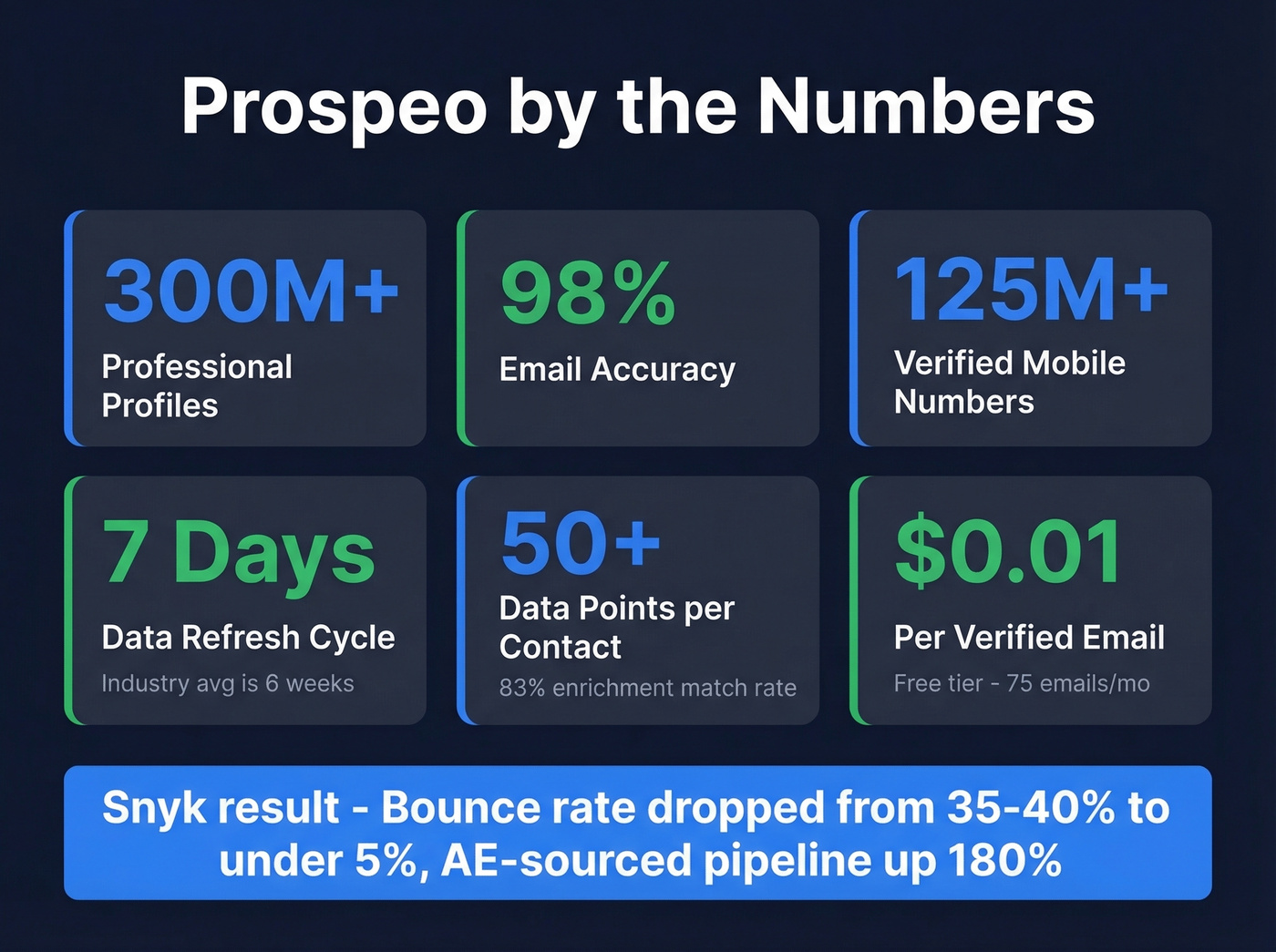
Prospeo covers 300M+ professional profiles, 143M+ verified emails, and 125M+ verified mobile numbers. The 98% email accuracy comes from a proprietary 5-step verification process - catch-all handling, spam-trap removal, and honeypot filtering.

What separates Prospeo from the pack is the 7-day data refresh cycle. The industry average is six weeks. That gap matters when you're prospecting into fast-moving segments where people change roles quarterly. The platform includes 30+ search filters - buyer intent powered by Bombora across 15,000 topics, technographics, job change signals, headcount growth, and funding data - so you're finding the right contacts at the right time, not just any contacts.
CRM enrichment returns 50+ data points per contact with an 83% enrichment match rate, pushing directly into Salesforce or HubSpot. Native integrations also cover Smartlead, Instantly, Lemlist, Clay, Zapier, and Make. Pricing starts free at 75 emails/month, scales at roughly $0.01/email, and requires no contracts. For context, Snyk's 50 AEs used Prospeo to cut their bounce rate from 35-40% down to under 5%, with AE-sourced pipeline up 180%.

Your CRM is the Ferrari. Prospeo is the fuel. 300M+ profiles, 98% email accuracy, and a 7-day refresh cycle mean your sales database never goes stale. At ~$0.01/email, you get enterprise-grade intelligence without the enterprise invoice.
Stop managing an empty database. Start filling it with verified contacts.
Apollo.io
Best for: Teams that want prospecting + sequencing in one platform on a budget.
Apollo is the Swiss Army knife of sales intelligence - database, sequencer, dialer, and basic enrichment in a single tool. Paid plans start at $49/mo (Basic), $79/mo (Professional), and $119/mo (Organization, minimum 3 seats). With 1,145 G2 reports, it's one of the most reviewed tools in the category.
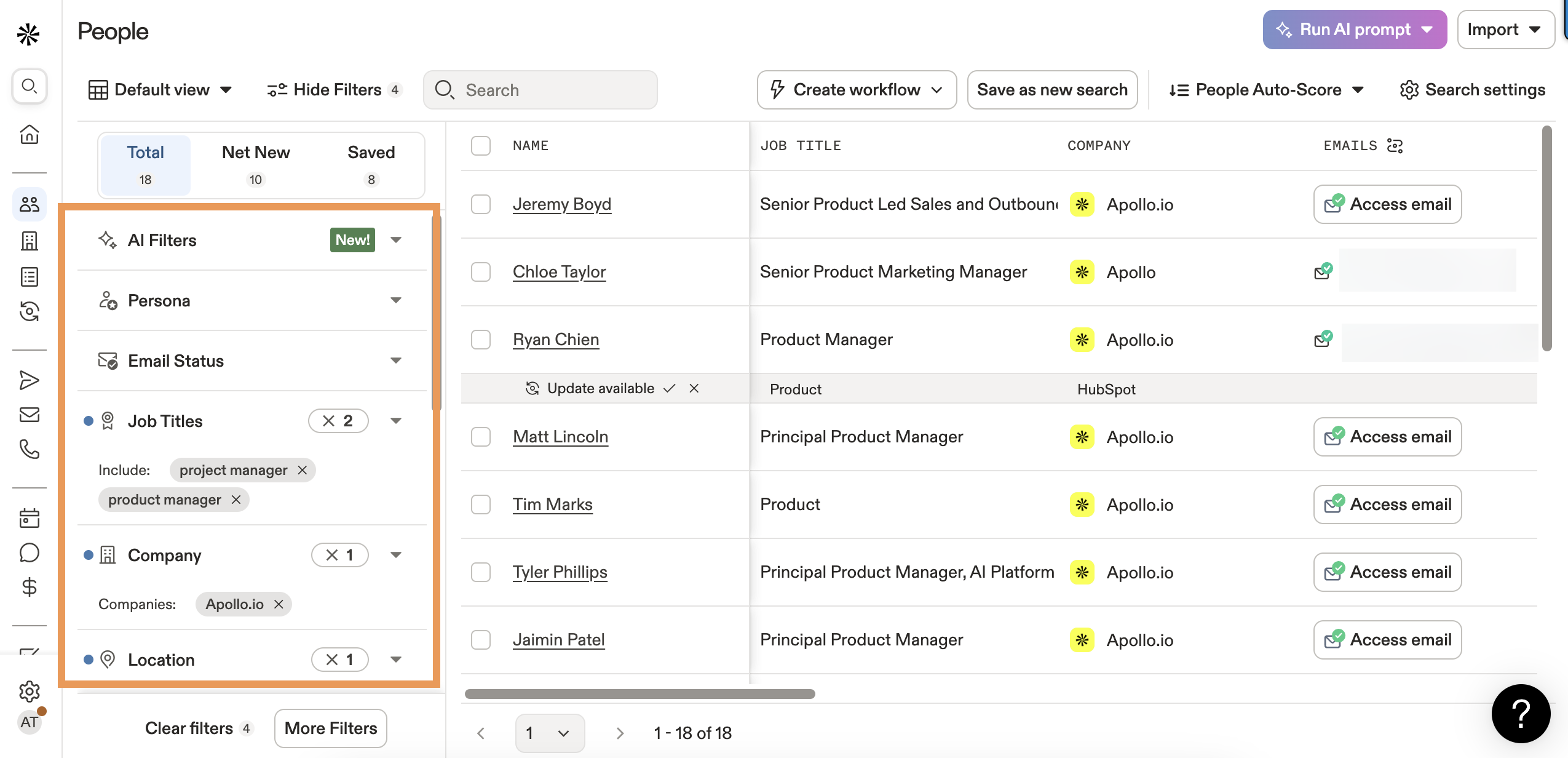
The sticker price looks great until you understand credit mechanics. Credits don't roll over between billing cycles. Waterfall enrichment - where Apollo queries multiple data sources to find a match - burns credits unpredictably depending on your ICP and region. Budget for 30-50% more than the base plan if you're running heavy outbound.
Apollo is the right call for teams under 25 reps who need an all-in-one tool and can manage their credit consumption carefully.
ZoomInfo
Best for: Enterprise teams with budget for the market leader.
ZoomInfo holds 150 No. 1 rankings on G2 and serves 35,000+ companies. The database is the deepest in the US market, and the platform spans intent data, conversation intelligence, and workflow automation.
Here's our honest take: ZoomInfo is still the most comprehensive all-in-one platform. But most teams don't need all-in-one. A mid-market contract runs $15k-$40k/year, and the consensus on r/sales is that you end up paying for modules you never turn on. If your average deal size doesn't justify that spend, you almost certainly don't need ZoomInfo-level investment.
Cognism
Cognism is the strongest option for European data coverage, with phone-verified mobile numbers and built-in GDPR compliance that US-first providers can't match. Custom pricing typically lands at $1,000-$3,000/mo for small teams. If your territory is primarily European, Cognism deserves a serious look. Skip it if you're selling exclusively into North America.
B2B contact data decays 30% per year. Prospeo refreshes every 7 days - 6x faster than the industry average. Layer in 30+ filters, Bombora intent data, and 125M+ verified mobiles so your CRM stays accurate and your reps stay selling.
Teams using Prospeo book 26% more meetings than ZoomInfo users.
Best No-Code Sales Databases
When a CRM is too rigid and a spreadsheet isn't enough, no-code platforms let you build exactly the database your workflow demands.
Airtable
Airtable's free plan handles basic use cases, with Team at $20/user/mo and Business at $45/user/mo. The relational linking between tables - contacts tied to companies tied to deals tied to activities - gives you CRM-like structure without CRM-like rigidity.
The tradeoff is clear: you're building, not buying. Expect to spend a week configuring views, automations, and integrations before it feels like a sales tool. We've seen ops-heavy teams love it and quota-carrying reps hate it in equal measure.
Quickbase
Quickbase starts at $35/user/mo with a minimum of 20 users - that's a $700/mo floor before anyone logs in. Enterprise-only fit for teams that need complex workflow automation and custom reporting beyond what Airtable or a traditional CRM can handle.
For teams wanting full data ownership, self-hosted options like Supabase, Baserow, or Retool give you complete control over your schema and infrastructure, though they require engineering resources to set up and maintain.
What It Actually Costs
The sticker price is rarely what you actually pay. Here's the full picture across all three categories.
| Tool | Category | Pricing Model | Starting Price | Free Tier? | Watch Out For |
|---|---|---|---|---|---|
| Prospeo | Sales Intel | Credit-based | ~$0.01/email | Yes (75/mo) | - |
| HubSpot | CRM | Seat-based | Free / $15/seat | Yes | $3K-$7K onboarding |
| Pipedrive | CRM | Seat-based | $14/user/mo | No | Add-ons double cost |
| Apollo | Sales Intel | Hybrid (seat + credit) | $49/mo | Yes | Credits don't roll |
| Salesforce | CRM | Seat-based | $25/user/mo | No | Admin costs |
| monday CRM | CRM | Seat-based | $9/seat/mo | Yes (2 seats) | Limited free tier |
| ZoomInfo | Sales Intel | Flat-rate contract | ~$15K-$40K/yr | No | Module bloat |
| Cognism | Sales Intel | Flat-rate contract | ~$1K-$3K/mo | No | Custom pricing only |
| Airtable | No-Code | Seat-based | $20/user/mo | Yes | Build time |
| Close | CRM | Seat-based | $9/seat/mo | No | Limited at scale |
| Freshsales | CRM | Seat-based | $9/user/mo | Yes | Ecosystem lock-in |
| Quickbase | No-Code | Seat-based | $35/user/mo | No | 20-user minimum |

At 5 seats, a sales intelligence free tier plus HubSpot Free costs $0/mo total. A Pipedrive Advanced + Apollo Professional stack runs roughly $540/mo. A Salesforce + ZoomInfo stack starts around $1,250+/mo minimum.
At 25 seats, those numbers become $0/mo, $2,700/mo, and $10,000+/mo respectively. The gap compounds fast. Companies that invest in CRM see an average return of $8.71 for every $1 spent - but only if the data feeding the CRM is accurate enough to act on.
How to Keep Your Database Clean
Poor data quality costs organizations an average of $15M annually, per Gartner. Most of that damage is preventable with continuous maintenance instead of annual "data cleanup" projects that never actually happen.
Here's the checklist that actually works:
- Deduplicate weekly, not quarterly. Automated deduplication rules catch most duplicates before they cause problems. Waiting for a quarterly cleanup means reps have already called the same prospect twice.
- Validate at point of entry. Every new record should hit validation rules before it's saved - email format, required fields, standardized job titles.
- Standardize qualification fields. Use MEDDIC or BANT frameworks consistently. "Interested" isn't a qualification stage.
- Assign data ownership. Someone needs to own data quality. Without a data steward, hygiene is everyone's job and therefore nobody's job.
- Integrate your tools properly. A third of companies still move data manually between systems. One-way syncs and Zapier-as-database-sync are common failure modes - they weren't designed for that. (If you need a setup walkthrough, see connect them properly.)
- Use a provider with a short refresh cycle. The easiest way to prevent data decay is to stop it at the source. A 7-day refresh cycle versus the 6-week industry average compounds across thousands of records.
How to Choose the Right Tool
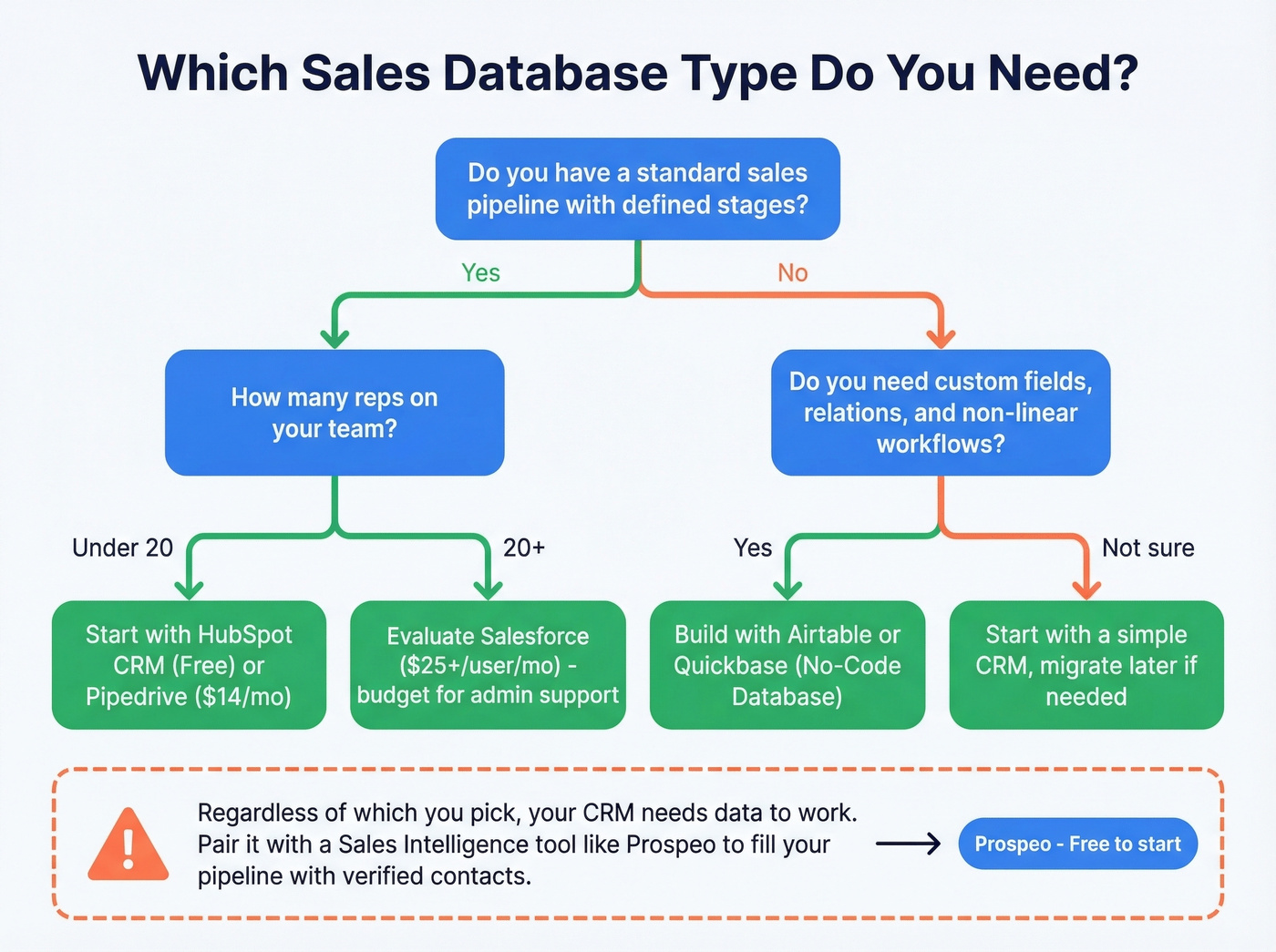
Your team size, use case, and budget point to a specific category combination. Here's the decision tree:
Bootstrapped / under 10 reps: Prospeo's free tier + HubSpot Free or Close. Total cost: under $100/mo. You get verified contact data and a functional CRM without signing a single contract. If you're still building pipeline from scratch, add a few sales prospecting techniques before you buy more tools.
Mid-market / 10-50 reps: Pipedrive + a sales intelligence tool like Apollo or Prospeo. Pipedrive handles the pipeline; the intelligence tool handles prospecting. Budget $500-$2,000/mo depending on volume.
Enterprise / 100+ reps: Salesforce + a dedicated data provider. Salesforce is the system of record; enrichment keeps records fresh at scale. Add Cognism if you're heavy in EMEA.
Unique workflows / ops-heavy teams: Airtable + a sales intelligence API. Build the database structure you need, pipe in verified contacts programmatically.
The data backs this up: Frontify saw a 42% increase in sales velocity and 35% higher win rate after consolidating their tools into the right category combination. AI-powered lead scoring and email drafting are table stakes in 2026 - most tools on this list offer some version. If you're evaluating that layer, start with lead scoring and work backward into tooling.
Look, the biggest mistake isn't picking the wrong tool - it's buying one tool and expecting it to do everything. A CRM doesn't find prospects. A sales intelligence tool doesn't manage deals. Pick one from each category and connect them properly. That's the whole secret.
FAQ
What's the difference between a CRM and a sales database?
A CRM manages existing relationships and tracks deals through your pipeline. A sales database - or sales intelligence tool - finds new prospects with verified contact data. Most teams need both: one to source contacts, one to manage them through the funnel.
Do I need both a CRM and a sales intelligence tool?
Yes, if you run outbound. A CRM without prospect data is an expensive address book. Sales intelligence tools fill your CRM with verified contacts; the CRM tracks what happens next. Prospecting from inside a CRM alone means working with stale, incomplete records.
How often should I clean my sales database?
Continuously, not annually. B2B contact data decays roughly 30% per year. Use automated deduplication, validation rules at point of entry, and a data provider with a short refresh cycle to stay ahead of decay rather than chasing it.
What's the average cost of this software?
CRMs range from free (HubSpot) to $300/user/month (Salesforce Enterprise). Sales intelligence tools range from free tiers to $40,000+/year. Most mid-market teams spend $50-$150/user/month across both categories combined.
Can I use a spreadsheet instead?
You can start there, but you'll hit limits fast - no relational linking, no automation, no audit trail, no duplicate prevention. Switch to a proper tool once your list exceeds a few hundred records or more than one person needs to work the same pipeline. The migration only gets harder the longer you wait.