

Sales Force Automation: What It Is, What It Costs, and Whether You Need It
A RevOps lead we know ran a time audit last quarter. His 12-person sales team was burning 14 hours a week per rep on admin - data entry, pipeline updates, follow-up scheduling - and wondering why pipeline was flat. The fix wasn't hiring. It was automating the work nobody should've been doing manually in the first place.
That's the promise of sales force automation. Here's what it actually costs, how it works, and whether your team needs it or whether you're better off with something lighter.
What Is Sales Force Automation?
Sales force automation (SFA) is the category of software that automates the repetitive, mechanical parts of selling: logging activities, routing leads, scheduling follow-ups, updating deal stages, generating quotes, and rolling up forecasts. You'll see it called SFA in vendor docs, but the concept stays the same regardless of branding.
Think of SFA as a subset of CRM. Where CRM covers the full customer lifecycle - marketing, service, success - SFA focuses narrowly on sales execution. The rep's daily workflow, not the company's customer database. This distinction matters because most vendors bundle automation into their CRM suite and market the whole thing as one product. That's how you end up paying for marketing automation and service ticketing when all you needed was pipeline management and automated task creation.
What You Need (Quick Version)
If your reps spend more time on admin than selling, you need SFA. If you're under 10 reps, you probably don't need a full suite - a pipeline tracker, clean contact data, and a sequencer get you 80% of the way there.
The short list:
- Enterprise teams (20+ reps): Salesforce Sales Cloud. It's the default for a reason - workflow depth, customization, ecosystem.
- SMBs and small teams: Pipedrive. Visual pipeline, fast setup, no bloat. Starts at EUR 14/user/month.
- Free starting point: HubSpot Sales Hub free tier. Limited, but enough to learn what you actually need before spending.
Here's the thing: most teams buying SFA software are over-buying. Before you sign a $30k annual contract, ask whether a $50/mo pipeline tool plus verified contact data would solve 80% of the problem. If your average deal size sits below five figures, it almost certainly would.
The Problem SFA Solves
Reps aren't spending their time selling. Forrester's activity study puts it at roughly 14 out of 51 working hours per week on administrative tasks. Salesforce's State of Sales report says reps spend only about 30% of their time actually selling. LinkedIn's research found salespeople actively work with customers and prospects for only about 10 hours per week, with much of the rest going to CRM updates, research, and admin.
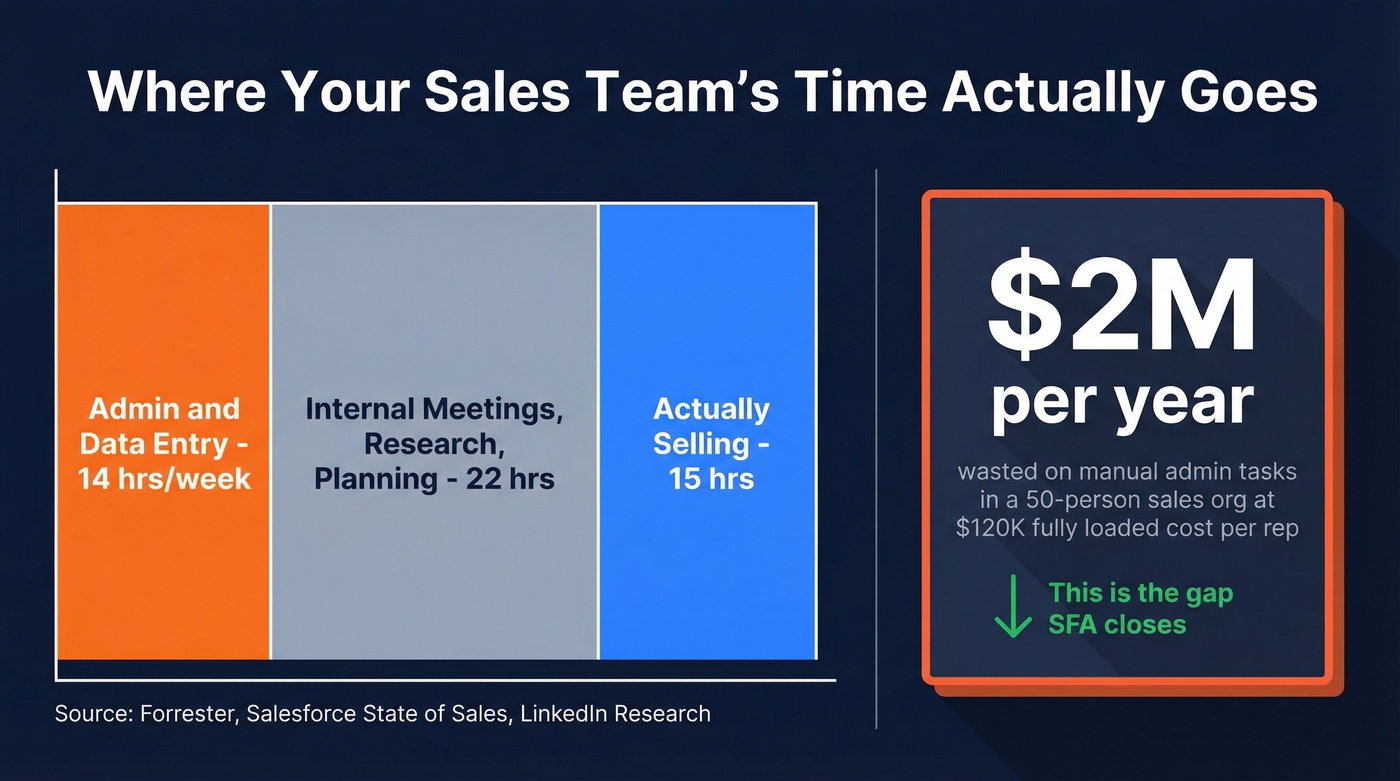
All three data points land in the same place: reps are spending a third to a quarter of their week on work a machine should handle. Multiply that across a 50-person sales org at an average fully loaded cost of $120k per rep, and you're burning around $2M/year on manual data entry, pipeline hygiene, and follow-up scheduling. That's the gap SFA is designed to close.
The market reflects this pain. The global SFA market is projected to hit $12.5 billion in 2026, growing to $22.7 billion by 2033 at an 8.9% CAGR. North America accounts for 35%+ of that market, with APAC growing fastest at 15.2% CAGR - relevant if your sales org spans multiple regions. Cloud deployments are growing fastest at 14.2% CAGR, which tells you where things are heading: away from on-prem installations and toward tools you can deploy in weeks, not months.
How SFA Works Stage by Stage
SFA isn't one feature. It's a layer of automation across every stage of the sales process.
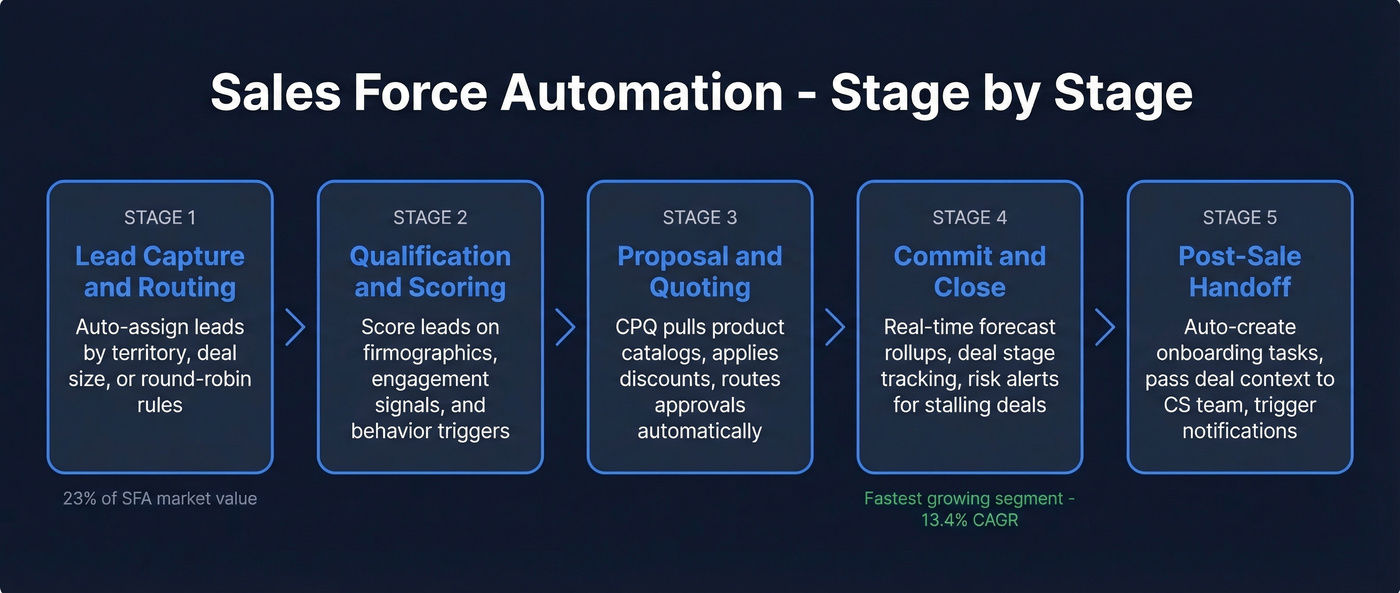
Lead Capture & Routing
Leads come in from forms, events, ad campaigns, and outbound prospecting. An SFA system automates the routing - assigning leads to the right rep based on territory, deal size, industry, or round-robin rules. Without this, leads sit in a shared inbox while reps cherry-pick the easy ones. Lead management represents 23%+ of the SFA market by value, making it the single largest functional segment.
Qualification & Scoring
Once a lead is routed, SFA tools score it based on firmographic data, engagement signals, and behavioral triggers. A VP of Sales who opened three emails and visited your pricing page gets a higher score than a marketing coordinator who downloaded one PDF. The automation here replaces the gut-feel prioritization that most reps default to - and gut feel, in our experience, is wrong about 60% of the time.
Proposal & Quoting
Configure-price-quote (CPQ) automation eliminates the spreadsheet gymnastics of building proposals. SFA tools pull in product catalogs, apply discount rules, route approvals, and generate documents - cutting proposal turnaround from days to hours. For teams selling complex or multi-line deals, this stage alone justifies the investment.
Commit & Close
Forecast rollups, deal stage tracking, incentive compensation management, and risk alerts live here. SFA aggregates pipeline data in real time so managers see which deals are stalling, which are accelerating, and where the quarter is actually landing. Analytics and reporting is the fastest-growing SFA segment at 13.4% CAGR - pipeline dashboards are shifting from nice-to-have to non-negotiable.
Post-Sale Handoff
The handoff from sales to customer success is where deals go to die if it's manual. Automation handles task creation for onboarding, triggers internal notifications, and passes context - deal notes, stakeholder map, contract terms - to the CS team without requiring the rep to write a novel in Slack.

SFA automates your workflow, but garbage data in means garbage pipeline out. Prospeo feeds your CRM with 98% verified emails and 125M+ direct dials - refreshed every 7 days, not every 6 weeks. Native integrations with Salesforce, HubSpot, and every major sequencer mean your reps stop doing data entry and start closing.
Fix the data layer before you automate everything else.
SFA vs CRM: What's Actually Different
Every major CRM vendor bundles SFA features into their platform and markets the whole thing as "CRM." But the distinction matters for your budget and your implementation scope.
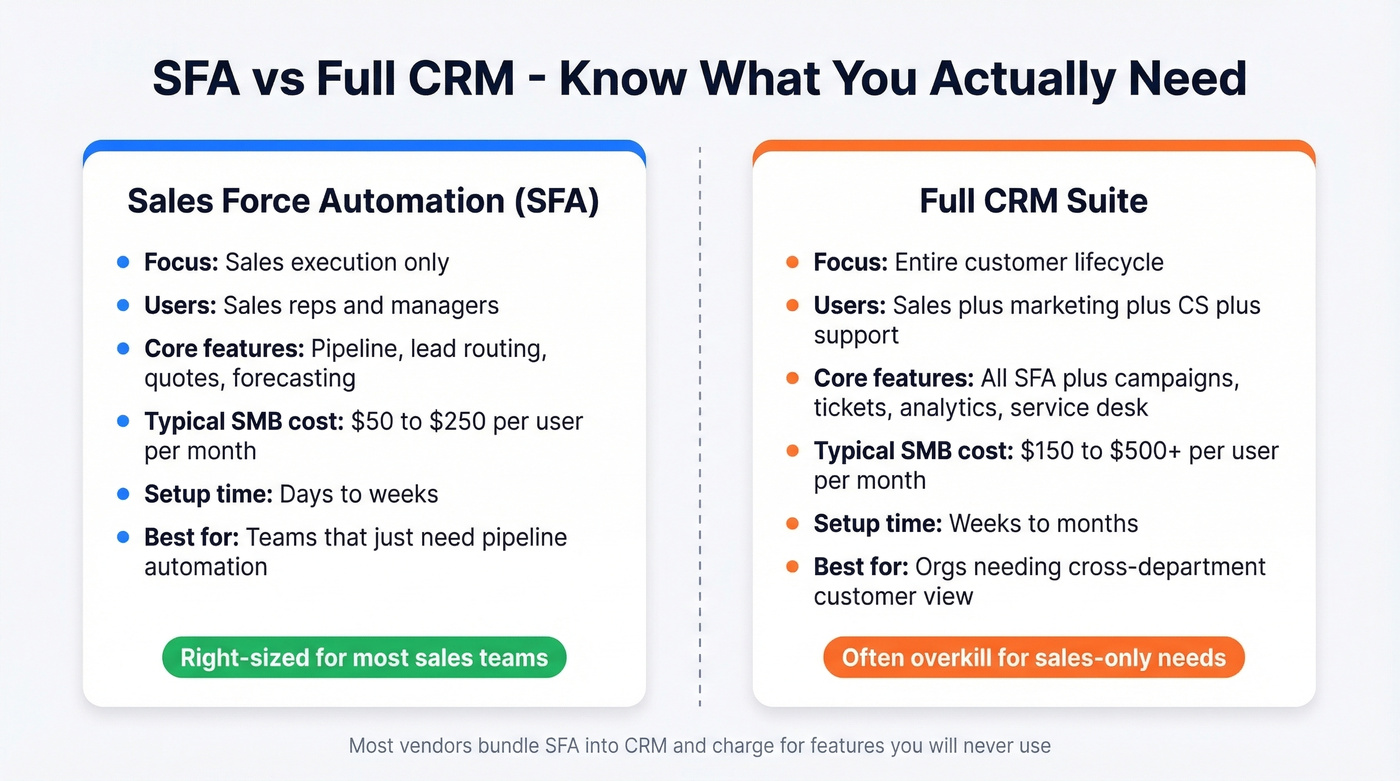
| Dimension | SFA | Full CRM |
|---|---|---|
| Focus | Sales execution | Customer lifecycle |
| Users | Sales reps, managers | Sales + marketing + CS |
| Core features | Pipeline, routing, quotes | + campaigns, tickets, analytics |
| Typical cost (SMB) | $50-$250/mo/user | $150-$500+/mo/user |
| Setup time | Days to weeks | Weeks to months |
A SoftServe case study illustrates this well: their client found reps were spending 75% of each store visit on manual order-taking, with visits lasting roughly 25 minutes. The fix wasn't a full CRM overhaul - it was automating the order capture and shifting routine ordering to a digital channel. Pure SFA.
Vendors blur these lines on purpose. "All-in-one" positioning sells bigger contracts. If your team only needs pipeline automation and lead routing, don't let a vendor upsell you into a full CRM suite with marketing automation and service desk modules you'll never configure.
The Data Problem Nobody Talks About
Every SFA implementation guide talks about workflows, integrations, and change management. Almost none start with the thing that actually kills most deployments: data quality.
If 30% of your email addresses are invalid - and that's not unusual for teams relying on stale databases - every automated sequence you build just sends bounces faster. Your lead routing assigns dead contacts. Your scoring model trains on garbage. Your forecasts reflect phantom pipeline.

We've seen this pattern repeatedly: teams spend months implementing a CRM, build beautiful automation workflows, then watch sequences underperform because the underlying contact data is stale or wrong. The tool isn't broken. The data is.
Snyk's 50-person sales team hit exactly this wall. Their bounce rate sat at 35-40% until they switched to Prospeo as their data layer - 300M+ professional profiles with 143M+ verified emails at 98% accuracy, refreshed on a 7-day cycle. Bounce rate dropped to under 5%, and AE-sourced pipeline jumped 180%. That wasn't an SFA improvement. It was a data improvement that made their existing automation actually work.
Fix your data before you configure a single workflow. The most elegant automation in the world can't compensate for contacts that don't exist.
You read the stat: reps burn 14 hours a week on admin. Half of that is hunting for accurate contact data. Prospeo's CRM enrichment returns 50+ data points per contact at a 92% match rate - for roughly $0.01 per email. That's the 80% fix most teams need before signing a $30K SFA contract.
Stop paying enterprise SFA prices to solve a data problem.
AI in Sales Force Automation: What Works in 2026
71% of salespeople now automate personalized communications, and 75% of GenAI users report automating workplace tasks. The hype is real. The practical reality is more nuanced.
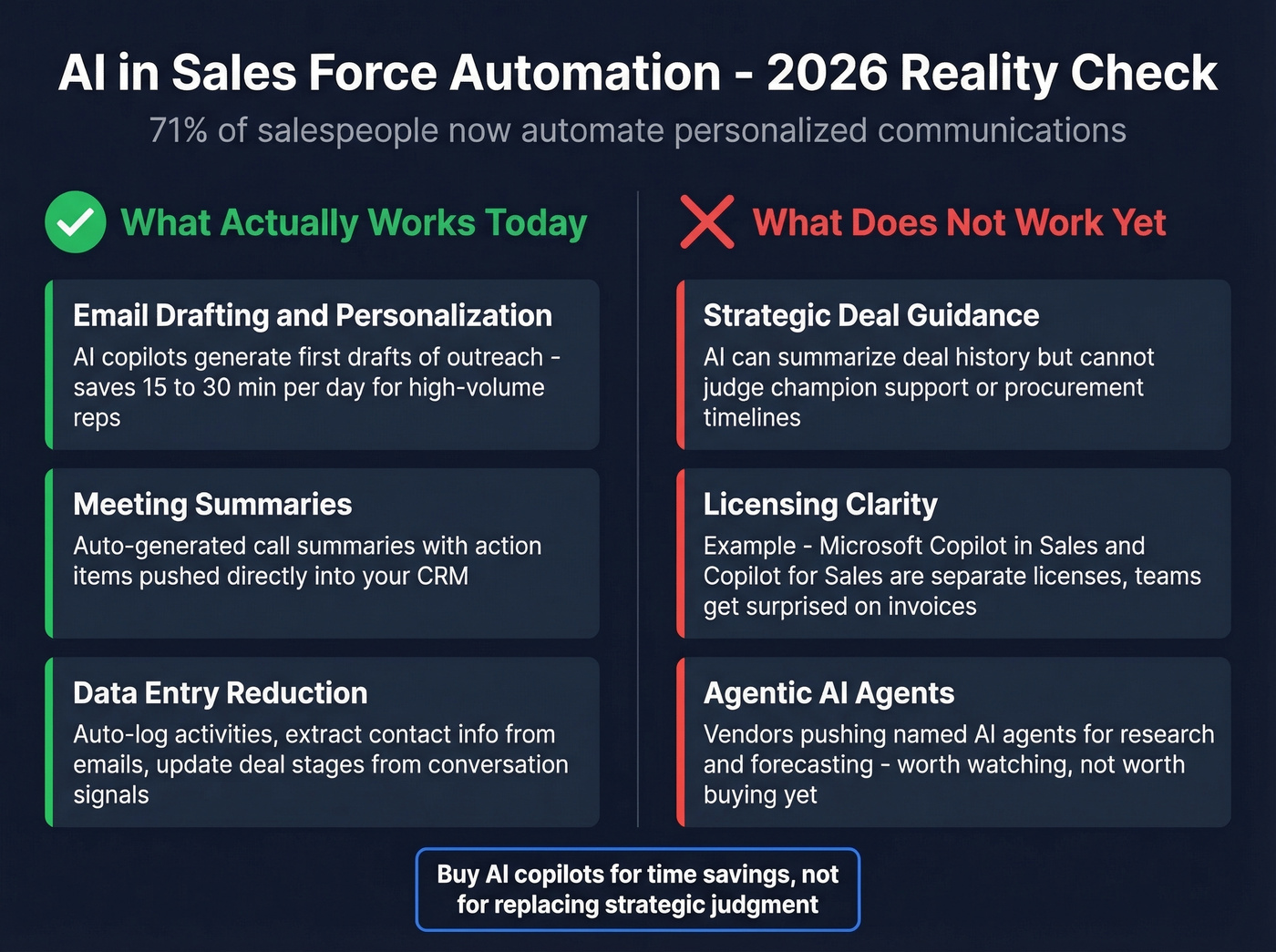
What actually works today:
- Email drafting and personalization. AI copilots generate first drafts of outreach emails, follow-ups, and proposals that reps then edit. This saves 15-30 minutes per day for high-volume reps.
- Meeting summaries. Auto-generated call summaries with action items, pushed into the CRM. Genuinely useful - when the recording consent policies don't make it awkward.
- Data entry reduction. AI that auto-logs activities, extracts contact info from emails, and updates deal stages based on conversation signals.
What doesn't work yet:
- Strategic deal guidance. AI copilots can summarize a deal's history, but they can't tell you whether the champion is losing internal support or whether the procurement timeline is realistic. That's still human judgment.
- Licensing gotchas are real. Microsoft's Copilot ecosystem is a good example: Copilot in Sales (inside Dynamics 365) and Copilot for Sales (in Outlook/Teams) are separate licenses. Teams assume one covers both and get surprised on the invoice.
- Agentic AI is emerging but unproven. Some vendors - Creatio, Salesforce - are pushing named AI agents for account research, quote generation, and forecasting. Worth watching, not worth buying yet.
Let's be honest: AI copilots are useful for email drafting and meeting summaries. They're not yet capable of replacing strategic deal judgment. Buy them for the time savings, not the "AI-powered selling" marketing pitch.
Best SFA Software Compared (2026 Pricing)
Standalone SFA tools run $50-$250/month per user. Full CRM suites with SFA included cost $150-$500+ per user. Free tiers exist but are limited. Here's how the major players stack up.
| Tool | Best For | Starting Price | SFA Strength | Limitation |
|---|---|---|---|---|
| Salesforce | Enterprise orgs | ~EUR 25/mo/user | Deepest customization | Complexity + cost |
| Pipedrive | SMB sales teams | EUR 14/mo/user | Visual pipeline UX | Limited reporting |
| HubSpot Sales Hub | Startups/free start | Free tier | CRM + marketing combo | Paid tiers get pricey |
| Zoho CRM | Budget-conscious | Free (3 users) | Value for features | UI feels dated |
| Dynamics 365 Sales | Microsoft shops | ~EUR 65/mo/user | Office 365 integration | Steep learning curve |
| Freshsales | Small teams | Free tier | Built-in phone/email | Smaller ecosystem |
| Creatio Sales | Process-heavy orgs | ~EUR 25/mo/user | No-code workflows | Less brand recognition |
| NetSuite CRM | ERP-first companies | ~EUR 99+/mo/user | ERP integration | Platform fee on top |

Salesforce Sales Cloud
The 800-pound gorilla. Salesforce Sales Cloud ranges from EUR 25/mo/user (Starter Suite) to EUR 500/mo/user (Einstein 1 Sales), and that's before implementation costs. G2 rating: 4.3/5 stars. Salesforce's own customer survey of 3,706 companies reports a 26% productivity increase post-implementation.
For enterprise teams with complex sales processes, it's still the most customizable SFA platform on the market. The workflow builder, approval routing, and AppExchange ecosystem are unmatched. The tradeoff is complexity - you'll need an admin or a consultant from day one, and a common theme on r/salesforce is teams going too big too fast and ending up with a tool nobody uses properly.
Verdict: Still the best all-in-one platform. But most teams don't need all-in-one.

Pipedrive
Pipedrive is what happens when you build SFA software for salespeople instead of for admins. The visual pipeline is intuitive, setup takes hours instead of weeks, and pricing runs EUR 14-EUR 99/mo per user. It's the obvious pick for teams under 20 reps who want pipeline automation without the overhead of Salesforce.
Skip it if you need complex CPQ, multi-entity reporting, or deep marketing automation - that's not what Pipedrive is built for.
HubSpot Sales Hub
| Pros | Cons |
|---|---|
| Best free tier in the category | Paid tiers escalate fast |
| Seamless marketing-to-sales handoff | Enterprise tier competes on price with Salesforce |
| Intuitive UI, fast onboarding | Customization depth is limited |
| Strong reporting at paid tiers | Sequences locked behind Starter+ |
G2 rating: 4.5/5 stars. The free tier is the best way to learn what SFA features you actually need before committing budget. Paid tiers run from Starter through Enterprise and can reach ~$150+/mo/user depending on plan and seats. If you're already on HubSpot Marketing Hub, this is the natural choice. If you're not, compare carefully against Pipedrive before paying for Enterprise.
Zoho CRM
Use this if you want a full-featured CRM with SFA capabilities for under ~$50-$60/mo per user and you're comfortable with a UI that prioritizes function over polish. The free tier supports three users - genuinely useful for micro-teams. Skip this if you need a large integration ecosystem or if your team has strong UX expectations. Zoho does a lot, but nothing feels premium.
Microsoft Dynamics 365 Sales
If your company runs on Microsoft 365, Dynamics is the path of least resistance. Outlook integration, Teams integration, and SharePoint document management all work natively. Pricing runs ~EUR 65-EUR 135/mo per user. The downside: Dynamics has one of the steepest learning curves in the category, and the Copilot licensing confusion mentioned earlier is a real budget risk.
Freshsales, Creatio & NetSuite CRM
Freshsales bundles a built-in phone dialer and email tool into its SFA, which makes it appealing for small teams that don't want to manage separate tools. Free tier available, paid plans up to ~EUR 59/mo per user. The ecosystem is smaller than Salesforce or HubSpot, so you'll hit integration limits faster as you scale.
Creatio Sales is worth a look if your sales process is highly structured and you want no-code workflow automation - pricing starts around EUR 25/mo per user. NetSuite CRM makes sense only if you're already on NetSuite's ERP; expect ~EUR 99+/mo per user plus a platform fee. Neither is a mainstream pick, but both serve specific niches well.
Implementation: What to Expect
Enterprise SFA deployments typically take 6-12 months and come with a 15-25% productivity dip during transition. SMB implementations on tools like Pipedrive or HubSpot can be done in days to weeks.
What kills most rollouts comes down to four things.
Dirty data is the #1 failure point. If your CRM is full of duplicates, stale contacts, and unverified emails, automating on top of it just scales the mess. Clean your data before you configure workflows - not after. (If you need a shortlist, start with these data enrichment services.)
Insufficient training. Buying Salesforce Enterprise and expecting reps to figure it out is how you end up with a EUR 165/mo/user tool used as a glorified spreadsheet. Budget 10-15% of your implementation cost for training, minimum.
Wrong license tier. Teams routinely over-buy on features they don't need or under-buy and hit walls within months. Start with the tier that covers your current workflow, not the one that covers your "future state" roadmap.
Hidden implementation costs. The license fee is the sticker price. Consultants, data migration, custom integrations, and ongoing admin add 30-100% on top, especially for Salesforce and Dynamics deployments.
Cloud-first deployments are faster to stand up and easier to iterate on. Mobile-first access matters too - if your reps are in the field, make sure the tool has a usable mobile app, not just a responsive web page. Unless you have a specific compliance reason for on-prem, go cloud.
FAQ
Is SFA the same as Salesforce?
No. Salesforce is one vendor - the largest in the category. Sales force automation is a software category that includes Salesforce, Pipedrive, HubSpot, Zoho, and dozens of others. SFA refers to the practice of using automation to support the selling process, not to any single product.
Do small teams need SFA?
Teams under 10 reps rarely need a full platform. A pipeline tracker like Pipedrive (EUR 14/mo), clean contact data from a provider like Prospeo (free tier with 75 verified emails/mo), and an email sequencer cover 80% of what enterprise SFA does at a fraction of the cost.
How much does SFA software cost?
Standalone tools run $50-$250/month per user. Full CRM suites with SFA cost $150-$500+/month per user. Free tiers exist from HubSpot, Zoho, and Freshsales but limit automation depth. Budget an extra 30-100% for implementation on enterprise platforms.
What's the typical ROI timeline?
Expect 6-12 months for enterprise deployments to pay back. SMBs using lighter tools see time savings within weeks. Industry survey data suggests 5-10 hours saved per rep per week once fully adopted.
What's the biggest implementation mistake?
Dirty data. If your contact records are stale, duplicated, or unverified, every automation you build amplifies the problem. Clean and verify your database first, then configure workflows.