

Sales Presentations That Actually Close Deals: A Data-Backed Guide
Reps spend roughly 30% of their time actually selling. The rest disappears into admin, internal meetings, and building sales presentations that nobody finishes reading. Quota attainment sits at 43.5%. Win rates are down 18% versus 2022. B2B SaaS teams close roughly 37% of SQLs, which means you don't have many extra shots to waste on a deck that doesn't land.
So what is a sales presentation, exactly? It's a structured, visual asset used mid-to-late funnel to align stakeholders and drive a decision. A sales pitch is the tighter, mostly verbal version you use early on to earn the next step. Treat those as the same thing and your deals stall.
The Short Version
Front-load value in your first 3 slides. 82% of viewers who get past slide 3 finish the entire deck. Bury your hook on slide 6 and you've already lost the room.
Personalize every deck. Personalized presentations drive 68% more full reads. Generic decks get skimmed and forgotten.
Use a proven framework and stop building from scratch. Raskin's 5-step narrative for enterprise, the 7-slide buyer-journey for SMB. Pick one, adapt it, move on.
Here's the thing: if your deck needs 30+ slides to "explain" your product, the product isn't the problem - your positioning is.
What 1.3 Million Sessions Tell Us About Sales Decks
Storydoc analyzed 1.3M+ business-presentation sessions, and the findings should change how you build every deck going forward.
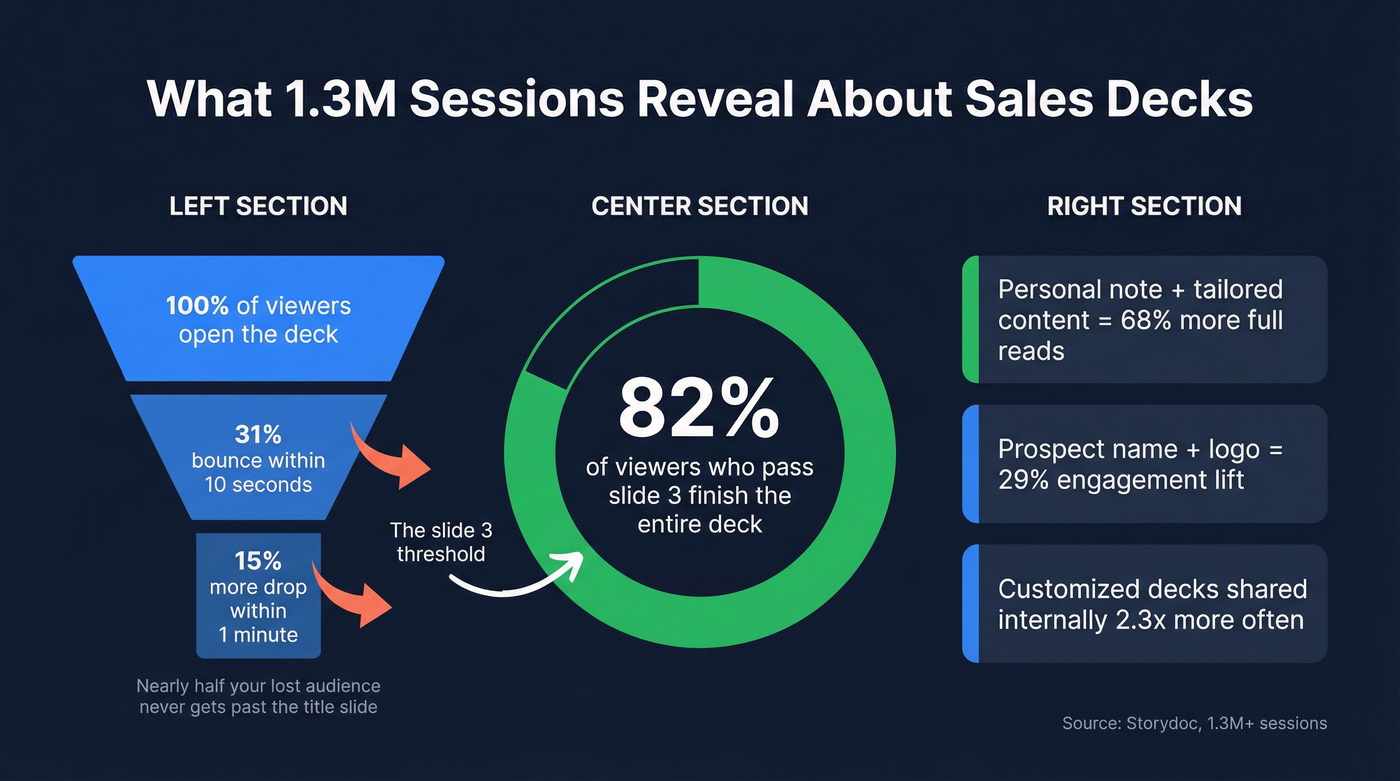
The bounce problem is brutal. Of viewers who disengage, 31% bounce within the first 10 seconds. Another 15% drop within the first minute. That means nearly half of your lost audience never made it past your title slide and company overview - they're gone before you've said anything meaningful. If your first three slides are a logo, a mission statement, and an agenda, you're bleeding attention before you've earned it.
But the flip side is encouraging: 82% of viewers who make it past slide 3 finish the entire deck. Your opening isn't "setup." It's the whole fight.
Personalization is the biggest lever. Decks with a personal note tailored to the recipient get 68% more full reads and 41% more reading time. Including the prospect's company name, logo, and a direct message lifts engagement by 29%. Tailoring a few slides to their specific business adds another 33%. Combine both and you get a 47% engagement lift - and customized decks get shared internally 2.3x more often.
One more reality check: 32% of decks are opened on mobile. Your deck has to sell when you're not in the room. If it can't persuade behind closed doors on a phone screen, it's not a sales asset. It's a file attachment.
Types of Decks and When to Use Each
Not every deck serves the same purpose. Duarte's taxonomy is the clearest framework for matching deck type to selling moment:
- First call deck - lightweight, problem-focused. Your goal is a second meeting, not a close.
- Product demo deck - feature-forward, but only after you've established the problem. Wrap the demo in context, not a feature tour.
- Executive briefing - strategic, concise, ROI-heavy. C-suite doesn't want 40 slides. They want three numbers and a decision framework.
- Problem-solution deck - the workhorse for mid-funnel deals. Name the pain, quantify it, show your fix.
- Investor presentation - different audience, different stakes. Market size, traction, team, ask.
The mistake most reps make is using the same deck for all five scenarios. Sending a 40-slide product demo to a CFO who asked for a 10-minute ROI overview is how deals quietly die.
Two Proven Frameworks
Raskin's 5-Step Strategic Narrative
Andy Raskin reverse-engineered the Zuora sales deck and distilled it into five elements that work for any complex enterprise deal:
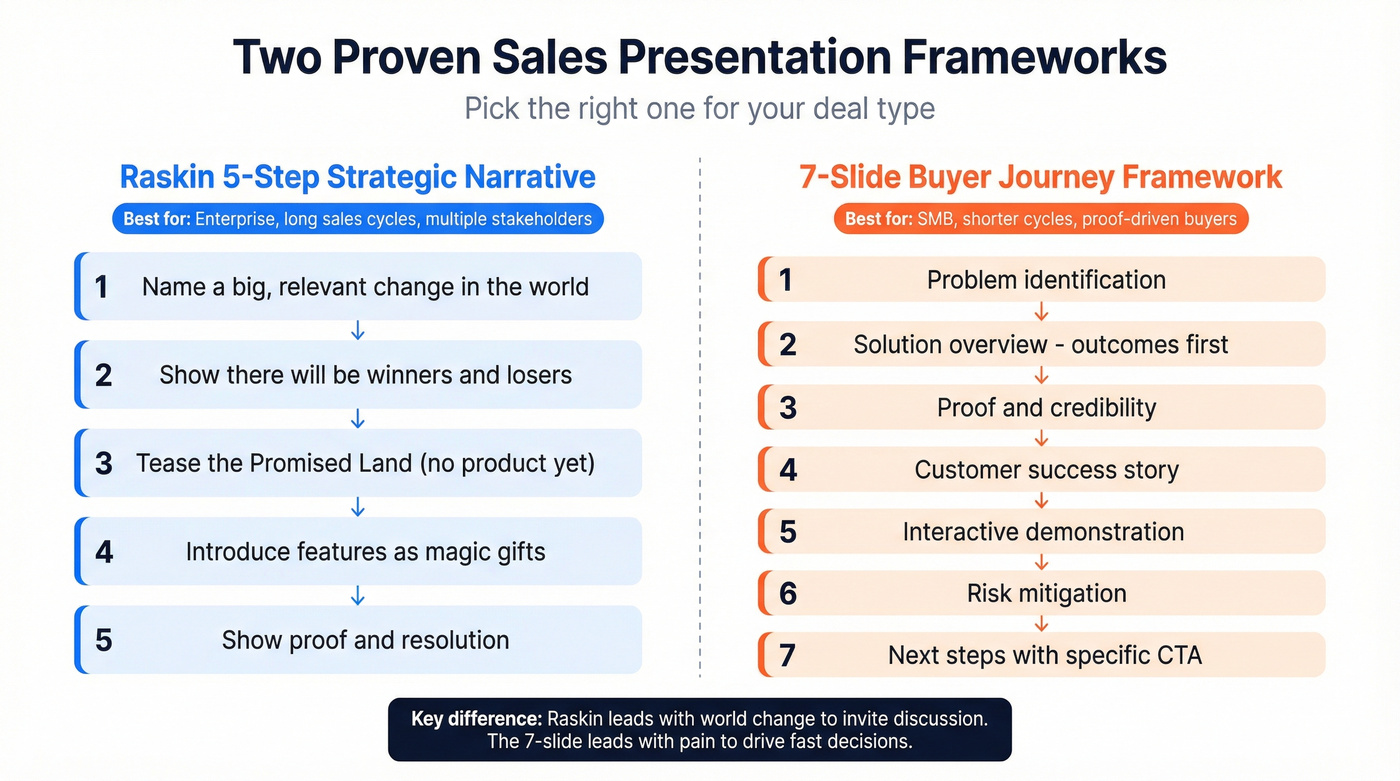
- Name a big, relevant change in the world. Don't start with your company or product. Start with a shift your prospect already feels - regulatory changes, buyer behavior shifts, market consolidation.
- Show there'll be winners and losers. The status quo isn't safe. Companies that adapt win; those that don't fall behind.
- Tease the Promised Land. Describe the future state your prospect can reach - without mentioning your product yet.
- Introduce features as "magic gifts." Bring in your product as the tools that remove specific obstacles on the path to the Promised Land.
- Show proof and resolution. Case studies, data, testimonials - evidence that others reached the Promised Land using your approach.
Most reps instinctively start with "the problem." Raskin's key insight is that leading with a problem puts prospects on the defensive. Leading with a world change invites discussion.
The 7-Slide Buyer-Journey Framework
For transactional or SMB deals where you don't need a 20-minute narrative arc, the 7-slide framework from Salesgenie maps directly to the buyer's decision process:
- Problem identification - prove you understand their pain
- Solution overview - outcomes first, features second
- Proof and credibility - data, third-party validation, testimonials
- Customer success story - measurable results from a similar company
- Interactive demonstration - scenarios relevant to the prospect
- Risk mitigation - handle objections before they're raised
- Next steps - specific CTA with timelines and mutual commitments
Use Raskin for enterprise deals with multiple stakeholders and long sales cycles. Use the 7-slide framework for shorter cycles where the buyer needs proof fast and a clear path to "yes."
Hero's Journey: When You Need a Champion
If your deal depends on one internal champion driving consensus, borrow the hero's journey structure: the buyer is the hero, the old way is the villain, and your product is the tool that helps them win. Audiences retain 63% of a story versus 5% of statistics - so when you need your champion to retell your narrative accurately in rooms you'll never enter, story structure isn't optional.
Map Your Deck to Discovery
Your deck should mirror your qualification framework. If you're running MEDDIC, your Metrics findings become the ROI slide, Identified Pain maps to the problem slide, and Decision Criteria drive your comparison slide. Running SPICED? Pain and Impact feed the "why change" narrative, while Competition and Decision Criteria shape "why us."
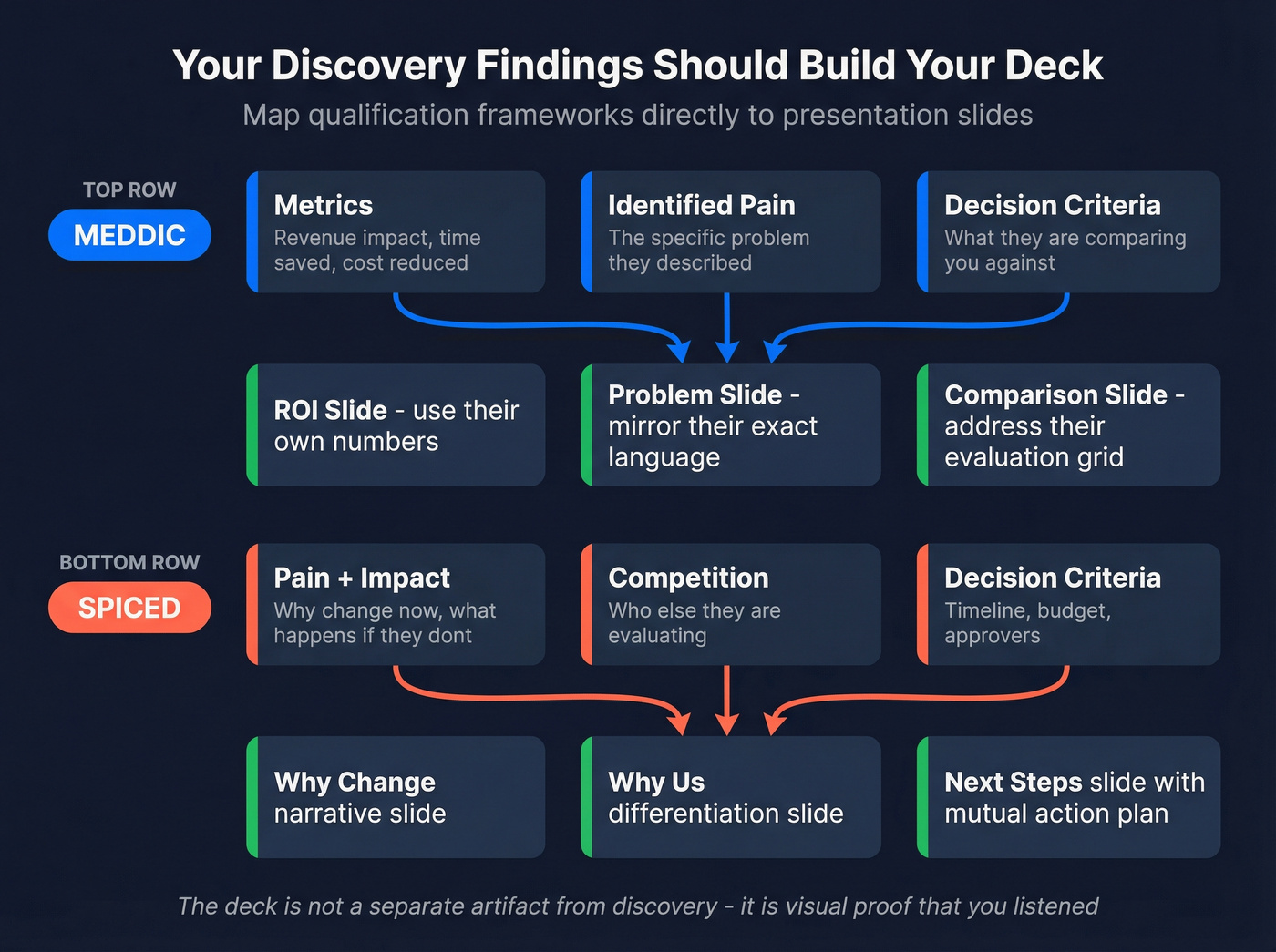
The deck isn't a separate artifact from discovery - it's the visual proof that you listened.

Personalized decks get 68% more full reads - but personalization requires real data. Prospeo gives you 50+ data points per contact, from job title to tech stack to buyer intent signals, so every slide speaks directly to your prospect's world.
Stop guessing what matters to your buyer. Know it before slide one.
Personalization at Scale
The Storydoc data makes this non-negotiable: combining name/logo personalization with tailored content slides produces a 47% engagement lift. But most teams treat personalization as "swap the logo on slide 1 and call it done." That's the 29% version.
The real gains come from tailoring two or three slides to the prospect's business - their industry constraints, their tech stack, their growth stage, and the internal politics you uncovered in discovery. You're not trying to impress them with effort. You're trying to make the deck feel like it was built for their decision.
The practical way to do this is modular decks. Build a core narrative with 4-5 fixed slides (world change, Promised Land, proof), then create swappable modules: an ROI slide for finance, a technical architecture slide for engineering, an implementation timeline for ops, a security slide for IT.
Modular personalization only works if your underlying data is current. We've watched teams ship tailored decks that used the wrong job title, referenced a tool the prospect ripped out months ago, or congratulated them on funding they didn't raise. That doesn't feel "personal." It feels careless. Prospeo's 7-day data refresh cycle and 98% email accuracy keep personalization grounded in reality, so you're building on current information and sending the deck to the right person in the first place.

Delivery: Live, Virtual, and Async
Live Presentations
Hook early. Duarte's guidance is simple: open with a story, a question, or a surprising fact - never with your company history. Speak, don't read. If you're reading bullet points off the screen, you've turned yourself into a narrator and the audience has already tuned out.
Body language matters more than most reps admit. Stand up (yes, even on video). Slow down. Pause after your strongest claims and let the buyer react.
Virtual Presentations
Virtual selling punishes clutter. Use larger fonts, high contrast, and minimal text per slide because your buyer is often on a laptop - or a phone. Design for attention, not completeness.
Build in interaction every few slides: "Does this match what you're seeing?", a quick poll, or a choice between two paths. That tiny moment of control keeps people engaged when their inbox is one tab away.
Async and Video Decks
Async selling keeps deals moving when calendars don't. Build decks that work without you: short speaker notes, embedded video walkthroughs, and clear navigation. Atlassian's approach with Loom is a solid model - record a short walkthrough layered on top of the deck, then send it to the champion to share internally.
Let's be honest: the consensus on r/sales is that most decks shouldn't exist at all. We disagree - but only if they're built to travel. If your deck can't be forwarded to procurement, legal, and a skeptical VP without you narrating, it's not doing its job.
Seven Mistakes That Kill Your Deal
1. Leading with features instead of a world change. Your product isn't the story. The shift in your prospect's world is the story. Your product is the resolution.
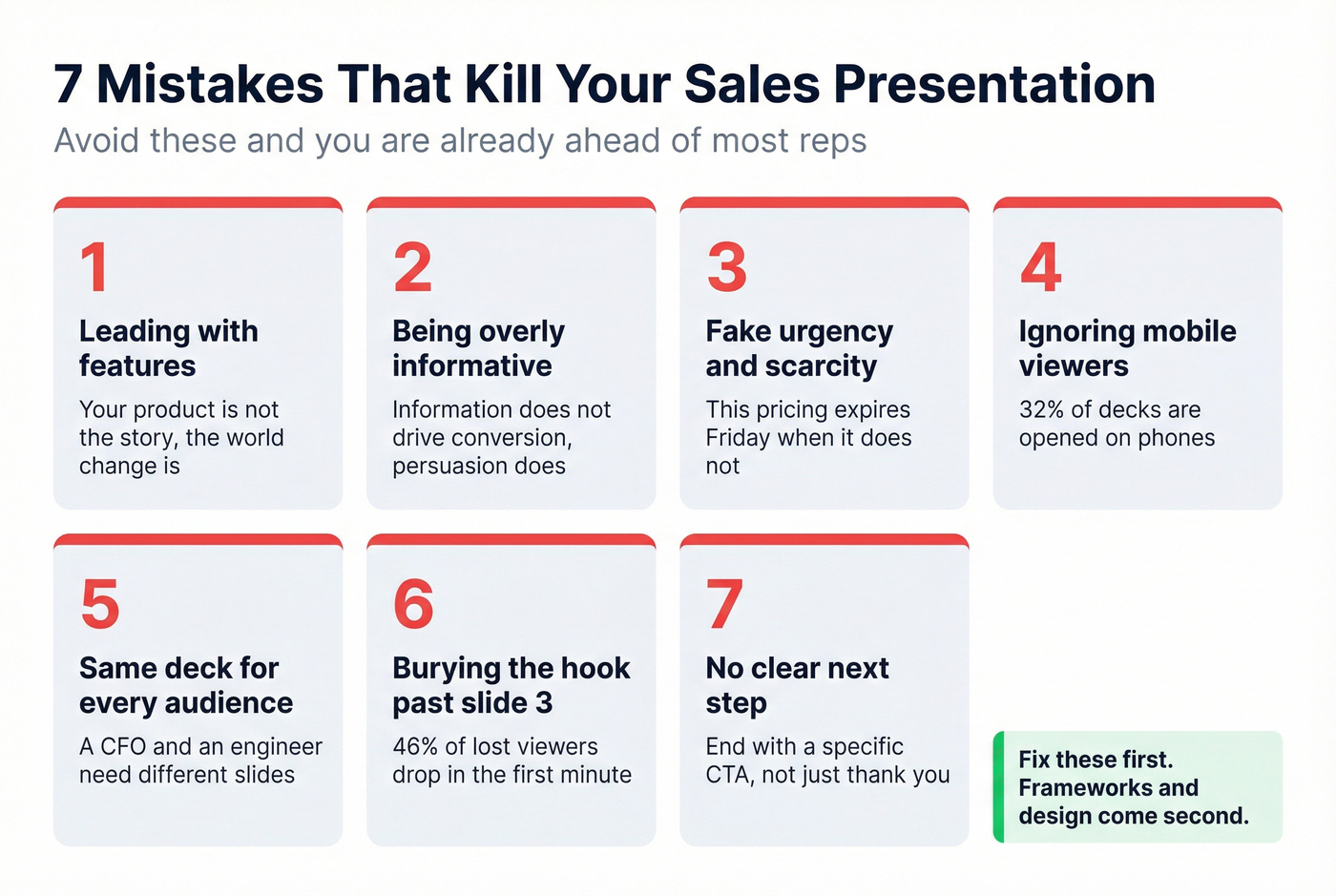
2. Being overly informative. A study of 5,000+ professionals found that being overly informative was one of the highest-ranked self-identified mistakes. Information doesn't drive conversion. Persuasion does.
3. Using fake urgency and scarcity. "This pricing expires Friday" when it doesn't. Bryan Vasquez, Head of Sales at LinkBuilder.io, drove a 20% win-rate lift over two quarters by replacing urgency-based CTAs with data-backed proposals and tailored value maps. Manipulation backfires. Trust compounds.
4. Concluding instead of closing. Many presenters wrap up but never ask. A conclusion summarizes; a close proposes a specific next step - a pilot date, a technical review, a contract timeline. (If you need a tighter close, steal a few from the Ben Franklin close.)
5. Rushing to pitch before discovery is complete. One example from HubSpot's research: a rep sent a full deck two minutes into a call, before the buyer finished explaining their problem. The deal died. Your deck should prove you listened, not prove you have slides ready. Use a real discovery call script and keep the deck in your back pocket.
6. Ignoring mobile viewers. 32% of your audience opens on mobile. Tiny fonts, dense tables, and unreadable charts don't look "detailed." They look inconsiderate.
7. Presenting to the wrong person with stale data. You built a personalized deck for a leader who changed roles last month. That's how good deals quietly evaporate. This is where data enrichment and a clean CRM matter.
Best AI Tools for Sales Presentations in 2026
AI is now table stakes for deck building. Salesforce research shows 81% of sales teams are investing in AI, and Gartner found reps who partner with AI are 3.7x more likely to meet quota. The practical impact: you can build a solid first draft in 30 minutes instead of burning half a day.
| Tool | Best For | Starting Price | Key Feature |
|---|---|---|---|
| Gamma | Free tier + web-native | ~$8/mo | Agent Mode, analytics |
| Beautiful.ai | Auto-design | $12/mo Pro | Smart templates |
| PlusAI | PPT/Slides users | $10/user/mo | Live Snapshots |
| Canva | Free + brand control | Free / ~$13/mo | Brand kit, templates |
| Pitch | Team collaboration | $25/mo Pro | Real-time collab |
| Slidebean | Budget AI builder | $7/mo Starter | Cheapest paid AI option |
Gamma's Agent Mode is the most interesting right now: you describe what you need conversationally and it builds the deck. It's web-native, has a free tier, and the analytics are perfect for seeing where stakeholders drop off.
For teams that live in PowerPoint or Google Slides, PlusAI is the better fit. Live Snapshots keeps charts current when underlying data changes - a lifesaver for ROI models and QBR-style slides.
Beautiful.ai solves the "my reps can't design" problem with auto-layout that keeps slides clean without manual formatting. Canva remains the most flexible free option for brand consistency across sales and marketing.
Skip Slidebean if you need advanced analytics or team collaboration features - it's bare-bones compared to Gamma or Pitch. But for solo founders on a budget, it gets the job done.
One thing none of these tools fix: bad inputs. AI can format a deck beautifully, but it can't tell you whether the buyer's org chart changed last week or whether you're pitching the wrong use case. That's a data problem, not a design problem. If you're building a repeatable outbound motion, pair this with a tighter sales prospecting system.
Your sales presentation closes deals when it proves you listened during discovery. Prospeo's 30+ search filters - intent data, headcount growth, funding, technographics - arm you with the context that turns generic decks into personalized deal-winners.
Build the ROI slide with real numbers. 300M+ profiles at $0.01 per lead.
FAQ
How long should a sales presentation be?
Aim for 7-12 slides and 15-20 minutes live. The data shows 82% of viewers who pass slide 3 finish the entire deck, so front-load value and cut anything that doesn't advance the deal. Shorter decks also get shared internally more often.
What's the best structure for a sales deck?
For enterprise, use Raskin's 5-step narrative: world change, winners/losers, Promised Land, "magic gifts," proof. For SMB or transactional deals, use the 7-slide buyer journey from problem identification through next steps. Match the framework to your sales cycle length.
Should I still use PowerPoint?
PowerPoint works fine - structure matters more than software. For speed, layer on AI tools like PlusAI or build web-native decks in Gamma and export when needed. The tool doesn't close the deal; the narrative does.
How do I personalize decks without rebuilding every time?
Build a modular core deck with 4-5 fixed slides, then swap 2-3 slides by persona: ROI for finance, architecture for engineering, implementation for ops. Pull current contact and company details before customizing so you're not working from stale information.
What's the biggest mistake reps make in sales presentations?
Concluding instead of closing. End every deck with a specific next step - a pilot start date, a technical review, or a mutual action plan with deadlines. If you don't ask, the buyer defaults to "we'll think about it," and momentum dies.