

The 8 Best Sales Workflow Software Tools for 2026
Sales reps spend 64% of their time on admin tasks - logging calls, updating CRMs, routing leads, chasing approvals. Teams that automate these workflows close deals 23% faster and save 2-3 hours per rep per day. The right sales workflow software eliminates that drag. G2's 2026 Best Sales Software list saw 60% turnover from 2025, with 30 new entrants - the tools winning today aren't the same ones that won last year.
Here are the eight worth your attention right now.
What Sales Workflow Software Actually Does
Sales automation handles individual tasks - sending a follow-up, logging a call. Workflow software orchestrates multi-step processes across systems: when a lead hits a scoring threshold, route it to the right rep, enrich the contact, trigger a sequence, notify Slack, and update the CRM - all without a human touching it. That's the difference between task automation and revenue operations.
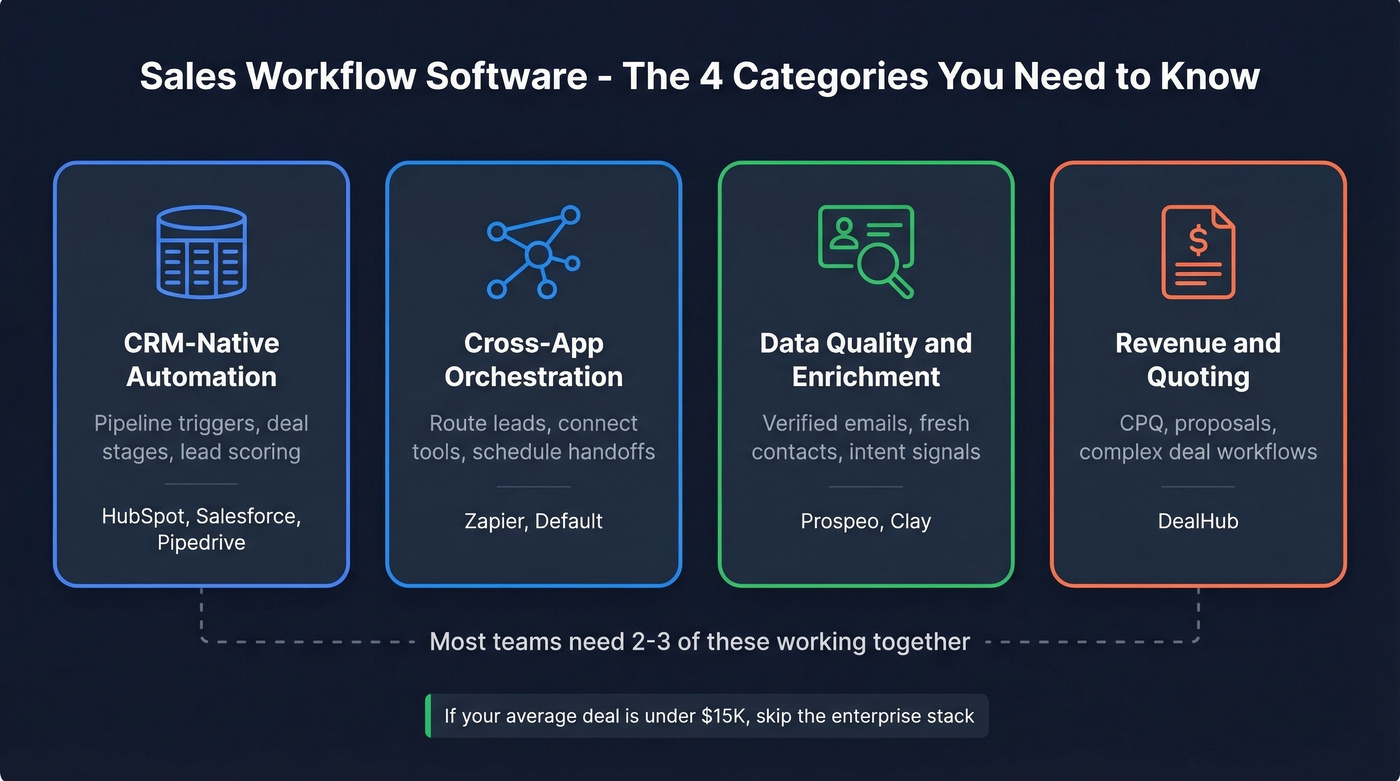
The category spans CRM-native automation (HubSpot, Salesforce), cross-app orchestration (Zapier, Default), data quality layers, and specialized revenue tools (DealHub). Most teams need two or three of these working together. If your average deal size is under $15k, you almost certainly don't need an enterprise stack - a lightweight CRM, a data layer, and an orchestration tool will outperform a bloated all-in-one every time.
Quick Comparison
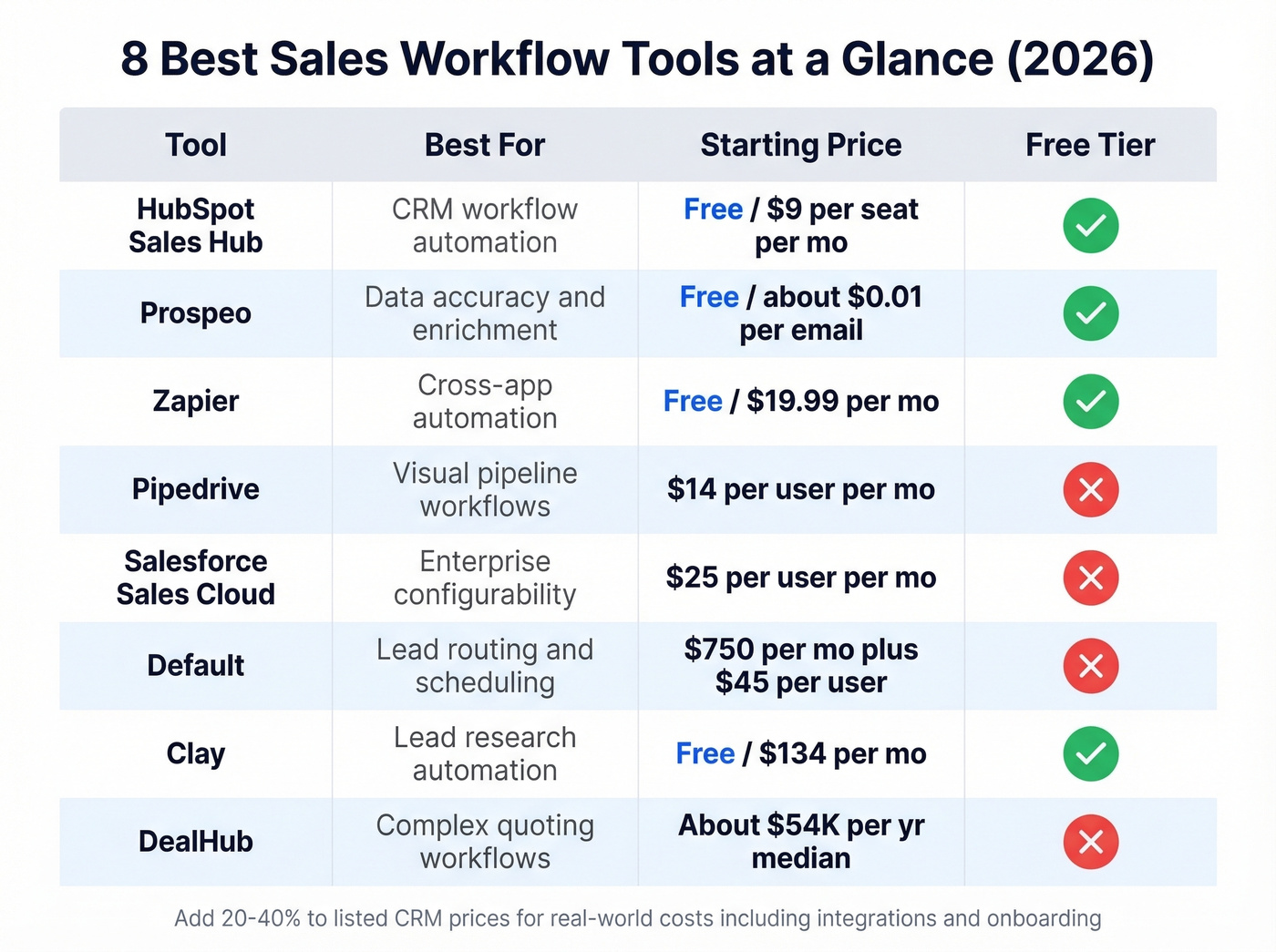
| Tool | Best For | Starting Price | Free Tier |
|---|---|---|---|
| HubSpot Sales Hub | CRM workflow automation | Free / $9/seat/mo | Yes |
| Prospeo | Data accuracy & enrichment | Free / ~$0.01/email | Yes |
| Zapier | Cross-app automation | Free / $19.99/mo | Yes |
| Pipedrive | Visual pipeline workflows | $14/user/mo | No |
| Salesforce Sales Cloud | Enterprise configurability | $25/user/mo | No |
| Default | Lead routing & scheduling | $750/mo + $45/user | No |
| Clay | Lead research automation | Free / $134/mo | Yes |
| DealHub | Complex quoting workflows | ~$54K/yr median | No |
The 8 Best Tools, Reviewed
HubSpot Sales Hub
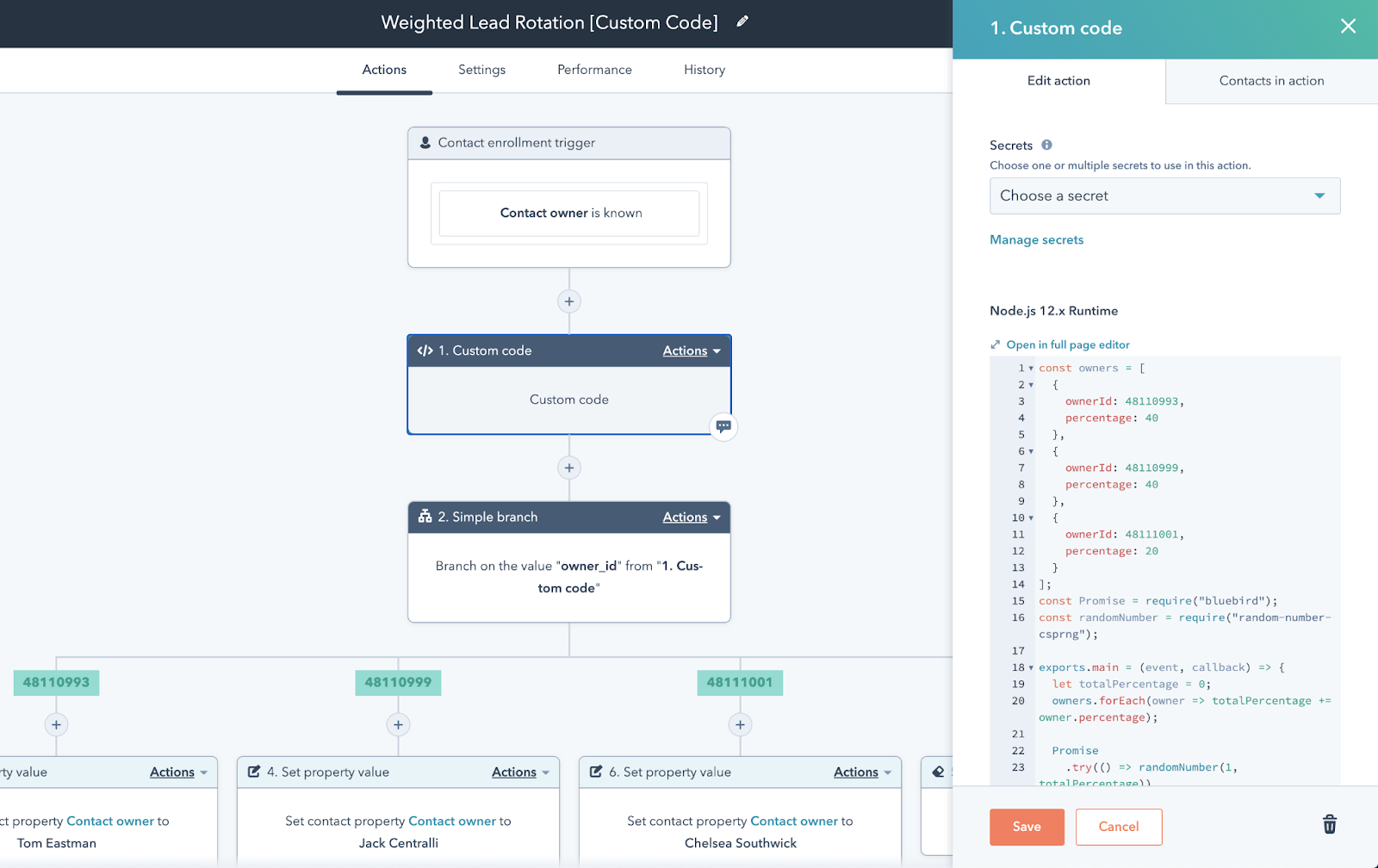
Use this if you want CRM and workflow automation in one platform. The free CRM covers core sales basics like pipeline management and contact tracking. Starter at $9/seat/mo unlocks simple automation. Professional at $90/seat/mo (plus a $1,500 onboarding fee) is where the real workflow builder lives - custom sequences, lead rotation, deal-stage triggers, and conditional branching that actually handles complex sales processes.
Skip this if you need advanced automation on a tight budget. HubSpot's best workflow features sit behind the Professional tier, and that jump from $9 to $90/seat is steep. The 1,400+ marketplace integrations are a real strength, but we've seen teams buy Professional just for one automation feature they could've built in Zapier for $20/mo. Do the math before you upgrade.
Prospeo
Use this if you care about the data flowing through your workflows. Every tool on this list routes, sequences, or enriches contacts - but if those contacts have bad emails or outdated job titles, the workflow executes perfectly and produces nothing. We've watched teams spend weeks building beautiful automations only to realize their contact data was garbage.
Prospeo's database covers 300M+ professional profiles with 98% email accuracy and a 7-day refresh cycle, while the industry average sits at six weeks. A stale contact list doesn't just bounce; it tanks your domain reputation and poisons every downstream workflow. The 125M+ verified mobile numbers carry a 30% pickup rate. The free tier gives you 75 emails/mo to test, and paid plans run about $0.01/email with native integrations into Salesforce, HubSpot, Clay, and Zapier. For teams running enrichment as a workflow step, the 92% API match rate means records rarely fall through the cracks.

Zapier
Zapier's 8,000+ integrations make it the connective tissue of most sales stacks. New lead in Typeform, enrich the contact, create a deal in Pipedrive, notify the team in Slack. Done. The free tier handles 100 tasks/mo, paid plans start at $19.99/mo for 750 tasks and $49/mo for 2,000.
Here's the thing: Zapier is the glue, not the brain. For anything beyond linear "if this, then that" workflows, you'll hit limits fast - and per-task pricing can surprise you at scale. It pairs beautifully with a CRM but doesn't replace one.

Pipedrive
Pipedrive is the CRM that reps actually like using. The visual pipeline - drag deals between stages, see everything at a glance - is a big reason it's popular with smaller sales teams. Pricing runs $14-$99/user/mo across five tiers, with the LeadBooster add-on at $32.50/mo for chatbots and web forms.
Where it falls short is marketing depth and deal velocity analytics. It's a sales tool, not a full GTM platform. If that's all you need, it's great.
Salesforce Sales Cloud
The most powerful CRM on the market, and the most expensive to actually run. List prices range from $25 to $350/user/mo, but real-world year-one costs for a 10-user implementation hit $37K+ once you factor in consultants, training, and add-ons. Salesforce holds roughly 23.8% of the global CRM market and its 7,000+ AppExchange apps mean you can build almost anything.
The tradeoff is admin overhead - you'll need a dedicated Salesforce admin or a consultant on retainer. This is the right choice for complex RevOps orgs with the budget and headcount to support it. For a 5-person sales team? Overkill.
Default
One of the few RevOps workflow tools with transparent pricing, and that alone earns it a spot here. The Startup plan runs $750/mo + $45/user (billed annually) and includes 1 workflow and 10K credits/year. Growth adds 10 workflows, premium enrichment, and more credits with custom platform pricing. The Web Intent add-on at $400/mo layers website visitor identification into your workflows.
Default's standout is workflow observability: you can trace what happened to a lead across steps, so routing, scheduling, enrichment, and handoffs don't turn into a black box. The consensus on r/sales and RevOps communities is that this visibility alone justifies the price for mid-market teams tired of debugging invisible lead leaks.
Clay
Think of Clay as the research brain that automates the enrichment steps eating hours of SDR time. Free tier available, Starter at $134/mo. It pulls from dozens of data sources to build rich lead profiles, but it's a research engine, not a CRM - pair it with a pipeline tool for deal management and a verification layer for email accuracy.
If you want to go deeper on list building, see our Clay list building breakdown.
DealHub
Enterprise quote-to-revenue platform. Median annual contract runs $54,520/yr based on observed purchases, with a range of $14K-$156K/yr. Common friction themes include navigating large proposals, managing multiple integrations, and the sheer amount of configuration required. If you're not running multi-tier pricing with complex product bundles, you don't need it. Full stop.

Every workflow tool on this list routes, sequences, and enriches contacts - but bad data breaks the entire chain. Prospeo's 7-day refresh cycle and 98% email accuracy mean your automations actually connect with real buyers, not dead inboxes.
Stop building perfect workflows on top of garbage data.
Pricing Reality Check
Budget rule of thumb: add 20-40% to any listed CRM price for integrations, onboarding, and add-ons. That hidden cost uplift catches almost every team we've talked to.
| Tool | Free Tier | Starter Price | Mid-Tier Price |
|---|---|---|---|
| HubSpot | Yes | $9/seat/mo | $90/seat/mo |
| Prospeo | Yes (75 emails) | ~$0.01/email | $39-$159/mo |
| Zapier | Yes (100 tasks) | $19.99/mo | $49/mo |
| Pipedrive | No | $14/user/mo | $49/user/mo |
| Salesforce | No | $25/user/mo | $165/user/mo |
| Default | No | $750/mo + $45/user | ~$1,500/mo + $45/user |
| Clay | Yes | $134/mo | $314/mo |
| DealHub | No | ~$14K/yr | ~$55K/yr median |

Workflow Mistakes That Kill Your Pipeline
Building only for the happy path. Your workflow handles perfect leads but silently fails on bounced emails and stale job titles. Without fallback logic and fresh data, records break and nobody notices until pipeline reviews.
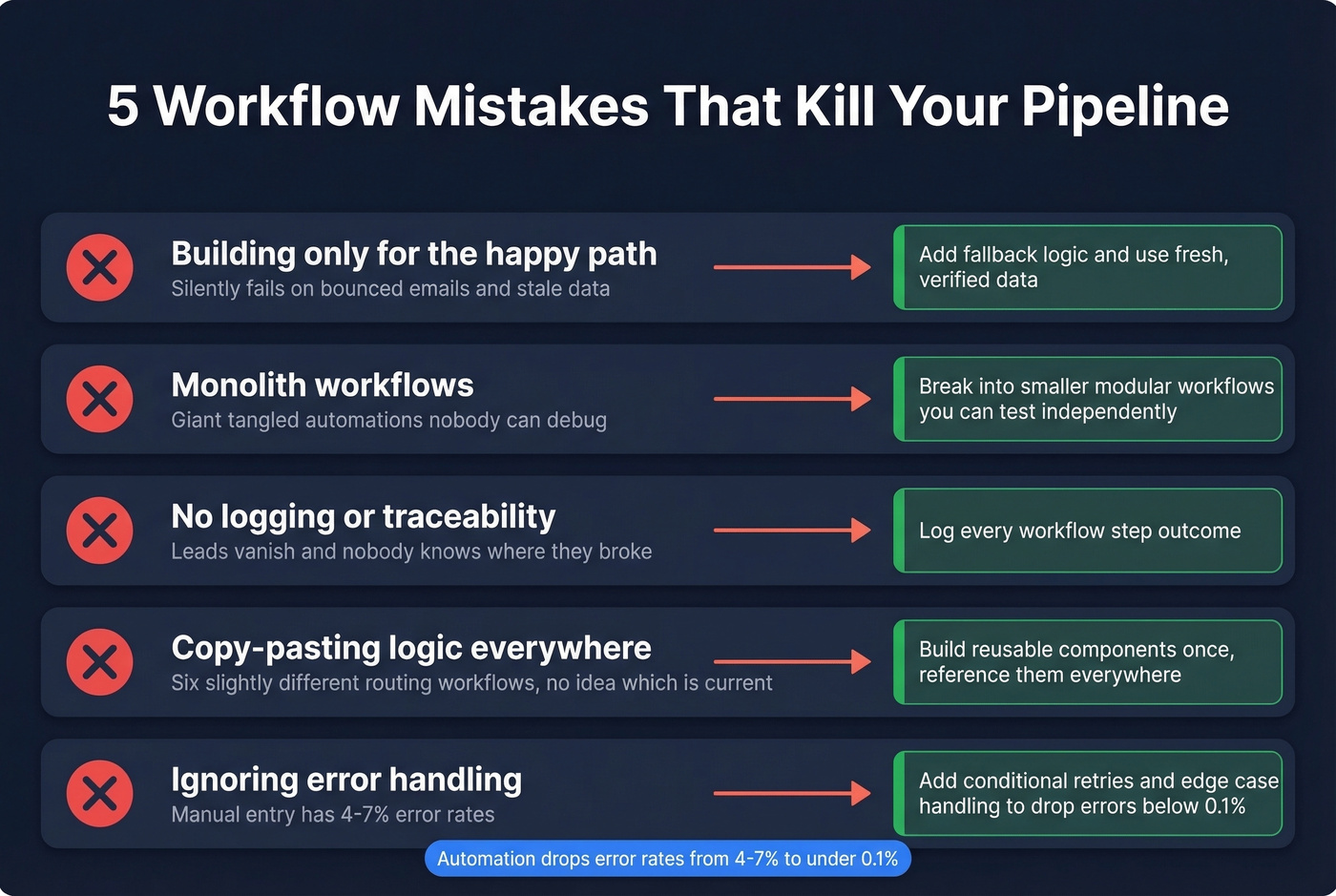
Monolith workflows. Giant, tangled automations are hard to debug. Break complex processes into smaller, modular workflows you can test independently. We learned this the hard way after spending two days tracing a single broken Zap through a 14-step sequence.
No logging or traceability. When a lead disappears between enrichment and CRM creation, you need to know where it broke. Every workflow step should log its outcome.
Copy-pasting logic instead of building reusable components. You end up with six slightly different lead routing workflows and no idea which one is current. Sound familiar?
Ignoring error handling. No-code is great until you need a conditional retry or custom error logic. Manual data entry carries 4-7% error rates that automation drops to under 0.1% - but only if the automation handles edge cases properly. If deliverability is part of your workflow, start with an email deliverability guide and track your email bounce rate as a leading indicator.
Sales workflow software saves reps 2-3 hours a day - unless stale contacts tank your deliverability. Prospeo enriches records with 50+ data points at a 92% API match rate, plugging directly into HubSpot, Salesforce, Clay, and Zapier.
Add the data layer your sales stack is missing for $0.01 per email.
How to Choose the Right Stack
You don't need eight tools. You need two or three that talk to each other.
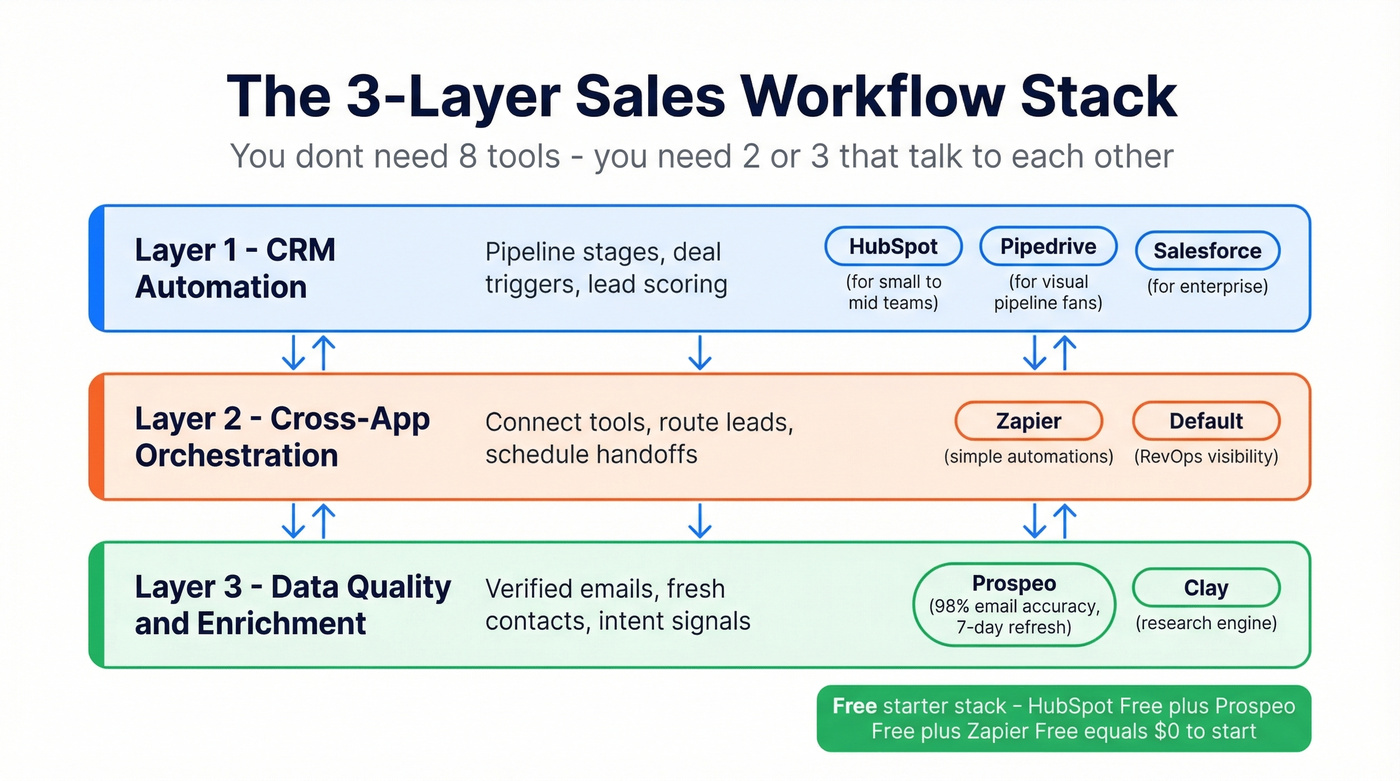
CRM automation for pipeline stages, deal triggers, and lead scoring - that's HubSpot, Salesforce, or Pipedrive depending on your team size and budget. Cross-app orchestration for connecting tools, routing logic, and scheduling - Zapier or Default. Data quality and enrichment for verified emails, fresh contacts, and intent signals - Prospeo or Clay.
Let's be honest: a HubSpot free + Prospeo free + Zapier free stack costs nothing to start and scales cleanly as you grow. That three-layer approach covers the full sales workflow automation loop without locking you into a single vendor or forcing a premature enterprise commitment. If you're building the top of funnel too, pair this with a few free lead generation tools and proven sales prospecting techniques.
FAQ
Is a CRM enough for sales workflow automation?
For basic pipeline automation - deal-stage triggers, task assignment, email templates - yes. But CRMs don't verify contact data or connect natively to every tool in your stack. Most teams add a data quality layer and an orchestration tool to cover the full workflow without manual gaps.
What's the difference between sales automation and workflow software?
Sales automation handles individual tasks: sending a follow-up, logging a call. Workflow software orchestrates multi-step processes across tools - routing leads, triggering sequences, syncing data, and handling exceptions. Think single action vs. end-to-end process.
How much should I budget for sales workflow tools?
A starter stack using free tiers costs $0. A mid-market stack with paid plans runs $500-$2,000/mo. Enterprise CRM implementations start at $37K+ in year one. Always add 20-40% to listed prices for integrations, onboarding, and add-ons you'll inevitably need.