

Sample Sales Presentation: Scripts, Slides & Frameworks You Can Actually Use
You've read a dozen articles that give you a 7-slide outline and call it a day. Great - now you've got seven empty slides and zero idea what to actually say on each one. That's not a sample sales presentation; it's a table of contents.
Here's the thing: 96% of prospects research your company before they take a meeting. 73% of B2B buyers actively avoid sellers who send irrelevant outreach. Your deck isn't competing against other vendors' decks - it's competing against everything the buyer already knows. The presentation that wins tells them something they didn't already find on their own.
What You Need (Quick Version)
The 7-slide structure:
- The Opening - "The reason we're here today..."
- The Cost of the Problem - quantified in dollars or time
- Why This Problem Exists - root cause, not symptoms
- Your Solution - outcomes, not features
- How It Works - three steps max
- Social Proof - one case study with hard numbers
- Next Steps - mutual action plan, not "any questions?"
Which framework fits your situation:
- Most reps, most deals → Problem-Solution-Benefit (the 7-slide structure above)
- Selling a new category or pitching C-suite → Raskin's "Big Shift" narrative
- First discovery call where trust is low → "What We've Heard" practitioner approach
The time rule: 20 minutes of structured content. For a 60-minute meeting, present for 20-30 minutes and leave the rest for discussion. The discussion is where deals actually close.
Scroll down for the full narrated sample with scripts for every slide.
Before You Build a Single Slide
The biggest waste of time in sales isn't a bad deck. It's a good deck shown to the wrong person.
Before you open PowerPoint, answer three questions about your prospect: Do they have a problem they want to fix? Are they willing to change? Do they understand the impact of doing nothing? These come from Pitch.com's buyer qualification framework, and they're the simplest filter we've found. If the answer to any of those is "no," you don't need a better deck - you need a better-qualified meeting.
71% of prospects prefer independent research over talking to a rep. Reps spend roughly 60% of their time on non-selling tasks. The hours you invest customizing a deck need to count.
That means verifying you're presenting to the right stakeholder with current contact data before you commit to a custom build. Upload your prospect list to Prospeo, verify emails, and enrich contact data including job titles - the 98% email accuracy and 7-day data refresh mean you're working with current information, not stale CRM records from six months ago. The best presentation in the world fails if your follow-up bounces or you're pitching a director when the VP is the actual decision-maker.

A Complete 7-Slide Sales Deck (Steal This)
Here's the full 7-slide deck, narrated. Copy the structure, swap in your product, and you've got a presentation that works for most B2B sales conversations. The guiding principle: spend roughly 70% of your time on slides 1-3. That's where urgency gets built. Rush the problem and your solution lands flat.
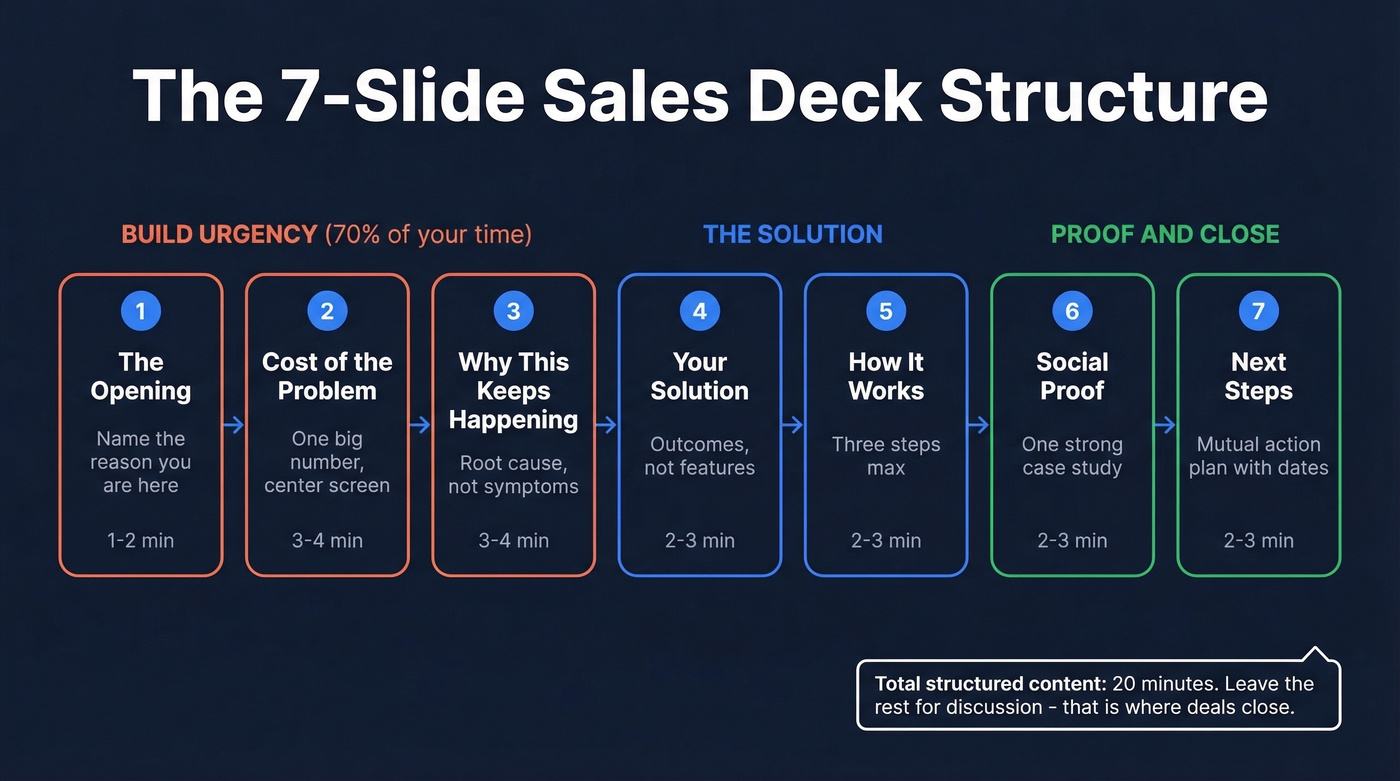
If your average deal size is under $10k, you probably don't need more than these 7 slides. Ever. The teams we've seen overthink their decks are almost always compensating for weak discovery, not weak slides.
Want to copy this into a blank deck right now? Open Google Slides, create 7 slides, and paste these titles in order: (1) "[Prospect] + [You]: Solving [Problem]" → (2) "What [Problem] Is Costing Teams Like Yours" → (3) "Why This Keeps Happening" → (4) "How [Your Company] Fixes This" → (5) "Getting Started Is Simple" → (6) "How [Customer] Got [Result]" → (7) "Suggested Next Steps." Then fill in the talk tracks below.
Slides 1-3: Building Urgency
Slide 1: The Opening - "The reason we're here today..."
Slide title: "[Prospect Company] + [Your Company]: Solving [Specific Problem]"
Talk track: "The reason we're here today is that [specific trigger - a conversation, a pain point they mentioned, a market shift]. I want to spend most of our time understanding whether this is actually costing you what we think it is, and if so, walk through how we've helped companies like yours fix it."
Design: Company logos side by side. One sentence max on the slide. The rest is verbal. Budget 1-2 minutes.
Why "the reason we're here today"? It's adapted from cold-call research showing a 2.1x higher success rate when you name the reason for the conversation upfront. That principle applies to slide one just as much as a phone call - start a conversation, don't deliver a monologue.
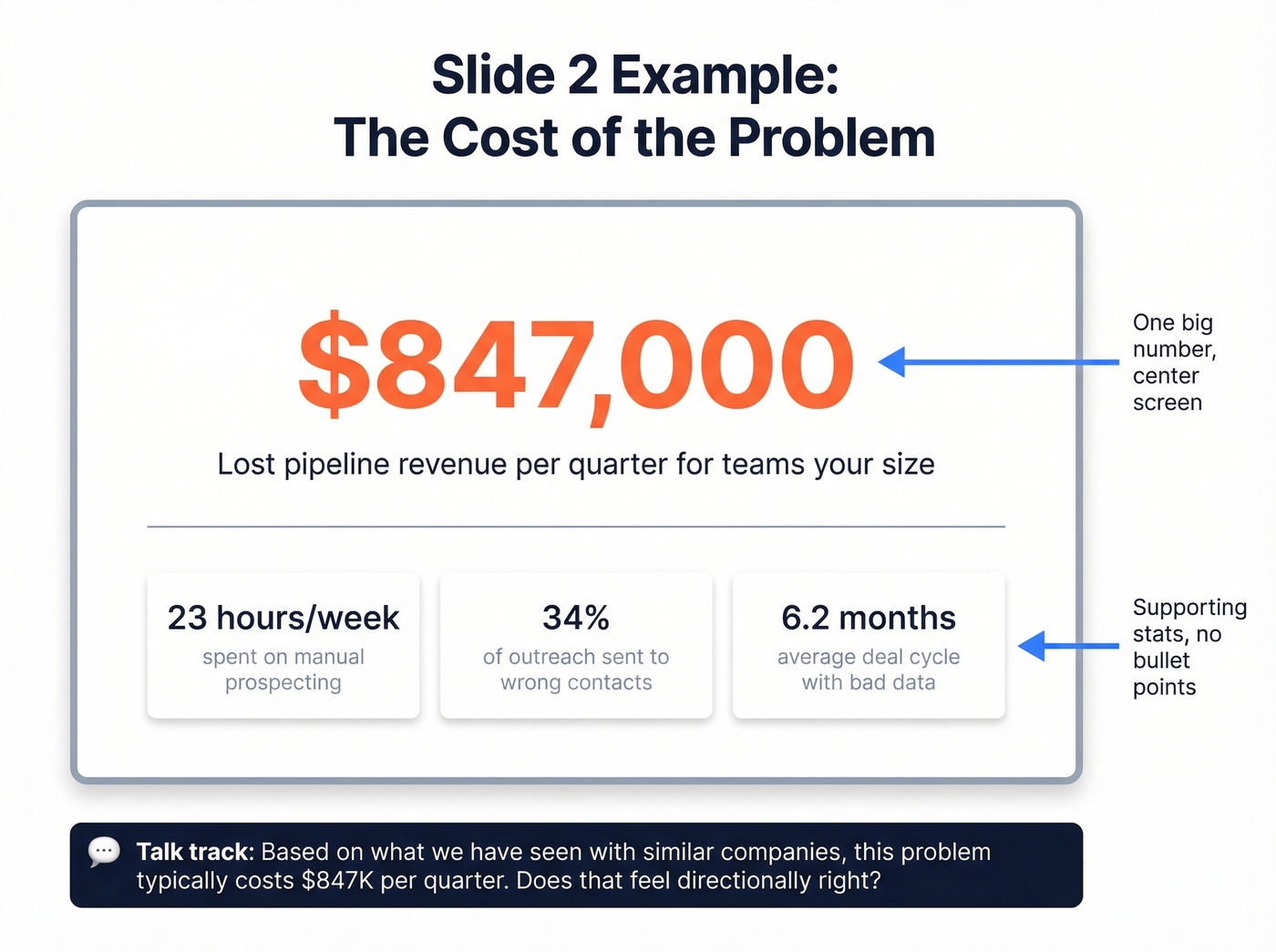
Slide 2: The Cost of the Problem
This is the slide that separates amateurs from closers. Lead with a question, not a lecture.
Ask: "Based on what we've seen with similar companies, [problem] typically costs [dollar amount / hours lost / pipeline leaked] per quarter. For a team your size, that's roughly [specific estimate]. Does that feel directionally right?"
Put one big number center-screen with a supporting stat below it. No bullet points. Budget 3-4 minutes including their response. If they push back on the number, that's valuable intel. If they nod, you've got buy-in to keep going.
Slide 3: Why This Problem Exists
Slide title: "Why This Keeps Happening"
Talk track: "Most teams try to solve this with [common workaround]. The issue isn't effort. It's that [root cause - fragmented data, wrong workflow, misaligned incentives]. That's what creates the gap between what your team does and what actually moves pipeline."
Design: Simple before/after or cause-effect diagram. Two columns max. 3-4 minutes.
This slide earns you the right to show your solution. Skip it, and slide 4 feels like a pitch. Nail it, and slide 4 feels like relief.
Slides 4-5: The Solution
Slide 4: Outcomes, Not Features
Slide title: "How [Your Company] Fixes This"
Talk track: "We help [persona] go from [current painful state] to [desired outcome] by [one-sentence mechanism]. The result is [measurable improvement]."
Three outcome statements, each with an icon. No feature lists. No screenshots yet. 2-3 minutes.
Look, this is the slide most reps overload. They cram in every feature, every integration, every capability. Resist. One idea per slide. If they want the feature deep-dive, that's what the demo is for.
Slide 5: How It Works - Three Steps Max
Talk track: "Step one: [action]. Step two: [action]. Step three: [outcome]. Most teams are up and running in [timeframe]."
Three numbered steps, left to right. Optional small product screenshot below. 2-3 minutes. Not five steps. Not seven. Three. If your product requires more to explain at a high level, you're explaining the wrong layer.
Build these slides as modular components - keep slides 4-5 consistent across prospects, but swap the problem framing, case study, and ROI numbers based on industry and role. A deck that tries to speak to everyone speaks to no one.
Slides 6-7: Proof and Close
Slide 6 is where one strong case study beats five weak ones. Pick the customer closest to your prospect's industry, size, or pain point.
Format: customer logo, one quote (two sentences max), and 2-3 metrics in large font. Example talk track: "[Customer] had the same problem. After implementing [your product], they saw [specific metric: 3x pipeline, 40% faster ramp, bounce rate from 35% to under 4%]." If you've got a video testimonial, embed a thumbnail. 2-3 minutes.
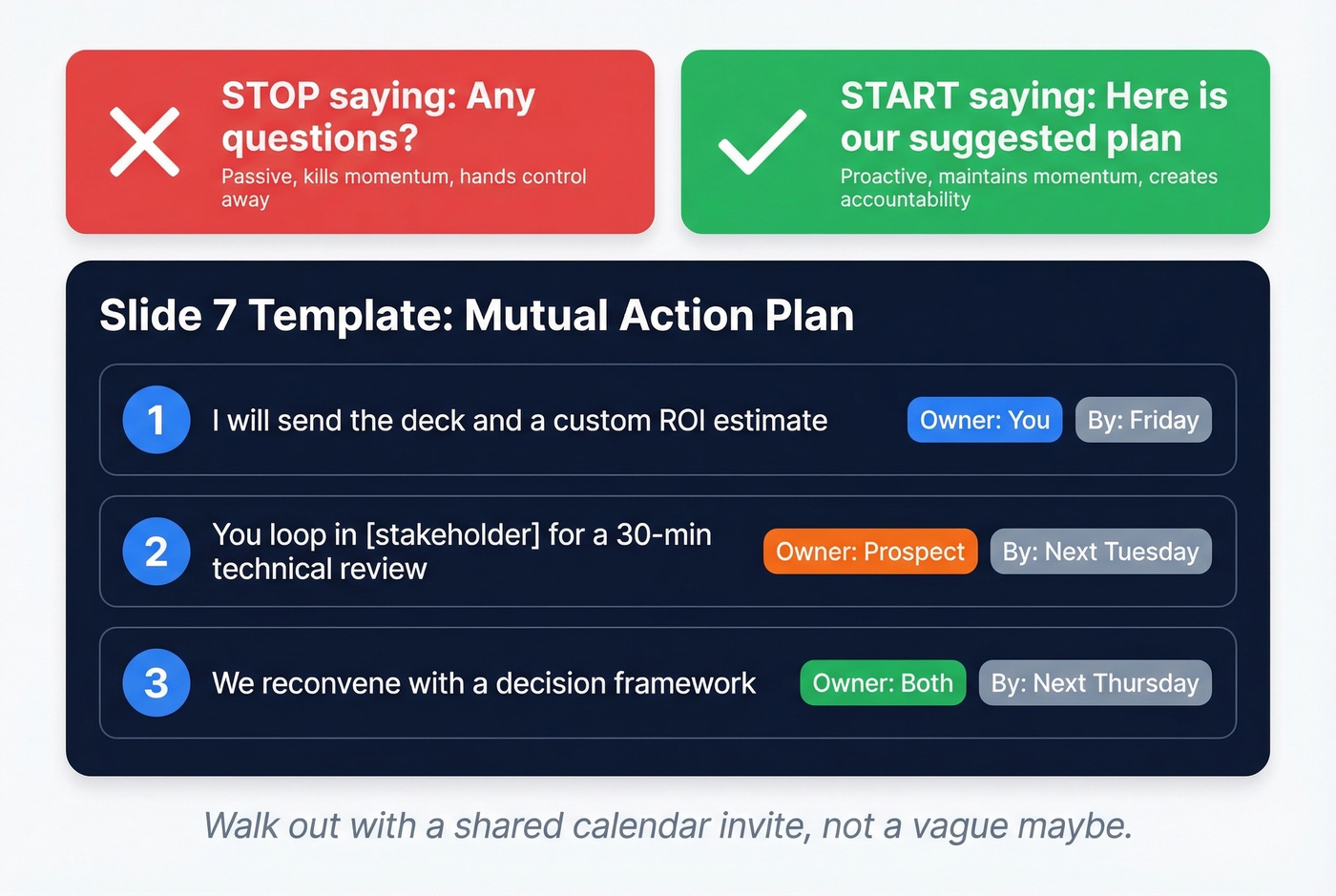
Slide 7 is where most reps fumble.
Never end with "any questions?" It's passive, it kills momentum, and it hands control to whoever wants to derail the conversation. Instead, present a mutual action plan: "I'll send you the deck and a custom ROI estimate by Friday. You loop in [stakeholder] for a 30-minute technical review next week. We reconvene on [date] with a decision framework. Does that timeline work?" Three next steps with owners and dates. Walk out with a shared calendar invite.

The article says it best: the best presentation in the world fails if your follow-up bounces. Prospeo gives you 98% email accuracy with a 7-day data refresh, so every stakeholder you pitch has a verified, current email waiting in your CRM.
Stop perfecting slides and start reaching the right decision-makers.
3 Proven Presentation Frameworks
The 7-slide structure follows the Problem-Solution-Benefit model. It's the most versatile framework, but not the only one. Below are three approaches - each with a different opening move - so you can pick the right one based on your deal stage and audience.
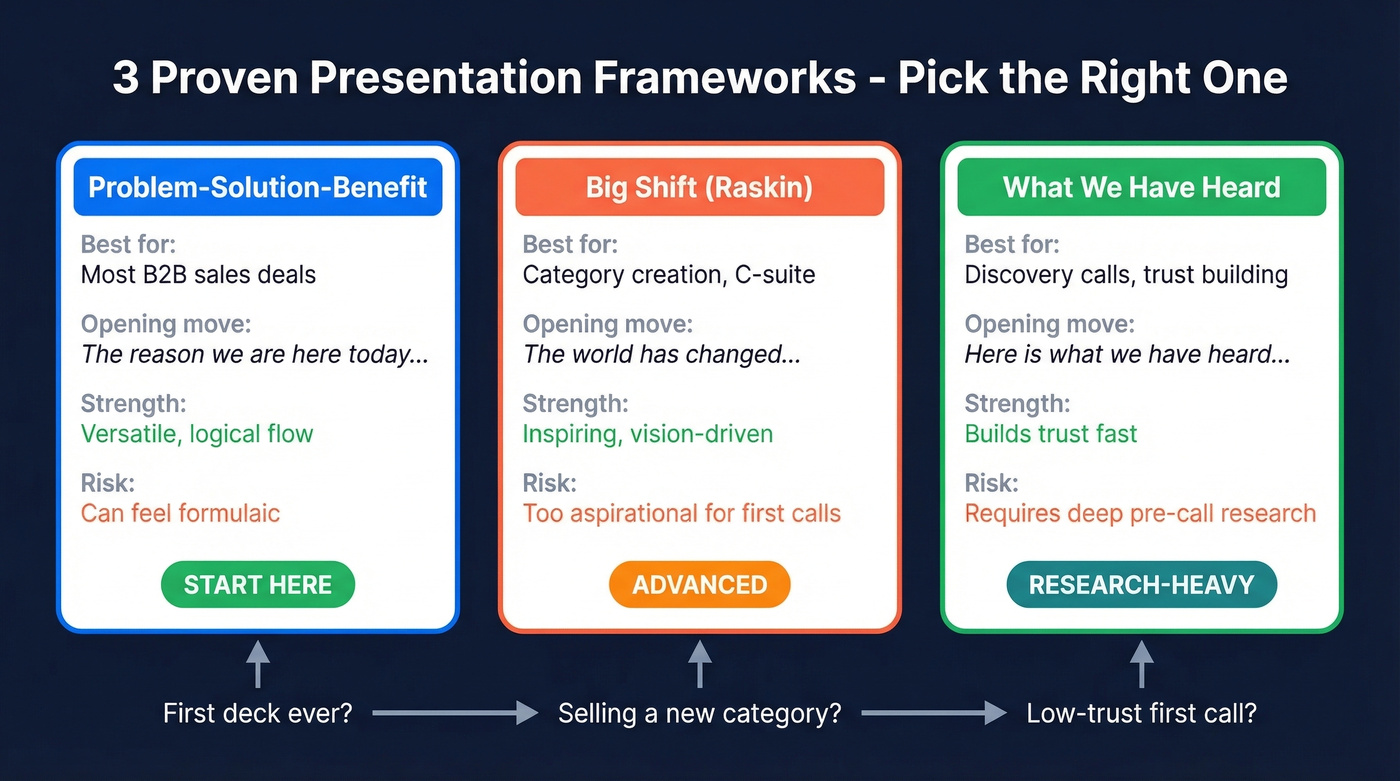
| Framework | Best For | Opening Move | Risk |
|---|---|---|---|
| Problem-Solution-Benefit | Most B2B sales | "The reason we're here..." | Can feel formulaic if not personalized |
| Big Shift (Raskin) | Category creation, C-suite | "The world has changed..." | Too aspirational for first calls |
| "What We've Heard" | Discovery calls, trust-building | "Here's what we've heard..." | Requires strong pre-call research |
The "Big Shift" (Raskin / Zuora)
Andy Raskin's five-part narrative framework flips the traditional sales deck. Instead of starting with the prospect's problem - which can put people on the defensive - you name a big, relevant change in the world. Then you show there'll be winners and losers. Then you tease the "Promised Land," a future state rather than your product. Only then do you introduce your features as "magic gifts." Finally, you present evidence it's real.
This works brilliantly for category creation and executive audiences. But Content Camel's analysis nails the honest critique: Raskin-style decks are too aspirational for practitioner-level first calls. If you're selling to a VP of Ops who just wants to know if your tool integrates with Salesforce, "the world has changed" won't land.
Problem-Solution-Benefit (Classic)
This is the 7-slide structure from the sample above. It follows the natural logic of how people make decisions: understand the problem, evaluate the fix, see the proof, commit to next steps. If you're building your first sales deck from scratch, start here. Graduate to the Raskin narrative once you're selling a category, not just a product.
"What We've Heard" (Practitioner)
Skip this framework if you haven't done deep pre-call research. It opens with "Here's what we've heard from teams like yours" - then lists 2-3 frustrations in the prospect's own language. From there: impact of doing nothing, before/after comparison, brief "how it works," proof, next steps. The strength is trust-building. The risk is that generic "what we've heard" statements backfire immediately. If your research is thin, you'll sound like every other rep who "did their homework" by skimming a homepage.
Real Sales Pitch Examples
Zuora - Category Creation Done Right
Zuora's deck is the canonical Raskin "Big Shift." It opens with "Old World vs New World" - subscription economy replacing ownership - and positions every company as either adapting or dying. Zuora barely appears until slide 8 or 9. By then, the prospect is already bought into the narrative. Dock's teardown breaks down the pattern: trend → evidence → winners → gap → solution. As a sales pitch presentation example, it's hard to beat for executive-level storytelling.
TeleTracking - Proof That Brevity Wins
Not every meeting warrants a 20-minute walkthrough. TeleTracking tells a complete story in roughly six slides, leaning on CFO-ready ROI tables and data visualizations. If you can say it in 6 slides, don't stretch it to 12.
Reddit Ads - Personality Meets Hard Numbers
Reddit's advertising deck does something most B2B decks are afraid to do: it leads with personality. The deck showcases platform culture before pivoting to hard metrics - 70M monthly readers, 5B pageviews, 20 minutes average time-on-site. Your deck doesn't have to be sterile to be credible. In our experience, the decks that get forwarded internally are the ones with a point of view, not the ones that play it safe.
Design for the Forward
Your champion loved the demo. They asked you to send the deck. Two weeks later: silence. The deck didn't sell without you in the room.
Storydoc's research on interactive presentations shows a 146% increase in reading time and 41% full-read completion rate compared to static PDFs. Decks get shared internally about 50% of the time, which means half your presentations need to work as standalone documents for people who weren't in the meeting - the CFO, the CTO, a procurement lead with zero context.
Designing for the forward means three things. Speaker notes need to read as a standalone narrative, not cryptic bullet reminders. Every data visualization should be self-explanatory - if someone needs your verbal walkthrough to understand the chart, redesign the chart. And embed your strongest proof points directly on the slides, not in your talk track.
Chip Heath's research in Made to Stick found that 63% of people remember stories, while only 5% remember standalone statistics. Build your slides around the story, and the data will stick. Keep fonts large, text minimal, and every slide answerable with one question: "Would this make sense to someone who wasn't in the room?"
If you want to go deeper on narrative structure, sales deck storytelling is the skill that makes these slides travel.
Mistakes That Kill Your Deck
Talking more than listening. The best presenters pause after every major slide and ask a confirming question. Build a question into slides 2, 4, and 7.
Feature-dumping. Nobody cares that you have 47 integrations. They care that their team saves 10 hours a week. For every feature on your slide, write the outcome it creates. Then delete the feature and keep the outcome. (If you need a clean way to draw the line, use this features and benefits breakdown.)
Presenting to the wrong stakeholder. We've seen reps spend four hours customizing a deck for the Director of Marketing only to learn the VP of Revenue is the actual buyer. Use Prospeo to confirm job titles and reporting structures before committing to a custom deck - ten minutes of verification saves four hours of wasted prep.
No mutual action plan. "Any questions?" isn't a close. Slide 7 should have three specific next steps with owners and dates. Walk out of every meeting with a shared calendar invite. If you want a tighter run-of-show, use a sales call agenda template.
Before you customize a single slide, make sure you're presenting to the actual decision-maker. Prospeo enriches contacts with 50+ data points - including current job titles, verified emails, and direct dials - so you never waste a polished deck on the wrong person.
Know exactly who holds the budget before you open PowerPoint.
FAQ
How long should a sales presentation be?
Twenty minutes of structured content for a 60-minute meeting. Present for 20-30 minutes and leave the rest for discussion - that's where objections surface and deals actually close. Past 30 minutes of slides, attention drops sharply.
How many slides do I need?
Seven to twelve slides covers most B2B sales presentations. One idea per slide, 1-2 minutes each. Past 12, you're feature-dumping. The strongest decks in the examples above rarely exceed ten slides.
What's the difference between a pitch and a presentation?
A pitch is a 30-second verbal hook to start a conversation. A presentation is the full structured narrative - slides, proof, and a clear next step. The pitch gets you the meeting; the presentation closes the deal.
How do I make sure my follow-up lands?
Verify your prospect's email before you present. Send the deck within two hours with a personalized note referencing something specific they said. Speed and relevance beat polish every time. (For templates, see follow up email after demo and bump email.)