

How to Search for an Email Account by Name: Every Method That Actually Works
SDRs spend 18-22 minutes finding a single accurate email manually. That's nearly half an hour per prospect before writing the first line of outreach. There are much faster ways.
We've tested the free tricks, the paid tools, and the duct-tape workarounds. Below is everything that actually works in 2026 - ranked by effort, cost, and reliability.
What You Need First
Before you search, nail down what we call the Identity Trio: full name, current company, and at least one disambiguator like location, job title, or social handle. Without these, you'll waste time chasing the wrong Jane Smith.
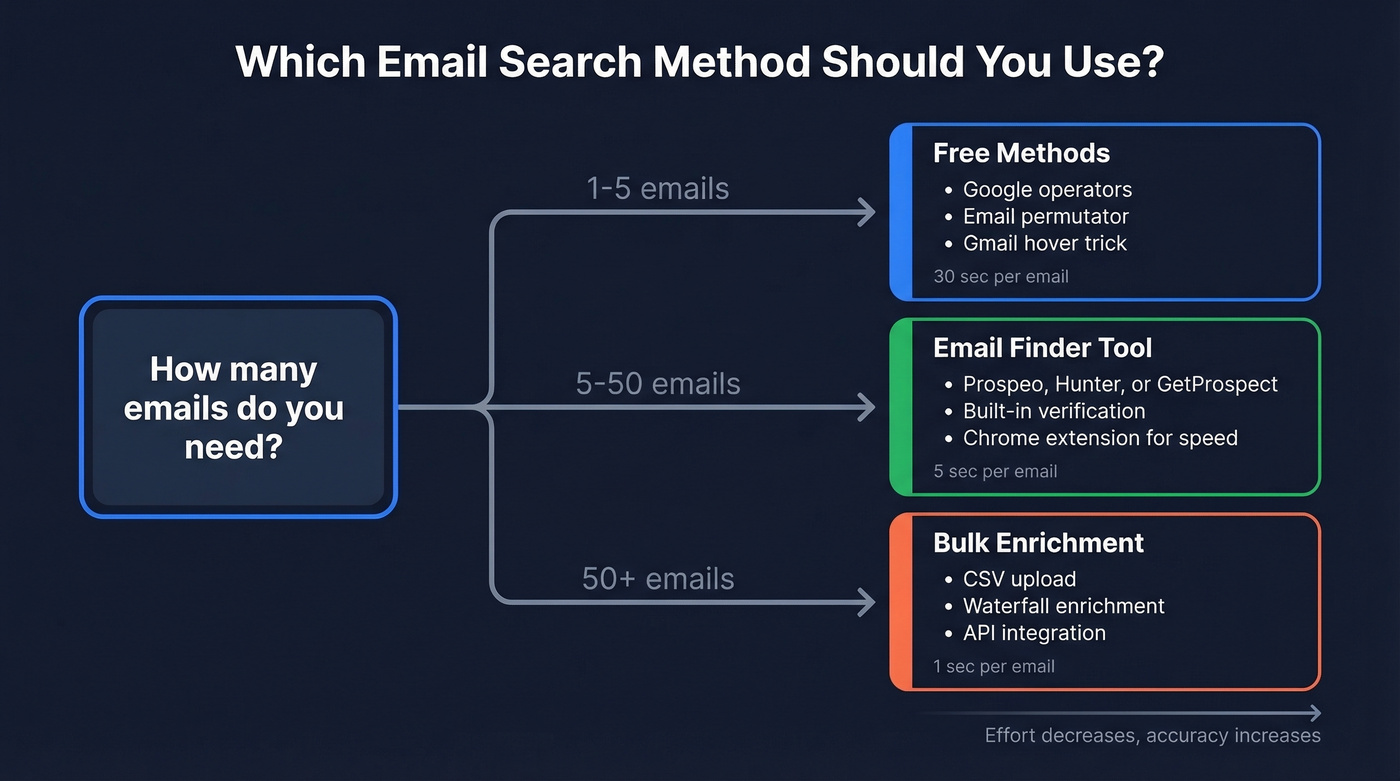
Pick your path based on volume:
- One-off search, no signup - Google operators + an email permutator + the Gmail hover trick. Free, but slow.
- Reliable results, minimal effort - A dedicated email finder with verification. The comparison table below breaks down your options.
- Bulk list (50+ names) - Use a tool with CSV upload and waterfall enrichment.
Free Methods to Find Email by Name
Google Search Operators
Google is surprisingly powerful for email discovery if you know the right queries. Here are five you can copy-paste right now:
"Jane Doe" "@acme.com"
site:acme.com "Jane Doe" email
[filetype:pdf](https://developers.google.com/search/docs/crawling-indexing/indexable-file-types) "Jane Doe" "@acme.com"
site:github.com "Jane Doe" "@acme.com"
"@acme.com" -site:acme.com
That last one is the sleeper hit. It finds instances of the company's email pattern scattered across the web: conference speaker bios, press releases, PDF directories. Once you know the pattern, you can guess your target's address with decent confidence.
The direct name+domain query works roughly 35-45% of the time for professionals at mid-to-large companies. Not great, but free and takes 30 seconds.
Guess the Email Pattern
Corporate email patterns are predictable. The dominant format depends on company size - here's what we've seen across 5M+ companies:
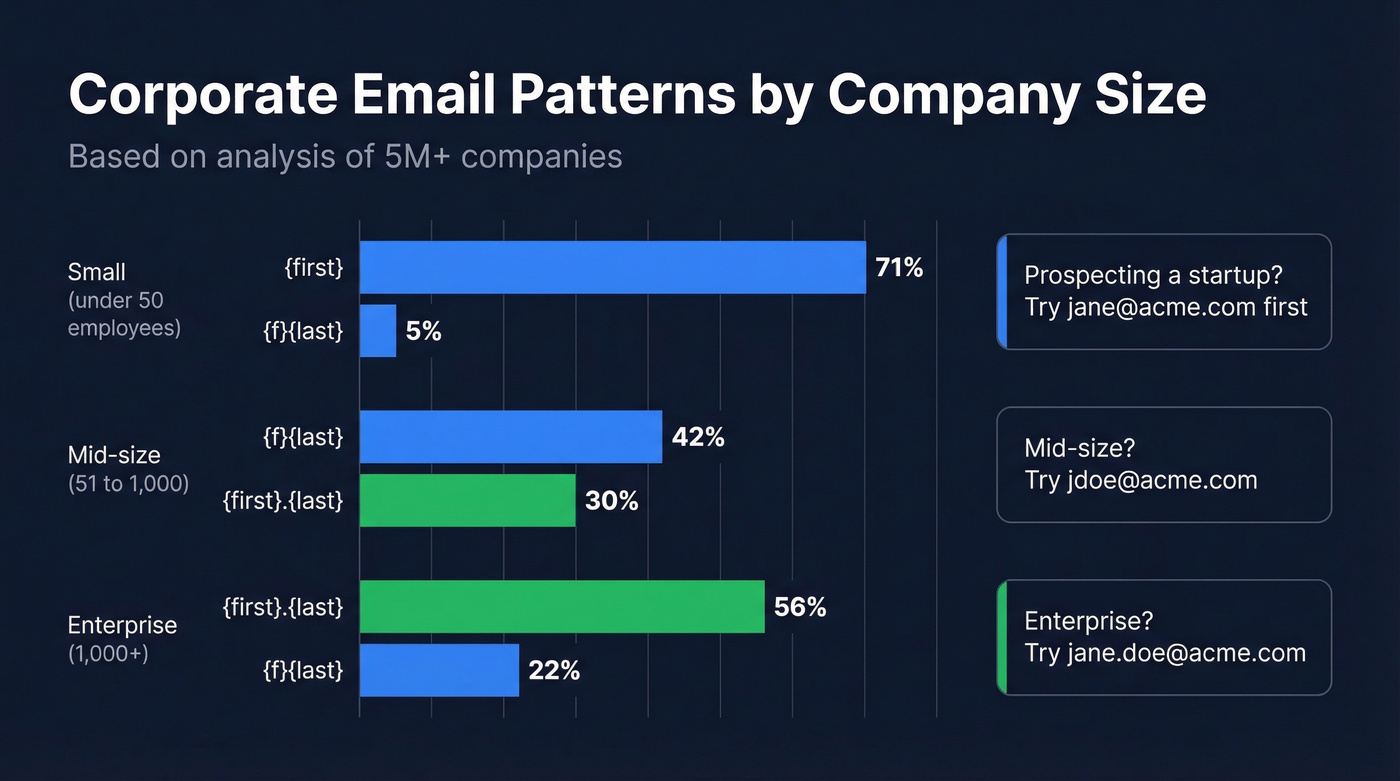
| Pattern | Overall | Small (<50) | Mid (51-1,000) | Enterprise (1,000+) |
|---|---|---|---|---|
{first} |
61% | 71% | - | - |
{f}{last} |
15% | - | 42% | 22% |
{first}.{last} |
13% | - | 30% | 56% |
{first}{last} |
4% | - | - | - |
Small companies default to first-name-only addresses (jane@acme.com). As headcount grows, formats shift toward first.last. If you're prospecting into an enterprise, {first}.{last} is your best first guess. For a 5-person startup, try {first} alone.
Permutator + Gmail Hover Trick
Email permutators generate every plausible combination for you. Mailmeteor's permutator produces up to 34 variations from a name and domain, completely free. Metric Sparrow's Email Permutator+ goes further with 46 combinations.
Once you've got your list, paste them into Gmail's "To:" field one at a time and hover over each address. If a profile image pops up, that address is likely valid. It won't work for every recipient, but when it does, it's instant confirmation without sending a single email.
Don't blast all 34 permutations. Sending to invalid addresses tanks your sender reputation. Validate first, send second.
Other Free Tactics
Check company About or Team pages - smaller companies often list emails directly. X/Twitter bios, GitHub commit histories, and YouTube About tabs all leak email addresses more often than you'd expect. You can also subscribe to the target company's newsletter, then inspect the "From" header to see their email domain and naming convention.

You just read five free methods to search an email by name. Every one of them tops out around 45% accuracy. Prospeo's email finder runs every name through 300M+ profiles and 5-step verification - returning 98% accurate emails refreshed every 7 days, not 6 weeks ago.
Skip the guesswork. Get 75 verified emails free every month.
Best Email Finder Tools for 2026
Free methods work for one-off searches. For anything beyond that, you need a dedicated tool.

| Tool | Free Tier | Paid From | Accuracy | Best For |
|---|---|---|---|---|
| Prospeo | 75 emails/mo | ~$0.01/email | 98% verified | Accuracy & freshness |
| Hunter | 50 searches/mo | $49/mo | Not published | Brand recognition |
| GetProspect | 50 emails/mo | $34/mo (annual) | 95% guaranteed | Credit-back guarantee |
| Anymail Finder | 100 credits | $14/mo | 97% | Pay-only-for-valid |
| Skrapp | 50 credits/mo | $49/mo | 92% | Prospecting workflows |
| Snov.io | 50 credits trial | $39/mo | Not published | Multi-channel outreach |
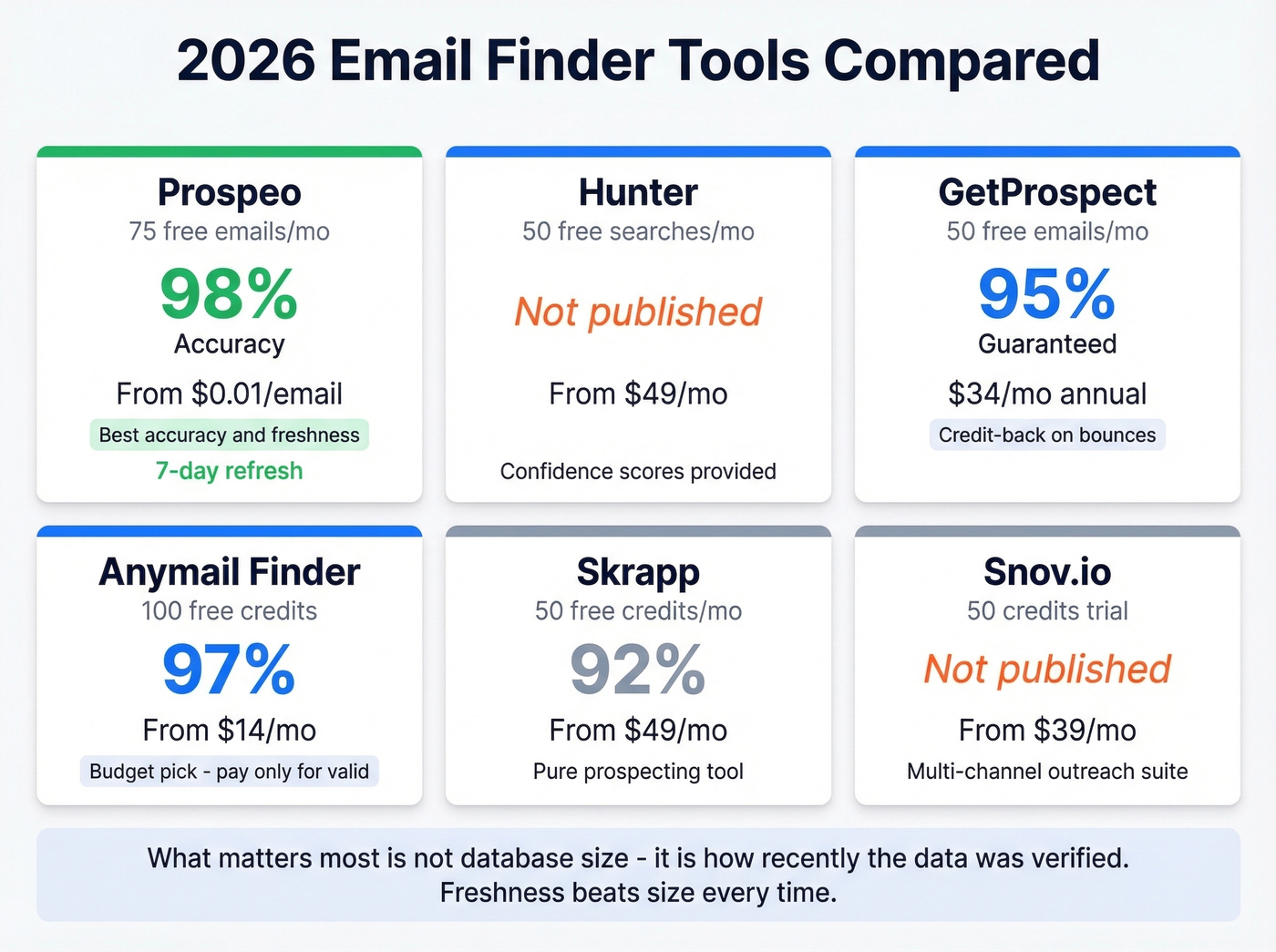
Here's the thing: every tool in this space throws around "database size" numbers - 100M contacts, 200M, 300M. Those numbers are marketing. What actually matters is verification recency. An email that was valid six weeks ago might bounce today because your prospect changed jobs. Freshness beats size every time.
Prospeo
Prospeo covers 300M+ professional profiles with 143M+ verified emails, but the numbers that matter are downstream: 98% email accuracy and a 7-day data refresh cycle. The industry average refresh is six weeks. That gap is enormous when you're running cold outreach at scale.

The free tier gives you 75 verified emails per month - one of the most generous in this comparison. The Chrome extension lets you pull verified contact data from any website in one click. Paid plans run about $0.01 per email with no annual contracts.
Permutators give you 34 guesses. Prospeo gives you the answer. One name + company returns a verified email at 98% accuracy for about $0.01 - no contracts, no annual commitment. That's 18 minutes of manual searching replaced by one click.
Find any professional email in seconds, not half an hour.
Hunter
Hunter is the name most people think of first, and that brand recognition counts for something. The domain search feature is genuinely useful - type in a company domain and Hunter surfaces the main email patterns and addresses associated with it.
The free tier gives you 50 searches per month. Paid plans start at $49/mo for 1,000 credits. Hunter verifies emails before returning them, and when an email can't be fully validated it provides a confidence score. It doesn't publish a single headline accuracy percentage, though, so you'll want to watch bounces closely if deliverability is critical.
If you're comparing options beyond Hunter, see our breakdown of Hunter alternatives.
GetProspect
Use this if you want a safety net on data quality. GetProspect's 95% accuracy guarantee comes with a credit-back policy - if an email bounces, you get the credit refunded. The Chrome extension carries a 4.8/5 rating on the Chrome Web Store with 1,000+ reviews.
Skip this if you need the absolute freshest data. GetProspect doesn't publish its refresh cycle, and the credit-back model means you're still dealing with bounces before getting reimbursed. Pricing runs $49/mo or $34/mo on an annual plan.
Anymail Finder
The budget pick. Anymail Finder only charges for valid emails - unverified or not-found results don't cost you a credit. The 100 free credits are generous for testing, and paid plans start at just $14/mo, the cheapest entry point here by a wide margin.
The trade-off: it's a verification-first lookup tool, not a full prospecting platform. If all you need is "name to verified email," it punches above its weight.
Skrapp vs. Snov.io
Both sit at similar price points, but they solve different problems. Skrapp ($49/mo, 200M+ lead database) is a pure prospecting tool - pick it if you want a searchable database with email enrichment built in. Snov.io ($39/mo) is a multi-channel outreach suite with email finding bolted on - pick it if you also need campaigns and outreach automation. If you only need email addresses, Snov.io's extra features are cost you're not using.
If you're building a full outbound stack, start with our list of SDR tools.
How Accurate Are These Tools, Really?
Every email finder claims 90%+ accuracy. Most of them are exaggerating.
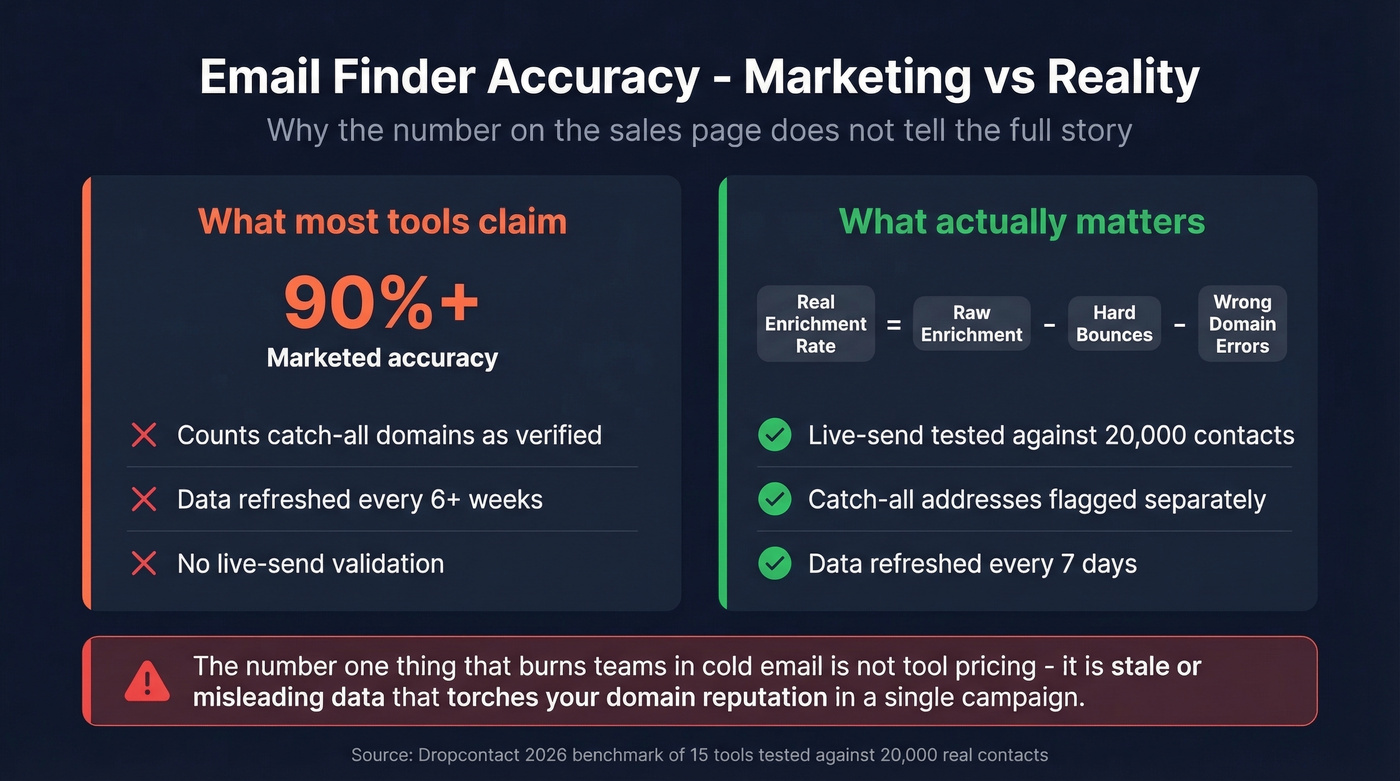
The most rigorous public benchmark comes from Dropcontact's 2026 study: 15 tools tested against 20,000 real contacts, with verification done by actually sending emails - not running them through a validator. The top performer hit 54.9% real enrichment with just 0.9% hard bounces. Most tools clustered well below. Dropcontact ran the study and was one of the tested tools, so take the rankings with a grain of salt, but the methodology of live sending to 20,000 contacts is the most transparent benchmark available.
The key metric is "real enrichment rate" - raw enrichment minus hard bounces minus wrong-domain errors. A tool that finds 60% of emails but 10% bounce is worse than one that finds 40% with only 1% bouncing. Your sender reputation doesn't care about the emails that worked. It cares about the ones that didn't.
Then there's the catch-all domain problem. Catch-all servers accept mail to any address at the domain, so a verification ping returns "valid" even for addresses that don't exist. Bad tools count these as verified. Good tools flag them separately.
We've watched teams wreck their sender reputation in a single campaign because they trusted a "verified" list packed with catch-all addresses. The #1 thing that burns teams in cold email isn't tool pricing - it's stale or misleading data that turns into bounced campaigns and torches domain reputation. Verification methodology matters more than the accuracy number on the marketing page.
If you want to go deeper on bounce prevention, read our guide to email bounce rate and the full email deliverability guide.
Let's be honest: if your deal sizes sit below five figures, you probably don't need a $15K/year data platform. A tool with 98% accuracy at $0.01/email will outperform a bloated enterprise suite where half the features gather dust. Pay for data quality, not feature count.
Waterfall Enrichment
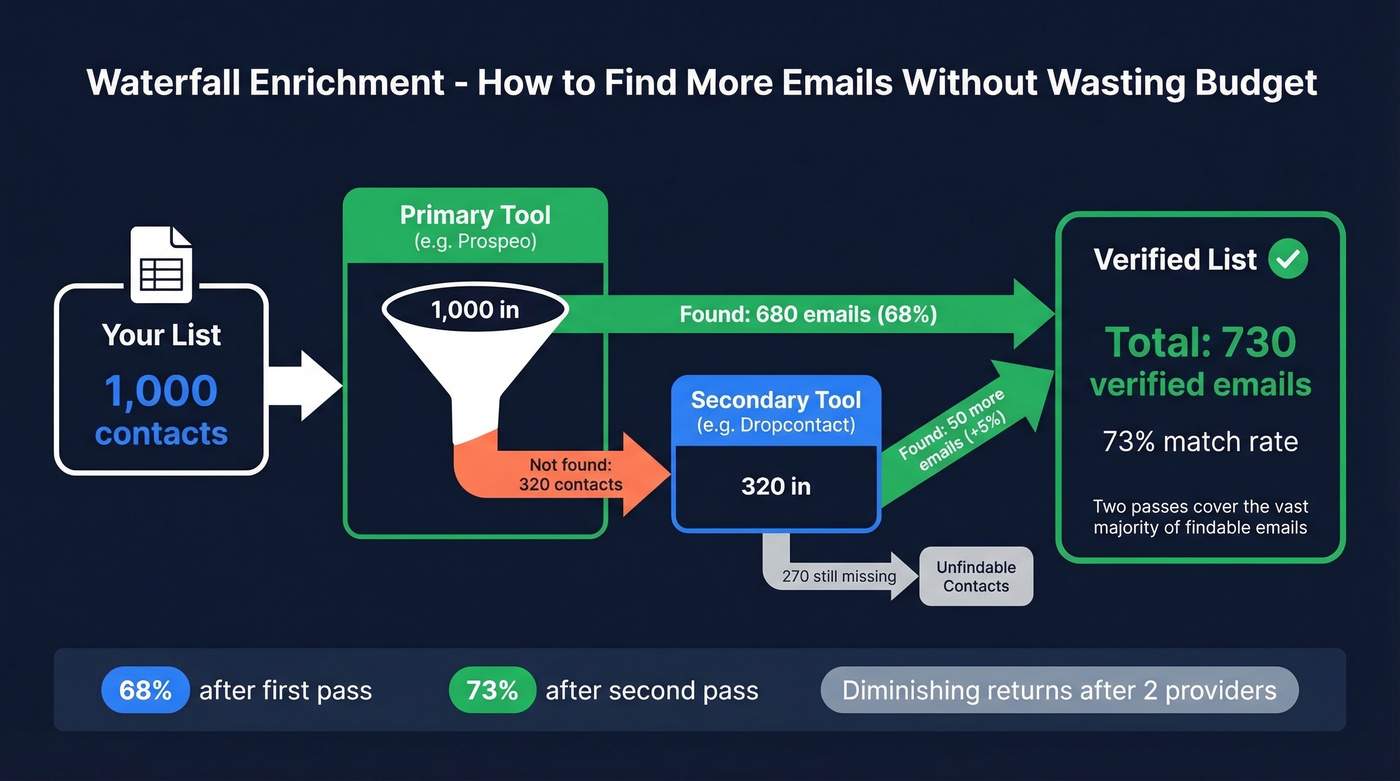
No single tool finds every email. The smart play is waterfall enrichment - run your list through your primary tool, then cascade the misses to a second provider.
A PhantomBuster test of 1,000 profiles showed Hunter alone hitting a 68% match rate. Adding Dropcontact as a second pass pushed that to 73%. Two passes cover the vast majority of findable emails without burning budget on a third or fourth provider.
If you're doing this at scale, it's worth formalizing your lead enrichment workflow.
FAQ
Is it legal to search for someone's email by name?
For B2B outreach, yes in most jurisdictions. GDPR allows contact under "legitimate interest" for business communication, and CAN-SPAM permits cold email with an opt-out mechanism and physical address. Stick to professional addresses and honor unsubscribe requests immediately.
What if I can't find the email at all?
Try the waterfall approach with a second email finder. If that fails, verify the person actually works at that company - job changes are the #1 reason emails go missing. As a last resort, reach out via social channels and ask for their preferred email directly.
Which free email finder gives the most verified results?
Anymail Finder offers 100 free credits, but not all turn into valid emails. Prospeo leads with 75 free verified emails per month at 98% accuracy. Hunter and GetProspect both offer 50. If accuracy matters more than raw volume - and it should - the verified count is the number to compare.
How long does it take to find an email account by name?
Manual methods like Google operators, permutators, and the Gmail hover trick take 5-15 minutes per contact. A dedicated email finder returns a verified result in under 10 seconds. At 50+ prospects, the time savings compound fast - hours saved per week that go straight back into actual selling.