

How to Write a Soft Reminder Email That Gets a Reply (Not an Eye Roll)
You've sent three perfectly polite follow-ups. Radio silence. Now you're staring at your draft folder, wondering if "just checking in" makes you sound desperate or just annoying. You're not alone - 53% of American workers intentionally avoid certain emails to protect their mental health, according to a Forbes/ZeroBounce workplace communication survey. Your soft reminder email landed in that pile.
Let's fix that.
The Quick Version
- Keep the body under 90 words. One ask, one deadline.
- "Quick question" subject lines can hit a ~39% open rate in real-world testing.
- Send reminder #1 around day 3, #2 around day 7. Three emails max before switching channels (see When Should You Follow Up on an Email?).
- Drop "friendly reminder," "per my last email," and "just circling back." They backfire.
- Zero replies after 3 follow-ups? The problem isn't your wording - it's bad contact data or a dead inbox.
What Makes a Polite Follow-Up Work?
A soft reminder email is a polite nudge designed to move things forward without applying pressure. It covers two scenarios: before something happens (meeting confirmations, upcoming deadlines, pre-due-date invoices) and after something didn't happen (no response, overdue payment, missing deliverable).
The difference from an aggressive follow-up comes down to tone and length. An aggressive follow-up demands action and stacks guilt. A polite reminder provides context, makes one clear ask, and gives the recipient an easy path to respond - you're respecting the other person's time while still keeping things on track (more examples in our sales follow-up templates).
Anatomy of an Effective Reminder
Most effective friendly reminder emails include five parts. Miss one and the email gets ignored or triggers the wrong reaction.
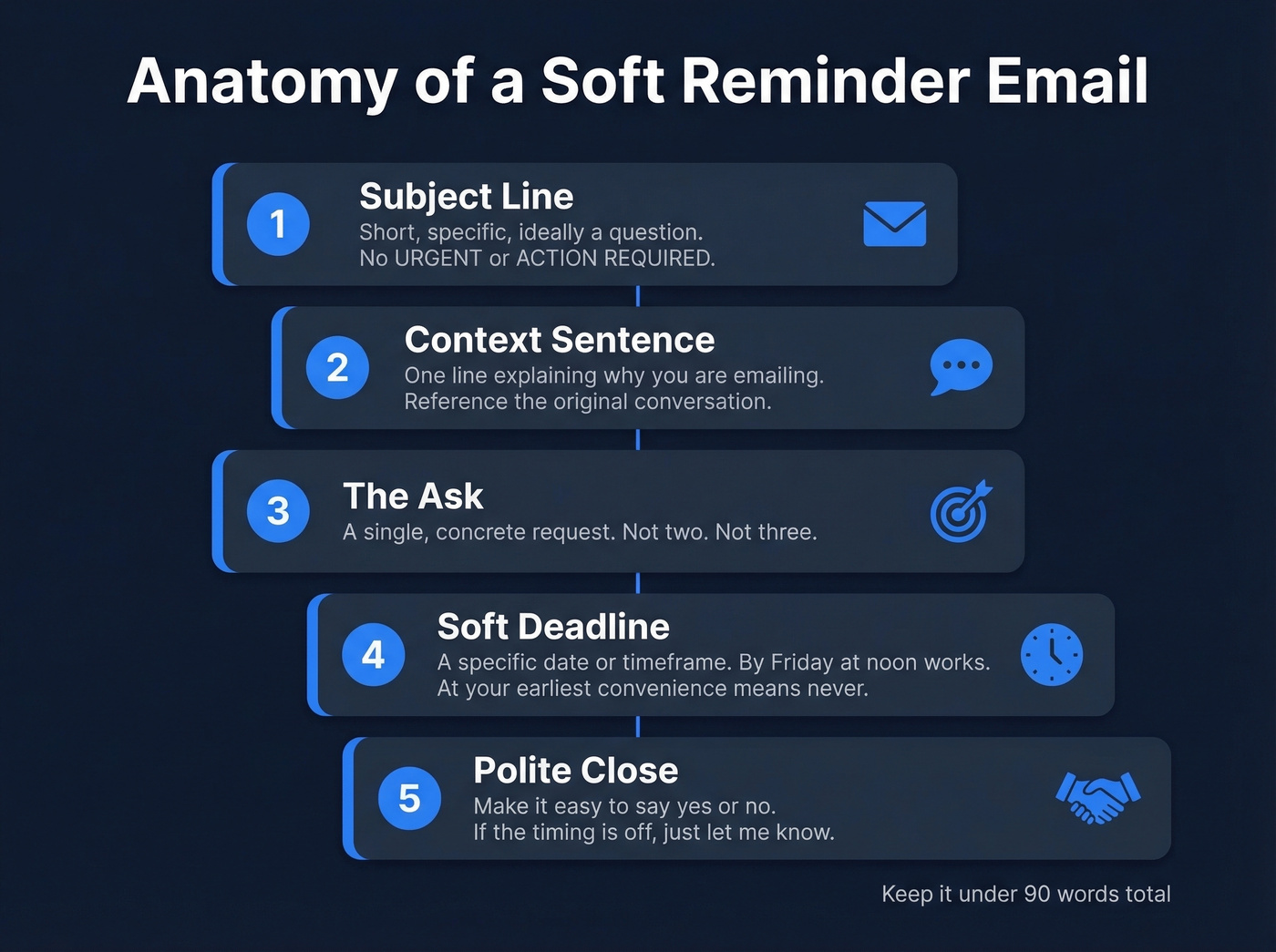
- Subject line - Short, specific, ideally a question. No "URGENT" or "ACTION REQUIRED." (Need ideas? See email subject line examples.)
- Context sentence - One line explaining why you're emailing. Reference the original conversation, invoice number, or meeting date.
- The ask - A single, concrete request. Not two. Not three.
- Soft deadline - A specific date or timeframe. "By Friday at noon" works. "At your earliest convenience" means never.
- Polite close - A sentence that makes it easy to say yes or no. "If the timing's off, just let me know" removes pressure and increases reply rates.
One founder on Reddit doubled reply rates after cutting emails from 141 to 56 words. Saleshandy recommends keeping reminder emails 50-90 words and under 120 total. If your reminder needs a scroll bar, it's too long.
Subject Lines That Get Opened
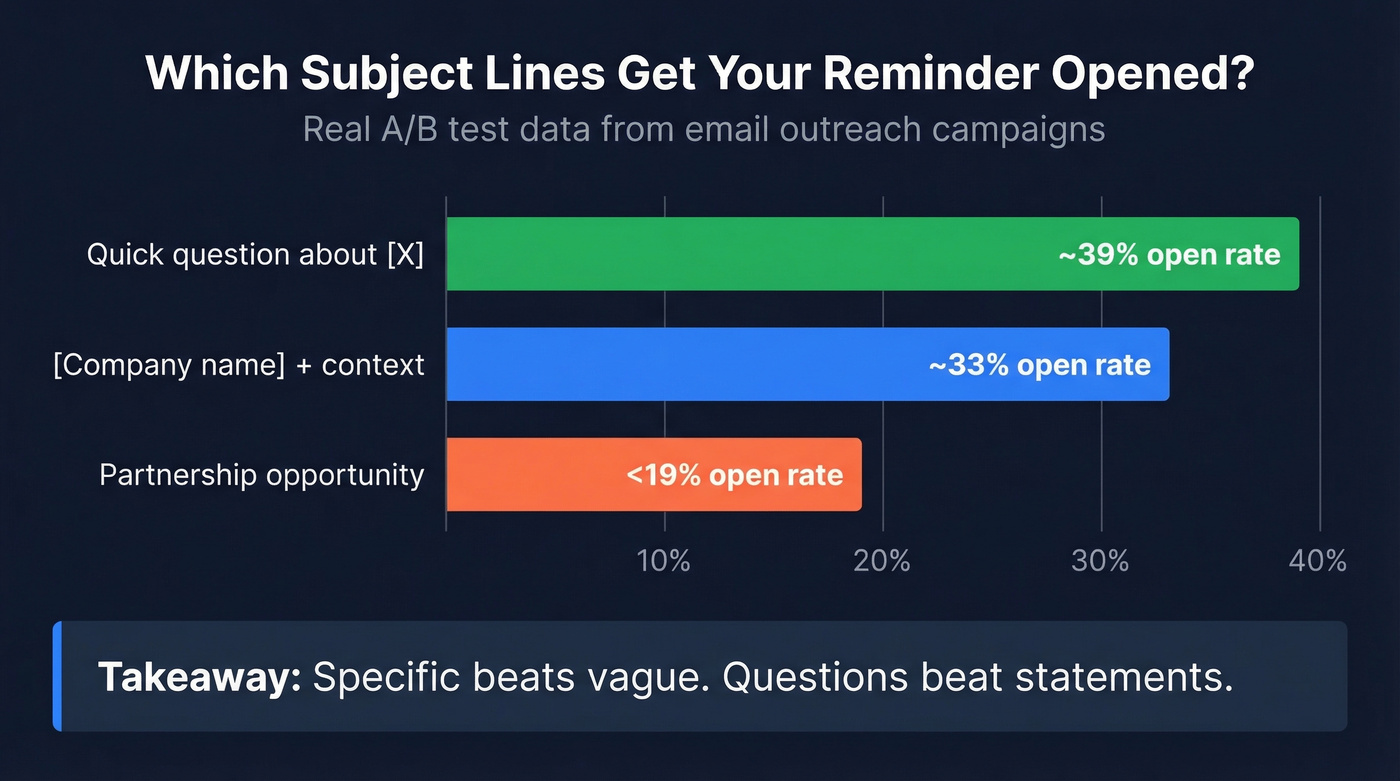
Subject lines determine whether your gentle reminder email gets read or buried. From one real-world A/B test shared on Reddit:
| Format | Open Rate |
|---|---|
| "Quick question about [X]" | ~39% |
| [Company name] + context | ~33% |
| "Partnership opportunity" | <19% |
Specific beats vague. Questions beat statements. Here are subject lines by scenario:
No-response: "Quick question about [project name]" · "Still relevant?" · "Did this get buried?"
Payment: "Invoice #1234 - quick heads-up" · "Payment due Friday - need anything from us?"
Meeting: "Confirming Thursday at 2 PM" · "Tomorrow's call - still work for you?"
Deadline: "The [deliverable] deadline is Friday" · "[Name], quick reminder on the Q2 report"
Internal: "Need your sign-off before I can move forward" · "Quick flag - waiting on budget approval"

The best reminder email template in the world won't save you if the address is wrong. 53% of workers ignore emails - but 0% can reply to a bounced one. Prospeo's 98% email accuracy and 7-day refresh cycle mean your polite follow-ups actually land in real, active inboxes.
Stop crafting perfect reminders for dead inboxes. Verify first.
15 Copy-Paste Templates
No-Response Follow-Ups
First follow-up (day 2-3):
Hi [Name],
Wanted to make sure my [email/proposal] from [day] didn't get lost. The short version: [one-sentence summary of what you need].
Would [specific date] work for a quick reply?
[Your name]
Why this works: references the original, restates the ask in one line, and gives a concrete date.
Second follow-up (day 7):
Hi [Name],
I know inboxes get crowded. I need a quick yes/no on [specific thing] so I can [next step on your end].
If this isn't a priority right now, just let me know and I'll close the loop.
[Your name]
Final follow-up (closing the loop):
Hi [Name],
Haven't heard back - I'll assume the timing isn't right and close this out. If anything changes, reply here and we'll pick it back up.
[Your name]
The breakup email creates urgency without pressure. We've seen this template outperform "just checking in" by a wide margin.
Follow-up after proposal/quote:
Hi [Name],
Following up on the proposal I sent [date]. Any questions, or does the pricing need adjusting?
I can hold the quoted rate through [date]. Let me know either way.
[Your name]
Payment & Invoicing
Friendly overdue invoice reminder:
Hi [Name],
Quick heads-up - invoice #[number] for [amount] was due on [date]. I've reattached it. Can you confirm it's in the queue?
[Your name]
Second payment reminder (firmer):
Hi [Name],
Second note about invoice #[number], now [X days] overdue. I'd appreciate an update on the payment timeline. If there's an issue, let's sort it out.
[Your name]
Pre-due-date heads-up:
Hi [Name],
Invoice #[number] for [amount] is due on [date]. No action needed if it's already scheduled. Let me know if you need anything to process it.
[Your name]
Meetings & Scheduling
Meeting confirmation reminder:
Hi [Name],
Confirming our call on [day] at [time]. Agenda: [one sentence]. If anything's changed, let me know and we'll reschedule.
[Your name]
Reschedule request after no-show:
Missed you on the call at [time] today - no worries, things come up. I'm open [two specific time slots]. Pick one and I'll send the invite.
[Your name]
Starting with the situation instead of "Hi [Name]" signals brevity and keeps the tone light.
Post-meeting action item nudge:
Hi [Name],
Great conversation on [day]. Confirming next steps: [one-sentence summary of their action item]. Can you have that over by [date]?
[Your name]
Internal / Workplace
Reminder to boss (approval needed):
Hi [Name],
The [project/budget/request] I sent on [date] needs your approval before I can move forward. My deadline is [date]. A quick thumbs-up works.
[Your name]
Reminder to colleague (deliverable needed):
Hey [Name],
I need the [deliverable] by [date] to stay on track for [downstream task]. If you're blocked, let me know and I'll help clear it.
[Your name]
Cross-team request follow-up:
Hi [Name],
Following up on the [data/asset/access] request from [date]. We're targeting [date] for launch and this is on the critical path. Who's the best person to loop in if you're not the right contact?
[Your name]
Other Scenarios
Interview follow-up:
Hi [Name],
Thank you for the conversation on [day]. I enjoyed learning about [specific detail]. I'm very interested - anything else you need from me for next steps?
[Your name]
Contract/signature reminder:
Hi [Name],
The contract from [date] is still awaiting signature - terms unchanged. Can you sign by [date] so we can kick off on schedule?
[Your name]
When to Send and When to Stop
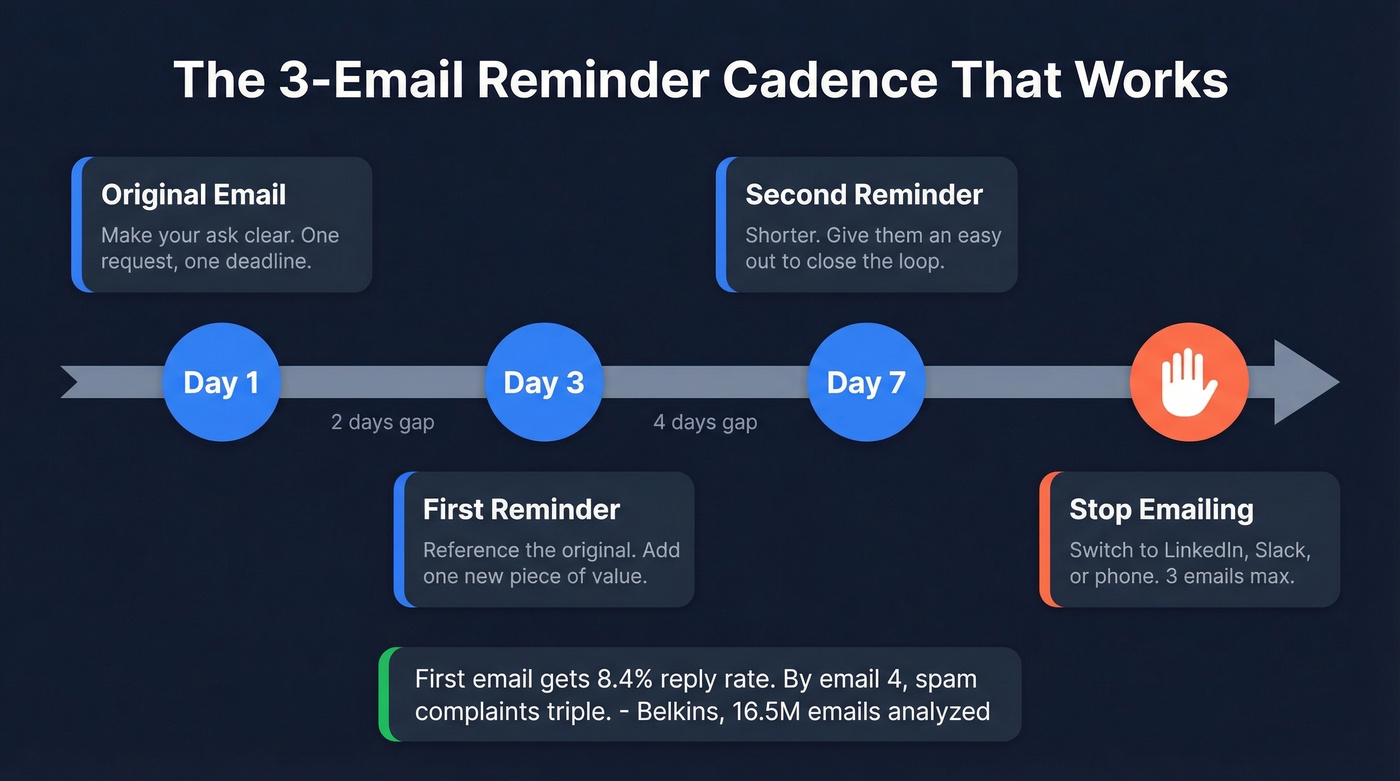
Belkins analyzed 16.5M cold emails and found the highest reply rate - 8.4% - came from the first email alone. Every additional follow-up eroded performance. By the fourth email, spam complaints more than tripled.
Founders show a unique curve: 6.64% initial reply rate, climbing slightly to 6.94% on the second follow-up, then cratering to 3.01% by the fourth. In our experience, the third email is where you should stop.
Here's the cadence that works:
- Day 1: Send the original email.
- Day 3: First reminder. Reference the original, add one new piece of value (see how to add value in sales).
- Day 7: Second reminder. Shorter. Give them an easy out.
- After that: Stop emailing. Switch channels.
Spacing emails 2-3 days apart outperforms next-day nudges. Following up within 24 hours reads as impatient. Personalized follow-ups pull 29% higher open rates than generic ones, so reference something specific from your last interaction every time (more on personalized outreach).
Phrases That Kill Your Reminder
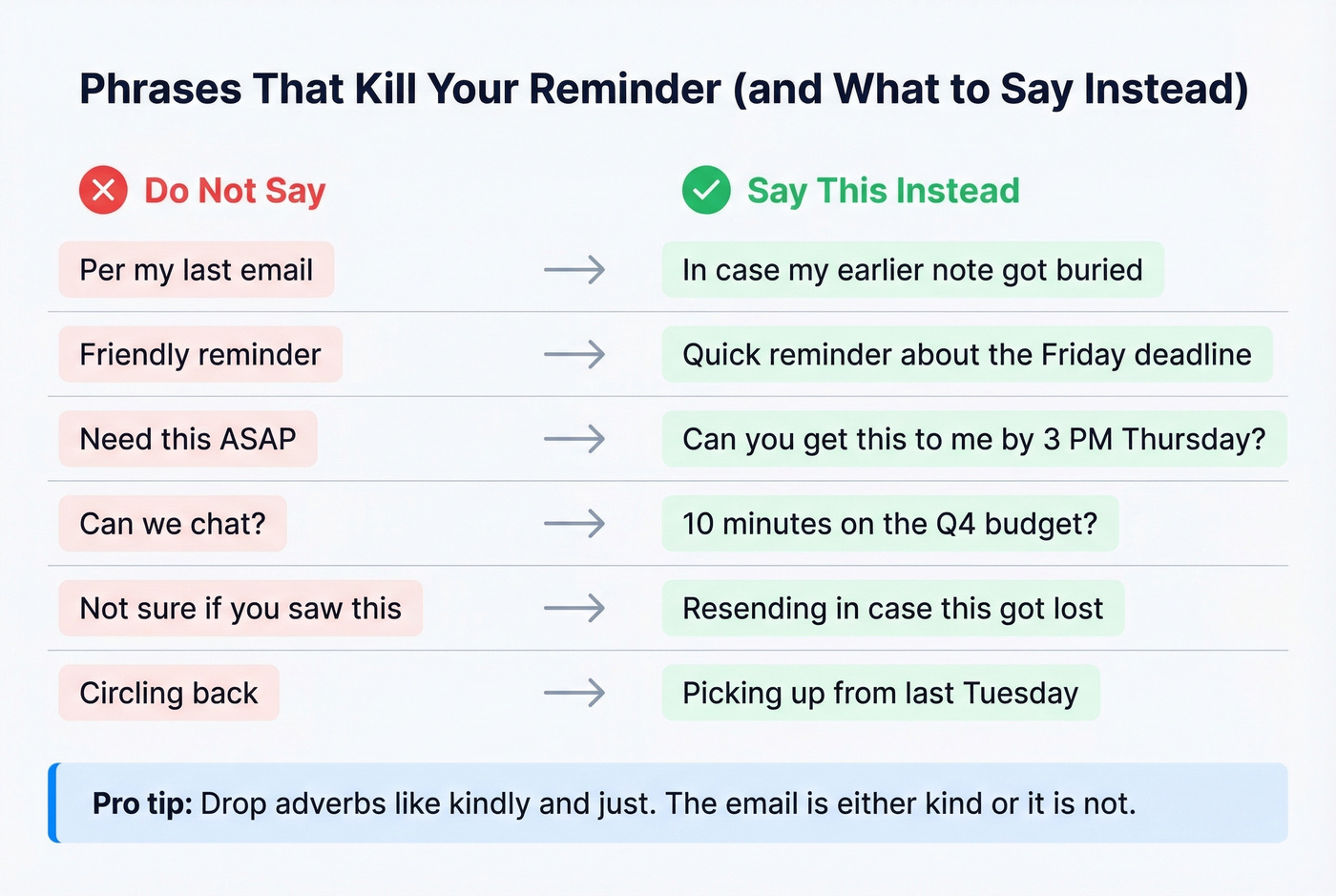
These are the phrases most likely to make recipients cringe, based on the Forbes/ZeroBounce survey:
| Don't Say | Say Instead |
|---|---|
| "Per my last email" | "In case my earlier note got buried" |
| "Friendly reminder" | "Quick reminder about the Friday deadline" |
| "Need this ASAP" | "Can you get this to me by 3 PM Thursday?" |
| "Can we chat?" | "10 minutes on the Q4 budget?" |
| "Action required" | "Here's what needs attention by Friday" |
| "Following up again" | "Wanted to bump this in your inbox" |
| "Not sure if you saw this" | "Resending in case this got lost" |
| "Please advise" | "What's your recommendation?" |
| "Circling back" | "Picking up from last Tuesday" |
The "kindly" debate? The consensus on r/etiquette is that "I just wanted to kindly follow up" reads as condescending - even when you genuinely mean it. Drop the adverb. The email is either kind or it isn't.
Why Your Reminders Aren't Working
Here's the thing most people miss: they obsess over wording when the real problem is infrastructure. If you've sent three well-crafted reminders and gotten nothing back, the usual culprits are overloaded inboxes, wrong send times, an interrogating tone, and zero personalization.
But the silent killer? Bad contact data. One founder dropped their bounce rate from 11% to under 2% just by verifying their list - and saw reply rates double. B2B contact data decays fast as people change jobs and domains go dark.
Every bounce damages your sender reputation, which means your next email - even to a valid address - is more likely to land in spam. Make sure your SPF, DKIM, and DMARC records are properly configured (start with this email deliverability guide), and run your list through an email verification tool like Prospeo before you waste time crafting the perfect follow-up. With 98% email accuracy and a 7-day data refresh cycle, it takes minutes to clean a list and protect your domain.
When Email Isn't Working
After three emails with no response, switch channels. One person on Reddit described sending a 7th reminder before finally CC'ing their VP - that's six emails too many. B2B engagement typically requires 6-8 touchpoints, but those touchpoints shouldn't all be email.
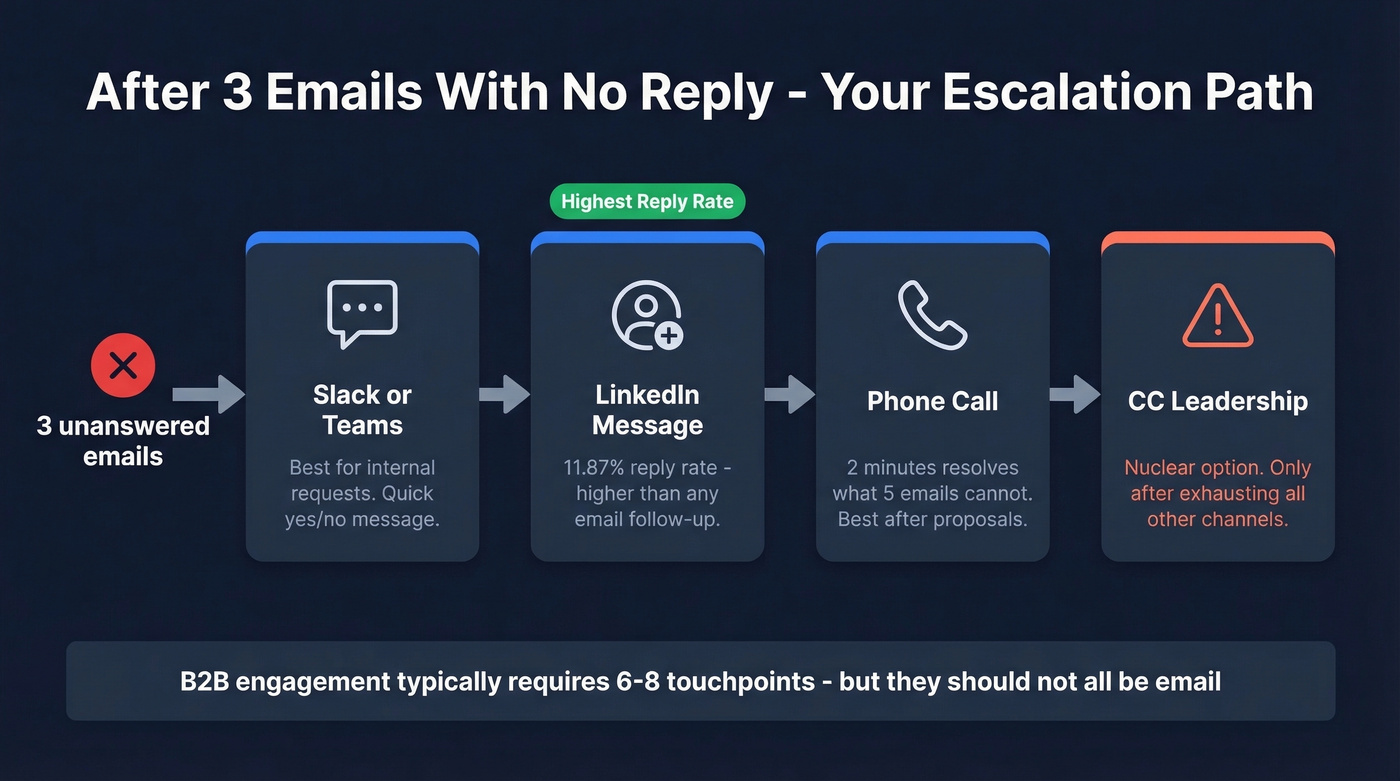
The escalation path that works:
- Slack or Teams message - best for internal requests. Try: "Hey [Name], sent you an email about [thing] on [date]. Quick yes/no when you get a sec?"
- LinkedIn message - LinkedIn nurturing sequences hit 11.87% reply rates in Belkins' dataset, higher than any email follow-up.
- Phone call - for external contacts after a proposal or invoice. A 2-minute call resolves what 5 emails can't (pair it with a cold calling system if you need consistency).
- CC'ing leadership - the nuclear option. Use it only when you've exhausted everything else and the item is genuinely blocking work.
Skip the escalation if the stakes are low. Not every unanswered email needs a multi-channel campaign - sometimes people just aren't interested, and that's fine.
Zero replies after 3 follow-ups? The problem isn't your wording - it's stale data. Prospeo refreshes 300M+ contacts every 7 days (not 6 weeks like competitors) and verifies every email through a 5-step process. Your reminder sequences deserve deliverable addresses at $0.01 each.
Fix your contact data and watch your reply rates climb.
FAQ
How many reminder emails should I send?
Three max. Belkins' data shows four or more emails more than triples spam-complaint risk. After three, switch to phone, chat, or loop in leadership.
Is "gentle reminder" passive-aggressive?
Usually, yes. The Forbes/ZeroBounce survey ranked "friendly reminder" among the most cringe-inducing workplace phrases. Replace it with something specific like "Quick reminder about the Friday deadline."
Best day and time to send a reminder?
Tuesday through Thursday, 8-11 AM in the recipient's timezone. Shifting sends into this window improved open rates by 16% in one real-world test.
How long should a soft reminder email be?
Under 90 words for the body. One ask, one deadline, one polite close. If you need background, link to it instead of pasting inline.
What's the difference between a soft reminder and a courtesy reminder?
A courtesy reminder is typically sent before a deadline or event as a proactive heads-up - think meeting confirmations or pre-due-date invoice notices. A soft reminder can serve that same purpose but also covers reactive scenarios, like following up after someone hasn't responded. The tone is nearly identical; timing is what sets them apart.