

SpamAssassin and Email Deliverability: What Actually Matters (and What Doesn't)
A cold email sender posted on r/coldemail last month with a familiar problem: GlockApps showed "SpamAssassin likes your email! Score: 0.00" - a perfect score - and Yahoo was still routing everything to spam. Replies were thin. Frustration was high. The SpamAssassin score was meaningless because Yahoo doesn't use SpamAssassin.
This confusion around SpamAssassin and email deliverability is everywhere, and it's costing teams real pipeline.
The Short Version
- Gmail, Outlook, and Yahoo don't use SpamAssassin. Stop obsessing over the score if your recipients are on major providers.
- Fix authentication first (SPF/DKIM/DMARC), clean your data second, tweak content last. That order matters.
- Treat your SA score as a diagnostic tool, not a deliverability guarantee.
What Is SpamAssassin in 2026?
SpamAssassin is an open-source spam filter maintained by the Apache Software Foundation since 2001 - and still actively developed. Version 4.0.2 dropped in late 2025 with a new Redirector plugin, performance enhancements, and Perl 5.42 compatibility. The 3.4 branch is officially end-of-life, so if you're still running it, upgrade now.
The 4.0.0 release brought full Unicode support, asynchronous DNS queries, async DCC checks using dccifd, and async Pyzor and Razor lookups via separate processes - all of which significantly improved throughput. A well-tuned SA installation can hit 99.9% correct classification, though that number assumes proper configuration and updated rulesets, which most installations don't have.
Does SpamAssassin Affect Inbox Placement?
Here's the thing: SpamAssassin's direct impact on deliverability at major mailbox providers is wildly overstated. Gmail, Outlook, and Yahoo all run proprietary filtering systems that analyze thousands of signals - engagement history, sender reputation, authentication alignment, complaint rates. They don't use SA's rule-based scoring.
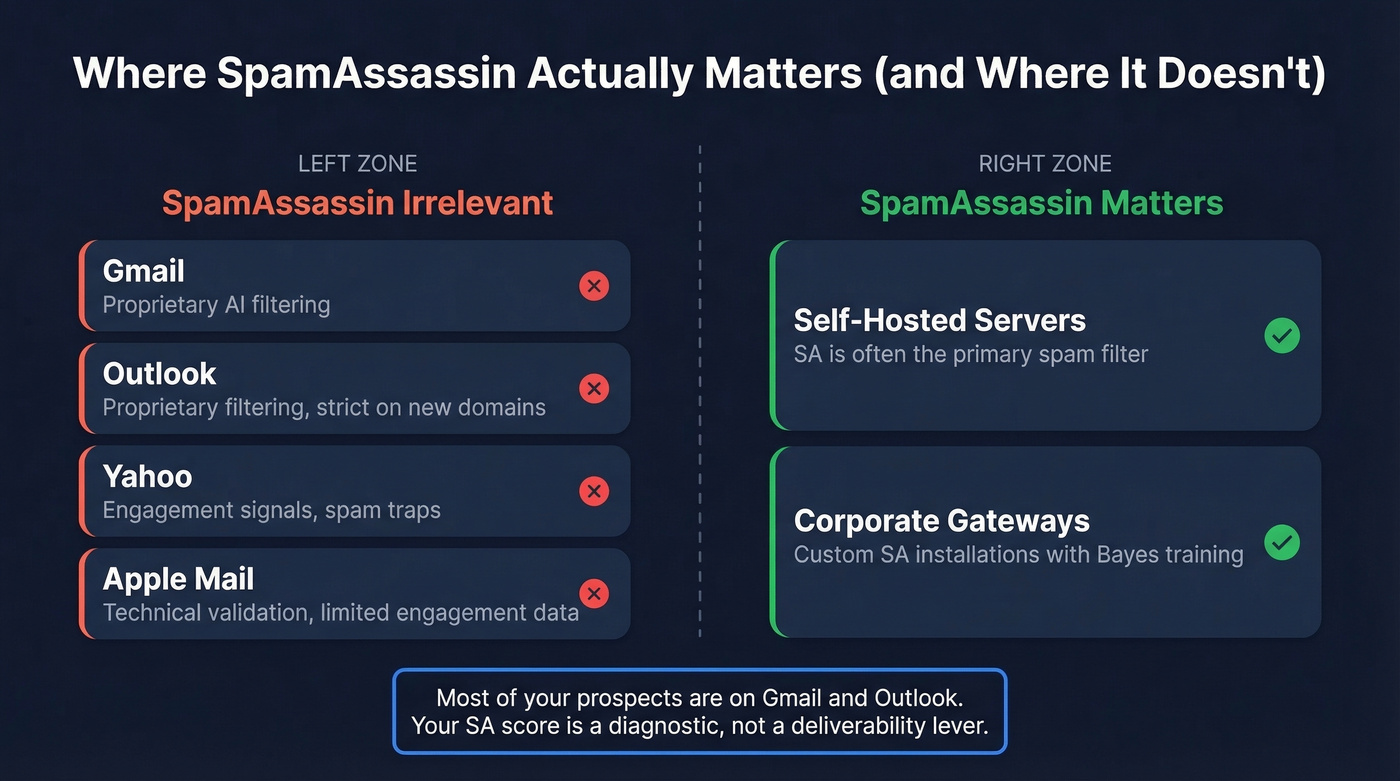
Where SA still matters is on smaller mail servers, self-hosted corporate gateways, and niche environments running it as a primary filter. A meaningful chunk of legitimate mail passes through servers where SA is the gatekeeper.
| Provider | Primary Filtering | Key Signals | SA Relevance |
|---|---|---|---|
| Gmail | Proprietary AI filtering | Engagement, reputation, authentication | None |
| Outlook | Proprietary filtering (stricter for new domains/IPs) | Reputation, complaints, new-sender sensitivity | None |
| Yahoo | Proprietary filtering with engagement signals | Spam traps, engagement, authentication | None |
| Apple Mail | MPP limits engagement signals; leans on technical validation | Technical validation, authentication | Minimal |
| Self-hosted | Often SpamAssassin | SA rules, DNSBL, Bayes | High |
Most of your prospects are on Gmail and Outlook. For them, your SA score is a useful diagnostic - not a deliverability lever.
One thing worth calling out: Microsoft filtering is often stricter on new domains and IPs early on. If you're launching cold outbound on a fresh domain, expect Outlook to be a headache - and that has nothing to do with SpamAssassin.
How SpamAssassin Scoring Works
SA uses an additive scoring model. Every incoming email gets evaluated against hundreds of rules, each adding or subtracting points. Positive scores push toward "spam," negative scores push toward "legitimate." The total determines whether the email gets flagged.
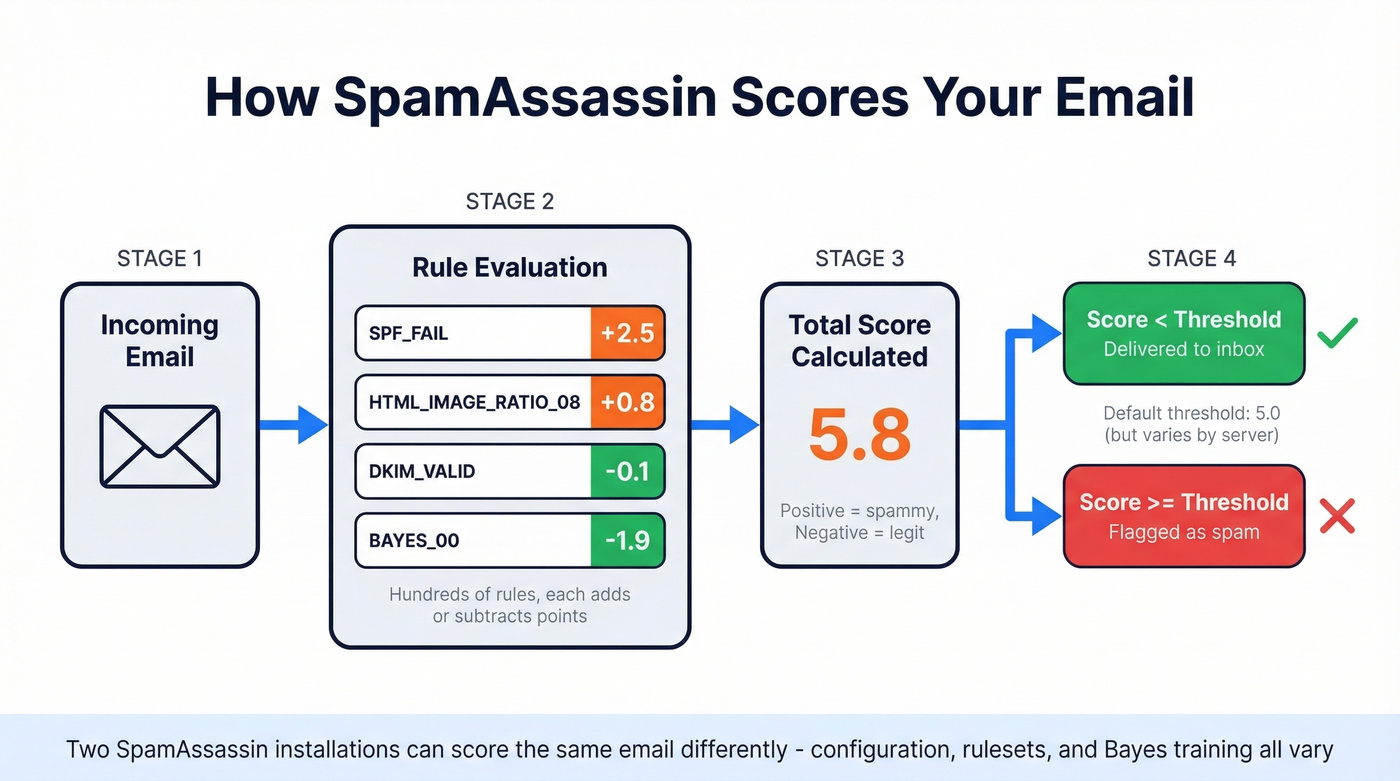
Rules without an explicit score default to 1.0. Rules prefixed with T_ (test rules) default to 0.01 - essentially inactive. The system supports four separate score sets depending on whether Bayesian classification and network tests are enabled, which means the same email can score differently on different servers. Two SA installations can produce wildly different results for identical messages depending on configuration, rulesets, and Bayes training data. That's not a bug - it's the architecture.

SpamAssassin scores won't save you if you're sending to invalid addresses. Bounces destroy sender reputation - the signal Gmail and Outlook actually care about. Prospeo's 5-step email verification delivers 98% accuracy with catch-all handling and spam-trap removal, keeping your bounce rate under 4%.
Fix the data feeding your outbound before you tweak another subject line.
What's a Good Score?
The default threshold is 5.0, but Apache's own documentation calls that "quite aggressive" and recommends ISPs use 8.0-10.0. Aim for under 3.0 as a diagnostic benchmark. If you're running CI pipelines or pre-send automation, gating on a 3.0 threshold catches most problems before they hit real inboxes.
| Score Range | Risk Level | Action |
|---|---|---|
| 0-2.9 | Low | No action needed |
| 3.0-4.9 | Medium | Review flagged rules |
| 5.0-7.9 | High | Fix auth + content issues |
| 8.0+ | Critical | Audit everything - likely blocked |
Rules That Kill Deliverability
Not all rules hit equally hard. These are the high-impact ones we see constantly in real-world setups, along with what triggers them and how to fix each.
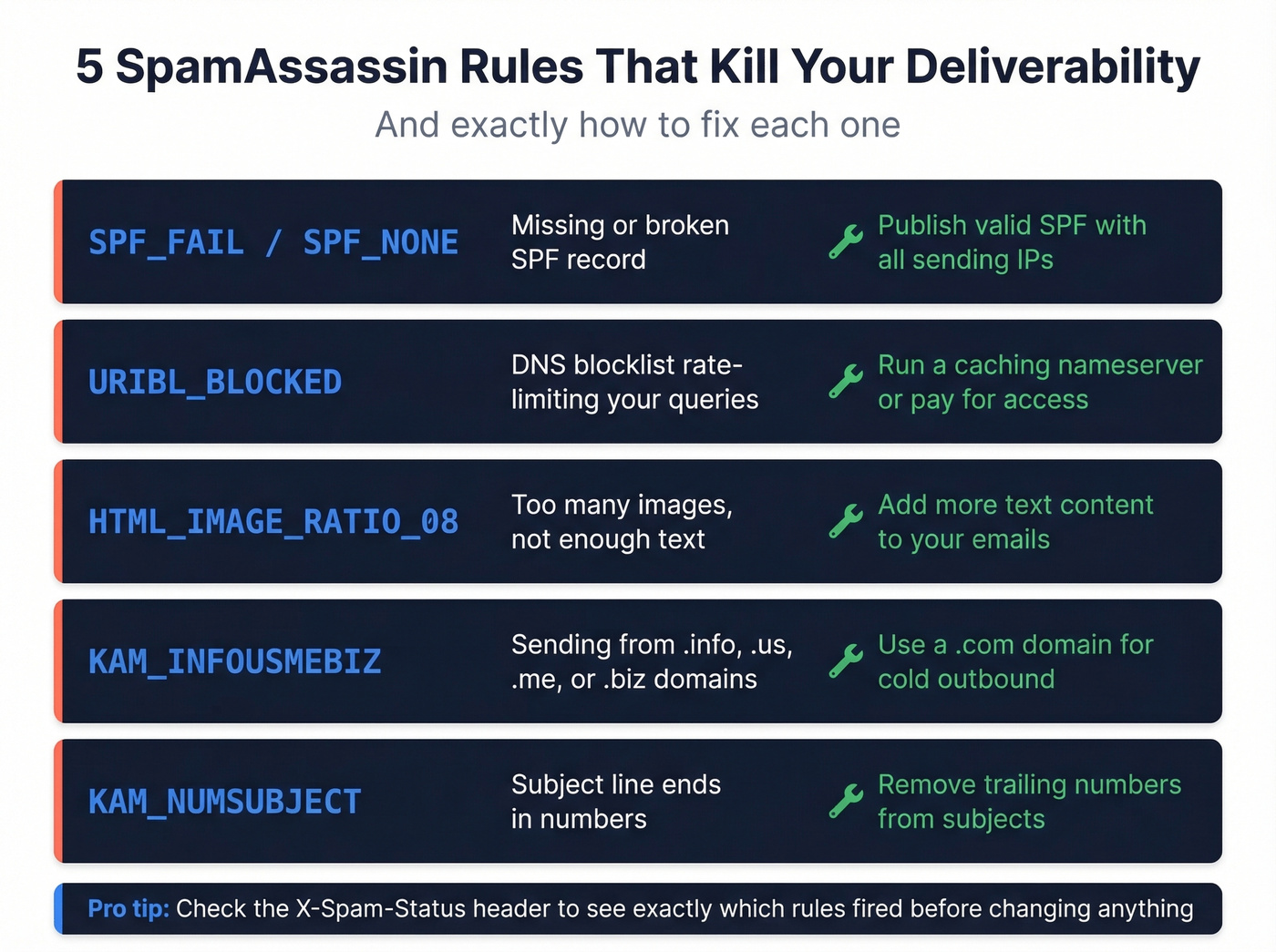
| Rule | What Triggers It | Fix |
|---|---|---|
| SPF_FAIL / SPF_NONE | Missing or misconfigured SPF record | Publish a valid SPF record; include all sending IPs |
| URIBL_BLOCKED | DNS blocklist rate-limiting your queries | Run a caching nameserver, mirror the list, or pay for access |
| HTML_IMAGE_RATIO_08 | Too many images relative to text | Add more text content; don't send image-only emails |
| KAM_INFOUSMEBIZ | Sending from .info, .us, .me, or .biz TLDs | Use a .com domain for cold outbound - period |
| KAM_NUMSUBJECT | Subject line ends in numbers (excluding current years) | Remove trailing numbers from subject lines |
When you get flagged, the X-Spam-Status header tells you exactly what happened. It looks something like: X-Spam-Status: Yes, score=5.8 required=5.0 tests=KAM_INFOUSMEBIZ,KAM_NUMSUBJECT,HTML_IMAGE_RATIO_08. The score is your total, required is the server's threshold, and tests lists every rule that fired. Read that header before you change anything - it's your debugging roadmap.
One myth worth busting: the USER_IN_DEF_DKIM_WL rule reduces your score by roughly 7.5 points, which is massive. But there's no application process to get on that whitelist. Entries are added rarely and unilaterally. Don't waste time chasing it.
Common Myths That Waste Your Time
"Stay under 5.0 or you're dead." Apache's own docs recommend ISPs set thresholds at 8.0-10.0. A score of 5.1 doesn't mean your email is blocked everywhere - it means one default configuration would flag it.
"You can apply to get whitelisted." There's no formal application process. The global whitelist is maintained ad hoc. Focus on authentication instead.
"A perfect SA score means inbox placement." That Reddit user got a 0.00 and still landed in Yahoo's spam folder. SA scores and inbox placement are different problems with different solutions. If you treat deliverability checker results as guarantees rather than diagnostics, you'll chase the wrong fixes for weeks.
How to Test Your Score Before Sending
Running a spam filter test before every campaign is the fastest way to catch rule violations early. Three tiers, depending on your volume:
Free/quick: Mail-Tester.com - send to a unique address, get your score and flagged rules. It's the most popular email spam tester for a reason: limited daily tests, but great for spot checks.
Professional: GlockApps (from ~$79/mo) - multi-provider inbox placement testing plus SA scoring. Worth it if you're running campaigns at scale.
DIY: Run a local SpamAssassin instance to debug specific rules. Best for high-volume senders who need granular control.
Use these tools for diagnostics, not as gospel. Any spam tester tells you what SA thinks. It doesn't tell you what Gmail thinks.
Fixing Deliverability in Cold Outbound
If you're running cold outbound, SA optimization is the last 10% - not the first thing to fix. The remediation order that actually works: authentication, then data quality, then content.
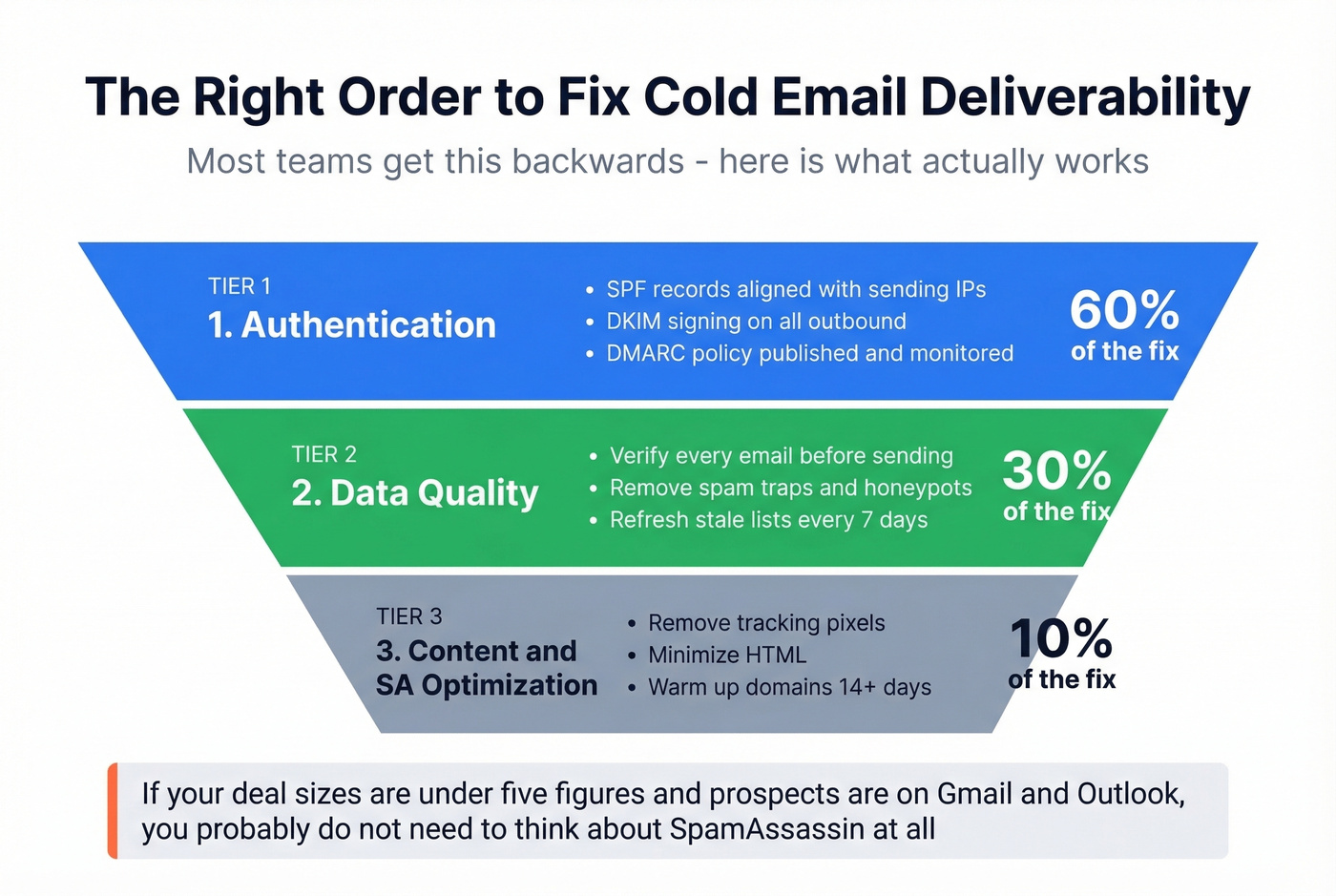
Let's be honest: if your deal sizes are under five figures and your prospects are mostly on Gmail and Outlook, you probably don't need to think about SpamAssassin at all. Fix your SPF/DKIM/DMARC, clean your list, and write emails that sound like a human wrote them. That gets you 90% of the way there.
On the content side, the consensus on r/coldemail is clear: remove tracking pixels, minimize HTML, and warm up new domains for at least 14 days before scaling volume. These aren't just SA optimizations - they help across all filtering systems.
Most teams get the causation backwards. Bad email data causes bounces. Bounces damage sender reputation. Damaged reputation feeds into reputation-based SA rules and blocklist checks, which push your score higher. The SpamAssassin score is a symptom. Bad data is the disease. In our experience, teams that fix data quality before touching templates see the fastest improvement - sometimes within days, not weeks.
Before you touch your templates, clean your list. Prospeo's 5-step verification process handles catch-all domains, spam-trap removal, and honeypot filtering - the exact upstream issues that cascade into deliverability problems. With 98% email accuracy and a 7-day data refresh cycle, you're not sending to addresses that went stale six weeks ago.
If you want to get more systematic about it, track your email bounce rate and use email reputation tools to spot issues before providers do.
Every bounced email chips away at the domain reputation that actually controls inbox placement. Teams using Prospeo's 143M+ verified emails cut bounce rates from 35%+ to under 4% - the kind of improvement no SpamAssassin rule optimization can match. At $0.01 per email, clean data costs less than one lost deal.
Stop debugging spam scores. Start sending to real inboxes.
FAQ
Does SpamAssassin affect email deliverability on Gmail?
No. Gmail uses proprietary AI-based filtering that weighs engagement signals, sender reputation, and authentication alignment - not SpamAssassin's rule-based scoring. A perfect SA score has zero direct impact on Gmail inbox placement. Treat it as a diagnostic for self-hosted mail servers only.
What SpamAssassin score is too high?
The default flagging threshold is 5.0, but Apache recommends ISPs use 8.0-10.0. As a diagnostic benchmark, aim for under 3.0. Anything above 5.0 warrants investigating which specific rules are firing via the X-Spam-Status header.
What does an email spam test involve?
Send your draft to a testing address like Mail-Tester.com, review the SA score and individual rule hits, fix flagged issues, and retest. Repeat until you're consistently under 3.0. Treat this as an iterative diagnostic loop - not a one-time checkbox before launch.
Can bad email data hurt my SpamAssassin score?
Yes, indirectly. High bounce rates damage sender reputation, which feeds into reputation-based SA rules and DNSBL blocklist checks. Cleaning your list with a verification tool that catches spam traps and honeypots upstream prevents these bounces before SA ever scores your message.