

SPF, DKIM & DMARC Records: The Practical Setup Guide
Business email compromise is a $55 billion scam, according to FBI data. Phishing drives roughly 16% of data breaches. And as of 2026, Google, Yahoo, and Microsoft enforce bulk-sender authentication aggressively - non-compliant traffic now sees permanent rejections. If you haven't configured your SPF, DKIM, and DMARC records, your outbound is already hitting spam folders or bouncing entirely.
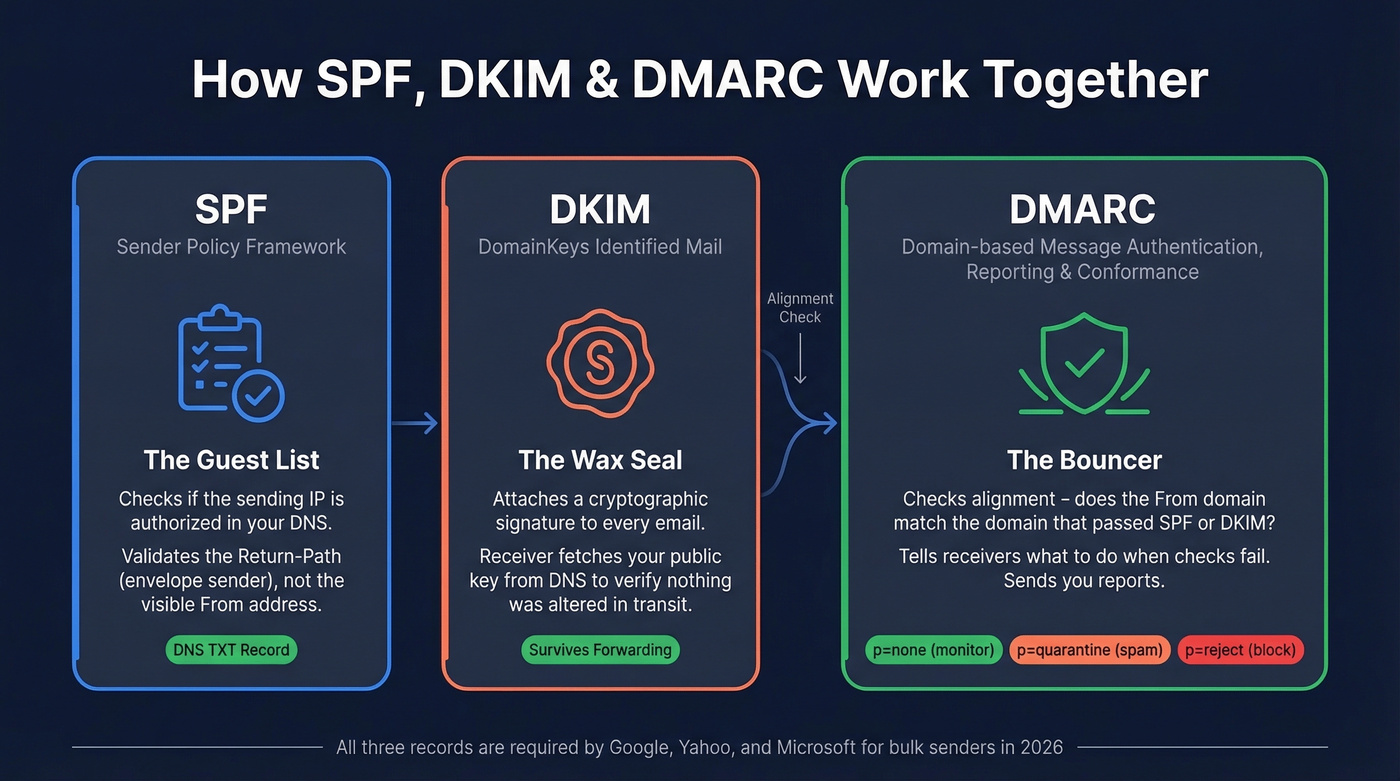
Think of SPF as a guest list, DKIM as a wax seal, and DMARC as the bouncer who checks both.
- SPF tells receiving servers which IPs can send on behalf of your domain.
- DKIM proves the email wasn't tampered with using a cryptographic signature.
- DMARC ties SPF and DKIM together with a policy and a reporting layer.
Every major inbox provider now requires all three for bulk senders. Here's exactly what to publish in your DNS.
How SPF, DKIM & DMARC Work
SPF (Sender Policy Framework)
SPF is a DNS TXT record listing every server authorized to send email for your domain. When a receiver gets a message, it checks the sending IP against your SPF record. No match, and the message gets rejected or routed to spam. Critically, SPF checks the Return-Path - the envelope sender - not the visible From address, which is why DMARC alignment matters so much.
A real-world example for a team using Google Workspace and Brevo:
v=spf1 include:_spf.google.com include:spf.brevo.com -all
That -all means "reject anything not on this list." Two rules you can't break: only one SPF record per domain, and a hard cap of 10 DNS-lookup-triggering mechanisms per RFC 7208. Mechanisms that count toward the limit include include, a, mx, redirect, exists, and ptr. Mechanisms that don't: ip4, ip6, all. At around seven SaaS tools, many orgs are already brushing up against the threshold.
DKIM (DomainKeys Identified Mail)
DKIM attaches a cryptographic signature to every outgoing email. The receiving server fetches your public key from DNS and verifies the signature matches. If someone altered the message in transit, verification fails.
Your DKIM record looks something like this:
v=DKIM1; k=rsa; p=MIGfMA0GCSqGSIb3DQEBAQUAA4GNA...
Each sending service gets its own selector - a label that tells the receiver which key to look up. Google might use google._domainkey, while your marketing platform uses something different entirely. You can publish DKIM as a TXT record or a CNAME for delegated key hosting, depending on the provider.
If you want a quick validation workflow after publishing, see how to verify DKIM is working.
DMARC (Domain-based Message Authentication, Reporting & Conformance)
DMARC is the policy layer. It tells receivers what to do when SPF or DKIM fails, and it sends you reports about it. The critical concept is alignment: the domain in the visible "From" header must match the domain that passed SPF or DKIM. Without alignment, a spoofer could pass authentication on their own domain while impersonating yours in the From field.
Start with monitoring mode:
v=DMARC1; p=none; rua=mailto:dmarc-reports@yourdomain.com
Publish this at _dmarc.yourdomain.com as a TXT record. One DMARC record per domain - same rule as SPF. Only about 30% of domains globally had adopted DMARC as of 2023, which tells you how far behind most organizations still are. Even domains that don't send email should publish a DMARC record - often v=DMARC1; p=reject - to prevent spoofing. Once you're enforcing DMARC, you can also publish a BIMI record to display your brand logo in supported inboxes, but that's a separate setup.
Provider Requirements in 2026
| Date | Milestone |
|---|---|
| Feb 2024 | Google & Yahoo begin initial enforcement - SPF+DKIM+DMARC required for 5K+/day senders |
| Apr 2024 | Google & Yahoo tighten enforcement |
| May 2025 | Microsoft Outlook.com enforcement begins |
| Nov 2025 | Gmail ramps up enforcement; non-compliant traffic sees permanent 550 rejections |
| 2026 | Full enforcement across all three providers |
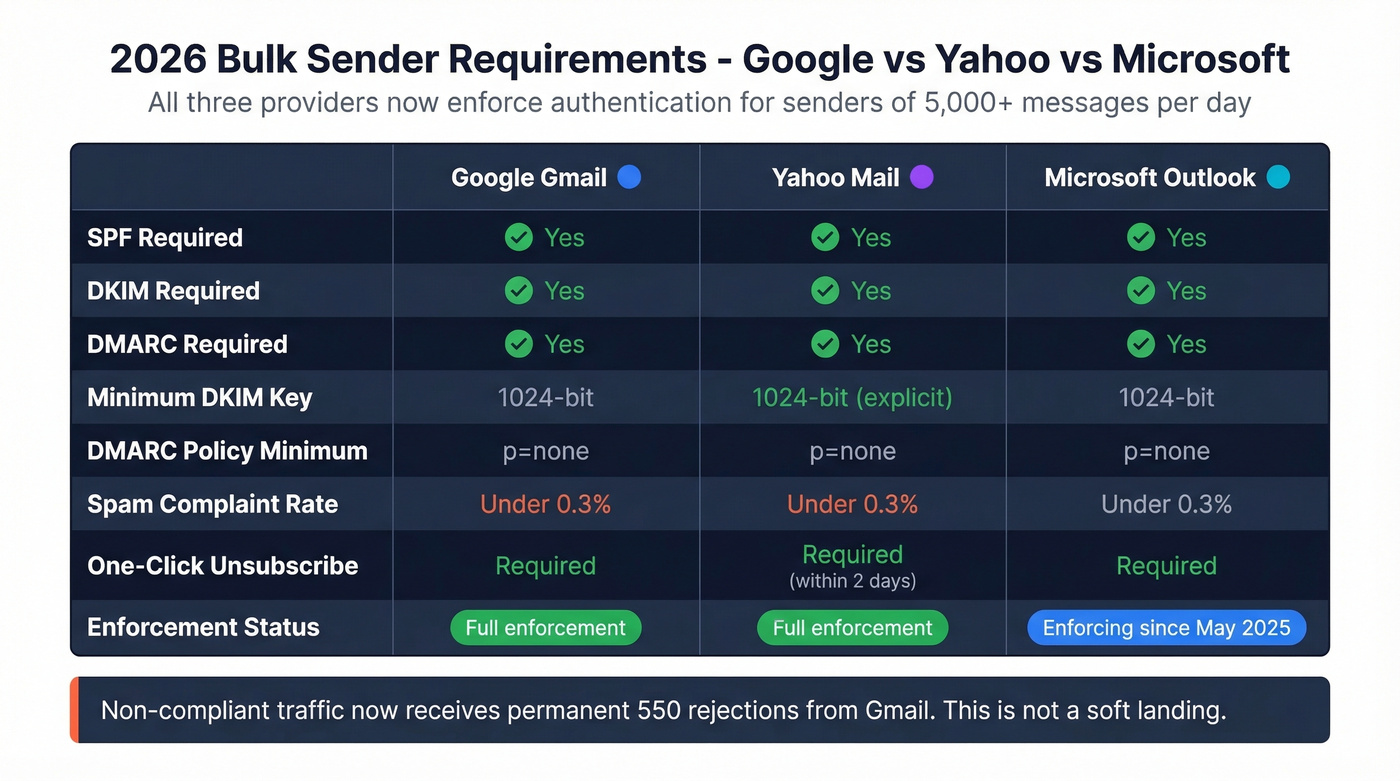
Yahoo's official requirements are the most specific: spam complaint rate below 0.3%, one-click unsubscribe honored within 2 days, DKIM minimum 1024-bit key length, DMARC at least p=none with passing alignment. Relaxed alignment is acceptable. Bulk sender means 5,000+ messages per day.
Google and Microsoft enforce similar rules. If you're sending outbound at any real volume in 2026, all three records are non-negotiable.
Phased DMARC Rollout
Don't jump straight to p=reject. That's how you accidentally block your own marketing platform's emails and spend a Friday afternoon on a fire drill.
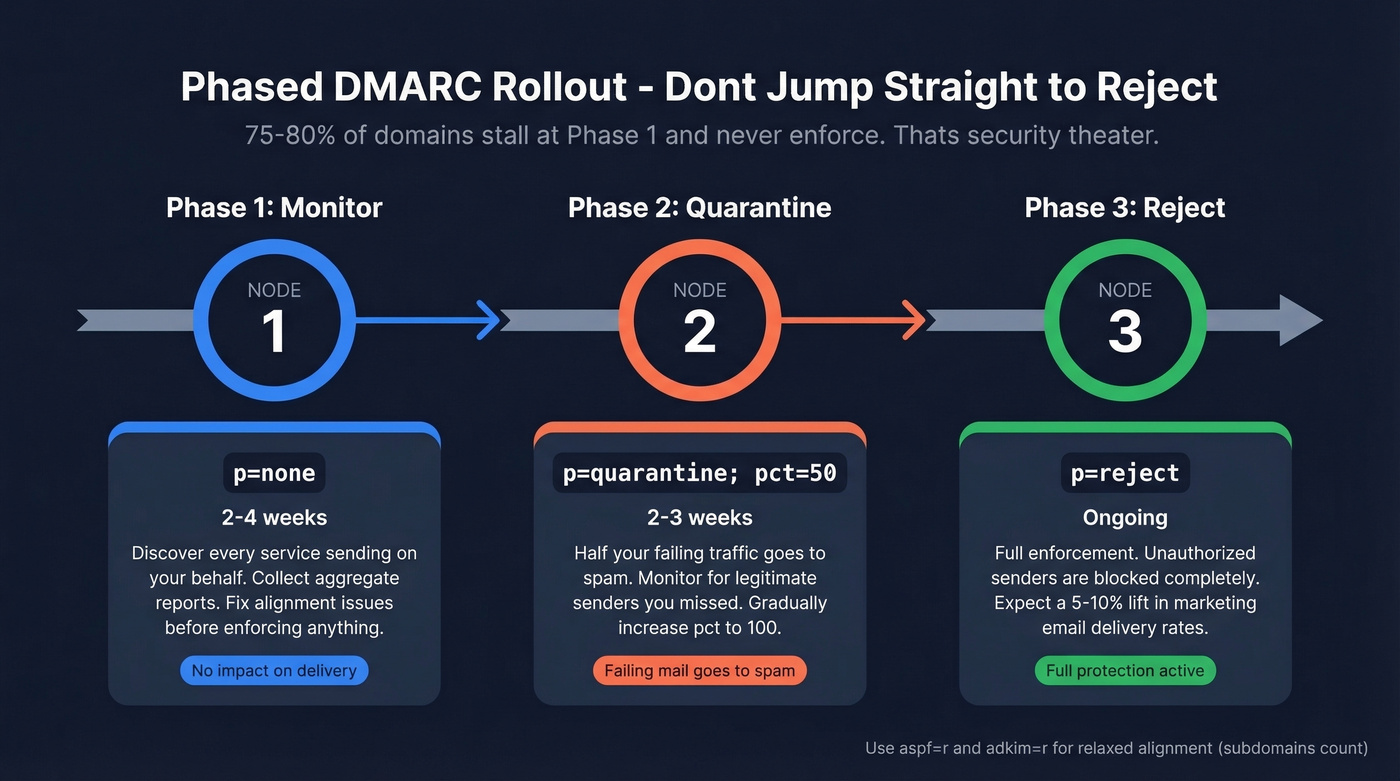
Phase 1 - Monitor (2-4 weeks):
v=DMARC1; p=none; rua=mailto:dmarc-reports@yourdomain.com; aspf=r; adkim=r
Discover every service sending on your behalf. Fix alignment issues.
Phase 2 - Quarantine (2-3 weeks):
v=DMARC1; p=quarantine; pct=50; rua=mailto:dmarc-reports@yourdomain.com; aspf=r; adkim=r
Half your failing traffic goes to spam. Monitor for legitimate senders you missed.
Phase 3 - Reject (ongoing):
v=DMARC1; p=reject; rua=mailto:dmarc-reports@yourdomain.com; aspf=r; adkim=r
The aspf=r and adkim=r tags set relaxed alignment, meaning subdomains count. Switch to aspf=s; adkim=s for strict alignment if you want exact domain matching only.
Here's the thing: 75-80% of domains that publish DMARC stall at p=none and never move to enforcement. That's security theater. The whole point of DMARC is the policy - p=none just watches. Organizations that move to enforcement typically see a 5-10% lift in marketing email delivery rates, which makes the effort worth it beyond security alone.

Perfect authentication means nothing if you're emailing dead addresses. Prospeo's 5-step verification and 7-day data refresh keep bounce rates under 4% - so your SPF, DKIM, and DMARC setup actually pays off with emails that land in real inboxes.
Stop authenticating emails that were never going to arrive.
Reading DMARC Reports
DMARC aggregate reports arrive as raw XML. Genuinely painful to parse without tooling.
You'll get rua reports - aggregate, usually daily - but almost never ruf reports, which are forensic and per-failure. Gmail and Outlook don't send ruf at all due to privacy concerns, so don't count on them. The fields that matter in aggregate reports are source_ip (who's sending), count (volume), disposition (what the receiver did), and the dkim/spf result per record. Use these to identify unauthorized senders before you move from monitoring to enforcement. Free tools like Valimail or Postmark's DMARC digests make the XML digestible.
Troubleshooting Common Failures
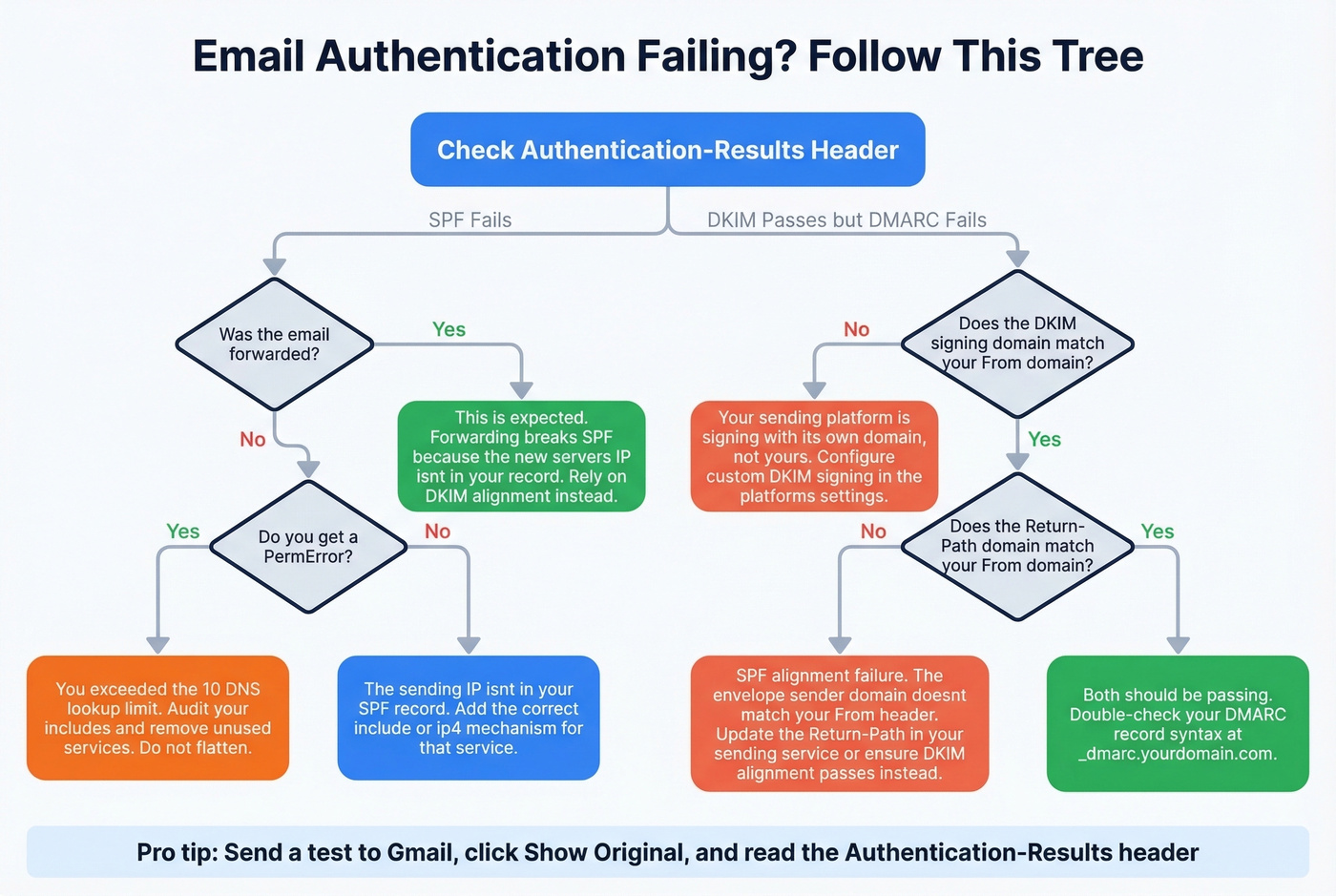
We've seen every one of these break production sends:
| Problem | Cause | Fix |
|---|---|---|
| SPF fails after forwarding | Forwarded IP isn't in SPF | Rely on DKIM alignment |
| DKIM passes but DMARC fails | Platform signs with its domain | Configure custom DKIM signing |
| SPF PermError | Exceeded 10 lookups | Audit includes, consolidate |
| SPF passes but DMARC fails | Alignment issue, not auth | Match Return-Path to From domain |
The forwarding scenario trips up more teams than anything else. SPF checks the sending IP, and when a message gets forwarded, the new server's IP isn't in your SPF record - so SPF breaks. DKIM survives forwarding because it's tied to the message content, not the sending server. This is exactly why you need both protocols working together.
On the SPF lookup limit: yes, it's really enforced. We've seen teams debate this on r/sysadmin, but receivers do return PermError when you exceed 10 lookups. Avoid SPF flattening - providers rotate IPs, and flattened records go stale fast. Better to audit your includes and cut services you're no longer using.
Authentication Is Only Half the Equation
Let's be honest: perfect email authentication won't save you if your contact data is garbage. High bounce rates destroy sender reputation regardless of how clean your DNS is, and we've watched sales teams burn through domains because they're blasting unverified lists. Getting your SPF, DKIM, and DMARC records right is essential, but so is list hygiene. Prospeo's email finder runs a 5-step verification process with catch-all handling and spam-trap removal - the kind of thing that keeps bounce rates under 5% instead of the 30-40% range we see from teams using unverified data. Authentication protects your domain. Clean data protects your reputation. You need both.
If you're trying to quantify the damage, start with email bounce rate benchmarks and fixes.
You just spent hours configuring DNS records to protect your domain reputation. Don't torch it with bad data. Prospeo delivers 98% email accuracy with spam-trap removal and catch-all verification built in - the same infrastructure trusted by 15,000+ companies.
Protect the deliverability you just built - start with clean data.
FAQ
Can I skip SPF if I have DKIM and DMARC?
No. Yahoo explicitly requires SPF for all senders, and Google mandates it for anyone sending 5,000+ messages per day. DMARC needs at least one of SPF or DKIM to pass with alignment, but skipping SPF means you lose a layer of protection and risk non-compliance. Set up all three.
How do I check if my records are working?
Send a test email to a Gmail account, open it, click "Show original," and look for the Authentication-Results header - it shows SPF, DKIM, and DMARC pass/fail results in one place. You can also use free tools like MXToolbox or Google Admin Toolbox for DNS-level validation.
How long does DNS propagation take?
Most DNS changes propagate within 15 minutes to 2 hours, though some providers take up to 48 hours. DKIM records with long key values can be slower. Check your TTL settings and verify with a DNS lookup tool before testing.
Does authentication alone fix deliverability?
No. Authentication prevents spoofing and satisfies provider requirements, but inbox placement also depends on sender reputation, bounce rates, and engagement metrics. Teams sending to unverified lists still land in spam regardless of their DNS setup.