

How to Set Up an SPF Record: The Complete Guide With Copy-Paste Examples
It's Monday morning. Your sales team's cold emails are bouncing to Gmail, and nobody changed anything. Turns out marketing added HubSpot last week without updating DNS, and now your SPF record is broken. We've seen this scenario tank outbound pipeline for weeks - and in 2026, the consequences are worse than ever.
Between 80% and 95% of cyberattacks start with a phishing email, and with cybercrime costs projected at $10.5 trillion annually, authentication isn't optional. Google and Yahoo's bulk-sender requirements demand SPF and DKIM, plus DMARC and an easy unsubscribe mechanism. Fail authentication, and your messages land in spam - or don't land at all.
Here's everything you need for a proper SPF record setup: the syntax, provider-specific records, the 10-lookup trap, and the mistakes that break deliverability silently.
Quick Start: Copy-Paste SPF Records
If you just need the record and want to move on, grab the one that fits:
Google Workspace only:
v=spf1 include:_spf.google.com -all
Microsoft 365 only:
v=spf1 include:spf.protection.outlook.com -all
Google Workspace + SendGrid:
v=spf1 include:_spf.google.com include:sendgrid.net -all
Paste the right one into a TXT record at your domain's root. If your stack is more complex, keep reading - the details matter.
What Is an SPF Record?
An SPF record is a DNS TXT record that tells receiving mail servers which IP addresses and hosts are authorized to send email on behalf of your domain. When an email arrives, the receiver checks the envelope sender - the MAIL FROM address, not the visible From: header - against your SPF record per RFC 7208. If the sending server isn't listed, SPF fails.
Here's what a basic record looks like:
v=spf1 include:_spf.google.com -all
Version tag, one authorized sender, and a hardfail directive for everything else. Simple enough. The complexity comes when you add more senders, which every modern company does.
SPF Syntax Reference
Before building your record, you need to know the building blocks. SPF uses mechanisms to define who's authorized and qualifiers to define what happens when a mechanism matches.
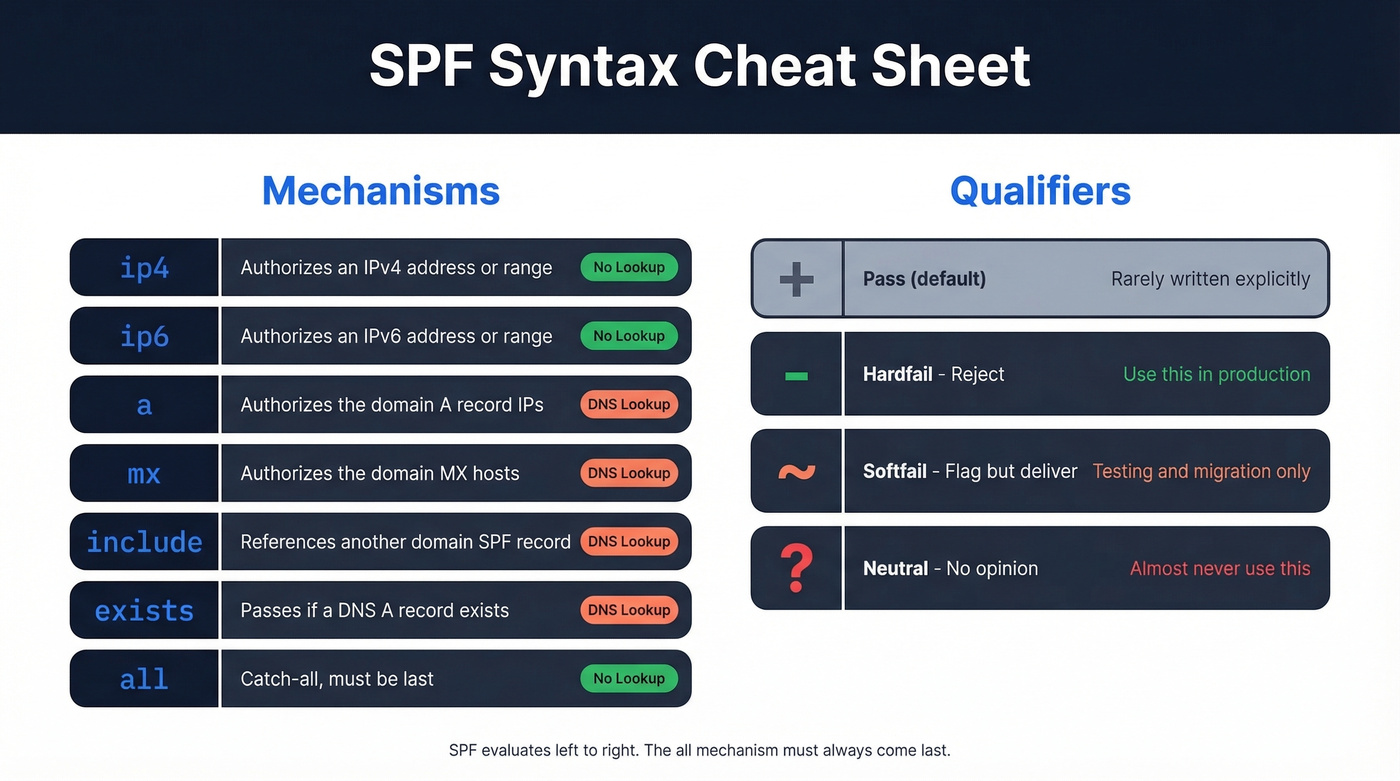
| Mechanism | What It Does | DNS Lookup? |
|---|---|---|
ip4 |
Authorizes an IPv4 address/range | No |
ip6 |
Authorizes an IPv6 address/range | No |
a |
Authorizes the domain's A record IPs | Yes |
mx |
Authorizes the domain's MX hosts | Yes |
include |
References another domain's SPF | Yes |
exists |
Passes if a DNS A record exists | Yes |
redirect |
Replaces the current SPF with another | Yes |
all |
Catch-all at the end of the record | No |
ptr |
Reverse DNS lookup (deprecated) | Yes |
Skip ptr. It's expensive, unreliable, and explicitly discouraged in the spec.
| Qualifier | Meaning | When to Use |
|---|---|---|
+ (default) |
Pass | Implicit; rarely written |
- |
Hardfail - reject | Production records |
~ |
Softfail - flag but deliver | Testing/migration only |
? |
Neutral - no opinion | Almost never |
SPF evaluates left to right, and all must be the last mechanism. Use -all unless you're actively migrating senders and need a temporary softfail window. There's no good reason to stay on ~all permanently - it's the email equivalent of a security camera that records but never alerts anyone.
How to Set Up SPF Records: Step by Step
Step 1: Inventory Every Sender
Audit every service that sends email from your domain. That means your email platform, marketing automation, transactional email, CRM, and support desk. Vendor support teams will often tell you to add an include without checking your existing record or total lookup count - don't blindly follow their instructions.
Check your DMARC aggregate reports if you already have them. They'll show you senders you forgot about, and we've found this step alone catches at least one or two "ghost" senders that nobody on the team remembers adding.
Step 2: Build the Record
You get 10 DNS lookups total. That's a hard cap from RFC 7208, and exceeding it causes a PermError - your emails get rejected or spammed. Target 8 or fewer lookups to leave buffer for provider-side changes you can't control.
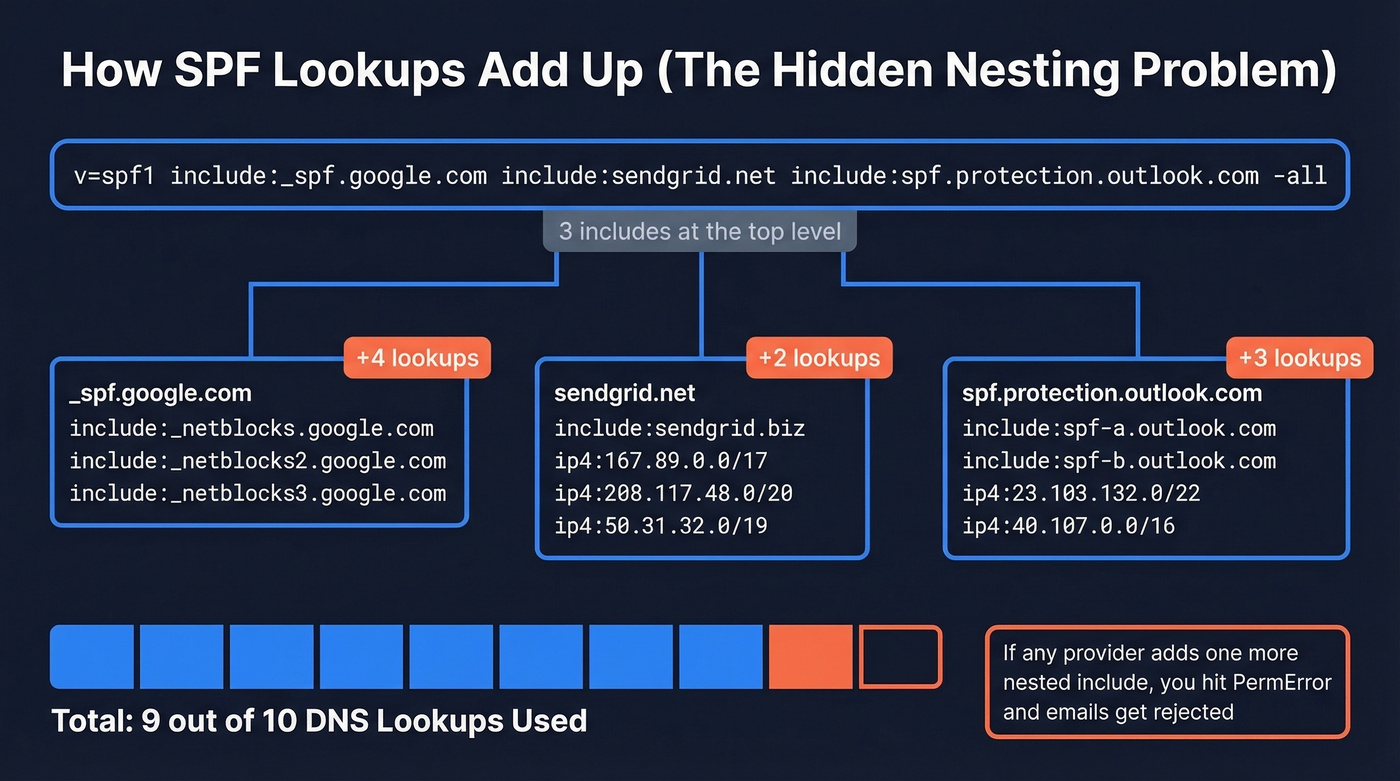
Here's a worked example for a SaaS startup using Google Workspace, SendGrid, and Microsoft 365:
v=spf1 include:_spf.google.com include:sendgrid.net include:spf.protection.outlook.com -all
At the top level, that's three mechanisms triggering DNS lookups. But the real risk is nested lookups: each include can expand into additional include, a, and mx checks under the hood. That's how a record that looks "small" still hits the 10-lookup cap.
Step 3: Add the Record to DNS
Log into your DNS provider and create a TXT record:
- Host/Name:
@(or leave blank, depending on the provider) - Type:
TXT - Value: your full SPF string
- TTL:
3600(1 hour). Drop to300temporarily if you're testing so changes propagate faster and rollback is quick.
One record. Not two. Publishing multiple SPF TXT records on the same domain causes a PermError and breaks everything.
Provider-Specific Notes
GoDaddy: Go to DNS Management, Add Record, TXT. The Host field should be @. Paste the full SPF string into the TXT Value field.
Namecheap: Under Advanced DNS, Add New Record, TXT. Set Host to @ and Value to your SPF string. After saving, verify the record with an external tool to confirm it published correctly - we've seen Namecheap silently truncate long records.
Step 4: Validate
Run your record through MxToolbox's SPF checker or Google Admin Toolbox. Confirm three things: syntax is clean, all mechanisms resolve, and your total lookup count is under 10. If you're sitting at 9 or 10, you're one vendor change away from breaking.
Step 5: Monitor With DMARC
This isn't one-and-done. Set up a DMARC record with rua= reporting to receive aggregate reports. These show you SPF pass/fail rates over time, catch new senders you forgot to authorize, and alert you when a provider-side change pushes your lookups over the limit.
Start DMARC at p=none to collect data without affecting delivery, then tighten to quarantine or reject once you're confident.
For a deeper deliverability baseline beyond authentication, see our Email Deliverability Guide.

A perfect SPF record means nothing if you're sending to bad email addresses. Prospeo's 5-step verification and 7-day data refresh keep bounce rates under 4% - so your SPF, DKIM, and DMARC setup actually protects a domain worth protecting.
Stop fixing deliverability problems caused by bad data.
SPF Configuration for Common Providers
Every email provider gives you a different include value, and none of them warn you how many nested lookups their include triggers. Here are the ones you'll see in real setups:
| Provider | SPF Mechanism |
|---|---|
| Google Workspace | include:_spf.google.com |
| Microsoft 365 | include:spf.protection.outlook.com |
| SendGrid | include:sendgrid.net |
| Mailchimp | include:servers.mcsv.net |
| Salesforce | include:_spf.salesforce.com |
| Amazon SES | include:amazonses.com |
Let's build real combined records.
SaaS startup (Google Workspace + SendGrid + Microsoft 365):
v=spf1 include:_spf.google.com include:sendgrid.net include:spf.protection.outlook.com -all
Enterprise (Microsoft 365 + Salesforce + Mailchimp + Amazon SES):
v=spf1 include:spf.protection.outlook.com include:_spf.salesforce.com include:servers.mcsv.net include:amazonses.com -all
If either record gets close to the 10-lookup limit, you'll need to simplify with subdomains, pruning, or IP-based mechanisms. If you want more copy-paste variations, use these SPF record examples.
The 10-Lookup Limit
Why SPF Breaks Silently
Your record can exceed 10 lookups even if you never touch it. Each include points to another domain's SPF record, and that domain's record can change without notifying you. If a provider adds more nested mechanisms inside their SPF, your total lookup count goes up silently. The consensus on r/DMARC is that this catches people off guard constantly - one day everything works, the next day Gmail is rejecting your emails, and you didn't change a thing.
When you exceed 10 lookups, SPF returns a PermError. Most receivers treat that as a failure.
Here's the thing: the 10-lookup limit is the single worst design decision in email authentication. It made sense when companies used one email provider. In 2026, a mid-market company easily uses five to seven email-sending services. The limit hasn't changed. Your stack has.
How to Stay Under the Limit
Replace include with ip4/ip6 for senders with static IPs. A transactional email server with a fixed IP doesn't need an include - use ip4:203.0.113.10 and save a lookup.
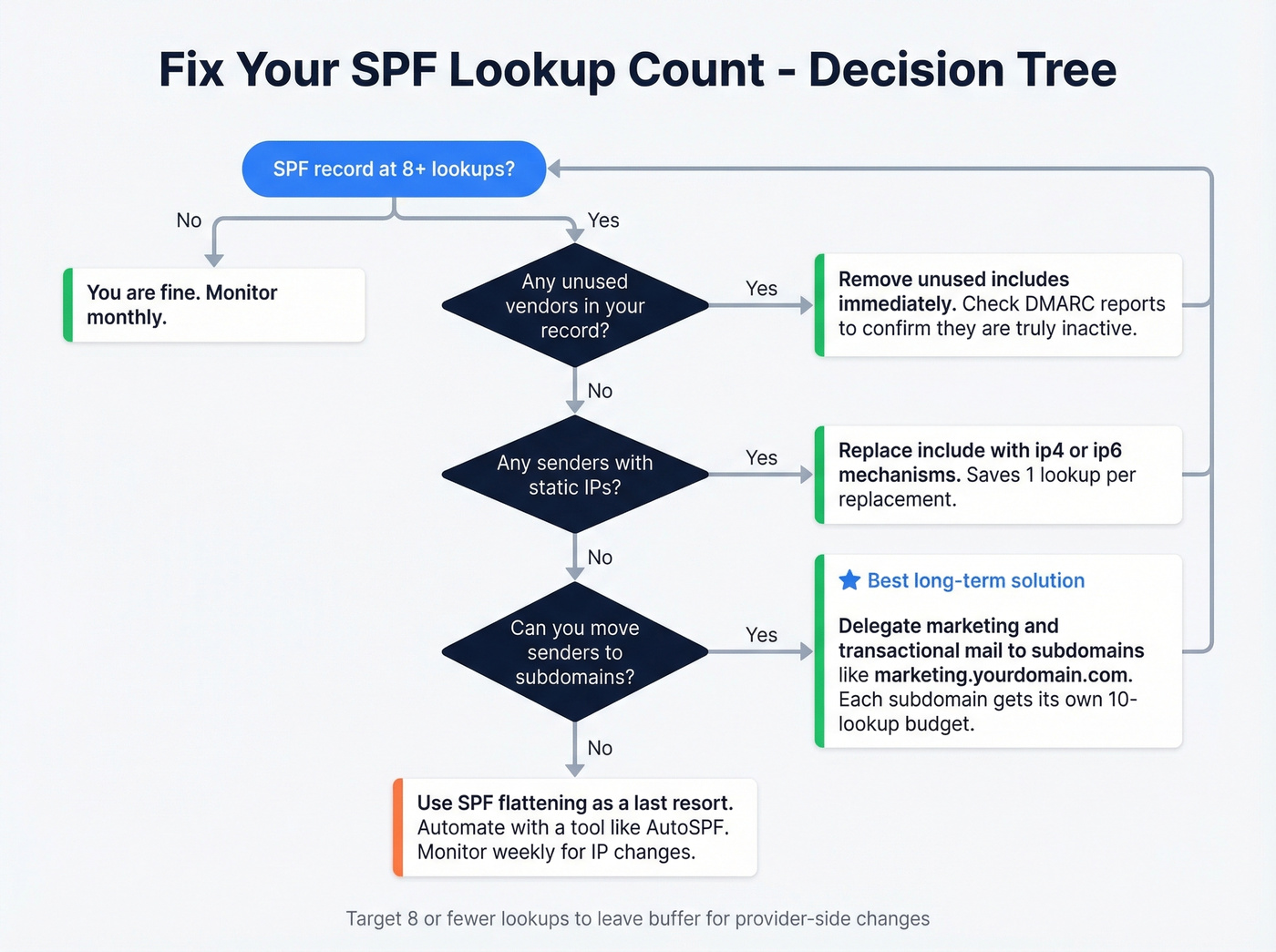
Move senders to subdomains. Keep your root domain lean and delegate marketing and transactional email to subdomains. Before: one bloated record. After:
- Root:
v=spf1 include:spf.protection.outlook.com -all marketing.yourdomain.com:v=spf1 include:sendgrid.net include:servers.mcsv.net -all
Remove unused vendors. That Mandrill include from 2019? Kill it.
Don't use ptr. Deprecated, triggers a lookup, and adds no value.
SPF flattening as a last resort. Flattening converts includes to raw IP addresses, eliminating lookups. It works until the provider changes their IPs, and then it silently breaks. Flattening is a band-aid, not a solution. If you go this route, tools like AutoSPF can automate monitoring and updates so you're not manually checking IP ranges every week. But subdomain delegation is almost always the better answer.
Common Mistakes and Fixes
Multiple SPF records on one domain = PermError. This is the #1 mistake we see. You can only have one SPF TXT record per domain. If your DNS shows two records starting with v=spf1, merge them into one. The 255-character limit is per string within a record, not per record - you can split a long value into multiple quoted strings that concatenate. That's different from having two separate SPF records.
If you're also troubleshooting bounces while fixing authentication, use these email bounce rate benchmarks and diagnostics.
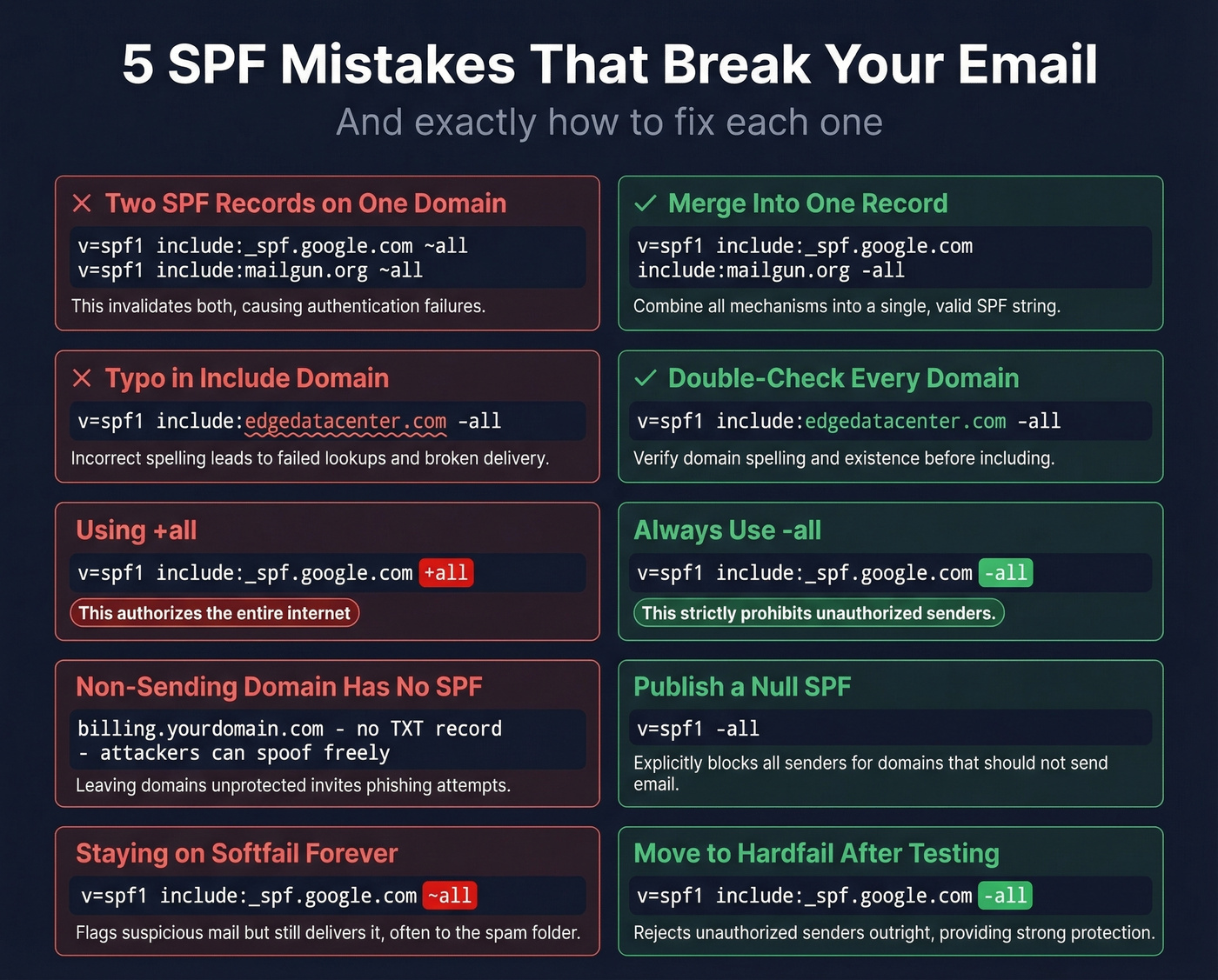
Typos in include domains = silent failure. A real example from r/DMARC: someone typed include:edgedatacetner.com instead of include:edgedatacenter.com. One transposed letter, and the include resolves to nothing. SPF doesn't warn you - it just fails for that sender.
Using +all = you've authorized the entire internet. This tells receivers that literally any server can send email as your domain. Use -all. Always.
Forgetting non-sending domains. If billing.yourdomain.com doesn't send email, it still needs an SPF record: v=spf1 -all. Without one, a lookup returns "none" - zero SPF protection, and attackers can spoof it freely.
SPF alignment confusion. We see this trip up even experienced email ops teams. You've rewritten your record multiple times, but DMARC reports still show SPF as "not aligned." SPF alignment checks the envelope sender (Return-Path), not the From: header. These are different things. If your marketing tool sends with a Return-Path of bounce@sendgrid.net but your From: header says you@yourdomain.com, SPF passes for sendgrid.net - but it won't align with your domain for DMARC purposes. You need DKIM alignment to cover that gap. This is the single most misunderstood concept in email authentication, and it's the reason we always tell teams to set up DKIM before assuming SPF alone has them covered. If you want the deeper technical breakdown, read our guide to DMARC alignment and how it impacts pass/fail.
SPF, DKIM, and DMARC Together
SPF alone isn't enough. It doesn't survive forwarding, it doesn't verify message integrity, and it doesn't tell receivers what to do when authentication fails. You need all three protocols working together.
| Protocol | What It Does | DNS Record | What It Checks |
|---|---|---|---|
| SPF | Lists authorized senders | TXT on domain | Envelope sender IP |
| DKIM | Signs messages cryptographically | TXT (public key) | Message body + headers |
| DMARC | Sets policy + enables reporting | TXT (_dmarc.) |
SPF/DKIM alignment with From: domain |
Implementation order: SPF first, DKIM second, DMARC third. Start DMARC at p=none, review your aggregate reports for a few weeks, then move to quarantine and eventually reject. You can verify all three by checking the Authentication-Results header in any received email - look for spf=pass, dkim=pass, and dmarc=pass. For a practical checklist, see how to verify DKIM is working.
SPF protects your domain from spoofing. But sending to invalid addresses damages your reputation just as fast. Before launching outbound campaigns, run your list through Prospeo's email verification - 98% accuracy with a 7-day data refresh cycle. Pair a clean authentication setup with verified contact data and you eliminate the two biggest deliverability killers in one move. If you're scaling outbound, also track email velocity so you don't trigger provider limits.
You just spent time locking down your DNS so emails authenticate properly. Don't waste that effort on unverified contact lists that spike your bounce rate and trigger spam filters. Prospeo delivers 98% email accuracy at $0.01 per lead - so every send hits a real inbox.
Protect your sender reputation with data that's verified weekly.
FAQ
Can I have multiple SPF records on one domain?
No. Two SPF TXT records on the same domain cause a PermError and break authentication entirely. Merge all authorized senders into a single record - combine their include mechanisms separated by spaces before the closing -all.
What's the difference between -all and ~all?
-all instructs receivers to reject unauthorized senders outright. ~all flags them but typically still delivers the message. Use -all for production domains; only use ~all temporarily during a migration window.
How long does DNS propagation take after adding an SPF record?
Typically minutes to a few hours, rarely up to 48 hours depending on your registrar. Lower your TTL to 300 seconds before making changes so rollback is fast if something breaks.
What happens if I exceed 10 DNS lookups?
SPF returns a PermError, and most receivers treat it as an authentication failure - meaning rejected messages or spam folder delivery. Fix it by replacing includes with ip4/ip6 for static-IP senders, delegating to subdomains, or removing unused vendors.
Does SPF alone protect my sender reputation?
SPF stops unauthorized servers from sending as your domain, but it doesn't prevent reputation damage from bounces, spam traps, or honeypots in your own lists. A perfect SPF record won't save you if 15% of your emails bounce because the addresses are stale.