


5 Stackcrawler Alternatives That Go Beyond Tech Detection
Stackcrawler does one thing well: you paste a URL, it tells you what tech the site runs. With 30 free lookups and paid plans starting at $9/month, it's cheap. But here's the frustration we keep hearing from sales teams: you find out a company uses Shopify, and then what? You still need to find the VP of E-commerce, get a verified email, and actually reach them. Detection without contact data is a research project, not a pipeline.
The technographics market hit roughly $1.17 billion by 2025, which means more tools and more noise to cut through. These five alternatives solve different parts of the problem depending on whether you're prospecting, researching, or building market intelligence decks.
Our Picks (TL;DR)
- Prospeo - Best for turning tech stack signals into verified outreach lists. Technographic filters plus 300M+ contacts in one platform.
- Wappalyzer - Best browser extension for real-time, page-by-page frontend detection. The industry standard for quick lookups.
- BuiltWith - Best for enterprise-scale technology intelligence with historical data spanning 41 years.
Quick Comparison
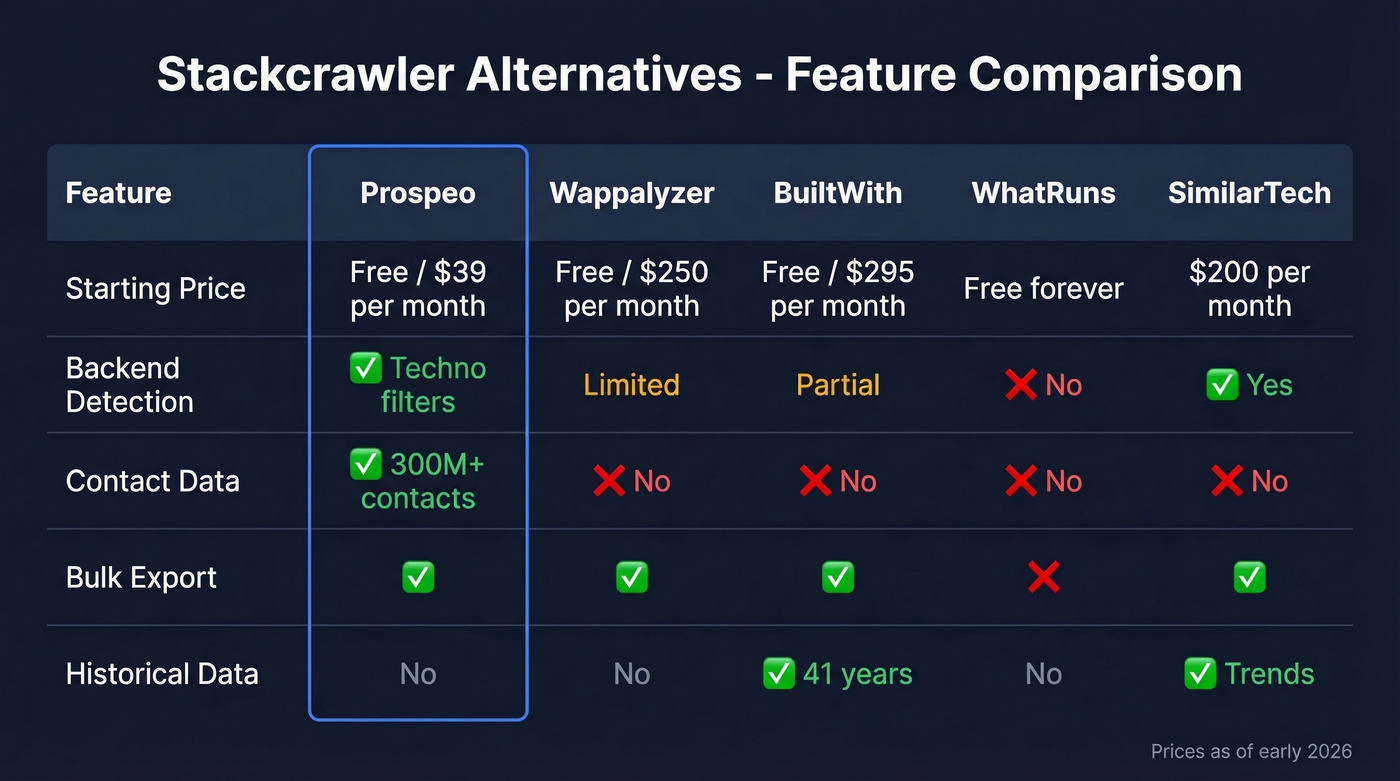
| Tool | Best For | Starting Price | Backend Detection | Contact Data |
|---|---|---|---|---|
| Prospeo | Tech-to-outreach | Free / ~$39/mo paid | Technographic filters | Yes |
| Wappalyzer | Browser detection | Free / $250/mo paid | Limited | No |
| BuiltWith | Enterprise research | Free / $295/mo paid | Partial | No |
| WhatRuns | Quick free checks | Free | No | No |
| SimilarTech | Market share data | ~$200/mo | Yes | No |

Stackcrawler tells you a company runs Shopify. Prospeo tells you the VP of E-commerce's verified email and direct dial. Filter 300M+ profiles by technology stack, job title, and company size - then export outreach-ready lists with 98% email accuracy. No tool-stitching required.
Go from tech detection to booked meetings in one platform.
The Best Stackcrawler Alternatives Compared
Prospeo
Use this if you're a sales team that needs to go from "companies running HubSpot" to "verified email for the Head of Marketing at those companies" without stitching three tools together.
If you're building outbound lists, it helps to pair technographics with sales prospecting techniques so the signal turns into action.
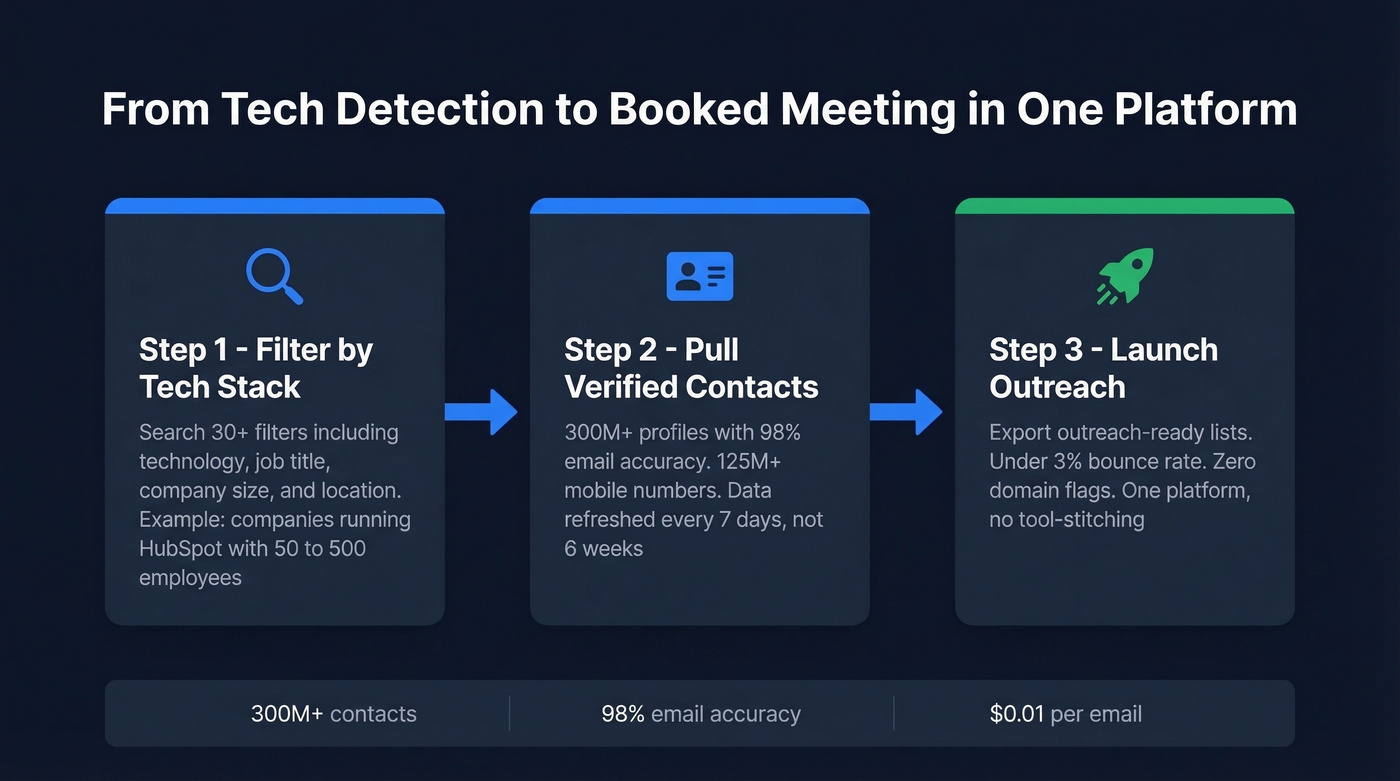
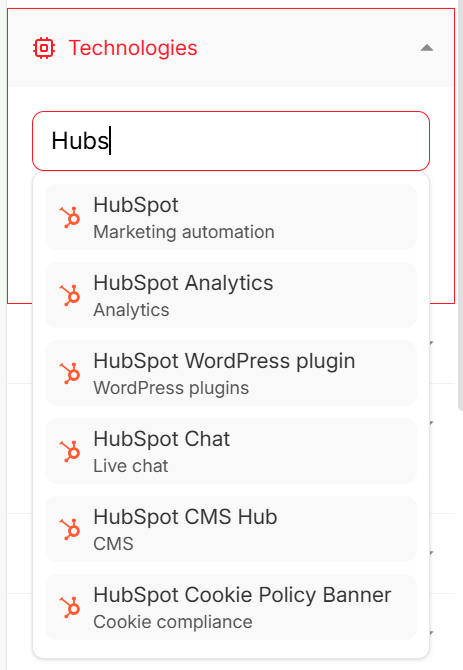
Prospeo's B2B database includes technographic filters among 30+ search criteria, so you filter by technology, layer on job title and company size, and export a list of verified contacts in seconds. We've tested this workflow extensively - the 300M+ profile database returns results with 98% email accuracy on a 7-day data refresh cycle, which is dramatically faster than the 6-week industry average. The Chrome extension (40,000+ users) pulls contact data from any company website in one click, and you also get access to 125M+ verified mobile numbers with a 30% pickup rate across all regions.
One of our customers, Stack Optimize, built from $0 to $1M ARR using this exact tech-to-outreach workflow - client deliverability stayed above 94% with bounce rates under 3% and zero domain flags. (If you're trying to keep bounces low at scale, see Email Bounce Rate.)
Skip this if you only need raw technology detection for competitive research and don't care about reaching people at those companies.
Pricing starts free with 75 emails and 100 Chrome extension credits per month. Paid plans run about $0.01 per email with no annual contracts.
Wappalyzer
Wappalyzer is the default tech detection tool for a reason. Its extension is used by over 2 million people daily, and it automatically surfaces frameworks, languages, servers, and tools the moment you land on a page. We've used it alongside every other tool on this list, and for quick frontend identification, nothing beats the speed.

It holds a G2 rating of 4.7/5 across 55 reviews, with users consistently calling the data "accurate, detailed, and instantly actionable." The free tier gives you 50 lookups per month - enough for casual research without pulling out a credit card. Pro plans start at $250/mo with 5,000 lookups and 5,000 email verifications, while the Business plan at $450/mo bumps you to 20,000 lookups. One nice touch: you can pause your plan for up to 3 months, and API credits included in the plan won't expire during the pause.
The downside? Frontend-heavy detection. The consensus across developer forums like r/webdev is clear: frontend detection is reliable, but backend detection across all these browser-based tools is largely inference-based. Also, API credits expire after 60 days (bundled credits last 365 days), which catches people off guard.
Compared to Stackcrawler, Wappalyzer's detection depth is significantly broader, but you're paying about 28x more at the Pro tier.
BuiltWith
BuiltWith is the heavyweight of technology intelligence. It tracks 113,027 technologies across 414 million domains with history going back 41 years. No other tool in this space comes close on data breadth.
The Basic plan at $295/mo limits you to 2 technologies and 2,000 domain uploads per month. Pro at $495/mo unlocks unlimited technologies. For solo researchers, the BuiltWith Advanced tier at $144/year is the sweet spot - you get individual detailed lookups without the enterprise commitment. Free individual site lookups are available forever, which makes it easy to test before committing.
Skip this if you're a sales rep who just needs to know what CMS a prospect uses. BuiltWith is built for analyst teams running large-scale market research, not for one-off prospecting. The CSV exports feed into larger analysis workflows, though expect some cleanup time before the data is presentation-ready.
If you're doing this for competitive research, a lightweight competitive intelligence strategy will help you turn exports into decisions.
WhatRuns
WhatRuns is 100% free with no usage caps. Install the browser extension, click it on any site, and see what's running. No API, no bulk export, no database. It's the tool you use when you need a quick answer and don't want to create an account anywhere.
If you need anything beyond that - bulk lookups, historical data, contact info - you've outgrown it.
SimilarTech
SimilarTech plays in a different lane entirely: market share reports, trend analysis, and version tracking timelines. For an analyst building a deck on CMS adoption rates across the Fortune 500, this is the right tool. Plans start at $200/mo (Basic) and run to $490/mo (Ultimate). With a G2 rating of 4.2/5 on just 12 reviews, it's a niche enterprise play. Most sales teams will never need it.
Which Alternative Should You Pick?
Let's be honest: most tech detection tools stop at detection. The right choice depends entirely on what you do after you see the tech stack.
Sales team building outbound lists? Go with Prospeo. You don't just need to know what tech a company uses - you need verified emails and direct dials for the people who buy that tech. We've seen teams cut their tool stack from three platforms to one and start booking meetings the same week. (If you're standardizing your stack, start with an SDR tool shortlist.)
If you're enriching existing accounts instead of net-new prospecting, consider adding data enrichment services to keep records current.
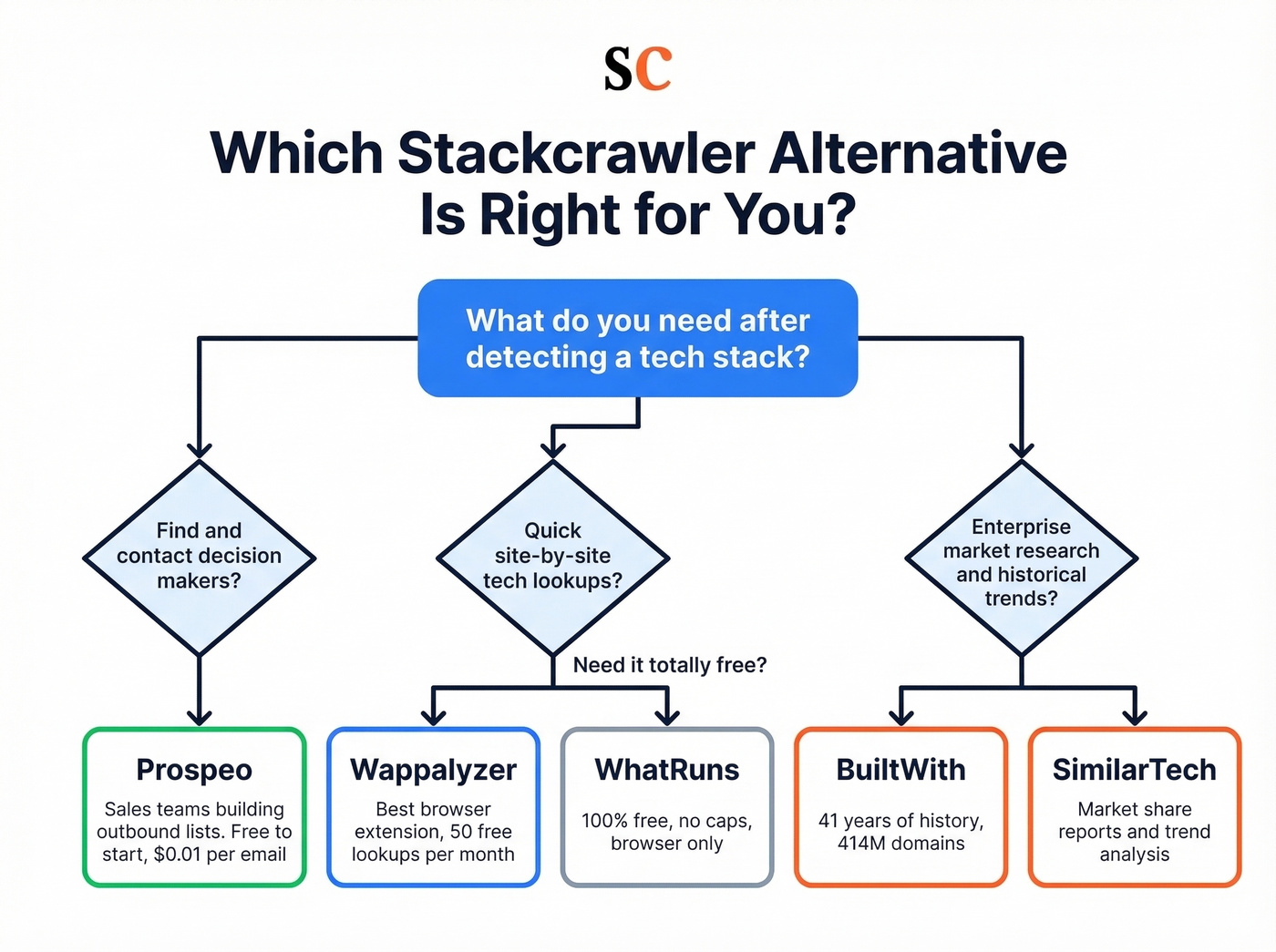
Developer or marketer doing quick site-by-site lookups? Wappalyzer. The browser extension is fast, accurate for frontend tech, and the free tier handles casual research without a credit card.
Enterprise market research team tracking technology adoption over time? BuiltWith. The historical data and domain scale are unmatched, and the exports feed into larger analysis workflows even if they need some cleanup.
Look - if your average deal size is under $15k, you almost certainly don't need BuiltWith or SimilarTech-level intelligence. A free tool like WhatRuns plus a contact data platform will get you further, faster, and for a fraction of the cost. (To keep outreach consistent, use proven sales follow-up templates.)
Stack Optimize built a $1M agency on this workflow: filter by technology, pull verified contacts, launch campaigns - all without a single domain flag. Prospeo refreshes data every 7 days (not 6 weeks), so you're reaching real people at real companies. Starting at $0.01 per email, no contracts.
Turn technographic signals into pipeline for a penny per lead.
FAQ
Is Stackcrawler free?
Yes - Stackcrawler offers a free plan with 30 technology lookups per month. Paid plans start at $9/month for higher limits and specialized detectors. For most casual users, the free tier covers basic needs.
What's the best free tech stack checker?
WhatRuns is completely free with no usage caps, but it's browser-only with no API or bulk export. Wappalyzer's free tier gives you 50 lookups per month with deeper detection and structured output. For most people, Wappalyzer's free plan is the stronger starting point.
Can tech stack tools also find contact data?
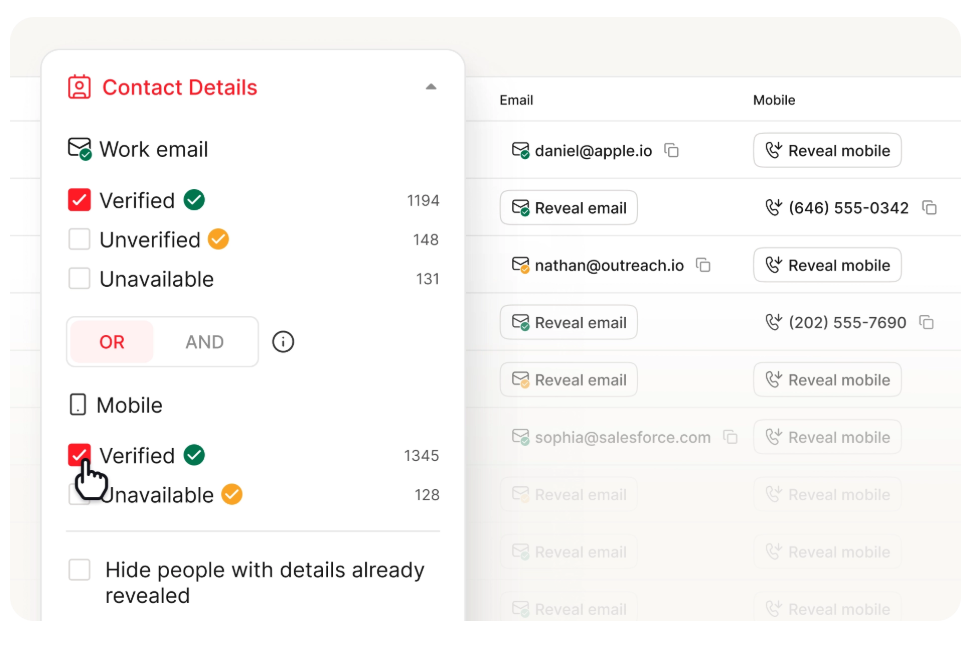
Most can't - they detect technologies but don't provide emails or phone numbers. Prospeo is the exception: its B2B database combines technographic filters with 300M+ verified contacts and 125M+ mobile numbers, so you go from detection to outreach without juggling multiple platforms.
What's the cheapest BuiltWith alternative for sales teams?
Stackcrawler at $9/month is the cheapest for pure detection. But if you need contact data alongside technographics, Prospeo's free tier (75 emails/month) or paid plans at ~$0.01 per email deliver more pipeline value than detection-only tools at any price.