

Best Tech Stack Lookup Tools - Pricing, Accuracy, and Honest Picks
Your manager wants a list of every company running Salesforce in the DACH region by Friday. With verified emails for the CRM admin. You've got a browser extension that tells you what one website runs, but building a prospecting list from that? Completely different problem.
The gap between "I can see their stack" and "I can reach their team" is where most tech stack lookup tools fall short. We've spent weeks testing the major options, and the differences in pricing, accuracy, and actual usefulness are bigger than you'd expect.
Why Technographics Matter in 2026
The technographics market hit $1.17B in 2025 - up from $367M in 2020, a 26.1% CAGR - and it's still accelerating. The average enterprise runs 100+ software applications, and knowing which ones creates a massive targeting advantage. If you sell a Salesforce integration, you don't want to cold-email HubSpot shops. If you compete with Stripe, you want to find out what technology a company uses before your SDRs pick up the phone.
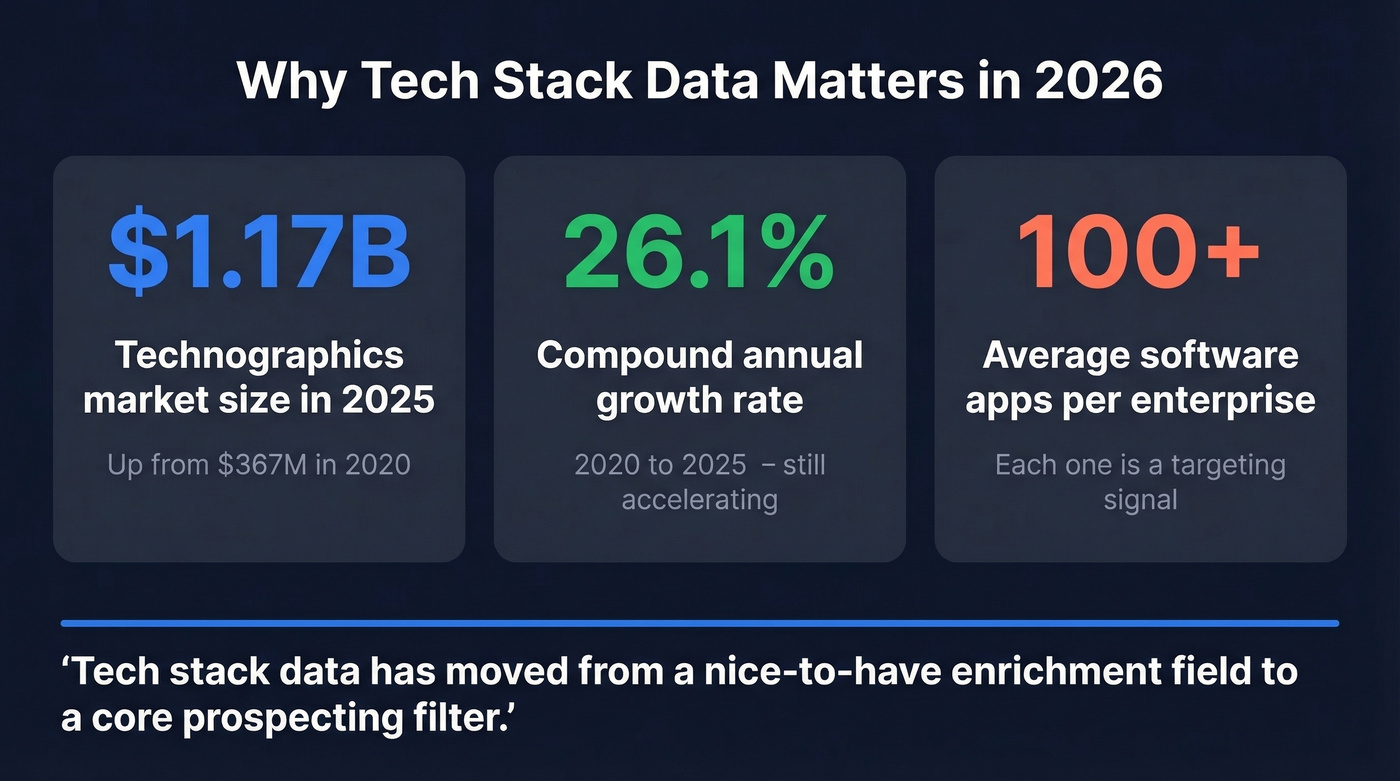
Tech stack data has moved from a "nice-to-have" enrichment field to a core prospecting filter. The tools that deliver it range from free browser extensions to enterprise platforms pushing nearly $1,000/mo.
Our Top Picks
| Tool | Best For | Free Tier | Starting Paid Price |
|---|---|---|---|
| Wappalyzer | Instant single-site lookups | 50 lookups/mo | $250/mo |
| Prospeo | Stack search + verified contacts | 75 emails + 100 credits/mo | ~$0.01/email |
| TheirStack | Technographics + hiring signals | 50 company credits/mo | ~$99/mo |
| BuiltWith | Historical data + scale | Individual lookups | $295/mo |
| Ful.io | Technographics + email search | 25 lookups + 5 emails/mo | $149/mo |
| W3Techs | Market-share statistics | Fully free | N/A |
| Hexomatic | Automated bulk checks | Limited free | ~$49/mo |
| TechnologyChecker.io | Budget backend detection | Free lookups | $89/mo |
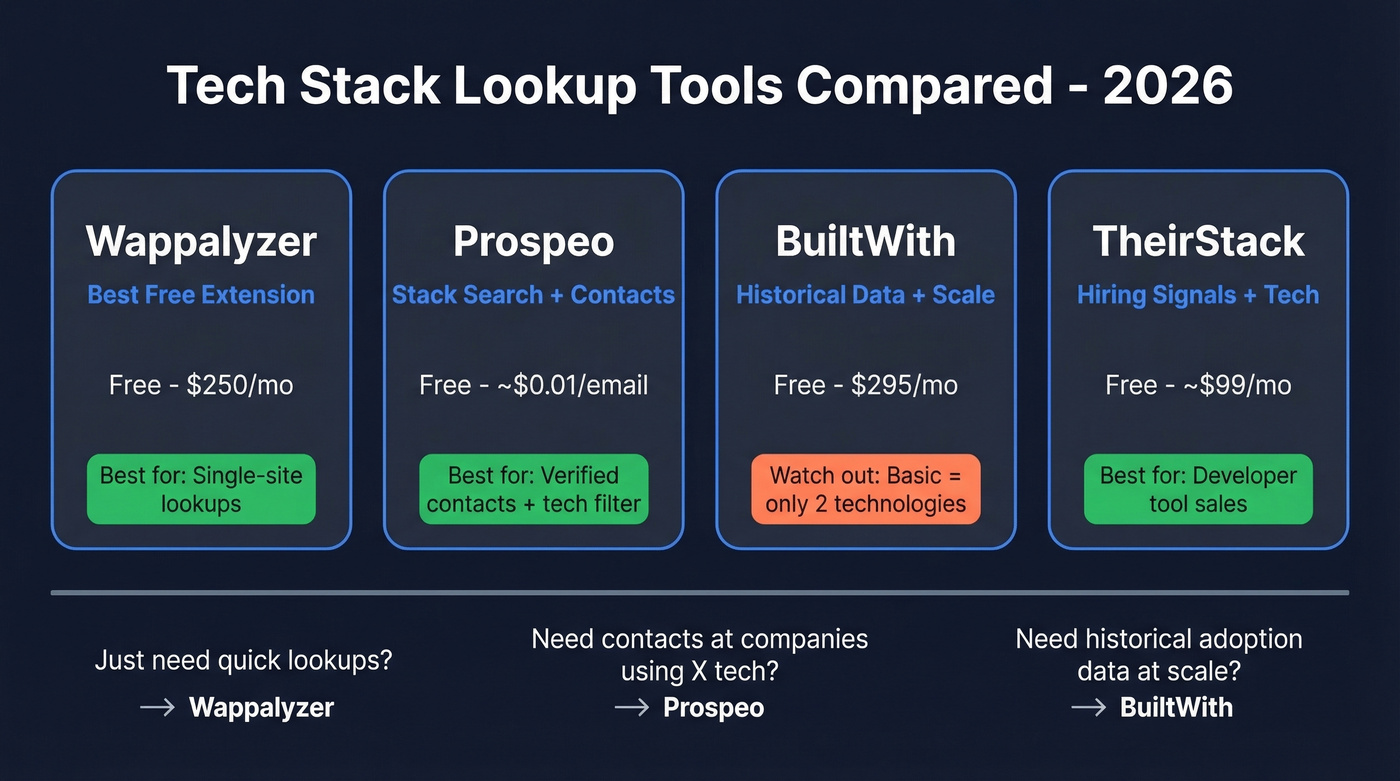
Quick verdict: Wappalyzer for fast, free single-site checks. Prospeo if you need to go from "companies using X technology" to "verified emails for decision-makers" without switching tools. TheirStack if hiring intent layered on technographics matters to your workflow.
Here's our hot take: if your average deal size is under five figures, you probably don't need a $500/mo technology lookup tool. A free extension plus a solid contact database will outperform an expensive all-in-one you only use at 20% capacity.
Skip all three if you only need occasional lookups and don't mind manual work - install a browser extension and check Chrome DevTools.
The Best Tools for Tech Stack Lookup
Wappalyzer - Best Free Extension
Wappalyzer detects technologies on any website you visit via a browser extension, with strong JavaScript library fingerprinting. It tracks thousands of technologies and carries a 4.7/5 rating on G2 - reviewers consistently call the data "accurate, detailed, and instantly actionable."

The free tier gives you 50 lookups per month, which is generous for individual research. Paid plans start at $250/mo for Pro with 5,000 lookups, $450/mo for Business at 20,000, and $850+/mo for Enterprise at 200,000+. One gotcha most roundups skip: API credits included in plans expire after 60 days. Purchased credit bundles last 365 days, but the included ones vanish fast.
Wappalyzer excels at frontend and JavaScript detection. Like most tools, it's less reliable for backend technologies like server-side languages and databases - a limitation we'll dig into later.
- Use it if: You need quick, accurate single-site lookups or want lead lists filtered by frontend technologies.
- Skip it if: Your volume exceeds 50 lookups/mo and you're not ready to pay $250/mo.
Prospeo - From Technology Filter to Verified Contact
Most technology detection tools stop at the company level. You get a list of domains running a specific technology, and then you're on your own finding the right person to email. Prospeo closes that gap entirely.
Instead of detecting technologies on individual sites and then hunting for contacts elsewhere, you search its 300M+ profile database directly by technology used - alongside job title, location, company size, and intent signals powered by Bombora across 15,000 topics. The results come back with 98%-accurate verified emails and direct dials attached, and the 7-day data refresh cycle means you're not emailing someone who left the company six weeks ago. One search, one export, done.
The 30+ search filters - including technographics, buyer intent, job changes, headcount growth, and funding - make it straightforward to build hyper-targeted lists without stitching together multiple subscriptions. The free tier includes 75 emails and 100 Chrome extension credits per month. Paid plans run roughly $0.01 per email with no contracts and no annual commitments.
For teams where the whole point of a tech stack lookup is to reach the people behind the stack, this eliminates the two-tool workflow entirely.
- Use it if: You need verified contact data for decision-makers at companies running specific technologies - not just a list of domains.
- Skip it if: You only want raw technology detection without any prospecting workflow.
BuiltWith - The Pricing Trap You Should Know About
Here's the thing about BuiltWith: the Basic plan at $295/mo only covers 2 technologies and 2 keywords. That's barely useful for prospecting. You're realistically looking at Pro at $495/mo for unlimited technologies, or Team at $995/mo as the API tier.
What you get for that money is serious scale: data from 414 million domains, 113,007+ technologies, and history going back 41 years with weekly updates. If your goal is to find a company's tech stack along with historical adoption trends - say, tracking when a competitor's customers started migrating away from their platform - this is the deepest dataset available.

Individual site lookups are free forever. There's also a lesser-known Advanced plan at $144/year for detailed individual lookups - solid for researchers who don't need lists.
In a 500-site benchmark test, BuiltWith hit 87% accuracy for React detection, while Wappalyzer caught 47 Next.js implementations that BuiltWith missed. For historical technology adoption data or massive-scale list building, BuiltWith is the only game in town. But for modern JS framework detection on a budget, look elsewhere.
TheirStack - Hiring Signals Change Everything
A company listing Kubernetes in their stack is interesting. A company actively hiring three Kubernetes engineers? That's a buying signal.
TheirStack combines technology detection with hiring signal analysis across 178M job postings in 195 countries, tracking 33,000 technologies. Customer-reported outcomes include a 35% decrease in research time and 3x more meetings booked - numbers we find plausible given how much time the hiring-plus-stack combination saves in practice.
The free plan gives you 50 company credits and 200 API credits per month. Free users can browse up to 5 pages of results with 25 results per page. Paid plans start around ~$99/mo based on the feature tier structure, though pricing isn't published transparently.
- Use it if: You sell developer tools, infrastructure, or SaaS where hiring patterns signal buying intent.
- Skip it if: You need verified contact data alongside company-level insights - TheirStack stops at the company level.
Ful.io - Solid Mid-Market Hybrid
Ful.io blends technology detection with email search, covering 75K+ technologies, 100M+ websites, and 1.2B+ emails. The free tier includes 25 technology lookups and 5 email searches per month. Individual runs $149/mo, Professional jumps to $249/mo with 2,000 API credits, and Business hits $399/mo with 20,000 API credits. A reasonable middle ground for mid-market teams who want technographics and basic contact data in one subscription without enterprise pricing.
W3Techs - Free Market-Share Data
W3Techs provides free, continuously updated market-share statistics for web technologies - plus a site lookup, a bookmarklet, browser extensions, and a Site Info API. It's not a prospecting tool. It's a research resource. Completely free, no account required.
Hexomatic - Automation-First Detection
Hexomatic offers a free technology checker with automation workflows for bulk scanning. It's more of a web scraping platform that happens to include tech detection than a dedicated technographics tool. The free tier is limited; paid plans start around ~$49/mo. Best for teams already using Hexomatic's broader automation features who want technology detection baked in.
TechnologyChecker.io - Budget Backend Detection
TechnologyChecker.io differentiates on backend detection methods like DNS analysis, TLS inspection, and API fingerprinting. Free individual lookups, paid plans from $89/mo. We haven't stress-tested it against the Tier 1 options, but if backend technology identification is specifically what you need, it's worth a trial.

Most tech stack lookup tools give you a list of domains. Prospeo gives you verified contacts at those companies. Filter 300M+ profiles by technology used, layer on job title, buyer intent, and 28 other filters - and export with 98%-accurate emails attached.
Stop paying for domains when you need decision-makers. Search by tech stack now.
Pricing Comparison
| Tool | Free Tier | Starting Paid | API Access | Key Gotcha |
|---|---|---|---|---|
| Wappalyzer | 50 lookups/mo | $250/mo | Included on Business+ | Credits expire in 60 days |
| BuiltWith | Individual lookups | $295/mo (Basic) | Team tier only | Basic = 2 technologies |
| TheirStack | 50 co. credits/mo | ~$99/mo | Yes | Free limited to 5 pages |
| Ful.io | 25 lookups + 5 emails/mo | $149/mo | Professional+ | Individual API unclear |
| W3Techs | Fully free | N/A | Yes (Site Info API) | No prospecting features |
| Hexomatic | Limited free | ~$49/mo | Yes | Tech detection is secondary |
| TechnologyChecker.io | Free lookups | $89/mo | Yes | Smaller dataset |
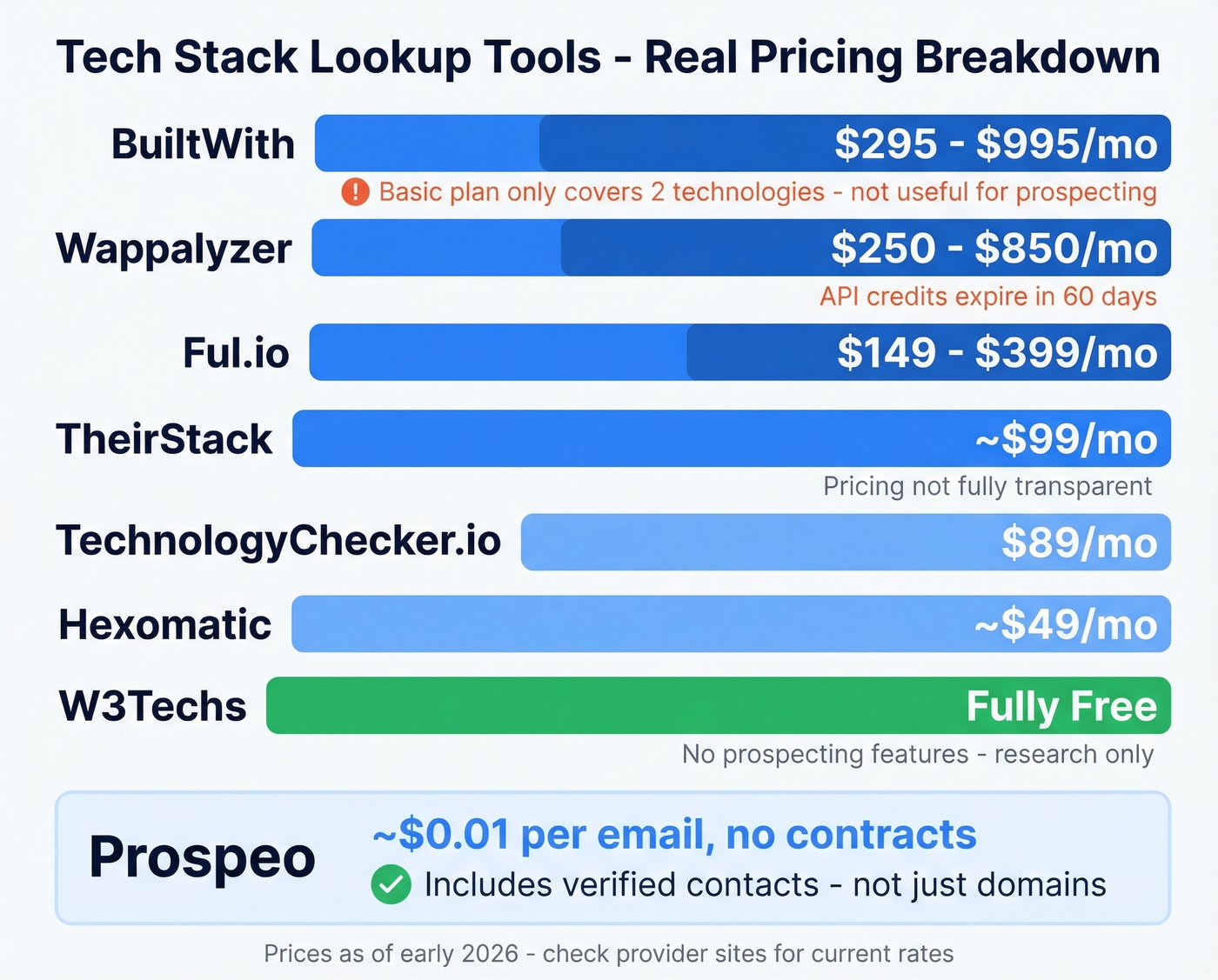
The biggest pricing trap is BuiltWith's Basic plan. $295/mo sounds reasonable until you realize it only covers 2 technologies.
How Tech Stack Detection Actually Works
Every technology lookup tool relies on some combination of five core methods:
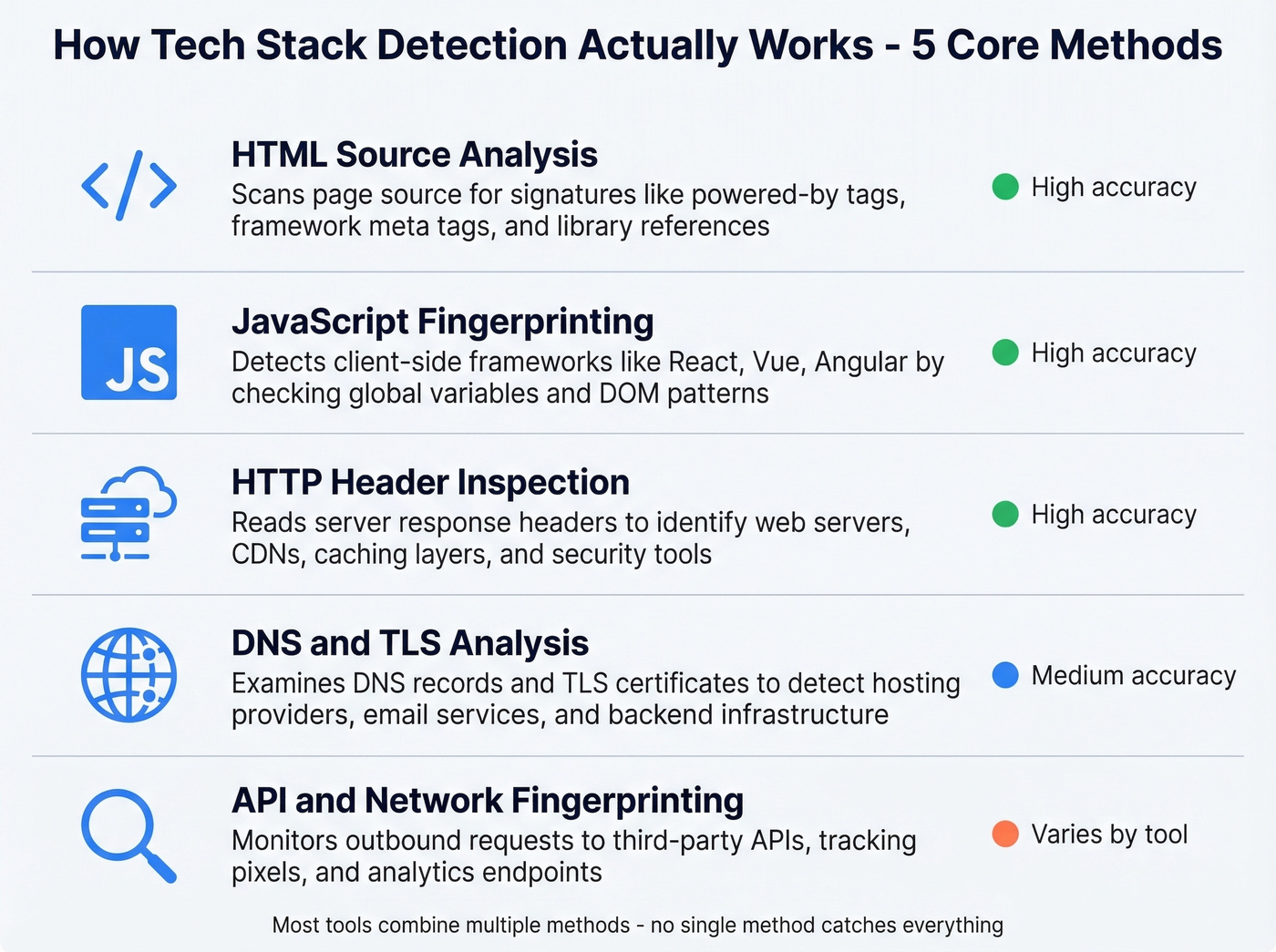
- HTML source analysis - scanning page source for signatures like "powered by," framework-specific meta tags, and library references.
- HTTP header inspection - reading server response headers that reveal web servers, caching layers, and security tools.
- JavaScript library fingerprinting - identifying loaded JS files, global variables, and framework-specific DOM patterns.
- DNS record analysis - checking MX records, TXT records, and CNAME entries that reveal email providers, CDNs, and hosting infrastructure.
- File and directory structure scanning - probing for technology-specific paths like
/wp-admin/or/sitemap.xmlpatterns that indicate specific CMS platforms.
Frontend detection - methods 1 through 3 - typically hits 85-95% accuracy for mainstream technologies. In our testing, that range holds up consistently. Backend detection is a different story: server-side languages, databases, and internal tools are largely invisible to external scanning. If someone tells you their tool reliably detects whether a company runs PostgreSQL vs. MySQL, be skeptical.
Accuracy - What Tools Get Right and Wrong
In the 500-site benchmark test, Wappalyzer led on JavaScript detection at roughly 94% accuracy. BuiltWith hit 87% for React detection in the same benchmark, missing 47 Next.js implementations that Wappalyzer caught.
Where every tool struggles is backend and server-side detection. Tools can infer backend tech from headers, DNS, and file structures, but it's easy to end up with false positives if you treat inferred backend signals as hard filters. The consensus on r/sales and r/SaaS threads is the same: trust frontend signals for prospecting, treat backend detection as directional.
The practical takeaway: for CMS, analytics, marketing tools, and JavaScript frameworks, these tools are reliable enough to prospect on. For databases, server-side languages, and internal tooling, lower your expectations considerably.
From Stack to Contact - The Real Workflow
Here's the scenario that plays out every week in sales orgs: you need to find what software a company uses, get a list of matching domains, and then... you're staring at company names with no contacts. You switch to a separate tool, try to match domains to people, cross-reference job titles, and hope the emails are valid. It's a two-tool, three-hour workflow that should take fifteen minutes.
If you're doing this at scale, you also need a repeatable lead generation workflow and a clean handoff into your CRM.
Let's be honest - most of the frustration with tech stack lookup isn't about the detection itself. It's about what happens after. You've got the data, but you can't act on it without another subscription, another export, another round of email verification. Prospeo's approach of combining technographic search with verified contact export in a single step is why teams like Stack Optimize built from $0 to $1M ARR while maintaining 94%+ deliverability and sub-3% bounce rates across all client campaigns.
If you're building outbound sequences off technographics, pair this with a tight B2B cold email sequence and monitor email bounce rate to keep deliverability stable.
Stitching together Wappalyzer for detection and another tool for contacts costs $300+/mo and hours of manual matching. Prospeo combines technographic filters with verified emails at $0.01 each - refreshed every 7 days, not 6 weeks.
One search. Technology filter to verified inbox. Zero stitching required.
FAQ
Is BuiltWith actually free?
Individual site lookups are free forever - that part is real. But list-building and bulk analysis start at $295/mo on the Basic plan, which only covers 2 technologies. The $144/year Advanced plan offers detailed individual lookups and is the best budget option if you don't need exportable lists.
Which tool is most accurate for tech stack lookup?
Wappalyzer leads for frontend and JavaScript detection at roughly 94% accuracy in a 500-site benchmark. BuiltWith offers the broadest coverage with 113,007+ technologies tracked. No tool reliably detects backend technologies - expect accuracy to drop significantly for server-side stacks. Use frontend signals for prospecting and treat backend detection as directional only.
How do I find the tech stack of any company?
Install Wappalyzer's free browser extension and visit the company's website - you'll see detected technologies instantly. For bulk research, BuiltWith and TheirStack let you search across millions of domains. If you also need contact data for decision-makers, Prospeo lets you filter by technology and export verified emails in a single step.
Can these tools detect backend technologies?
Partially. Tools infer backend tech from HTTP headers, DNS records, and file structures, but server-side languages and databases are largely invisible to external scanning. Frontend detection runs 85-95% accurate for mainstream technologies; backend detection is materially lower and frequently based on inference rather than direct observation.
How often is tech stack data updated?
It varies widely. BuiltWith updates weekly. Wappalyzer refreshes when you run a scan. Prospeo refreshes its entire database - including technographic filters - on a 7-day cycle, significantly faster than the 6-week industry average. Stale data means stale outreach, so refresh frequency matters more than most teams realize.