

How to Track Job Changes and Turn Them Into Pipeline
Your best customer's VP of Sales just moved to a company 3x the size. You found out three months later from a bounced email. That deal-in-waiting evaporated because nobody was watching.
70.8% of contacts experience some kind of change within 12 months, and job-change outreach pulls 15-25% response rates versus 5-8% for cold. Tracking job changes is the warmest signal in B2B sales, and most teams are flat-out ignoring it.
Here's our take: if your average deal size is under $10K, you probably don't need a $30K/year tracking platform. A B2B database with a job change filter and a monthly export cadence will get you 80% of the value.
Who to Track
Not all job changes deserve the same response. A former VP gets a "congrats + strategic value" message, while a former power user gets a "want to bring this tool with you?" nudge. Prioritize ruthlessly.
Tier 1 - Former champions who bought your product. They already know your value prop. New decision-makers spend 70% of their budget in the first 100 days. These are your fastest path to pipeline.
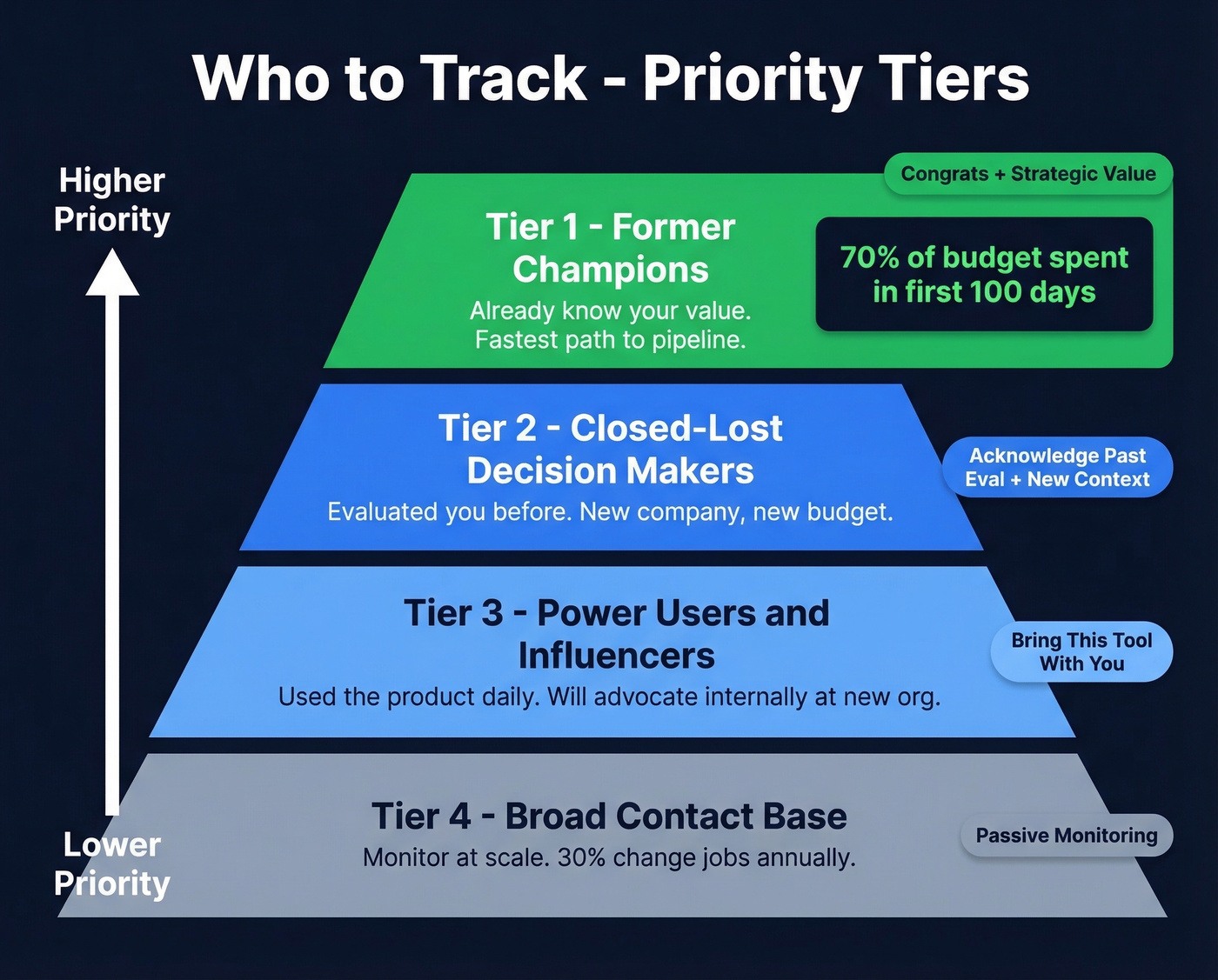
Tier 2 - Closed-lost decision-makers. They evaluated you, liked you enough to reach late stage, but timing or budget killed the deal. New company, new budget.
Tier 3 - Power users and influencers. They didn't sign the contract, but they used the product daily. They'll advocate internally at the new org.
Tier 4 - Broad contact base. Worth monitoring at scale. 30% of contacts change jobs annually, so even passive monitoring catches real opportunities.
The 90-Day Window
Speed matters more than perfection here. There's a roughly 90-day honeymoon period after someone starts a new role where they're actively evaluating tools and spending budget - and deals closed within 50 days carry a 47% win rate, while deals that drag past that window drop to 20% or lower. In our experience, the sweet spot is 30-45 days: early enough to catch the budget window, late enough that they've settled in and can actually make purchasing decisions. Teams that detect career moves inside this window consistently outperform those relying on stale CRM data.
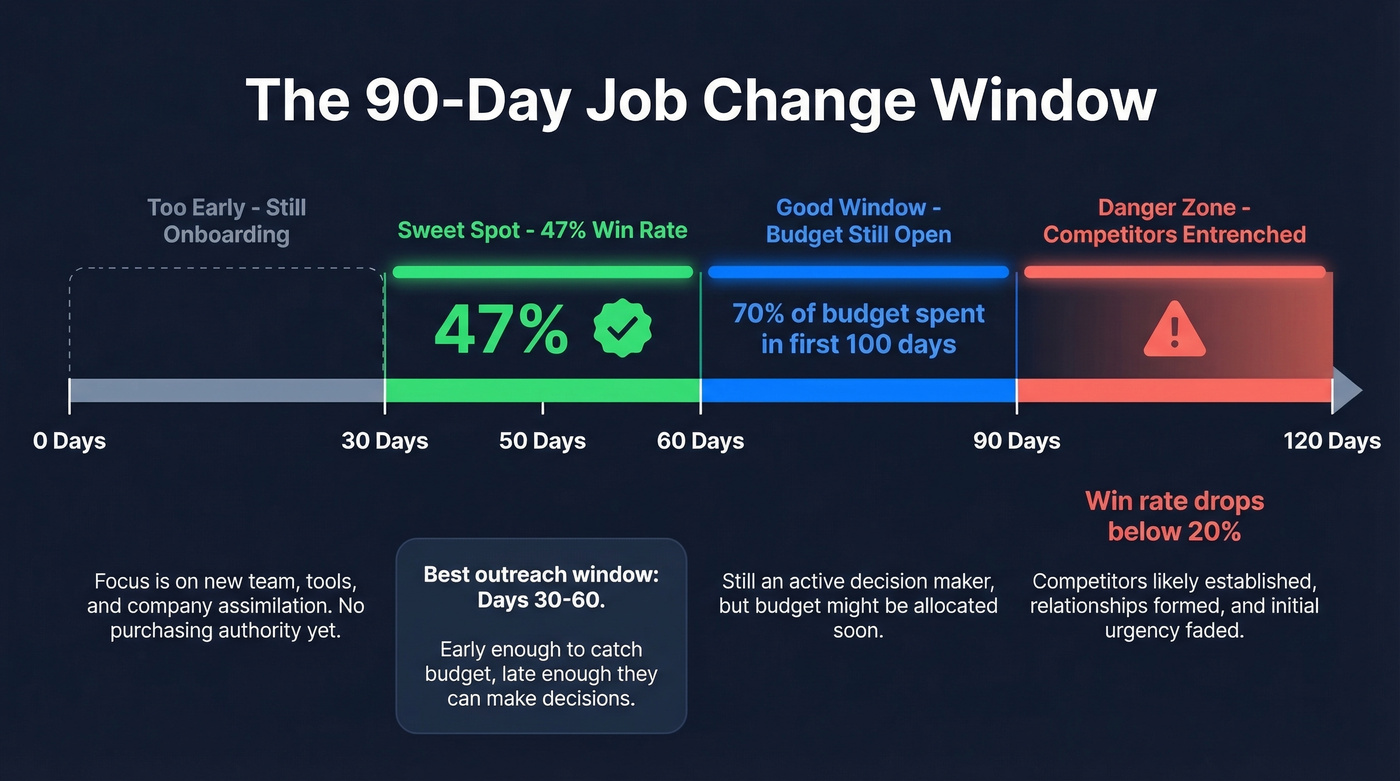
Wait past 90 days and you're competing against entrenched vendors who got there first.

Most teams detect job changes with one tool, then scramble to verify new contact data with another. Prospeo combines both: a job change filter inside a 300M+ database, 98% verified emails, and a 7-day refresh cycle so you catch moves inside the 90-day window - not after it closes.
Stop losing pipeline to stale data. Start tracking job changes at $0.01 per verified email.
Best Job Change Tracking Tools
| Tool | Best For | Starting Price | CRM Support | Focus |
|---|---|---|---|---|
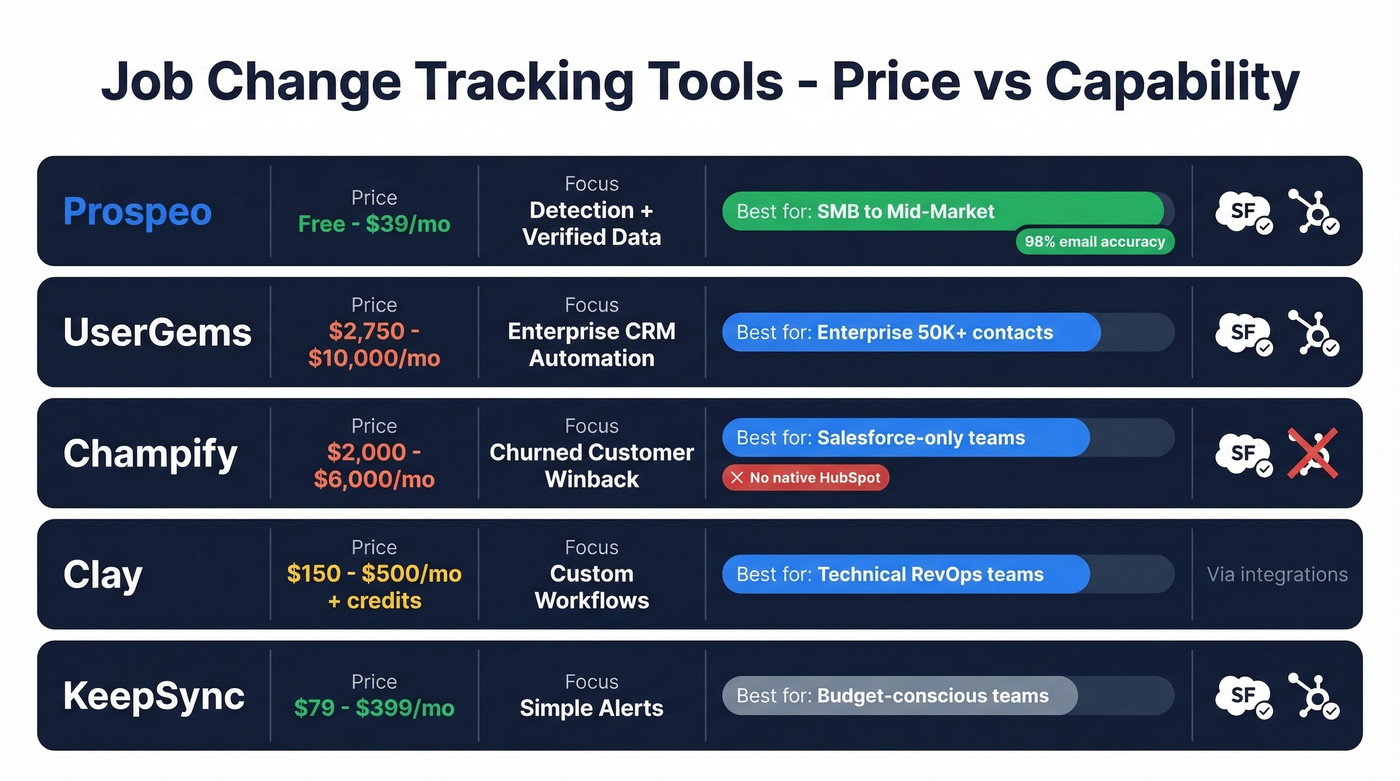
| Prospeo | Detection + verified data | Free / ~$39/mo | SF, HubSpot | Accuracy + freshness |
| UserGems | Enterprise automation | $2,750/mo | SF, HubSpot | CRM routing |
| Champify | Churned-customer wins | $2,000/mo | Salesforce only | Playbook automation |
| Clay | Custom workflows | ~$150-500/mo + credits | Via integrations | Flexibility |
| KeepSync | Budget monitoring | $79/mo | SF, HubSpot | Simple alerts |
Prospeo
One of the only tools that combines job-change detection with verified contact data in a single platform. The B2B database includes a job change filter among 30+ search criteria, so you find contacts who recently moved and immediately get a 98% verified email for their new role - no second tool needed. Data refreshes every 7 days versus the roughly 6-week refresh cycle common with competitors, which means you're catching changes while they're still in that honeymoon window. At ~$0.01 per email, it's the most cost-effective option for teams that need both detection and verified data. Free tier covers 75 emails/month, paid plans start at ~$39/mo, no contracts.
UserGems
[Pricing starts at $2,750/mo](https://www.usergems.com/pricing) for the Core tier with 20 end users and 30K records, plus a $3,000 implementation fee. Advanced runs $5,750/mo, Elite hits $10,000/mo. The consensus on r/sales? "Pricing is crazy," but the automation is genuinely best-in-class. UserGems connects to your CRM, detects changes, layers in intent signals, and routes leads directly to reps with context. They offer an ROI guarantee - 1X on Core, up to 3X on Elite. If you're monitoring 50K+ contacts and need hands-off routing, it earns its price tag.
Champify
No native HubSpot integration. Full stop. If you're a HubSpot shop, skip this one - it's Salesforce only, with HubSpot sync available through the Salesforce-to-HubSpot integration. For Salesforce teams, though, Champify is excellent at winning back churned customers. When a former customer lands at a target account, it builds the play and assigns the rep automatically. Core starts at $2,000/mo for 15K contacts, Pro at $3,000/mo, Enterprise at $6,000/mo, with a $500K ROI guarantee.
Clay
Skip this if nobody on your team can handle a technical setup. But if you've got a RevOps person who likes building things, Clay is unmatched for custom job movement workflows. Reddit practitioners call it "insanely powerful once you master it." Job change signals consume 1 action + 0.2 data credits per check, and you can layer in enrichments, custom logic, and multi-step automations. Plans run ~$150-500/mo depending on volume, plus credit consumption.
KeepSync
$79-$399/mo. Good CRM support, straightforward setup. It won't route leads or build playbooks, but it'll tell you when someone moves. A solid budget option for teams that need monitoring without enterprise complexity.
Others Worth Knowing
Common Room has a free tier and tracks community signals but isn't focused enough for dedicated champion tracking. Seamless.AI runs ~$150/mo as a broader data platform with some change detection. Wiza Monitor is worth watching as an emerging option. And if you've tried Sales Navigator for this, you already know - it's too manual for monitoring career moves at scale.
How to Operationalize It
Let's break this into the actual steps we've seen work across dozens of teams.
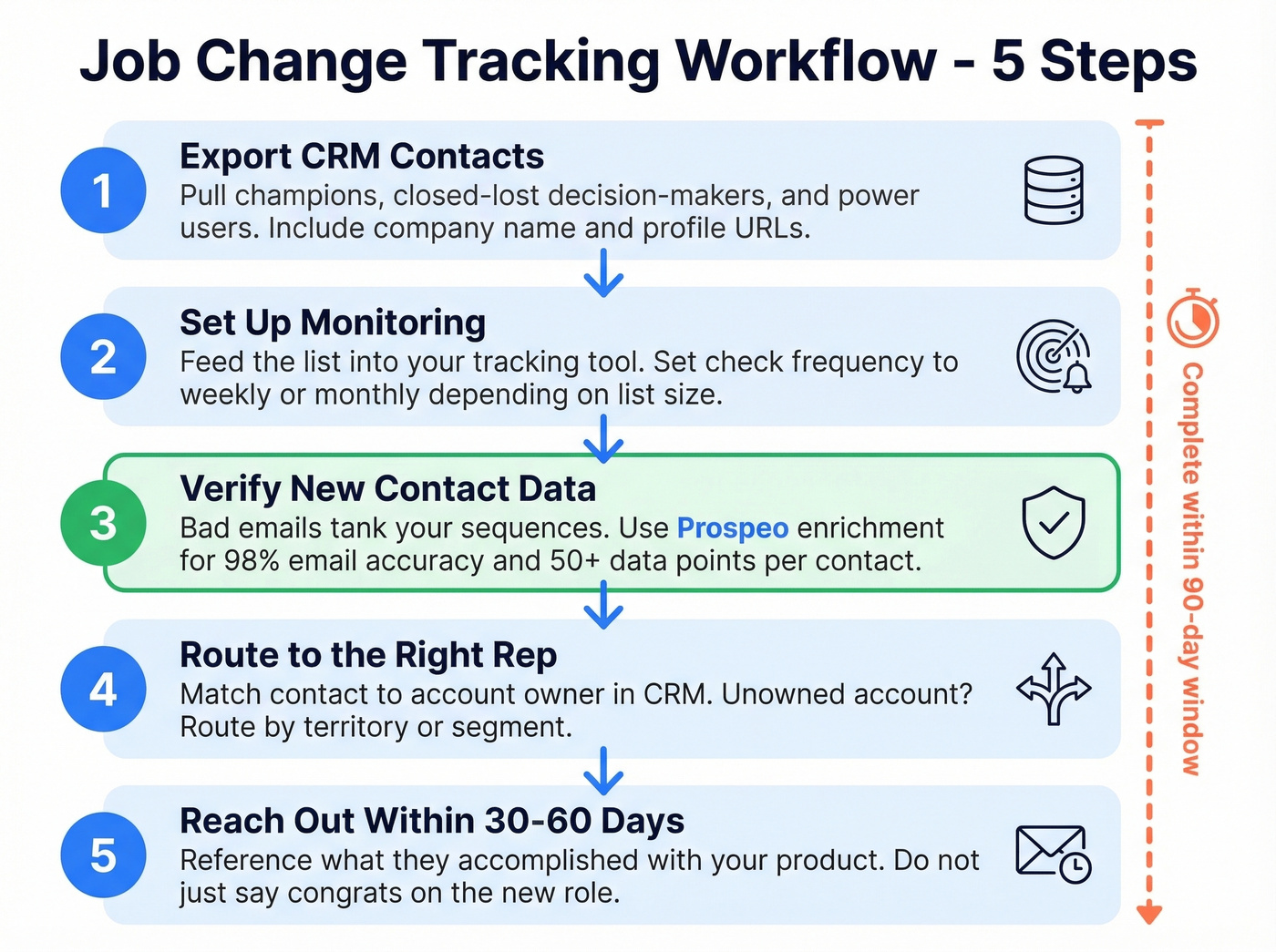
Step 1 - Export your CRM contacts. Pull champions, closed-lost decision-makers, and power users. Include company name and profile URLs where available.
Step 2 - Set up monitoring. Feed the list into your tracking tool. Set check frequency to weekly or monthly depending on list size.
Step 3 - Verify new contact data. You detected the change - now you need a verified email for their new role. Bad emails tank your sequences regardless of how good your signal detection is. Prospeo's enrichment returns 50+ data points per contact at a 92% API match rate, with 98% email accuracy.
Step 4 - Route to the right rep. Match the contact to the account owner in your CRM. Unowned account? Route based on territory or segment.
Step 5 - Reach out within 30-60 days. Former champion? Reference what they accomplished with your product. Closed-lost? Acknowledge the previous conversation and the new context. Don't just say "congrats on the new role" - that's what everyone else sends. (If you need copy, start with these sales follow-up templates.)
Your former champions are starting new roles right now - and spending 70% of their budget in the first 100 days. Prospeo's enrichment returns 50+ data points per contact at a 92% match rate, so you reach them with a verified email before a competitor does. No contracts, free tier included.
Catch the job change. Verify the email. Close the deal - all from one platform.
The DIY Approach (Under $500/Month)
You don't need a $30K/year tool to track job changes. We've run this workflow for teams monitoring 500 contacts and it takes about 3 hours per month: export your top 500 contacts from your CRM monthly, run them through a B2B database with a job change filter, and flag mismatches between stored company and current company. Verify new emails, update your CRM, and route to reps.
Save the enterprise tooling for when you're monitoring 10K+ contacts and need automated routing. Until then, a spreadsheet and a good data source will get you surprisingly far.
FAQ
How often should I check for job changes?
Monthly at minimum - 2-4% of contacts change roles each month, so waiting a full quarter means missing 6-12% of your list. Weekly checks are ideal if your tool supports automated monitoring.
What's the best time to reach out after someone changes jobs?
Within 30-60 days of their start date. New decision-makers spend 70% of their budget in the first 100 days, and deals closed within 50 days have a 47% win rate. Wait past 90 days and you're competing against entrenched vendors.
Can I track job changes without a dedicated tool?
Yes. Export CRM contacts monthly, run them through a B2B database with a job change filter, flag company mismatches, verify new emails, and route to reps. It's effective for teams monitoring under 1,000 contacts and doesn't require enterprise software.
What's a good free option for job change alerts?
Prospeo offers a free tier with 75 emails/month and includes a job change filter in its 30+ search criteria. Common Room also has a free tier for community-signal tracking, though it's less focused on direct job-change detection.