

How to Track Website Visitors: The Complete 2026 Guide
Your website got 5,000 visitors last month. Twelve filled out a form. The other 4,988 looked at your pricing page, read a case study, maybe even compared your plans - then vanished. You've got no idea who they were, what they wanted, or how close they came to buying.
That gap between traffic and pipeline is where most B2B companies bleed revenue, and learning how to track website visitors properly is how you stop the bleeding.
What You Need (Quick Version)
You don't need ten tracking tools. You need three, plus a way to act on what you find.
- Traffic data: Google Analytics 4 is free and everyone needs it
- Behavior insights: Microsoft Clarity gives you unlimited heatmaps and session recordings at zero cost
- B2B visitor identification: RB2B for person-level data in the U.S., or Leadfeeder for global company-level coverage
That stack covers what happened, why it happened, who did it, and how to reach them.
Two Types of Visitor Tracking
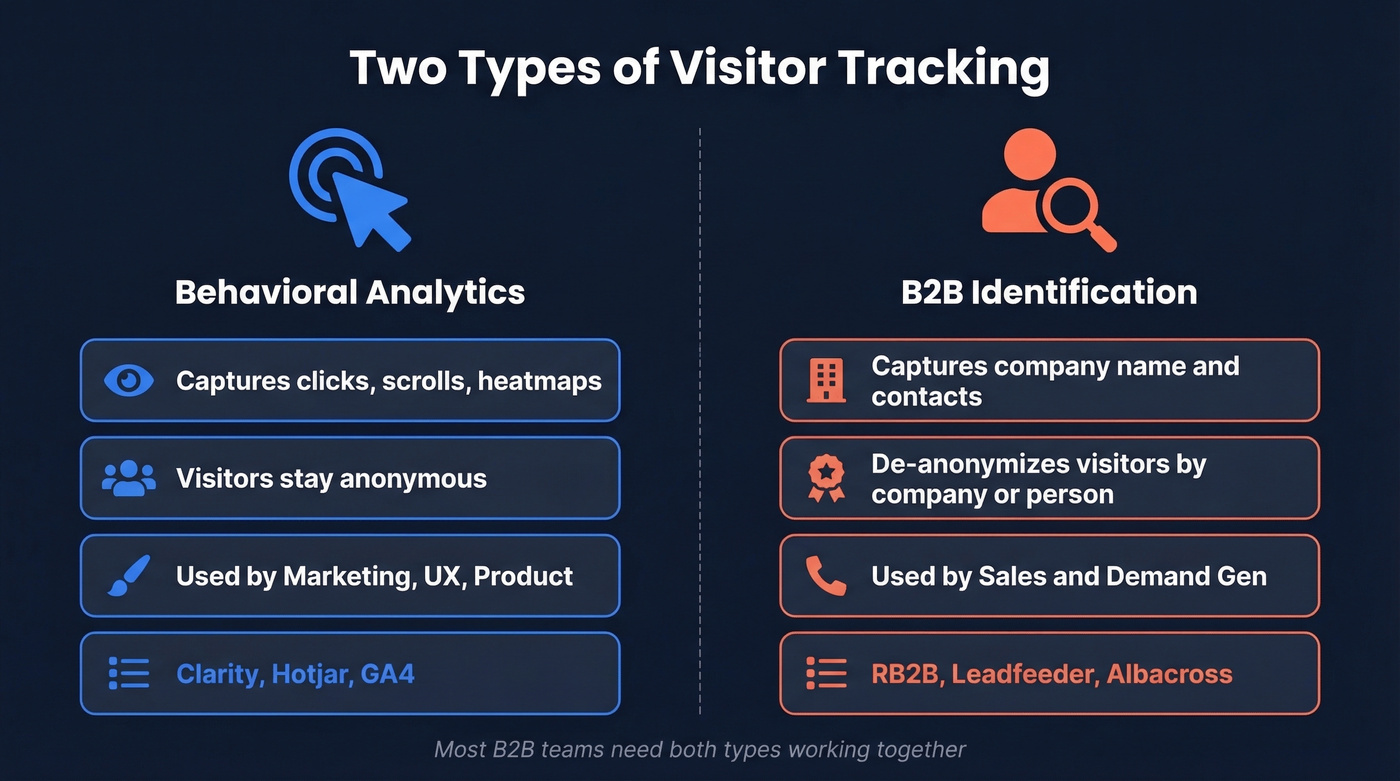
There's a distinction most articles blur: behavioral analytics and B2B visitor identification solve fundamentally different problems. Behavioral tools answer "what did visitors do?" Identification tools answer "who's visiting my website?"
| Behavioral Analytics | B2B Identification | |
|---|---|---|
| Captures | Clicks, scrolls, heatmaps | Company name, contact info |
| Visitor type | Anonymous aggregate | De-anonymized company/person |
| Primary user | Marketing, UX, product | Sales, demand gen |
| Example tools | Clarity, Hotjar, GA4 | RB2B, Leadfeeder, Albacross |
Most teams need both. GA4 tells you that 300 people visited your pricing page from a Google ad. Clarity shows you they all rage-clicked the "Compare Plans" button. RB2B tells you one of them was a VP of Engineering at a Series C company. Different questions, different tools.
How Visitor Tracking Works
Under the hood, every tracking tool starts the same way: a JavaScript snippet fires when someone loads your page. That snippet collects session data - pages viewed, time on site, scroll depth, clicks - and sends it to the tool's servers.
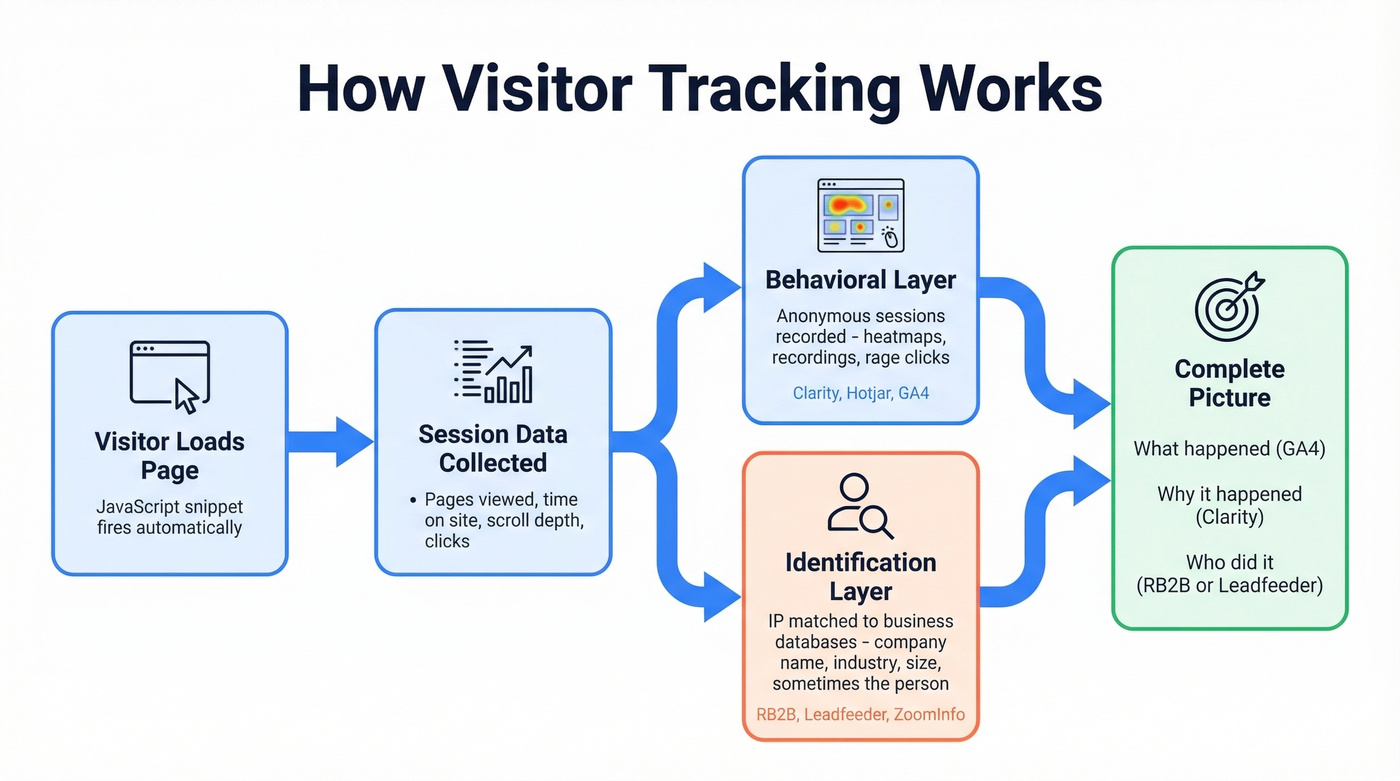
Behavioral tools like Clarity and Hotjar record this data as anonymous sessions. They don't know or care who the visitor is. They're watching the mouse, not the person.
B2B identification tools add a second layer. They match the visitor's IP address against databases of known business IP ranges, then enrich that match with firmographic data - company name, industry, size, sometimes even the specific person if they've been cookied elsewhere. The more sophisticated tools layer in reverse-identity resolution to get from "someone at Acme Corp" to "Sarah Chen, VP Engineering." RB2B does this for U.S. traffic; Leadfeeder sticks to company-level globally.
Here's the thing: GA4 tells you what happened. It doesn't tell you who did it or why. For B2B teams, pairing GA4 with behavioral and identification tools isn't optional - it's the minimum viable stack.
Best Behavioral Tools
Microsoft Clarity
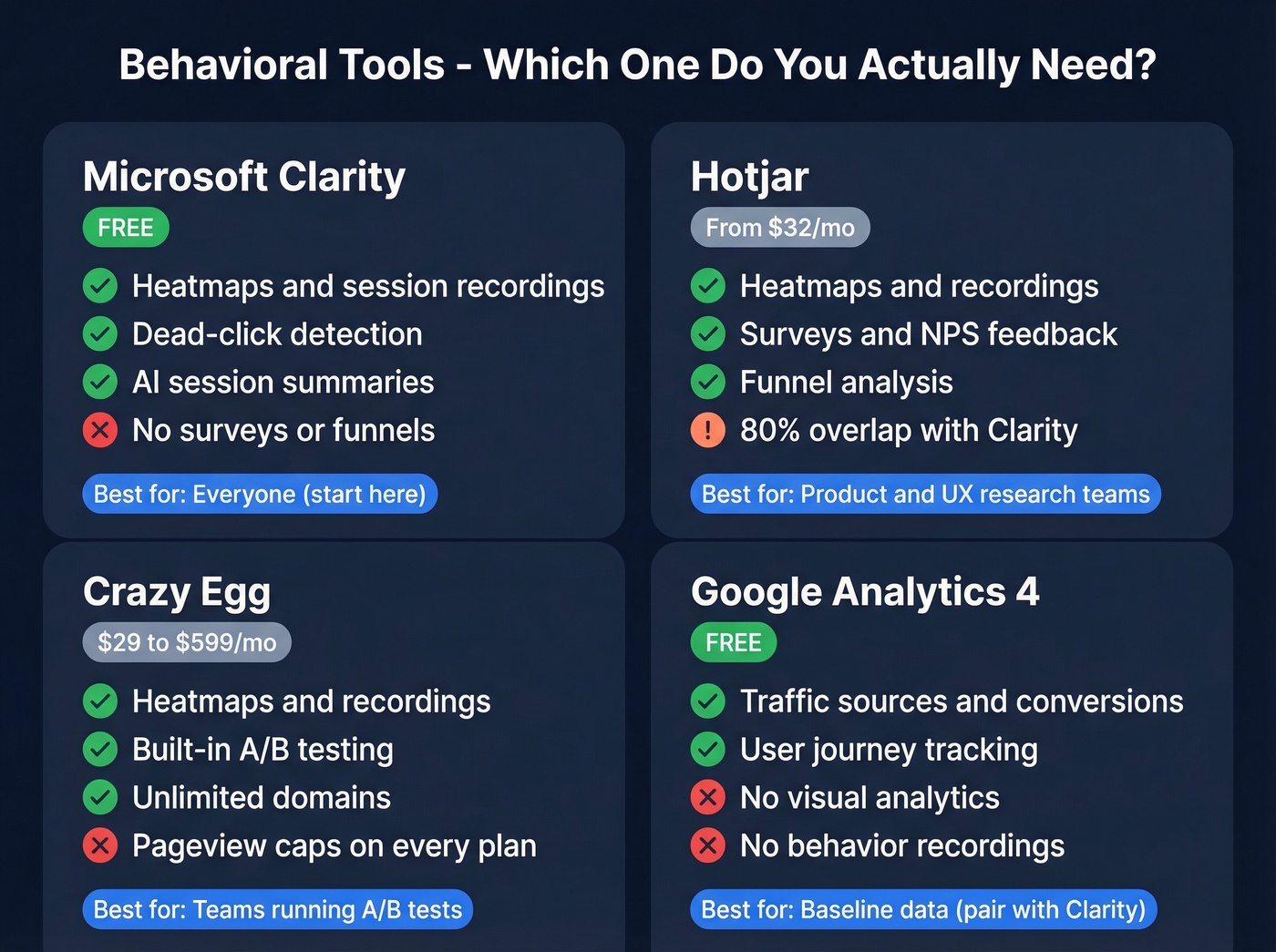
Clarity is free forever with no traffic limits, and over 2M sites run it. The feature set is impressive for a free tool - session recordings, click/scroll/area heatmaps, dead-click detection, and AI-generated session summaries via Copilot. It's GDPR and CCPA ready out of the box.
Recordings stick around for 30 days by default, or 13 months if you tag or favorite them. The consensus on r/PPC is that Clarity has made Hotjar's free tier irrelevant - one practitioner reported using it for two years and seeing conversion rate improvements just from diagnosing dead clicks.
Skip this if you need built-in surveys, on-page feedback widgets, or funnel analysis. Clarity doesn't do those.
Hotjar
Hotjar (now part of Contentsquare) earns its price tag when you need the full qualitative research toolkit in one place. Beyond heatmaps and recordings, it offers on-page feedback widgets, NPS surveys, and funnel analysis that lets you visualize exactly where visitors drop off in multi-step flows. The integrated insights workflow - combining recordings with user feedback - is built for product and UX teams running continuous discovery.
Plans start around $32/mo billed annually, and the free tier has session limits. We've seen teams pay for Hotjar for months before realizing Clarity does 80% of what they need at zero cost. If you aren't using surveys or funnels, you're overpaying.
Crazy Egg
A/B testing is Crazy Egg's real differentiator. It bundles visual analytics with a native A/B testing engine, which saves you from stitching together separate tools. Pricing runs from $29/mo (Starter) to $599/mo (Enterprise), billed annually. No overages - collection pauses when you hit limits. Unlimited domains on every plan, and there's a 30-day free trial.
Skip this if you don't need A/B testing. Clarity gives you heatmaps and recordings for free, and dedicated A/B tools like VWO or Optimizely are more powerful if testing is your core workflow.
Google Analytics 4
GA4 is the baseline everyone needs. It's free, it tracks traffic sources, pageviews, conversions, and user journeys. But it's a "what happened" tool, not a "who did it" or "why" tool. Pair it with Clarity for behavior and a B2B identification tool for identity. Alone, GA4 is necessary but insufficient.
Other options like Mouseflow and Lucky Orange exist but overlap heavily with Clarity and Hotjar - they aren't worth evaluating unless you need specific integrations they offer.
Behavioral Tools Comparison
| Tool | Price | Visual Analytics | A/B Testing | Pageview / Session Limit |
|---|---|---|---|---|
| Clarity | Free | Heatmaps + recordings | ✗ | Unlimited |
| Hotjar | From ~$32/mo | Heatmaps + recordings + surveys | ✗ | Session-limited (free tier) |
| Crazy Egg | $29-$599/mo | Heatmaps + recordings | ✓ | 5K-1M tracked pageviews/mo |
| GA4 | Free | ✗ | ✗ | Unlimited |

Visitor identification tools tell you who's on your site. Prospeo tells you how to reach them. Turn de-anonymized visitors into pipeline with 98% accurate emails and 125M+ verified mobile numbers - refreshed every 7 days.
Stop watching visitors vanish. Start booking meetings with them.
Best B2B Identification Tools
Match-Rate Reality Check
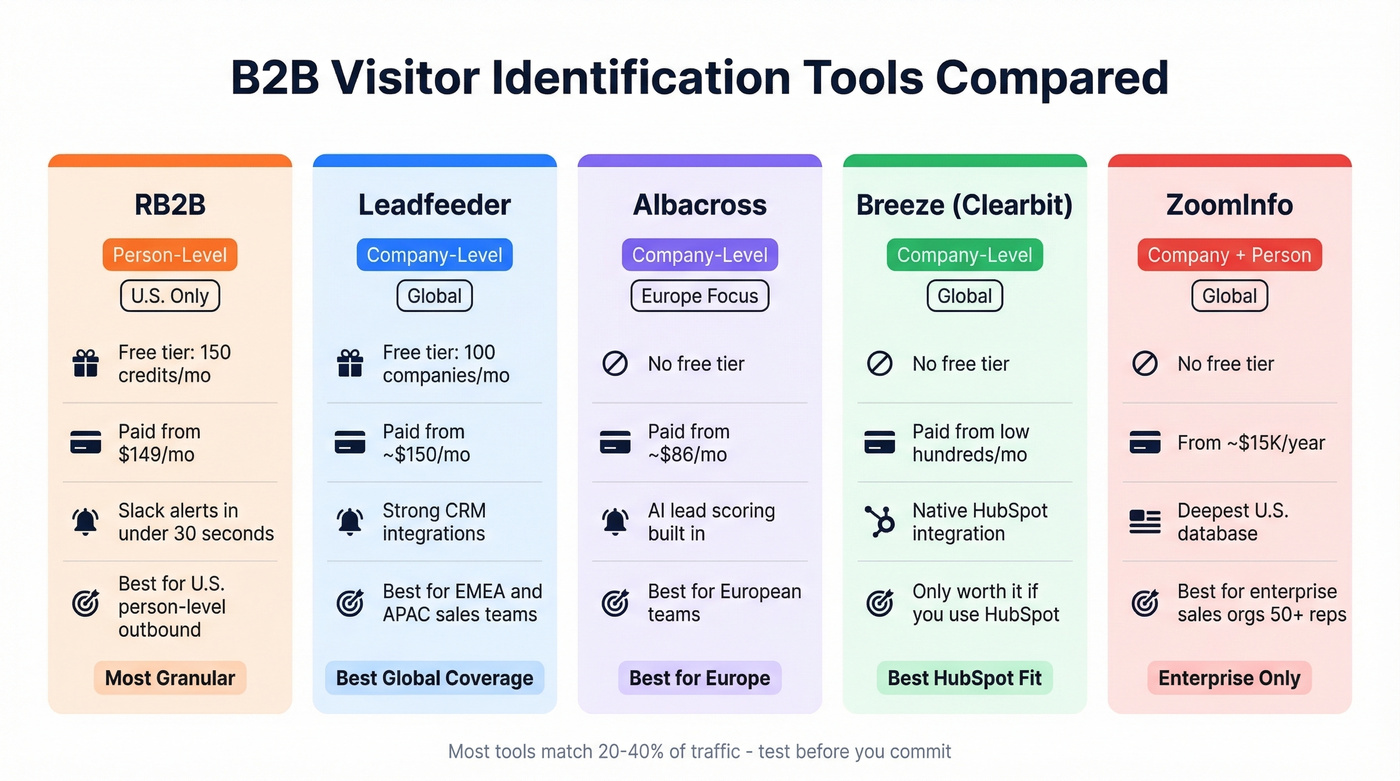
Before you evaluate any tool, calibrate your expectations. Most B2B visitor identification tools match 20-40% of traffic to company identities. Tools claiming 70%+ are typically layering multiple data sources or limiting to specific geographies. If a vendor promises to identify "most" of your visitors, ask for methodology - and test it yourself with a two-week trial before committing.
When evaluating, focus on five dimensions: identification accuracy, enrichment depth, sales workflow integration, pricing transparency, and time-to-value. Most vendors pitch you on accuracy alone. The other four matter just as much.
RB2B
Use this if you want person-level identification - not just "someone from Acme Corp visited," but "Sarah Chen, VP Engineering, visited your pricing page at 2:14 PM" with a Slack alert in under 30 seconds. RB2B is one of the few tools doing true person-level resolution with name, role, and email addresses. The free plan gives you 150 credits/month. Pro+ runs $149/mo for 300 credits, with custom plans above 2,000 credits.
The catch: person-level data is U.S. only. Global visitors get resolved at the company level via a Demandbase integration on paid plans, which is how RB2B frames its 70-80% traffic resolution number. Reddit users on r/b2bmarketing flag support quality as a weak spot - something to weigh if you're scaling.
Skip this if your target market is primarily outside the U.S., or you need enterprise-grade support.

Leadfeeder / Dealfront
Use this if you sell internationally and need company-level identification with global coverage. Leadfeeder, now part of Dealfront, matches IP addresses plus behavioral data against business databases to identify visiting companies. It won't tell you the specific person, but it'll tell you "3 people from Acme Corp viewed your pricing page this week" and sync that to your CRM.
The free plan caps at 100 companies/month. Paid plans start around EUR 139/mo, roughly $150. CRM integrations with Salesforce and HubSpot are solid. For teams selling into EMEA or APAC, Leadfeeder's global coverage makes it the safer bet over RB2B's U.S.-centric model.
Skip this if you need person-level data, not just company names.
Already on HubSpot? Start with Breeze Intelligence
If you're running HubSpot, Breeze Intelligence (formerly Clearbit) is the fastest path to visitor identification without adding another vendor. Pricing is credit-based and typically starts in the low hundreds per month, scaling up with usage. The value proposition collapses without the native integration - don't bother if you aren't already deep in HubSpot.
Albacross
Best for European teams wanting AI-powered lead scoring on top of company identification. Scoring prioritizes companies showing buying signals based on visit frequency and page depth. Self-serve plans start from about EUR 79/mo (~$86), with custom pricing on the Growth plan. Not a great fit for teams needing person-level data or heavy U.S. coverage.
ZoomInfo
Enterprise-grade visitor identification with the deepest U.S. database - and pricing to match. Expect $15,000-$40,000+/year depending on modules and seats.
Let's be honest: ZoomInfo is still the most complete all-in-one platform for large sales orgs. But if your deal sizes are under $20k or your sales team is under 50 people, you almost certainly don't need it. The opaque pricing and long contracts make it a poor fit for anyone who isn't running a mature, high-velocity outbound operation.
B2B Identification Comparison
| Tool | ID Level | Coverage | Free Tier | Paid From |
|---|---|---|---|---|
| RB2B | Person | U.S. only | 150 credits/mo | $149/mo |
| Leadfeeder | Company | Global | 100 companies/mo | ~$150/mo |
| Albacross | Company | Europe-focused | No | ~$86/mo |
| Breeze (Clearbit) | Company | Global | No | Low hundreds/mo |
| ZoomInfo | Company + person | Global | No | ~$15K/year |
From Visitors to Pipeline
Here's where most tracking setups break down.
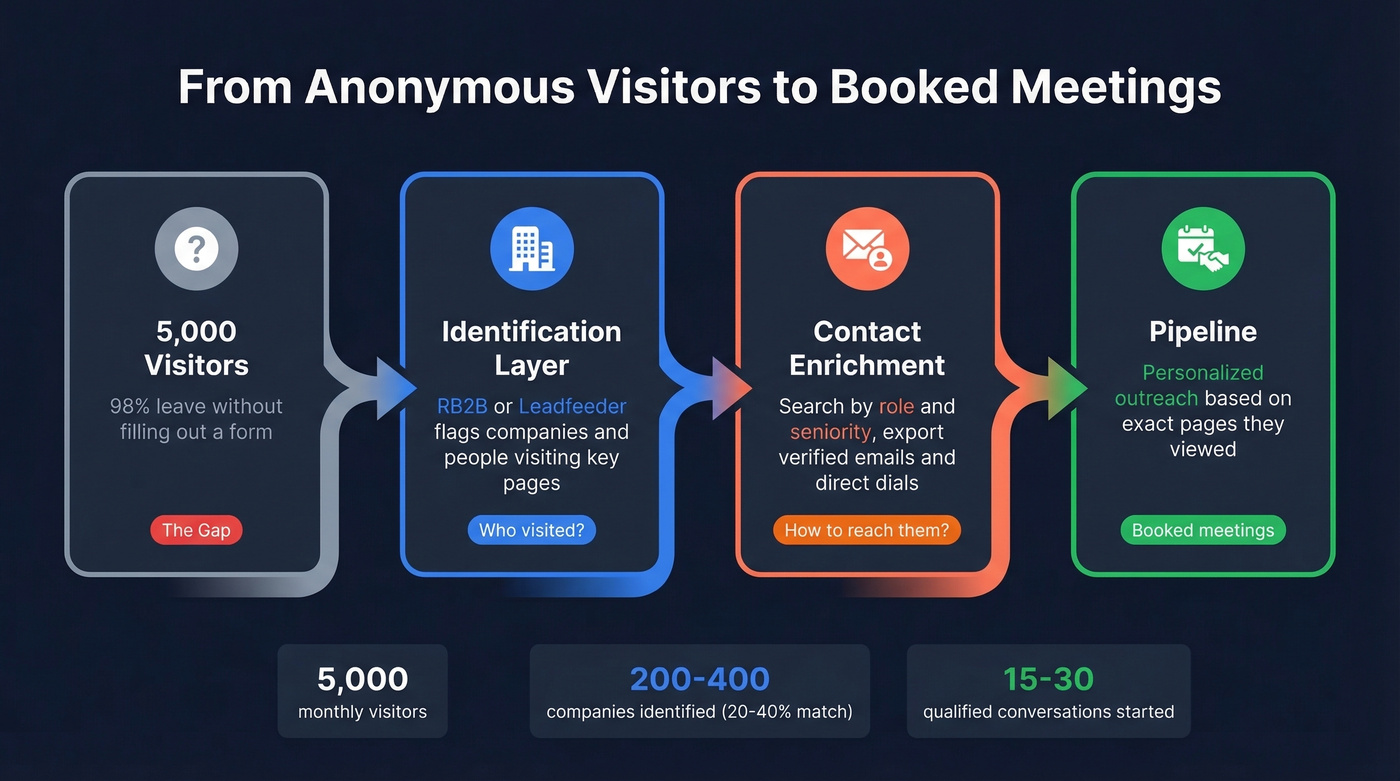
Your identification tool tells you Acme Corp visited your pricing page three times this week - great. But you still don't have the VP of Engineering's verified email or a direct dial. You have a company name and a pageview count, which is about as useful as a business card with no phone number.
This is the gap a contact data platform fills. Take the companies your identification tool flagged, search by role and seniority, and export verified contacts for the decision-makers you actually need to reach. Prospeo covers 300M+ professional profiles with 98% email accuracy and 125M+ verified mobile numbers, refreshed on a 7-day cycle. The free tier gives you 75 emails and 100 Chrome extension credits per month, with native integrations pushing contacts directly into Salesforce, HubSpot, Lemlist, Instantly, or Smartlead.
In our experience, the difference between verified and unverified data is the difference between pipeline and spam complaints. One sales team we worked with dropped their email bounce rate from 35% to under 4% after switching to verified contact data - and tripled their pipeline from $100K to $300K per week. Bad data turns your entire visitor tracking investment into wasted SDR hours and a torched sender reputation.

RB2B and Leadfeeder show you the company. But your SDRs need direct contact data to act. Prospeo's 300M+ profiles with 30+ filters let you go from 'someone at Acme visited pricing' to a verified email and direct dial in seconds - at $0.01 per email.
Bridge the gap between website visit and first touch for a penny per lead.
Privacy, Compliance, and Cookieless Tracking
GDPR and Cookie Consent
GDPR fines reached EUR 5.88B cumulatively by early 2025, with penalties up to EUR 20M or 4% of global annual revenue. This isn't theoretical risk - it's operational reality. Before you install any tracking pixel, make sure your consent implementation actually works.
The checklist:
- Granular category choices - analytics, advertising, functional - not just "accept all"
- No pre-ticked boxes
- A clear "Reject All" button alongside "Accept All"
- Easy withdrawal via a persistent "cookie preferences" link
- Backend alignment: if a user rejects analytics cookies, your tag manager must not fire analytics tags. This is where most implementations fail. The banner says one thing; the tracking does another.
For detailed guidance, the ICO's cookie compliance page is the clearest regulatory reference available.
Cookieless Alternatives
The privacy landscape is pushing teams toward cookieless analytics, and the options are better than most people realize.
First-party data collection, zero-party data from surveys and preference centers, contextual analytics, and server-side tracking all work without setting cookies on the visitor's browser. Dedicated cookieless analytics tools like Plausible (sub-1KB script versus GA4's 45KB+) and Fathom (under 3KB) use session-based hashing - they combine an anonymized IP, user agent, and date into a hash that resets every 24 hours. No cookies, no personal data, no cross-session profiles. Matomo offers a self-hosted alternative with full data ownership, and when configured without cookies, it can run without a consent banner in certain compliance setups.
One approach to avoid: device fingerprinting. It isn't GDPR-compliant, it requires consent anyway, and it damages user trust. If a vendor pitches fingerprinting as a "cookieless" solution, walk away.
Common Mistakes to Avoid
No goals defined before implementation. Install tracking after you've decided what you're measuring. "More data" isn't a goal. "Reduce pricing page drop-off by 15%" is. The teams that get the most from website visitor tracking are the ones that define goals before installing a single pixel.
Ignoring mobile analytics. Mobile visitors behave differently - shorter sessions, more scrolling, different click patterns. If you're only reviewing desktop heatmaps, you're missing half the picture.
Using only aggregate data. GA4 tells you bounce rate went up. It doesn't tell you why. Pair it with Clarity's session recordings to watch what actually happened. The "why" lives in individual sessions, not dashboards.
Trusting match rates at face value. When a B2B identification vendor says "70% match rate," ask for methodology. Is that U.S. only? Does it include company-level matches they're calling "identified"? Run your own test with a two-week trial.
Not verifying contact data before outreach. This one's frustrating because it's so preventable. Run identified contacts through a verification tool before loading them into sequences. A 35% bounce rate destroys sender reputation faster than any identification tool can generate leads.
FAQ
How do I track who visits my website?
Install GA4 or Microsoft Clarity for behavioral data, then add a B2B identification tool like RB2B (person-level, U.S.) or Leadfeeder (company-level, global). GA4 captures traffic patterns; identification tools reveal which companies or individuals are behind those sessions. Both are free to start.
Can I see who visits my website for free?
Yes. GA4 and Clarity are completely free with no traffic limits. RB2B's free plan identifies up to 150 visitors per month at the person level, and Leadfeeder's free tier covers 100 companies per month. Prospeo adds 75 free email lookups monthly to turn those identified companies into actionable contacts.
Can I track website visitors without cookies?
Yes. Tools like Plausible, Fathom, and Matomo use session-based hashing - anonymized IP plus user agent plus date, reset every 24 hours. No cookies, no personal data stored, no cross-session profiles. These approaches are lighter and often eliminate the need for consent banners entirely.
What's a realistic match rate for B2B identification?
Most tools match 20-40% of B2B traffic to company identities. Vendors claiming 70%+ typically combine person-level and company-level matches or limit results to U.S. traffic. Always request methodology details and run a two-week trial with your own traffic before committing.
How do I contact visitors after identifying them?
Identification tools reveal company names, not always direct contact details. Use a contact data platform to search identified accounts by role and seniority, then export verified emails and direct dials. Verify everything before outreach - a bounce rate above 5% damages your sender domain fast.