

How to Use Jira for Your Sales Pipeline - And Where It Breaks
A typical B2B company leaks 3-5% of potential revenue through pipeline inefficiencies: pricing inconsistencies, stale deals, broken follow-ups. If your workflow already lives in Jira, the instinct to use Jira for sales pipeline management makes total sense. Small teams tell us the same thing all the time - "My workflow already lives in Jira, I just need client records and follow-ups without switching platforms." Fair enough. But the question isn't whether Jira can work as a sales pipeline. It's where it stops working.
What You Actually Need
Jira works as a lightweight deal tracker for teams already living in Atlassian's ecosystem, especially if you're staying within the Free plan limit of 10 users. Use the Sales Pipeline template, add 4-5 custom fields, and budget for at least the Standard plan (~$9/user/month) if you want automation that won't immediately hit limits.
Got 10+ reps or no existing Jira investment? Skip to the "When to Use a Real CRM" section - a dedicated tool like Pipedrive ($14.90/user/month) or HubSpot Free will save you hours of configuration.
Here's our honest take: most teams asking "can I use Jira for sales?" don't actually need Jira for sales. They need to avoid buying a CRM they won't use. If that's you, Jira is a perfectly fine starting point. Just know the ceiling is low.
Quick Setup in 15 Minutes
The fastest path from zero to a working Kanban pipeline:
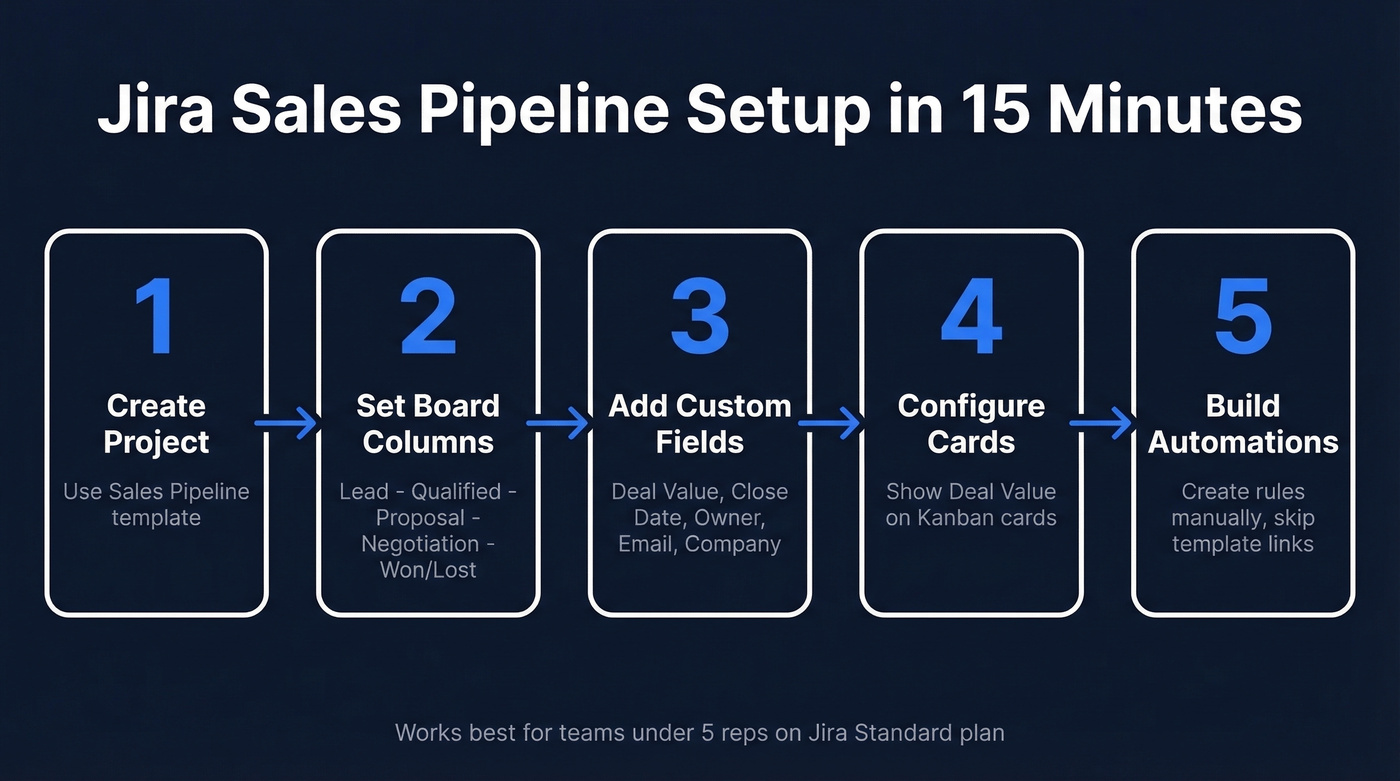
- Create a new project using Jira Work Management's Sales Pipeline template. This gives you a Kanban board with basic stages out of the box.
- Set your board columns to match your actual process: Lead, Qualified, Proposal, Negotiation, Won/Lost. Five stages is plenty - don't overcomplicate this.
- Add custom fields: Deal Value (number), Close Date (date picker), Deal Owner (user picker), Contact Email (short text), Company (short text). These turn a generic issue into a deal card.
- Configure your Kanban board to show Deal Value on cards so you get a visual pipeline with dollar amounts at a glance.
- Build automation rules from scratch. Atlassian's automation template library deep links have been historically unreliable - they often loop back to the same page. Create rules manually instead.
We've seen teams under 5 reps run this setup for months without issues. The problems start when you try to scale it.
Three Automation Rules That Earn Their Keep
Most Jira automation rules for sales are overkill. These three actually matter:
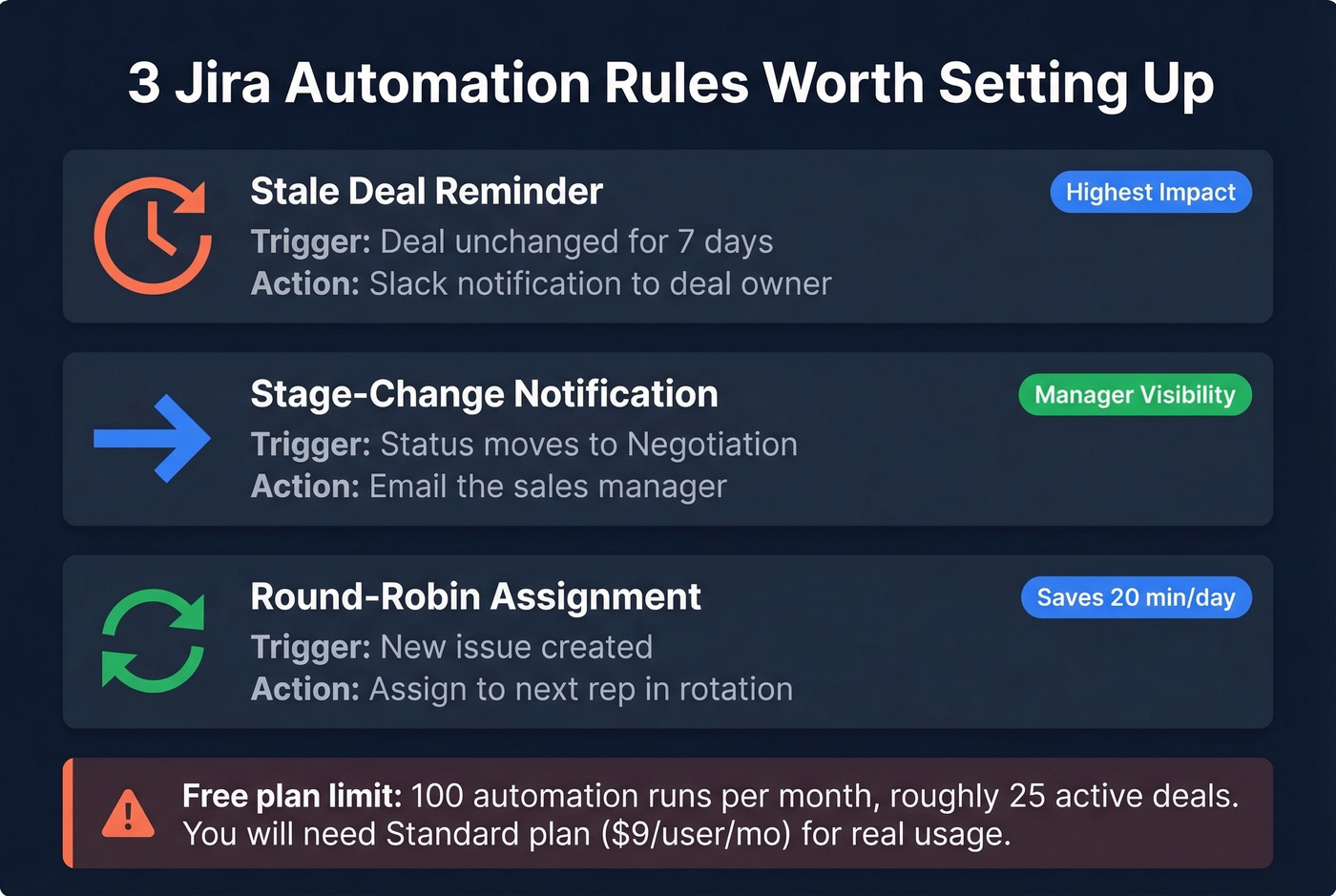
Stale deal reminder. Trigger: issue unchanged for 7 days. Action: Slack notification to the deal owner. In our experience, this single rule justifies the Standard plan by itself. Deals go cold fast, and reps forget.
Stage-change notification. Trigger: status moves to Negotiation. Action: email the sales manager. Managers need visibility into late-stage deals without hovering over the board all day.
Round-robin assignment. Trigger: new issue created. Action: assign to the next rep in rotation. This eliminates the "who's picking this up?" Slack thread that eats 20 minutes every morning.
One hard constraint: the Free plan caps you at 100 automation rule runs per month. That's roughly 25 active deals getting one automated touch per week. You'll hit the ceiling fast.
What Jira Plan Do You Need?
| Feature | Free | Standard | Premium |
|---|---|---|---|
| Users | 10 max | 50,000 max | 50,000 max |
| Automation runs | 100/mo | 1,700/mo | 1,000/user/mo |
| Storage | 2 GB | 250 GB | Unlimited |
| Price | $0 | ~$9.05/user/mo | ~$18.30/user/mo |
Standard is the real starting line. The Free plan's 100 automation runs can't support more than about 25 active deals. For a 5-person sales team, Standard runs ~$45.25/month - reasonable, but you're paying for a project management tool doing CRM duty. Check Atlassian's pricing page for current rates.

Your Jira pipeline is only as strong as the contact data behind it. Prospeo verifies emails at 98% accuracy and returns 50+ data points per contact - so every deal card has a real person behind it, not a dead inbox.
Stop tracking deals to nowhere. Verify your pipeline contacts first.
Best Jira CRM Plugins
| App | Rating | Installs | Best For |
|---|---|---|---|
| Atlas CRM | 3.3/4 | 1,700 | Most installs |
| Mria CRM | 4/4 | 350 | Highest-rated |
| Sales CRM (J Soft) | 3.7/4 | 128 | Gmail/Outlook sync |
Mria CRM is the one to watch - highest-rated option in this shortlist and it carries the "Runs on Atlassian" trust badge. Before buying any connector, check whether it's aligned with Atlassian's cloud direction. Atlassian is actively phasing out the legacy Connect framework in favor of Forge, and apps that don't keep up can end up abandoned. Expect $2-5/user/month for Marketplace CRM apps like these.
Where Jira Breaks as a CRM
Look, Jira wasn't built for sales. The gaps show up fast once you push past a basic Kanban board.
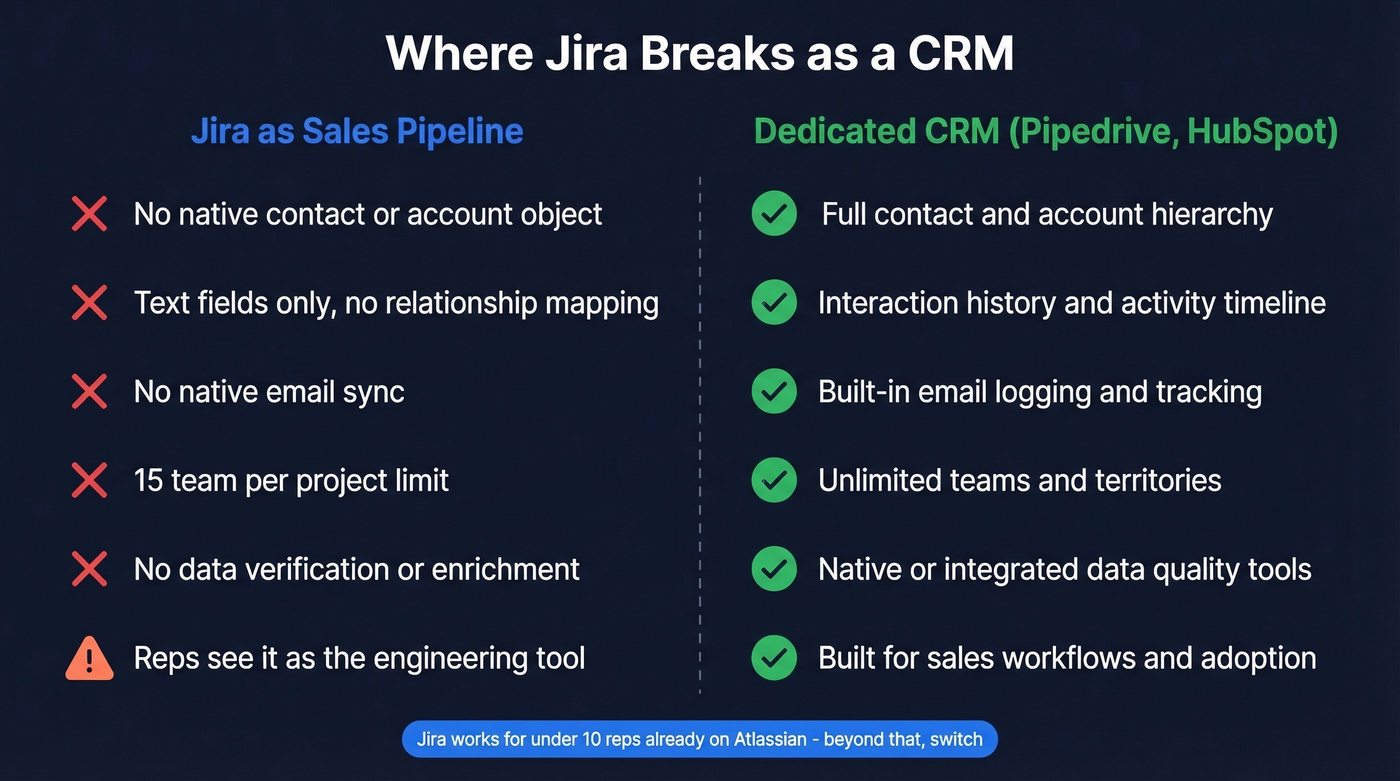
No native contact or account object. Every "contact" is a text field on an issue. No relationship mapping, no account hierarchy, no interaction history. You're essentially duct-taping CRM concepts onto a ticketing system. If you need real contact management, Jira will feel like a workaround.
15-team-per-project limit. An Atlassian PM confirmed this limit exists, but it's barely documented. Multiple sales regions or product lines will hit this wall, and there's no clean workaround.
No native email sync. You can't log emails to deal records without a third-party plugin. That means every customer conversation lives somewhere else - your inbox, Slack, wherever - disconnected from the deal card.
Beyond these structural gaps, there's a cultural problem. Sales reps see Jira as "the engineering tool." One user on r/CRMSoftware described wanting client records and conversation tracking without switching platforms, but getting reps to actually log deals in Jira instead of a spreadsheet is a change management project all on its own. And Jira has zero opinion about whether your contact data is real. It'll happily let you track 200 deals with dead email addresses and disconnected phone numbers.

Filling the Data Quality Gap
Jira tracks deals but can't verify whether the email or phone on a record actually works. Before reps start outreach from that Kanban board, run contact lists through Prospeo. You get 98% email accuracy, 125M+ verified mobile numbers, and can enrich records via CSV upload or API at a 92% match rate. If you're comparing vendors, start with data enrichment services and work backward from your workflow. The free tier gives you 75 verified emails per month - enough to validate a small pipeline without spending a dime.

Before you spend $55/month duct-taping CRM plugins onto Jira, make sure the emails and phones on those deal cards actually connect. Prospeo's free tier gives you 75 verified emails per month - enough to validate your entire active pipeline.
Clean data costs $0.01 per email. Bad data costs you the deal.
When to Use a Real CRM
| Option | Cost (5 users) | Pipeline Built-in | Email Sync |
|---|---|---|---|
| Jira Standard + Mria | ~$55/mo total | Via plugin | Via plugin |
| Pipedrive Essential | ~$75/mo | Yes | Yes |
| HubSpot Free CRM | $0 | Yes | Yes |
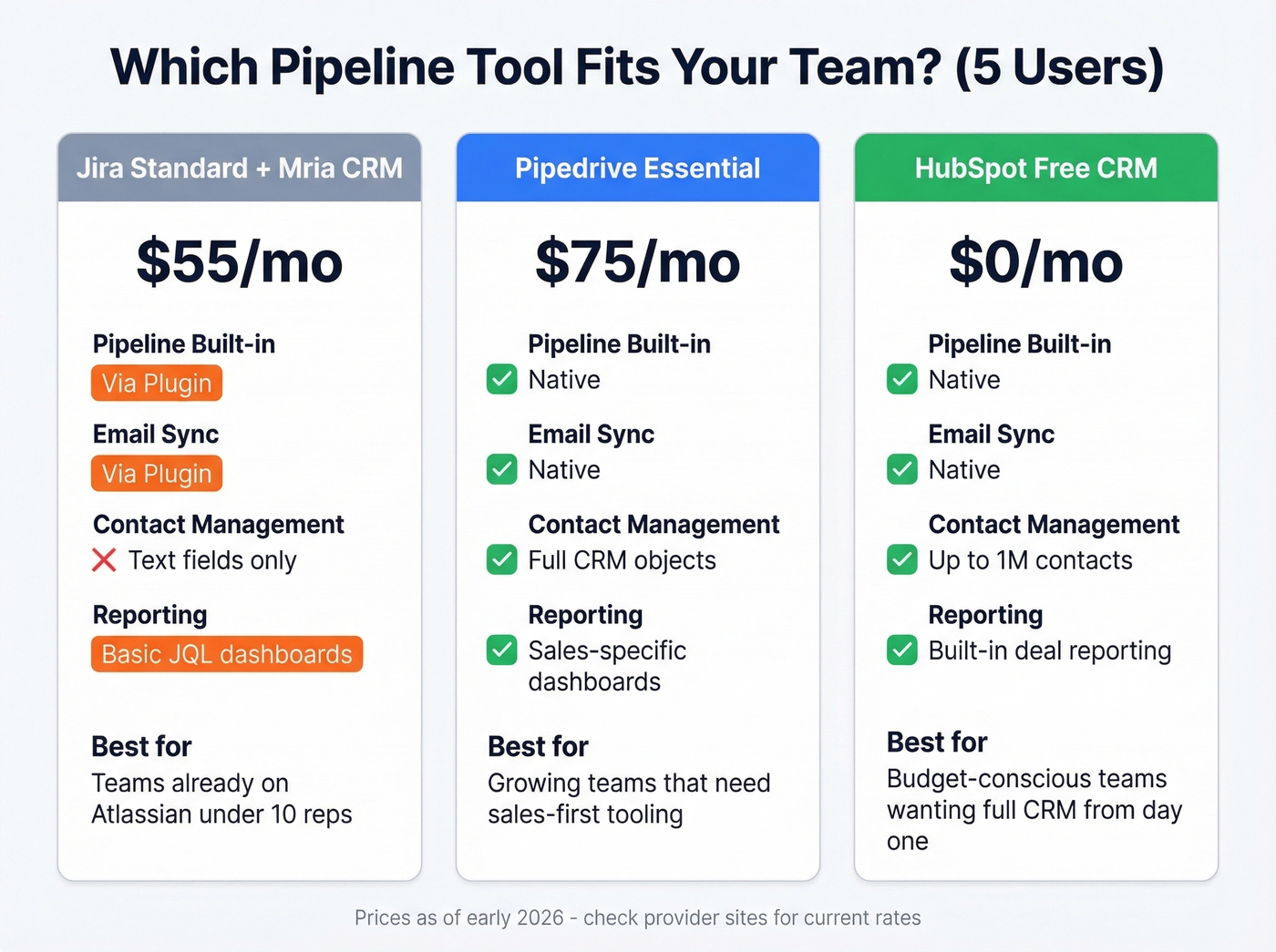
Let's be direct: if you've got 10+ sales reps and no existing Jira investment, a dedicated CRM is almost always the better choice. If you want a quick gut-check, skim a few examples of a CRM and compare what’s native vs bolted on. HubSpot's free CRM gives you unlimited users and up to 1M contacts with native email tracking, deal stages, and reporting that Jira simply doesn't have. Need Jira integration alongside a real CRM? A HubSpot-Jira connector runs ~$0.50/user/month - far cheaper than a HubSpot Sales Hub Starter seat at ~$90/user/month.
Using Jira for your sales pipeline works best as a bridge. It's a way to manage deals inside a tool your team already opens every day, without the overhead of onboarding a new platform. Once you outgrow it - and you will, if things go well - migrate to a purpose-built CRM and keep Jira for what it does best: engineering and project work. If follow-ups are the main thing breaking, steal a few sales follow-up templates and standardize the motion before you migrate.
FAQ
Can Jira replace a CRM for small sales teams?
For teams up to 10 users already on Atlassian tools, yes - with the Standard plan and a plugin like Mria CRM. You'll get basic deal tracking, Kanban stages, and automation. Beyond 10 reps or if you need native email logging, Pipedrive or HubSpot Free will serve you better out of the box.
How do I track deal value and forecasting in Jira?
Add Deal Value and Win Probability custom fields to your issue type, then create JQL-filtered dashboard gadgets that sum weighted values by stage. For example, project = SALES AND status = Negotiation with a two-dimensional filter gives you a basic forecast view. It's not as polished as CRM reporting, but it's functional enough for a team of 5-8 reps tracking 50-100 active deals.
How do I keep contact data accurate in a Jira pipeline?
Jira has no built-in email or phone verification. Before importing contacts, run your list through a verification tool to flag invalid addresses. Bad data means wasted outreach, bounced emails, and damaged sender reputation - problems Jira won't warn you about.