

How to Validate a Gmail Address (And Why Most Tools Can't)
You uploaded a list of 5,000 Gmail addresses to your verification tool, and every single one came back "valid." Not because they're all real - but because Gmail tells every verification service the exact same thing, regardless of whether the mailbox exists.
That's not a glitch in your tool. It's how Gmail works. The global inbox placement rate sat around 83.5% in 2024, meaning roughly one in six emails never reached the inbox. For Gmail addresses specifically, the situation is worse because the standard verification method that works on corporate domains flat-out doesn't work here.
The Short Answer
No tool can confirm with certainty whether a @gmail.com mailbox exists. Gmail returns a [250 OK](https://www.ietf.org/rfc/rfc5321.txt) response to SMTP recipient checks regardless of whether the address is real. Your best move: use a verification tool with catch-all handling to filter syntax errors, disposable addresses, and risk signals, then layer double opt-in for anything flagged as unknown. Any tool claiming 100% Gmail verification is overselling.
How SMTP Verification Actually Works
When email verification works correctly, it follows a predictable SMTP handshake:
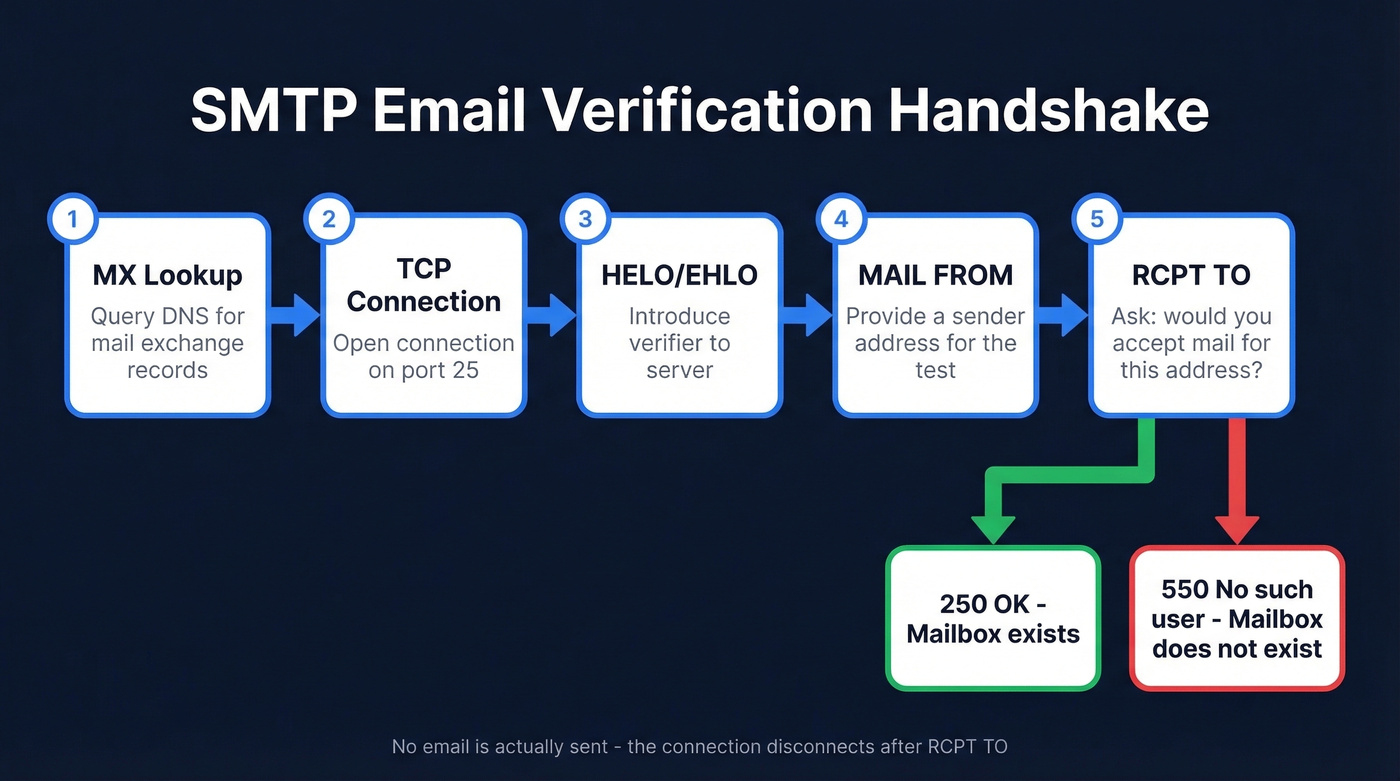
- MX lookup - queries DNS to confirm the domain has mail exchange records.
- TCP connection on port 25 - opens a connection to the mail server.
- HELO/EHLO - introduces the verifier to the server.
- MAIL FROM - provides a sender address for the test.
- RCPT TO - the critical step. The tool asks: "Would you accept mail for this address?"
On a well-behaved mail server, you get 250 OK for real addresses and 550 No such user for fake ones. The tool disconnects before actually sending anything. The whole process often takes under 500ms - right up until Gmail gets involved.
Why Gmail Breaks SMTP Checks
Gmail returns 250 OK for every RCPT TO command, regardless of whether the mailbox exists. Send a verification probe to totallynotreal847293@gmail.com and Gmail says "sure, we'll accept that." This is deliberate anti-enumeration behavior - Google doesn't want spammers harvesting valid addresses by probing their servers.
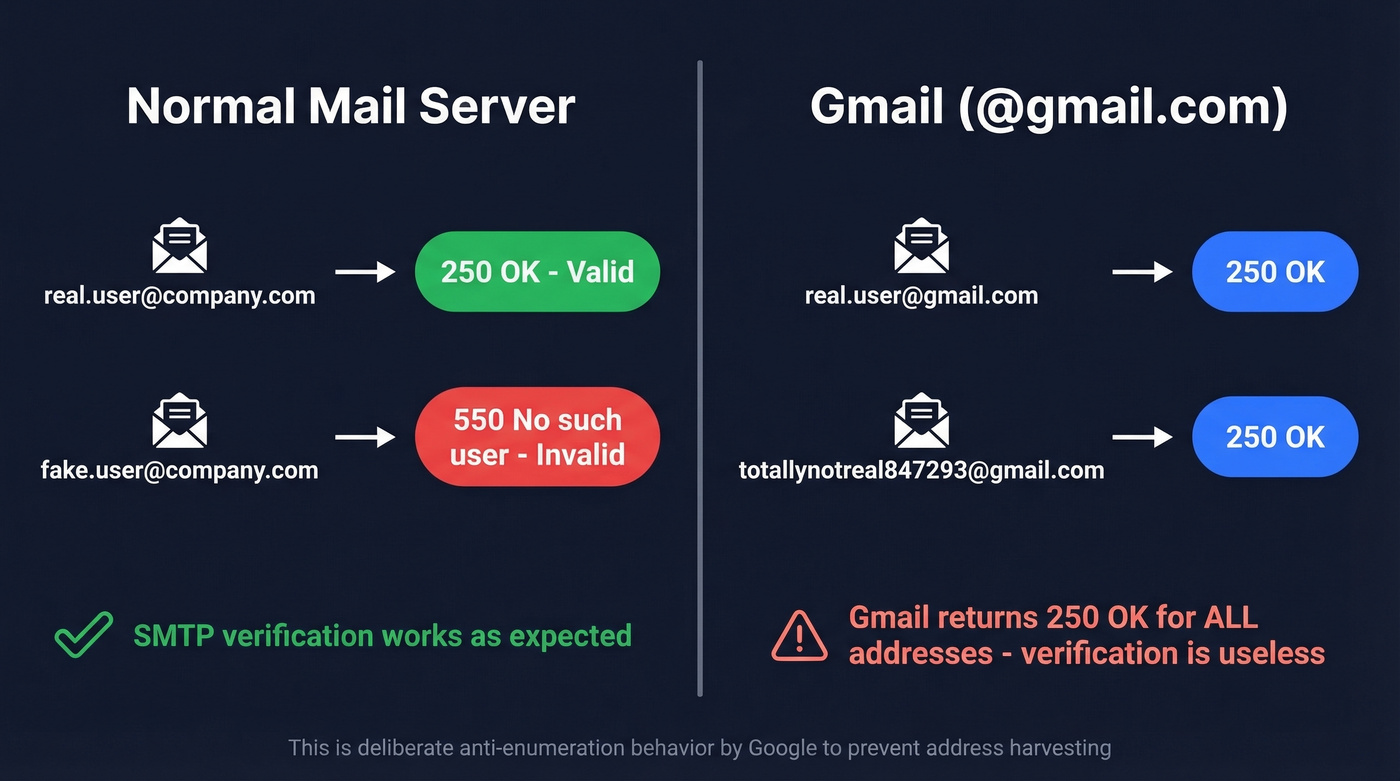
Here's the thing: we've run the same test list through four different verification tools and gotten identical catch-all results for every Gmail address. The consensus on r/sales and r/emailmarketing is blunt - a lot of "email verification" is basically syntax checks plus a few extra steps. They're not entirely wrong when it comes to Gmail specifically.
One important distinction: this applies to consumer @gmail.com addresses. Google Workspace custom domains are a different story. Workspace admins can configure catch-all routing and inbound rules in the Admin Console, so custom domains on Google's infrastructure behave very differently depending on configuration.

Gmail's catch-all behavior makes SMTP verification useless for @gmail.com addresses. Prospeo's 5-step verification cross-references 143M+ verified emails, removes spam traps and honeypots, and refreshes data every 7 days - so you get real risk signals instead of a meaningless "250 OK." Start free with 75 verifications, no credit card required.
Stop trusting Gmail's fake "valid" response. Get actual verification.
Gmail Quirks That Inflate Your List
Even confirmed-real Gmail addresses create list hygiene headaches thanks to two features most people forget about.
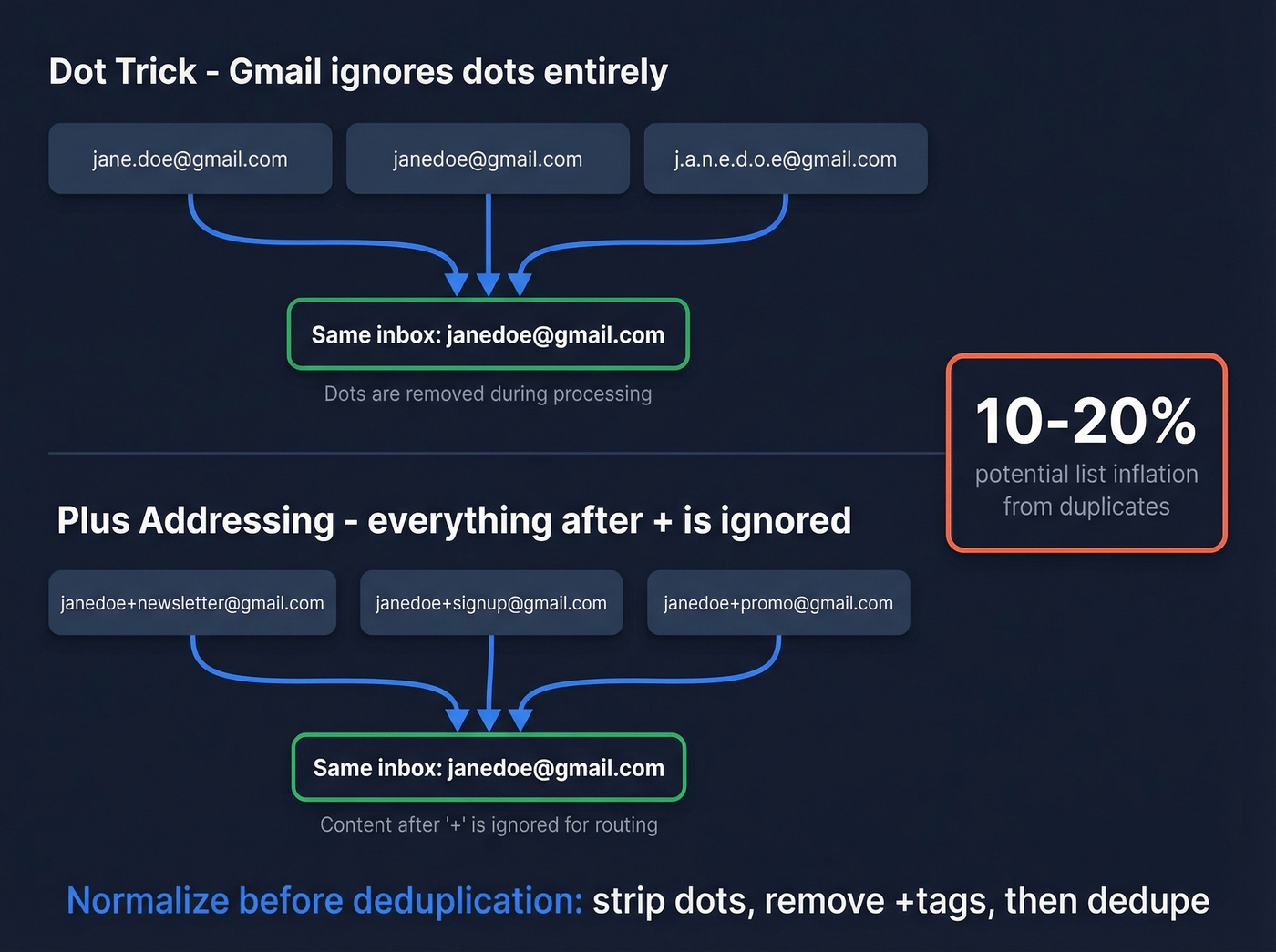
Gmail ignores dots in the local part entirely. jane.doe@gmail.com, janedoe@gmail.com, and j.a.n.e.d.o.e@gmail.com all deliver to the same inbox. If your list has multiple dot variants, you've got duplicates masquerading as unique contacts. Strip dots before deduplication.
Plus-addressing works similarly: janedoe+newsletter@gmail.com delivers to janedoe@gmail.com. This is a legitimate Gmail feature, not a sign of a fake address, but high volumes of plus-address variants likely mean one person signed up multiple times. Strip everything between + and @ before deduplication.
The practical implication is that your "unique Gmail addresses" count can be inflated by 10-20% or more. Normalize before you count, and definitely before you pay per-contact for enrichment.
What Verification Tools CAN Tell You
Since mailbox existence is off the table for @gmail.com, what do you actually get? More than you'd think.
| Status | What It Means | Gmail Behavior |
|---|---|---|
| Valid | Mailbox confirmed | Rare for @gmail.com |
| Invalid | Syntax/domain fail | Works normally |
| Catch-all | Server accepts all | Most @gmail.com results |
| Unknown | Can't determine | Some @gmail.com results |
Most tools add a secondary "Safe to Send" overlay - Yes, No, Risky, or Unknown - that layers risk signals on top of the raw status. For @gmail.com addresses, expect most results to land in catch-all or unknown. The tool can still catch syntax errors, disposable email services, and role-based addresses like info@ or support@. That filtering alone prevents the worst bounces.
If you're trying to go deeper than basic checks, it helps to understand how to check if a Gmail account exists and why most approaches fail.
Best Tools to Validate Gmail Addresses
Let's be honest: if your list is more than 40% Gmail addresses, you need catch-all handling more than you need a high "accuracy" number. A tool claiming 99.9% accuracy that simply marks every Gmail address as "valid" isn't giving you useful data - it's giving you a false sense of security.
| Tool | Free Tier | Paid Pricing | Best For |
|---|---|---|---|
| Prospeo | 75 emails/mo | ~$0.01/email | Gmail-heavy lists with catch-all handling |
| ZeroBounce | 100/mo | $15 per 2,000 | Risk scoring at scale |
| NeverBounce | 1,000 credits | ~$8/1K | One-time legacy list scrubs |
| Hunter | 100/mo | From ~$49/mo | Prospecting + verify combo |
| Bouncer | 1,000 credits | ~$7/1K | Budget bulk under 50K |
| Verifalia | Single-address free | ~$5-$15/1K | Developer API, no subscription |
Prospeo
Prospeo's 5-step verification cross-references catch-all responses against its 143M+ verified email database and applies spam-trap removal, honeypot filtering, and behavioral risk scoring to produce a confidence signal where SMTP alone gives you nothing. Instead of just returning "catch-all" and leaving you guessing, you get an actionable risk assessment that tells you whether to send, skip, or route through double opt-in.
The 7-day data refresh cycle versus the 6-week industry average is what sold our team on it. Gmail addresses go stale fast - people abandon accounts, hit storage limits, set up forwarding - and weekly refreshes catch changes that monthly tools miss entirely. Snyk's team saw their bounce rate drop from 35-40% to under 5% after switching. The free tier gives you 75 emails per month, no contracts, no credit card required. Enough to test against your own list before committing.
If you're comparing vendors, you may also want to review Bouncer alternatives or Hunter alternatives depending on what you're optimizing for.
Your verification tool marks every Gmail address as valid because Gmail tells it to. Prospeo layers catch-all handling, behavioral risk scoring, and a 7-day refresh cycle to flag stale and risky Gmail addresses before they tank your bounce rate. Snyk dropped from 35-40% bounces to under 5%.
98% email accuracy where other tools give you catch-all shrugs.
ZeroBounce
If you need a second opinion on a list you've already cleaned, ZeroBounce earns its place. The AI-powered scoring system adds genuine nuance for Gmail addresses where binary valid/invalid doesn't apply. You get 100 free monthly credits, with paid plans starting at $15 per 2,000 emails. It gets expensive above 100K records, but the scoring granularity justifies the premium for Gmail-heavy lists.
Other Options Worth Knowing
Skip NeverBounce unless you're doing a one-time scrub. It gives you 1,000 free credits and charges ~$8 per thousand after that - solid for that legacy list of 50,000 Gmail addresses gathering dust, but not built for ongoing hygiene.
Hunter is better known for email finding than verification. If you're already using it for prospecting, adding verification keeps your stack simple. 100 free checks per month, paid plans from ~$49/mo. Bouncer and Verifalia round out the budget tier - Bouncer offers 1,000 free credits at ~$7 per thousand with no frills, while Verifalia has a free single-address tool that's handy for quick checks and a developer-friendly API with pay-as-you-go pricing.
If you're building lists upstream, pairing verification with data enrichment services can reduce bad records before they ever hit your sequencer.
Best Practices for Gmail Validation
Since no single tool definitively verifies Gmail mailbox existence, you need a layered approach. Your process matters more than your tool choice.
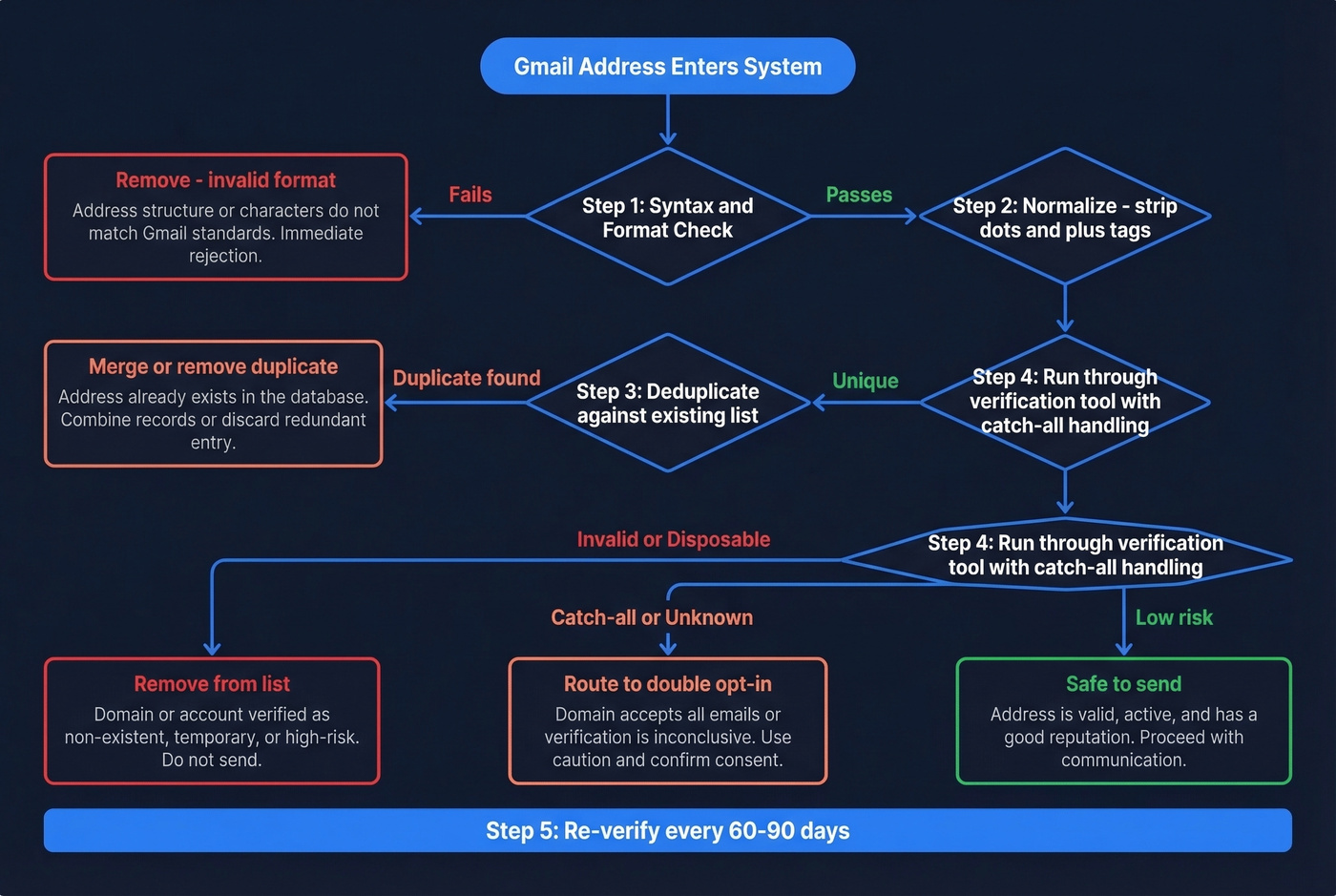
Verify at point of capture. Real-time verification on signup forms catches typos and disposable addresses before they enter your database. This is cheaper and more effective than batch cleaning later - we've seen teams cut their invalid-address rate by 60-70% just by adding a verification step to their forms.
If you're running outbound, it also helps to monitor email bounce rate and follow a broader email deliverability guide so Gmail validation doesn't become your only line of defense.
Combine verification with double opt-in for unknowns. Run your existing addresses through a verification tool to catch obvious problems, then use double opt-in for anything flagged as catch-all or unknown. This is the only reliable way to confirm a Gmail address is real and actively monitored by a human.
Re-verify every 60-90 days. Gmail accounts get abandoned, forwarding rules change, and storage fills up. Tools with automatic refresh cycles reduce the manual burden here. And always normalize before deduplication - strip dots from the local part, remove everything between + and @, then deduplicate. Do this before importing into your CRM or sequencer, not after.
Mailchimp's deliverability guide and Google's own bulk sender guidelines both converge on the same point: combine multiple verification methods rather than trusting any single check. For Gmail specifically, that layered approach isn't optional. It's the only thing that works.
FAQ
How do you check if a Gmail address is valid?
You can't fully confirm mailbox existence through SMTP because Gmail accepts all addresses at the server level. Use a multi-step verification tool to filter syntax errors, disposable domains, and risk signals, then rely on double opt-in for final confirmation. No single check gives you a definitive answer for @gmail.com.
Can you validate a Gmail address without sending an email?
Partially. You can confirm correct syntax, valid MX records, and filter out disposable or role-based addresses. But you can't confirm whether the specific mailbox exists, because Gmail returns 250 OK for all addresses. Tools like Prospeo and ZeroBounce add risk scoring on top of these checks to give you a confidence signal rather than a binary yes/no.
Is a Gmail plus-address a sign of a fake email?
No. Plus-addressing like janedoe+tag@gmail.com is a legitimate Gmail feature that delivers to the base address normally. However, high volumes of plus-address variants in your list likely indicate a single person signing up multiple times. Deduplicate by stripping the +tag before the @ symbol.
Which free tool is best for verifying Gmail addresses?
For Gmail-heavy lists, Prospeo's 75 free monthly verifications with full catch-all handling and spam-trap removal give you the most useful free tier. ZeroBounce offers 100 free monthly credits with AI-based risk scoring. For one-time bulk cleans, NeverBounce's 1,000 free credits cover larger legacy lists.