

How to Build a Verified Email List That Actually Works
64.6% of businesses say deliverability issues have directly impacted their revenue. Not engagement metrics or open rates - actual revenue. And 60.3% cite spam filtering as their top inbox barrier, a problem that starts with sending to addresses that don't exist.
Whether you're sitting on a CRM full of aging contacts or building a verified email list from zero, the mechanics are the same: bad data destroys campaigns, tanks sender reputation, and wastes months of rebuilding trust with inbox providers. Email lists decay by nearly 25% per year, which means the list you trusted in January is already rotting by summer.
Here's what actually works - the process, the tools, and the maintenance cadence that keeps bounce rates where they need to be.
What You Need (Quick Version)
Your situation determines your tool:
- Already have a list that needs cleaning? Bouncer or ZeroBounce handle standalone bulk verification well. Upload a CSV, get results, move on.
- Building a list from scratch? Prospeo finds and verifies B2B emails in a single workflow - 98% accuracy, 7-day data refresh, free tier included. No need to chain two separate tools together.
- On a tight budget? EmailListVerify runs $24 per 10k verifications. It's bare-bones, but it works for bulk cleaning when cost is the constraint.
Pick the path that matches where you are right now.
What "Verified" Actually Means
A verified email list is one where every address has been checked - programmatically, not by a human - to confirm it can receive mail. The word "verified" gets thrown around loosely, so let's break down what the process involves.

Most serious verification tools run a four-step process:
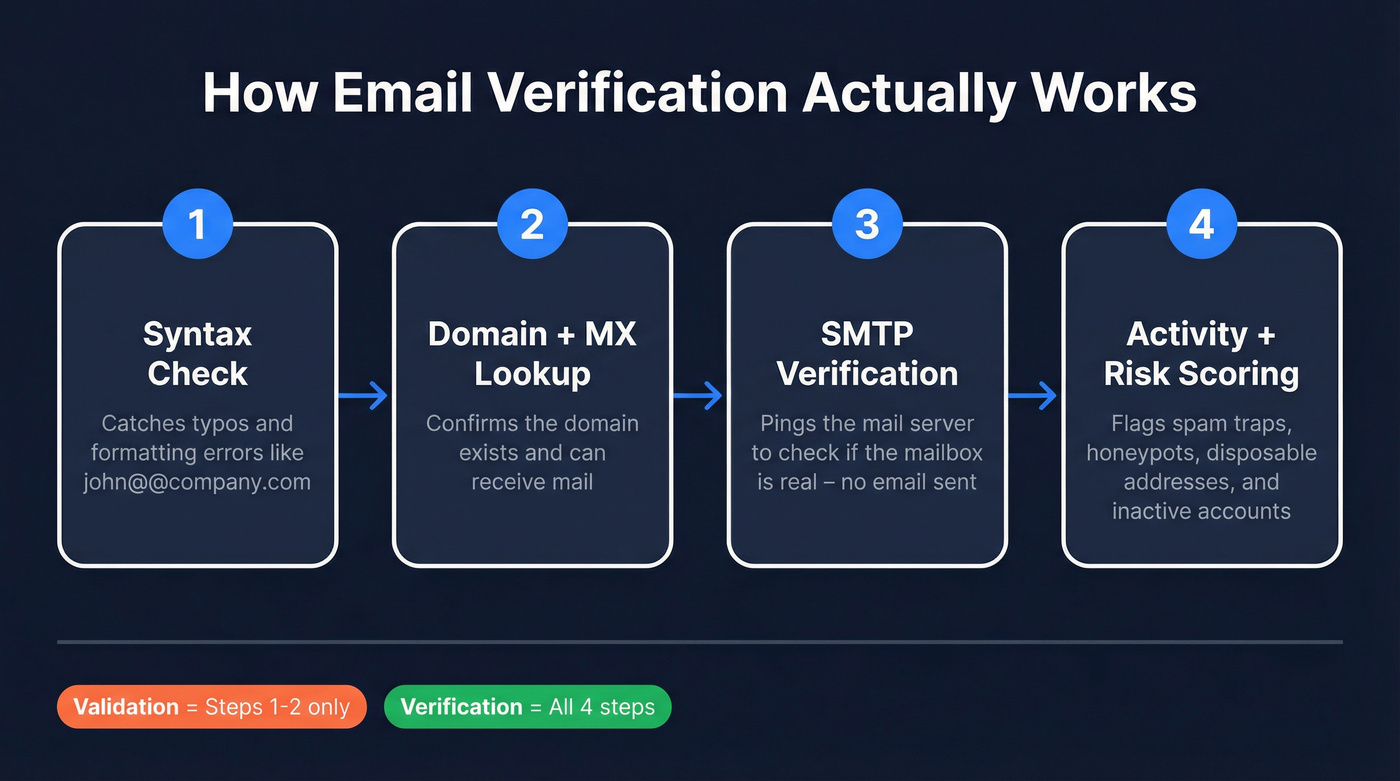
- Syntax check. Does the address follow valid email formatting? Catches typos like
john@@company.comor missing TLDs. - Domain and MX lookup. Does the domain exist, and does it have mail exchange records configured to receive email?
- SMTP verification. The tool pings the mail server to ask whether the specific mailbox exists - without actually sending an email.
- Activity and risk scoring. Is this a known spam trap, honeypot, or disposable address? Has it shown any sign of recent activity?
There's a useful distinction between "verified" and "validated" that most articles blur. Validation is the syntax and format check - step one. Verification goes deeper, confirming the mailbox exists and can receive mail. When someone says they have a "validated list," they might just mean they checked for typos.
Then there's the catch-all problem. Some domains - especially enterprise ones - accept mail sent to any address at that domain, whether the specific mailbox exists or not. These "accept-all" domains make verification unreliable because the server says "yes" to everything. A good verifier flags catch-all addresses separately so you can decide how to handle them rather than treating them as confirmed valid.
Why "99% Accuracy" Is Misleading
Every verification tool's marketing page says something like "99% accuracy" or "industry-leading precision." These numbers are, at best, fantasy.
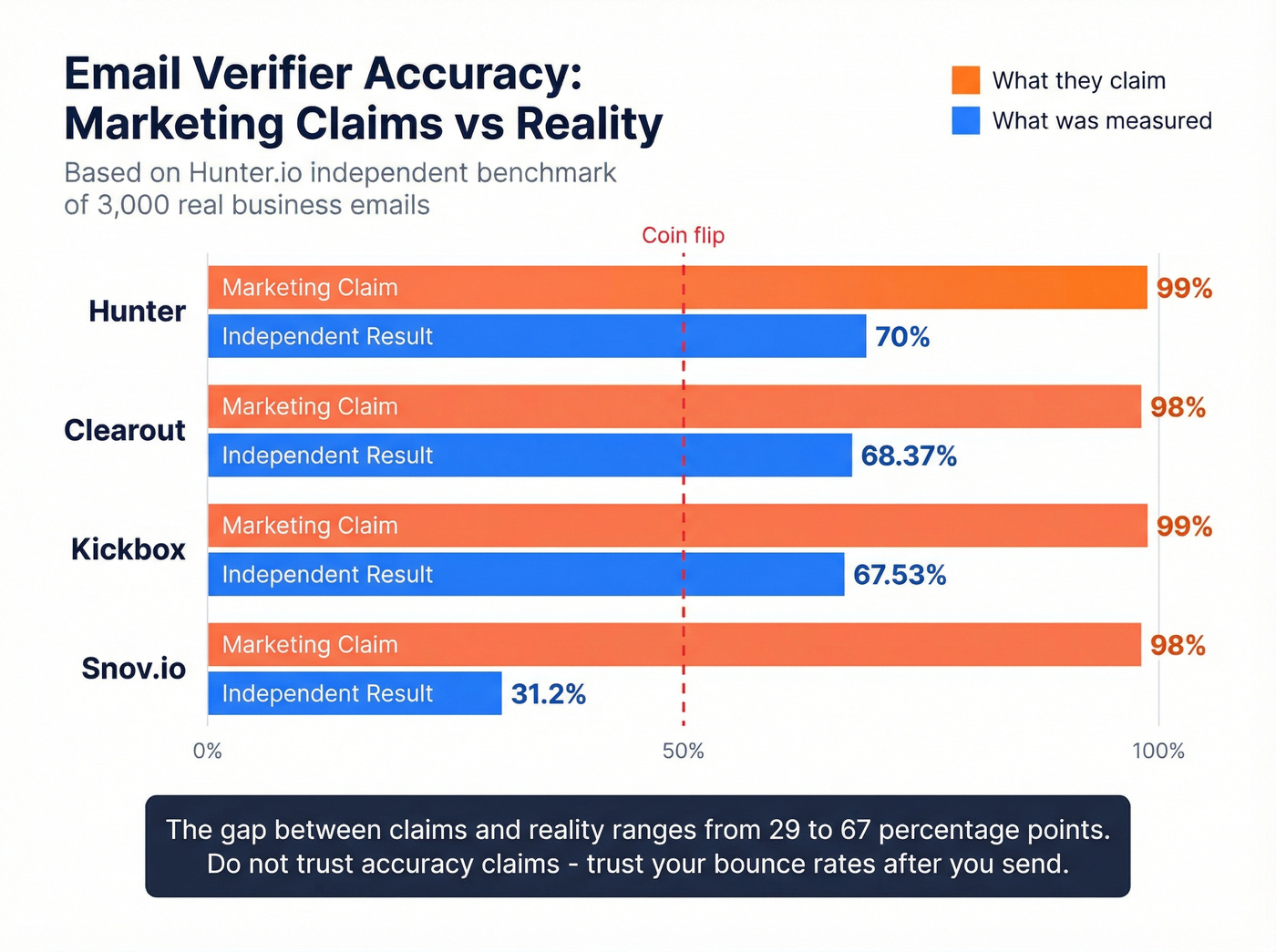
Hunter ran a benchmark of 15 email verifiers using 3,000 real business emails segmented by company size. The dataset included 2,700 addresses collected from actual outreach campaign responses plus 300 known invalid addresses. The top performer hit 70% accuracy. The next best, Clearout, came in at 68.37%. Kickbox landed at 67.53%. Some tools scored as low as 31%.
Here's why the numbers diverge so dramatically. Most vendors calculate accuracy against their own test sets - curated lists where they already know the answers. Real-world lists are messier. They include catch-all domains that no verifier can definitively classify, recently churned addresses that were valid last month but aren't today, and role accounts like info@ and support@ that technically exist but will never convert.
| Tool | Marketing Claim | Independent Benchmark |
|---|---|---|
| Hunter | 99%+ | 70.00% |
| Clearout | 98%+ | 68.37% |
| Kickbox | 99%+ | 67.53% |
| Snov.io | 98%+ | 31.20% |
Catch-all domains are the biggest accuracy killer. When a domain accepts all mail regardless of whether the specific mailbox exists, the verifier can't distinguish between a real person and a black hole. Some tools classify these as "valid." Others mark them "unknown," which tanks their accuracy score but is often more honest.
Nearly 1 in 10 webform email submissions are invalid - and that's before you get to purchased lists or scraped data, where invalid rates run much higher. Don't trust accuracy claims. Trust bounce rates after you send.
Here's the thing: if your deal sizes are modest and your list is under 50,000 contacts, the difference between a 65% and 70% accurate verifier barely matters. What matters is that you verify at all - 7.4% of teams never do, and they're the ones getting their domains blacklisted.
How to Build a Clean List From Scratch
Building a clean list isn't a one-time event - it's a workflow. We've seen teams cut bounce rates from 8% to under 2% just by adding pre-campaign verification to their process.
Start With Clean Sources
The cheapest verification is the one you never have to do. Double opt-in for inbound lists eliminates most junk at the point of entry. If someone can't confirm their email address, they weren't a real lead anyway.
For webforms, add real-time verification at the point of capture. Tools like Kickbox, ZeroBounce, and Emailable offer APIs that check addresses before they hit your database. Given that roughly 9% of webform emails are invalid, this one step prevents a meaningful chunk of bad data from ever entering your system. The same logic applies to event lists, webinar registrations, and content downloads - any time someone hands you an email address, verify it before it touches your CRM.
Find and Verify in One Step
For outbound B2B prospecting, the cleanest workflow is one where finding and verifying happen simultaneously. Stitching together a prospecting tool, a separate verifier, and then an export creates friction, burns credits twice, and introduces lag where data decays between steps.

Prospeo handles both sides. Search across 300M+ professional profiles using 30+ filters - job title, industry, buyer intent, technographics, job change, headcount growth, funding, revenue - and every email that comes back has already been through a 5-step verification process including catch-all handling, spam-trap removal, and honeypot filtering. The database refreshes every 7 days, which matters because an email verified six weeks ago might already be dead. At roughly $0.01 per email, the cost includes finding and verification - you're not paying twice.
Verify Before Every Campaign
This sounds obvious, but only 23.6% of teams actually verify their lists before every send. Another 40.2% verify monthly, and 7.4% never verify at all.
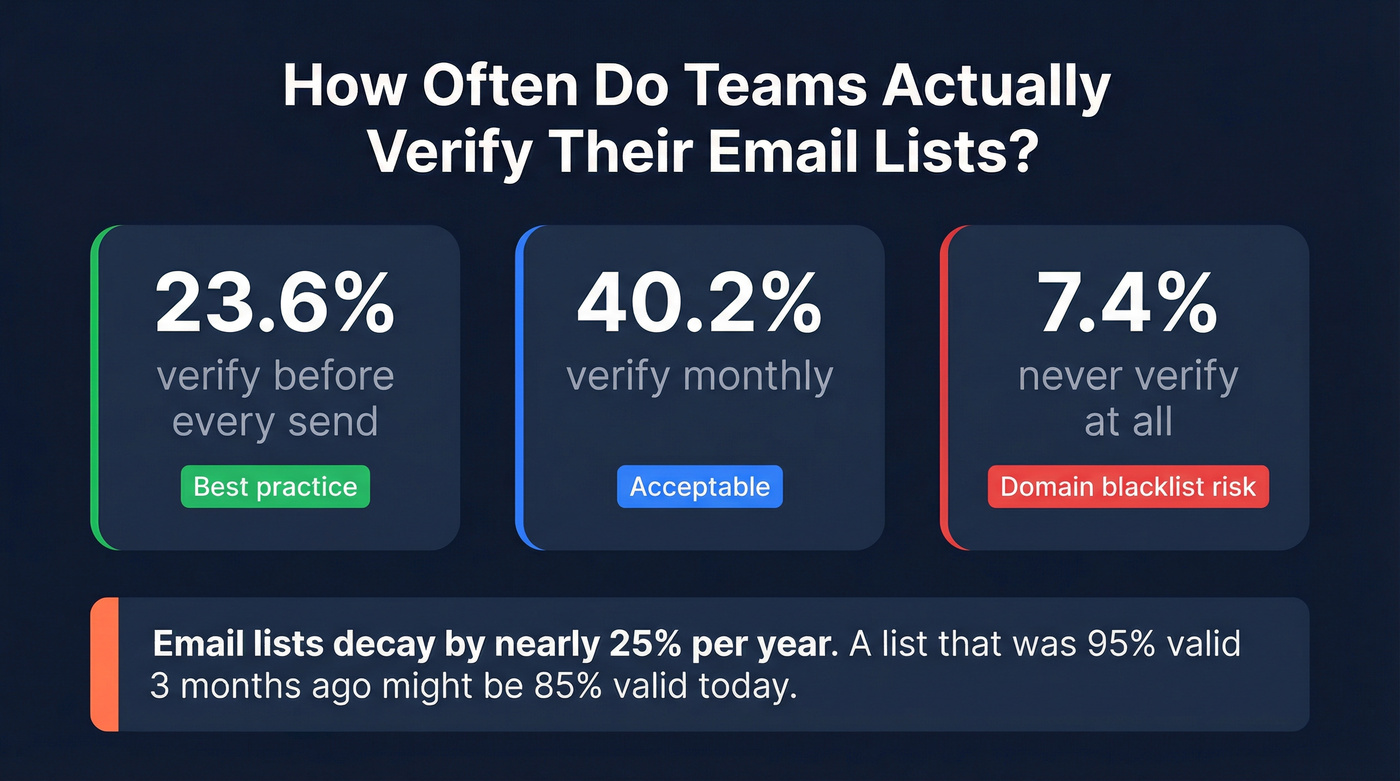
Email addresses decay constantly. People change jobs, companies restructure, domains expire. A list that was 95% valid three months ago might be 85% valid today. If you're running cold outreach, verify the segment you're about to email - not your entire database, just the contacts going into that specific campaign. The cost is trivial compared to the domain reputation damage from a 5%+ bounce rate.

Most teams chain a prospecting tool with a separate verifier - paying twice and watching data decay between steps. Prospeo finds and verifies B2B emails in one workflow across 300M+ profiles, with 5-step verification, catch-all handling, and a 7-day refresh cycle.
Get verified emails at $0.01 each - no second tool required.
Is Buying an Email List Legal?
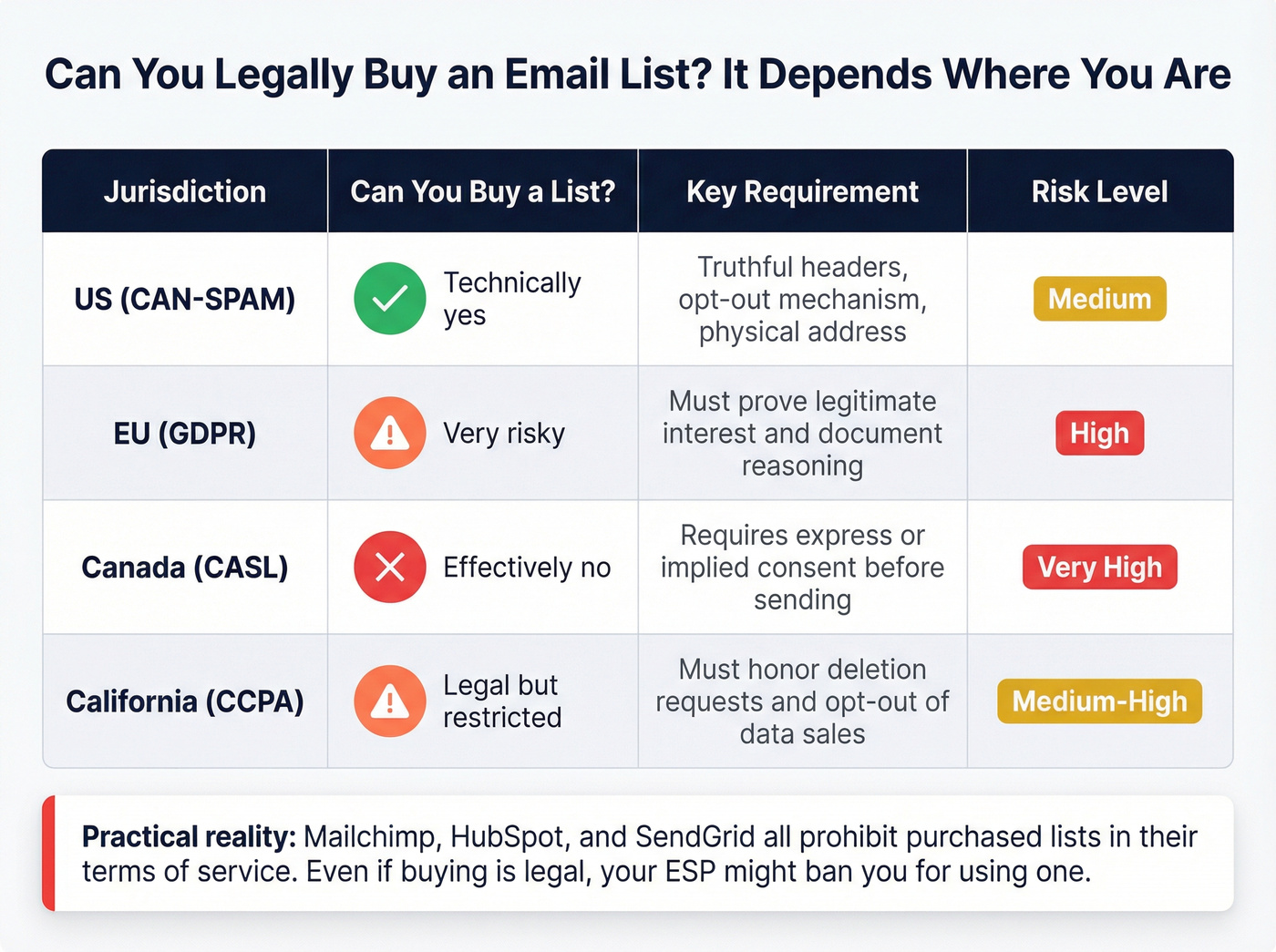
Some people looking for a verified email list want to buy one outright. Whether that's legal depends on jurisdiction - whether it's smart is a different question entirely.
United States (CAN-SPAM)
CAN-SPAM is surprisingly permissive about sourcing. The law regulates how you email, not where you got the address. You need truthful headers, accurate subject lines, a physical address, and a working opt-out mechanism. Buying a list isn't illegal under CAN-SPAM.
EU (GDPR)
GDPR is stricter. You need a lawful basis to process personal data, and "I bought it from a vendor" isn't one. Legitimate interest can work for B2B outreach if you can demonstrate relevance - you're contacting a VP of Engineering about an engineering product, for example. But you need to document that reasoning, disclose how you obtained the data, and honor objection requests immediately.
Canada (CASL) & California (CCPA/CPRA)
CASL is the strictest of the bunch. Canada requires express or implied consent for commercial electronic messages. There's a B2B exemption concept for messages sent to someone whose role makes the communication relevant, but sender identification and opt-out requirements are strict. CCPA/CPRA focuses on transparency and consumer control - the right to know what data you have, request deletion, and opt out of data sales.
Regardless of jurisdiction, the practical reality is this: Twilio/SendGrid explicitly says "don't purchase lists from third-party vendors." Mailchimp and HubSpot prohibit purchased lists in their terms of service. Even if buying is technically legal, your ESP might ban you for using one.
Best Email Verification Tools in 2026
We've tested and tracked these tools across client campaigns and internal benchmarks. Here's what each does best, with real pricing and the context you need to choose.
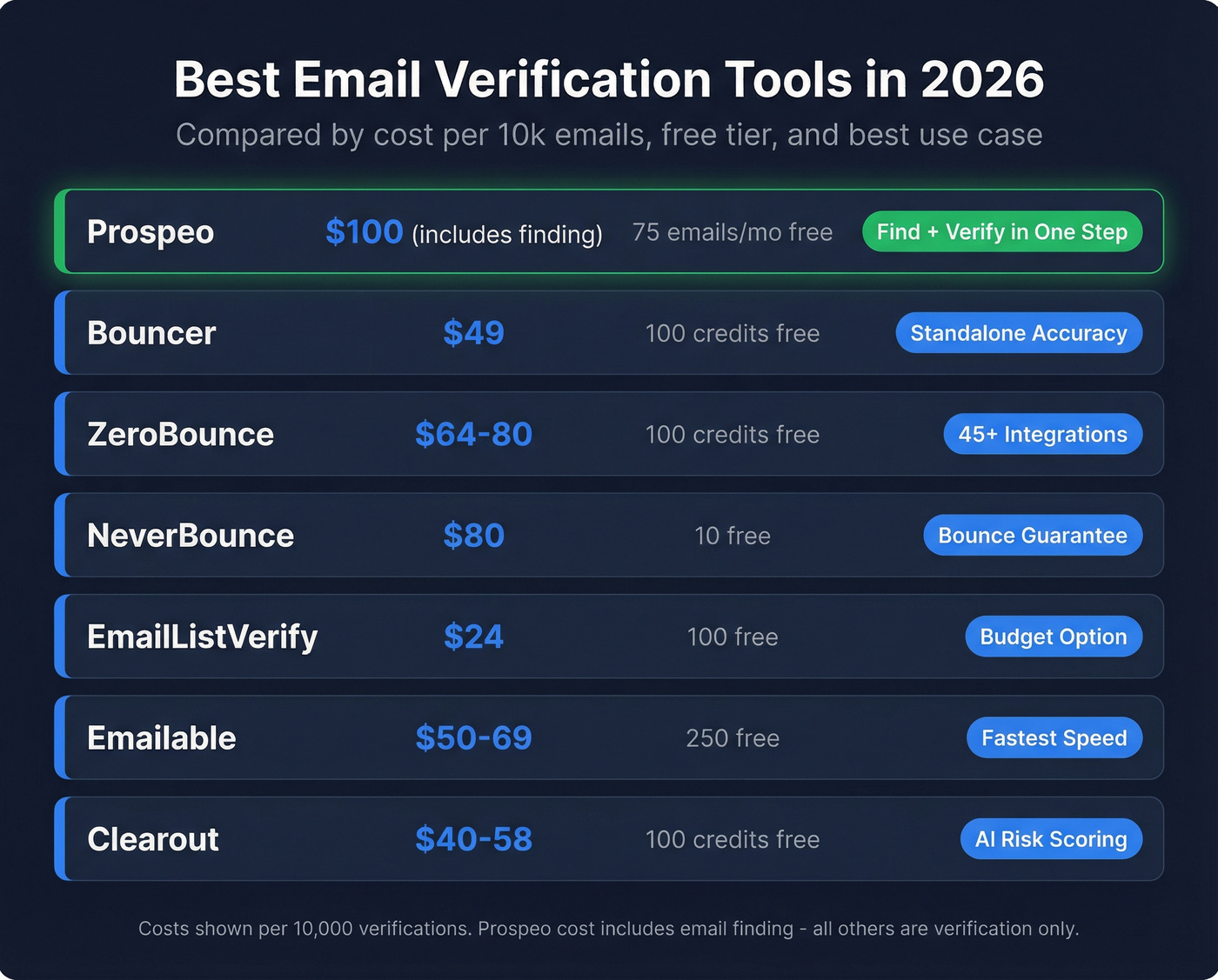
| Tool | Best For | Cost per 10k | Speed | Free Tier | Key Strength |
|---|---|---|---|---|---|
| Prospeo | Find + verify | ~$100 (incl. finding) | - | 75 emails/mo | Combined workflow |
| Bouncer | Standalone accuracy | $49 | 0.8s/email | 100 credits | SOC 2 + GDPR |
| ZeroBounce | Integrations | $64-$80 | 1.2s/email | 100 credits | 45-49 integrations |
| NeverBounce | Bounce guarantee | $80 | 0.5s/email | 10 free | Refund policy |
| EmailListVerify | Budget cleaning | $24 | - | 100 free | Lowest cost |
| Emailable | Speed | $50-$69 | 0.012s/email | 250 free | Fastest processing |
| Clearout | AI scoring | $40-$58 | - | 100 credits | Risk scoring |
Prospeo
The only tool on this list that combines email finding with verification in a single platform. You're not paying $49 to verify a list you already built somewhere else - you're paying to build the list and get verified results in one step.
The 143M+ verified emails, drawn from a 300M+ professional profile database, run through a 5-step verification process with catch-all handling and spam-trap removal. Data refreshes every 7 days - dramatically faster than the 4-6 week industry average. Stack Optimize used Prospeo to build from zero to $1M ARR while maintaining 94%+ deliverability and sub-3% bounce rates across all client campaigns. Meritt tripled their pipeline from $100K to $300K per week and dropped bounce rates from 35% to under 4%. At roughly $0.01 per email with a free tier to start, it's the best value for teams that need both prospecting and verification.
Hunter's benchmark showed the best standalone verifier hit just 70% accuracy. The gap? Stale data and catch-all domains. Prospeo refreshes every 7 days and filters spam traps, honeypots, and catch-alls before an email ever reaches your list - 98% accuracy, measured by bounce rates, not marketing pages.
Build a verified email list that stays clean past January.
Bouncer
Use this if you already have lists from other sources and need a dedicated, privacy-conscious verifier. Bouncer's SOC 2 and GDPR compliance is genuine - they anonymize emails immediately and delete data after 60 days. Bulk uploads handle up to 250,000 addresses. With a 4.8 on G2 and 4.9 on Capterra, it's consistently one of the highest-rated standalone verifiers.
Skip this if you need email finding, enrichment, or integrations beyond basic verification. Bouncer does one thing well and doesn't try to do more.
ZeroBounce
ZeroBounce is the verification tool for teams already running complex stacks. With 45-49 native integrations - including most major ESPs, CRMs, and automation platforms - it slots into existing workflows without custom API work. The minimum purchase is 2,000 credits for $20, which makes it accessible for testing. Beyond verification, ZeroBounce offers email scoring and basic enrichment like name, gender, and location appends. SOC 2 and GDPR compliant. The tradeoff: at $64-$80 per 10k, it's expensive for pure verification.

NeverBounce
NeverBounce's differentiator is its bounce refund guarantee - if a verified email bounces, they refund the credit. That's a meaningful safety net for teams sending high-volume cold outreach where every bounce hurts sender reputation. At $80 per 10k it's one of the priciest mainstream options, but the guarantee partially offsets that. Catch-all detection accuracy runs around 94% in independent testing, which is solid.
EmailListVerify
The budget play. At $24 per 10k, EmailListVerify is for cleaning large legacy databases when cost is the primary constraint. Accuracy won't match the premium tools - independent benchmarks placed it at 63.87% - but for bulk hygiene on lists you'd otherwise throw away, the economics make sense. Don't use it as your only verification layer for active outreach campaigns. For even cheaper options, MillionVerifier runs around $3.70 per 1k and DeBounce around $1.50-$2 per 1k, though with corresponding tradeoffs in accuracy and features.
Emailable
Fastest processing in the category at 0.012 seconds per email - about 42x faster than NeverBounce and roughly 100x faster than ZeroBounce. If you're running real-time API verification on high-traffic webforms where latency kills conversion rates, Emailable's speed is the reason to choose it. Pricing runs $50-$69 per 10k depending on volume.
Clearout
Clearout uses AI-based confidence scoring rather than binary valid/invalid classifications. Useful if you want granular risk tiers for catch-all addresses rather than a simple yes/no. At $40-$58 per 10k, it's mid-range on price. It scored 68.37% in independent benchmarks - second-highest overall - though Clearout's own marketing claims 98%+. That gap between vendor marketing and independently tested accuracy is a pattern across the entire industry.
The ROI of Verification
Say you're sending 100,000 emails per campaign with a 10% bounce rate. That's 10,000 wasted sends - emails that never reach a human, damage your sender score, and get your domain flagged.
After verification, a reasonable target is 2% bounce. That's 8,000 recovered deliverable emails per campaign. If each delivered email is worth $0.50 in pipeline value (conservative for B2B), that's $4,000 in recovered value from a single campaign.
Verification costs? Somewhere between $24 and $80 per 10k emails depending on the tool. For 100,000 emails, you're spending $240 to $800 to recover $4,000 in value. That's a 5-16x return before you factor in sender reputation protection. Businesses allocate 26.6% of their marketing budget to email on average, and verification protects that investment for pennies on the dollar. The fact that 7.4% of teams never verify at all is genuinely baffling - it's like insuring your car but not your house.
How to Maintain a Clean List Long-Term
One-time verification is a start. Ongoing maintenance is what actually keeps deliverability stable.
Twilio/SendGrid recommends cleaning your list every six months as a baseline. For larger programs with 100,000+ contacts, quarterly or monthly cleaning is more appropriate. In our experience, the teams that maintain sub-1% bounce rates aren't doing anything magical - they're just cleaning consistently and verifying before every campaign. Boring work, but it compounds.
Here's a practical maintenance checklist:
Set bounce rate thresholds. For marketing email, keep bounce rates under 0.5%. For cold outreach, Instantly's benchmark is total bounces under 2% with hard bounces under 1%. If you're above these numbers, your list needs cleaning now. (If you need a deeper triage flow, start with hard bounces and work backward.)
Remove role accounts. Addresses like info@, support@, and sales@ technically exist but rarely convert and often trigger spam complaints. Strip them out. (If you’re blocking throwaway signups too, keep a disposable email domains list handy.)
Run re-engagement before purging. For marketing lists, send a re-engagement sequence to inactive contacts. If they don't respond after two attempts, remove them. Don't keep dead weight just because the list size feels good. (Need copy ideas? Use these re-engagement subject lines.)
Prioritize data freshness. This is where tool choice matters. A verification tool with a weekly data refresh catches decayed addresses faster than one relying on month-old snapshots. The gap between "verified once" and "continuously fresh" is the difference between 2% and 5% bounce rates over time. (More on the underlying problem: B2B contact data decay.)
Deduplicate ruthlessly. Duplicate contacts inflate your list size and waste sends. Most CRMs have dedup tools; use them after every import. (If you’re standardizing the process, follow a CRM verify workflow.)
FAQ
How often should I verify my email list?
Before every major campaign, or quarterly at minimum. Only 23.6% of teams verify before every send - the rest are gambling with sender reputation. For high-turnover lists like SaaS with frequent signups, monthly verification is safer. Lists over 100,000 contacts should treat quarterly as the floor, not the ceiling.
What's a good bounce rate after verification?
For marketing email, keep it under 0.5%. For cold outreach, total bounces should stay under 2% with hard bounces below 1%. If you're consistently above these thresholds post-verification, either your verifier isn't catching enough invalids or your data sources need upgrading.
What are catch-all emails and should I send to them?
Catch-all domains accept mail sent to any address at that domain, whether the specific mailbox exists or not - meaning verification can't confirm individual addresses. Send to them in small test batches and monitor bounce rates closely. Tools like Bouncer flag catch-all addresses separately so you can make an informed risk decision rather than blindly blasting the whole segment.
Is it legal to buy an email list?
Under US CAN-SPAM, purchasing lists is legal - the law regulates sending behavior, not sourcing. GDPR requires a documented lawful basis, making purchased data riskier in the EU. Most ESPs like Mailchimp and HubSpot ban purchased lists in their terms of service regardless, so your sending platform might block you even if the law doesn't.
Can I find and verify emails in one tool?
Yes. Platforms that combine email finding with built-in verification deliver clean contacts from a single search without chaining separate prospecting and verification services. This eliminates the data decay that happens when you find an email in one tool and verify it hours or days later in another.
