

How to Verify a Correct Email Address in 2026
You pasted an email into a free checker and got "unknown." That single word is where most verification guides stop being useful. This one won't.
Here's what's actually happening when you verify a correct email address, why most tools get it wrong, and which ones are worth your time.
What You Need (Quick Version)
- Verify a single email right now? Hunter lets you check one address for free with no signup - the fastest path for a spot-check. Create an account and you get about 100 verifications per month.
- Bulk verification on a budget? MillionVerifier at $0.0003/email is the cheapest option that still works. Skip it for B2B-heavy lists, though - more on that below.
How Email Verification Works
Every verification tool runs the same basic process. No email is actually sent - it's a conversation between servers that stops short of delivery. Understanding these four steps is the foundation of any reliable check.
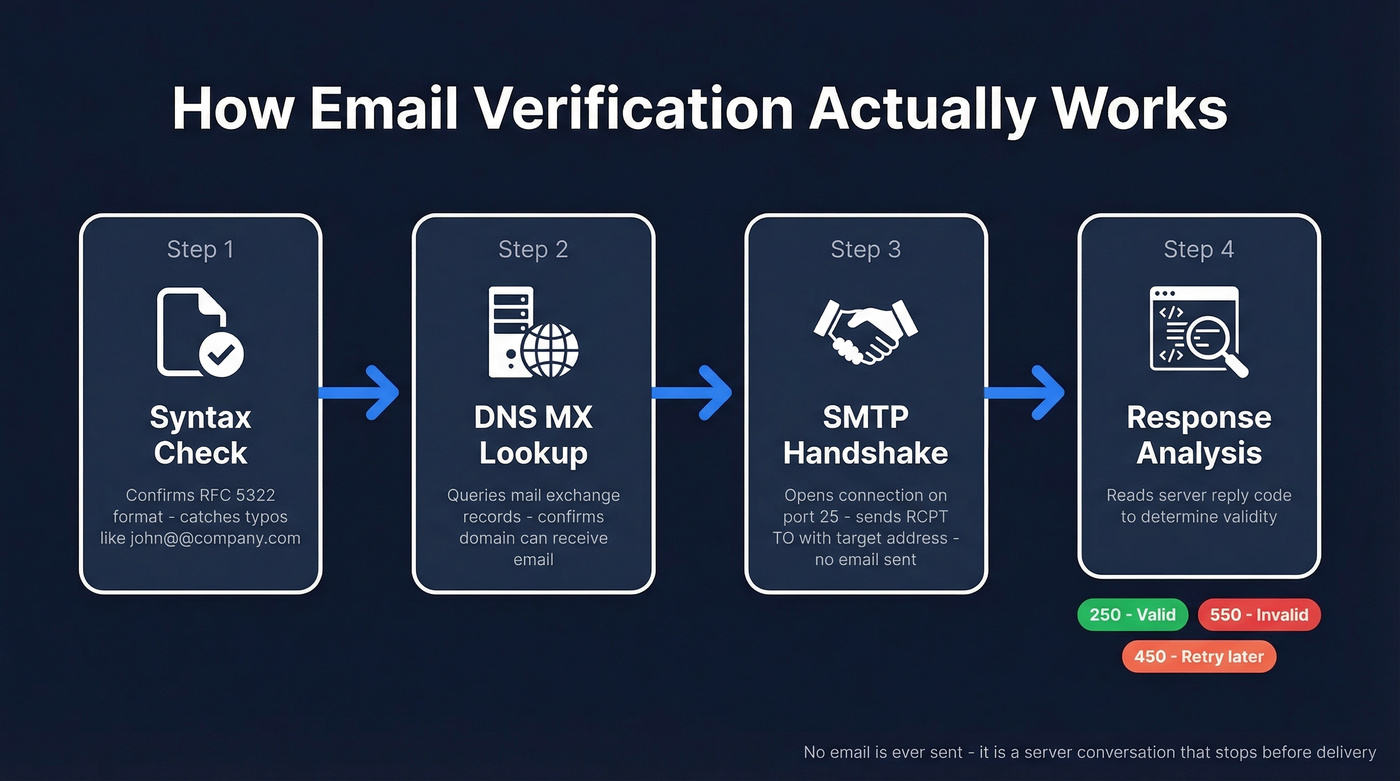
- Syntax check - confirms the address follows RFC 5322 formatting rules. Catches typos like
john@@company.com. - DNS MX lookup - queries the domain's mail exchange records to confirm it can receive email. This is what
nslookup -type=mx domain.comdoes manually. - SMTP handshake - opens a TCP connection to the mail server on port 25, introduces itself with an EHLO command, and issues a
RCPT TOwith the target address. - Response code analysis - the server's reply tells you everything.
| SMTP Code | Meaning | What to Do |
|---|---|---|
| 250 | Accepted | Likely valid |
| 550 | No such user | Invalid - remove |
| 450 | Greylisting/retry | Wait 15-30 min, retry |
This process works perfectly on standard domains. It falls apart on catch-all domains - and that's where the real problems start.
Why 99% Accuracy Claims Are Wrong
Hunter benchmarked 15 verification tools against 3,000 real business emails. The top performer hit 70% overall accuracy. Not 99%. Not 95%. Seventy percent.
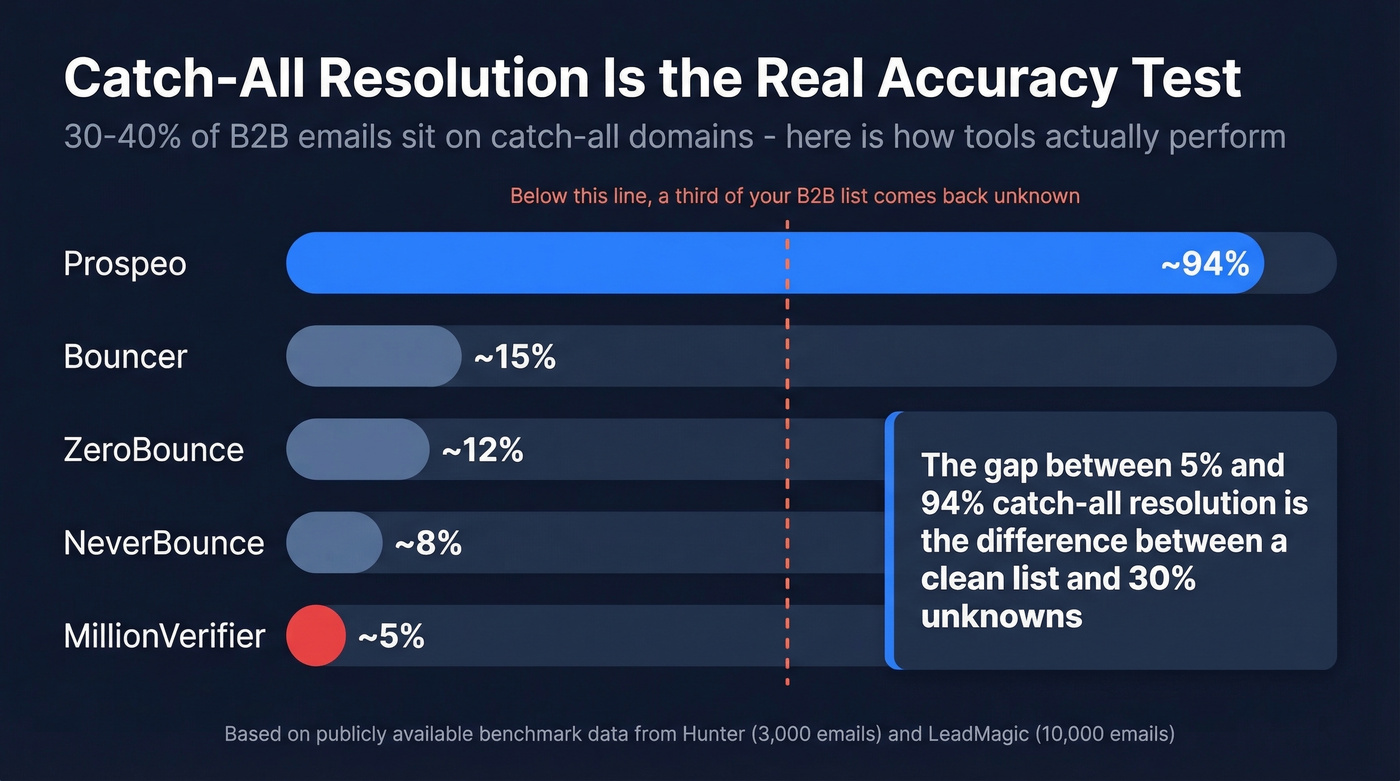
The gap is catch-all domains. Around 30-40% of B2B email addresses sit on servers configured to accept any recipient at the SMTP level. Send a RCPT TO for totallyFakeAddress@company.com and you'll get a 250 response. The server says "sure, I'll take it" whether the mailbox exists or not.
A 10,000-email benchmark showed catch-all resolution ranging from 5% to 94% across tools. That's a massive spread, and it's the real differentiator - not accuracy on easy addresses, but what happens with the third of your list that basic tools mark "unknown."
Here's the thing: if your outbound list is mostly B2B, the only accuracy number that matters is catch-all resolution. Everything else is table stakes.

Most tools choke on catch-all domains - marking 30-40% of your B2B list as "unknown." Prospeo's 5-step verification with proprietary infrastructure resolves catch-alls, removes spam traps, and delivers 98% accuracy at ~$0.01/email.
Find and verify emails in one step - no second tool needed.
Three Methods to Check Any Address
Manual MX Lookup
nslookup -type=mx domain.com
On Linux/Mac, use dig MX domain.com instead. This confirms the domain has mail exchange records and can receive email, but it won't tell you whether a specific mailbox exists - just that the domain is set up for mail. Good for a quick sanity check before you spend credits on full verification. For a deeper dive into building your own SMTP check, this dev.to walkthrough covers the raw protocol.
Use a Verification Tool
This is the right answer for 95% of situations. We've run our own lists through multiple tools, and the catch-all resolution gap is real - it's the difference between a clean list and a 30% unknown rate that leaves you guessing.
Prospeo runs a 5-step verification process that handles catch-all domains specifically: syntax validation, DNS checks, SMTP handshake, catch-all handling, spam-trap removal, and honeypot filtering. The 98% accuracy comes from proprietary infrastructure that doesn't rely on third-party email providers. The workflow advantage matters just as much - search by 30+ filters, get verified contacts back, push them straight to your sequencer, no buying from one vendor and cleaning with another.

For quick spot-checks, ZeroBounce offers 100 free validations per month when you sign up with a business or premium domain. Hunter lets you check a single address for free with no signup and cross-references results against its own B2B database for an extra signal layer.
Small Batch in Google Sheets?
Mailmeteor offers 50 free verifications per month through a Sheets extension running 15+ checks including format, DNS, MX, and SMTP validation. Perfect for lists under 50 contacts. Don't expect catch-all resolution at this tier.
Best Free Verification Tools
| Tool | Free Tier | Paid Rate | Catch-All | Best For |
|---|---|---|---|---|
| Prospeo | 75/mo | ~$0.01/email | Yes (5-step) | Find + verify in one step |
| ZeroBounce | 100/mo (business domain signup) | $0.008/email | Limited (~12%) | Quick single checks |
| Hunter | 1 free check (no signup) + ~100/mo with account | Included in plans | Accept-all for major providers | B2B database cross-ref |
| NeverBounce | Free trial | $0.008/email | Limited (~8%) | Pay-as-you-go bulk |
| MillionVerifier | Trial credits | $0.0003/email | Minimal (~5%) | Budget bulk - not B2B |
| Mailmeteor | 50/mo | N/A | Basic | Google Sheets users |
| Bouncer | Free trial | $0.008/email | Limited (~15%) | Mid-range alternative |
Most pay-as-you-go verifiers cluster around $0.008/email with single-digit catch-all resolution. MillionVerifier wins on raw price but resolves just 5% of catch-all addresses, meaning a third of your B2B list comes back "unknown." Skip it if your list is B2B-heavy.
If you're comparing options beyond the free tier, see our breakdown of Bouncer alternatives and Hunter alternatives.
Mistakes That Kill Sender Reputation
Bought lists are poison - and unverified lists aren't much better. We've seen teams torch their domain reputation in a single campaign by ignoring these basics.
Don't send test emails to check addresses. It damages your sender reputation and produces unreliable results. Bounces might be caused by your reputation, not invalid addresses. Use a tool that does SMTP handshakes instead.
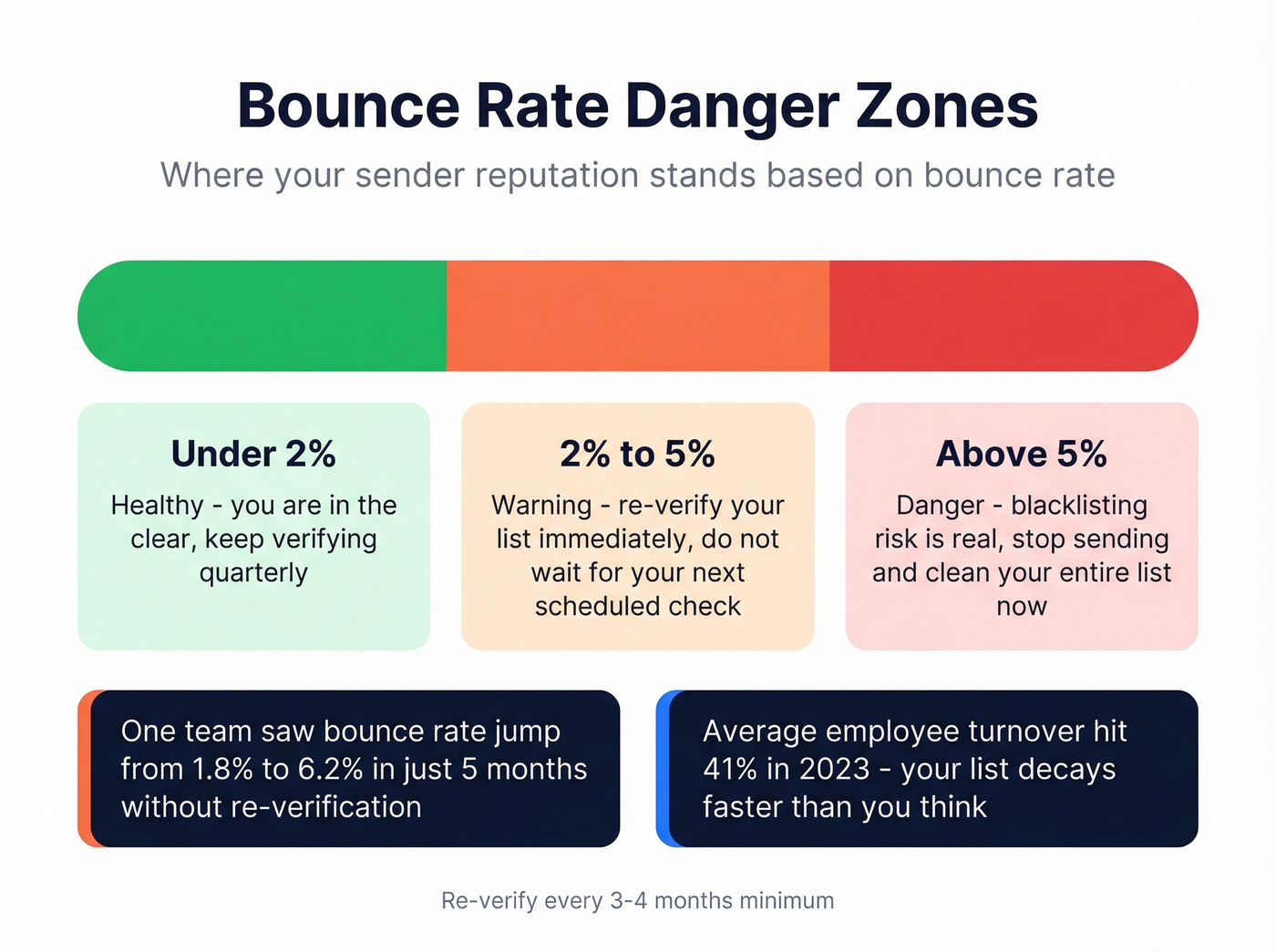
Re-verify every 3-4 months. Average employee turnover hit 41% in 2023, and there's no sign it's slowed down since. Your list decays faster than you think - one team we worked with saw their bounce rate jump from 1.8% to 6.2% in just five months without re-verification.
Don't treat "unknown" as valid. Unknown means risky. Send to enough unknowns and your bounce rate climbs past the danger zone. Under 2% bounce rate is healthy. Between 2-5% is a warning. Above 5% and you're looking at blacklisting.
To go deeper on keeping inbox placement stable, use an email deliverability guide, monitor your email bounce rate, and follow a process to improve sender reputation.
Let's be honest - if you're running outbound at any real volume, verification isn't optional. It's infrastructure.
Re-verifying stale lists every quarter costs time and credits. Prospeo refreshes all 300M+ profiles every 7 days - not the 6-week industry average - so your contacts stay accurate between campaigns without manual re-checks.
Get emails that are already verified when you pull them.
FAQ
How do I check if an email is valid without sending a message?
Use a verification tool that performs an SMTP handshake - it queries the mail server's response without delivering anything. ZeroBounce and Hunter both automate this. For a domain-level check, run nslookup -type=mx domain.com in your terminal to confirm the domain accepts mail.
Why does my verifier return "unknown"?
The address sits on a catch-all domain, which accepts any recipient at the SMTP level. Around 30-40% of B2B emails are on catch-all servers. Tools with dedicated catch-all resolution handle most of these; budget tools like MillionVerifier resolve only about 5%.
How often should I re-verify my email list?
Every 3-4 months minimum. Employee turnover means lists decay fast - if your bounce rate climbs above 2%, re-verify immediately regardless of schedule. Teams running weekly outbound campaigns should verify monthly to stay under deliverability thresholds.