

How to Verify an Email Address: The Complete Guide
You exported 5,000 contacts from your CRM last Tuesday, loaded them into your sequencer, and hit send. By Wednesday morning, 612 bounced. Your ESP flagged the domain. Your deliverability score dropped from 94 to 71. Outbound is paused while you "clean the list."
That scenario plays out every week at companies that treat email verification as an afterthought. The average bounce rate across industries is 2.48%, but teams working with stale B2B data routinely see 10-15% on their first send. Knowing how to verify an email address properly is the difference between a campaign that books meetings and one that gets your domain blocklisted.
What You Need (Quick Version)
Cleaning a bulk list? You need a dedicated verifier. The top three for price-to-accuracy: ZeroBounce ($7.50/1K on the minimum pack), Bouncer ($7/1K, the budget pick), and NeverBounce ($8/1K with 1,000 free credits).
Bouncing despite "verified" data? Your problem isn't verification - it's the data source. If your contact database refreshes every six weeks, you're checking addresses that have already decayed. No verifier can keep up with that kind of rot. Fix the upstream source first.
What Email Verification Actually Means
Email verification checks whether a specific address can receive messages without actually sending one. That distinction matters. You're not emailing the person - you're connecting to their mail server and checking whether the mailbox appears deliverable.
In practice, vendors use "verification" and "validation" interchangeably. Most tools run syntax checks, domain/DNS checks, and an SMTP mailbox check in one pipeline. Whether you need to check a single lead or clean an entire campaign list, the underlying process is the same. You submit an address, the tool runs format checks, DNS lookups, and an SMTP handshake in sequence, and you get a result back in anywhere from sub-second to five-plus seconds depending on how cooperative the receiving server feels.
Why Verification Matters in 2026
The email ecosystem got meaningfully stricter over the past two years. Google and Yahoo began enforcing SPF, DKIM, and DMARC authentication requirements in early 2024, and enforcement has tightened through 2025 and into 2026. Anyone sending more than 5,000 emails per day must comply. They've also set a hard ceiling: keep your spam complaint rate below 0.3%, ideally under 0.1%.
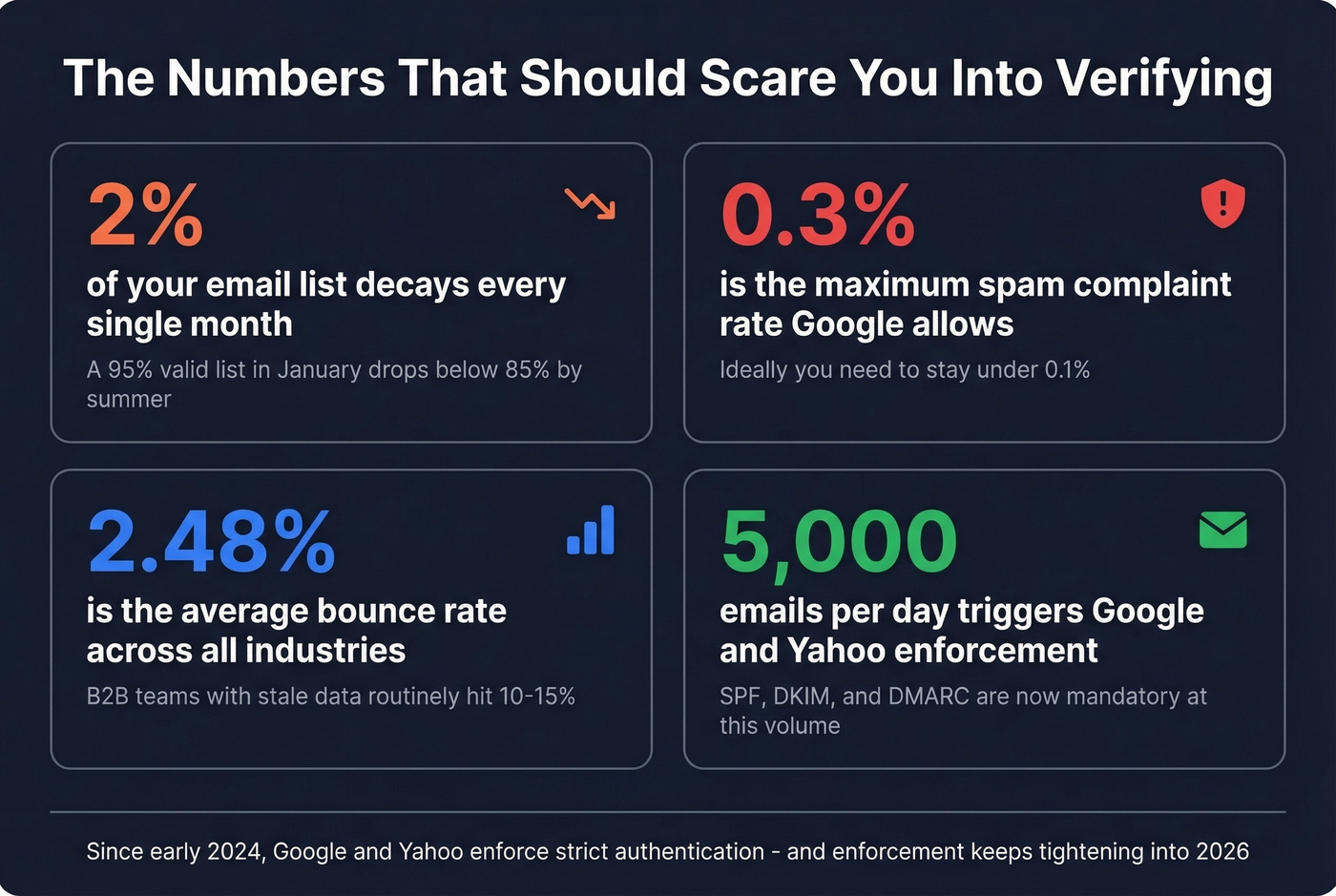
High bounce rates accelerate reputation damage faster than almost anything else. When your emails bounce, ISPs interpret that as a signal you're sending to unverified or purchased lists - exactly what spammers do. The punishment is swift: throttled delivery, spam folder placement, and eventually blocklisting.

Here's what "normal" bounce rates look like by industry:
| Industry | Avg Bounce Rate |
|---|---|
| IT/Tech/Software | 0.90% |
| Government | 1.30% |
| Advertising | 1.10% |
| Construction | 2.20% |
| All Industries | 2.48% |
Those numbers come from WebFX's benchmark data. If you're running above 2.48%, your sender reputation is taking hits with every campaign.
The decay problem compounds this. Email lists lose roughly 2% of valid addresses every month. People change jobs, companies restructure domains, mailboxes get deactivated. A list that was 95% valid in January is below 85% by summer if you don't re-verify. That's not a theoretical risk - it's arithmetic.
How Email Verification Works
Every verification tool runs some version of the same four-tier pipeline. The difference between a $3/1K tool and a $15/1K tool usually comes down to how well they handle tiers 3 and 4.
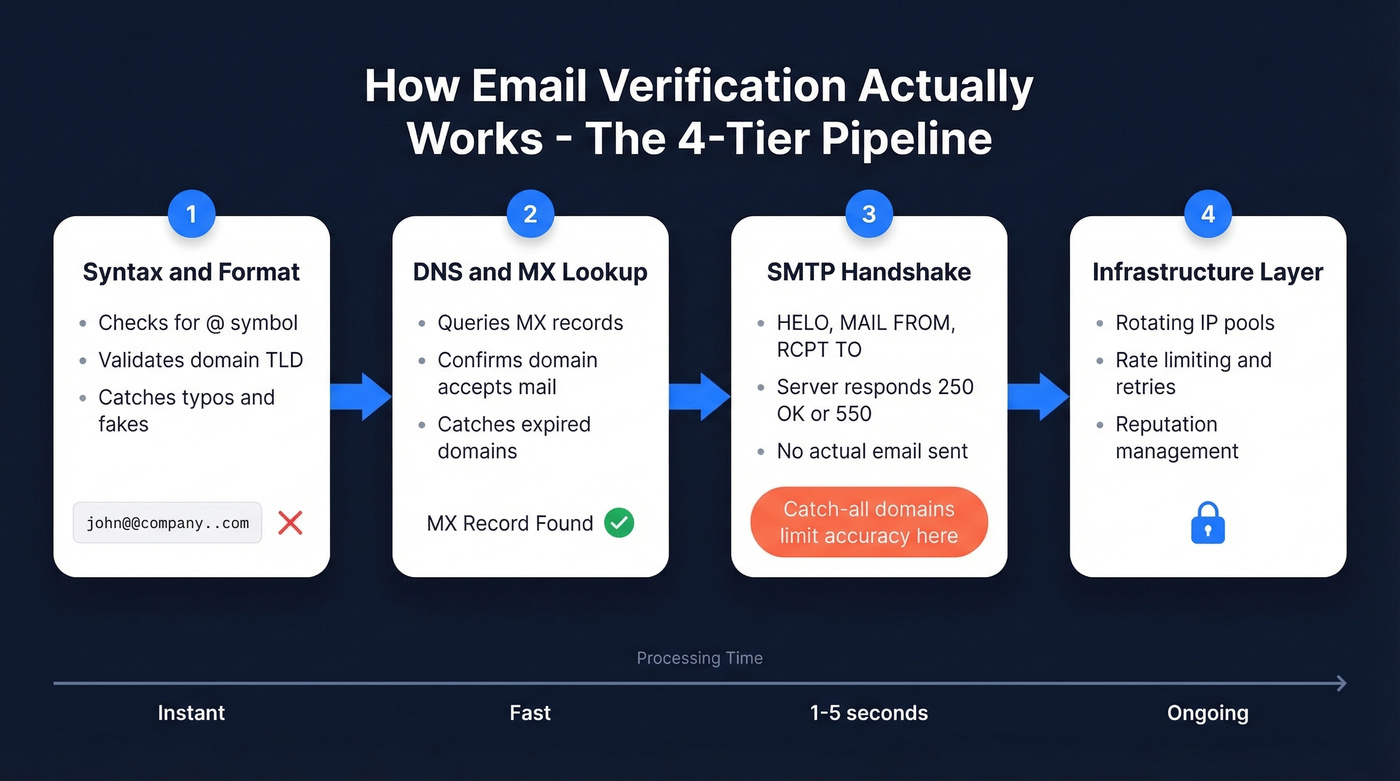
Tier 1 - Syntax and Format
The simplest layer. Does the address follow the rules? A valid email needs a local part, an @ symbol, and a domain with a valid TLD. Addresses with spaces, double dots, or missing components get flagged immediately. This catches typos and obviously fake entries - "john@@company..com" never makes it past this gate. Every tool does this. It's table stakes.
Tier 2 - DNS and MX Lookup
The tool queries the domain's DNS records to find its MX (Mail Exchange) entries. MX records tell the internet which servers handle email for that domain. No MX records? Can't receive email. Full stop.
This layer also catches expired domains, parked pages, and domains that have disabled email entirely. It's fast and reliable, but it only confirms the domain accepts mail - it says nothing about whether the specific mailbox exists.
Tier 3 - The SMTP Handshake
This is where real verification happens. The tool opens a connection to the recipient's mail server and initiates an SMTP conversation - the same protocol any email client uses to deliver a message:
- HELO/EHLO - the verifier identifies itself to the mail server
- MAIL FROM - declares a sender address
- RCPT TO - specifies the email address being checked
The server's response to RCPT TO is the critical moment. A 250 OK typically means the server accepts mail for that recipient. A 550, 551, or 553 usually means the recipient doesn't exist.
The handshake happens without sending an actual email. The tool disconnects before the DATA command, so no message is delivered and the recipient never knows they were checked.
But SMTP verification has real limitations. Greylisting causes temporary failures - servers return 450/451/452 codes that mean "try again later," not "this address is invalid." Good tools retry with backoff patterns. Cheap tools mark these as "unknown" and move on.
And then there's the catch-all problem. Catch-all domains accept mail for any address - real or fake. The SMTP handshake returns 250 OK for literally every address you test. SMTP probing alone can't confirm whether a specific mailbox exists on a catch-all domain.
Tier 4 - Infrastructure and Anti-Detection
Major email providers increasingly limit SMTP mailbox probing, often returning ambiguous responses that make "valid vs invalid" harder to determine at scale. Getting accurate results at volume requires serious infrastructure: rotating IP pools with proper reverse DNS, rate limiting to avoid blocklists, connection pooling for throughput, and active reputation management.
This is why verification costs money. The SMTP protocol is free. The infrastructure to run it reliably across millions of addresses without getting blocked is not.

The best verification strategy is never needing one. Prospeo's 5-step verification pipeline - with catch-all handling, spam-trap removal, and honeypot filtering - runs before you ever see an email. 98% accuracy, 7-day data refresh, under $0.01 per address.
Start with clean data instead of cleaning dirty data.
Understanding Your Results
Verification tools don't return a simple yes/no. You'll get one of several statuses, and how you handle each one directly impacts your bounce rate.
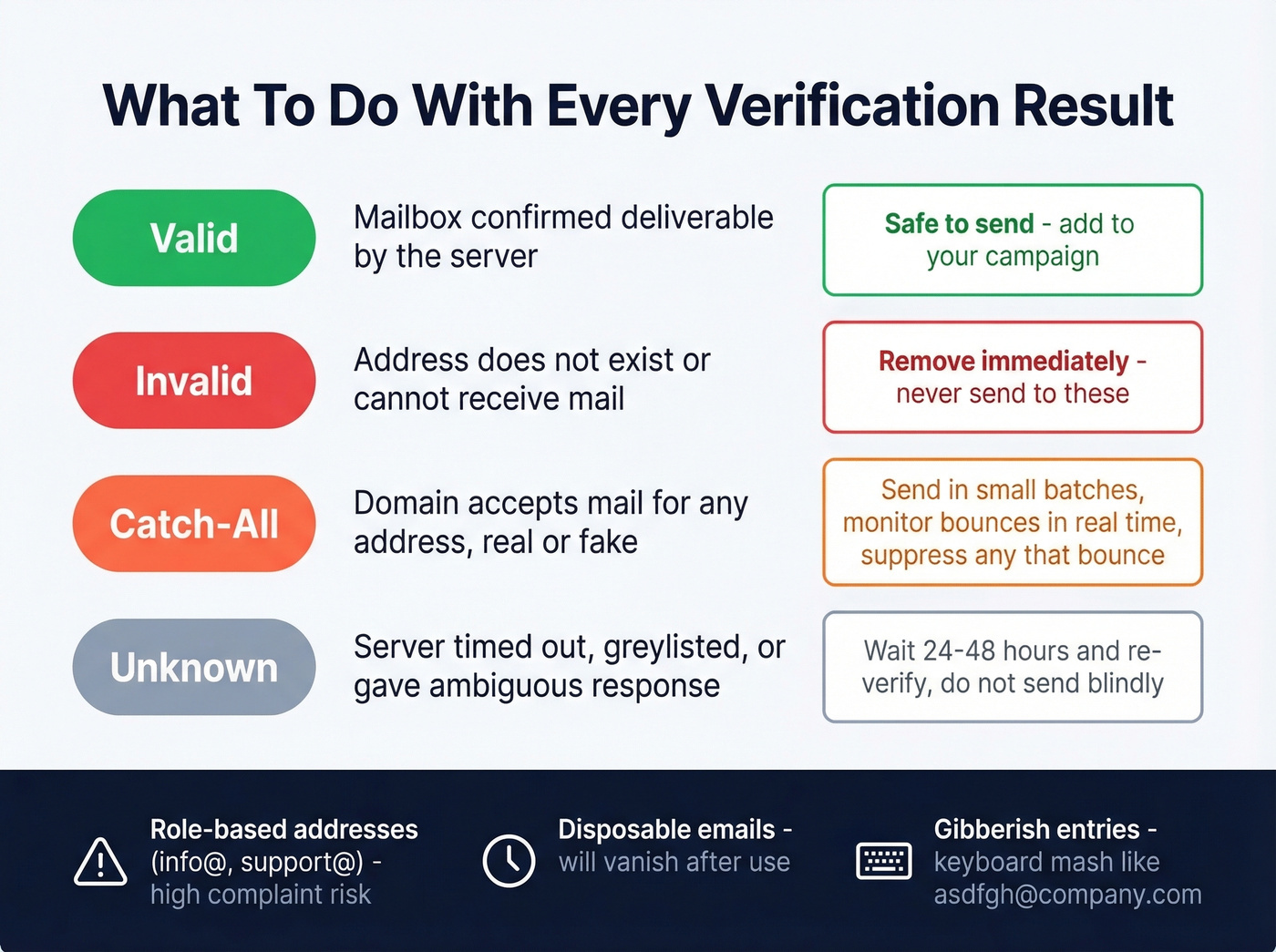
| Status | Meaning | Action |
|---|---|---|
| Valid | Mailbox appears deliverable | Safe to send |
| Invalid | Doesn't exist or can't receive | Remove immediately |
| Catch-All | Domain accepts everything | Send with caution, monitor |
| Unknown | Server unresponsive or ambiguous | Re-verify later or suppress |
Beyond the core status, most tools flag additional risk signals. Role-based addresses like info@, support@, and sales@ technically work but often route to shared inboxes that generate spam complaints. Disposable addresses from services like Guerrilla Mail or Mailinator will accept your email and then vanish. Gibberish detection catches keyboard-mash entries like "asdfgh@company.com" that somehow passed syntax checks.
The "unknown" status deserves special attention because it costs you credits without giving you a clear answer. Unknowns happen when the receiving server times out, greylists your connection, or returns ambiguous codes. We've seen lists come back with 8-12% unknowns on the first pass. The move is to wait 24-48 hours and re-verify - many resolve to valid or invalid on the second attempt. Don't send to unknowns blindly, and don't delete them without retrying.
One more nuance: never treat catch-all and valid the same way. Valid means the server handled the mailbox check cleanly. Catch-all means the domain accepts mail for any address you ask about. Send to catch-alls in small batches, monitor bounce rates in real time, and suppress any that bounce.
The Accuracy Myth
Every verification tool's marketing page says "99% accuracy." Let's be honest about what actually happens when you test them.
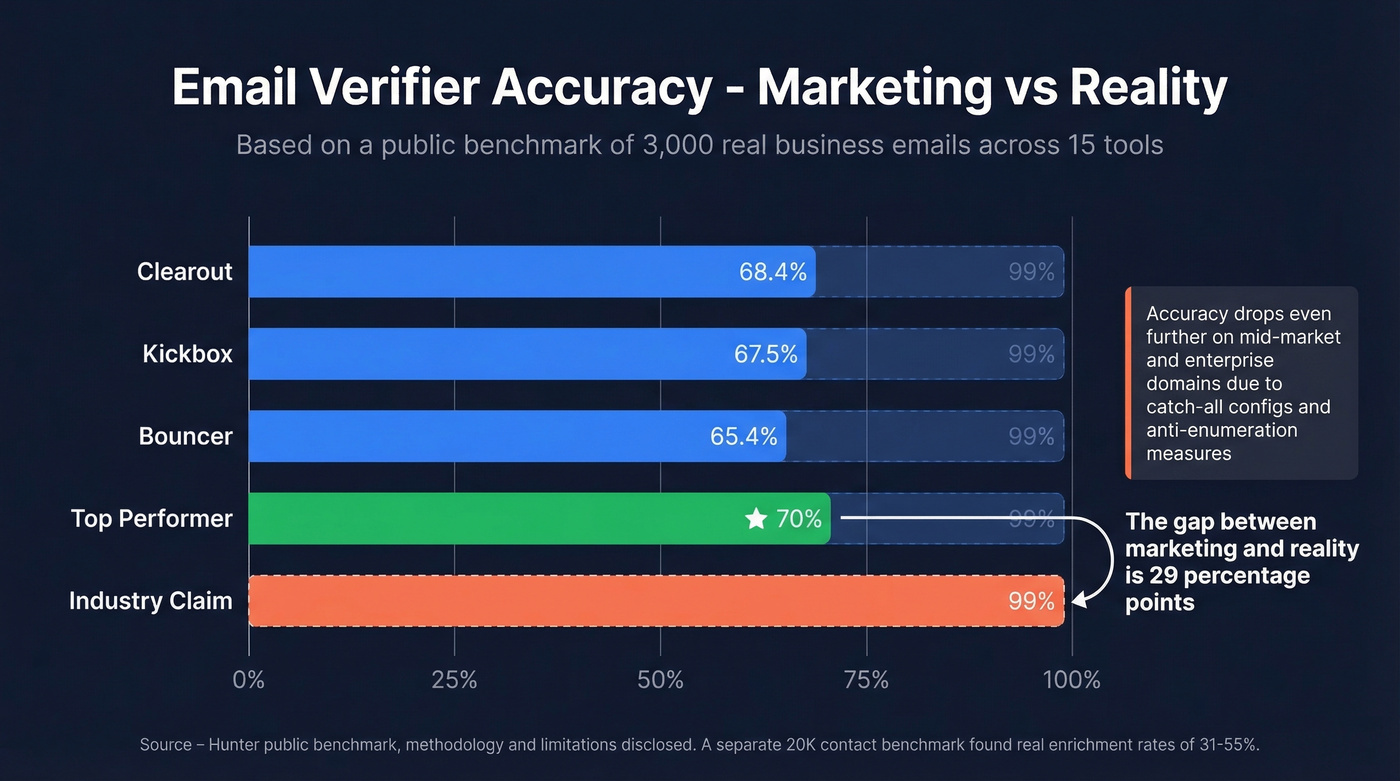
The most transparent public benchmark we've found is a vendor-run test by Hunter that includes their own tool alongside competitors, with methodology and limitations disclosed. It tested 15 email verifiers against 3,000 real business emails, segmented by company size. The top performer scored 70%. Not 99%. Not 95%. Seventy percent. Clearout came in at 68.37%, Kickbox at 67.53%, Bouncer at 65.43%.
A separate benchmark of 20,000 contacts across 15 email finders used real email delivery - not just SMTP responses - to measure hard bounces and wrong-domain rates. Their "real enrichment rate" topped out at 54.9%, with results landing around 31-55% across tools.
Here's the thing: if your deal sizes sit below $10K and you're spending more than $10 per 1,000 on verification alone, you're overpaying. The accuracy difference between a $7/1K tool and a $15/1K tool is marginal. What actually moves the needle is the freshness of your data before it ever hits a verifier.
Accuracy drops significantly on mid-market and enterprise domains. These companies run stricter server configurations, more aggressive anti-enumeration measures, and more catch-all setups. The 99% accuracy claim might hold on a list of consumer webmail addresses. It falls apart on the B2B contacts you actually care about.
Best Verification Tools Compared
| Tool | Free Tier | Cost/1K | Bulk | Best For |
|---|---|---|---|---|
| Prospeo ★ | 75/mo | $10 (find + verify) | Yes | Best overall for B2B |
| ZeroBounce | 100/mo | $7.50 | Yes | Safe corporate pick |
| Hunter | 100/mo | ~$10 | Yes | Devs who want transparency |
| NeverBounce | 1,000 | $8 | Yes | No-frills bulk cleaning |
| Bouncer ★ | 1,000 | $7 | Yes | Best budget option |
| Clearout | 100 | Credit-based | Yes | API-first workflows |
| BriteVerify | None | $10 | Yes | Enterprise compliance |
| Verifalia | Free tool | Paid plans | Yes | List cleaning + API |
| Email Hippo | 100/day | Paid plans | Yes | UK/EU-focused teams |
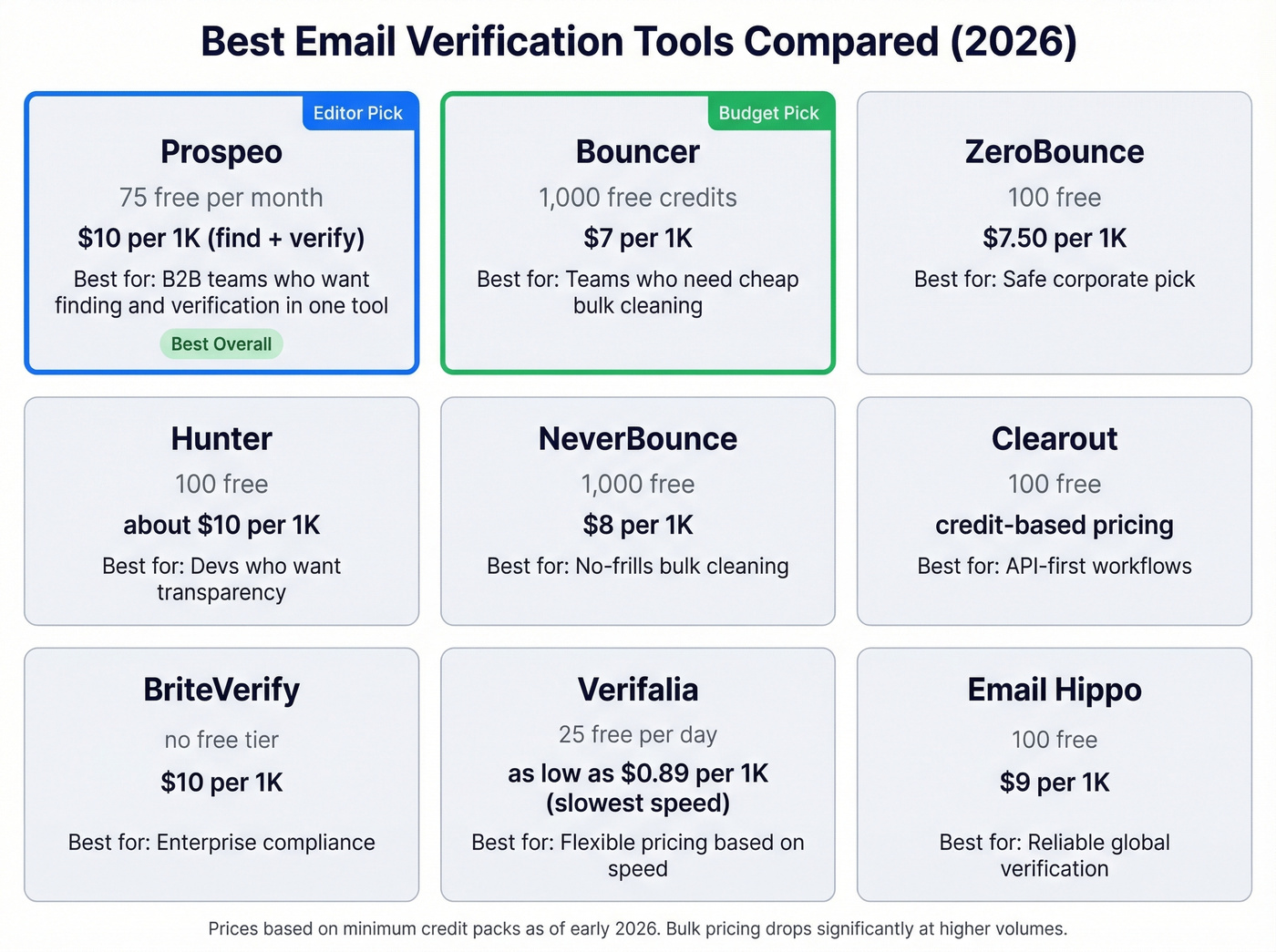
★ = Editor's pick for the category
A note on Prospeo's pricing: $10/1K includes both finding and verifying contacts. Most tools on this list only verify addresses you already have. When you factor in the cost of sourcing contacts separately, the effective per-contact cost is significantly lower.
ZeroBounce - Safe Corporate Pick
Use this if you inherited a dirty CRM and need it cleaned by Friday. ZeroBounce is the tool most teams reach for when they have a messy list and need results fast. Upload a CSV, get results in minutes. Their ONE plan at $99/month for 10K credits works well for teams running regular cleaning cycles, and their documentation on result categories is thorough.

Skip this if you're running weekly outbound sequences. Even at $7.50 per 1,000, costs compound quickly when you're re-verifying large lists every month. ZeroBounce solves the downstream problem - cleaning data after it's already gone stale.
Hunter - The Benchmark Story
We respect Hunter more than most tools in this space for one reason: they published a public accuracy benchmark that includes their own tool alongside competitors, complete with methodology and limitations.

Their benchmark of 15 verifiers against 3,000 real business emails is the closest thing we have to a detailed, reproducible public test. They scored 70% - highest in their own test - and they disclosed potential methodology bias. The tool offers 100 free verifications per month, a well-documented API, and clean integration with their email finder. It's the pick for developer-heavy teams who want to see the receipts.
NeverBounce - No-Frills Bulk Cleaning
Use this if you need straightforward bulk cleaning without bells and whistles. NeverBounce gives you 1,000 free credits, charges $8/1K on pay-as-you-go, and does exactly what the name promises. Upload, clean, download.
Skip this if you need advanced catch-all handling. For teams under 50 employees who just need basic list hygiene, NeverBounce or Bouncer is all you need - don't overcomplicate it.
Bouncer - Budget Pick
Bouncer charges $7 per 1,000 emails. In the public benchmark, it scored 65.43%, putting it in the middle of the pack. For teams running tight budgets who need basic list hygiene, the price-to-value ratio is hard to beat. Don't expect enterprise-grade catch-all handling, but for straightforward valid/invalid classification, it gets the job done. The 1,000 free credits are generous enough to test thoroughly before committing.
Clearout - API-First Workflows
Clearout scored second in the public benchmark at 68.37%. Its API is well-built and fast, making it a strong choice for teams integrating verification into signup forms or automated workflows. They offer 100 free credits and credit-based pricing that scales with volume.
Quick Mentions
BriteVerify is the enterprise compliance play - no free trial, $10/1K. If you're in a heavily regulated environment and need a conservative vendor choice, it fits. For everyone else, it's more than you need.
Verifalia offers a free online email verifier alongside list cleaning and an API. Solid option if you want a more diagnostic style of verification reporting.
Email Hippo has been around since 2009 and offers a free verifier capped at 100 checks per day. Reliable, if unglamorous. Good for UK/EU teams who want a vendor in their timezone.
Catch-all domains, greylisting, stale records - every problem in this article traces back to one thing: your data source refreshes too slowly. Prospeo refreshes every 7 days (industry average: 6 weeks) and verifies with proprietary infrastructure, not third-party providers. That's why teams using Prospeo see bounce rates under 4%.
Fix the source and the bounces fix themselves.
Best Practices That Actually Matter
These aren't theoretical recommendations. They're the rules that keep your sender reputation intact and your sequences running.
Re-verify before every major send. Email lists decay at roughly 2% per month. A list verified 60 days ago has lost ~4% of its valid addresses. That's enough to push you over the bounce rate threshold on a large campaign.
Keep your bounce rate below 2%. Ideally under 1%. The industry average sits at 2.48%, and anything above that puts you in the danger zone with ISPs. Google and Yahoo are watching spam complaint rates too - stay below 0.3% or face throttling.
Never treat catch-all results as valid. Send to catch-all addresses in small, monitored batches. If a batch bounces above 5%, suppress the rest. Catch-all domains are the single biggest source of "verified but bounced" frustration, and the consensus on r/sales is that most teams underestimate how many of their "valid" addresses are actually catch-alls.
Verification doesn't equal deliverability. A valid address can still land in spam if your sender reputation is poor, your content triggers filters, or your domain lacks proper authentication. SPF, DKIM, DMARC, domain warm-up, and volume control all matter independently of whether the address exists. (If you need the full playbook, start with an email deliverability guide and then tighten your setup with DMARC alignment and a working DKIM.)
Filter before you verify. Don't waste credits checking contacts who haven't opened an email in 12 months or who were last updated in 2023. Suppress inactive contacts first, then run the rest through your verifier.
Automate the pipeline. Connect verification to your CRM, forms, and enrichment workflows via API. Manual CSV uploads work for one-off cleanups, but any team sending regularly should have verification running automatically on inbound leads and before every outbound sequence. If you're building outbound lists at scale, pair this with a data enrichment workflow and a repeatable lead generation workflow.
FAQ
Can I verify an email without sending one?
Yes. Verification tools use SMTP handshake probing - specifically the RCPT TO command - to check if a mailbox appears deliverable without transmitting a message. The connection closes before any content is sent, and the recipient never knows they were checked.
Why does my verified list still bounce?
Catch-all domains return "valid" for any address, including fake ones. List decay invalidates roughly 2% of emails per month. Some mail servers also return deliberately ambiguous responses that make mailbox probing unreliable.
How often should I re-verify my list?
Before every major campaign. Lists decay at about 2% per month, so anything older than 30 days deserves a fresh pass. Using a data source with a short refresh cycle reduces how often you need standalone re-verification.
What's a good bounce rate target?
Below 2%, ideally under 1%. The industry average is 2.48%. Google and Yahoo flag senders with spam rates above 0.3%, and high bounce rates compound reputation damage quickly.
Are free email verification tools accurate enough?
Free single-check tools work fine for one-off lookups - Hunter, ZeroBounce, and Prospeo all let you check addresses without paying. For bulk work, expect to pay $7-15 per 1,000 emails. Free tiers cut corners on catch-all handling and retry logic, so test accuracy before committing to production-scale sends.