

How to Verify Any Email Address Online - Complete 2026 Guide
You sent 5,000 cold emails last Tuesday. By Wednesday morning, 847 had bounced. By Thursday, your domain reputation was in the gutter and Gmail was routing your follow-ups straight to spam. That sequence plays out every week at companies that don't verify email addresses online before hitting send - and it's entirely preventable.
Global inbox placement sits around 84%, meaning roughly one in six emails never reaches the inbox even under ideal conditions. Gmail enforces a 0.3% complaint-rate threshold before it starts throttling your deliverability. Bounce a chunk of your list on top of that and you're compounding the damage. A 5% bounce rate on Monday tanks your sender score, which drops inbox placement on Wednesday's campaign, which makes Thursday's follow-ups invisible. The fix isn't complicated - it's just a step most teams skip until the damage is done.
What You Need (Quick Version)
One-off checks: Use a free online email verifier like Verifalia or Hunter's email verifier. Both handle single-address lookups without a paid plan.
Bulk list cleaning: Bouncer ($7/1K) or NeverBounce ($8/1K) offer a strong balance of accuracy and cost. Both include free trial credits so you can test before committing.
One distinction worth knowing: validation checks whether an email is formatted correctly (syntax, domain structure). Verification goes further and confirms the mailbox can receive mail. When people look up how to check email validation online, they usually need full verification - not just a format check.
How Email Verification Works
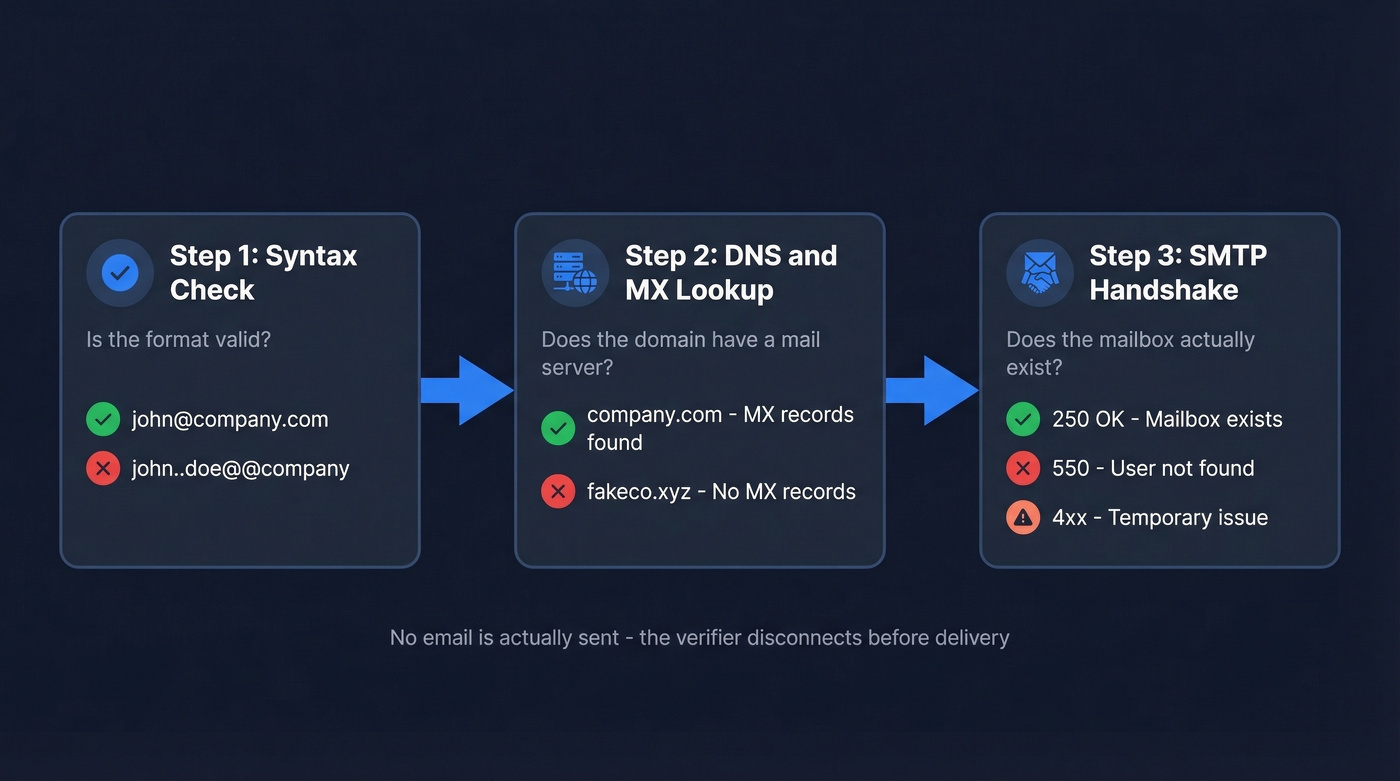
Most verification tools follow the same three-step process. The differences come down to how thoroughly each step is executed and what happens with ambiguous results.
Syntax and Format Check
The tool checks whether the email address is structurally valid: does it have an @ symbol, is the domain formatted correctly, are there illegal characters or spaces? A string like john..doe@@company fails immediately. This step catches typos and formatting errors, runs fast, and most tools handle it identically.
DNS and MX Record Lookup
The tool queries the domain's DNS records to confirm it has mail exchange (MX) servers configured. If company.com doesn't have MX records pointing to a mail server, no email address at that domain can receive mail. Quick, binary, and reliable.
SMTP Mailbox Verification
This is where tools diverge in quality. The verifier opens an SMTP connection to the recipient's mail server and initiates a handshake:
- Connect - expects a
220response (server ready) - HELO/EHLO - identifies the sender; expects
250 - MAIL FROM - declares a sender address
- RCPT TO - asks "does this specific mailbox exist?"
The server's response to that final RCPT TO command is the signal. A 250 usually means the server accepted the recipient. A 5xx response like 550 User not found indicates a permanent failure - that's a hard bounce waiting to happen. A 4xx indicates a temporary issue: mailbox full, server busy, greylisting.
The verifier disconnects before actually sending a message. No email is delivered. The entire check happens through this handshake, typically completing in milliseconds to a few seconds. Some vendors claim "30+ verification steps," but those are sub-checks within this same three-stage framework - not fundamentally different processes.
A note on privacy: treat data handling as a first-class feature. ZeroBounce, for example, states that uploaded data can't be viewed by its team and results are supplied with a one-time encryption key. If a vendor can't clearly explain retention and access controls, don't upload your list.
Why "99% Accuracy" Is a Lie
Let's be honest - every verification vendor's marketing page says "99% accuracy." The independent data tells a different story.
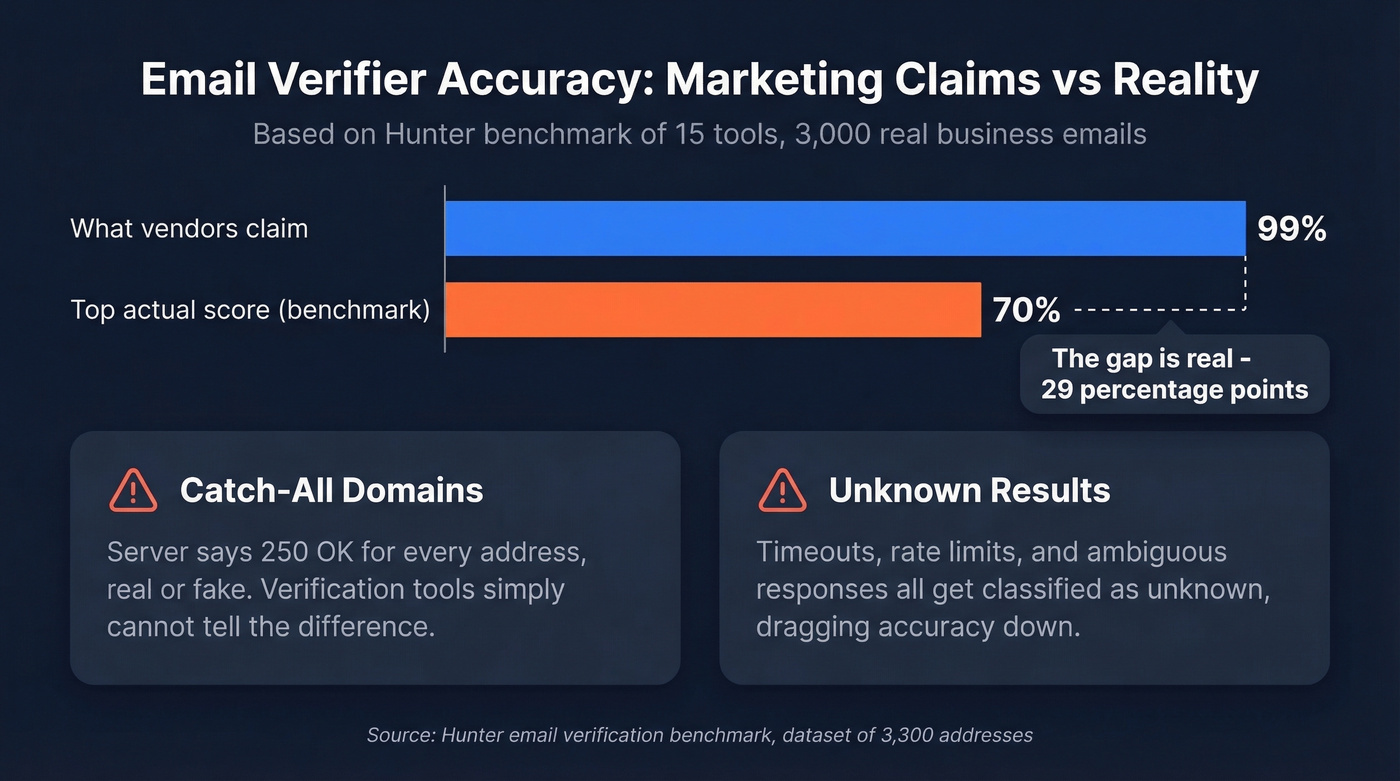
Hunter ran a benchmark of 15 email verification tools using 3,000 real business emails segmented by company size, plus 300 known-invalid addresses. The top accuracy score across all tools? 70%. Not 99%. Not 95%. Seventy percent.
The gap between marketing claims and real-world performance comes down to two things. First, catch-all domains. These servers return 250 OK for any recipient during SMTP checks, making it impossible to confirm whether a specific mailbox exists. A verification tool can't distinguish real.person@catchall-company.com from gibberish@catchall-company.com - both get the same response. Second, "unknown" results. When a mail server times out, rate-limits the connection, or returns ambiguous responses, the verifier classifies the result as unknown. Both catch-all and unknown results deflate real-world accuracy numbers significantly.
The benchmark deserves a caveat: the dataset came from Hunter's own outreach activity, which may bias results in their favor. Still, it's the most transparent test available, and the core insight holds - accuracy drops sharply on mid-market and enterprise domains with stricter mail server configurations.
Here's the thing: most teams obsess over finding the "most accurate" email verifier when the real problem is upstream. If you're scraping emails from random web sources and then trying to verify them, you're polishing garbage. The teams we've seen with the best deliverability numbers start with a high-quality data source and treat verification as a safety net, not a rescue mission.

The article above nails it: the best deliverability teams treat verification as a safety net, not a rescue mission. Prospeo's 5-step verification - including catch-all handling, spam-trap removal, and honeypot filtering - happens before you ever export a contact. 98% email accuracy. Data refreshed every 7 days. Bounce rates under 4% across 15,000+ companies.
Start with clean data instead of cleaning up dirty lists.
How to Read Verification Results
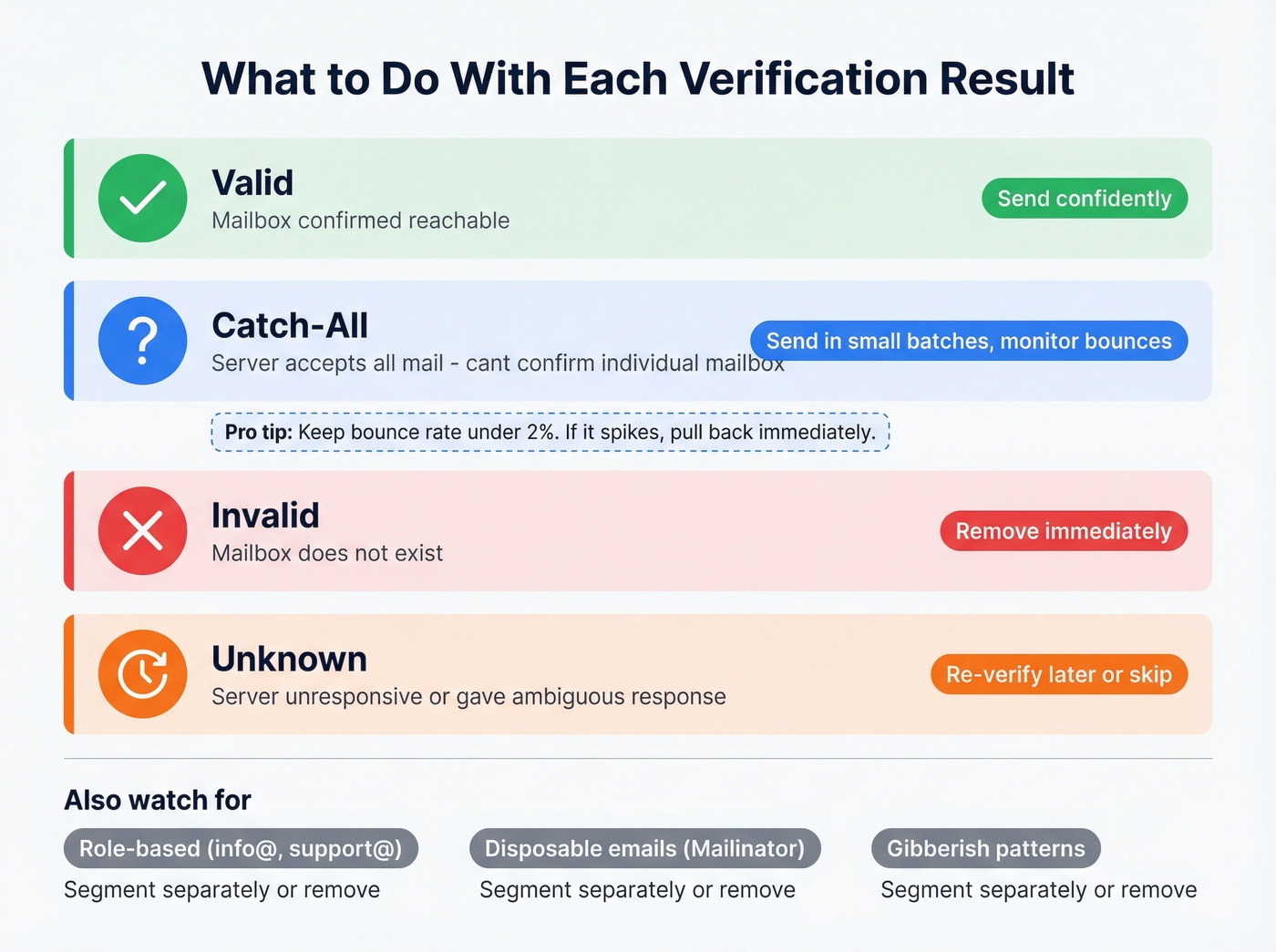
When you run a list through any verifier, you'll get back a status for each address. Here's what each one means and what to do about it:
| Status | What It Means | What to Do |
|---|---|---|
| Valid | Mailbox confirmed reachable | Send confidently |
| Catch-All | Server accepts all mail | Send cautiously, monitor |
| Invalid | Mailbox doesn't exist | Remove immediately |
| Unknown | Server unresponsive or ambiguous | Re-verify later or skip |
Most tools also flag role-based addresses (info@, support@), disposable email providers like Mailinator, and gibberish patterns suggesting fake signups. Role-based addresses aren't necessarily invalid, but they have lower engagement and higher complaint rates - segment them separately if you send to them at all.
The catch-all category trips up most teams. There's no perfect answer here. You can't confirm individual mailboxes on catch-all domains through SMTP alone. The best approach: segment catch-all results into their own list, send in small batches, and watch bounce rates closely. Under 2% bounces - keep going. If they spike, pull back. For teams that want to benchmark their verifier's catch-all performance, build a test set of 1,000+ emails at a known catch-all domain, include 25-50 confirmed valid addresses, fabricate the rest, and measure how many the tool correctly identifies.
Best Tools to Verify Email Addresses Online
| Tool | Cost per 1K | Free Tier | Best For | Differentiator |
|---|---|---|---|---|
| Prospeo | ~$10 (with finder) | 75 emails/mo | Find + verify workflow | 98% accuracy, 7-day refresh |
| Bouncer | $7 | 1,000 trial credits | Pure bulk verification | 4.9 Capterra (233 reviews) |
| NeverBounce | $8 | 1,000 trial credits | Zero-tolerance senders | Most conservative classifier |
| ZeroBounce | $6.40 | 100/mo | Data-rich verification | 45 integrations + enrichment |
| Hunter | $14.90 | 100 verifications/mo | Benchmark transparency | Ran the 15-tool benchmark |
| Clearout | $5.80 | Limited | Budget bulk cleaning | 68.37% benchmark accuracy |
| EmailListVerify | $2.40 | Limited | Cheapest bulk option | Lowest per-email cost |
| Kickbox | $8 | Limited | Mid-range reliability | 67.53% benchmark accuracy |
Prospeo - Find and Verify in One Step
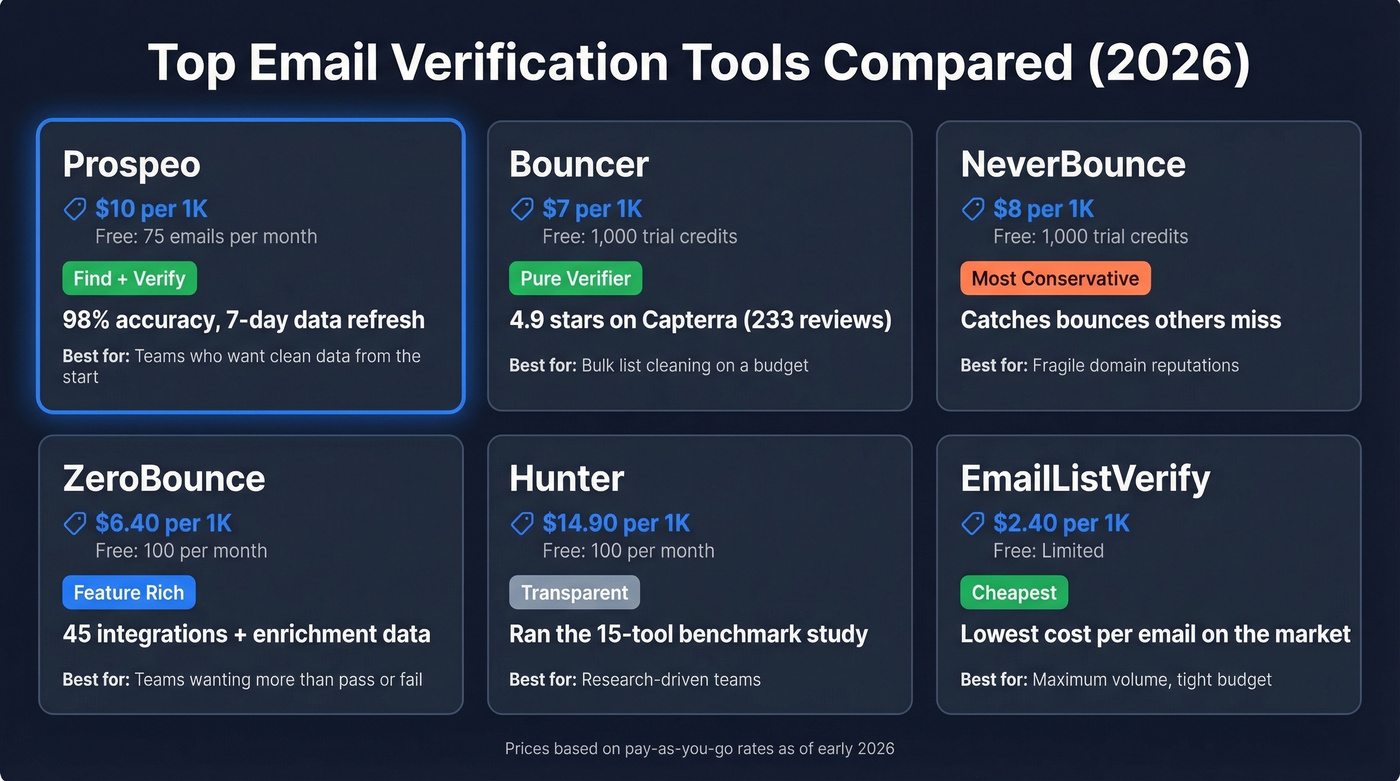
Most verification tools assume you already have a list. Prospeo solves the upstream problem. Its email finder pulls from 143M+ verified emails across 300M+ professional profiles, running every result through a 5-step verification process - including catch-all handling, spam-trap removal, and honeypot filtering - before it ever hits your CRM. The data refreshes every 7 days, compared to the industry average of roughly 6 weeks.
At ~$0.01 per email with a free tier of 75 emails per month, you're not paying for a list and then paying again to clean it. Meritt dropped their bounce rate from 35% to under 4% after switching. Stack Optimize maintains 94%+ deliverability across all client campaigns with zero domain flags. For teams tired of the "find, then verify, then pray" workflow, this is the cleaner path.

Bouncer - Best Pure Verifier
Use this if: You already have lists and just need them cleaned fast and cheap.
Skip this if: You need email finding, enrichment, or anything beyond verification.
Bouncer does one thing and does it well. At $7 per 1,000 emails with a 1,000-credit free trial, it's one of the most cost-effective pure verifiers available. The reviews back it up - 4.9 on Capterra across 233 reviews and 4.8 on G2 with 232 reviews. That's unusually high for a verification tool, and G2 reviewers consistently praise its simplicity. For teams that already have a solid data source and just need a validation layer, Bouncer is an easy pick.
NeverBounce - Most Conservative
NeverBounce takes the cautious approach, and there's data to support why that matters. In a head-to-head test of 563 emails, ZeroBounce marked 61 more emails as safe than NeverBounce did. When the tester sent to ZeroBounce's "verified" list of 453 emails, 2 bounced. NeverBounce had flagged those exact 2 as invalid.
Two bounces out of 453 doesn't sound like much - until you're sending 50,000 emails a month and those marginal calls compound. At $8/1K on pay-as-you-go, NeverBounce costs slightly more than Bouncer but buys you tighter risk control. If your domain reputation is already fragile, that conservatism is worth the premium.
ZeroBounce - Richest Feature Set
ZeroBounce is the verification tool for teams that want more than a pass/fail answer. Beyond standard verification, it returns activity data, enrichment signals, and abuse/complaint scoring - useful context if you're trying to prioritize a list, not just clean it. With 45 integrations and 100 free verifications per month, it fits into most stacks easily.
The tradeoff is price. At ~$64 per 10K verifications, it's roughly 40% more expensive than Bouncer for the same volume. We've seen teams justify the cost when they're using enrichment signals for segmentation, but if all you need is clean/dirty classification, you're overpaying.
Hunter - The Benchmark Runner
Hunter deserves credit for publishing the most transparent verification benchmark in the industry - 15 tools, 3,000 real emails, methodology disclosed. They scored 70% accuracy, which topped the field. The free tier includes 100 verifications per month plus an email finder, making it a solid starting point for individual prospectors who want to check an address before launching a campaign.
The catch: at $14.90 per 1K, Hunter is by far the most expensive option for bulk work. It's priced as a prospecting platform that includes verification, not as a dedicated verifier. If you're already using Hunter for email finding, the built-in verification makes sense. As a standalone verifier, the math doesn't work at scale.
Budget and Niche Options
Clearout scored 68.37% in the 15-tool benchmark - second overall - at $5.80 per 1K. Solid mid-range option. EmailListVerify is the cheapest at $2.40 per 1K, worth considering for massive lists on tight budgets where slightly lower accuracy is acceptable. Kickbox came in third at 67.53% accuracy, priced at $8 per 1K - reliable but not differentiated enough to recommend over Bouncer or NeverBounce at those rates.
The consensus on r/coldemail and r/sales is that verification tools charge too much - one user even built a free validator out of frustration. That's fair for one-off checks. But for bulk verification where accuracy matters, the $5-8/1K range pays for itself in preserved deliverability many times over.
Bounce Rates - The Numbers That Matter
The industry consensus is clear: keep your total bounce rate under 2%. Above 5%, ISPs start throttling or blocking your sends entirely.
Hard bounces are permanent failures - the mailbox doesn't exist, the domain is dead, or the address is syntactically broken. These destroy sender reputation fast. Soft bounces are temporary - mailbox full, server down, message too large. Less damaging individually but they still count against you when they pile up. Running a verification check before every campaign is the simplest way to keep both types under control.
The ISP landscape isn't uniform, either. Gmail delivers to the inbox 87.2% of the time, but Microsoft (Outlook/Hotmail) only hits 75.6%. Yahoo sits at 86%, Apple Mail at 76.3%. If your prospect list skews heavily toward Microsoft domains, you're already fighting an uphill deliverability battle - which makes verification even more critical.
If you're also trying to protect your domain long-term, pair verification with a broader email deliverability checklist and ongoing sender reputation monitoring.
How Often Should You Re-Verify?
B2B email lists rot faster than most teams realize. Average professional turnover runs around 41% annually. Of new hires, 38% leave within their first year, and 40% of those departures happen within the first 90 days. That's a lot of dead addresses accumulating in your CRM every quarter.
Re-verify your active sending lists every 3-4 months. For high-volume senders pushing 10K+ emails per month, monthly re-verification pays for itself in preserved domain reputation alone. Beyond scheduled re-verification, verify at the point of entry - run real-time checks on form submissions and CRM imports to prevent bad data from entering your system in the first place.
One alternative to scheduled re-verification is using a data source with a continuous refresh cycle. A 7-day refresh means every new search starts with current data rather than a snapshot from six weeks ago - though you'll still want to re-verify any lists you've already exported and let age.
If you're scaling outbound, it also helps to manage email velocity so verification gains don't get erased by aggressive sending.
You just read that the best independent benchmark scored email verifiers at 70% accuracy. Prospeo doesn't rely on third-party email providers - our proprietary infrastructure verifies at 98% accuracy at roughly $0.01 per email. Teams using Prospeo cut bounce rates from 35%+ to under 4% without bolting on a separate verification tool.
Skip the verification step entirely - get emails that are already verified.
FAQ
How do I verify an email address online without sending a message?
SMTP verification checks whether a mailbox exists by initiating a handshake with the mail server, then disconnecting before delivering anything. The recipient never receives a message, and the check completes in milliseconds to a few seconds. Every major email checker uses this same underlying process.
Are free email verification tools accurate enough?
For single spot-checks, free tools like Verifalia and Hunter's free tier work fine. Independent benchmarks show even top tools cap around 70% accuracy on real business emails once catch-all and unknown results are factored in. Free tiers are sufficient for a handful of addresses, not for campaign-scale lists.
What should I do with catch-all results?
Catch-all servers accept all emails during SMTP checks, so verification can't confirm individual mailboxes. Segment them into a separate list, send in small batches, and monitor bounce rates. Under 2% bounces - keep going. If they spike, pull back immediately.
How much does bulk email verification cost?
Prices range from $2.40/1K (EmailListVerify) to $14.90/1K (Hunter). Most mid-range tools charge $5-8/1K. Prospeo bundles verification with email finding at ~$0.01/email, with 75 free credits per month.
What's a good free alternative to paid verification tools?
Prospeo's free tier includes 75 verified emails per month with full 5-step verification - more generous than Hunter's 100 verifications-only tier or ZeroBounce's 100/mo. Verifalia also offers free single-address lookups. For bulk work exceeding free limits, paid tools in the $5-8/1K range are worth the investment.