

How to Verify a Gmail Address Without Sending an Email (2026)
You need to know if a Gmail address is real before you hit send. Maybe you're cleaning a prospect list, maybe you're about to launch an outbound campaign - either way, a bounced email hurts your sender reputation. And Gmail is one of the hardest major providers to verify without actually sending a message.
Here's what works.
The Gmail Verification Problem
Most mail servers give you a straight answer. Send an SMTP RCPT TO command to a corporate domain, and you'll often get a clear 550 User not found if the address is dead. Gmail doesn't do this.
Gmail can return 250 OK even for addresses that don't exist. As one developer put it on Reddit, "Gmail always return OK 250 no matter what, if the mailbox exist or not." That same poster questioned whether verification vendors are "guessing/lying" about their ability to verify Gmail addresses at all. It's a fair question - and the answer is more nuanced than most guides let on.
Why Gmail Blocks Direct Verification
Mailbox providers try to prevent user enumeration, where attackers discover which mailboxes exist by probing the server. The VRFY and EXPN commands, originally designed to confirm whether a mailbox exists, are disabled on virtually every major mail server because they leak information and enable brute-force discovery. As Hunter's email verification guide explains, unless there's a very specific reason to keep VRFY enabled, it should be off.
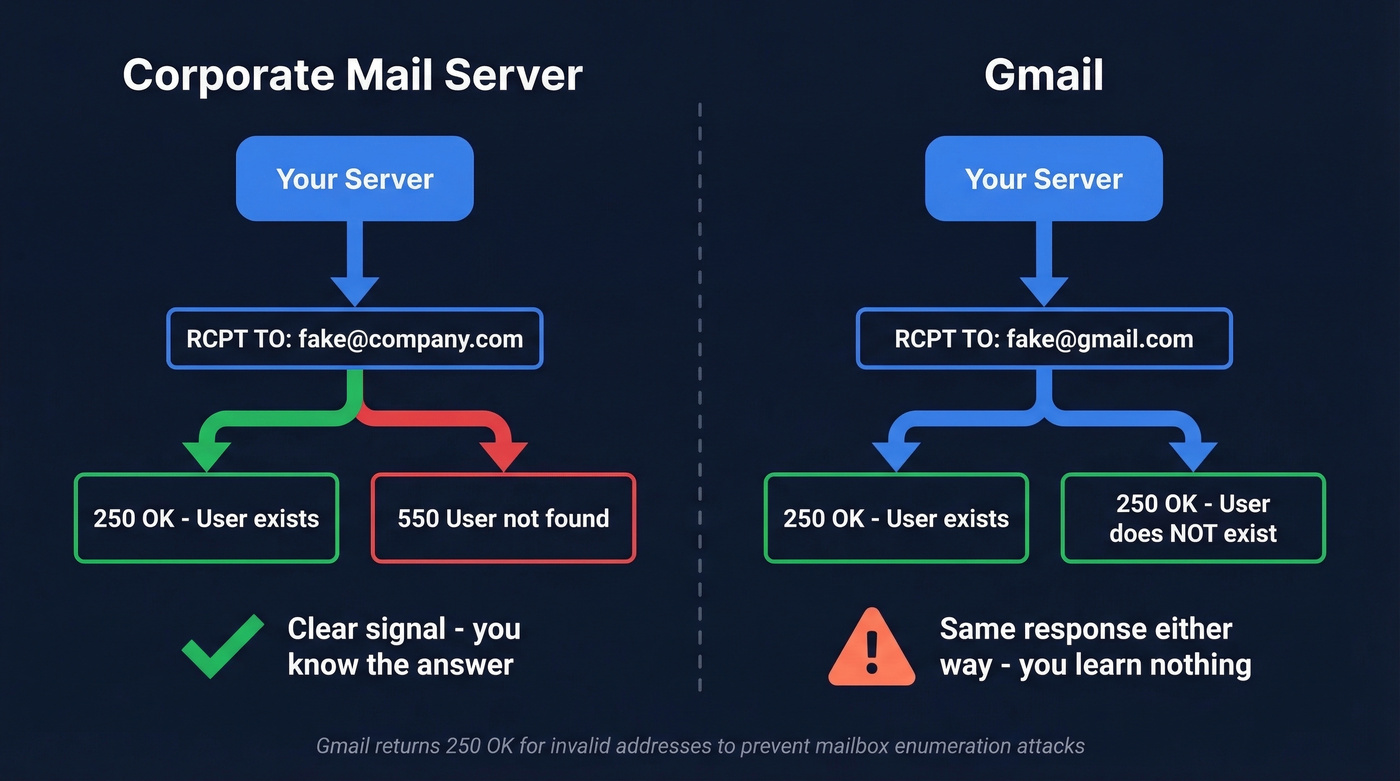
Gmail takes it further: even the RCPT TO step can return 250 OK for invalid recipients. Good security practice. Bad news for legitimate verification.
The stakes are concrete. Modern bulk-sender rules target bounce rates under 2% and spam complaints under 0.3%. Send to a list full of dead Gmail addresses and you'll blow past those thresholds fast, damaging your domain reputation in ways that take weeks or months to recover from.

Gmail's anti-enumeration defenses make SMTP checks unreliable. Prospeo's 5-step verification process handles catch-all domains, spam traps, and honeypots - delivering 98% email accuracy even on Gmail addresses. Start with 75 free verifications per month.
Stop guessing which Gmail addresses are real. Verify them at $0.01 each.
Four Ways to Check If a Gmail Address Exists
1. Email Verification Tools (Best Option)
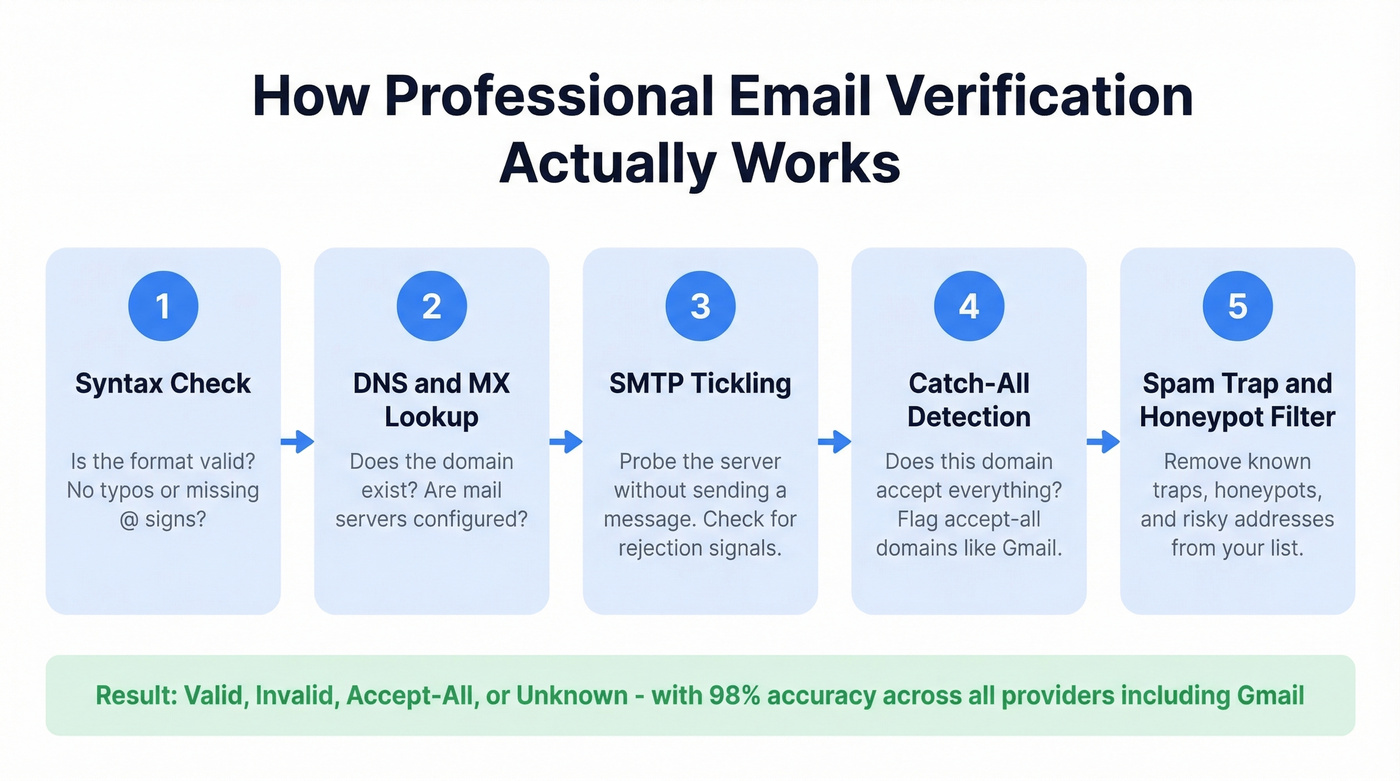
Professional verification tools don't rely on a single SMTP check. They run a multi-step process: syntax validation, DNS/MX record lookup, SMTP tickling (a controlled connection that probes the server without sending a message), and additional signals like historical deliverability patterns and catch-all detection. This layered approach is why tools can classify more Gmail addresses than manual methods - valid, invalid, accept-all, or unknown - even when Gmail's SMTP behavior is non-committal.
If you're comparing vendors, start with a shortlist of email reputation tools and spam trap removal capabilities, not just price-per-check.
Greylisting, where servers temporarily reject connections to filter spam, can also cause "unknown" results. Better verifiers handle this with retries and smarter logic rather than just passing the ambiguity along to you.
Prospeo runs a 5-step verification process with catch-all handling built in, which is directly relevant for Gmail's anti-enumeration behavior. With 98% email accuracy, a 7-day data refresh cycle, spam-trap removal, and honeypot filtering, you're getting a deliverability verdict - not just a syntax check. The free tier covers 75 emails per month, and paid plans run about $0.01 per email.
We've seen Reddit threads where users call verification pricing "outrageous expensive." At a penny per email, though, the cost is trivial compared to a bounced campaign that tanks your domain.
Use this if you're verifying more than a handful of addresses, or you need confidence before launching a campaign.
Skip this if you literally need to check one address once. People Chips (below) can handle a quick spot-check.
If you want a broader comparison set, see our breakdown of Hunter alternatives and Bouncer alternatives.
| Tool | Free Tier | Paid Starting Price |
|---|---|---|
| Prospeo | 75 emails/mo | ~$0.01/email |
| ZeroBounce | 100/mo | ~$0.008/email |
| NeverBounce | No free tier | ~$0.008/email |
| Bouncer | No free tier | ~$0.007/email |
| Hunter | Free single check | From $49/mo |
2. People Chips in Google Sheets (Free)
This is the clever workaround that most guides miss. Google Sheets has a feature called People Chips (introduced November 2021) that converts email addresses into rich contact cards - and it often only does that when Google recognizes the address.
This can be a handy add-on when you're doing lead enrichment or cleaning lists before outreach.
- Paste your email list into Column A of a Google Sheet.
- Duplicate Column A into Column B.
- Select Column B, right-click, and choose Convert to people chip.
- Use the formula
=NOT(A2=B2)in Column C. If the cell returnsTRUE, the address converted to a chip.
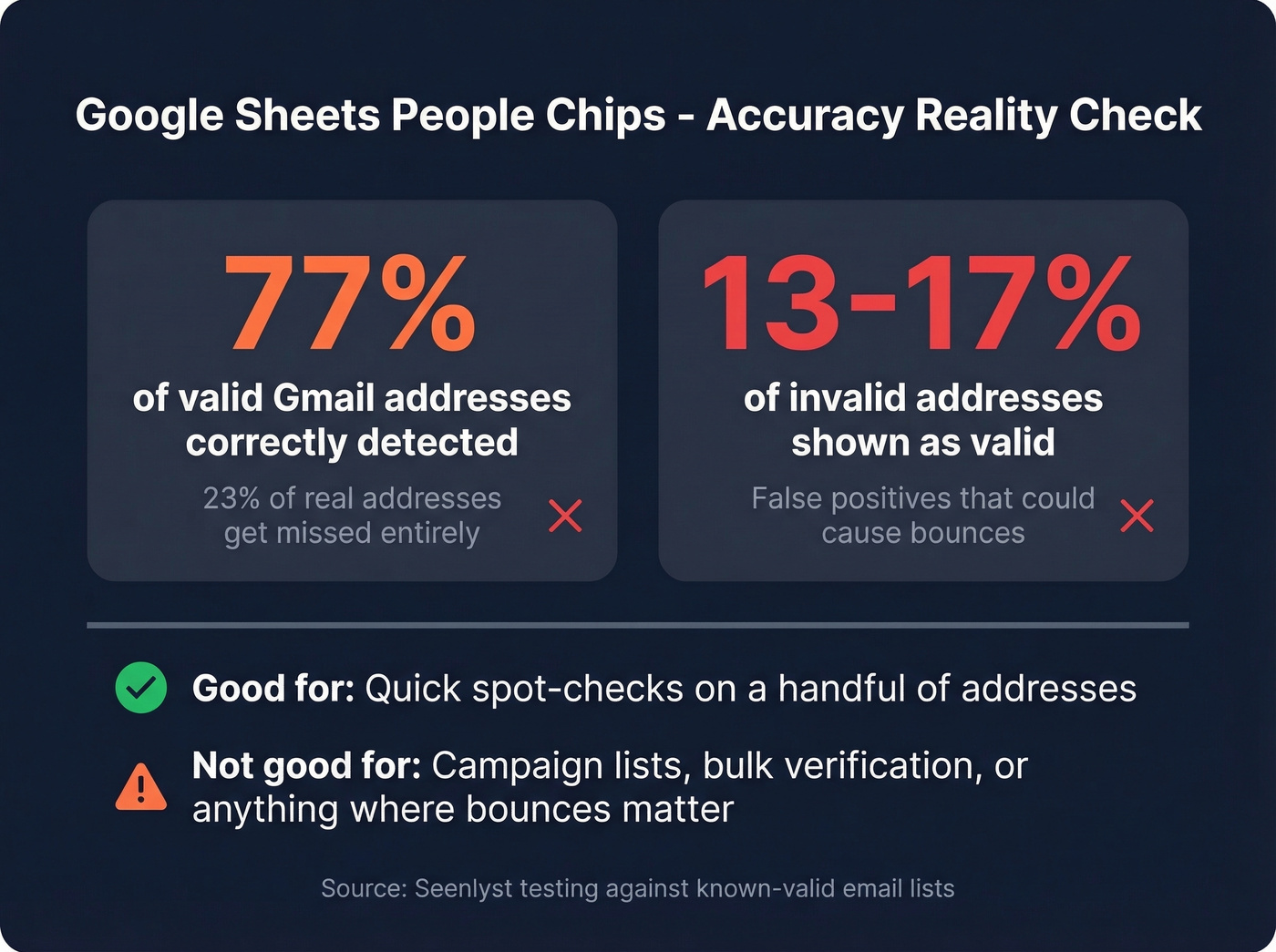
The catch: testing against known-valid email lists showed People Chips only detected 77% of known-valid addresses. That means 23% of real addresses get missed. On the flip side, 13-17% of known-invalid addresses also appeared valid, so you get false positives too.
Fine for spot-checking a handful of addresses. Don't build a campaign around it.
3. Manual SMTP Check (Educational Only)
This method fills most tutorials online. It works for many domains, but it's unreliable for Gmail specifically. Still worth understanding what's happening under the hood.
First, find Gmail's mail server:
nslookup -q=mx gmail.com
You'll get results like gmail-smtp-in.l.google.com (preference 5), plus several alternates with preferences 10 through 40. Then connect:
telnet gmail-smtp-in.l.google.com 25
220 mx.google.com ESMTP - gsmtp
EHLO example.com
MAIL FROM:<test@example.com>
RCPT TO:<target@gmail.com>
For some addresses, you'll get a clear rejection:
550-5.1.1 The email account that you tried to reach does not exist.
But for others - including invalid addresses in many cases - you'll get:
250 2.1.5 OK - gsmtp
Here's the thing about this method: results vary wildly depending on your IP reputation and Google's current throttling behavior. We've seen the same address return different responses from different IPs on the same day. Don't trust this for anything beyond curiosity.
If you're trying to reduce bounces at scale, it's more useful to learn how to check if an email will bounce and track your email bounce rate than to rely on raw SMTP responses.
4. Google Search / Social Profile Check (Last Resort)
Search the address in quotes - "target@gmail.com" - and look for public profiles, forum posts, or directory listings. This confirms the address is used, not that it's deliverable. Lowest reliability of any method, but occasionally useful as a supplementary signal when you've got nothing else.
Which Method Should You Use?
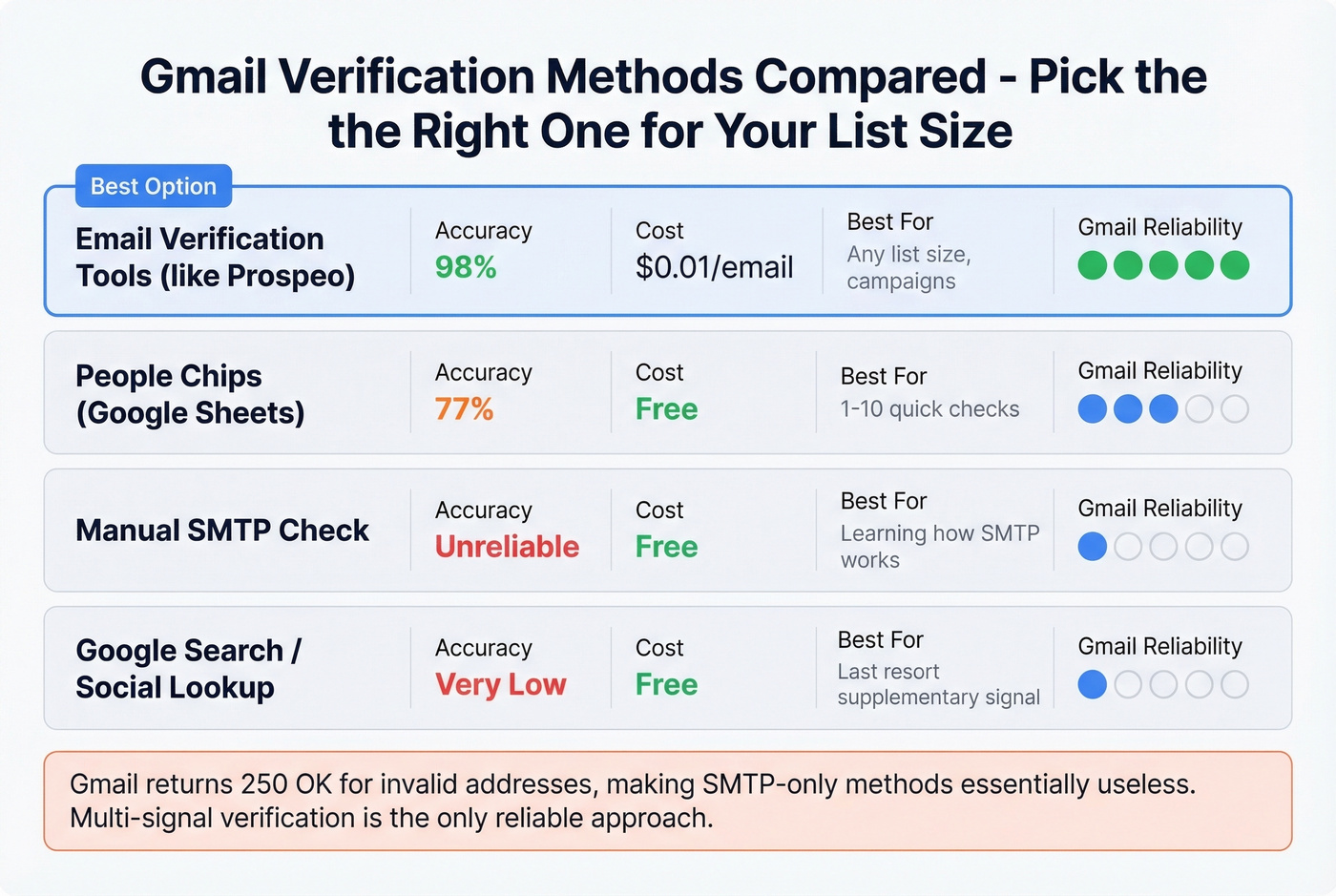
A penny per email versus a bounced campaign that tanks your sender reputation. The math isn't complicated.
| List Size | Best Method | Cost |
|---|---|---|
| 1-10 emails | People Chips | Free |
| 10-75 emails | Verification tool free tier | Free |
| 75+ emails | Paid verification | ~$0.01/email |
If you're sending any kind of outbound to Gmail addresses in 2026, manual verification methods are a waste of your time. Gmail's anti-enumeration measures are only getting stricter, and the free tiers on verification tools exist for exactly this reason. Trying to verify a Gmail email address without sending an email through SMTP alone is a losing game - the protocol just wasn't designed to give you reliable answers from providers this locked down.
Let's be honest: most teams we talk to already know their lists have problems. They just haven't quantified how much those bounces are costing them in domain reputation and missed replies.
People Chips miss 23% of valid addresses. Manual SMTP gives you false positives on Gmail. Prospeo's multi-step verification combines SMTP tickling, historical deliverability signals, and catch-all detection to give you a real deliverability verdict - not a coin flip.
Keep your bounce rate under 2% where it belongs. 75 free checks to start.
FAQ
Can you 100% verify a Gmail address without sending an email?
No tool guarantees 100% accuracy on Gmail due to anti-enumeration controls. The best verification services reach around 98% by combining SMTP probes with proprietary deliverability signals. Some addresses will return "unknown" - that's Gmail working as designed, not a tool failure.
Why does Gmail return "250 OK" for fake addresses?
Gmail uses anti-enumeration measures to prevent attackers from discovering valid mailboxes. Returning 250 OK for invalid recipients blocks brute-force username discovery at scale. This is exactly why single-step SMTP checks are unreliable for Gmail and why you need multi-signal verification to get a real answer.