

How to Verify If an Email Address Exists (2026)
You just exported 5,000 leads from a webinar, a trade show, or a scraping tool. You load them into your sequencer, hit send, and watch 400+ emails bounce back before lunch. Your domain reputation tanks, your ESP throttles you, and recovery takes weeks. With roughly 23% of email addresses going invalid every year, that's the default outcome for any team that skips verification.
Here's the thing: the gap between vendor marketing and real-world verification results is wider than most teams expect. We've tested these tools and methods extensively, and what follows is what we actually learned - not what the landing pages promise.
What You Need (Quick Version)
- You have a list and need to clean it - ZeroBounce or NeverBounce. Both are strong standalone verifiers with solid accuracy and reasonable per-verification pricing.
- You want verified emails from the start - Prospeo finds and verifies in one step, so you never export unverified data.
- You're a developer who wants self-hosted - Reacher. Open-source and Rust-based, but you'll need an open port 25 and SMTP proxies for any real volume.
One caveat that applies to every tool on this list: 30-40% of B2B domains are configured as catch-all, meaning they accept mail for any address - real or fake. No verification tool can definitively confirm a specific mailbox exists on a catch-all domain. The best tools handle this gracefully. Most just label it "unknown" and move on.
What "Verify an Email" Actually Means
Most people imagine a binary: valid or invalid. The reality is a four-layer stack, and each layer catches different problems.
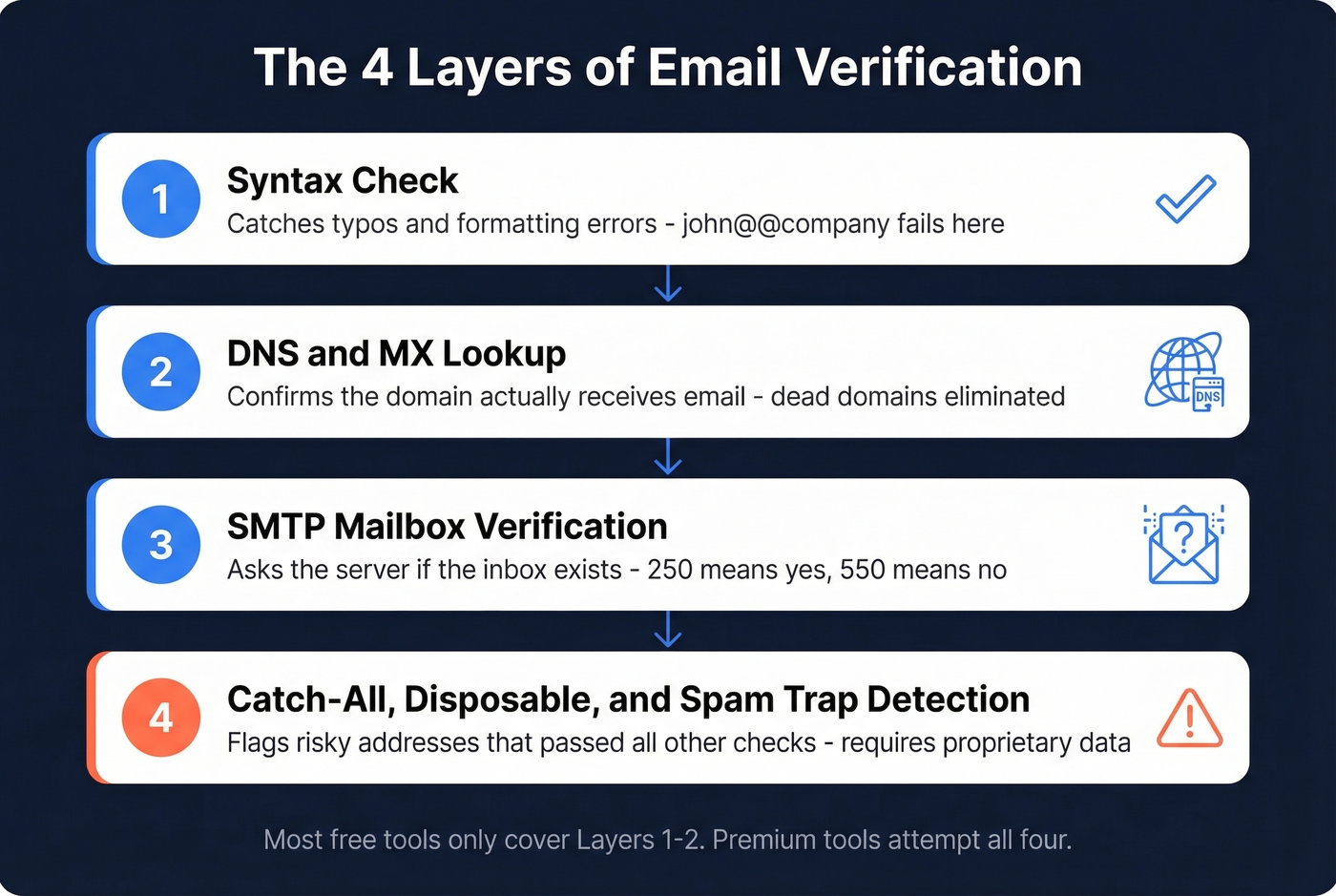
Layer 1 - Syntax check. Does the address follow the right format? john@company.com passes. john@@company doesn't. This catches typos and formatting errors, but nothing else.
Layer 2 - DNS and MX lookup. Does the domain have mail exchange records? If company.com has no MX record, nobody's receiving email there. Dead domains and obvious fakes get eliminated here.
Layer 3 - SMTP mailbox verification. The tool connects to the mail server and asks, "Would you accept a message for john@company.com?" without actually sending one. A 250 response means yes. A 550 means the mailbox doesn't exist. This is the core layer that confirms whether an individual inbox is active.
Layer 4 - Catch-all, disposable, and spam-trap detection. Even if the server says "yes," the address might be a catch-all that accepts everything, a disposable inbox that expires within hours, or a spam trap designed to catch senders with bad lists. This layer requires pattern recognition and proprietary data that goes well beyond raw SMTP responses.
The global inbox placement rate sits around 83.5% - roughly 1 in 6 emails never reach the inbox. Verification won't fix deliverability on its own, but it eliminates the most destructive variable: sending to addresses that don't exist.
How SMTP Verification Works
SMTP has been around since 1982. The extended version, ESMTP, introduced the EHLO command in 1995, enabling extensions like STARTTLS. The core handshake hasn't changed much, and that's exactly what verification tools exploit.
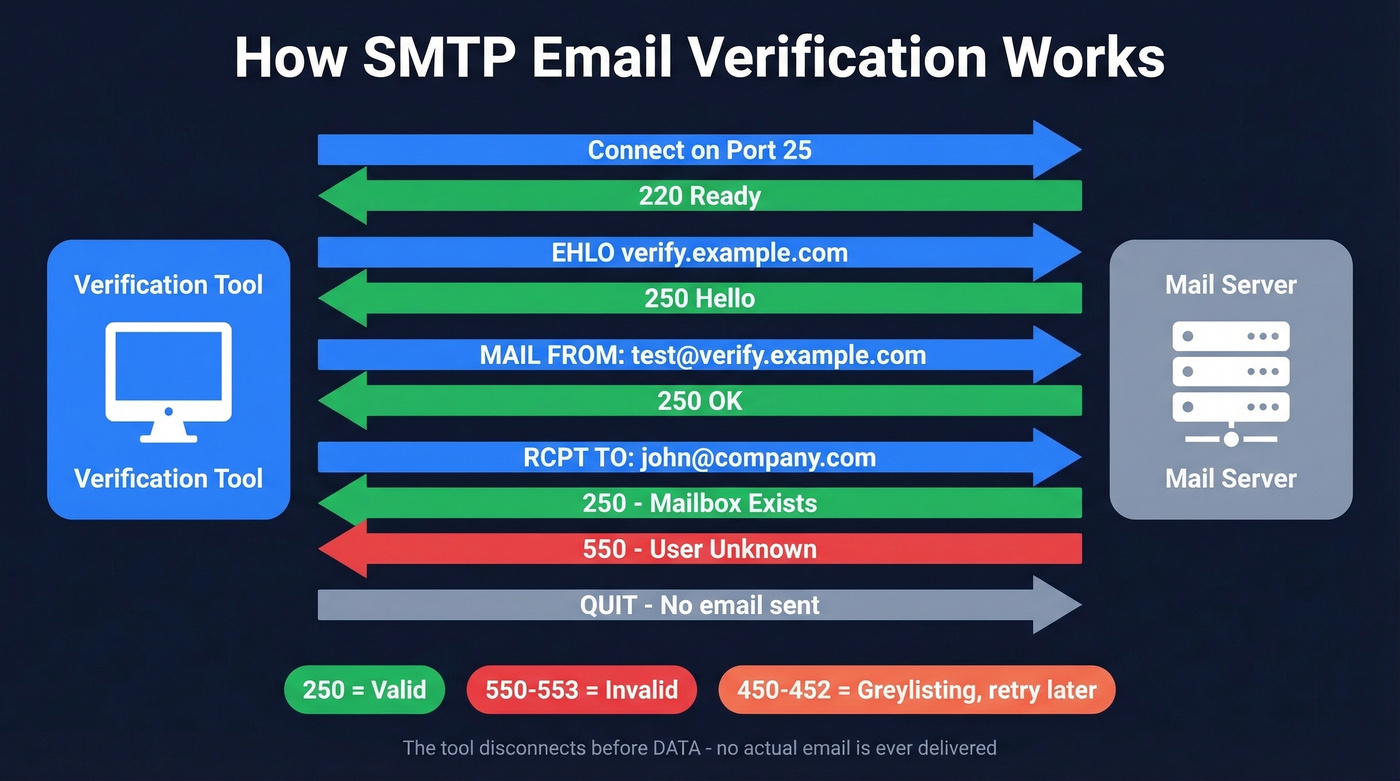
1. Connect to mail server on port 25
   Server responds: 220 mail.company.com ESMTP ready

2. Introduce yourself
   Client sends: EHLO verify.example.com
   Server responds: 250-mail.company.com Hello

3. Declare a sender
   Client sends: MAIL FROM:<test@verify.example.com>
   Server responds: 250 OK

4. Test the recipient
   Client sends: RCPT TO:<john@company.com>
   Server responds: 250 OK (mailbox exists)
     -   or   -
   Server responds: 550 User unknown (mailbox doesn't exist)
The tool never sends DATA - it disconnects after the RCPT TO response. No email is delivered. It's purely a probe.
Response codes tell you what happened. 250 means accepted. 550, 551, 552, 553 are permanent failures - the mailbox doesn't exist, the user is disabled, or the domain rejects the sender. 450, 451, 452 are temporary failures, often caused by greylisting, a technique where the server deliberately rejects the first connection attempt and expects legitimate senders to retry. Verification tools that don't handle greylisting properly will misclassify valid addresses as invalid. Always use EHLO instead of HELO - most modern servers expect it, and some will reject connections that don't.

SMTP probing breaks on catch-all domains, Gmail, and enterprise firewalls. Prospeo skips the guesswork entirely - its proprietary 5-step verification with catch-all handling, spam-trap removal, and honeypot filtering delivers 98% email accuracy before data ever hits your list.
Stop cleaning bad lists. Start with verified emails at $0.01 each.
Where Verification Breaks Down
Catch-all domains are the biggest gap. When a domain is configured as catch-all, the server returns 250 for every RCPT TO query - whether the mailbox is ceo@company.com or asdfghjkl@company.com. Standard SMTP probing can't distinguish real from fake. With 30-40% of B2B domains running catch-all, that's a massive blind spot that even premium tools with proprietary catch-all handling can only partially solve.
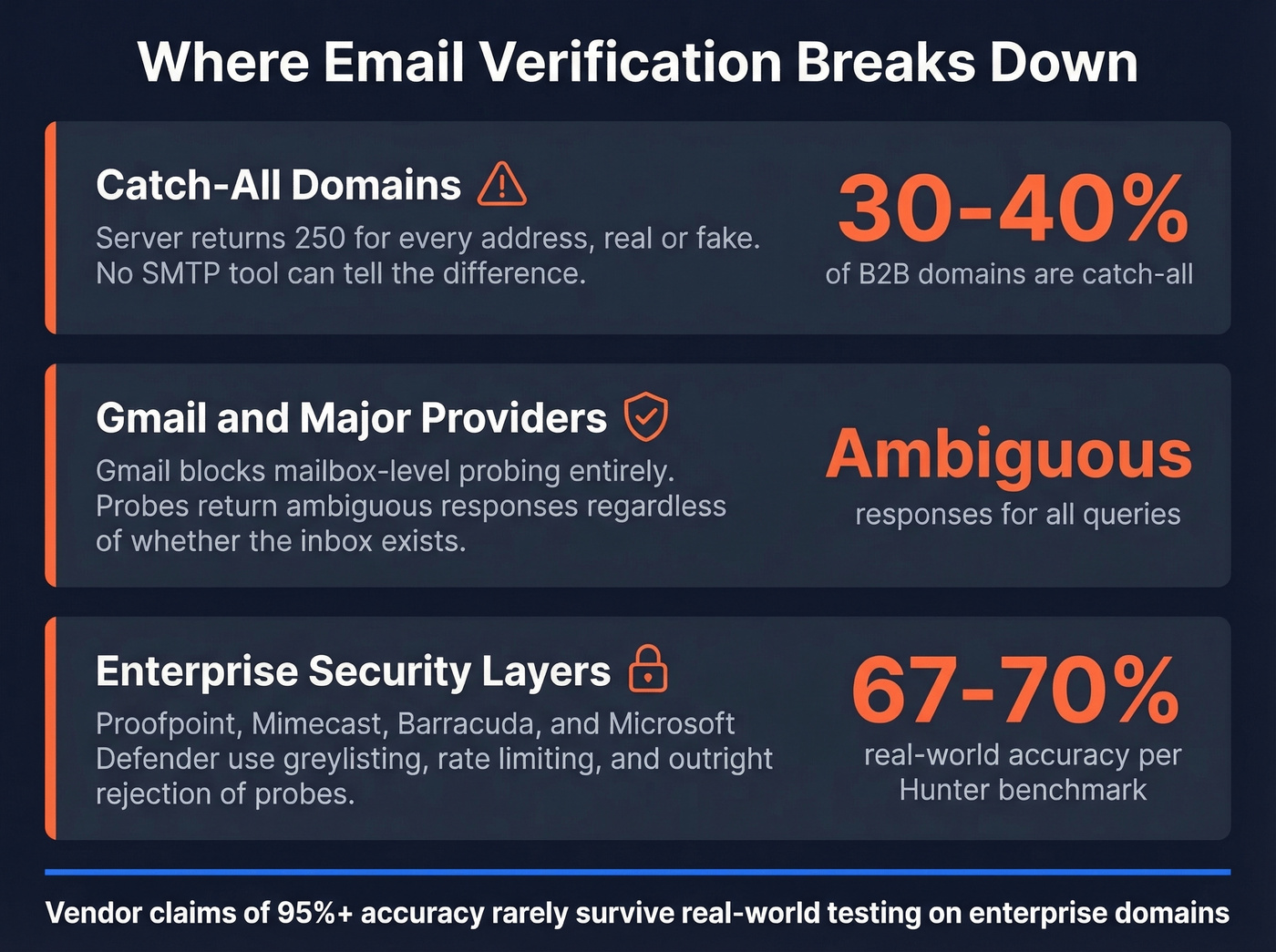
Gmail doesn't play along. Major providers often return ambiguous SMTP responses regardless of whether a mailbox exists. Reacher's open-source tool demonstrates this clearly: a probe to someone@gmail.com returns is_disabled: true and is_deliverable: false - not because the mailbox is invalid, but because Gmail blocks mailbox-level probing entirely. Developers on r/AskProgramming are skeptical that Gmail verification via SMTP is even possible. They're right to be.
Enterprise security layers actively block probing. Proofpoint, Mimecast, Barracuda, and Microsoft Defender all employ greylisting, rate limiting, and outright rejection of SMTP probes. Port 25 is also commonly blocked on cloud providers like AWS, GCP, and Azure, which limits where verification infrastructure can even run. Valid addresses get classified as "unknown" more often than vendors admit.
Vendor accuracy claims don't survive real-world testing. A Hunter benchmark of 15 verifiers using 3,000 real business emails found actual accuracy in the 67-70% range - a far cry from the high-90s numbers on marketing pages. In our experience, accuracy drops further on mid-market and enterprise domains where server configurations are stricter.
DIY: Check If an Email Exists Manually
You can run the SMTP handshake manually using Telnet. It's educational, impractical at scale, and increasingly blocked - but understanding it makes you a better buyer of verification tools.
Step 1: Find the MX record.
nslookup -type=mx company.com
Step 2: Connect via Telnet. On Windows, enable it via dism /online /Enable-Feature /FeatureName:TelnetClient. On macOS, install via Homebrew (brew install telnet). On Linux, sudo apt install telnet.
telnet mail.company.com 25
Step 3: Run the handshake.
EHLO mydomain.com
MAIL FROM:<test@mydomain.com>
RCPT TO:<john@company.com>
QUIT
If RCPT TO returns 250, the mailbox likely exists. 550 means it doesn't. 451 or 452 usually means greylisting - try again in a few minutes.
This method is mostly academic in 2026. Port 25 is commonly blocked on cloud providers and many residential ISPs. For anything beyond a one-off test, you need a dedicated tool.
Best Email Verification Tools
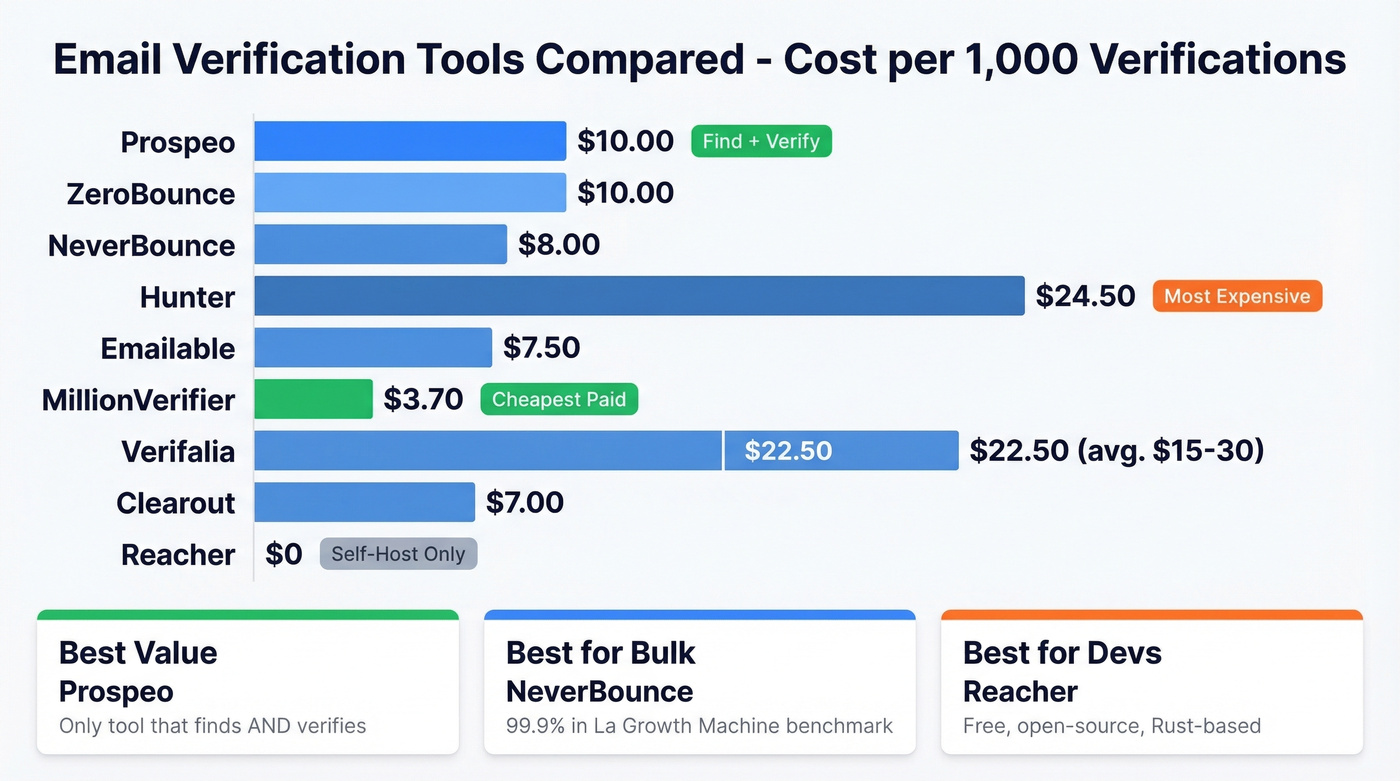
| Tool | Cost per 1K | Free Tier | Best For |
|---|---|---|---|
| Prospeo | ~$10 | 75/mo | Find + verify in one step |
| ZeroBounce | ~$10 | 100/mo | Standalone list cleaning |
| NeverBounce | ~$8 | None | Bulk verification at scale |
| Hunter | ~$24.50 | 50/mo | Already using Hunter |
| Emailable | ~$7.50 | Limited | Budget + accuracy balance |
| MillionVerifier | ~$3.70 | Limited | High-volume, low-cost |
| Verifalia | ~$15-30 | 25/day | One-off checks |
| Clearout | ~$7 | Limited | Mid-range all-rounder |
| Reacher | Free (self-host) | Unlimited | Developers only |
Free email checkers like Email Hippo and Mailmeteor work for one-off lookups, and some offer bulk options and APIs - but they aren't a replacement for a dedicated verifier if you need consistent results at scale.
Prospeo
Use this if you want to skip the "find emails, then verify them in a separate tool" workflow entirely. Prospeo's verified email database runs every address through a 5-step verification pipeline - syntax, MX, SMTP, catch-all handling, and spam-trap/honeypot removal - before it ever hits your export. You're starting with clean data, not cleaning dirty data after the fact.
The platform delivers 98% email accuracy at roughly $0.01 per email, with a 7-day data refresh cycle versus the 6-week industry average. When Snyk's 50-person AE team switched, their bounce rate dropped from 35-40% to under 5%, AE-sourced pipeline jumped 180%, and the team generated 200+ new opportunities per month. That's the difference between verifying after the fact and never exporting bad data in the first place.
The free tier gives you 75 emails per month to test. Paid plans scale with no annual contracts.

ZeroBounce
Use this if you already have a list and need to clean it before sending. ZeroBounce is one of the most established standalone verifiers, with a free tier of 100 verifications per month and solid API documentation.
At ~$10 per 1,000 verifications (2,000 minimum), it's not the cheapest option - but accuracy is consistently strong. Real-world results will be lower on catch-all-heavy domains, as with every tool, but ZeroBounce handles the standard valid/invalid/unknown categorization well.
Skip this if you need email finding too. ZeroBounce is purely a verifier - you'll need a separate source for contact discovery.

NeverBounce
A La Growth Machine benchmark of 127,000 verifications across seven tools gave NeverBounce a 99.9% accuracy score - the highest in their test. That's a single benchmark, not gospel, but it's a strong data point for a tool that comes in at ~$8 per 1,000 verifications.
NeverBounce is the go-to for bulk verification at scale. The tradeoff: no free tier, so you're committing to a paid plan from day one. For teams processing 10K+ addresses regularly, the per-unit economics make it worth the upfront commitment. For small-volume users testing the waters, start elsewhere.
Hunter
If you're already paying for Hunter's email finder, bundling verification makes sense. Otherwise, skip it. At ~$24.50 per 1,000 verifications - roughly 3x the cost of NeverBounce - Hunter is expensive for verification alone. It scored 98.5% accuracy in independent testing and offers 50 free verifications per month, but you're paying a premium for email-finding features you may not use.
If you're comparing email-finding stacks, see our breakdown of Hunter alternatives.
The Sleeper Pick: Emailable
Emailable doesn't get much attention, which is a shame. At ~$7.50 per 1,000, it undercuts most competitors while posting a 98.7% accuracy score in independent testing - the second-highest result. For teams that are price-sensitive but don't want to sacrifice accuracy, this is the tool we'd recommend looking at first. It does one thing and does it well.
MillionVerifier
The r/SaaS community has a recurring complaint: per-verification pricing is brutal at scale. MillionVerifier is the answer. At ~$3.70 per 1,000 verifications, it's the cheapest mainstream option by a wide margin. Accuracy is solid for the price, though don't expect the same catch-all handling you'd get from premium tools. For teams verifying 100K+ addresses monthly, the savings add up fast.
Verifalia, Clearout, and Reacher
Verifalia offers 25 free verifications per day - useful for confirming a single address before sending an important email. Paid plans run in the ~$15-30 per 1,000 range.
Clearout hits ~$7 per 1,000 and scored 98.2% in independent testing. A solid mid-range option without obvious weaknesses.
Reacher is free, self-hosted, and Rust-based. It's the only option giving you full control, but you'll need an open outbound port 25 and SMTP proxy servers for any meaningful volume. Don't attempt this if you aren't comfortable managing infrastructure.
If you're evaluating more verification vendors, our list of Bouncer alternatives covers additional options.
Hunter's benchmark found most verifiers land at 67-70% accuracy on real business emails. Prospeo's proprietary email infrastructure - built without third-party providers - hits 98% accuracy on 143M+ verified emails, refreshed every 7 days. Teams using Prospeo see bounce rates drop from 35%+ to under 4%.
Find and verify in one step. No post-export cleanup required.
Handling Your Verification Results
Verification tools don't return a simple yes/no. They return categories, and how you handle each one determines whether your domain stays healthy.
Valid addresses are safe to send. Invalid addresses should be removed immediately - sending to them is pure bounce rate inflation. Disposable addresses should also be removed; they're temporary inboxes that go dead within hours.
The trickier categories require more nuance. Catch-all and risky addresses should go into a separate segment - send in small batches of 50-100 and monitor bounce rates closely. If bounces stay under 2%, gradually increase volume. If they spike, pull back. Unknown addresses shouldn't be sent to now; recheck in 60-90 days. Server configurations change, greylisting windows expire, and addresses that were "unknown" last month may resolve on the next check.
We've seen teams lose weeks of sending capacity after ignoring the 2% bounce threshold. Gmail and Yahoo also enforce a 0.3% spam complaint rate threshold - another reason clean lists matter. If you've already crossed the line and your domain reputation has taken a hit, expect 6-12 weeks of recovery with no shortcut. During that window, send only to your most engaged contacts and verified addresses.
If you're troubleshooting bounces and thresholds, our guide to email bounce rate breaks down codes and fixes.
One r/Emailmarketing user put it bluntly: their before/after results from adding verification to their workflow were "night and day" - open rates recovered within a month of cleaning their list and switching to verified-only sends.
The 60-90 day recheck cadence isn't arbitrary. With 23% annual list decay, addresses go stale constantly. Monthly verification is ideal for weekly campaigns. Quarterly is the minimum for any active list.
If you're building outbound systems end-to-end, pair verification with a solid email deliverability guide and a plan to improve sender reputation.
Let's be honest about tool selection: if your deal sizes are under $10K, you probably don't need the most expensive verification tool on the market. MillionVerifier or Emailable will handle 90% of what ZeroBounce does at a third of the cost. Save the premium budget for a tool that finds and verifies so you aren't stitching together two workflows.
If you're sourcing contacts in bulk, see our picks for email list providers and data enrichment services.
FAQ
What's the most reliable way to verify if an email address exists?
SMTP-level mailbox verification is the most reliable method - it directly queries the mail server for a 250 or 550 response code. But catch-all domains, Gmail, and enterprise security gateways all produce ambiguous results. The best approach combines SMTP probing with catch-all detection and spam-trap filtering, which professional tools automate.
Can you check if an email exists without sending a message?
Yes. The SMTP handshake probes the mail server's RCPT TO response without ever delivering an email. Dedicated verification tools automate this process and layer on catch-all and spam-trap detection for more reliable results at scale.
Can you verify Gmail addresses?
Not reliably. Gmail returns ambiguous SMTP responses regardless of whether the mailbox exists - it's deliberately designed to prevent enumeration. Most verification tools mark Gmail addresses as "unknown" or "risky." Expect a higher percentage of unverifiable results when prospecting Gmail-hosted contacts.
How often should I re-verify my email list?
Every 60-90 days at minimum. With 23% annual list decay, addresses go stale faster than most teams realize. Monthly verification is safer for weekly outbound campaigns. The cost of re-verification is trivial compared to a damaged sender reputation.
What bounce rate is too high?
Keep total bounces under 2% and hard bounces under 1%. Exceed those thresholds and ESPs start throttling or blocking your domain. Recovery takes 6-12 weeks. Prevention - verifying before you send - is dramatically cheaper than repair.