

The Best Email Address Directory Tools, Ranked by What Actually Matters
You built a list of 500 prospects, loaded them into your sequencer, and hit send. Two days later, 40% bounced. Your domain reputation tanked, and now even the good emails land in spam. That's what happens when your email address directory is really just a stale database with a search bar bolted on.
The gap between the best tools and the worst is enormous - some deliver 80%+ valid emails while others struggle to clear 20%. We've tested most of these tools in production, run bake-offs, and watched the bounce rate reports come in. Here's what's actually worth your money.
Our Top Picks
| Pick | Best For | Why |
|---|---|---|
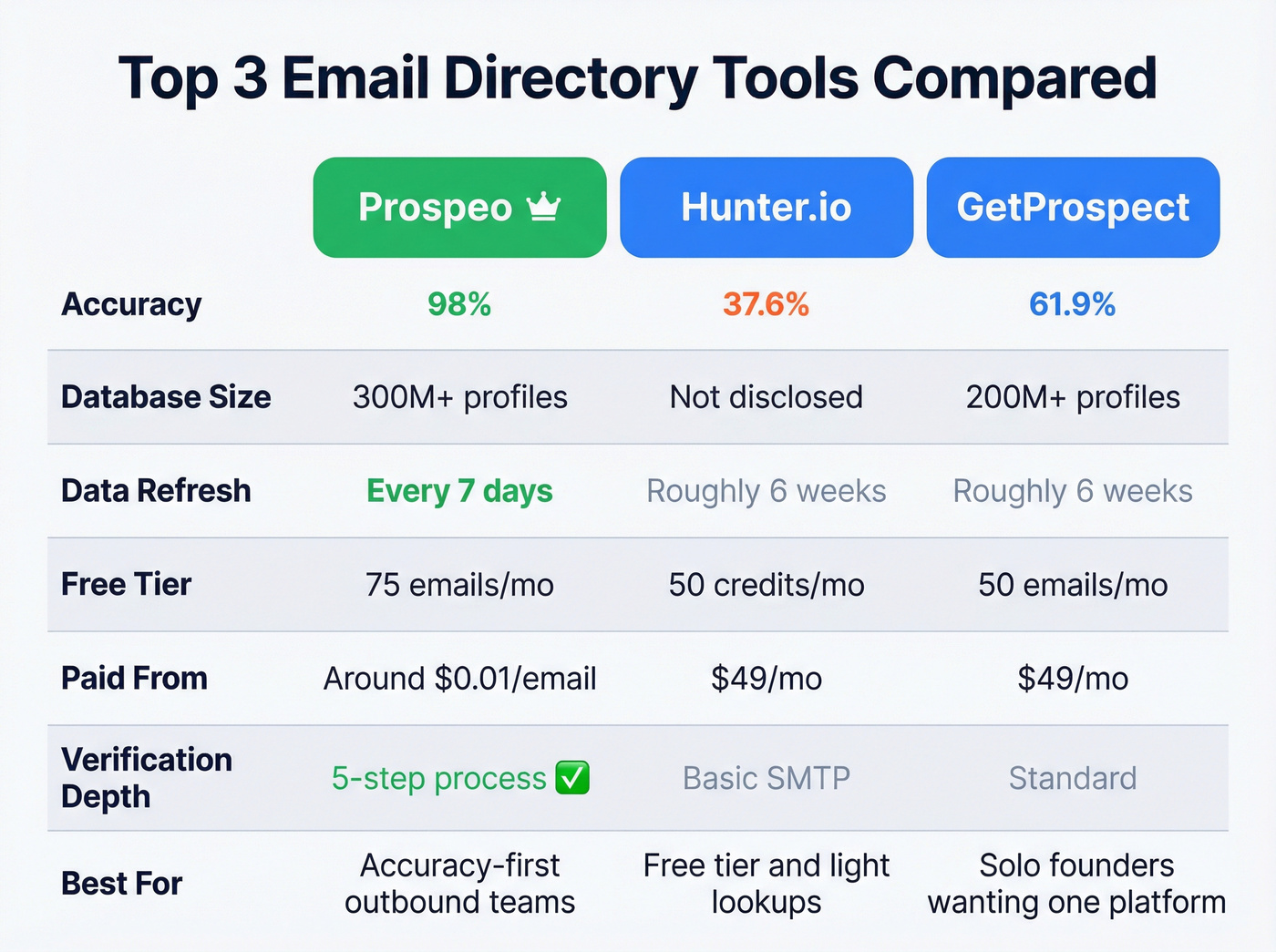
| Prospeo | Accuracy & freshness | 98% email accuracy, 7-day data refresh, 75 free emails/month |
| Hunter.io | Free tier & simplicity | 50 free credits/month, clear credit system |
| GetProspect | Database + outreach | 200M+ profiles, built-in cold email sequences |
How Email Directory Tools Work
Every email finder uses some combination of three methods: pattern matching, SMTP verification, and database lookup. Pattern matching guesses the email format - say, firstname.lastname@company.com - based on known patterns at that domain. SMTP verification pings the mail server to check if the address exists. Database lookup pulls from pre-crawled records, and one benchmark study found that 98% of solutions pull from essentially the same underlying data sources.

The verification result you get back isn't binary. Results fall into categories: Valid (confirmed reachable), Catch-All (server accepts everything, including fake addresses), Invalid (dead), Unknown (server didn't respond), and sometimes Pending (verification is delayed).
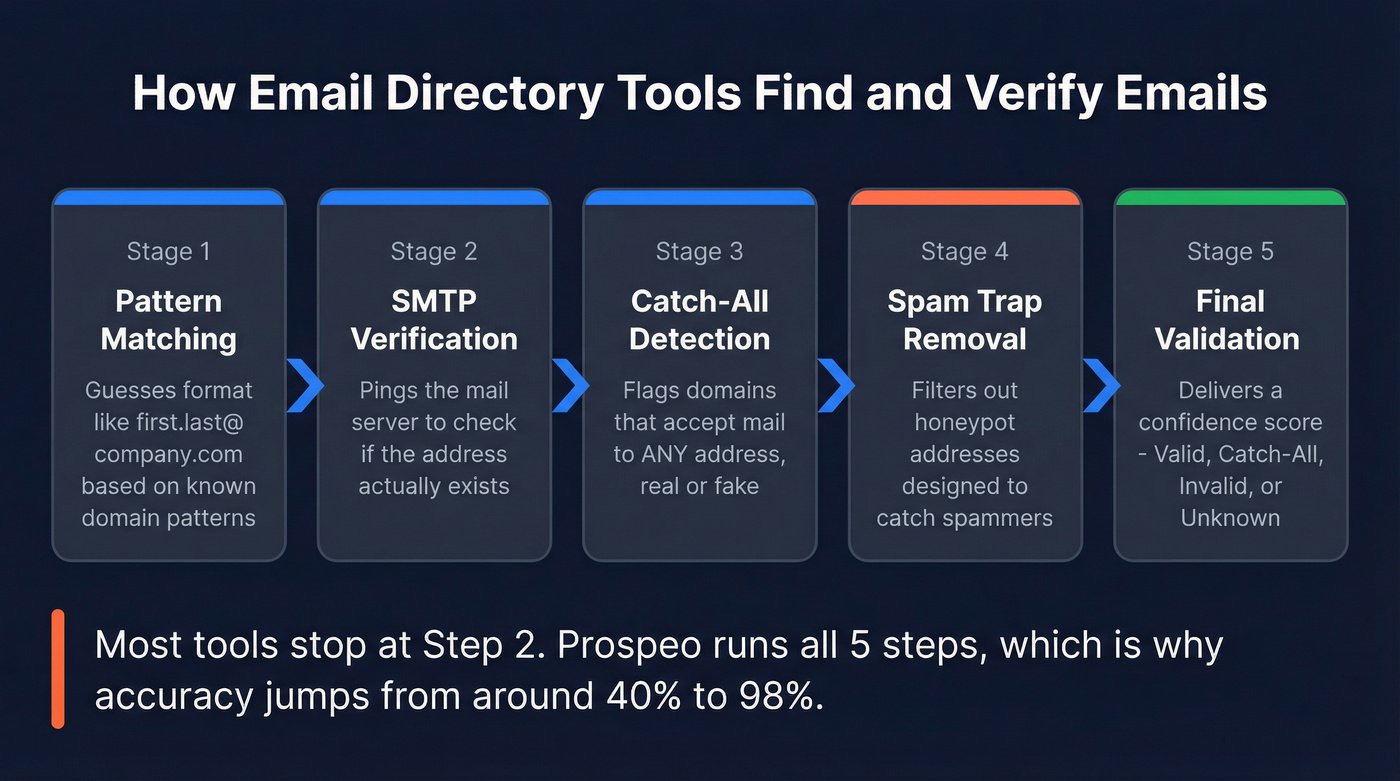
Here's the thing most people miss: catch-all domains are a trap. Between 15% and 28% of B2B domains are catch-all, meaning the server accepts mail to literally any address - real or invented. A tool can "verify" an email on a catch-all domain and still hand you a bounce. This is where verification depth separates real tools from pattern-match guesswork. Catch-all handling, spam-trap removal, and honeypot filtering are the layers that actually protect your sender reputation.
What the Benchmarks Show
Two vendor-run benchmarks give us real numbers. Take the rankings with skepticism since each vendor tested their own tool, but the data points are revealing.
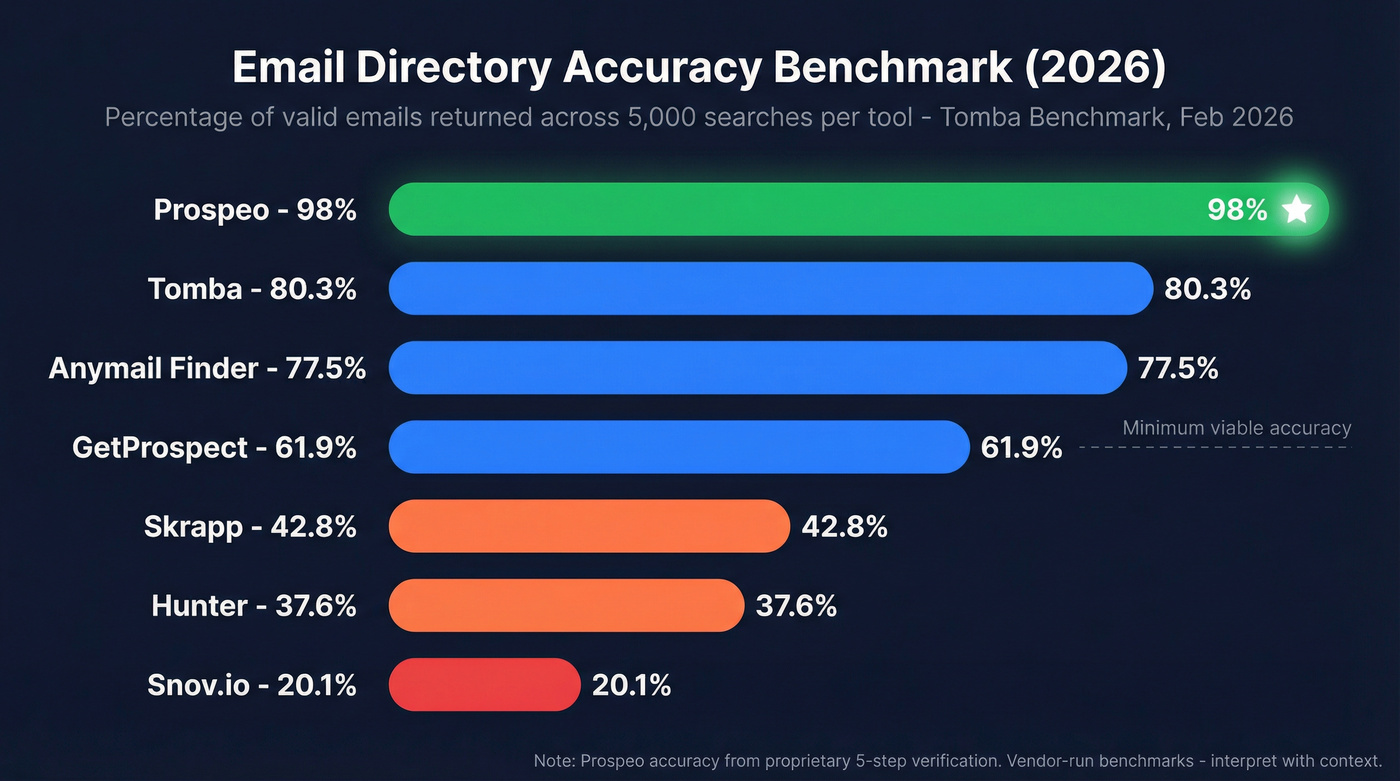
The Dropcontact benchmark tested 20,000 contacts across 15 tools. The Tomba benchmark ran 5,000 searches per tool across 9 providers in February 2026. Key results:
| Tool | Enrichment Rate (Dropcontact) | Hard Bounce (Dropcontact) | Accuracy (Tomba) |
|---|---|---|---|
| Tomba | - | - | 80.3% |
| Anymail Finder | 41.3% | 15.8% | 77.5% |
| GetProspect | - | - | 61.9% |
| Skrapp | - | - | 42.8% |
| Hunter | 32.5% | 11.2% | 37.6% |
| VoilaNorbert | 24.2% | 13.7% | 36.0% |
| Snov.io | - | - | 20.1% |
A few things jump out. The spread is massive - from 80.3% accuracy down to 20.1%. Company-name searches caused near-total failure for several tools; Snov.io returned just 0.8% valid results on company-name lookups. And high enrichment rates don't guarantee low bounces - Anymail Finder found the most emails in the Dropcontact test but also posted a 15.8% hard bounce rate.
Context on these benchmarks: They measure enrichment breadth - how many emails a tool returns from a cold search. That's useful, but it's only half the picture. A tool that returns fewer results but verifies each one through catch-all detection, spam-trap removal, and honeypot filtering will produce better deliverability outcomes than one that returns more at lower confidence.
If your deal sizes sit below five figures, you probably don't need the biggest database. You need the most accurate one. A 300-person list with 98% deliverability will outperform a 1,000-person list at 40% accuracy every single time - and it won't torch your domain in the process.

The benchmarks don't lie: the gap between the best and worst email directories is 60 percentage points. Prospeo's 5-step verification - catch-all detection, spam-trap removal, honeypot filtering - delivers 98% email accuracy across 300M+ profiles.
Stop gambling your domain reputation on stale directory data.
Best Email Address Directory Tools in 2026
1. Prospeo
Prospeo covers 300M+ professional profiles with 143M+ verified emails and 125M+ verified mobile numbers. The 98% email accuracy comes from a proprietary 5-step verification process - pattern matching, SMTP verification, catch-all detection, spam-trap removal, and honeypot filtering - built on proprietary infrastructure rather than third-party email providers.

The 7-day data refresh cycle is the standout differentiator. Most tools refresh on roughly a 6-week cycle, which means you're working with stale data by default. Prospeo refreshes records every 7 days, so job changes and role shifts surface faster than anywhere else we've tested.
The Chrome extension (40,000+ users) pulls verified contact data from any website or CRM in one click. The 30+ search filters include buyer intent powered by Bombora, technographics, job changes, headcount growth, and funding data - so you're finding the right people at the right time, not just any people.
Real results: Meritt dropped their bounce rate from 35% to under 4%. Stack Optimize maintains 94%+ deliverability across all clients with zero domain flags. At roughly $0.01 per email with a free tier of 75 emails and 100 Chrome extension credits per month, there's no contract and no sales call required.
Meritt cut their bounce rate from 35% to under 4%. Stack Optimize runs 94%+ deliverability across every client with zero domain flags. The difference is a 7-day data refresh and proprietary verification - not recycled third-party records.
Build your email list from the directory that refreshes every 7 days.
2. Hunter.io - The Safe First Step
Hunter is the tool most people try first, and for good reason. The free tier gives you 50 credits per month with zero commitment, and the credit system is transparent: 1 credit per email found, 0.5 credits per verification, nothing charged if no email is found. More tools should copy this model.

The Starter plan runs $49/mo ($34/mo billed annually) with 2,000 credits. Growth is $149/mo ($104 annual) for 10,000 credits. Unlimited users share the same pool, which works well for small teams.
Where Hunter falls short is raw accuracy. The Dropcontact benchmark showed a 32.5% enrichment rate with an 11.2% hard bounce rate. Tomba's test put accuracy at 37.6%. Not terrible, but not great - Hunter found 24.3 percentage points fewer valid emails than GetProspect in the same test. The consensus on r/sales tends to mirror this: Hunter's fine for light lookups, but teams running serious volume usually graduate to something with better hit rates.
Verdict: The best free starting point. Graduate to something more accurate once you're running real volume.
3. GetProspect - When You Want One Platform
GetProspect combines 200M+ profiles, a free tier of 50 emails per month, and built-in cold email sequences. The Starter plan is $49/mo ($34 annual) for 1,000 valid emails and includes 2,000 verifications.
At 61.9% accuracy in the Tomba benchmark, GetProspect landed well above Hunter and Snov.io. The built-in sequencing is the real draw - solo founders and small teams who don't want to manage separate tools for prospecting and outreach get a consolidated workflow. For teams searching for a business email lookup alongside outreach capabilities, it's one of the more complete options available.
Skip this if you already run a sequencer like Instantly or Lemlist. You'd be paying for outreach features you'll never use.
4. Anymail Finder
Anymail Finder's model is simple: you only pay for emails marked "Valid." Risky, catch-all, and not-found results cost nothing. That's a genuinely appealing structure, and the 77.5% accuracy score in the Tomba benchmark backs it up - one of the highest in the test. Plans start at just $14/mo with a 3-day free trial.
The catch? The Dropcontact test showed a 15.8% hard bounce rate, suggesting their "valid" classification runs generous. That bounce rate is a real risk to domain reputation at scale. It's the budget pick, and a good one, but you should still run a separate verification pass before sending anything.
5. ContactOut
ContactOut markets 350M+ profiles on some pages and 700M+ on others - a discrepancy that doesn't inspire confidence. The free tier gives you 5 emails per day. The Email plan runs roughly $49/mo annually, commonly capped at 2,000 emails per month with 300 exports. Team and API pricing requires a sales conversation.
Best for recruiters who need phone numbers alongside emails. Skip it if pricing transparency matters to you.
6. Snov.io - All-in-One, Low Accuracy
Snov.io bundles finding, verification, and outreach into one platform. The Starter plan is $29.25/mo on annual billing with 1,000 credits. That sounds reasonable until you realize the LinkedIn automation add-on costs $69/month per seat - a hidden cost that can triple your actual spend.
Look, we don't love calling out tools this directly, but the numbers speak for themselves: 20.1% accuracy in the Tomba benchmark. Company-name searches returned just 0.8% valid results. A 20% accuracy rate will destroy your deliverability if you're running serious outbound. This tool only makes sense for teams that prioritize workflow consolidation over data quality, and even then, it's a hard sell.
7. Tomba.io
Tomba scored 80.3% accuracy in its own benchmark - the highest result in the test. Since they ran the benchmark, take that with a grain of salt. Plans start at $49/mo. Worth testing if you want a second opinion on email validity, but the self-benchmarking conflict of interest is hard to ignore.
8. Skrapp.io
Skrapp offers 200M+ profiles. The Tomba benchmark showed 42.8% accuracy - middle of the pack. A decent option for light prospecting, nothing more.
9. VoilaNorbert
VoilaNorbert offers 50 free verified email addresses. It posted weak numbers in the benchmarks: 24.2% enrichment with a 13.7% hard bounce rate in the Dropcontact test, and 36.0% accuracy in Tomba's. Hard to recommend when better options exist at similar price points.
10. RocketReach
RocketReach targets enterprise buyers with a "lead intelligence" positioning. Individual plans run $53-107/mo based on community reports and competitor comparisons, though pricing isn't published transparently.
Pricing Comparison
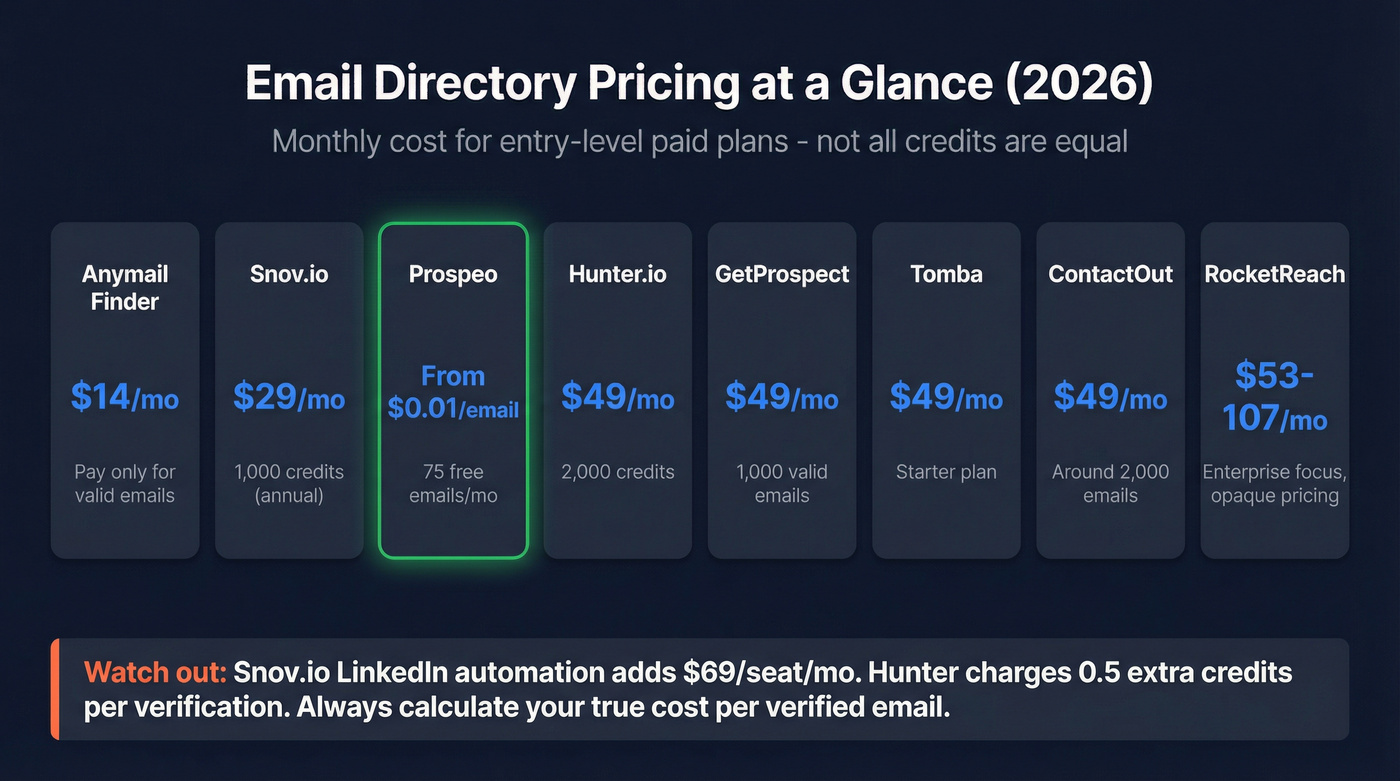
Not all credits are equal. Hunter charges 0.5 credits extra for verification. Snov.io bundles prospecting, finding, and verification into the same credit pool. Anymail Finder only charges for valid results. These differences make apples-to-apples comparison tricky, so here's a snapshot:
| Tool | Free Tier | Starter Price | Notes |
|---|---|---|---|
| Prospeo | 75 emails/mo | ~$0.01/email (credit-based) | Includes 5-step verification + 7-day refresh |
| Hunter | 50 credits/mo | $49/mo ($34 annual) | 2,000 credits; verification costs 0.5 credit |
| GetProspect | 50 emails/mo | $49/mo ($34 annual) | 1,000 valid emails + 2,000 verifications |
| Anymail Finder | 3-day trial (100 credits) | From $14/mo | Charges only for "Valid" |
| ContactOut | 5 emails/day | ~$49/mo annual | Caps and export limits apply on some plans |
| Snov.io | Trial | $29.25/mo (annual) | LinkedIn automation add-on is $69/seat/mo |
| Tomba | Limited | $49/mo | Self-benchmarked at 80.3% accuracy |
| Skrapp | Yes | Not public | 42.8% accuracy in Tomba benchmark |
| VoilaNorbert | 50 verified emails | Not public | Weak benchmark performance |
| RocketReach | Limited | $53-107/mo | Enterprise-focused, opaque pricing |

Database size matters less than most vendors want you to believe. A 700M-profile directory with 30% accuracy produces worse results than a 300M-profile database at 98% accuracy. Always ask: "What percentage of the emails I get back will actually land in an inbox?"
Free Ways to Find Email Addresses
Before you pay for anything, exhaust the free methods. Google operators like site:company.com "email" or intext:"@company.com" surface publicly listed addresses. WHOIS lookups on domain registration records sometimes include admin emails. GitHub bios, X/Twitter profiles, and personal websites often list contact info directly.
One underrated trick: subscribe to a company's newsletter. The sender address reveals their email format, and once you know one email at a domain, you can guess the rest. Many teams use free email directory search methods for 70-80% of lookups and reserve paid tools for high-value contacts where accuracy matters most.
A compliance note worth remembering: B2B email outreach is legal under GDPR, CAN-SPAM, and CCPA when done for legitimate business purposes. Always include an unsubscribe option, honor opt-outs, and verify before sending. The "verify before sending" part is where paid tools earn their keep.
How to Choose the Right Tool
Most teams don't need ten email finders. They need one accurate one and a verification layer. Let's break this down:
Need a free starting point? Hunter's 50-credit free tier is the obvious choice. Want prospecting and outreach in one tool? GetProspect consolidates the workflow, though you'll sacrifice some accuracy. Budget-constrained solo operator? Anymail Finder's pay-for-valid model keeps costs predictable.
For teams running enrichment via API or CRM integrations, prioritize tools that return rich contact records - 50+ data points per contact, for example - so you don't have to stitch together multiple services. In our experience, the "waterfall" approach of stacking multiple tools sounds smart in theory, but one accurate email address directory with built-in verification almost always outperforms three mediocre ones stitched together. Pick the tool that matches your accuracy threshold and volume needs, verify everything before it hits your sequencer, and move on.
FAQ
Are email address directories legal?
Yes. B2B email lookup tools are legal when used for legitimate business outreach under GDPR, CAN-SPAM, and CCPA. Compliance depends on usage: include unsubscribe options, honor opt-outs promptly, and maintain records of how you collected each contact. The tools themselves are legal; misuse isn't.
What's a catch-all domain and why does it matter?
A catch-all domain accepts email sent to any address at that domain, including fake ones. Between 15-28% of B2B domains are catch-all, meaning a "verified" email can still bounce. Tools with dedicated catch-all handling flag these separately so you can decide whether to risk sending.
How many credits do I actually need per month?
Most SDRs prospect 200-500 contacts per month. A free tier of 50-75 emails works for testing workflows. For active outbound teams, plan for 1,000-5,000 credits monthly depending on team size and campaign volume. Start free and scale once you know your conversion rates.
Can I use multiple email finders together?
You can, and some teams do run a "waterfall" approach through 2-3 tools to maximize coverage. In practice, one accurate tool with built-in verification often outperforms stacking three mediocre ones. The added complexity and cost of managing multiple subscriptions rarely justifies the marginal coverage gain.
How often should email data be refreshed?
Weekly refresh cycles catch job changes and role shifts fastest. Stale data is the top cause of high bounce rates, so always check a tool's published refresh cadence before committing. The industry average sits around 6 weeks, which is a long time in B2B - people change jobs, get promoted, and leave companies constantly.