How to Build OpenAI API Lead Scoring That Actually Works
You built the prompt from a Medium tutorial, ran it on 500 leads, and got 200 scores of exactly 75/100. The other 300 came back as malformed strings your parser couldn't handle. That's not lead scoring - that's a random number generator with extra steps.
Score clustering is the single most common failure mode developers hit with LLM-based scoring. Reddit threads on r/sales and r/machinelearning are full of the same complaint: every lead comes back between 70 and 80, the reasoning field sounds plausible, and the scores are functionally useless. Most OpenAI API lead scoring tutorials still use deprecated patterns and parse scores by splitting on colons. They skip the two things that actually matter: data quality going in and validation coming out.
Here's the fix.
What You Need (Quick Version)
- Clean your data first. Stale CRM records produce meaningless scores. Use an enrichment API that returns verified firmographic and contact data.
- Use Structured Outputs with JSON Schema - not string parsing.
- Start with gpt-4o-mini. It scores 10,000 leads for ~$1.35 via Batch API.
- Automate with Make or n8n, not Zapier - 3-5x cheaper at scale.
- Backtest scores against CRM outcomes quarterly or your model drifts silently.
Fix Your Data Before You Score
Lead scoring is a data quality problem disguised as an AI problem. Feed a language model a lead record with a missing job title, stale company revenue, and no tech stack data, and you'll get a confident-sounding score that means nothing. Garbage in, garbage out - except now the garbage has a reasoning field that makes it look legitimate.
Enrichment isn't an optional add-on. It's the prerequisite. Before any lead touches your scoring prompt, you need verified job titles, company revenue, headcount, tech stack, and funding status. Prospeo's enrichment API handles this at scale - 92% API match rate, 50+ data points returned per contact, and a 7-day refresh cycle that keeps records current.
That refresh cadence matters more than people realize. The industry average is six weeks, which means by the time most providers update a record, your prospect has already changed roles or the company has gone through a round of layoffs that completely reshuffled the org chart. A scoring model working with stale fields is guessing, no matter how good your prompt is. If you want the benchmarks and fixes behind this, see B2B contact data decay.

Here's the thing: we see the same pattern over and over. Teams spend weeks tuning their scoring prompt when the real problem is that 30% of their lead records are missing the fields the prompt needs to make a good decision. This is also why CRM hygiene matters before you automate anything.
Four Signal Categories to Score
Your scoring prompt needs to evaluate leads across four distinct dimensions, not just one blended number.
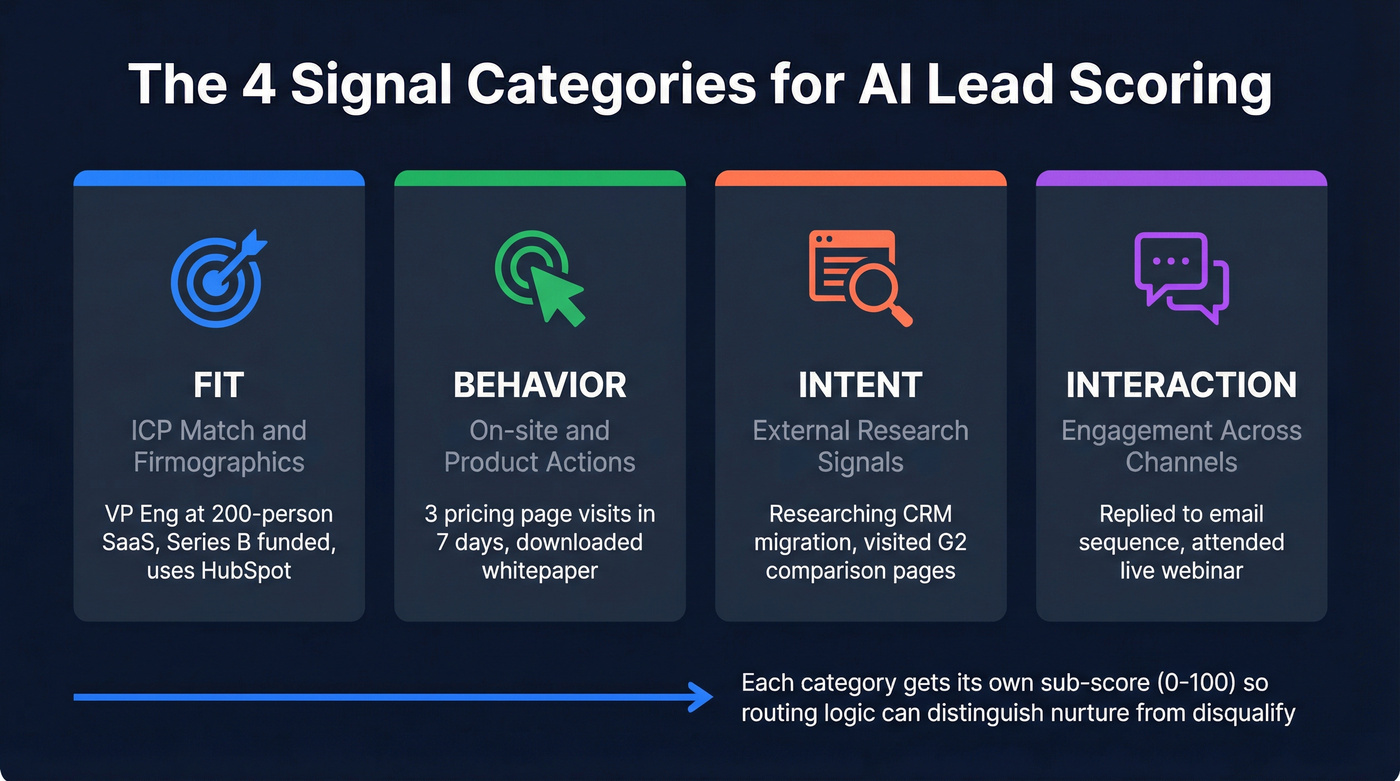
| Category | What It Measures | Example Data Point |
|---|---|---|
| Fit | ICP match / firmographics | VP Eng, 200-person SaaS |
| Behavior | On-site / product actions | 3 pricing page visits in 7d |
| Intent | External research signals | Researching "CRM migration" |
| Interaction | Engagement across channels | Replied to sequence, attended webinar |
Structure your prompt with explicit sections for each category. A single blended score hides whether a lead is a great fit who hasn't engaged yet (that's a nurture) or a poor fit who's very active (that's a disqualify). Separate sub-scores let your routing logic make smarter decisions downstream. If you’re building this for ABM, map these dimensions to your ABM lead scoring model.
Structured Outputs + Prompt Design
Every tutorial that parses scores by splitting on colons or regex-matching integers from freeform text is doing it wrong. Structured Outputs guarantee the model always generates responses that adhere to your supplied JSON Schema. No missing required keys. No invalid enum values. No parsing failures at 2 AM when nobody's watching.
Define a JSON Schema for your lead score object:
{
  "type": "object",
  "properties": {
    "overall_score": { "type": "integer", "minimum": 0, "maximum": 100 },
    "fit_score": { "type": "integer", "minimum": 0, "maximum": 100 },
    "behavior_score": { "type": "integer", "minimum": 0, "maximum": 100 },
    "intent_score": { "type": "integer", "minimum": 0, "maximum": 100 },
    "interaction_score": { "type": "integer", "minimum": 0, "maximum": 100 },
    "reasoning": { "type": "string" },
    "recommended_action": {
      "type": "string",
      "enum": ["fast_track", "nurture", "disqualify", "needs_research"]
    }
  },
  "required": ["overall_score", "fit_score", "behavior_score",
                "intent_score", "interaction_score", "reasoning",
                "recommended_action"],
  "additionalProperties": false
}
Pass this via the response_format: { type: "json_schema", json_schema: { ... } } parameter. response_format with json_schema is supported starting with gpt-4o-mini, gpt-4o-2024-08-06, and later snapshots. Older models only support json_object mode, which guarantees valid JSON but won't enforce your schema - a critical difference when you're processing thousands of leads unattended.
Your system prompt should follow this structure:
- Rubric definition - spell out exactly what a score of 90 vs 50 vs 20 means for each category. Be specific: "A fit_score of 85+ means the lead matches 4/5 ICP criteria including title seniority and company size."
- Lead data placeholder - where the enriched lead record gets injected.
- Output schema reference - reiterate the expected fields and enum values.
OpenAI's model optimization guide recommends including example outputs in your prompt. For lead scoring, that means 2-3 example leads with their expected scores and reasoning. This anchors the model's calibration and reduces score clustering - the exact problem that produces 200 leads all scored at 75. For more on building prompts that sales teams can actually operationalize, see prompt engineering for salespeople.

30% of lead records are missing the fields your scoring prompt needs. Prospeo's enrichment API returns 50+ data points per contact at a 92% match rate - with a 7-day refresh cycle so your AI never scores on stale data.
Feed your OpenAI pipeline data it can actually score.
Model Selection and Cost Math
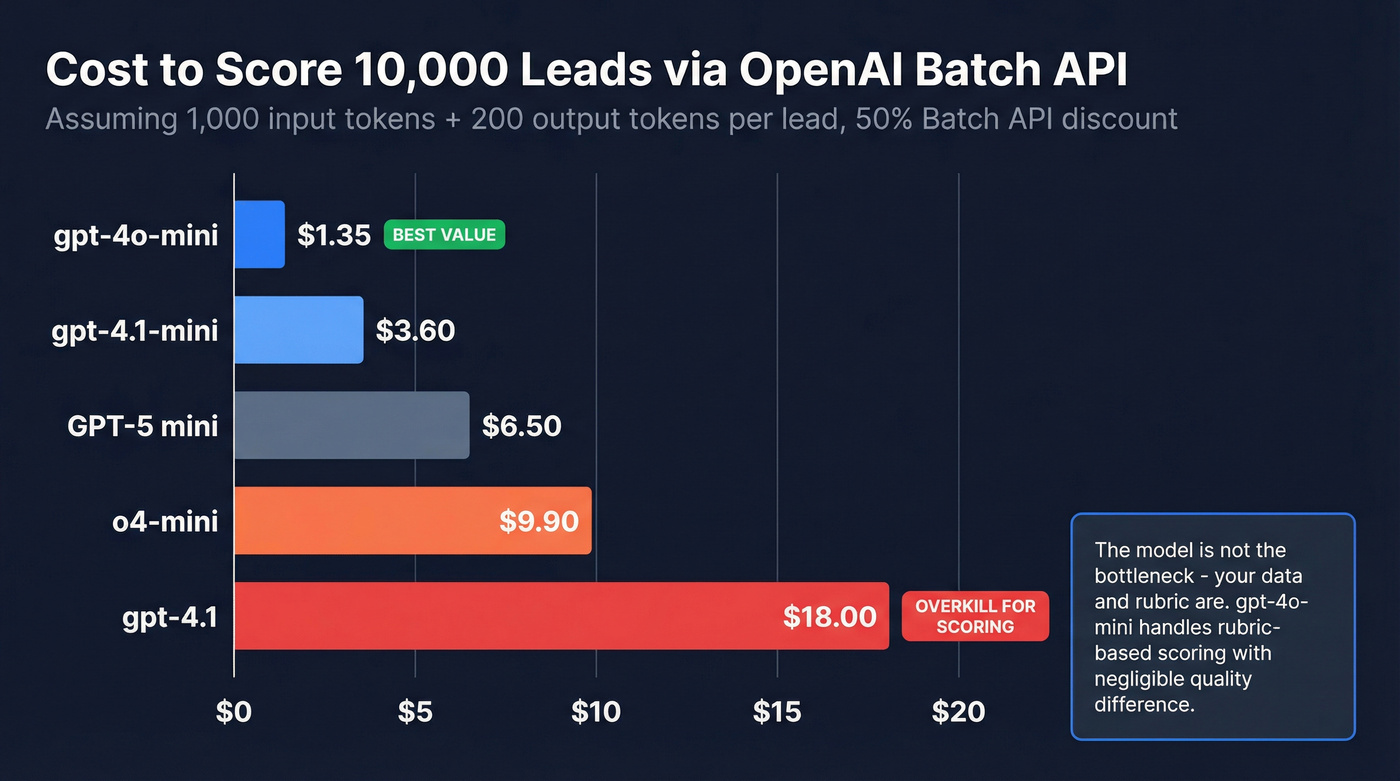
A typical lead scoring call runs ~1,000 input tokens (system prompt + rubric + lead data) and ~200 output tokens (score object + reasoning). Here's what that costs across models using Batch API pricing, which gives you a 50% discount in exchange for a 24-hour async processing window:
| Model | Input (Batch) | Output (Batch) | Cost / 10K Leads |
|---|---|---|---|
| gpt-4o-mini | $0.075/1M | $0.30/1M | ~$1.35 |
| gpt-4.1-mini | $0.20/1M | $0.80/1M | ~$3.60 |
| GPT-5 mini | $0.25/1M | $2.00/1M | ~$6.50 |
| o4-mini | $0.55/1M | $2.20/1M | ~$9.90 |
| gpt-4.1 | $1.00/1M | $4.00/1M | ~$18.00 |
Scoring 10,000 leads costs between $1.35 and $18. You don't need gpt-4.1 for this. We've tested it - gpt-4o-mini handles rubric-based classification at 5-10x lower cost with negligible quality difference for structured scoring tasks. GPT-5 mini is available but overkill when the rubric does the heavy lifting. Save the bigger models for complex reasoning where the extra spend actually moves the needle.
If your deal sizes are consistently under $15K, you almost certainly don't need anything beyond gpt-4o-mini. The model isn't the bottleneck - your data and rubric are.
The Batch API is the right choice for scoring in bulk. You submit a file of requests, OpenAI processes them within 24 hours, and you get results at half the standard rate. For inbound leads hitting a form in real time, use standard pricing instead - the latency tradeoff is worth it for time-sensitive routing.
Choosing Your Automation Layer
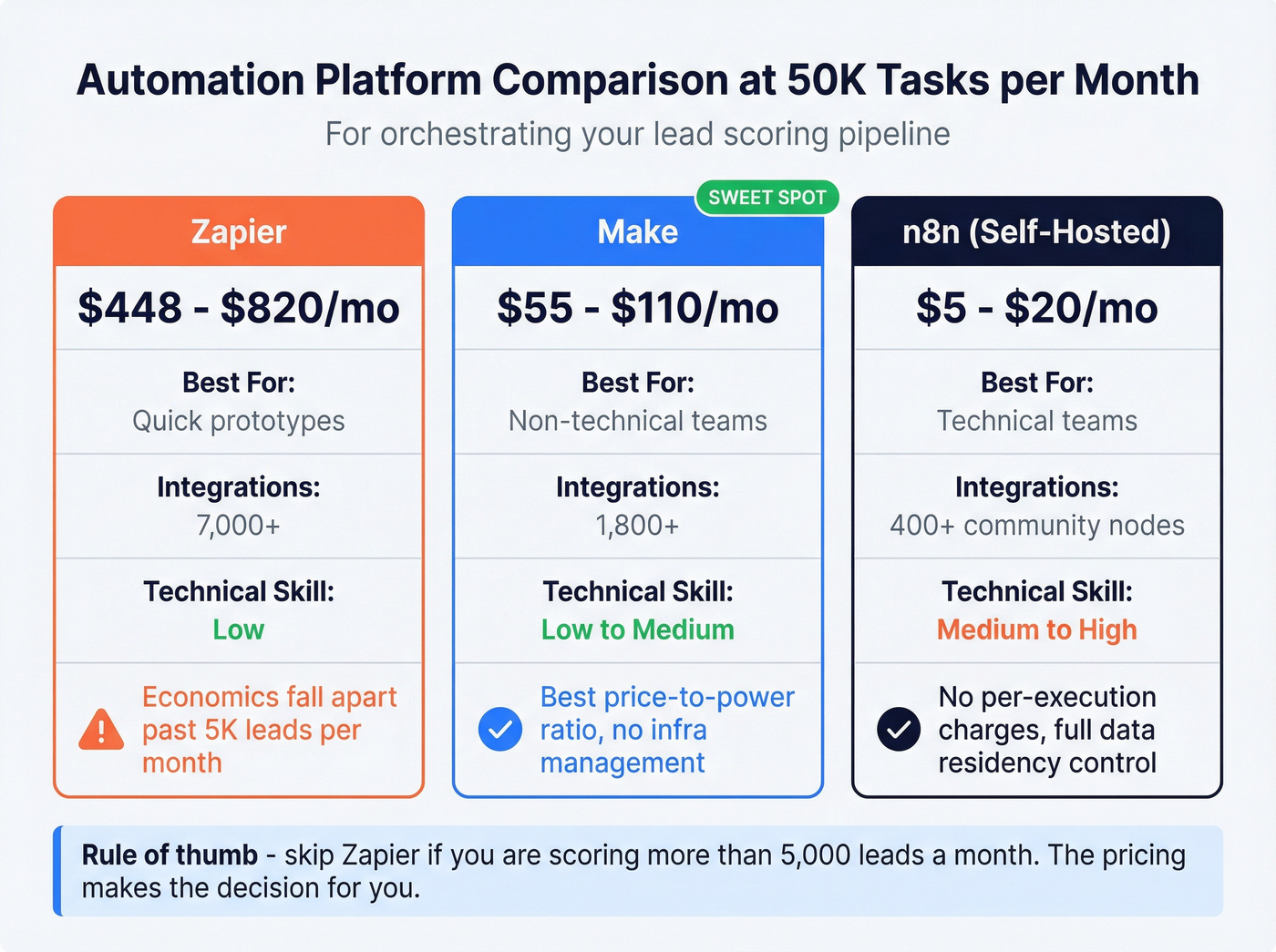
You need something to orchestrate the pipeline: pull leads, call an enrichment API, call OpenAI for scoring, push results to your CRM.
| Platform | 50K Tasks/Mo Cost | Best For | Tradeoff |
|---|---|---|---|
| Zapier | ~$448-$820/mo | Quick prototypes | Expensive at scale |
| Make | ~$55-$110/mo | Non-technical teams | 3-5x cheaper than Zapier |
| n8n (self-hosted) | ~$5-$20/mo | Technical teams | Needs Docker comfort |
Zapier's 7,000+ integrations make it the fastest way to prototype, and plenty of teams start with a Zapier ChatGPT lead scoring workflow to validate the concept before optimizing costs. But the economics fall apart once you're processing real volume.
Make offers the best price-to-power ratio for teams that don't want to manage infrastructure. n8n self-hosted is the clear winner if you've got someone comfortable with Docker - no per-execution charges, full control over data residency, and 400+ community nodes. If you’re standardizing this across RevOps, you’ll want a broader no code sales automation playbook.
Skip Zapier if you're scoring more than 5,000 leads a month. Its pricing makes the decision for you.
One pattern worth noting from practitioner communities: some teams use Apify or similar tools to pre-extract structured data from company websites before feeding it into the scoring prompt. This adds a web-scraping enrichment layer on top of your contact data enrichment, giving the model richer context - things like recent blog posts, product launches, or hiring patterns that don't show up in standard firmographic databases. (Related: data extraction tools.)
Train Your Scoring Model to Improve
Stop treating lead scoring as a one-time prompt engineering project. OpenAI's models are non-deterministic, and behavior can shift between model snapshots. A prompt that produced well-calibrated scores in January can drift by March without any changes on your end.
Most tutorials skip the eval loop entirely. Don't be most tutorials.
To build a scoring model that actually improves over time, you need a continuous feedback loop grounded in real CRM outcomes:
- Build a test set of 50-100 historically won and lost deals from your CRM
- Score them with your current prompt and model
- Measure correlation between predicted scores and actual outcomes
- Iterate on rubric weights, few-shot examples, and threshold definitions
- Repeat quarterly at minimum
Per OpenAI's model optimization guide, GPT models like gpt-4.1 follow explicit instructions well, while reasoning models like o4-mini do better with higher-level outcome guidance. If your scoring rubric is highly prescriptive - "weight title seniority at 30%, company size at 25%" - stick with gpt-4.1-mini or gpt-4o-mini. When you want the model to infer what makes a good lead from examples alone, o4-mini may justify its higher cost.
The teams that get real value from LLM scoring are the ones running this loop continuously, not the ones who shipped a prompt once and moved on. This is also where RevOps lead scoring governance pays off.
The Full Pipeline
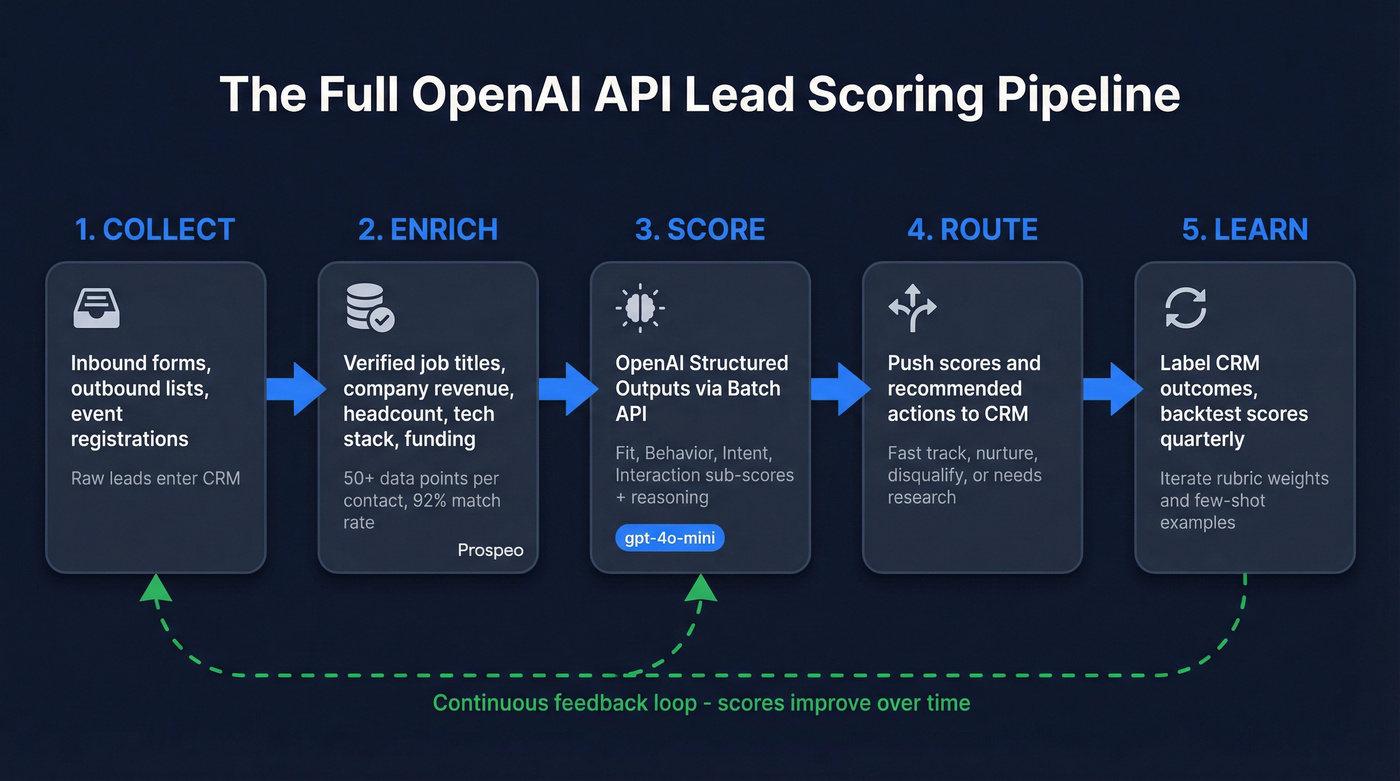
- Collect - Inbound forms, outbound lists, event registrations feed raw leads into your CRM
- Enrich - Fill in verified job titles, company data, tech stack, and funding status via enrichment API
- Score - OpenAI Structured Outputs via Batch API returns calibrated scores with reasoning
- Route - Push scored leads to HubSpot or Salesforce with score fields and recommended actions
- Learn - Label CRM outcomes as won, lost, or unresponsive, then backtest scores against those labels quarterly to recalibrate your rubric
Here's a minimal example creating a contact in HubSpot with the score fields:
requests.post(
    "https://api.hubapi.com/crm/v3/objects/contacts",
    headers={"Authorization": f"Bearer {HUBSPOT_TOKEN}"},
    json={"properties": {
        "email": lead["email"],
        "ai_lead_score": score["overall_score"],
        "ai_recommended_action": score["recommended_action"]
    }}
)
Let's talk total cost. Enriching 10,000 leads through Prospeo's enrichment API costs ~$100. Scoring them via gpt-4o-mini Batch costs $1.35. That's roughly $101 for 10,000 scored, enriched leads - less than what most teams spend on a single ZoomInfo seat per month.
You're spending $1.35 to score 10K leads with gpt-4o-mini. Don't waste that on records with missing titles, outdated revenue, and dead emails. Prospeo enriches contacts at $0.01 each with 98% email accuracy and verified firmographics.
Clean data in, accurate scores out - starting at a penny per lead.
FAQ
How accurate is LLM scoring vs traditional point systems?
With enriched data and quarterly backtesting, LLM scoring captures nuance that static point rules miss - like interpreting a "Head of Growth" title differently at a 20-person startup vs a 5,000-person enterprise. Without validation, it's guessing with extra steps. Build the eval loop.
Do I need to send PII to OpenAI?
You're sending lead data - name, title, company. Review OpenAI's data usage policy: API data isn't used for training by default, unlike ChatGPT. Anonymize where possible, and remember that GDPR applies if you're scoring EU contacts. Use the API, not the chat interface.
What's the cheapest way to get clean lead data for scoring?
Credit-based enrichment APIs are the most cost-effective path. At ~$0.01/lead for 50+ data points with 98% email accuracy and a 92% match rate, you're spending a fraction of what legacy providers charge. Most offer free tiers - enough to test a full scoring pipeline before committing budget.