The Best Data Extraction Tools in 2026, Sorted by What You Actually Need
Somewhere right now, an ops analyst is copying invoice data from PDFs into a spreadsheet. Manually. In 2026. It sounds absurd, but 87% of enterprise data is still unstructured, and companies lose up to $1 trillion annually from document processing inefficiencies alone. The data extraction software market is projected to hit $28.5B by 2035 at a 16.6% CAGR - which tells you both how massive the problem is and how many vendors are rushing to solve it.
The challenge isn't finding a tool. It's finding the right tool. A web scraper won't help you pull structured records from Salesforce. An ETL platform won't verify a prospect's email address (see our breakdown of email address validation tools). And a document processor won't crawl product pages. Most "best tools" lists throw all of these into one bucket. We don't.
If you're looking for systematic review extraction tools like Covidence or chart digitizers like WebPlotDigitizer, those are specialized academic categories we won't cover here. This guide focuses on the five categories most business teams actually need.
Our Picks (TL;DR)
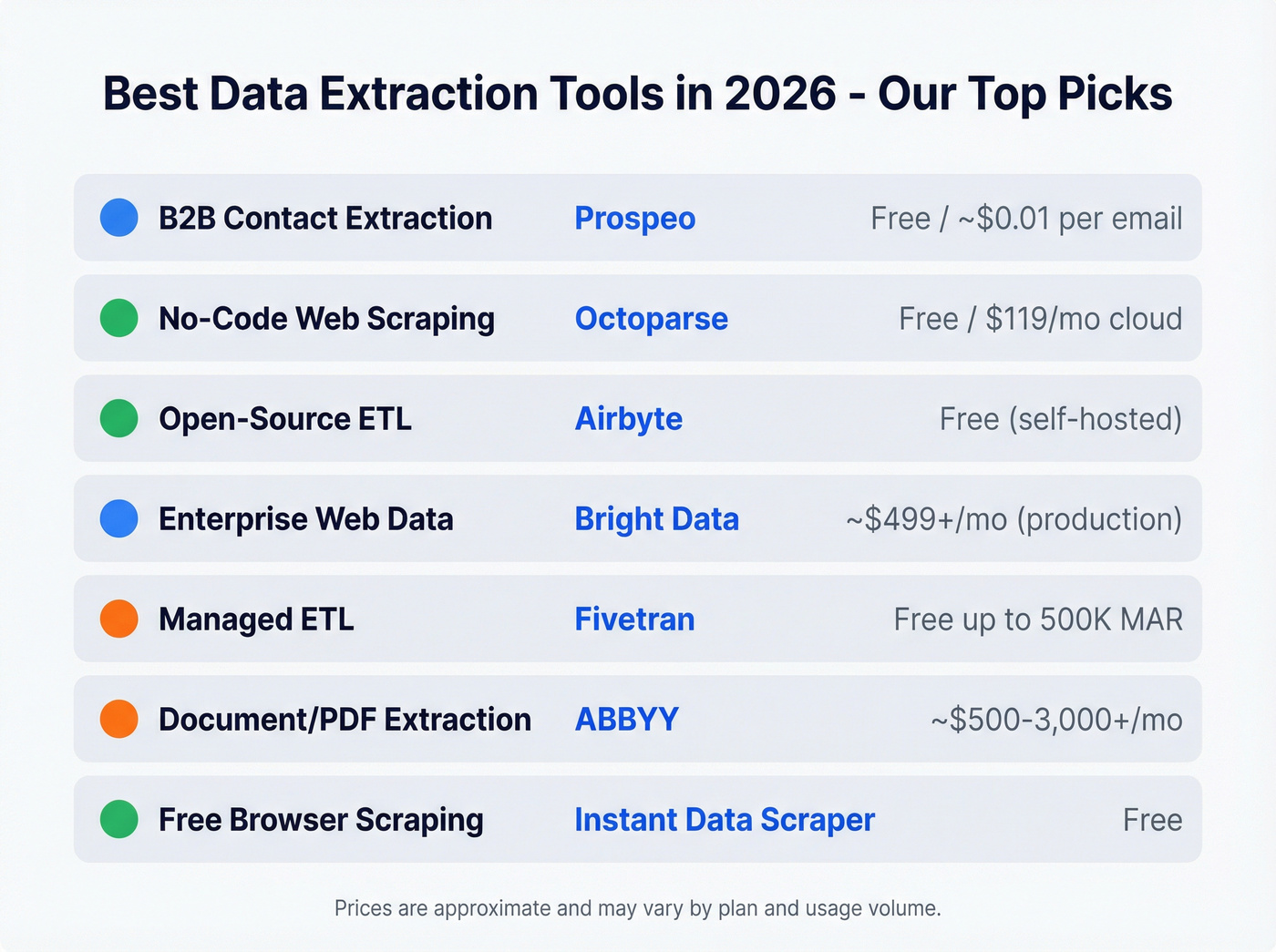
| Use Case | Tool | Starting Price |
|---|---|---|
| B2B contact extraction | Prospeo | Free / ~$0.01 per email |
| No-code web scraping | Octoparse | Free / $119/mo cloud |
| Open-source ETL | Airbyte | Free (self-hosted) |
| Enterprise web data | Bright Data | ~$499+/mo (production) |
| Managed ETL | Fivetran | Free up to 500K MAR |
| Document/PDF extraction | ABBYY | ~$500-3,000+/mo |
| Free browser scraping | Instant Data Scraper | Free |
Five Types of Extraction Tools
Most guides lump web scrapers and ETL platforms together as if they're interchangeable. They're not even close.
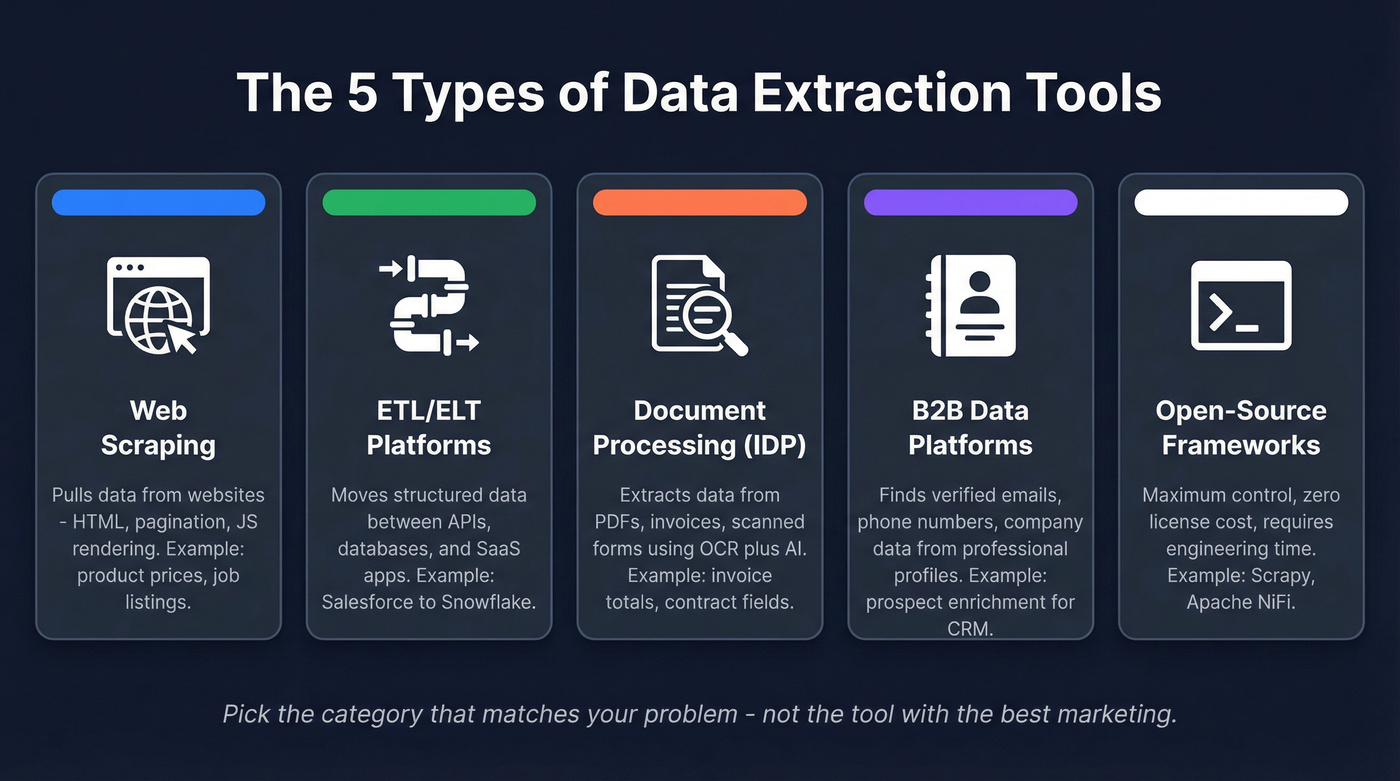
1. Web scraping tools pull data from websites - HTML parsing, pagination handling, proxy rotation, JavaScript rendering. Think product prices, job listings, or competitor monitoring (if you’re building a repeatable motion, see competitive insights). They handle unstructured web data well and nothing else.
2. ETL/ELT integration platforms connect to APIs, databases, and SaaS apps to move structured data between systems. They handle authentication, schema changes, and incremental loading. This is your Fivetran/Airbyte territory - pipeline plumbing, not web crawling.
3. Intelligent Document Processing (IDP) tools extract data from PDFs, scanned forms, invoices, and contracts. Modern ones combine OCR with machine learning for context-aware extraction - understanding that a number is a total, not a date. Legacy OCR hit roughly 80% accuracy; modern AI systems exceed 99%.
4. B2B data platforms extract verified contact information - emails, phone numbers, company data - from professional profiles and web sources. Web scrapers give you raw HTML. B2B platforms give you verified, enriched records ready for your CRM (and if you’re fighting decay, read B2B contact data decay).
5. Open-source frameworks give you maximum control and zero license costs. The tradeoff is engineering time. Scrapy, Apache NiFi, and self-hosted Airbyte all live here.
The tool you need depends entirely on which category your problem falls into.
Best Tools by Category
Best Web Scraping Tools
Apify
Founded in 2015, Apify has become a versatile web scraping platform for teams that need both pre-built solutions and custom flexibility. Pick an actor, configure inputs, run it on Apify's cloud infrastructure.

Where Apify shines is the middle ground between no-code and full custom. Start with a marketplace actor, then fork it and modify the code when your needs get specific. Pricing starts at $49/mo for the paid tier, with a free plan that gives you enough compute to test workflows. Enterprise plans scale with usage.
Use this if you need web data at scale and want pre-built scrapers you can customize. Skip this if your team has zero JavaScript experience and needs pure point-and-click.
Bright Data
Bright Data is a heavyweight in web data infrastructure. Their proxy network is massive, their data collection tools handle JavaScript-heavy sites, and their Web Scraper IDE lets you build custom collectors. For enterprise teams scraping at serious volume - millions of pages - it's one of the most capable options available. Their platform also exposes a data collection API, so developers can programmatically trigger and manage extraction jobs without touching the dashboard.
The pricing, though, is confusing by design. G2 lists it from $10/mo, but real production usage often starts around ~$499/month and scales with volume. The fact that Bright Data requires "contact sales" for anything meaningful tells you everything about their go-to-market.
Use this if you're scraping at enterprise scale and need bulletproof proxy infrastructure. Skip this if you're an SMB team that just needs data from a few hundred pages.
Octoparse
For non-technical teams, Octoparse is the fastest path from "I need this data" to "I have this data." The visual workflow builder lets marketing and ops people point, click, and extract - no Python required. There's a free local version for small jobs, and cloud plans start at $119/mo for scheduled, automated scraping.
Founded in 2012, it's been around long enough to handle edge cases that newer tools stumble on: pagination, infinite scroll, login-required pages. Like any visual scraper, jobs can break when sites update their HTML structure, so expect occasional maintenance.
ScrapingBee
ScrapingBee takes an API-first approach. Send an HTTP request with a URL, and ScrapingBee returns rendered HTML with JavaScript execution and proxy rotation baked in. No dashboard, no visual builder, just clean API responses. Pricing starts at $49/mo.
Use this if you're a developer who wants scraping infrastructure without managing proxies. Skip this if you need a visual interface or your team doesn't write code.
Tier 3 Picks
Data Miner is a Chrome extension for quick, small-scale scraping - highlight a table on a page, export to CSV. $19.99/mo for the paid tier, free for basic use. Perfect for one-off research, not production pipelines.
Instant Data Scraper is completely free and does one thing well: it auto-detects tabular data on any webpage and exports it. Zero configuration. Install the Chrome extension, click the button, download your CSV. It won't scale, but for quick grabs, nothing's faster.
ParseHub offers a visual scraping interface with a free tier and paid plans from $189/mo. It bridges the gap between Scrapy's power and Octoparse's simplicity, though it's showing its age against newer competitors.
Best ETL/ELT Platforms
Airbyte
Airbyte is our first pick for teams that want open-source flexibility without giving up a managed option. Open-source at its core, self-hosted for free, with a cloud option starting at ~$15/mo. The connector library covers 550+ sources and 30+ destinations, including ClickHouse, Elasticsearch, and CockroachDB alongside the usual Snowflake/BigQuery suspects.
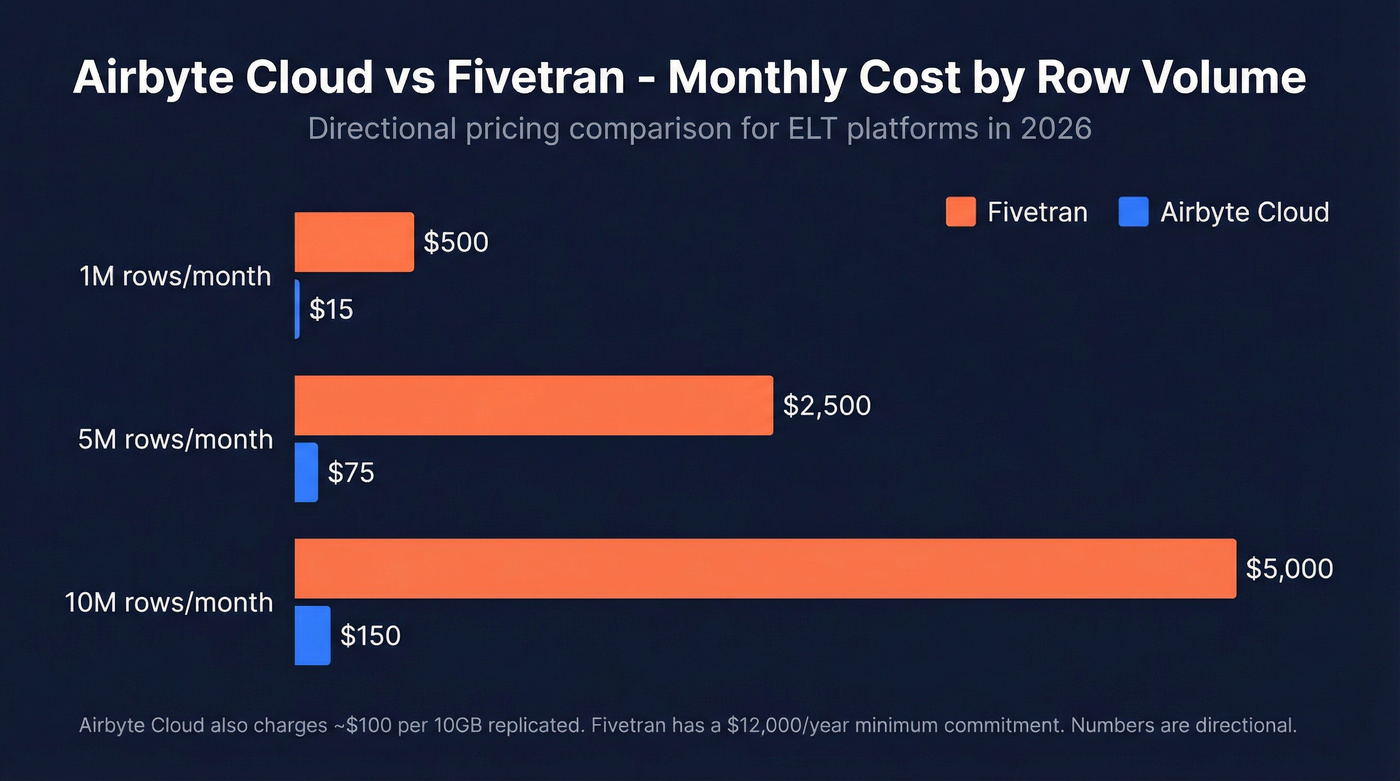
The real story is the cost difference at scale:
| Monthly Volume | Fivetran | Airbyte Cloud |
|---|---|---|
| 1M rows | ~$500 | ~$15 |
| 5M rows | ~$2,500 | ~$75 |
| 10M rows | ~$5,000 | ~$150 |
Those numbers come from a detailed Fivetran vs Airbyte breakdown and are directional - Airbyte Cloud also charges ~$100 per 10GB replicated, so costs scale with data volume. But the magnitude of difference holds. For a Series A company syncing CRM data to a warehouse, Airbyte saves thousands per year.
The tradeoff? Fivetran's managed service is more polished. Airbyte's self-hosted version requires someone who can manage Docker containers and troubleshoot connector issues. If your team has an engineer who can own it, Airbyte wins on value.
Fivetran
Fivetran is the incumbent for managed ELT - 500+ connectors, SOC 2 Type II and ISO 27001 certified, and a free tier up to 500,000 monthly active rows. The Standard plan starts at $500 per million MAR with a $12,000 minimum annual commitment.
That minimum commitment is the catch. For enterprise data teams moving tens of millions of rows, Fivetran's reliability and zero-maintenance model justify the cost. For smaller teams, you're paying enterprise prices for startup-sized workloads. We've seen teams start on Fivetran, realize they're spending $2,000+/mo to sync three data sources, and migrate to Airbyte within a quarter.
Skip this if your monthly row count is under 5M - you'll overpay.
Hevo Data
Hevo Data is a managed, no-code ELT platform that slots between Airbyte's DIY approach and Fivetran's enterprise pricing. Starts around $239/mo. Good for mid-market teams that want managed ETL without Fivetran's minimums.
Best Document & PDF Extraction
ABBYY
ABBYY has been in the document processing game longer than most tools on this list have existed. Their IDP platform handles the full workflow in five stages: intake and preprocessing (normalizing scans, correcting skew), OCR with ML-based field classification, cross-document validation against related records, human-in-the-loop review for low-confidence fields, and integration into ERPs, CRMs, and document management systems.
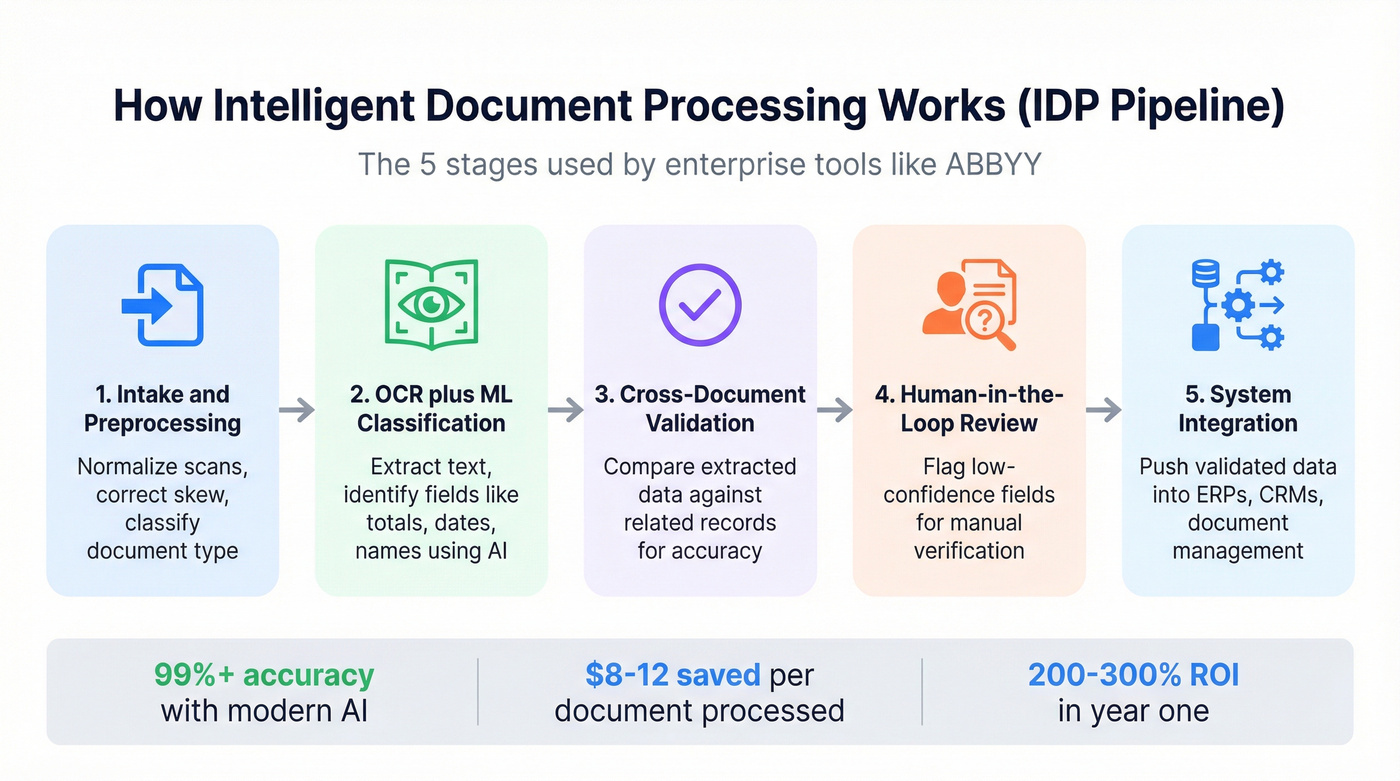
The AI document processing market hit $2.8B as of 2025 and is growing 35% annually. ABBYY sits at the enterprise end. Pricing is custom - expect $500-3,000+/mo depending on volume and complexity. The ROI math works quickly at scale: 65% of Fortune 500 companies have already adopted document automation, reporting $8-12 in savings per document processed and 200-300% ROI within the first year.
Use this if you're processing high volumes of structured documents and need enterprise compliance. Skip this if you're extracting data from a handful of PDFs per week - you'd be buying a firehose to water a houseplant.
Diffbot
Diffbot takes a different angle entirely. It uses computer vision and NLP to understand web pages structurally - identifying articles, products, discussions, and entities without custom rules. Their Knowledge Graph covers billions of entities and relationships. Pricing starts at $299/mo. Best suited for teams building knowledge bases or doing large-scale entity extraction rather than traditional invoice processing.
Best B2B Data Extraction Tools
Here's the thing: your SDR manager asks why half the emails are bouncing. You realize web scrapers extract raw data, not verified contact information. That's the gap this category fills - and it's the one most guides completely ignore.

Prospeo
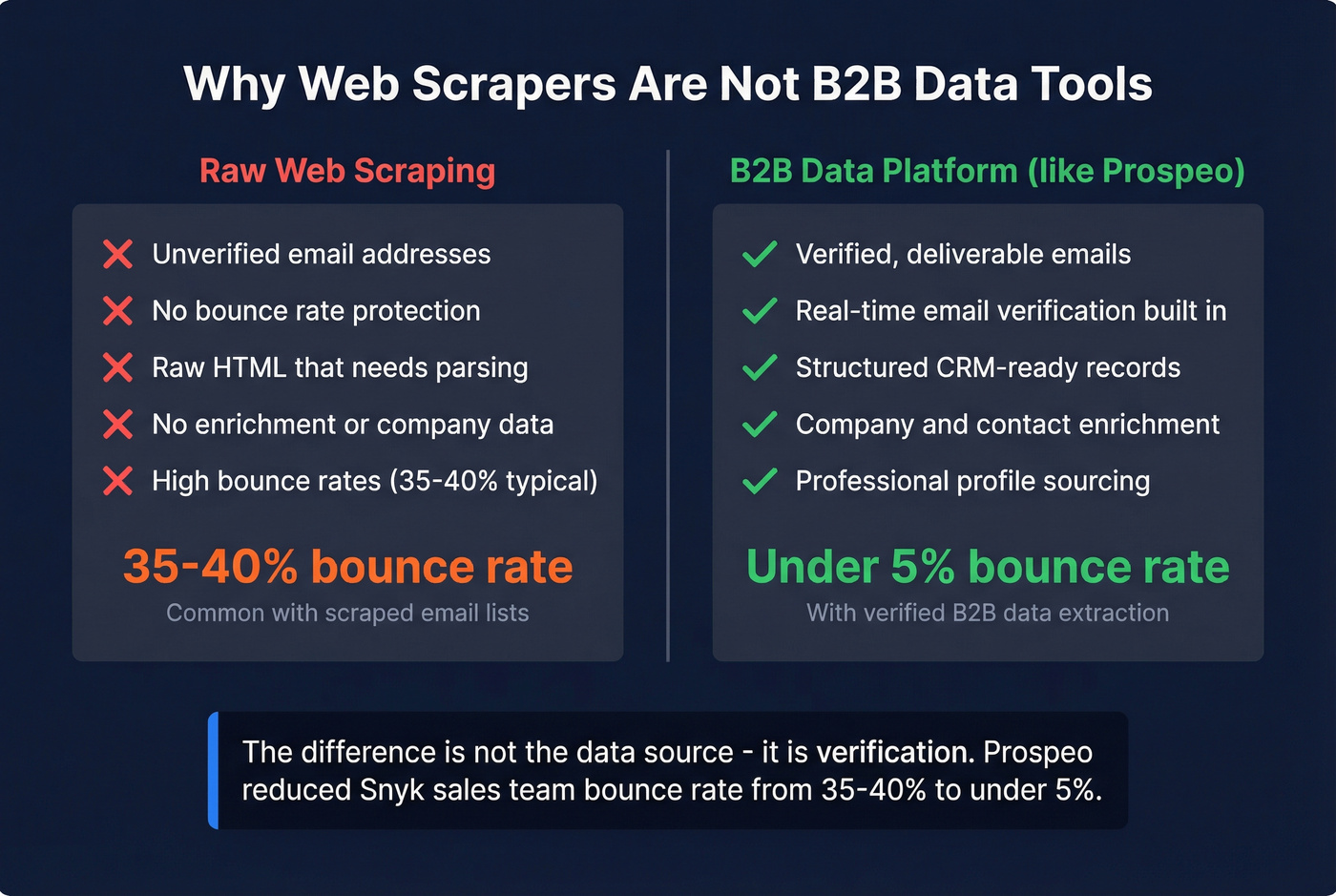
Snyk's 50-person sales team went from a 35-40% bounce rate to under 5% after switching their data source, and AE-sourced pipeline jumped 180%. That's the difference between raw extraction and verified B2B data (and if you want the mechanics, start with prospect data accuracy).
Prospeo pulls from 300M+ professional profiles with 98% email accuracy and refreshes every 7 days - the industry average is six weeks, which means most databases serve stale data by the time you hit "export." The platform covers 143M+ verified emails and 125M+ verified mobile numbers with a 30% pickup rate. Over 30 search filters let you slice by buyer intent, technographics (see firmographic and technographic data), job changes, and headcount growth, making it especially useful for bottom-of-funnel prospecting when you need to reach decision-makers who are actively in-market. The Chrome extension, with 40,000+ users, extracts contact data from any website or CRM in one click. Bulk operations run at roughly $0.01 per email. Free tier gives you 75 verified emails per month to test it.
Tier 3 B2B Tools
PhantomBuster automates data extraction from social platforms and web sources using "Phantoms" - pre-built automation sequences. Starts at $56. Good for growth hackers running specific platform automations, but it doesn't verify the data it extracts.
Captain Data orchestrates multi-step extraction workflows across web sources, combining scraping with enrichment. Pricing starts around $399/mo. It's built for ops teams that need to chain extraction steps together - scrape a list, enrich it, push to CRM - without custom code.
Browse AI monitors websites for changes and extracts structured data without code. Free tier available, paid from ~$19/mo. Think of it as a web monitoring tool with extraction built in - useful for tracking competitor pages or job boards.
Best Open-Source Tools
Scrapy
Scrapy has been the Python web scraping framework since 2008. It's fast, extensible, and handles complex crawling patterns that visual tools can't touch. The license costs $0. The developer maintaining your spiders costs $5,000-8,000/month.
Let's be honest: "free" is misleading when you factor in the human hours. Scrapy is phenomenal if you have engineering resources - middleware for proxy rotation, pipeline architecture for data cleaning, and a massive ecosystem of extensions. For teams with Python developers already on staff, it's the most powerful web scraping option available. For everyone else, Apify or Octoparse will get you there faster.
If your average deal size is under $15k and you don't have a dedicated data engineer, skip open-source entirely. The time you spend maintaining spiders and debugging connectors is time you're not spending on revenue. Pay for a managed tool and move on.
Apache NiFi is an open-source data flow automation platform from the Apache Foundation. It handles data routing, transformation, and system mediation at scale. Overkill for simple extraction, but powerful for teams building complex data pipelines across multiple sources. Free to self-host; budget $200-500/mo for infrastructure plus the engineer who knows how to configure it.
Airbyte (self-hosted) deserves a second mention here. The open-source version is genuinely free - deploy it on your own infrastructure and you've got 550+ connectors without a monthly bill. It's the best free ETL option available if your team can manage Docker.

Web scrapers give you raw HTML. B2B data platforms give you verified, enriched records. Prospeo delivers 98% email accuracy across 300M+ profiles with a 7-day refresh cycle - no proxies, no parsing, no cleanup.
Extract verified B2B contacts at $0.01 per email. No scraping required.
Pricing Comparison
Pricing varies wildly by category, so context matters more than the raw number.
| Tool | Category | Starting Price | Model |
|---|---|---|---|
| Instant Data Scraper | Web Scraping | Free | Free extension |
| Scrapy | Web Scraping | Free (OSS) | Self-hosted |
| Airbyte | ETL/ELT | Free (self-hosted) | Usage-based (cloud) |
| Data Miner | Web Scraping | $19.99/mo | Subscription |
| Apify | Web Scraping | $49/mo | Usage-based |
| ScrapingBee | Web Scraping | $49/mo | API credits |
| PhantomBuster | B2B Automation | $56 | Subscription |
| Octoparse | Web Scraping | $119/mo (cloud) | Subscription |
| Hevo Data | ETL/ELT | ~$239/mo | Subscription |
| Diffbot | Web data/API | $299/mo | Subscription |
| Captain Data | B2B Automation | ~$399/mo | Subscription |
| Bright Data | Web Scraping | ~$499+/mo | Usage-based |
| Fivetran | ETL/ELT | Free-$500/M MAR | Usage-based |
| ABBYY | Document/IDP | ~$500-3,000+/mo | Custom/enterprise |
To anchor your budgeting: SMB web scrapers run $20-120/mo. Enterprise web data platforms start at $300-500+/mo and scale with volume. ETL platforms range from $15/mo on Airbyte Cloud to $5,000+/mo on Fivetran at scale. IDP tools land in the $500-3,000+/mo range for production workloads.
How to Choose the Right Tool
The decision framework is simpler than most guides make it.
Step 1: Identify your data source. Are you pulling from websites, SaaS APIs, documents, or do you need verified contact data? This single question eliminates 80% of the options on any list.
Step 2: Match to category. Websites go to web scrapers. APIs and databases go to ETL/ELT. PDFs and forms go to IDP. People data goes to a B2B platform. Open-source if you have engineering resources and want maximum control.
Step 3: Filter by budget and technical skill. A no-code team shouldn't be evaluating Scrapy. A startup shouldn't be pricing Fivetran's enterprise tier. Match the tool's complexity to your team's capability.
Beyond those three steps, look for source compatibility with your specific targets, incremental loading so you don't re-extract everything every run, built-in data validation (see data quality), scalability for your growth trajectory, and security certifications relevant to your industry - SOC 2, HIPAA, or GDPR. In our experience, the best tool your team won't use is worse than a simpler tool they use daily.
Common Mistakes to Avoid
Mixing data granularities without aligning timestamps. Combining daily snapshots with real-time feeds creates phantom discrepancies. Always normalize to UTC and document the granularity of each source.
Ignoring API rate limits. Hitting 429 errors and retrying immediately is the fastest way to get your API key revoked. Implement exponential backoff, cache responses locally, and schedule extraction jobs via cron or Airflow rather than running them ad hoc.
Skipping data validation. Extraction without validation is just moving garbage between systems. Check for completeness, validity, and uniqueness. Build validation into the pipeline, not after it.
Failing to normalize identifiers. The same company appears as "IBM," "International Business Machines," and "ibm.com" across different sources. Without normalization rules, your downstream analytics are meaningless. Define canonical identifiers early.
Ignoring compliance and robots.txt. Scraping a site that explicitly blocks crawlers isn't just risky - it's the kind of shortcut that gets legal involved. Check terms of service, respect rate limits, and handle personal data according to GDPR and local privacy laws. Maintain audit trails with detailed logging of what was extracted, when, from where, and by which process.
Compliance and Legal Considerations
Look, here's the uncomfortable truth most extraction guides skip: public availability doesn't mean free for the taking. A California Law Review analysis argues that scraping personal data conflicts with core privacy principles - even when that data is publicly visible on the web.
GDPR protects personal data even when it's publicly available. The principles that matter: transparency (does the data subject know you're collecting?), purpose limitation (are you using data only for stated purposes?), data minimization (are you collecting only what you need?), and individual rights (can people access, correct, or delete their data?). The CFAA adds another layer in the US, though the legal landscape is still evolving.
Practical checklist before you extract anything: check robots.txt and respect it. Review the target site's terms of service. Handle any personal data according to GDPR regardless of where you're based - it's the safest default. Maintain audit trails. And if you're extracting B2B contact data, use a platform that's already GDPR-compliant with opt-out enforcement built in (more on that in our GDPR for sales and marketing playbook), rather than building compliance yourself.
Most extraction tools solve for volume. Prospeo solves for accuracy. 143M+ verified emails, 125M+ mobile numbers, and 50+ data points per contact - enriched and CRM-ready in seconds, not hours of post-processing.
Skip the scraping pipeline. Get enriched contact data directly.
FAQ
What's the difference between data extraction and web scraping?
Data extraction is the broader discipline - pulling information from any source including databases, APIs, documents, and websites. Web scraping is one specific method targeting website HTML. ETL platforms, document processors, and B2B data tools are all extraction tools that aren't scrapers. Scraping is a subset, not a synonym.
Are data extraction tools legal?
Scraping public websites is legal in most jurisdictions, but legality depends on the source, method, and data type. GDPR protects personal data even when it's publicly available. Always check robots.txt, review terms of service, and handle personal data according to local privacy laws. Reputable vendors build compliance into their platforms so you don't have to manage it yourself.
What's the best free tool for extracting data?
For web scraping, Instant Data Scraper and Scrapy are both completely free. For ETL, Airbyte's self-hosted version costs nothing beyond infrastructure. For B2B contact data, Prospeo's free tier gives you 75 verified emails per month - more generous than most competitors' free plans.
How accurate are these tools?
Accuracy varies dramatically by category. Modern AI document processors achieve over 99% accuracy versus roughly 80% from legacy OCR. Web scrapers are only as accurate as the HTML they parse - schema changes break them overnight. B2B data platforms range from 79% to 98% email accuracy depending on the provider.
Do I need a developer to use data extraction tools?
Not necessarily. Tools like Octoparse and Browse AI require zero coding. Managed ETL platforms like Hevo Data and Fivetran offer visual pipeline builders. Open-source frameworks like Scrapy and Apache NiFi require Python or Java skills. Match the tool to your team's technical capability - there's no shame in paying for simplicity if it gets you to production faster.