

How to Find Email Addresses for Free: 7 Methods That Work in 2026
You've got 200 names in a spreadsheet and zero budget. Maybe you're a founder doing your own outbound, or an SDR whose company hasn't sprung for a data platform yet. Either way, you need email addresses - not a wall of product landing pages trying to sell you an annual contract.
Here's the thing: the problem isn't whether email works for outreach. It's getting the right address without paying $49/month for a tool you'll use for two weeks. Manual methods first, then the best free-tier tools, then how to avoid bouncing half your list and torching your domain (see our Email Deliverability Guide if you want the full playbook).
TL;DR
Match your method to your volume:
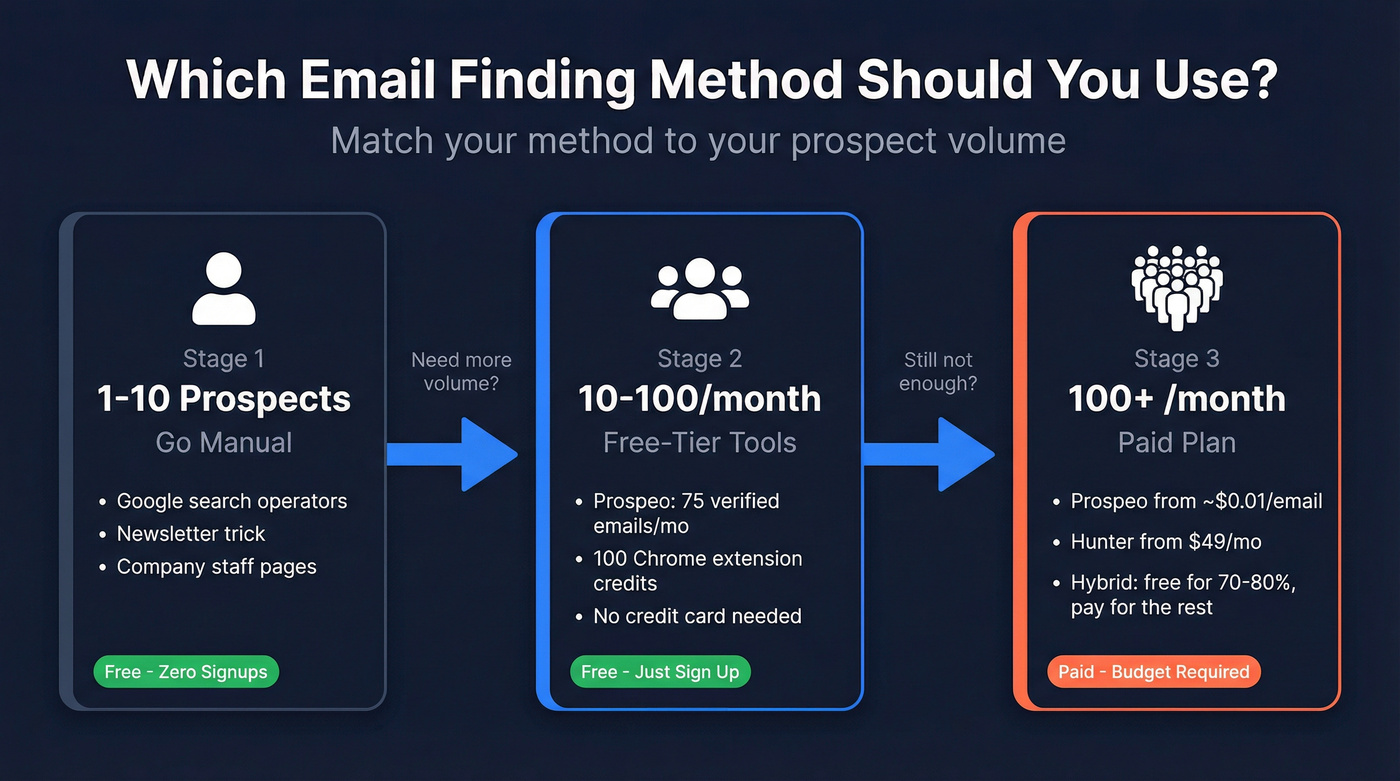
- 1-10 prospects: Go manual. Google operators, the newsletter trick, company pages. Zero cost, zero signups.
- 10-100 prospects/month: Use a free-tier tool like Prospeo - 75 verified emails and 100 Chrome extension credits per month, no credit card required.
- 100+ prospects/month: You'll need a paid plan. Prospeo starts at roughly $0.01/email; Hunter starts at $49/month.
Now let's get into the specifics.
Manual Methods (No Tools Required)
Google Search Operators
Google is a surprisingly powerful email lookup tool if you know the right syntax (this overlaps with classic Boolean search workflows):
site:company.com "@company.com"- surfaces any page on their domain containing an email address."@company.com" + "VP Sales"- narrows results to a specific role."firstname lastname" + "@company.com"- targets a specific person.
Wrap the email domain in quotes so Google treats it as an exact string. We've run these operators across hundreds of domains, and when they hit, the data is gold - you're getting an address published publicly on the company's own site. They don't always work, but the cost is literally zero.
The Newsletter Trick
Subscribe to a company's newsletter or blog updates using a throwaway email. When the welcome email arrives, check the sender address. If it comes from sarah.jones@company.com, you've just learned the company uses firstname.lastname@ as their format. Now you can construct addresses for anyone at that company.
This works surprisingly often with mid-market companies that haven't moved everything behind a noreply@ address. I've pulled format intelligence from welcome emails at companies where every other method came up empty.
Guess the Email Pattern
Most companies follow one of a handful of patterns (if you want a deeper workflow, see Guess Email Address Format):
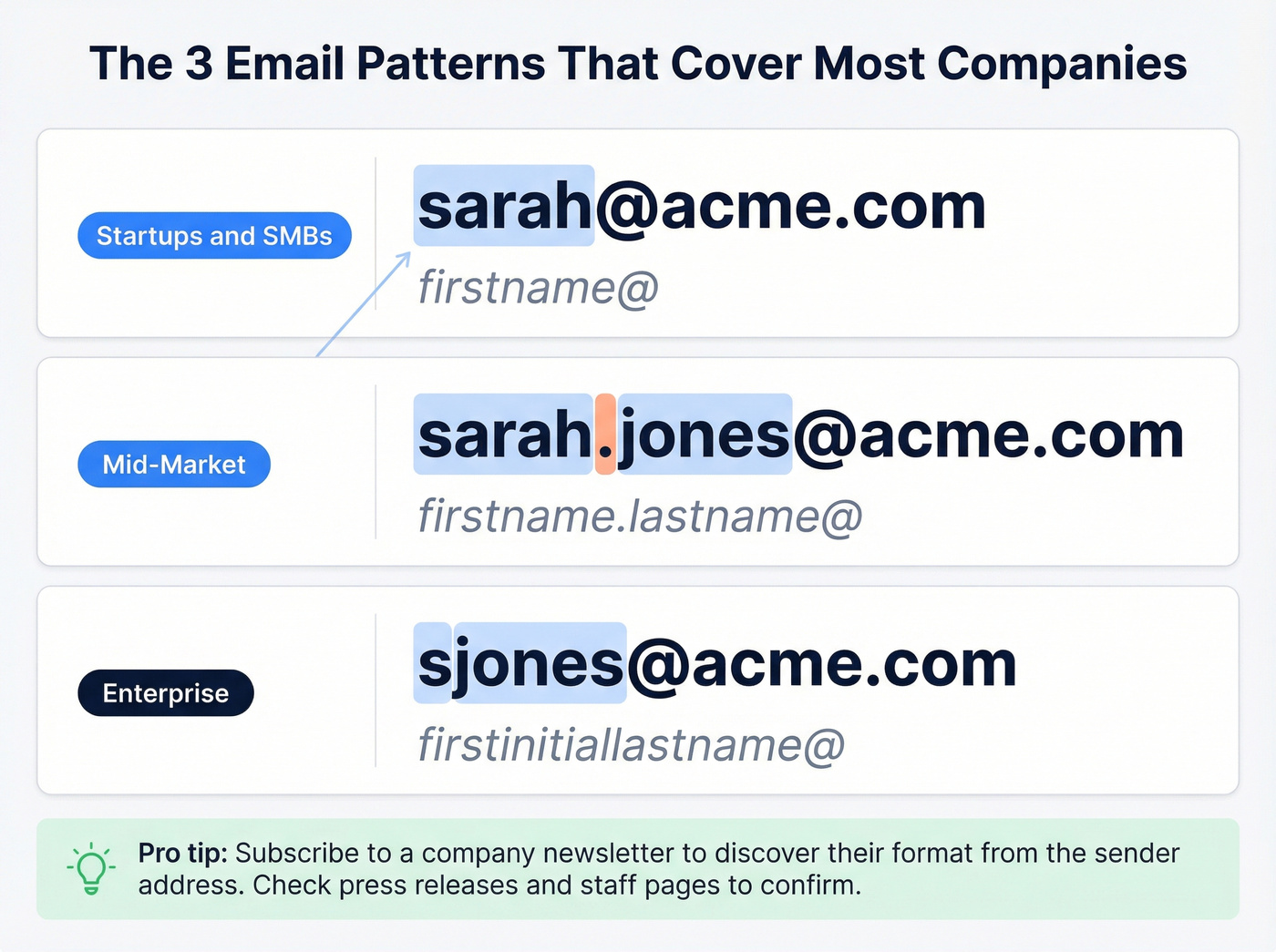
| Segment | Most Common Pattern | Example |
|---|---|---|
| Startups / SMBs | firstname@ | sarah@acme.com |
| Mid-market | firstname.lastname@ | sarah.jones@acme.com |
| Enterprise | firstinitiallastname@ | sjones@acme.com |
These three patterns cover the vast majority of companies. Once you've guessed a format, confirm it by checking press releases, newsroom pages, or staff directories - many companies publish at least one employee email that reveals the pattern.
Company Websites and Staff Pages
Before you reach for any tool, check the obvious places. About pages, team pages, contact pages, and newsroom sections often list direct email addresses. Press releases frequently include a media contact with a full email, and investor relations pages at public companies are another goldmine - IR teams publish their contact info because they want to be reachable.
Google Cache and the Wayback Machine
Companies remove email addresses from their websites all the time, but the internet has a long memory. Try cache:company.com/team in Google to see a cached version when available. For older pages, use the Wayback Machine to browse archived snapshots. You'd be surprised how many older versions of "Contact Us" pages still show individual email addresses that have since been replaced with a generic form.
Best Free Email Finder Tools
When manual methods aren't enough, these tools offer free tiers that let you locate and verify contacts without spending a dollar (here are more free email finder options if you want a longer list).
| Tool | Free Credits/Mo | Verification | Paid From |
|---|---|---|---|
| Prospeo | 75 + 100 ext. | Yes, 5-step | ~$0.01/email |
| Hunter | 50 credits | Yes (0.5 cr) | $49/mo |
| FindThatLead | 300, 10/day cap | Limited | $29/mo |
| GetProspect | 50 emails | Yes | $49/mo |
| Snov.io | 50 searches | Yes | ~$30/mo |
| Voila Norbert | 50 searches | No catch-all | $49/mo |
| Anymail Finder | 100 (3-day trial) | Yes | $14+/mo |

Prospeo
Prospeo gives you 75 verified emails and 100 Chrome extension credits every month on its free plan - no credit card, no time limit. What sets it apart isn't just the volume; it's the verification quality. Every email runs through a 5-step process that includes catch-all domain handling, spam-trap removal, and honeypot filtering, delivering 98% email accuracy. That means you're not wasting credits on addresses that'll bounce.
The Chrome extension works on any website or professional profile, pulling verified contact data in one click. Behind the scenes, Prospeo runs proprietary email-finding infrastructure rather than relying on third-party providers, and refreshes its data every 7 days - compared to the 6-week industry average. For teams that need reliable free data, it's the strongest option on this list.
Hunter

Hunter is the most recognized name in this space, and the free plan gives you 50 credits per month across all tools - finding, verifying, and bulk operations. One credit per email found, half a credit per verification. If Hunter can't find an email, you don't get charged, which is a nice touch.
Pros: API access on the free tier, clean interface, strong brand reputation.
Cons: Accuracy is a real concern. Independent benchmarks put Hunter well below the 95-99% accuracy claims you'll see on marketing pages. More on that below.
FindThatLead
Use this if you need raw volume and don't mind a daily cap. FindThatLead offers 300 credits per month on its free plan - the highest number on this list. The catch: you're limited to 10 per day, so you can't burn through them in one session. Verification credits are limited on the free plan, so you'll likely want a separate verifier for anything you'll actually send. Skip this if you need verified emails out of the box.
GetProspect
GetProspect's free tier gives you 50 emails per month, each with a confidence score. It's a solid middle-ground option when you want something straightforward and don't need bells and whistles. Paid plans start at $49/month and include 1,000 valid emails plus 2,000 verifications.
Snov.io
50 free searches per month. Accuracy is a serious concern - Snov.io scored just 20.1% in an independent benchmark we'll cover below. Verify everything independently before sending.
Voila Norbert
50 free searches. Doesn't check catch-all domains, which means a meaningful chunk of your results will be unverifiable. Paid plans run $49/mo for 1,000 leads.
Anymail Finder
Not a true free tier - it's a 3-day trial with 100 credits. The upside is you only get charged for verified results, so you know what you're paying for. After the trial, plans start at $14/month and scale up from there.

You just read five manual methods that work at single-digit volume. When you need 10-100 emails a month, Prospeo's free plan gives you 75 verified emails and 100 Chrome extension credits - with 98% accuracy from a 5-step verification process. No credit card. No time limit.
Stop guessing email patterns. Get verified addresses in one click.
Why Accuracy Matters More Than Credits
Let's be honest: every email finder tool claims 95-99% accuracy on their marketing page. The actual numbers tell a different story (and it gets worse as B2B contact data decay compounds over time).
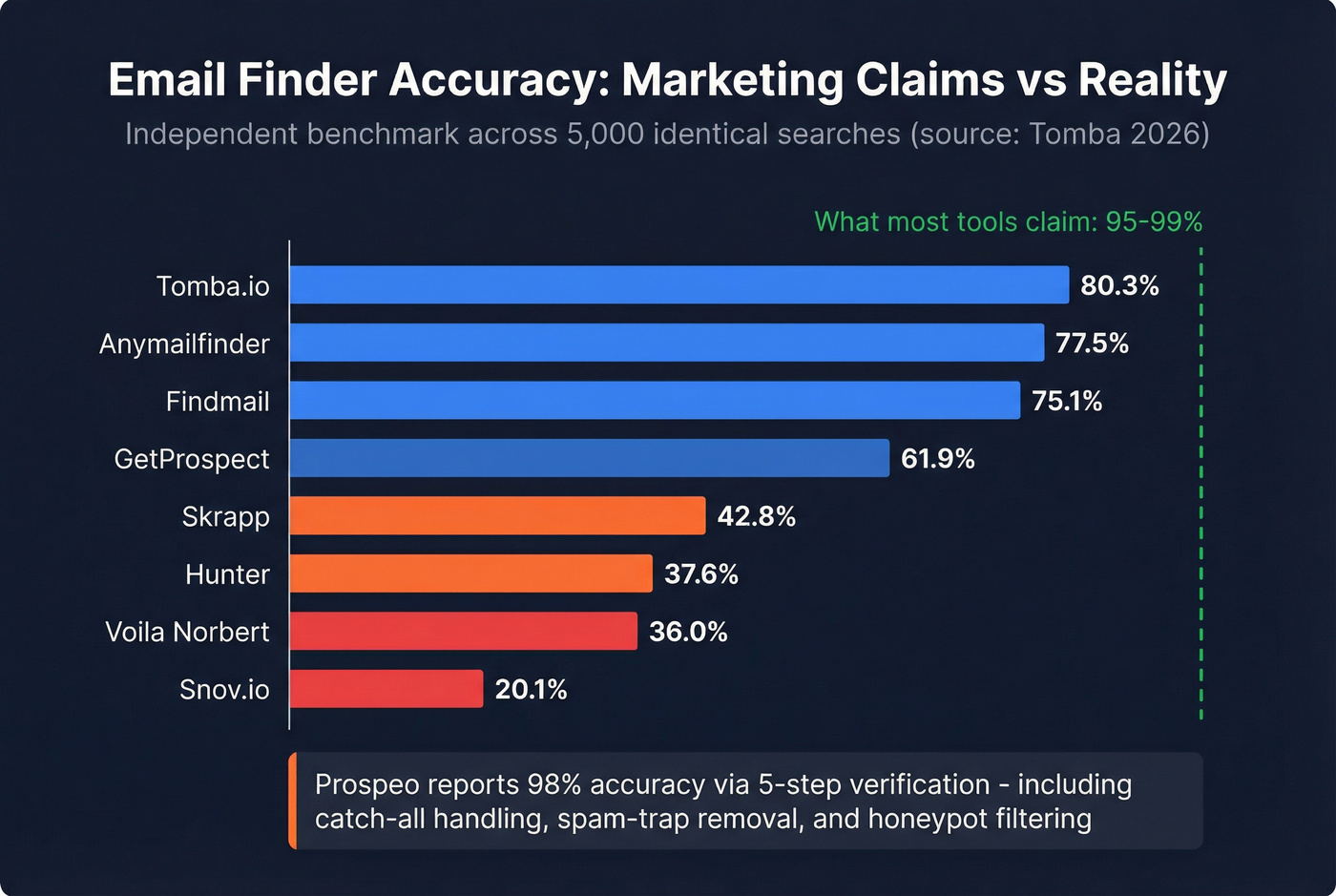
A benchmark published by Tomba tested 9 email finder tools across 5,000 identical searches:
| Tool | Accuracy |
|---|---|
| Tomba.io | 80.3% |
| Anymailfinder | 77.5% |
| Findmail | 75.1% |
| GetProspect | 61.9% |
| Skrapp | 42.8% |
| Hunter | 37.6% |
| Voila Norbert | 36.0% |
| Snov.io | 20.1% |

Tomba published this benchmark, so they unsurprisingly rank first - but the overall accuracy spread is consistent with what we've seen across dozens of implementations. In our testing, the gap between claimed and real accuracy is often even wider than these numbers suggest.
Why does this matter? Bad emails don't just fail silently. You send 50 emails, 15 bounce, and now your ESP is flagging your domain. Keep your hard bounce rate under 2-3% if you want stable deliverability (see Hard Bounce for what counts and how to fix it). A known issue with extension-based prospecting is that it can return outdated or generic addresses like info@company.com instead of direct contacts, which makes the accuracy problem worse than raw numbers suggest.
Real talk: if your average deal size is under a few thousand dollars, you probably can't afford bad free data. A bounced email costs you more than the email itself - it costs you domain reputation, which affects every future email you send. Spending $0.01 per verified email is cheaper than rebuilding a burned domain.
How to Verify Before You Send
Even if a tool says an email is "found," that doesn't mean it's safe to send to. Verification is a separate step, and skipping it is the fastest way to tank your sender reputation (here are the best email ID validators if you need a dedicated verifier).
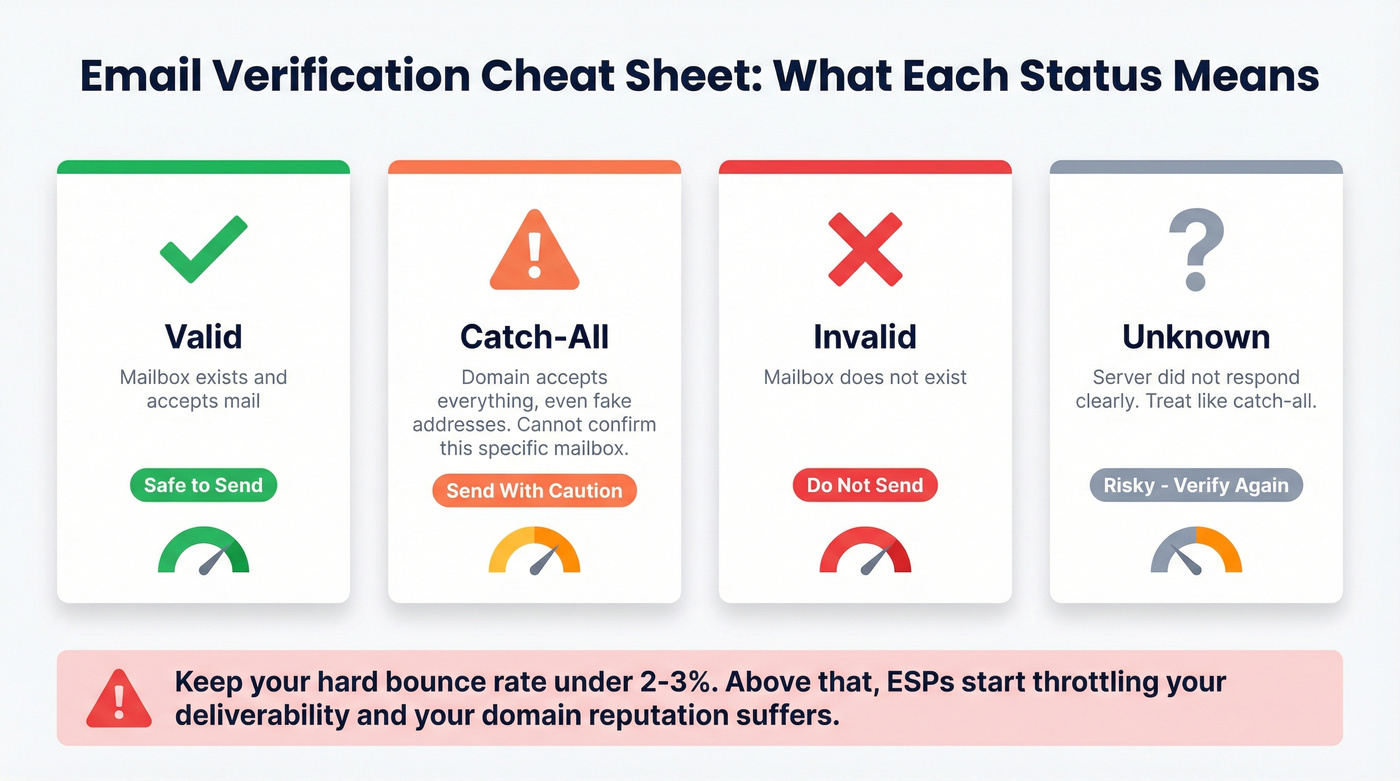
Here's what verification statuses mean in practice:
- Valid: The mailbox exists and accepts mail. Safe to send.
- Catch-all: The domain accepts everything - even fake addresses. The tool can't confirm this specific mailbox is real. Send with caution.
- Invalid: The mailbox doesn't exist. Do not send.
- Unknown: The server didn't respond clearly. Treat like catch-all - risky.
The rule of thumb: keep your hard bounce rate under 2-3%. Anything above that and ESPs start throttling your deliverability. Regardless of which tool you use, never send to unverified addresses. The 30 seconds it takes to verify a list is worth more than the hours you'll spend recovering a damaged domain.
The Smart Workflow
Don't overthink this. Match your method to your volume.
Under 10 prospects: Go manual. Google operators, the newsletter trick, company pages. It takes 2-3 minutes per person, and you'll learn the company's email format in the process.
10-100 prospects per month: Use a free-tier tool. Seventy-five verified emails per month covers most individual contributors and small teams. Supplement with manual methods for high-value targets the tool can't find.
Over 100 prospects per month: You need a paid plan. But here's the hybrid approach that actually works - use free methods and free-tier tools for 70-80% of your list, then pay only for the high-value misses. The VP who isn't on any public page, the decision-maker at a company with no staff directory. In our experience, this tiered approach keeps costs near zero for most prospecting while ensuring you don't miss the contacts that actually move pipeline (and it pairs well with a repeatable prospecting workflow).
Bad data doesn't just waste your time - it wrecks your sender reputation. Every email from Prospeo runs through catch-all handling, spam-trap removal, and honeypot filtering. That's why teams using Prospeo see bounce rates under 4%, while tools like Snov.io score 20% accuracy in independent tests.
Protect your domain. Only send to emails that actually exist.
FAQ
Is it legal to find someone's email address?
Yes - finding publicly available business emails is legal in most jurisdictions. Under GDPR, cold B2B outreach generally qualifies as legitimate interest, but you must include an opt-out mechanism. CAN-SPAM requires a functioning unsubscribe link and a valid physical address in every message.
What's a catch-all domain?
A catch-all domain accepts email sent to any address - even fabricated ones - so verification tools can't confirm whether a specific mailbox exists. Around 25% of business domains are configured this way. Always flag catch-all results and send to them cautiously, or skip them entirely.
Which free email finder gives the most credits?
FindThatLead offers 300 credits per month, but they're capped at 10 per day and lack full verification. For verified emails with no daily cap, Prospeo gives 75 emails plus 100 Chrome extension credits monthly - the best ratio of volume to data quality on a free plan.
How accurate are free email finder tools?
Independent benchmarks show most tools deliver 20-80% accuracy despite marketing claims of 95%+. Always verify before sending. One high-bounce campaign can damage your domain reputation for months, costing far more than the time saved by skipping verification.
Can I find personal email addresses with these tools?
Most B2B email finders return professional work emails only. Finding personal addresses raises privacy concerns and violates most tools' terms of service. Stick to work emails - they convert better for business outreach anyway.