

Accounts In-Market Intent Data: A Practical Definition + Activation Playbook (2026)
Most teams treat "in-market" like a vibe: a dashboard turns red, sales gets pinged, and everyone hopes pipeline appears.
If you want accounts in market intent data to pay for itself, you need a defensible threshold, a routing SLA, and a 30-day validation plan that forces a yes/no answer.
Here's the hook: once you define "in-market" in plain math, the whole program gets easier to run, easier to defend, and way harder for sales to ignore.
What you need (quick version)
You don't need more intent signals. You need a tighter definition and a boring operating cadence that sales can't dodge.
Here's the checklist I've used to stop the "is this account really in-market?" debate and start shipping meetings.
Checklist (copy this):
- Baseline window: what "normal" looks like (ex: 8-12 weeks)
- Spike window: what "now" looks like (ex: last 7-21 days)
- Spike threshold: numeric cutoff that counts as "real" (ex: Surge Score >= 60)
- Topic breadth: how many topics must spike (ex: >= 25% of tracked topics)
- Fit gate: only score accounts that match ICP (firmographics/technographics)
- Routing SLA: what happens within 24-48 hours after flagging
Mini framework:
- In-market = spike vs baseline + topic breadth + fit + routing SLA
- Spike vs baseline stops "always-high" accounts from fooling you.
- Topic breadth stops one random researcher from triggering sales.
- Fit stops you from chasing noise outside your ICP.
- Routing SLA stops the spike from cooling off before anyone acts.
One number to keep you honest: only 5-10% of ICP accounts are ready to buy right now. Your job isn't "find everyone." It's "find the few, fast."
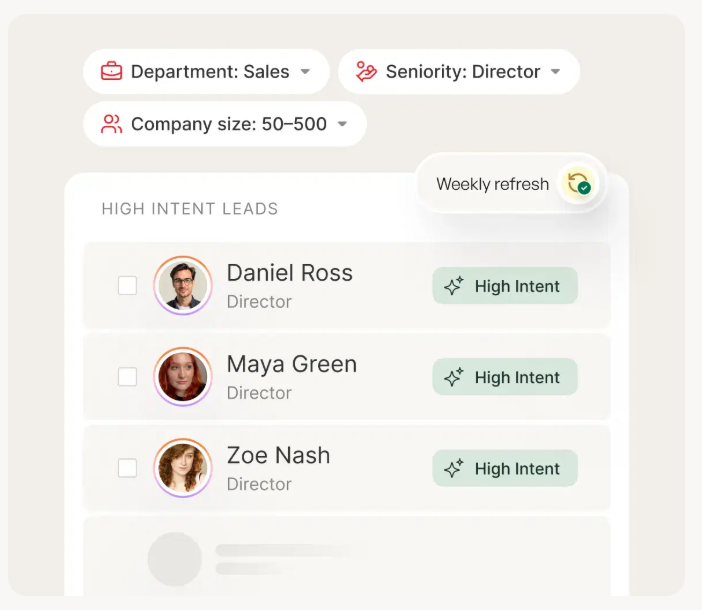
Why "in-market accounts" is a threshold, not a vibe
"In-market" isn't a label you slap on accounts you like. It's a cutoff you can explain to a skeptical CRO in one sentence.
Here's my blunt rule: if your intent tool can't tell you (1) the baseline window and (2) the spike threshold, you didn't buy intent data - you bought a dashboard.
I've watched teams burn an entire quarter arguing whether intent "works" when the real issue was simpler: they never defined what counts as a spike, so sales got flooded with junk and learned to ignore it.
What practitioners get wrong (and why they hate intent tools)
The most common complaint I hear sounds like this: "ABM tools are insanely expensive, and sales still won't use them." That's a real problem - and it's self-inflicted.
Teams buy a premium platform, skip the unsexy parts (thresholds, routing, ownership, rejection reasons), then blame the data when nothing changes. Intent isn't a magic meeting machine. It's a probabilistic signal that becomes valuable only when you force it into a tight operating model.
Look, here's the thing: if your average deal's small and your sales cycle's under a month, you probably don't need an "all-in-one ABM suite." You need a clean ICP, a small topic set, and ruthless SLAs.
Myth to kill: "More in-market accounts is better." No. More is usually worse. If your "in-market" list is 40% of your TAM, you didn't discover demand - you diluted the signal.
The operational definition of accounts in market intent data
A clean operational definition starts with one idea: intent is elevated behavior compared to an account's own baseline. That baseline clause is the whole game.
An account's "in-market" when:
- It shows a meaningful spike vs its own baseline, and
- The spike is broad across multiple relevant topics, and
- The account passes fit, and
- You can route it fast enough to matter
Rules you can actually implement
Rule 1: Use a spike threshold you can defend. Bombora-style surge scoring runs 0-100. A clean cutoff is: Score >= 60 = spiking. Treat 60+ as your default, then tune it using SDR acceptance plus a holdout test.
Rule 2: Topic breadth beats single-topic spikes.
A simple best practice: require spiking across at least 25% of the topics you track.
Example:
- You track 12 topics in a cluster.
- 25% = 3 topics.
- "In-market" requires 3+ topics spiking at >= 60, not just one.
This one rule eliminates most false positives without fancy math.
Rule 3: Fit is a gate, not a multiplier. Don't "downscore" bad-fit accounts. Don't score them at all.
Rule 4: Add a routing SLA to the definition. If you can't act within 48 hours, you're not running in-market. You're doing historical reporting.
Rule 5: Separate "in-market" from "sales-ready." Sales-ready = in-market + identifiable buying committee + a reason-to-talk (hand-raise engagement or decision-stage behavior like competitor comparisons).

Your BLAST framework flags in-market accounts. Prospeo turns them into booked meetings. Layer Bombora intent data across 15,000 topics with 300M+ verified profiles, 98% email accuracy, and a 7-day refresh cycle - so you act on surge scores before they cool off.
Stop letting in-market accounts decay. Reach them within your 48-hour SLA.
BLAST: the only framework you need to operationalize intent
To make this memorable (and repeatable), I use B.L.A.S.T. in RevOps workshops. It's the shortest path from "interesting signal" to "booked meeting."

- B - Baseline: define "normal" per account (8-12 weeks)
- L - Lift: define "spike" vs baseline (score cutoff or SD rule)
- A - Account-fit: pass/fail account scoring gate before scoring
- S - Scope: require topic breadth (>= 25% of tracked topics)
- T - Time-to-touch: enforce a 24-48 hour routing SLA
You'll see BLAST show up in the routing SOP and the 30-day validation plan because if you can't explain your model in five words, sales won't trust it.
Methodologies compared (and why tools disagree on counts)
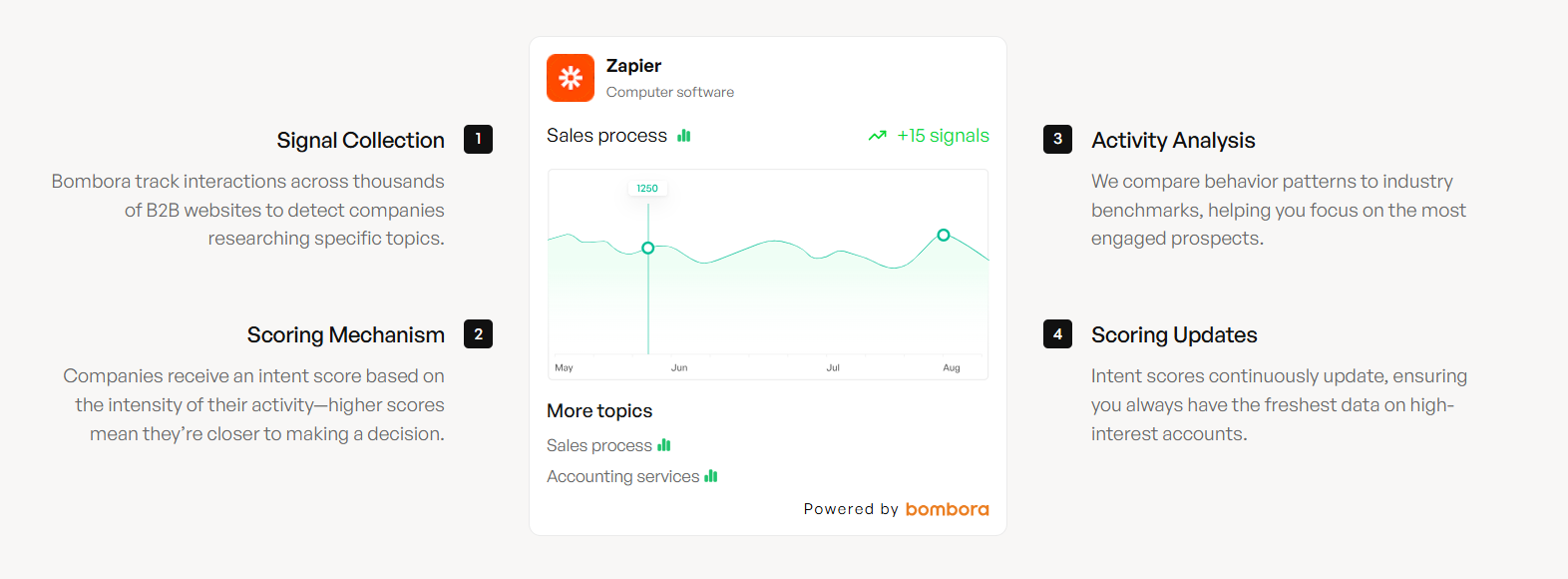
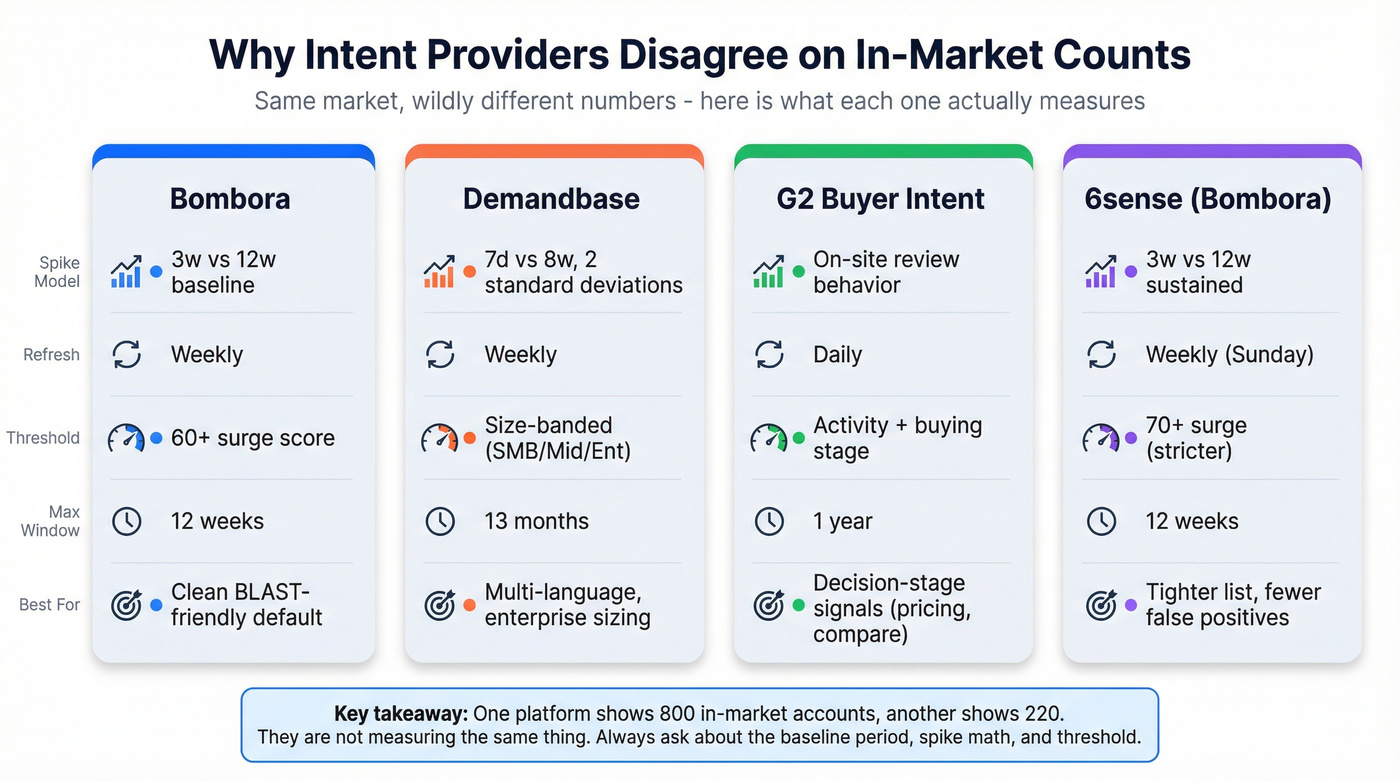
Different vendors look at the same market and produce wildly different "in-market" counts because they tune different knobs:
- Baseline period (what counts as "normal")
- Spike window (what counts as "now")
- Spike math (lift vs standard deviations vs proprietary scoring)
- Thresholding (cutoffs, size bands, topic breadth rules)
- Refresh cadence (daily vs weekly updates)
- Coverage (web-coop networks vs on-site behavior like review platforms)
That's why one platform shows 800 in-market accounts and another shows 220. The models aren't measuring the same thing.
Side-by-side methodology table (mobile-friendly)
| Provider | Spike model | Refresh | Thresholding | Max reporting window |
|---|---|---|---|---|
| Bombora | 3w vs 12w | Weekly | 60+ surge | 12w baseline |
| Demandbase | 7d vs 8w | Weekly | Trending Intent = 2SD; Strength uses size bands | 13 months |
| G2 Buyer Intent | On-site behavior | Daily | Activity + stage | 1 year |
| 6sense (Bombora) | 3w vs 12w sustained intent | Weekly (Sun) | 70+ surge | 12w baseline |
What each one really means in practice (with the "knobs" spelled out)
Bombora (Company Surge): Bombora's a clean BLAST-friendly model: it compares the last 3 weeks of consumption to a 12-week baseline, refreshed weekly. Operationally, 60+ is the spiking line, and topic breadth is how you keep it honest.
If you shorten your spike window from 3 weeks to 7 days, you'll catch faster-moving accounts, but you'll also increase volatility and false positives; if you widen the baseline from 12 weeks to 26 weeks, you'll smooth seasonality noise, but you'll react slower to real shifts.
Demandbase (Keyword Intent): Demandbase is powerful, but people mix up two separate concepts:
- Trending Intent (the spike): a spike defined as 2 standard deviations in the last 7 days vs the last 8 weeks
- Strength (the banding): low/medium/high based on employee-size bands (small accounts need fewer "readers" to register as high; large enterprises need many more)
Practical employee-band example (use this logic even if your tool labels differ):
- SMB: 2-3 unique researchers on a topic in a week is meaningful
- Mid-market: 4-8 unique researchers is meaningful
- Enterprise: 10+ unique researchers is meaningful
That's why a single universal threshold breaks. Size-banding fixes it.
Demandbase also supports up to 13 months of history and 133 languages, which matters if you sell outside the US and need non-English keyword coverage.
G2 Buyer Intent: G2 intent isn't "people reading random articles across the internet." It's explicit behavior on a review platform: pricing, alternatives, compare pages, category browsing, competitor profile views. It updates daily and the reporting date range caps at one year.
Coverage is narrower than web-coop networks, but the signal's closer to a decision.
6sense discrepancy (the one that confuses everyone): Even when 6sense uses Bombora data, it often treats "surging" as >= 70 and refreshes on a weekly Sunday cadence. That stricter cutoff plus fixed cadence is why 6sense can show fewer in-market accounts than Bombora for the same topics.
G2 -> Demandbase weighting heuristics (the practical "minutes" cheat code)
If you pipe review-site intent into an ABM platform, don't treat all behaviors equally. Use a simple weighting rule based on decision proximity.
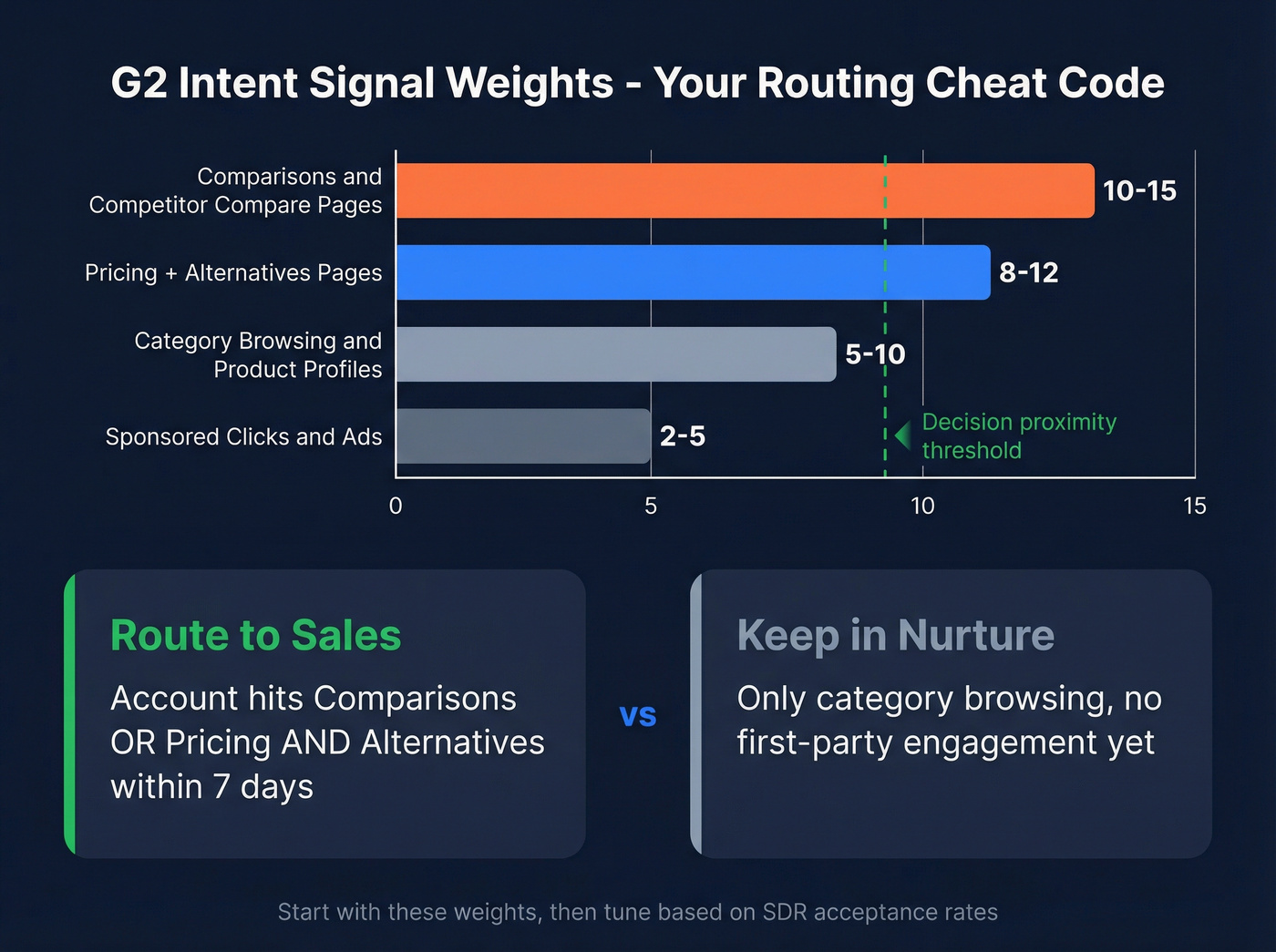
Example relative weights (start here):
- Comparisons / competitor compare pages: 10-15
- Pricing + alternatives pages: 8-12
- Category browsing / product profile views: 5-10
- Sponsored clicks / ads: 2-5
Routing rule that works: Route as sales action when an account hits (comparisons OR pricing) and alternatives inside 7 days. Keep it in nurture when it's only category browsing with no first-party engagement.
Budget ranges (typical, not list price)
Budget ranges vary by seats, segments, and add-ons. Use these so planning doesn't turn into a surprise fight in week three.

- Bombora: ~$25K/year
- 6sense: $60K-$100K+/year
- Demandbase: $18K-$110K/year
- G2 Buyer Intent: $15K-$60K/year
- Prospeo: free tier (75 emails + 100 Chrome extension credits/month); paid is credit-based (~$0.01/email; mobiles 10 credits), no contracts
Build your in-market model (MQA) with scoring + thresholds you can copy
Most teams fail because they route "intent" straight to sales. That guarantees rejection.
Sales wants a prioritized list of accounts that are both likely buying and reachable right now. The clean ops proxy is an MQA.
The model: MQA = fit + intent + engagement (account-level)
Use this:

- Fit score (static-ish): firmographics, technographics, geo, segment
- Intent score (third-party): surge/trending/behavioral signals by topic
- Engagement score (first-party): what they did with you (site, ads, email, events)
Then set two thresholds:
- MQA-N (nurture): enough signal to personalize and warm
- MQA-S (sales action): enough signal to route to SDR/AE now
Copy/paste first-party engagement scoring (worked example)
Engagement points (per account, rolling 14-30 days):
- Standard page view: 5
- Hot page view (pricing, case studies, security, integrations): 10
- Gated content download: 50
- Contact form: 200
- Free trial / demo request: 200
Thresholds:
- 50 points = nurture threshold (MQA-N)
- 200 points = sales action threshold (MQA-S)
Light math example:
- 6 hot page views (6 x 10 = 60)
- 1 gated download (50)
- Total = 110 -> nurture
Or:
- 1 contact form (200)
- Total = 200 -> sales action
How to combine fit + intent + engagement without overengineering
Keep it boring and enforce BLAST:
Fit gate (pass/fail):
- If fit fails -> don't score, don't route.
Intent threshold (Lift + Scope):
- Intent passes if:
- Surge/Trending meets your cutoff (ex: 60+ or 2SD), and
- Topic breadth meets your rule (ex: >= 3 topics if you track 12)
Engagement threshold (time-to-touch readiness):
- Engagement passes if:
= 50 for nurture, >= 200 for sales action
Then define:
- MQA-N = Fit pass + (Intent pass OR Engagement >= 50)
- MQA-S = Fit pass + (Intent pass AND Engagement >= 200) (or Engagement >= 200 alone if it's a true hand-raise)
Opinion I'll defend: topic breadth beats single-topic spikes almost every time. One topic is curiosity. Three topics is buying motion.
Monday-morning operating model: routing, SLA, and the weekly hot list
Dashboards don't create pipeline. Ownership does.
A weekly rhythm - weekly hot-account list + a 48-hour SLA - beats "real-time intent dashboards" because it forces prioritization and follow-through.
We've implemented this exact cadence with RevOps teams, and the pattern's consistent: once you make SLA compliance visible, sales behavior changes fast.
The Monday workflow (steal this)
Step 1 (Friday or Sunday refresh): generate the hot list
- Pull accounts that crossed your in-market threshold in the last 7 days.
- Apply topic breadth and fit gates.
- Cap it: 25-100 accounts per segment/region.
Step 2 (Monday AM): route to systems people actually use
- Create/update accounts in Salesforce or HubSpot with:
- Intent topics spiking
- Spike score / stage
- "First seen in-market" date
- Owner + SLA due date
- Send alerts to Slack or Teams for the owner and manager.
Step 3 (Monday-Wednesday): execute the play
- SDR: multi-thread into 3-6 roles (economic buyer + champion + IT/security + finance if relevant)
- AE: 1:1 outreach to top 10 accounts with a POV tied to the spiking topics
- Marketing: run a 7-14 day air cover (ads + email + webinar invite) for the same accounts
Step 4 (Thursday): inspect, don't debate
- Review: acceptance rate, meetings set, and "nope" reasons (bad fit, wrong subsidiary, student research, etc.)
- Tighten thresholds if the list's bloated.
Use this / skip this rules
Use this model if:
- You can commit to a 48-hour SLA for first touch.
- Sales leadership will enforce "work the list."
- You can enrich contacts fast enough to multi-thread.
Skip this model if:
- Your CRM account hierarchy's broken (duplicates, no parent/child rules).
- Sales refuses anything that isn't a hand-raise.
- You can't get contact data quickly enough to act.
Where Prospeo fits (last-mile execution)
Here's a scenario I've seen too many times: RevOps finally gets a clean weekly hot list, SDRs open the spreadsheet on Monday, and by lunch the whole thing stalls because half the accounts don't have reachable contacts, the other half have stale emails, and nobody wants to burn their domain reputation on guesses.
That's why the "last mile" matters.
Prospeo ("The B2B data platform built for accuracy") is built for speed once an account crosses the line: 98% email accuracy, a 7-day data refresh cycle, and an 83% enrichment match rate so your list doesn't die in a CSV. It also includes 125M verified mobile numbers with a 30% pickup rate, which is a big deal when you're trying to multi-thread fast.
Practical workflow: take your weekly hot-account list, push domains into enrichment (https://prospeo.io/b2b-data-enrichment), export outreach-ready contacts, and launch sequences the same day.

Why intent feels noisy (and how to fix it): matching, identity resolution, and false positives
Intent feels bad when the plumbing's bad.
The plumbing is identity resolution: mapping a signal to the right account, the right domain, the right subsidiary, and the right CRM record. Gartner estimates poor data quality costs orgs $12.9M/year on average, and intent workflows are a perfect way to light that money on fire.
Deterministic vs probabilistic matching (the part nobody wants to own)
Most teams mix these up:
- Deterministic matching = you can prove the mapping (exact domain, exact account record, known subsidiary mapping, known CRM ID). This is what you route to sales.
- Probabilistic matching = "pretty sure" mapping (IP-based inference, ambiguous parent/child, shared services domains, consultants). This belongs in nurture or an "unknown" queue until verified.
If you route probabilistic matches like they're deterministic, sales learns one lesson: ignore intent.
Failure modes checklist (what breaks in production)
- Domain mapping errors: signal fires on a parent domain, but you sell to a regional subsidiary (or vice versa).
- Duplicate accounts in CRM: intent routes to the wrong duplicate, so nobody works it.
- Subsidiary/holding company confusion: research happens at the parent, but the rep owns the child.
- ISP/VPN/geolocation noise: traffic looks like the wrong region or a data center.
- Context-free spikes: "cloud security" surges, but it's a student, partner, or consultant.
- Always-on researchers: analysts and agencies look in-market forever.
- Topic taxonomy mismatch: topics too broad ("CRM") or too narrow ("CRM for fintech mid-market").
The 3-check SOP before you route anything (RevOps-friendly)
Put this in a one-pager and enforce it.
Check 1 - Account mapping (parent/child rule):
- If the signal domain maps to a known child account, route to the child owner.
- If it maps to a parent only, route to the parent owner and tag the likely child subsidiaries for review.
- If mapping's ambiguous, mark it "Needs mapping" and don't route to SDR.
Check 2 - Duplicate control (merge rule):
- If the account has duplicates, route only to the surviving master record.
- Auto-log a task: "Merge duplicates before next refresh."
Check 3 - Geo sanity (VPN/ISP rule):
- If geo conflicts with the account's operating region, tag as "Geo mismatch" and keep it in nurture.
- Maintain an "Unknown/Noise" bucket for anything that fails checks 1-3.
Then: route only if it passes and log a rejection reason. Create a picklist for "nope reasons" (bad fit, wrong subsidiary, consultant, student, duplicate, no contacts, etc.). If you don't capture why sales rejected an account, you can't tune the model.
Activation playbooks beyond "send outreach"
If your only play is "SDR emails them," you're leaving value on the table. Intent's a coordination tool: it tells sales and marketing where to focus together.
Below are plays that work even when sales capacity's tight. Each one is Signal -> Action -> Metric.
1) Competitor interception (review-site behaviors)
Signal: pricing / alternatives / compare behavior on review platforms Action: route as decision-stage; run a 7-day "switch" sequence + competitor landing page Metric: meeting rate per 100 routed accounts; win rate vs competitor
Suggested weights (use these):
- Comparisons / compare pages: 10-15
- Pricing + alternatives: 8-12
- Category / product profile: 5-10
- Sponsored clicks: 2-5
Routing rule I like: comparisons or pricing + alternatives in the same 7 days = sales action.
2) Dark-funnel air cover (ads + personalization)
Signal: third-party intent spike with low first-party engagement Action: run 10-14 days of ads to a topic-matched page; personalize hero + proof to the top 1-2 surging topics Metric: lift in first-party engagement (hot page views, form fills) and MQA-S conversion
This is how you turn "they're researching" into "they're engaging with you."
3) Outbound POV swap (topic-based messaging that doesn't sound creepy)
Signal: surge on a specific topic cluster (ex: "SOC 2 automation," "data residency," "CRM migration") Action: send a 3-touch POV sequence:
- point of view + risk of doing nothing
- short teardown of the common approach
- proof (case study or benchmark) Metric: reply rate and meeting rate by topic cluster
Opinion: generic "saw you researching" messaging is lazy and gets ignored. Topic-based POV wins because it reads like expertise, not surveillance.
4) Partner/channel co-sell routing
Signal: intent spike on partner-adjacent topics (ex: "Snowflake security," "Salesforce CPQ," "Okta SSO") Action: route to partner manager + AE; run a co-branded webinar or joint outbound list Metric: sourced pipeline from partner-assisted accounts; meeting-to-opportunity rate
This works because partner credibility reduces friction when the account's already researching.
5) Content sprint (build what the market's telling you it wants)
Signal: the same 2-3 topics dominate your weekly hot list for 3+ weeks Action: publish two assets in 10 days:
- one decision page (pricing/security/integration)
- one comparison page (your approach vs common alternative) Metric: organic + paid conversion rate on those pages; assisted pipeline from in-market accounts
This is "ABM as leak detection": intent shows you what buyers are trying to understand, and your site either answers it or leaks them to competitors.
6) Territory carve-out (make SLA compliance measurable)
Signal: weekly hot list is too big and SLA compliance drops Action: split by region/segment; assign a hard cap per rep; publish a weekly SLA scoreboard Metric: median time-to-first-touch; acceptance rate; meetings per rep
If you don't cap the list, reps cherry-pick and the program dies quietly.
7) Renewal/retention window play (full-funnel intent)
Signal: customer accounts researching adjacent categories or competitors Action: route to CSM/AM with a 48-hour SLA; trigger a retention play (exec alignment, roadmap review, value recap) Metric: churn rate in flagged accounts vs unflagged; expansion pipeline
Intent isn't just net-new. It's an early-warning system for churn and expansion.
8) "No-contact" rescue play (when the account's hot but unreachable)
Signal: account is in-market but you lack buying committee contacts Action: run a 48-hour sprint:
- identify 3-6 roles (economic buyer, champion, IT/security, finance)
- add one warm intro path (partner, investor, mutual customer)
- launch a short call-first motion Metric: time-to-first-touch; connect rate; meetings set
This prevents the most frustrating failure state: the account's hot, and nothing happens because nobody can reach the right humans.
Prove it works in 30 days: validation plan + metrics for accounts in market intent data
If you don't validate intent feeds, you'll end up in the most common failure state: marketing believes, sales ignores, finance cancels.
Treat this like an experiment with BLAST baked in.
30-day validation checklist
Design
- Pick 1-2 segments (don't boil the ocean).
- Define your in-market threshold (Lift + Scope + Fit).
- Create a holdout group: similar accounts that don't get routed or worked.
Execution
- Enforce a 48-hour SLA for first touch on routed accounts.
- Track touches and outcomes at the account level.
Metrics (the ones that settle arguments)
- SDR acceptance rate: % of routed accounts SDRs agree are worth working
- Meeting rate: meetings per 100 routed accounts
- Time-to-first-touch: median hours from flag -> first touch (see speed-to-lead metrics)
- Pipeline lift vs holdout: routed accounts vs control group
- Stage velocity: time from first touch -> meeting -> opportunity
Decision rule (non-negotiable): If holdouts don't lose to routed accounts on meetings and pipeline inside 30 days, tighten thresholds or cut the feed.
One practical note: when you compare vendors, you'll often see different counts for in-market accounts because baseline windows, spike windows, and thresholds aren't aligned. Validate with holdouts, not screenshots.
You just built the threshold. Now you need the contacts. Prospeo gives you verified emails and direct dials for every account that clears your fit gate - 125M+ mobiles with a 30% pickup rate, at 90% less than ZoomInfo.
Intent without contact data is just a dashboard. Fix that in one click.
FAQ
What is an "in-market account" in intent data?
An in-market account shows a measurable spike versus its own baseline across multiple relevant topics in the last 7-21 days, passes ICP fit, and has a 24-48 hour routing SLA attached. In practice, that's a numeric cutoff (like 60+) plus topic breadth (like 3 of 12 topics) before sales gets it.
What surge score counts as in-market for Bombora-style intent?
For Bombora-style surge scoring, 60+ is the practical default cutoff for "spiking," and you should add a topic-breadth rule to cut false positives. A simple standard is >= 25% of tracked topics (e.g., 12 topics -> 3+ topics at 60+) before you call it in-market, then tune using SDR acceptance and a holdout test.
Why does 6sense show fewer in-market accounts than Bombora?
6sense often shows fewer in-market accounts because it applies a stricter cutoff and a fixed refresh cadence to Bombora-based intent. In many setups, 6sense treats "surging" as Company Surge Score >= 70 and refreshes weekly (Sunday), so fewer accounts cross the line than a 60+ definition.
How do I set intent thresholds for small vs large accounts?
Set thresholds by company size because large firms naturally generate more research activity. As a starting point, treat 2-3 unique researchers/week as meaningful for SMB, 4-8 for mid-market, and 10+ for enterprise, while keeping the same topic-breadth rule across segments.
What's a good free option for finding contacts after an account spikes?
Summary
Accounts in market intent data works when "in-market" is a measurable threshold (spike vs baseline + topic breadth), gated by fit, and paired with a 24-48 hour routing SLA. Define the cutoff, cap the weekly hot list, enrich the buying committee fast, and validate with a 30-day holdout so you're optimizing a system, not arguing about dashboards.